-
-
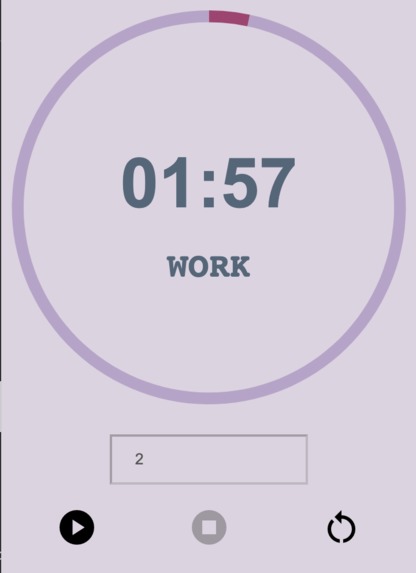
A screenshot of our chrome extension in action!

Inspiration
As masters of memorizing and regurgitating info, our team knows the pain and struggle of spending hours at a computer screen trying to study. Sometimes, all it takes is a small distraction before all hope for productivity is lost. Thus, we decided to code a cute, aesthetically pleasing pomodoro timer that will send positive affirming messages and water/posture check reminders during intense study sessions.
What it does
Sadly, we were unable to implement the positive affirmation features in time for this hackathon. However, currently, we do have a working Pomodoro timer as a chrome extension.
Currently, the user will open the chrome extension and input the amount of minutes desired for focus. Then, upon pressing start, the timer will start counting down with a circular progress bar ticking down so users can be inspired by a nice visual of relative time passed. While running, users will have the option to pause the time or reset to start over.
How we built it
To build our chrome extension, we had to use javascript, css, and html as well as a json file.
To implement the progress bar, we imported a chart.js file made by https://www.chartjs.org/. Then, as time passes, we increased the colored portion of the donut chart and decreased the white space proportion to the amount of time left.
To implement the three buttons,
The start button will first convert the amount of minutes entered into seconds. Then it will use a setInterval function to call a working updateCountdown method to decrease the timer by one every 1000 milliseconds.
The stop button when pressed will stop the updateCountdown through the clearInterval function and keep the time the same until resumed.
The reset button will completely kill the time remaining as well as the progress bar and allow the user to enter in another time.
Special thanks to https://www.chartjs3.com/ for being both the inspiration and help for our project!
Challenges we ran into
Our time ran into two main problems:
Our biggest challenge - and the biggest pitfall of Cute Pomodoro Timer - is the inability to run in the background. We originally planned on making a popup.js script as well as a background.js script, but we ultimately were unable to figure out how to make the two communicate with one another so that the timer runs in the background.
Our second challenge was implementing notifications. Ideally, while a user is studying, we want the extension to send encouraging messages such as "You're awesome!", "Keep Going!", or tell silly jokes as well as remainders for users to drink water, check posture, etc.
Accomplishments that we're proud of
Our biggest accomplishment was definitely figuring out how to update the progress bar to visually indicate the amount of time passed.
What we learned
We definitely learned a lot of javascript logic as well as a bit of html and css.
For javascript, both of us went in relatively green, so following along various videos and coming up with our own logic for the timer was definitely challenging but rewarding.
For HTML and CSS, we specifically learned about divider logic and flex boxes.
What's next for Cute Pomodoro Timer
Definitely the function to run in the background as well as sending various encouraging methods as mentioned before.
Aside from that, we'd imagine there could be a function to keep track of total amount of time focused and a graph displaying studying habits.

Log in or sign up for Devpost to join the conversation.