-
-
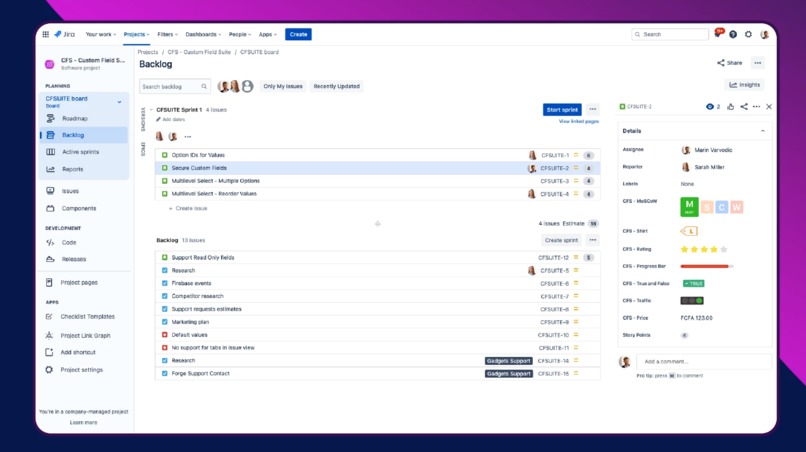
Customize Jira to suit your needs, increase the clarity of issues, and level up your skills with a powerful suite of custom field types.
-
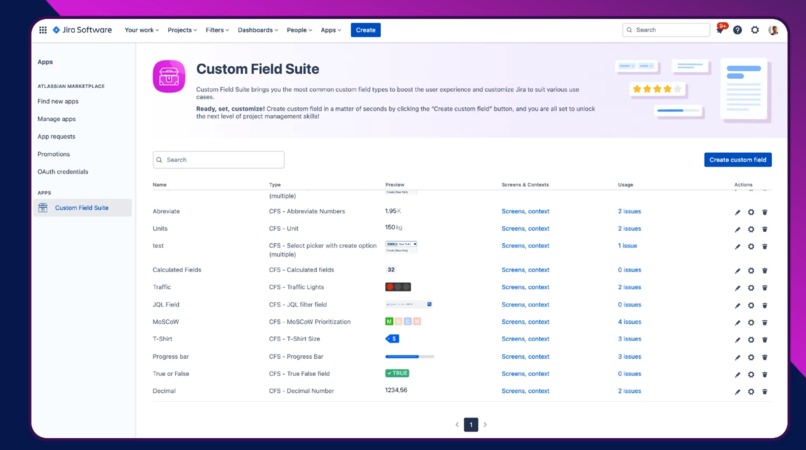
Effectively track progress of your project. Get a clear and eye-catching overview of all the created custom fields in one place.
-
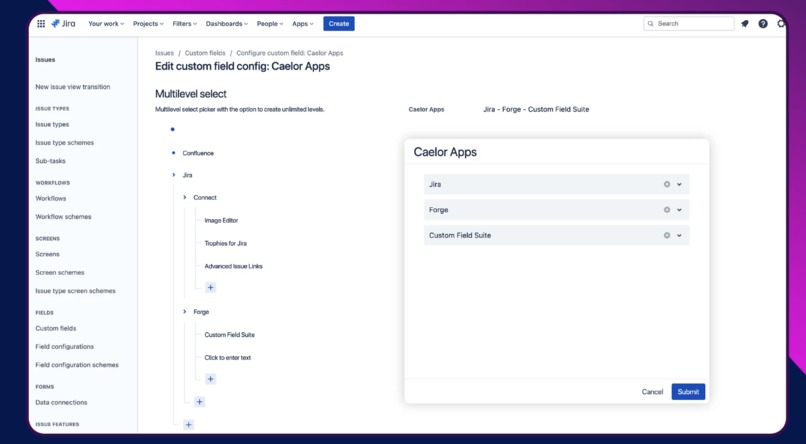
Easily configure cascading select fields with an unlimited number of levels.


Inspiration
Glow up your Jira issue view with the Custom Field Suite app! Use custom field types to add more details and make your Jira issues not just pretty smart but pretty and smart! We want to cover all use cases not covered by Atlassian and support them on their Forge journey.
What it does
Advance Jira issue visibility and usability with the Custom Field Suite! Easy to add, edit and customize, custom field types help you sort and prioritize all the work in a more clear and visually appealing way. Choose among numerous custom field types available within the app and turn your plain-looking Jira issues into straightforward and eye-catching requirements.
A collection of powerful and unique custom field types allows you to adapt Jira to your requirements. Single/multiple/multilevel select, MoSCoW, T-shirt size, currency, and more are available in the biggest and fastest-growing list of custom fields on the Atlassian Marketplace.
Use the most popular custom field types available within the Custom Field Suite app to improve the user experience while adapting Jira to different use cases. Explore the long list of custom field types available within the app and give your team the resources they require to complete the project successfully. Not just cool and super useful, but easily searchable, too.
How we built it
We built it with Forge using the latest features and UI options. We are following the Atlassian roadmap and trying to implement all changes within seven days.
Challenges we ran into
Most of our challenges were related to the Forge framework, but we solved them with the help of the Atlassian support team. Sometimes, we changed direction or deprecated some features, but we believe that Atlassian will solve the issues soon.
Accomplishments that we're proud of
Use the "is not Empty" query to search for issues related to your Custom Filed Suite fields. Clicking on the data in the "Usage" column displayed directly on the dashboard, a JQL filter is automatically entered: e.g., cf[10002] is not EMPTY (cf[10002] being a "MoSCoW Prioritization" field"). With this, the user now has the ability to view all issues to which they have associated fields they are searching. This was one of the most requested features from our customers.
Custom field types now come with more configuration options, making them even more visible and suitable for our customers' different use cases and needs. To name just one example, a new MoSCoW Prioritization field configuration offers two view options to choose from - Shortened view or Label view.
What we learned
We learned a lot about the Forge framework. We have also decided to rewrite all our apps using the forge framework.
What's next for Custom Field Suite - Powerful custom field types for Jira
We will add more custom filed types and try to cover many use cases requested by our customers. Enhance the visibility and improve the usability of Jira tickets by choosing from a vast selection of custom field types available within the Custom Field Suite app. Make things clear for everyone using Jira and unlock the next level of your project management skills in just a few clicks.


Log in or sign up for Devpost to join the conversation.