Inspiration
HackPSU this year is beach themed, so I wanted to make it easier to use your computer at the beach. No more touching your laptop, everything is seemless and completely remote.
What it does
Watch a demo here! https://drive.google.com/file/d/10mhc5vmF8UdDx4RCxLdKlXJ3KOT6YHXD/view?usp=sharing
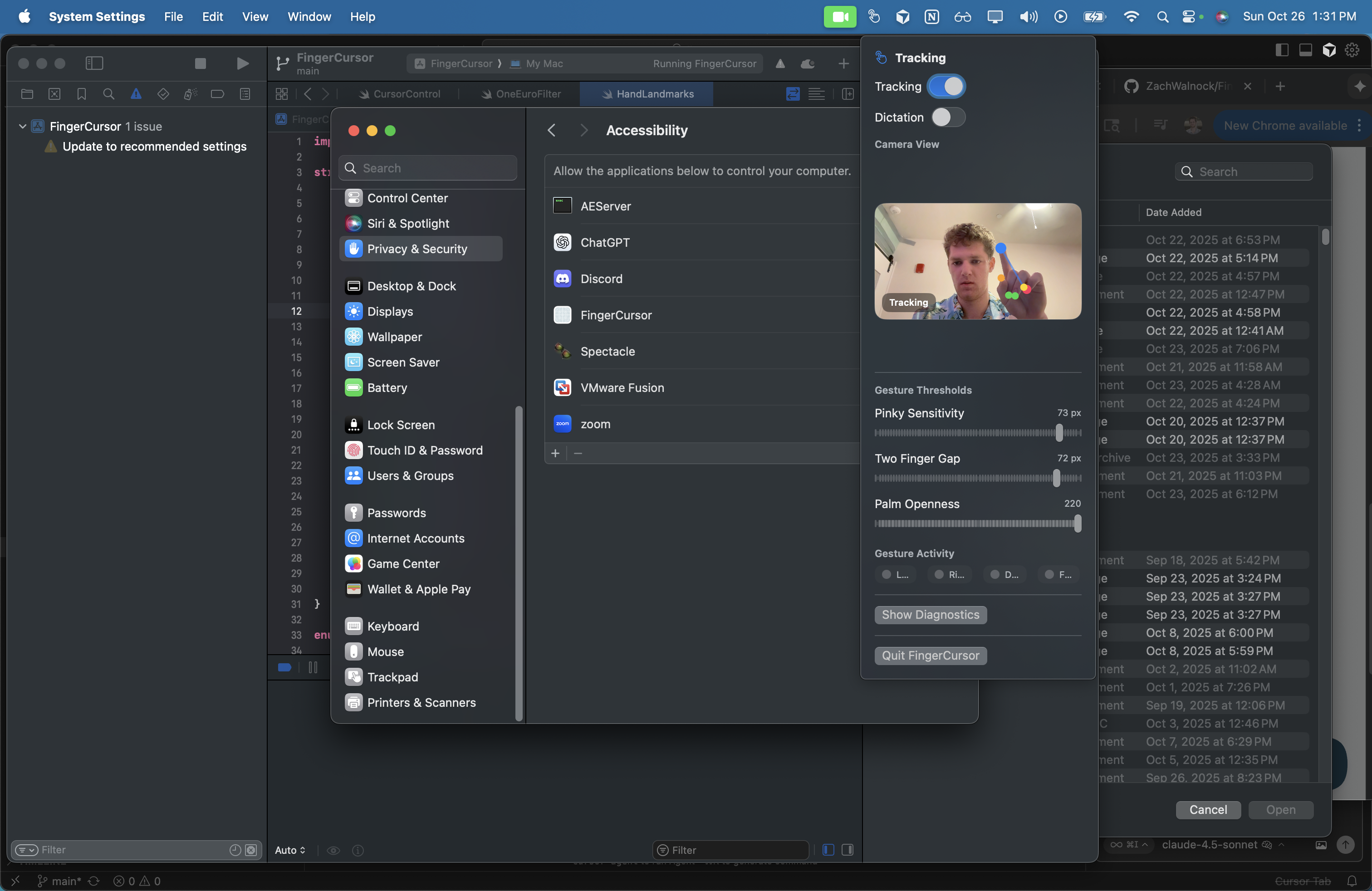
CursorFlow turns your laptop camera into an intelligent motion and voice controller. It tracks your index finger to move the cursor, detects gestures like: Open Palm → start/stop voice dictation Thumb + Index Pinch → left click Index + Middle Touch → right click
When you open your hand, CursorFlow listens and transcribes your speech into text in any active window, letting you “type” with your voice. It’s fully local, privacy-first, and works across the entire macOS environment.
How we built it
I built CursorFlow as a Swift-based macOS menubar app leveraging Apple’s Vision framework for real-time hand landmark detection and the Accessibility API for native cursor control and click simulation. A One-Euro filter smooths the fingertip tracking to eliminate jitter, while a gesture engine measures distances between hand landmarks to detect pinches, finger touches, and palm openness. For speech input, we integrated Apple’s Speech framework for fast on-device transcription, with an optional Whisper.cpp backend for offline mode. We built a simple onboarding and calibration flow to guide users through camera, mic, and accessibility permissions — then mapped camera-space motion to the screen with customizable sensitivity and smoothing.
Challenges we ran into
Latency and stability: keeping real-time tracking at 30–60 FPS while processing 21 landmarks per frame required careful optimization and multi-threading. Gesture accuracy: lighting, skin tone variation, and occlusions made detection inconsistent at first; we introduced adaptive thresholds and temporal hysteresis to stabilize outputs. Cursor mapping: translating normalized camera coordinates to full-screen movement was non-linear; we built a calibration routine and smoothing filter to make it feel natural. System permissions: Apple’s strict privacy model meant the app had to gracefully handle camera, microphone, and accessibility permissions without breaking UX.
Accomplishments that we're proud of
Achieved real-time hand tracking and smooth cursor control with minimal CPU usage. Built a seamless gesture interface that feels intuitive after just a few seconds of use. Integrated hands-free voice typing triggered by natural gestures — no buttons needed. Delivered a clean, lightweight macOS menubar app that feels like a native accessibility tool rather than a gimmick.
What we learned
Swift! I've never used Swift before or developed in the Apple environment before, and it was really fun to play around with.
What's next for CursorFlow
Multi-hand and multi-monitor support Custom gesture mappings (e.g., drag, scroll, zoom, window snapping) Cross-platform port to Windows and Linux using MediaPipe Enhanced voice integration with context-aware text insertion SDK/API so other developers can embed CursorFlow controls into their apps Eventually, full open-source release with community-trainable gesture models

Log in or sign up for Devpost to join the conversation.