-
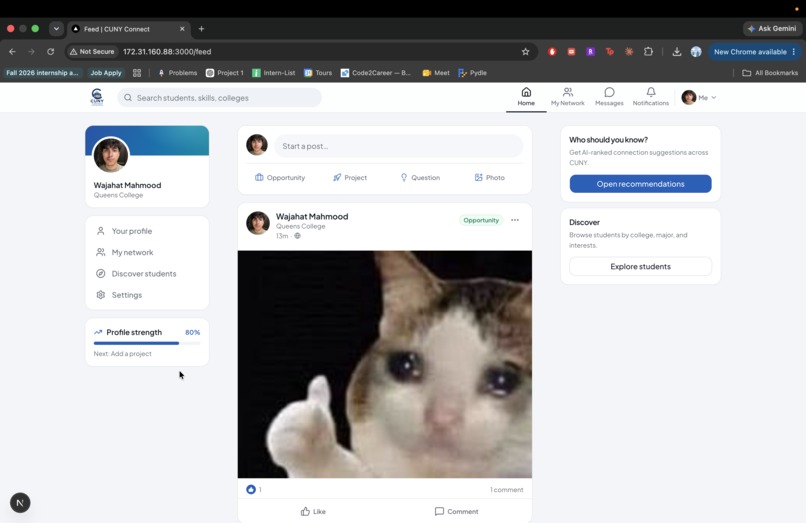
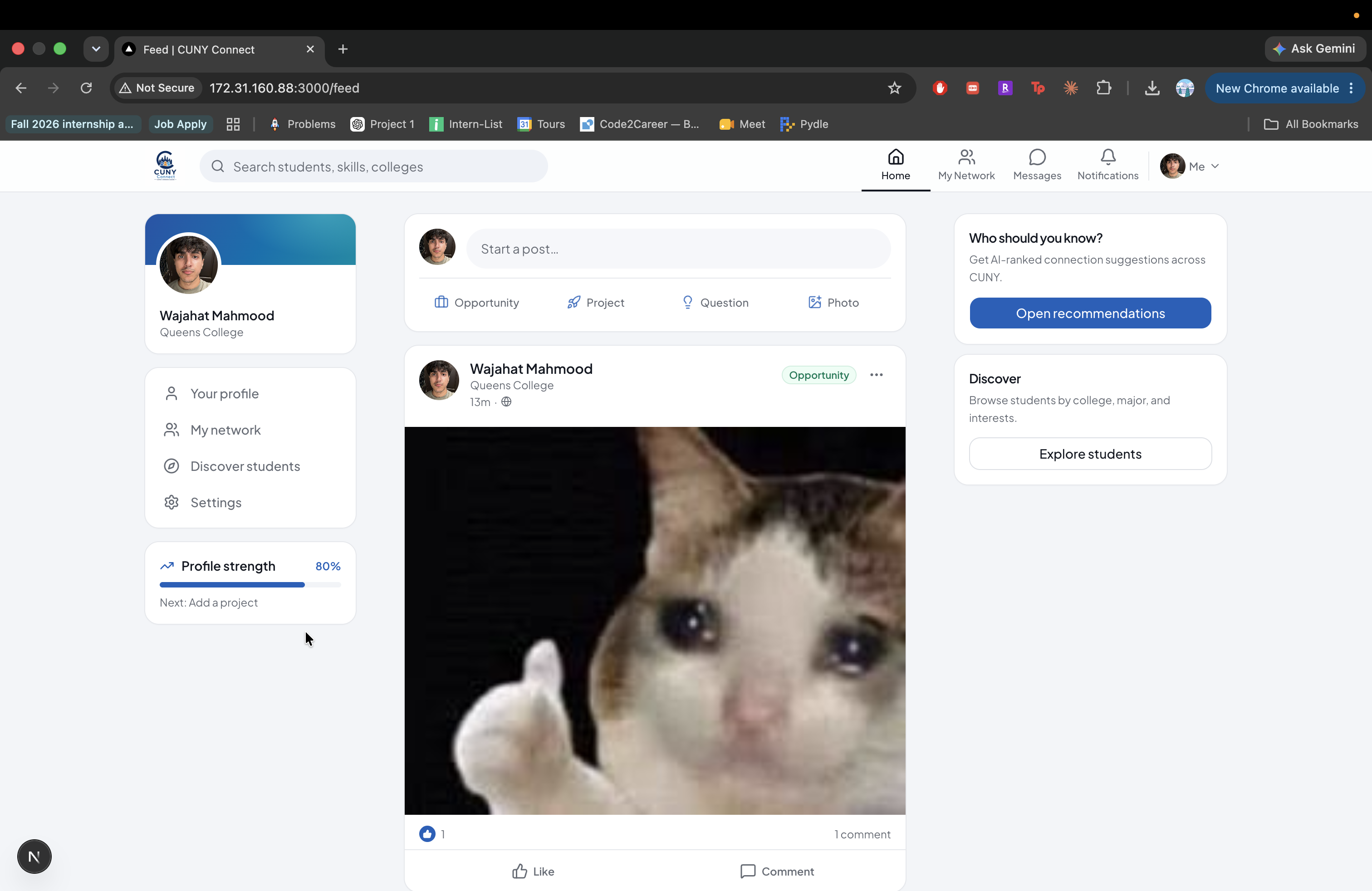
Posts/Feed Fucntion
-
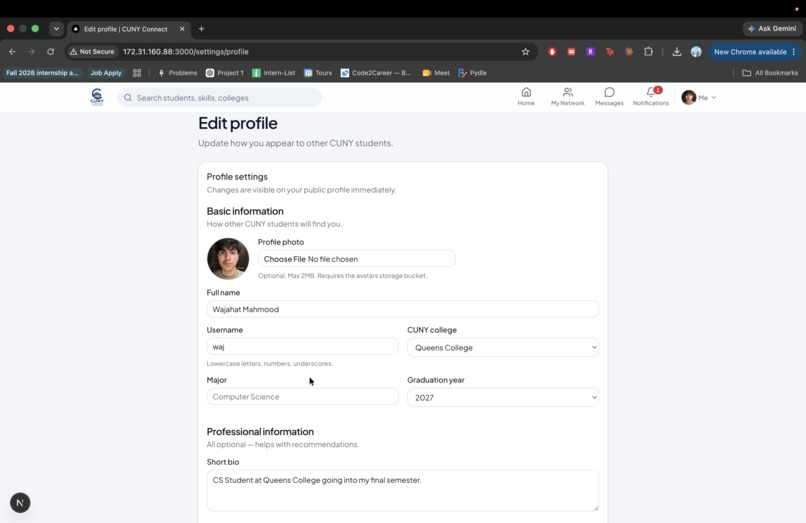
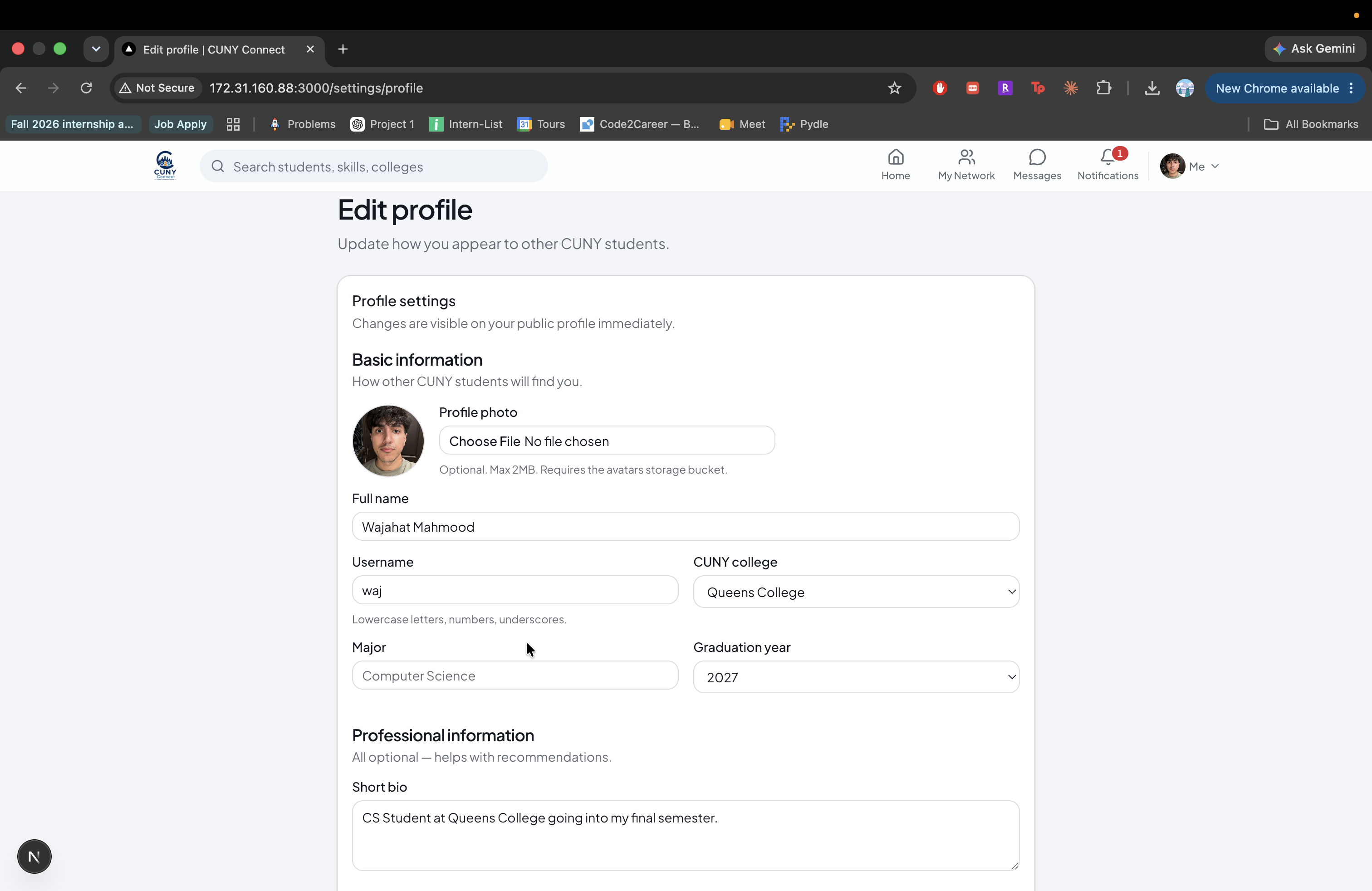
Profile Page
-
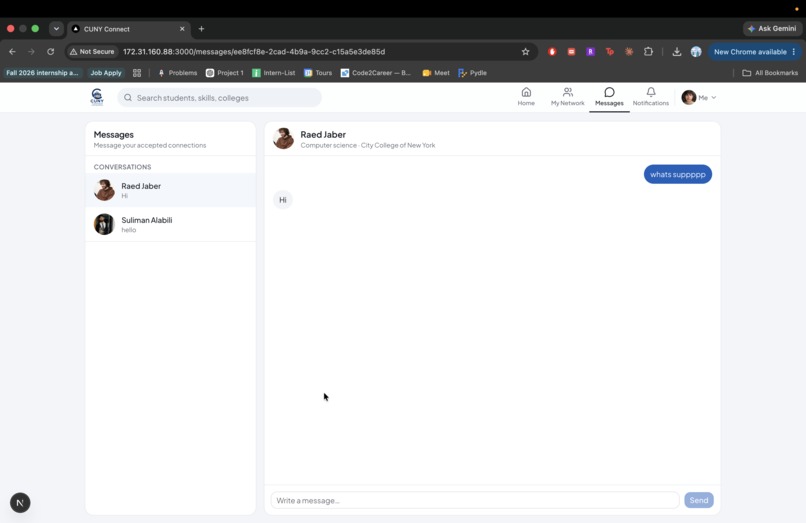
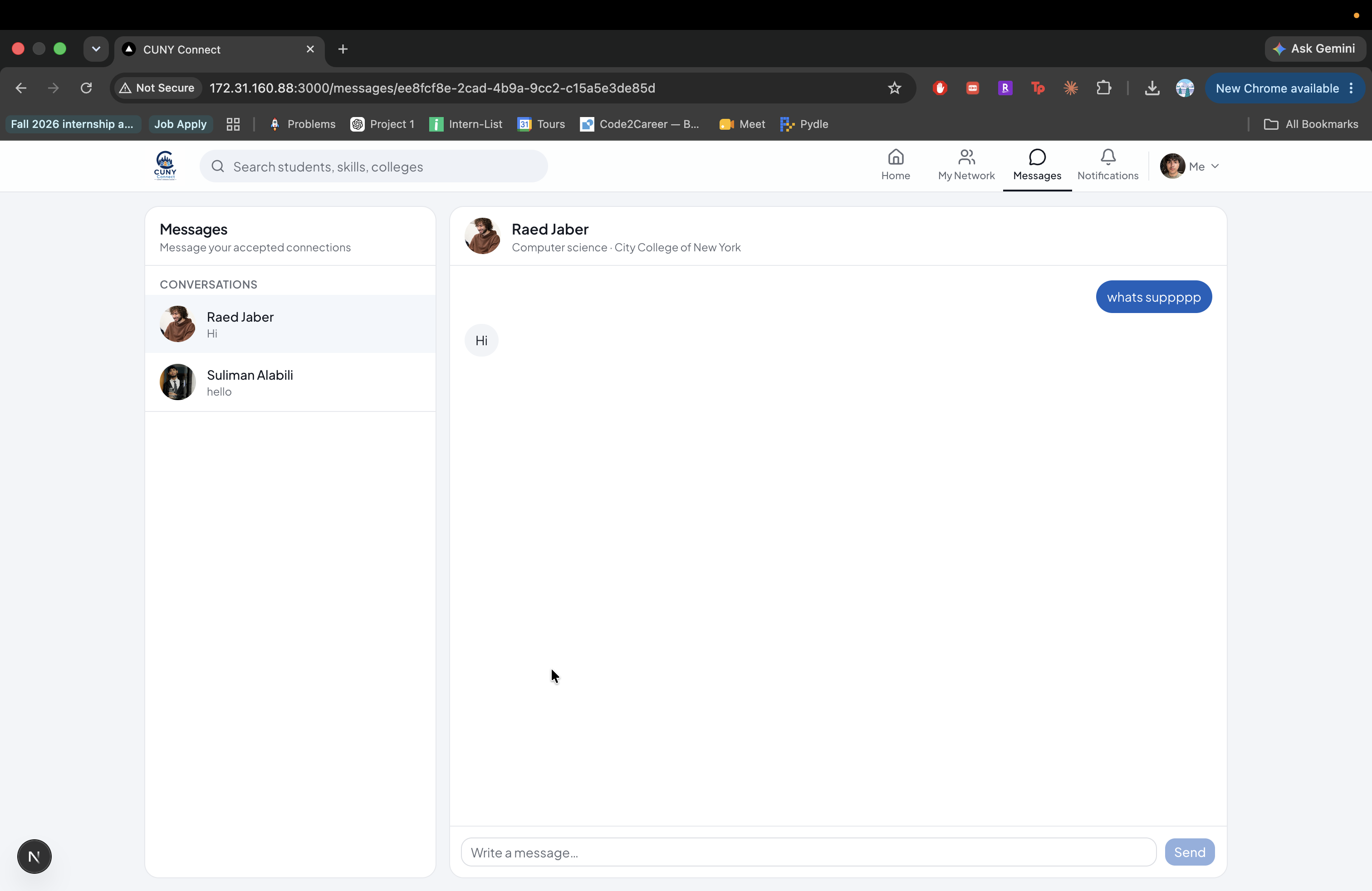
Chat Function
-
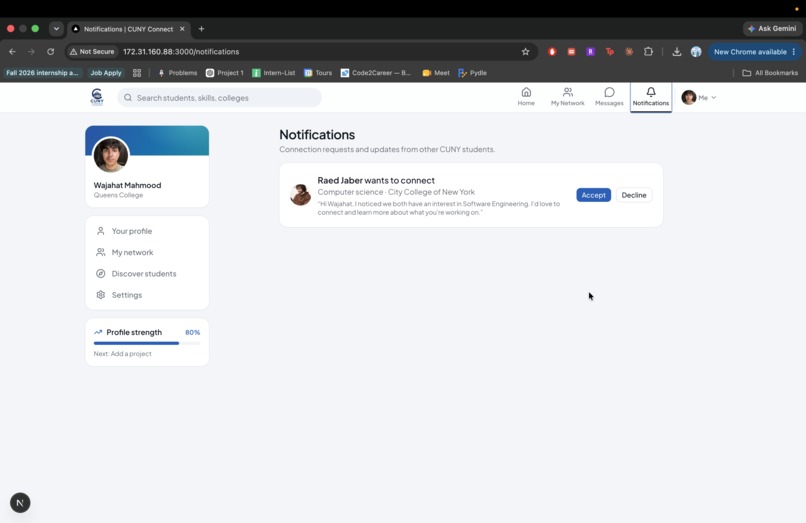
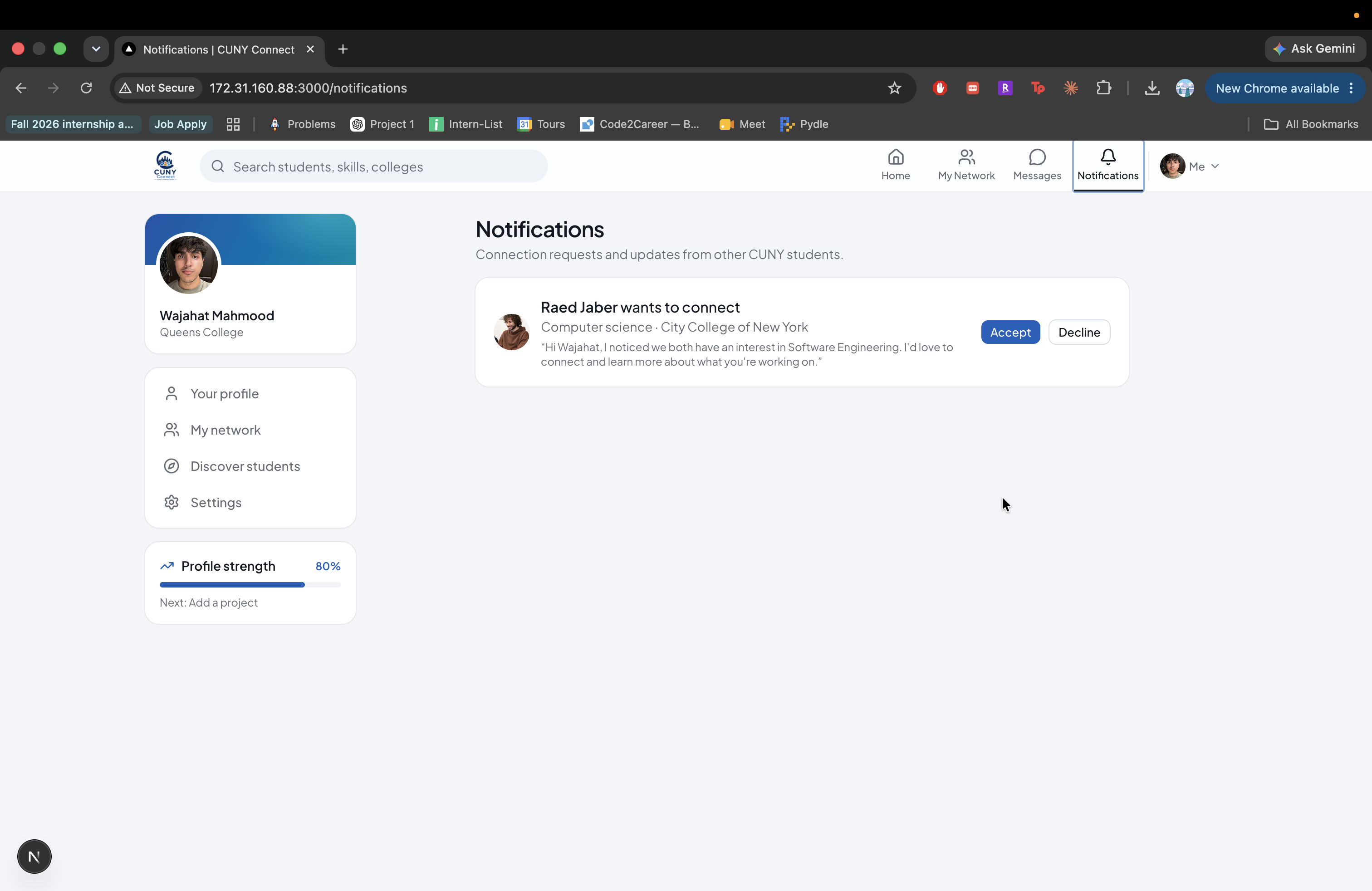
Notifications Page
CUNY Connect — Hackathon Submission
Inspiration
CUNY is one of the largest public university systems in the country, with hundreds of thousands of students across 25 campuses. Despite that scale, there is no dedicated platform for students to discover and build professional relationships with one another across the university system.
LinkedIn is built primarily around careers and the broader professional world. Group chats and Instagram are social but unstructured for networking. Classrooms connect students within individual courses, but rarely across campuses or disciplines.
We built CUNY Connect to fill that gap: a LinkedIn-style networking platform built exclusively for CUNY students.
Our goal is simple: help students connect, collaborate, and succeed with other students who share their skills, interests, and goals—whether they are looking for project teammates, internship connections, research collaborators, or mentors.
Every account is verified with a @cuny.edu email, creating a student-only community designed around trust and meaningful connections.
What It Does
CUNY Connect is a full-stack social networking platform with several core features.
🔐 Authentication & Profiles
- Sign up and log in using a CUNY email address
- Guided onboarding to build a student profile
Profiles include:
- College
- Major
- Bio
- Skills
- Interests
- Career goals
- Experience
- Projects
Public LinkedIn-style profiles at
/profile/[username]Profile strength meter to encourage completion
Avatar uploads and LinkedIn profile links
📰 Social Feed
Students can:
- Create posts with text and photo attachments
Choose categories including:
- Opportunity
- Project
- Academic
- Question
- Achievement
- Other
Like and comment on posts
Share opportunities and collaborate with other CUNY students
The feed uses a LinkedIn-inspired composer and card-based post design.
💬 Messaging
- Real-time 1:1 direct messaging between connected students
- Conversation list and chat interface
- Mobile-first experience with separate list and chat views
- Back navigation optimized for smaller screens
🤝 Network & Discover
Students can:
- Send, accept, and decline connection requests
- Browse students across the CUNY system
Search and filter by:
- College
- Major
- Skills
- Interests
Automatically hide users they are already connected with or have pending requests with
🤖 AI-Powered Connection Recommendations
Using Google Gemini, CUNY Connect recommends students who may be valuable connections.
The recommendation system considers:
- Shared skills
- Shared interests
- College
- Major
- Career goals
- Complementary strengths
Instead of simply showing "People You May Know," CUNY Connect explains why two students should connect.
Recommendations are cached in the database to reduce API costs and latency, with a local fallback scoring system when Gemini is unavailable.
🔔 Notifications
- Dedicated notification page
- Navigation badge counts
- Updates for connection activity
How We Built It
Tech Stack
| Layer | Technology |
|---|---|
| Frontend | Next.js 16, React 19, TypeScript |
| Styling | Tailwind CSS v4, shadcn/ui, Custom Design System |
| Backend & Database | Supabase (PostgreSQL, Auth, Storage, Realtime) |
| AI | Google Gemini API |
| Validation | Zod |
| Testing | Vitest |
Architecture
Server-First Design
Next.js Server Components handle server-side data fetching, while business logic is implemented through Server Actions rather than exposing unnecessary API endpoints to the client.
Modular Codebase
The application is separated into modules for:
- Authentication
- Profiles
- Feed
- Messaging
- Connections
- Recommendations
- UI components
Security
Supabase Row Level Security (RLS) policies enforce access control directly at the database and storage layers.
Real Data End-to-End
This is not a mock prototype. The application uses:
- Live Supabase queries
- Database migrations
- Supabase Storage
- Realtime messaging
- Production-style authentication and authorization
Key Implementation Details
🧠 AI Recommendation Pipeline
- Prefilter potential candidates
- Apply local scoring
- Send the strongest matches to Gemini
- Ask Gemini to rank candidates and explain compatibility
- Cache results in the database
- Fall back to local scoring when Gemini is unavailable
📰 Social Feed
Server Actions handle:
- Creating posts
- Uploading images
- Liking posts
- Commenting
- Deleting posts
Images are stored using Supabase Storage with Row Level Security policies.
💬 Messaging
Messaging uses:
- Pairwise conversation keys for 1:1 conversations
- Supabase Realtime subscriptions
- Database-level access controls
- Responsive layouts for desktop and mobile
🎨 UI Integration
We combined a complete UI redesign with an existing backend implementation, resulting in:
- LinkedIn-inspired navigation
- Desktop top navigation
- Mobile tab navigation
- Consistent card surfaces
- Improved profile layouts
- Responsive messaging
- Shared design components
📱 Mobile Development
The development server was configured to run on 0.0.0.0:3000, allowing the app to be tested directly on phones across the local network.
Challenges We Ran Into
Merging Two Unrelated Git Branches
One branch contained a complete UI redesign, while another contained the backend logic for messaging, the feed, Gemini integration, and database migrations.
Because the branches had no useful common merge base, we rebuilt the integration on main, selectively bringing in the redesigned UI while preserving the existing server logic.
Database Setup
The feed initially displayed a "database not ready" state because the social migrations had not been applied.
Post image uploads also failed until:
- The
image_urlcolumn was added - The
post-imagesstorage bucket was created - Correct RLS policies were added
Post Composer Bugs
The post button remained disabled until users manually selected a category, and image uploads failed without proper storage permissions.
We fixed this by:
- Adding a default category
- Improving error handling
- Adding proper storage RLS policies
Mobile Messaging
We encountered:
- Duplicate conversations in the sidebar
- Messages being cut off
- Viewport height issues
These were resolved using:
100dvh- Separate list-or-chat views on mobile
- Improved navigation
- Removal of duplicate fallback UI
Profile UI
The profile page had several visual issues:
- Redundant college information
- Low-contrast skills
- Header text overlapping the cover image
We addressed these with:
formatProfileMeta- Card-based profile sections
- Higher-contrast skill chips
- Responsive spacing such as
sm:pt-16
AI Reliability and Cost
Gemini requests can be slow or unavailable.
To make the feature more production-ready, we added:
- Database caching
- Candidate prefiltering
- Local fallback scoring
- Clear UI indicating whether a recommendation is AI-generated or estimated
Brand Assets
lucide-react does not include a LinkedIn icon, so we created a custom SVG component to support LinkedIn profile links.
Accomplishments We're Proud Of
🚀 A Complete End-to-End Product
We built authentication, profiles, a social feed, messaging, networking, student discovery, notifications, and AI-powered recommendations into one integrated platform.
🔒 A Real Security Model
The platform includes:
- CUNY-only authentication
- PostgreSQL Row Level Security
- Storage permissions
- Member-only messaging
🤖 AI That Adds Real Value
The AI does more than generate generic "people you may know" suggestions. It explains why two students may be valuable connections and uses caching and fallback scoring to remain reliable.
✨ Polished User Experience
We created:
- LinkedIn-inspired profiles and feeds
- Responsive navigation
- A mobile tab bar
- Profile completion gamification
- Mobile-optimized messaging
🔧 Surviving a Difficult Integration
We successfully combined a major UI redesign with a feature-rich backend without losing core functionality.
🏗️ Production-Minded Architecture
The project includes:
- Database migrations
- Server Actions
- Typed validation with Zod
- Row Level Security
- Unit tests for scoring and formatting
🎨 Custom Branding
We created and integrated the CUNY Connect brand across the marketing site, authentication flow, and application shell.
What We Learned
Supabase Storage Requires Policies
A public bucket allows public reads, but uploads and modifications still require the correct insert, update, and delete policies.
Branch Strategy Matters
Separating a UI-only branch from a logic-heavy branch created significant integration challenges. Integrating earlier or maintaining a single source of truth would have saved substantial time.
AI Features Need Fallbacks
Production AI cannot be treated as perfectly reliable. Caching, candidate prefiltering, and fallback scoring made the recommendation system more resilient.
Small UX Details Build Trust
Default post categories, visible upload errors, readable skill chips, and responsive layouts often have as much impact on the user experience as larger features.
Next.js App Router Fits This Architecture
Server Components and Server Actions reduced API boilerplate and helped keep sensitive logic and API keys off the client.
Design Systems Pay Off
Reusable components such as shared surfaces, sections, and chips made it easier to maintain consistency while integrating multiple parts of the application.
What's Next for CUNY Connect
Short Term
- Search: Connect the navigation search bar to students, skills, and colleges
- Post Editing: Allow users to edit published posts
- Richer Notifications: Add real-time updates for messages and connection requests
- Improved Onboarding: Add LinkedIn URLs and additional optional profile fields during signup
Medium Term
- Groups & Communities: Spaces for clubs, majors, organizations, and hackathon teams
- Events: Campus events with RSVP functionality
- Endorsements: Allow connections to endorse each other's skills
- Admin & Moderation: Reporting tools and basic administrative controls
Long Term
- Alumni Pathway: Verified alumni access with appropriate limitations after graduation
- Career Office Integrations: Internship opportunities connected to CUNY career centers
- Smarter Matching: Embeddings combined with Gemini for deeper similarity and compatibility analysis
- Native Mobile App: A React Native app or PWA with push notifications
Technical Debt
- Clean up duplicate
* 2.*files created during the branch integration - Expand test coverage for feed actions and messaging
- Consolidate all database migrations into a single setup guide for new developers
Built With
- eslint
- google-gemini-api
- html
- javascript
- next.js
- postgresql
- react
- shadcn/ui
- sql
- supabase
- tailwind-css
- typescript
- vitest
- zod


Log in or sign up for Devpost to join the conversation.