-
-
-

app icon

Inspiration
Cueback started from a problem I experienced while preparing for the Wharton Global High School Investment Competition.
I was comfortable with portfolio management, company analysis, and explaining why I made certain investment decisions. The part I struggled with was different: listening to a judge's question in English, understanding it immediately, organizing my thoughts, and answering naturally in English within only a few seconds.
Even if I had already thought about the question before, retrieving the right answer under pressure was difficult.
That made me ask a simple question:
What if I could prepare my answers in advance, and have the right one appear the moment a similar question was asked?
I did not want an AI system that generated answers for me during a presentation. I wanted something that would preserve my own thinking and help me retrieve it at the right moment.
That idea became Cueback.
What it does
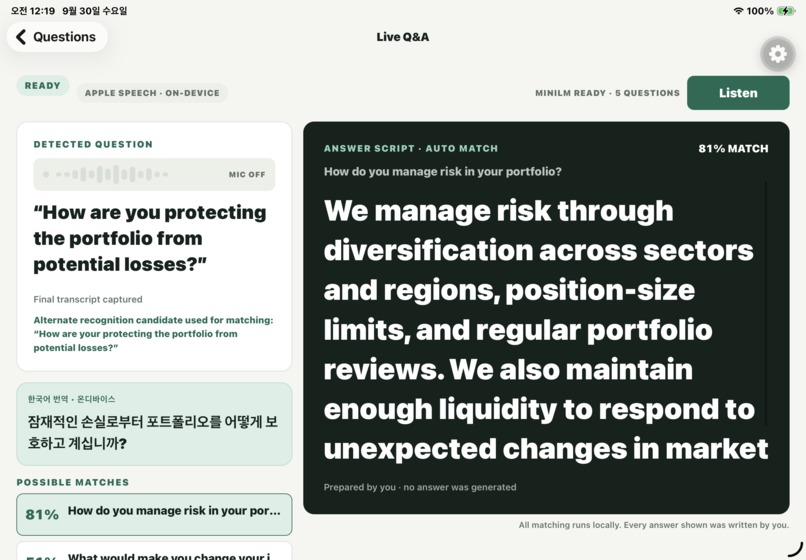
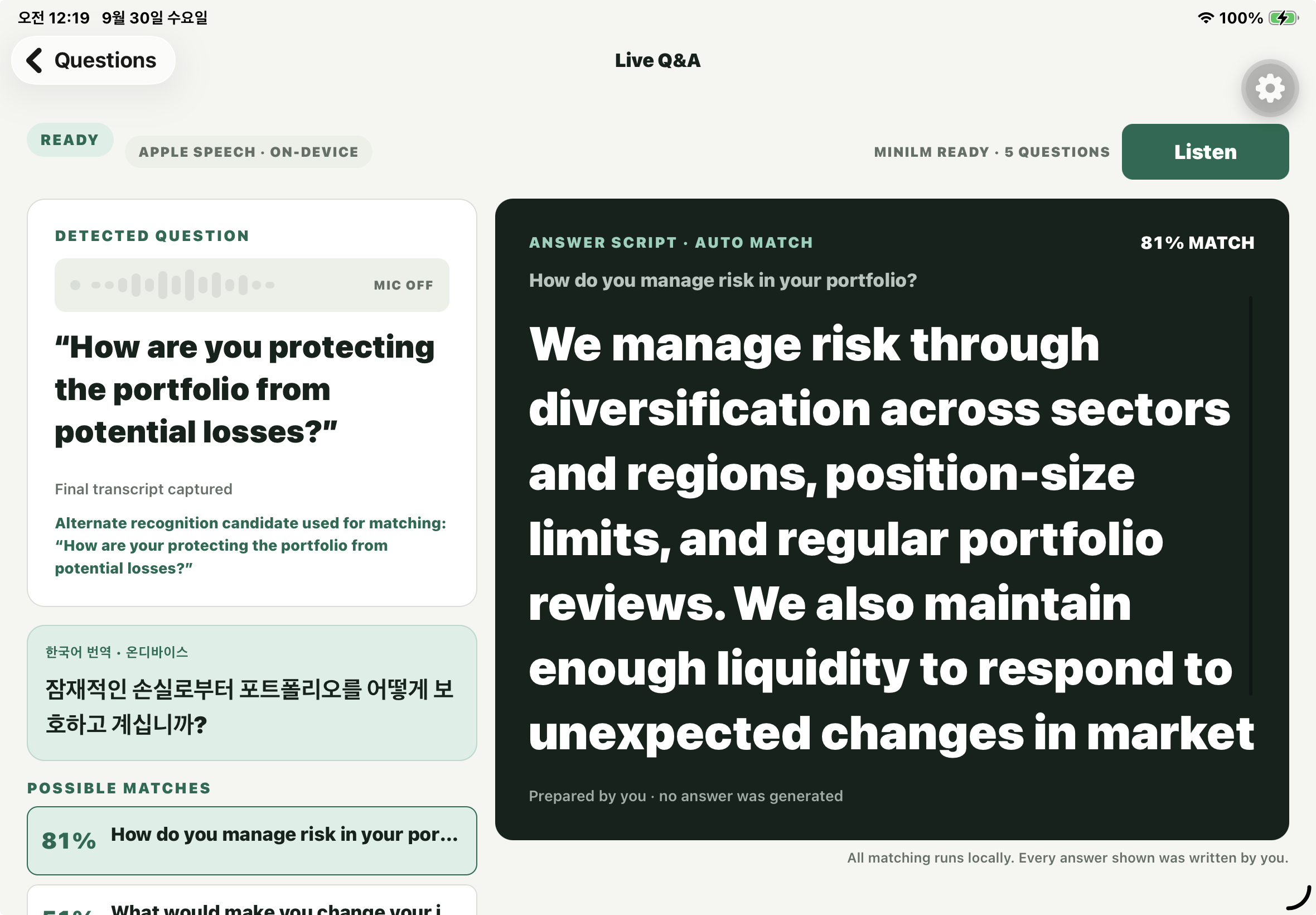
Cueback is a presentation Q&A assistant that helps presenters quickly find their own prepared answers during live questions.
Before a presentation, the user creates a presentation, writes expected questions, and prepares the exact answer scripts they want to use.
During a live Q&A session, Cueback:
- listens to an English question,
- transcribes it using speech recognition,
- compares the recognized question with the user's prepared questions,
- ranks the most semantically similar questions,
- shows the most relevant prepared answer,
- and provides a Korean translation of the recognized question when supported.
Cueback also shows multiple likely matches instead of blindly assuming that the top result is always correct.
If the similarity is not strong enough, Cueback does not automatically display an answer. It keeps a No confident match state and allows the presenter to choose a candidate manually.
Most importantly, Cueback never generates the answer itself.
Every answer displayed during a presentation was written by the user beforehand.
How we built it
Cueback is built with Expo, React Native, TypeScript, and React Navigation.
Presentation data, expected questions, and answer scripts are stored locally with AsyncStorage, allowing the core preparation workflow to remain simple and account-free.
For live questions, Cueback uses expo-speech-recognition to capture English speech.
The recognized question is then processed by a multilingual MiniLM embedding model running on-device through react-native-executorch.
Each prepared question is converted into an embedding, and Cueback uses cosine similarity to compare the live question against the prepared question bank.
Instead of matching only one transcript, Cueback can evaluate multiple speech-recognition alternatives and select the transcript that produces the strongest semantic match.
To improve performance, prepared-question embeddings are cached together with a model identifier and a hash of the question text. If a question is edited, Cueback detects that the old embedding is no longer valid and generates a new one.
We also built a native translation bridge so that the recognized English question can be translated into Korean on supported iOS and Android devices.
For monetization, Cueback uses the RevenueCat React Native SDK and RevenueCat Test Store.
The free version provides:
- one presentation,
- up to five expected questions per presentation,
- speech recognition,
- semantic matching,
- and prepared-answer display.
Cueback Pro removes the presentation and question limits.
RevenueCat is not just used as a decorative purchase button. The application checks the active pro entitlement from CustomerInfo, and the actual data-creation logic uses that entitlement to decide whether additional presentations or questions can be created.
Purchases, cancellations, failures, restoration, entitlement refresh, and subscription expiration are all handled through RevenueCat.
Challenges we ran into
One of the biggest challenges was making semantic matching reliable enough for a live presentation.
A judge may ask the same question using completely different vocabulary or sentence structure from the version I prepared beforehand. Simple keyword matching was therefore not enough.
Semantic embeddings solved much of this problem, but another challenge appeared: being wrong confidently is worse than showing no answer at all.
Because of that, Cueback uses a confidence threshold and comparison between the strongest candidates. If the match is too weak or ambiguous, Cueback refuses to automatically select an answer.
Another challenge was asynchronous behavior.
Speech recognition, embedding generation, semantic matching, local storage, and RevenueCat entitlement updates can all finish at different times.
An older matching request could potentially finish after a newer one and overwrite the correct result. Similarly, overlapping AsyncStorage writes could cause recent edits to be replaced by stale application state.
We addressed these problems by introducing request-generation checks for semantic matching and a serialized local-data store that always applies changes against the latest successfully persisted state.
The RevenueCat integration introduced similar edge cases. We had to ensure that pressing the purchase button did not automatically grant Pro. Cueback only unlocks Pro after RevenueCat returns a CustomerInfo object with an active pro entitlement.
We also protected the purchase and restore flows against duplicate operations.
Accomplishments that we're proud of
The part of Cueback I am most proud of is that it keeps the presenter in control.
Many AI presentation tools focus on generating more content. Cueback does the opposite.
It assumes that the presenter has already done the thinking.
The app's job is simply to help retrieve that thinking at exactly the right moment.
I am also proud that Cueback can handle meaning rather than exact wording. A judge does not need to ask the question in the same way it was written in the question bank.
The app can recognize a semantically similar question, rank multiple possibilities, and still refuse to choose when the confidence is too low.
The final application also combines several native and on-device systems in one workflow:
- live speech recognition,
- multilingual semantic embeddings,
- local question and answer storage,
- question translation,
- responsive iPad presentation UI,
- and RevenueCat entitlement-based monetization.
What we learned
Building Cueback taught me that reliability is often more important than adding another AI feature.
At first, the main problem seemed to be semantic similarity.
But as the application became more complete, I learned that many of the hardest problems were about state, timing, and uncertainty.
What happens if an old model request finishes late?
What happens if a question is edited while its embedding is being generated?
What happens if storage fails?
What happens if a purchase succeeds but the expected entitlement is missing?
What happens when the model is unsure?
Those questions changed how I approached the project.
Instead of trying to make Cueback always produce an answer, I designed it to recognize when it should not.
I also learned that monetization is not only about putting a paywall in front of a feature. RevenueCat became part of the application's state model: the active entitlement directly controls the limits of the local presentation library.
What's next
Cueback began as a tool for investment-competition Q&A, but the same problem exists in many other situations.
Students face it during academic presentations. Founders face it during pitch Q&A. Job applicants face it during interviews. People presenting in a second language face it almost everywhere.
The next step is to make Cueback useful for all of these scenarios while keeping the same principle:
The system should help people communicate what they already know, not replace what they think.
For Cueback Pro, I also want to explore more advanced AI-assisted processing to improve the quality of the live Q&A experience.
This could include AI-enhanced speech recognition that is more robust to accents, pronunciation differences, background noise, and presentation-specific terminology, as well as stronger semantic matching models that can better recognize when two differently worded questions are actually asking the same thing.
AI could also be used to rerank recognition candidates and matching results, improving retrieval accuracy without generating the answer itself.
The user's prepared answer would still remain the source of truth. AI would improve how Cueback understands the question and finds the right script, rather than writing a response for the presenter.
Other future directions include better rehearsal tools, question-bank analytics, confidence calibration, faster model startup, and optional synchronization across devices.
The long-term goal is for Cueback to become a lightweight layer between preparation and real-time communication — helping a presenter turn preparation into confidence when the question finally arrives.

Log in or sign up for Devpost to join the conversation.