Inspiration
As a first-time Adobe Photoshop user, I wanted to create an ugly holiday sweater that felt like a hilarious inside joke for creative people everywhere—what if Photoshop itself exploded into a hideous, cozy holiday knit? Pairing that meta-design humor with Gemini 3.1 (Nano Banana 2) inside Photoshop let me turn an ordinary headshot into a joyful, print-ready holiday card.
What it does
This two-part holiday piece connects seamlessly from sweater design to finished greeting card:
- The Ugly Sweater (
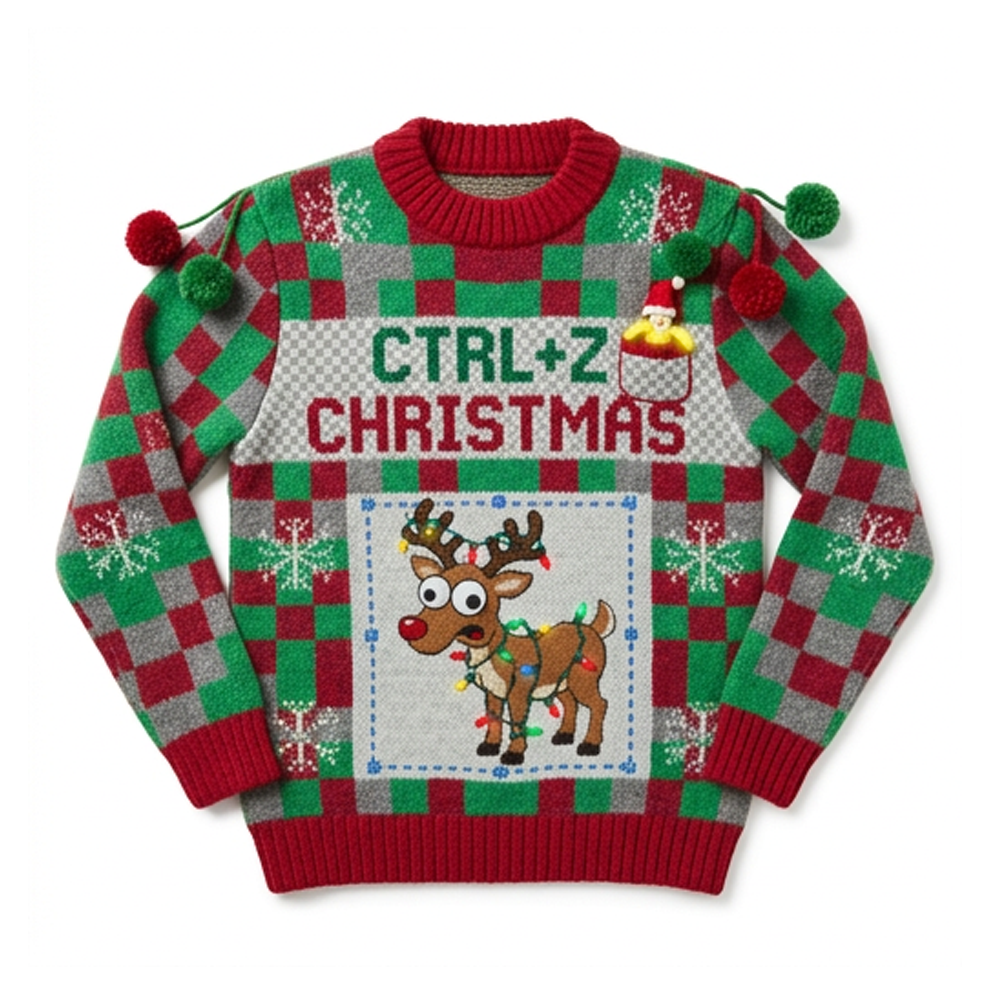
Sweater_Image1.png): A chunky-knit sweater woven in a green, red, and grey Photoshop transparency checkerboard pattern, featuring knitted yarn lettering (CTRL+Z CHRISTMAS), a panicked googly-eyed reindeer trapped inside a knitted blue dotted selection box with corner handles, dangling pom-poms, and a cheeky peeled banana wearing a Santa hat peeking out of the chest pocket. - The Finished Holiday Card (
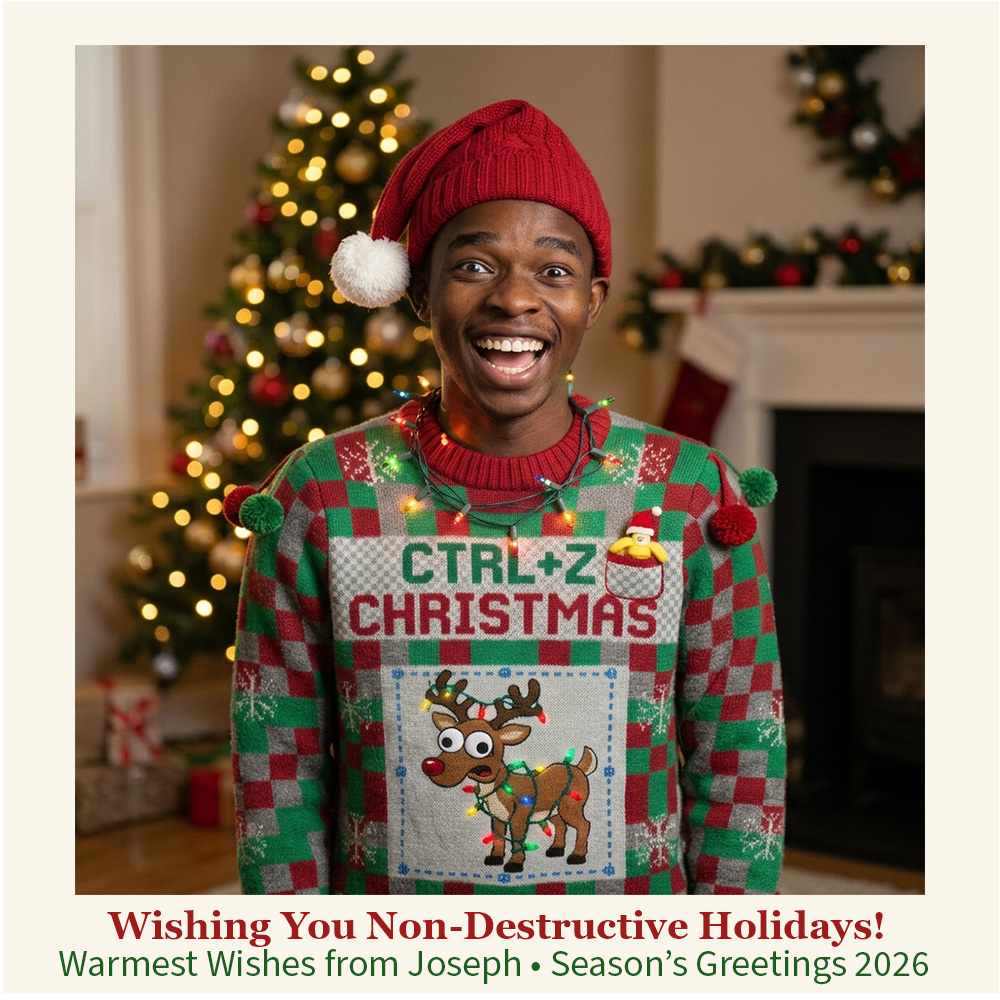
HolidayCard_Image2.png): Features my real photo seamlessly wearing the exact sameCTRL+Z CHRISTMASsweater inside a warm Christmas-tree living room, framed on luxury cream card stock with the greeting: "Wishing You Non-Destructive Holidays!"
How we built it
- Step 1 — Designing the Ugly Sweater (Photoshop + Nano Banana 2):
On a
1000 × 1000 pxcanvas, I used the Rectangular Marquee tool and Generative Fill with Gemini 3.1 (Nano Banana 2) to generate the checkerboard knit sweater, stitched"CTRL+Z CHRISTMAS"text, selection-box reindeer, and Santa-hat banana pocket. I then layered non-destructive Photoshop edits on top: aScreenblend-mode glow layer (0%hardness soft brush,#FFE600,#FF2A2A,#22FF55,#19C8FF) to illuminate the reindeer's bulbs, plus a Vibrance (+15) adjustment layer. - Step 2 — Adding Myself & Composing the Holiday Card:
On a fresh
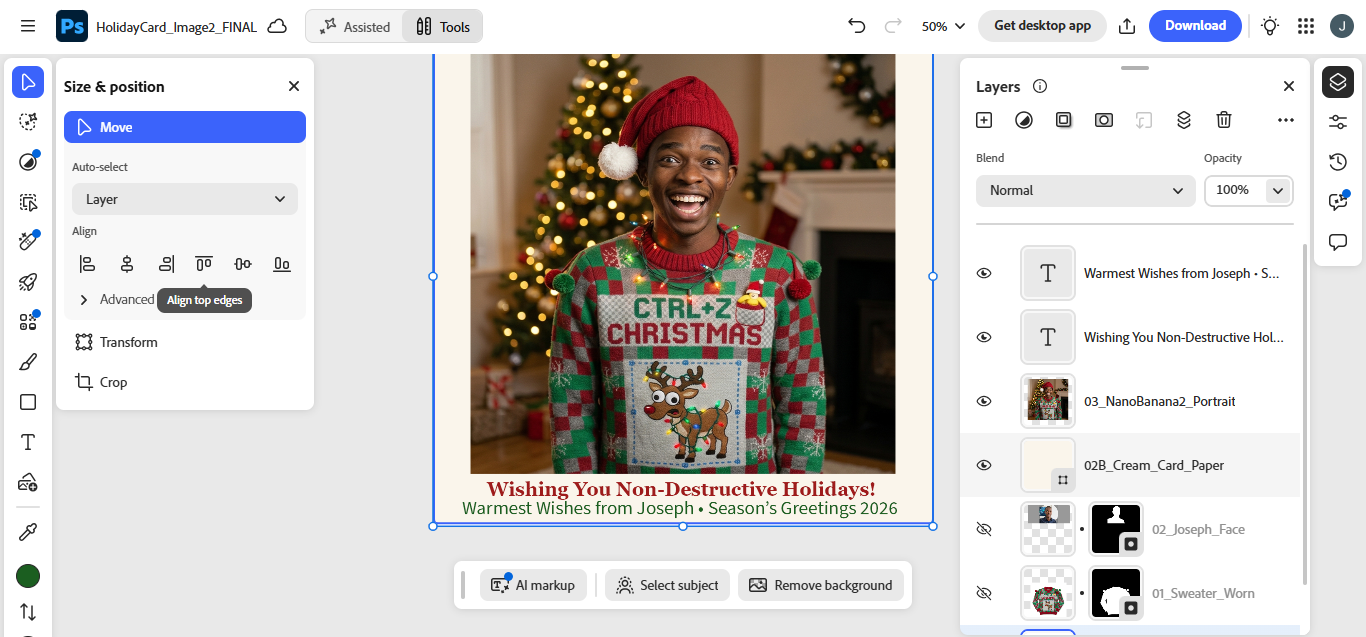
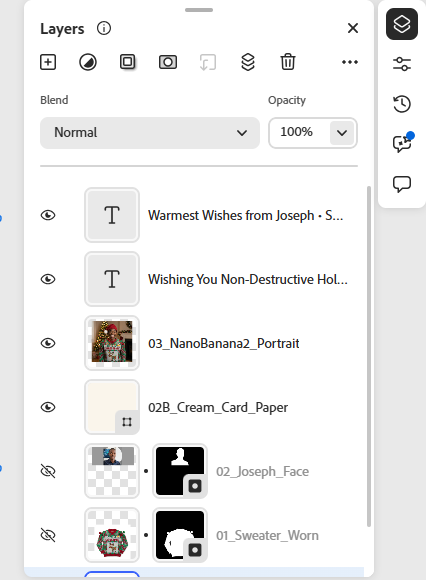
1000 × 1000 pxcanvas, I imported my real portrait (02_Joseph_Face) and exported sweater (01_Sweater_Worn), isolating both with Remove Background and Layer Masks. Using Generative Fill with Gemini 3.1 (Nano Banana 2) across the composed layers, I preserved my facial identity while transforming my calm headshot into a wide-eyed festive laugh, added a tilted red knitted Santa beanie and glowing collar fairy lights, draped the exactCTRL+Z CHRISTMASsweater onto my body, and generated a cozy Christmas tree and fireplace backdrop (03_NanoBanana2_Portrait). - Step 3 — Holiday Card Layout & Typography:
I placed a warm cream Solid Color fill layer (
#FAF5EB) underneath (02B_Cream_Card_Paper), used exact Transform (850 × 850 pxatX: 500, Y: 470) to create balanced card borders, and added two centered Type layers ("Wishing You Non-Destructive Holidays!"in#9E1B1Bbold serif and"Warmest Wishes from Joseph • Season’s Greetings 2026"in#1B5E20).
Challenges we ran into
- Protecting my real likeness & exact sweater continuity: Keeping my real facial identity recognizable while changing my expression to a big holiday laugh—and keeping every single sweater detail (
CTRL+Z CHRISTMAS, the reindeer, and the Santa-hat banana) completely unobstructed and accurately spelled. - Learning Photoshop from scratch while budgeting generative credits: Planning each selection and prompt carefully so every Nano Banana 2 generation worked on the first shot, and leaning on real non-destructive Photoshop layers for lighting, framing, masking, and typography.
Accomplishments that we're proud of
- Going from zero Adobe Photoshop experience to building an organized, multi-layer PSD workflow (
Remove Background,Layer Masks,Blend Modes,Adjustment Layers,Solid Color Fill,Transform, andType). - Keeping 100% visual continuity between the standalone sweater (
Image 1) and the worn sweater inside the final card (Image 2).
What we learned
That generative AI shines brightest when paired with deliberate art direction and real non-destructive Photoshop layers—Nano Banana 2 handled knitted typography, outfit draping, and lighting harmony, while Photoshop's masks, solid fills, and typography gave it the polish of a real printed holiday card.
What's next for CTRL+Z Christmas: A Non-Destructive Holiday Card
Sending this card to friends and fellow creators—and exploring even more Photoshop compositing and Relight techniques!
Built With
- nano-banana
- photoshop