cseCatalyst: Revolutionizing Exam Preparation 🚀


From the pages of "The National Examiner"

A crowd of students outside an examination center Aspirants inside the examination hall. For many, this is the culmination of years of dedicated effort.

The Uphill Battle of India's Brightest Minds

Every year, a river of humanity flows into the examination halls of the Union Public Service Commission (UPSC). Over a million apply; only a thousand make it. The journey is a testament to human endurance—a marathon of late nights, sacrificed social lives, and an unwavering focus on a vast syllabus that spans history, economics, technology, and ethics. The sheer volume of information, especially the ever-changing landscape of current affairs, is a formidable challenge. "You're not just reading the news," one aspirant told us, "you're expected to connect it to policy, predict its future impact, and write a 250-word essay on it. It's overwhelming." This intense pressure and information overload are the silent hurdles that define one of modern India's most challenging competitive endeavors.


## Inspiration ✨

This very struggle is what inspired cseCatalyst. Our project was born from witnessing the significant challenges faced by millions of aspirants preparing for competitive examinations like UPSC, State PCS, and Banking in India. We saw that traditional methods of studying current affairs are often _inefficient, time-consuming, and inaccessible to many.

Our core motivation was to leverage modern AI and technology to democratize access to high-quality, contextualized education. The mission is driven by the belief that education should be a fundamental right, not a privilege, and that every dream deserves a chance.

## What it does: The Catalyst Approach 💡

cseCatalyst is the intelligent study partner designed to solve these very problems. It's an AI-powered daily study partner that transforms how aspirants engage with current affairs. Here’s how:

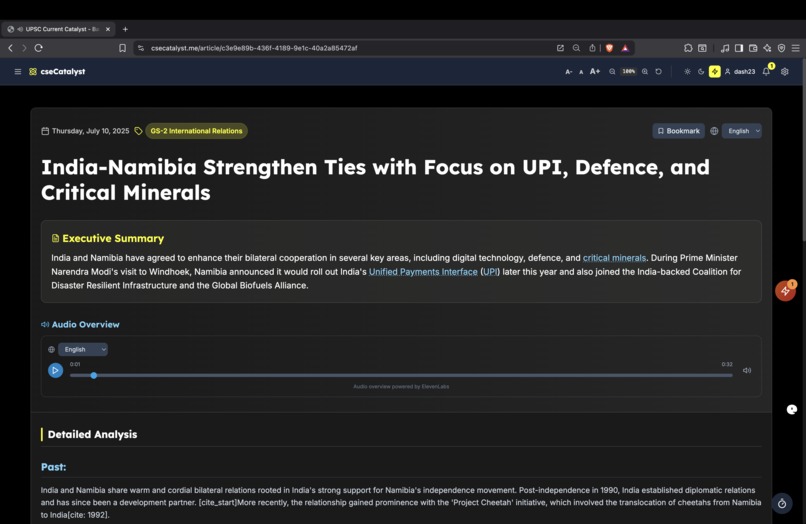
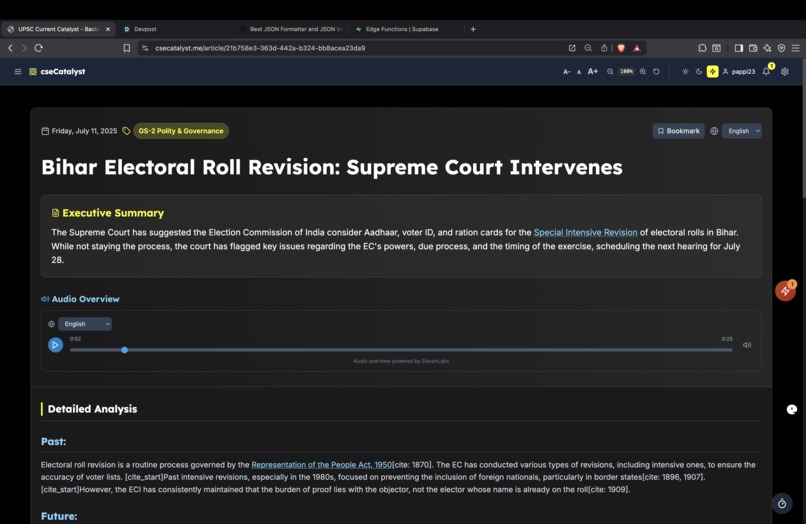
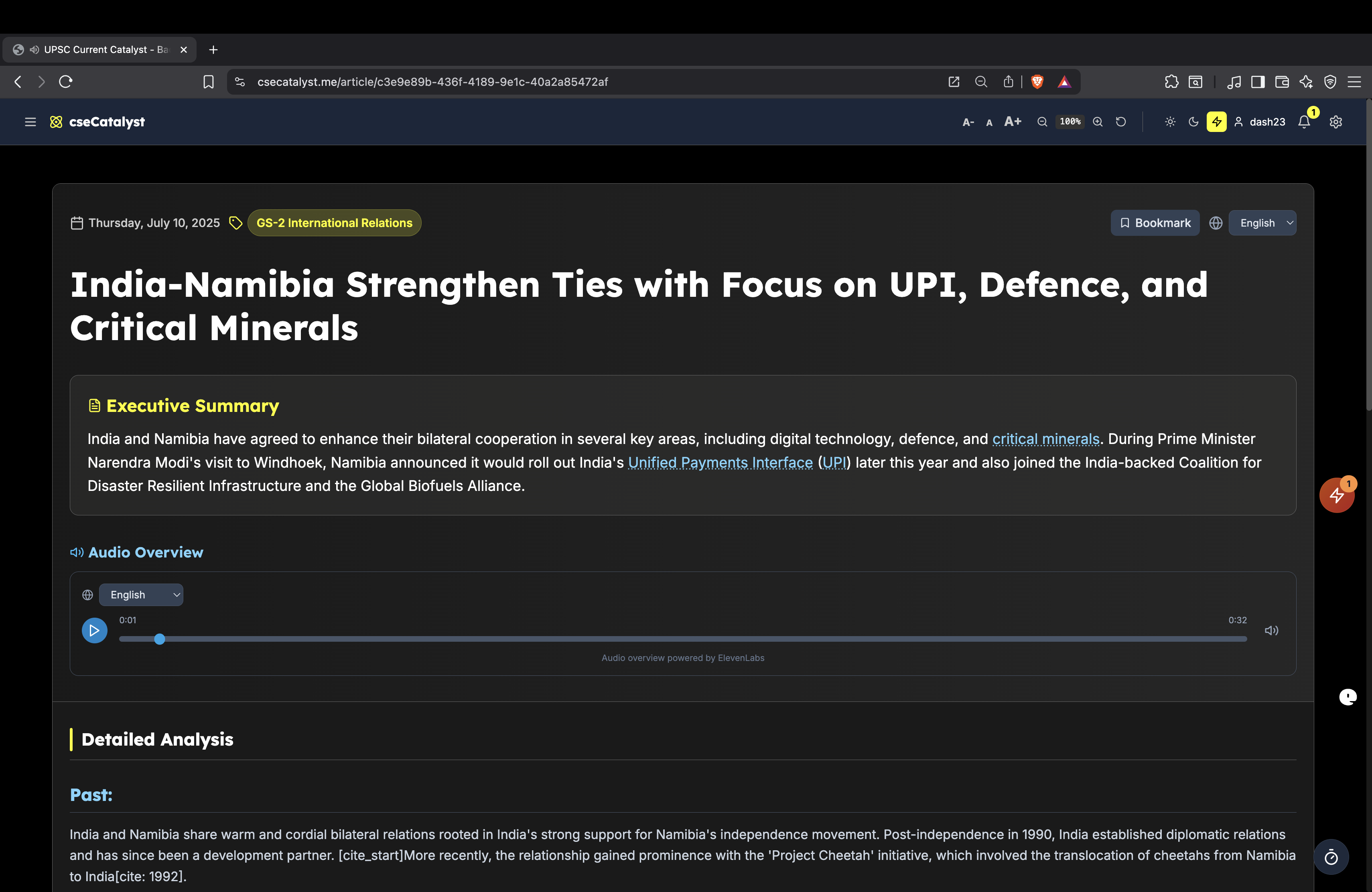
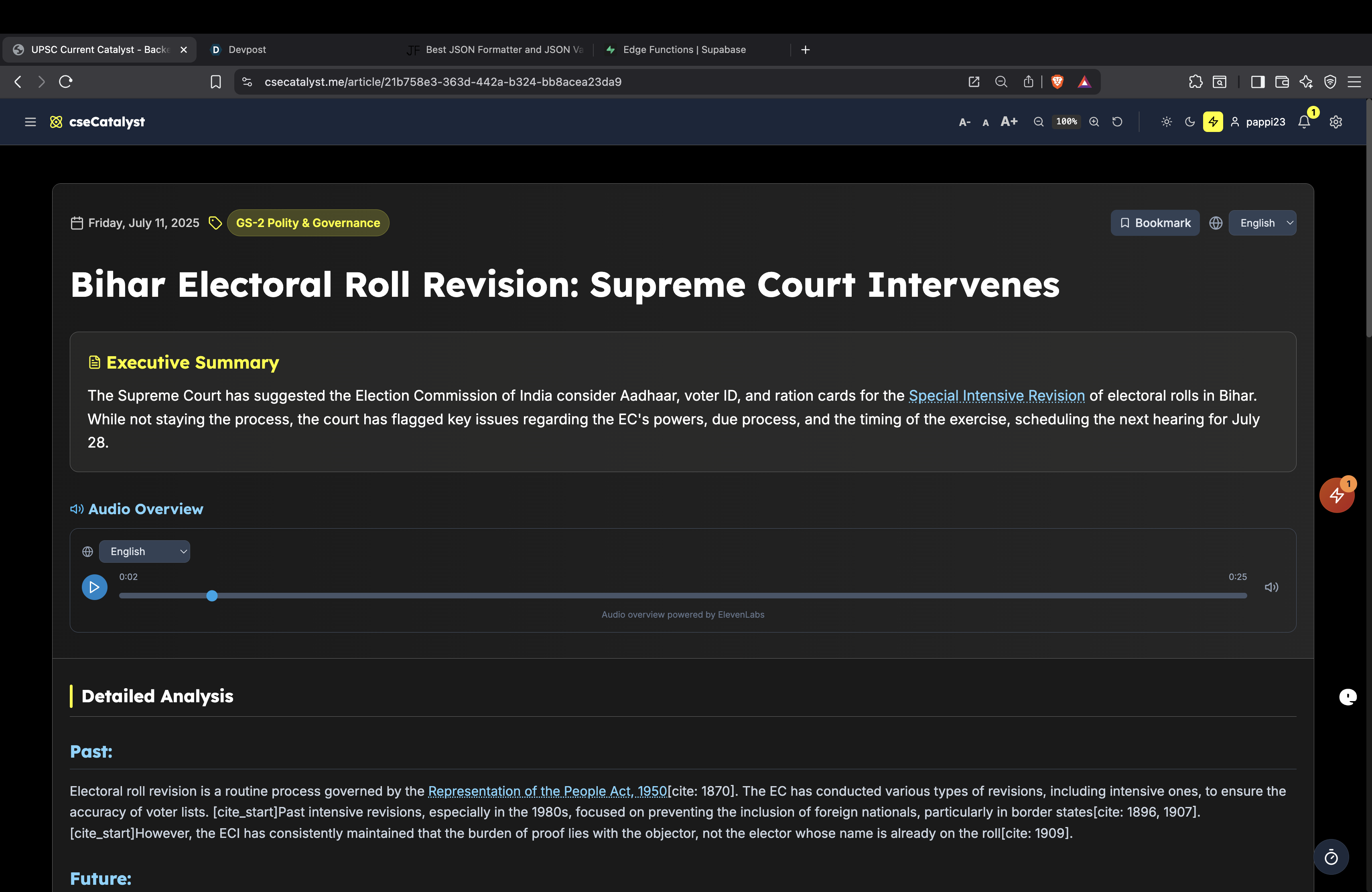
  • 🧠 AI-Powered Analysis: It analyzes daily news using a "Past-Present-Future" framework, offering historical context, current implications, and future predictions.
  • 📚 Multi-Source Synthesis: It integrates information from diverse sources like newspapers, PIB, PRS, and ministry websites for comprehensive coverage.
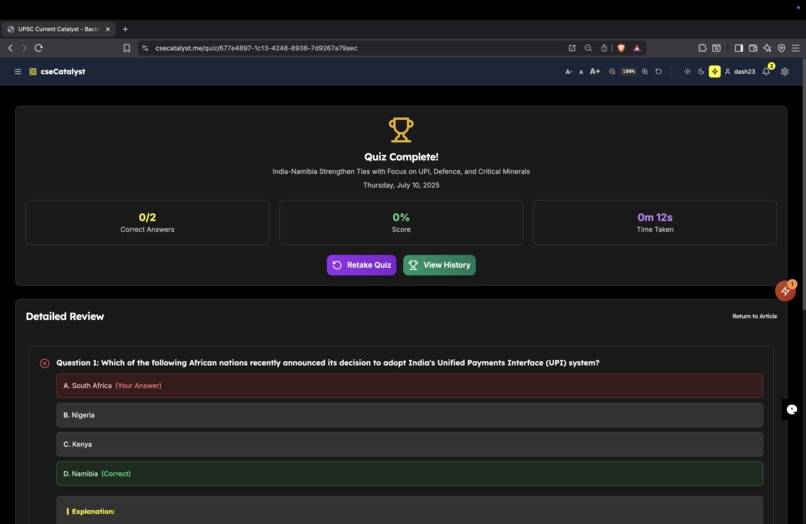
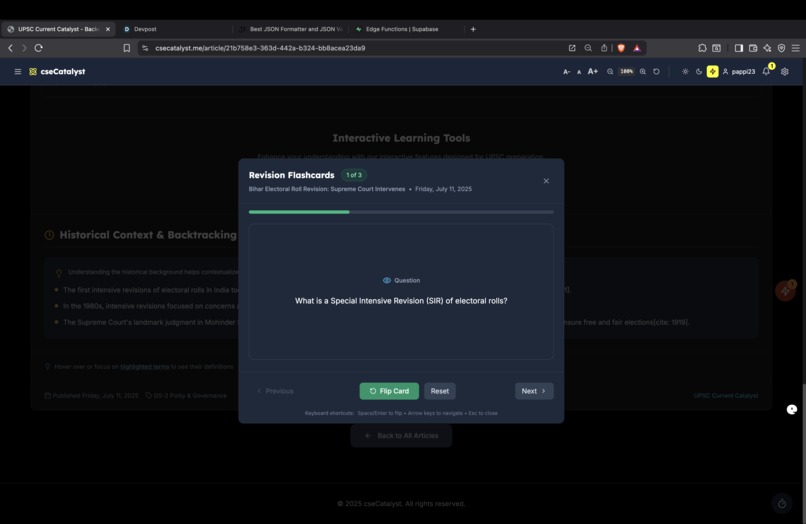
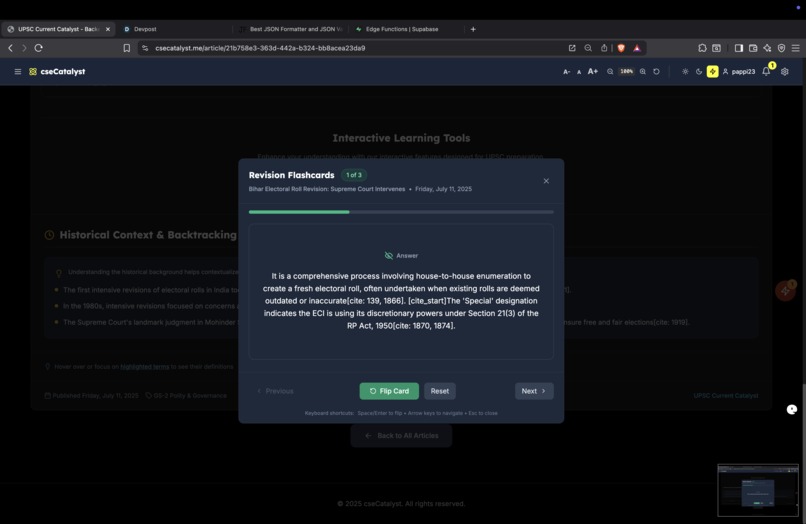
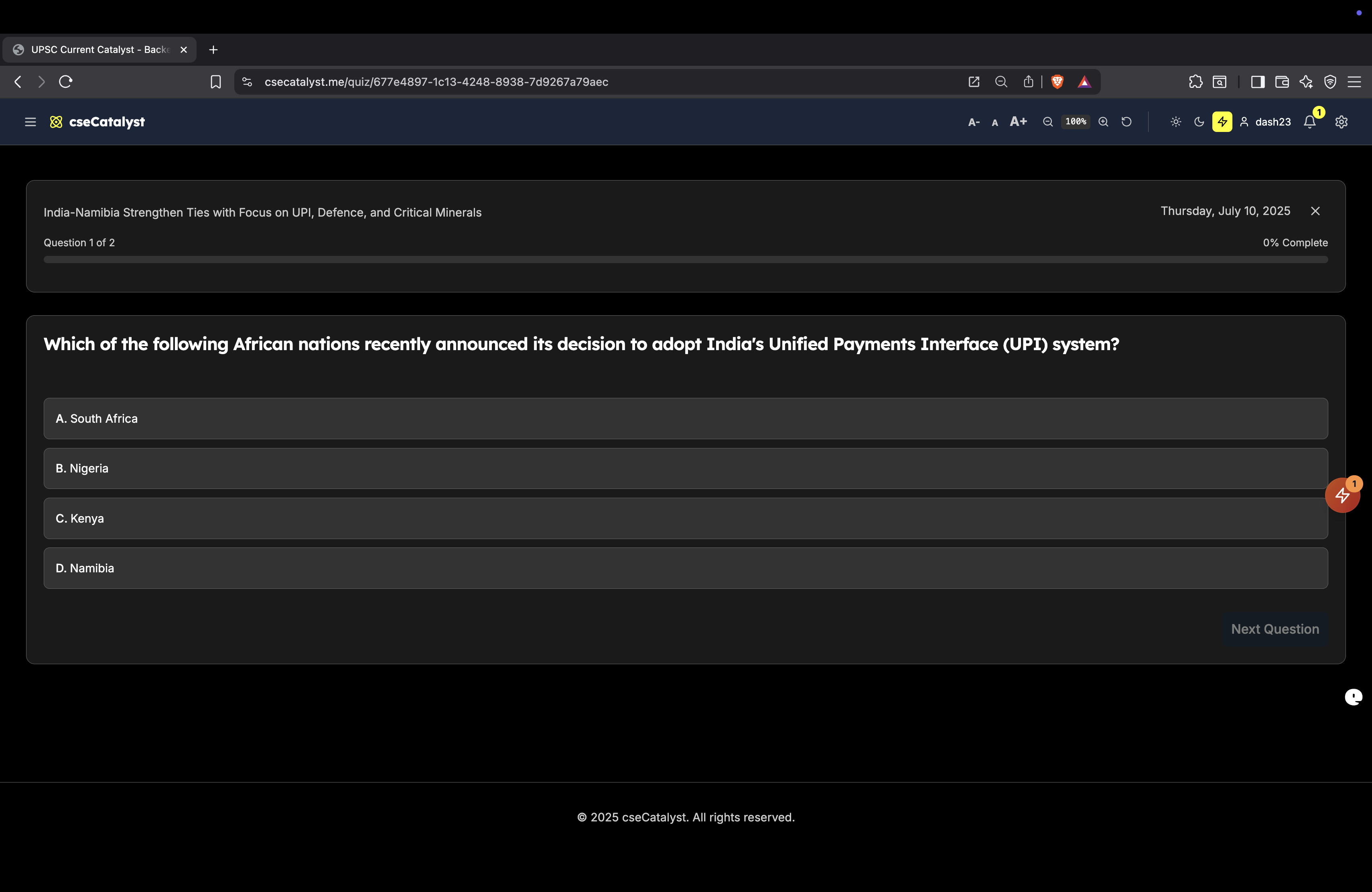
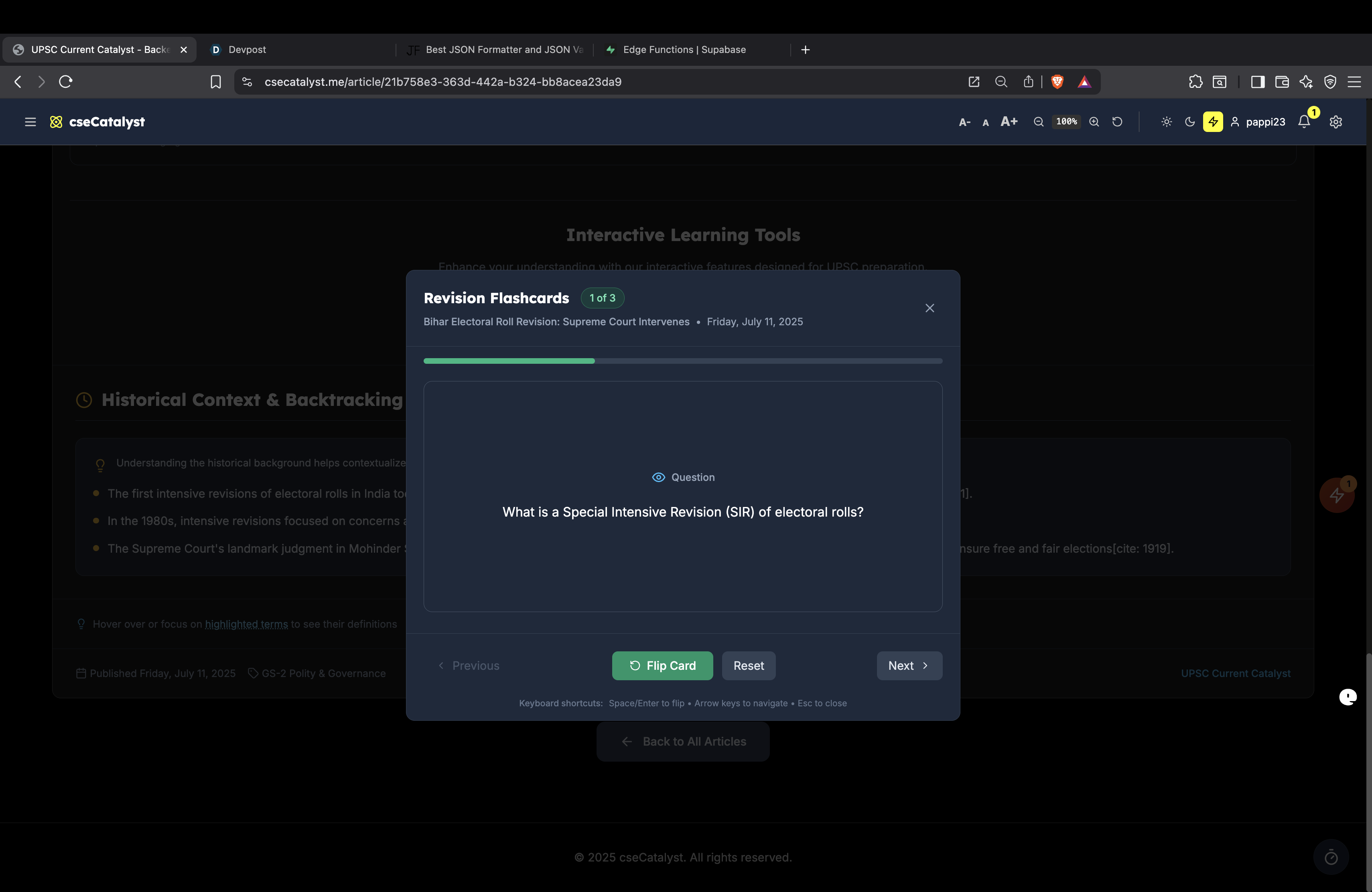
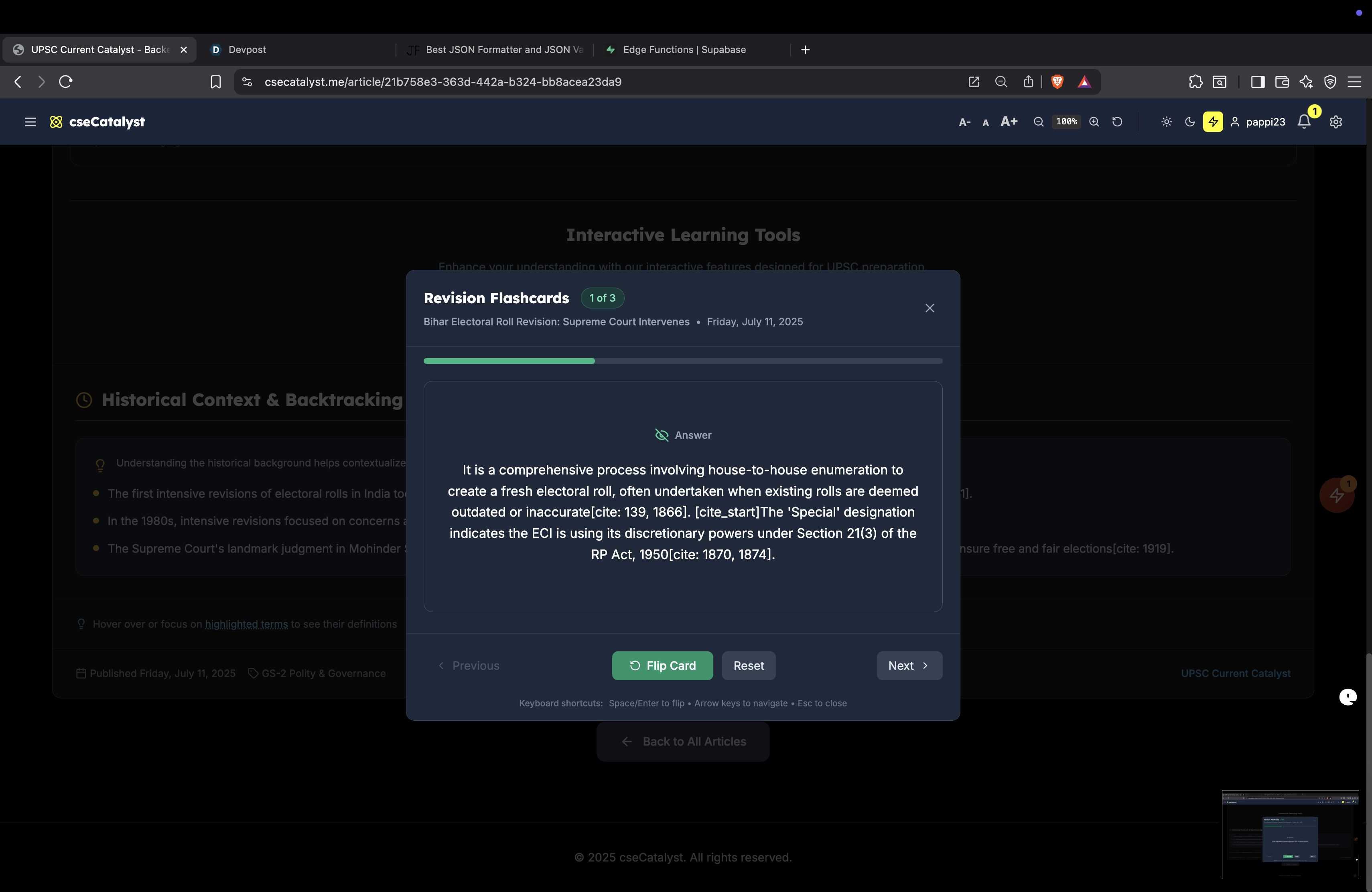
  • 🧩 Interactive Learning Tools: It offers quizzes, flashcards, and Mains model answers linked to articles to enhance retention and application. These are exclusive features for our Pro subscribers.
  • 🌐 Accessibility for All: It provides one-click translation into various Indian languages, generates audio versions of article summaries, and includes customizable themes and font sizes.
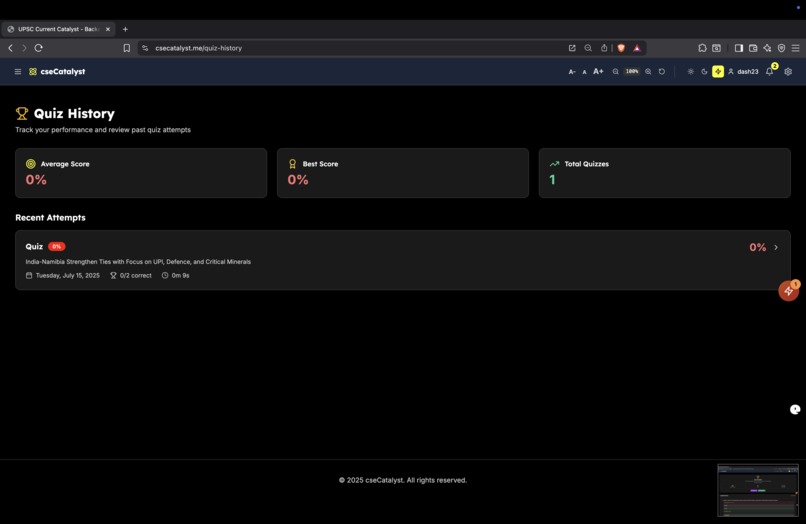
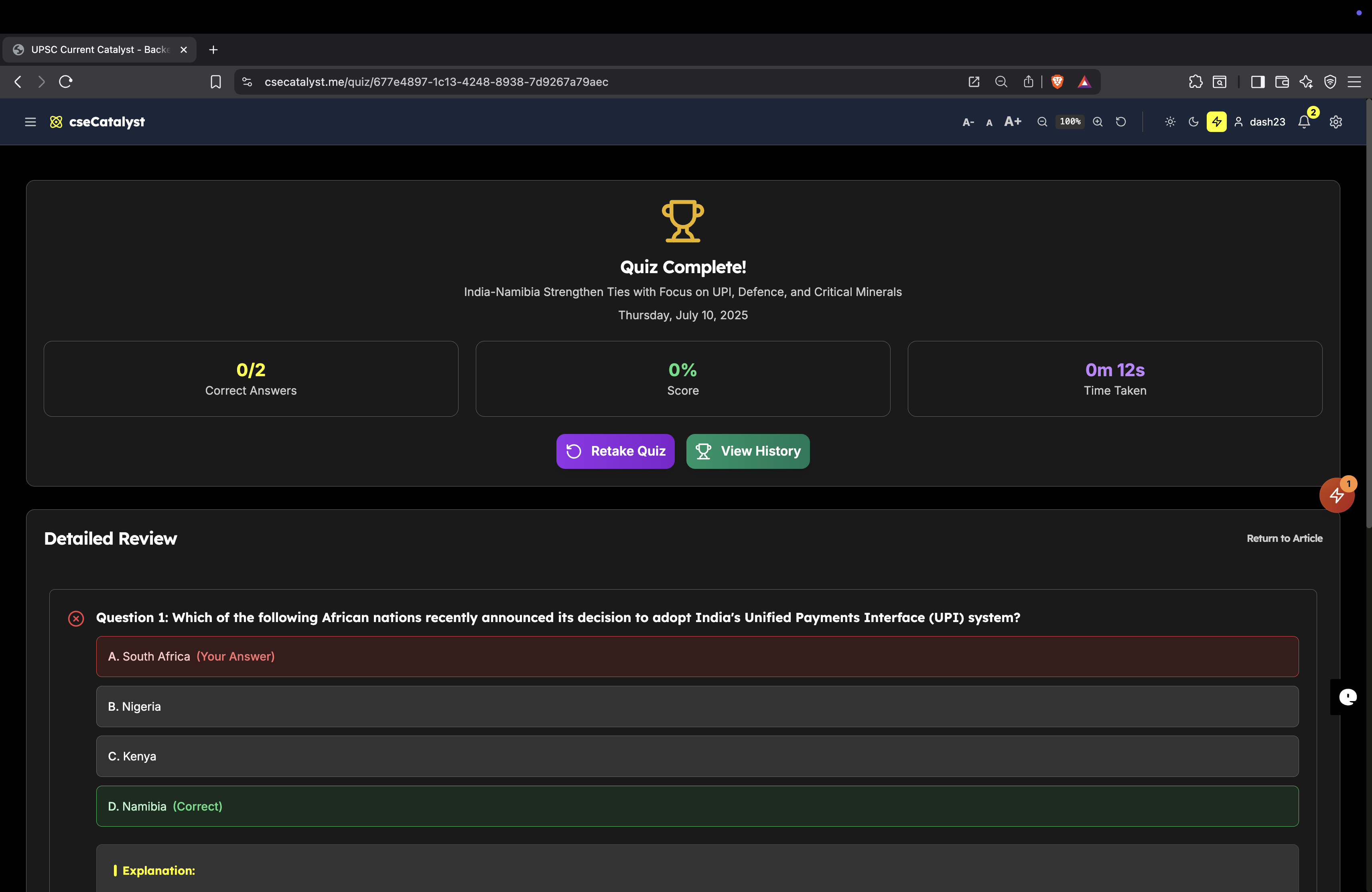
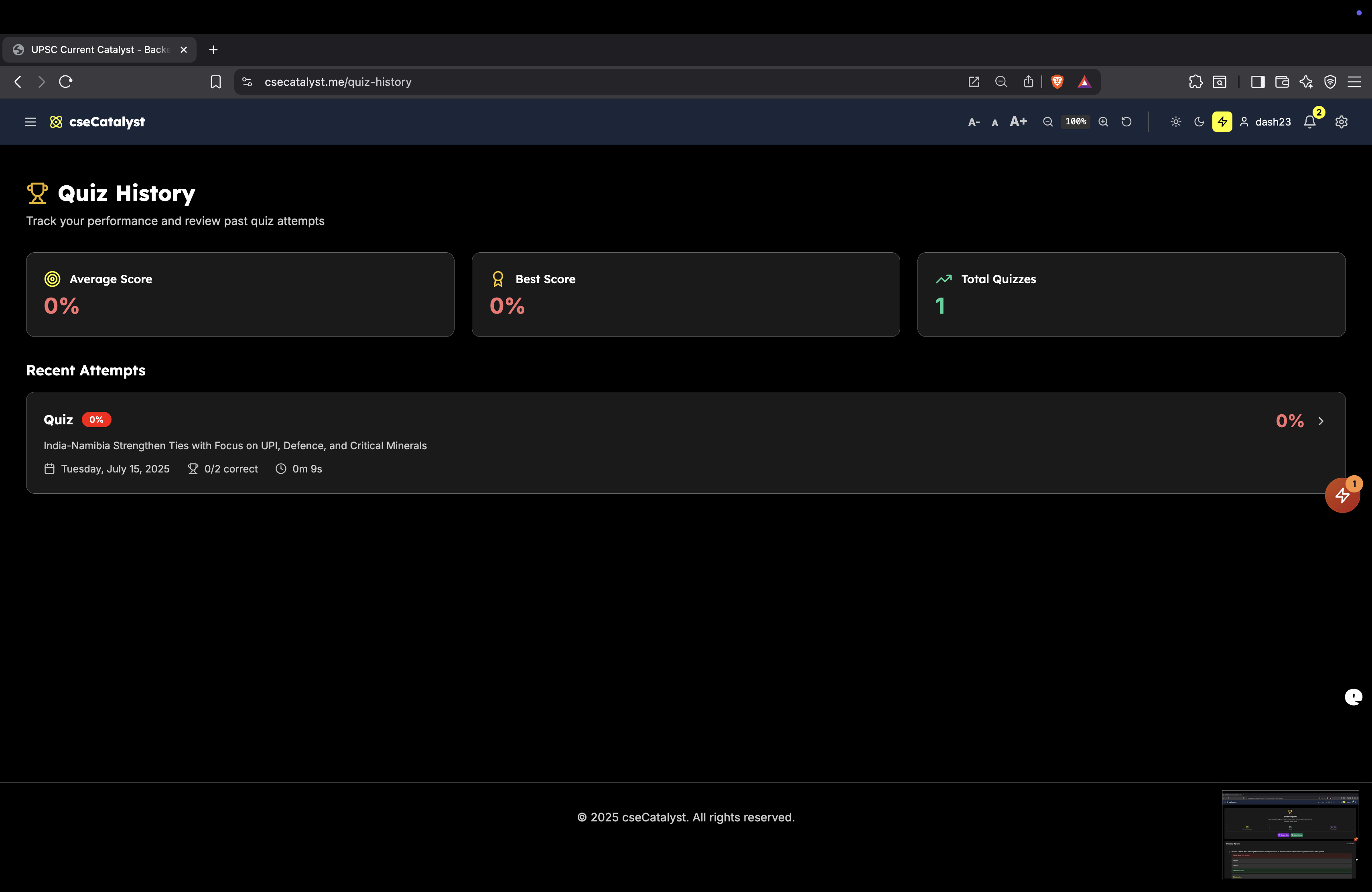
  • 📈 Progress Tracking: The platform monitors users' daily reading streaks and quiz performance history.

## How we built it 🛠️

The platform is built with a modern, full-stack architecture designed for scalability and security.

  • Backend: Developed using Node.js with the Express.js framework.
  • Database & Auth: We use Supabase as our primary backend-as-a-service. It provides a PostgreSQL database, secure user authentication, and powerful Row Level Security (RLS) for fine-grained data access control.
  • Frontend: Built with React.js and Vite, and styled with Tailwind CSS for a responsive and customizable UI.
  • Integrations: We leverage a suite of powerful services:
    • Supabase Edge Functions for serverless background tasks.
    • Google Cloud Translation API for multi-language support.
    • ElevenLabs for high-quality text-to-speech audio.
    • RevenueCat for managing subscriptions.
    • Sentry for real-time error monitoring.
    • Netlify Our Hosting Platform.

Here is a small code snippet illustrating the kind of logic we handle (example in Ruby for Markdown demonstration):

# Our project uses Node.js, but here's a Ruby example for formatting.
# This function would be triggered after content ingestion.

def process_article_enhancements(article_id)
  # 1. Fetch article from Supabase
  article = db.get_article(article_id)

  # 2. Asynchronously call translation and audio services
  translate_job(article.text)
  generate_audio_job(article.summary)

  puts "Enhancement jobs for article #{article_id} have been queued!"
end

## Challenges we ran into 🤯

  • Complex Data Ingestion: Designing a robust PostgreSQL function (ingest_daily_content) to atomically insert nested JSON data while maintaining data integrity was complex.

  • Third-Party API Integrations: Integrating external APIs was intricate, especially handling authentication for the Google Cloud Translation API within the Deno environment of Supabase Edge Functions.

  • Supabase RLS & Permissions: Implementing and debugging granular Row Level Security policies across numerous tables to ensure correct data access levels was very challenging.

  • CORS Errors: Resolving Cross-Origin Resource Sharing (CORS) issues between the frontend deployed on Netlify and the backend on Render was a recurring task.

## Accomplishments that we're proud of 🏆

  • Comprehensive AI Content Pipeline: We successfully implemented an end-to-end system that takes raw content, processes it with AI, generates translations and audio, and stores it in a structured, accessible format.

  • Robust Accessibility Features: We are proud of building accessibility in from the ground up, including multi-language support, audio overviews, and customizable themes, demonstrating a commitment to inclusive education.

  • Scalable & Secure Architecture: We designed a scalable backend with Supabase and Node.js, fortified with RLS and secure API practices, capable of handling a growing user base.

  • Integrated Learning Ecosystem: We successfully combined diverse learning tools—articles, quizzes, flashcards, and Mains answers—into a single, cohesive platform.

## What we learned 💡

  • Database Design is Key: A well-structured database schema is crucial for managing complex, interconnected data and enabling efficient querying.

  • The Power of Supabase: Supabase significantly accelerates development by providing an integrated backend solution. Its

    RLS capabilities are powerful but require careful planning.

  • Edge Functions for Async Tasks: Edge Functions are ideal for offloading compute-intensive tasks, preventing bottlenecks in the main application flow.

  • Accessibility is a Must: Designing for accessibility from the start leads to a more inclusive and user-friendly product for everyone.

## What's next for cseCatalyst 🔮

  • 🤖

    Advanced AI Chatbot: We plan to implement an AI chatbot that can answer user queries and provide personalized study recommendations.

  • 🤝

    Community Features: We envision integrating discussion forums and peer-to-peer learning functionalities.

  • 📊

    Enhanced Analytics: We will provide more detailed performance analytics for users to identify weak areas and create adaptive learning paths.

  • 🎮

    Gamification: We plan to introduce elements like badges and leaderboards, potentially using blockchain technologies like Algorand for digital rewards.

  • 📱

    Offline Mode & More Languages: We aim to expand translation capabilities to more regional Indian languages and develop robust offline capabilities for uninterrupted study.

Tester Credentials

User-id: dash@example.com

Password: Dash@123

🏠 Core Application Features

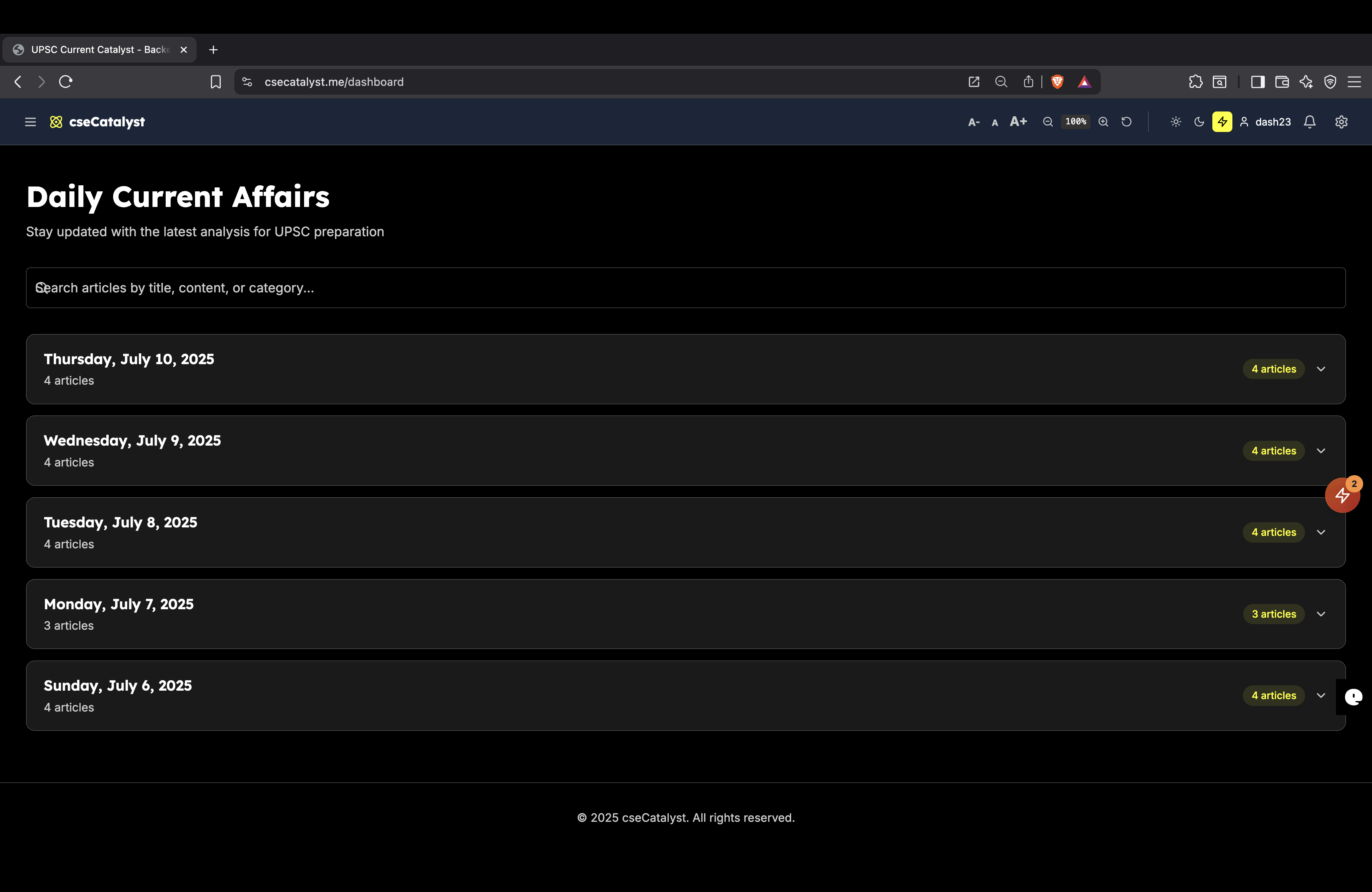
1. Dashboard

  • ✅ Daily articles feed
  • ✅ Article categories (GS Papers 1-4)
  • ✅ Recent activity overview
  • ✅ Quick navigation to all features
  • ✅ Responsive grid layout

2. Articles System

  • Daily Content: Fresh articles every day
  • GS Paper Categories: Papers 1, 2, 3, and 4
  • Rich Content Structure:
    • Past/Present/Future analysis
    • Key terms and definitions
    • Citations and references
    • Related topics
  • Multi-language Support: English, Hindi, Tamil
  • Audio Overview: Text-to-speech for articles
  • Reading Progress Tracking
  • Article Search and Filtering

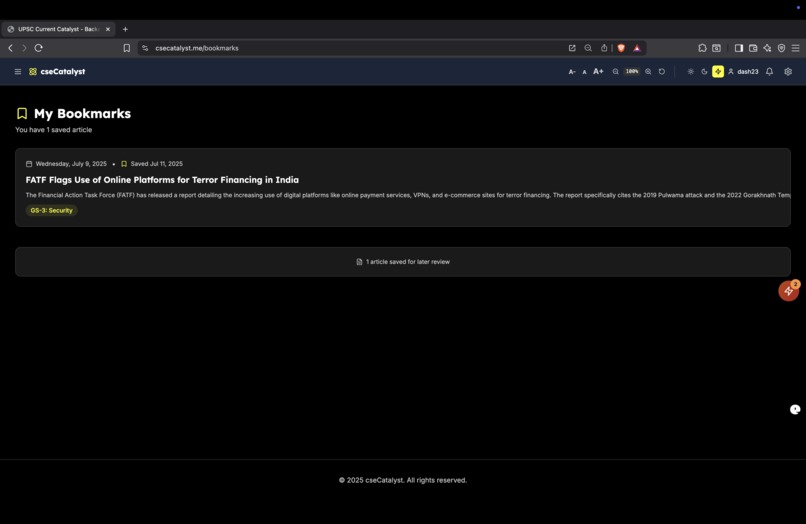
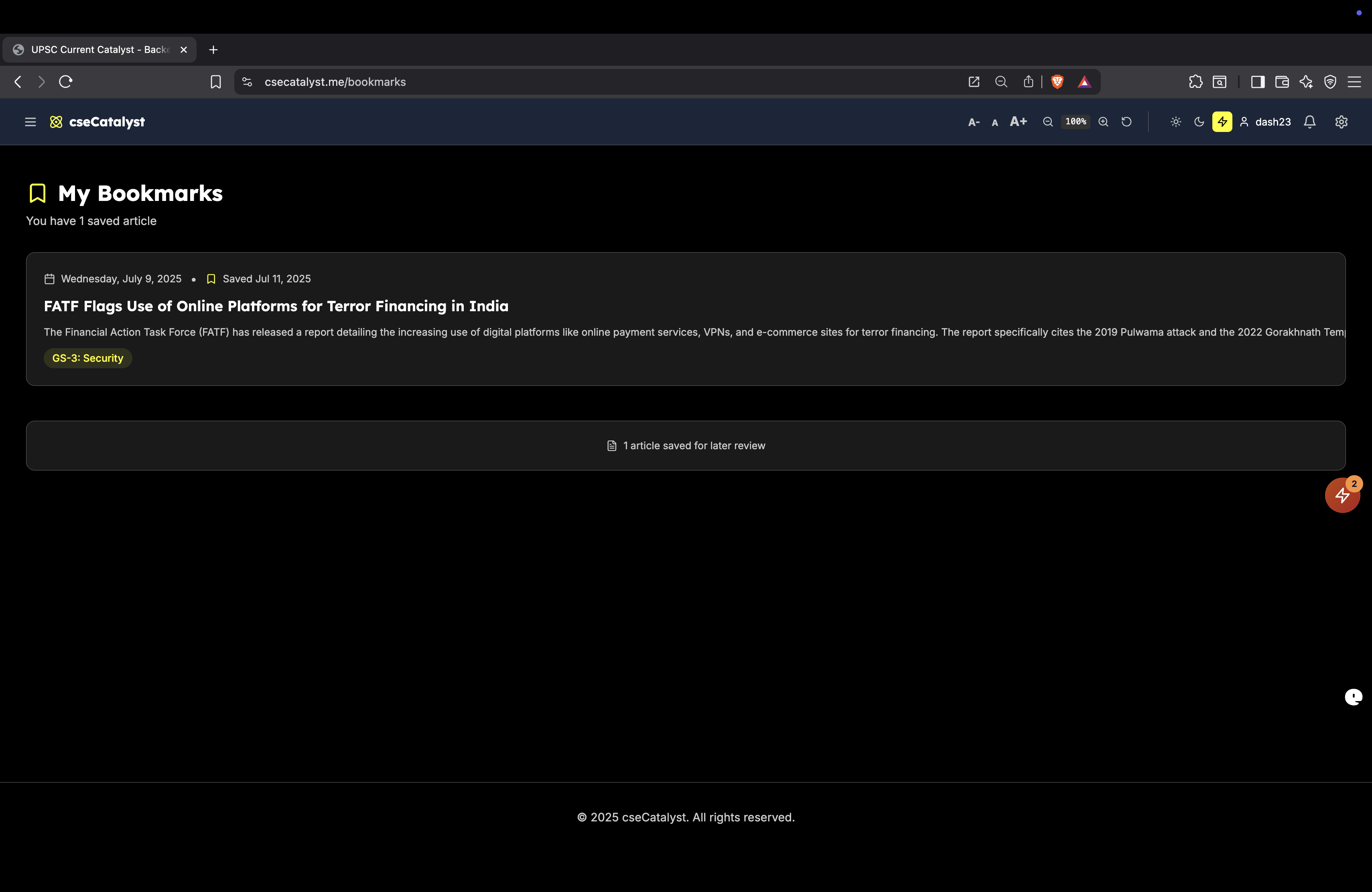
3. Bookmarks System

  • Save Articles: Bookmark for later reading
  • Bookmark Management: Organized bookmark list
  • Quick Access: Easy bookmark/unbookmark toggle
  • Bookmark Categories: Filter by GS papers
  • Search Bookmarks: Find saved articles quickly

4. Quiz System

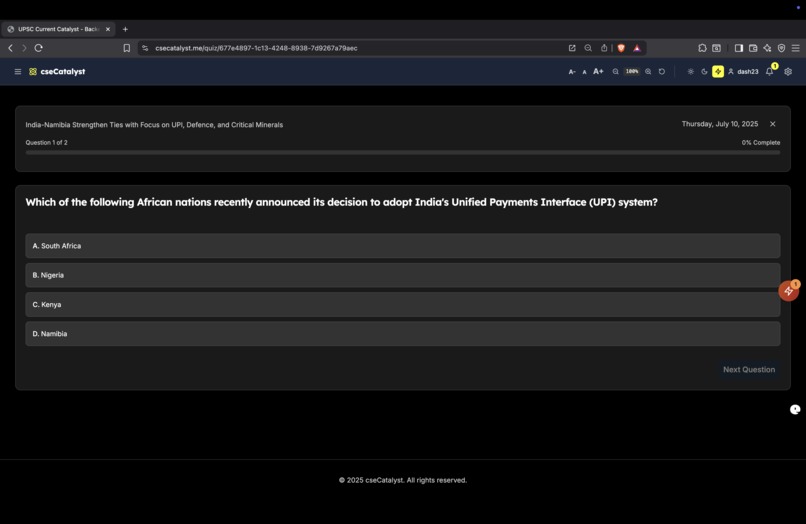
  • Article-based Quizzes: MCQs for each article
  • Mains Questions: Essay-type questions
  • Prelims Questions: Multiple choice questions
  • Model Answers: Detailed explanations
  • Quiz Attempts Tracking: Performance history
  • Progress Indicators: Visual progress bars
  • Score Calculation: Percentage and pass/fail status
  • Quiz History: Past attempts and scores

5. Flashcards System

  • Interactive Flashcards: Key terms and definitions
  • Article-linked Cards: Connected to specific articles
  • Flip Animation: Smooth card interactions
  • Progress Tracking: Cards reviewed and mastered
  • Spaced Repetition: Optimized learning schedule

👤 User Management & Authentication

6. User Authentication

  • Sign Up/Sign In: Email-based authentication
  • Password Reset: Secure password recovery
  • Email Verification: Account verification system
  • Auto Profile Creation: Seamless user onboarding
  • Role-based Access: User/Pro/Admin/Tester roles

7. User Profiles

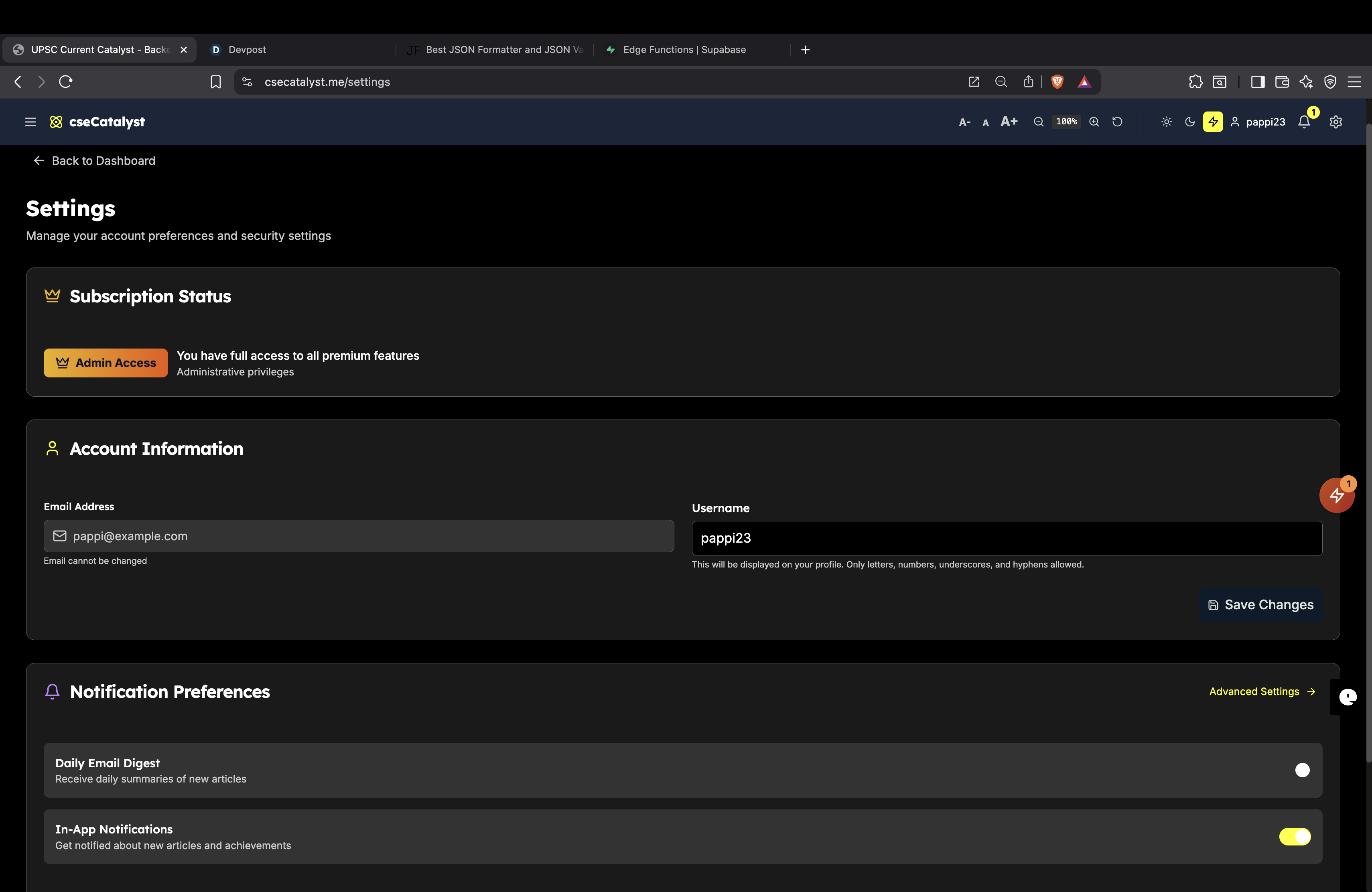
  • Profile Management: Edit username and preferences
  • Reading Statistics: Articles read, quiz scores
  • Activity History: User engagement tracking
  • Preference Settings: Customizable user experience

8. Subscription System

  • Pro Membership: Premium features access
  • Subscription Plans: Different tiers available
  • Payment Integration: Secure payment processing
  • Feature Gating: Pro-only content protection
  • Subscription Management: Upgrade/downgrade options

🎯 Gamification & Engagement

9. Reading Streaks

  • Daily Reading Streaks: Consecutive days tracking
  • Longest Streak: Personal best records
  • Total Articles Read: Lifetime reading count
  • Streak Widgets: Visual progress indicators
  • Streak Maintenance: Smart streak logic

10. Progress Tracking

  • Reading Progress: Articles completed
  • Quiz Performance: Scores and improvement
  • Learning Analytics: Detailed progress reports
  • Achievement Tracking: Milestones and goals

🎨 User Interface & Experience

11. Theme System

  • Light/Dark Themes: User preference toggle
  • System Theme: Auto-detect OS preference
  • Consistent Styling: Theme across all components
  • Smooth Transitions: Theme switching animations

12. Font Controls

  • Font Size Adjustment: Increase/decrease text size
  • Reading Comfort: Customizable typography
  • Accessibility: Better readability options
  • Persistent Settings: Saved user preferences

13. Responsive Design

  • Mobile Optimization: Touch-friendly interface
  • Tablet Support: Adaptive layouts
  • Desktop Experience: Full-featured interface
  • Cross-platform: Consistent experience

14. Navigation System

  • Header Navigation: Clean, organized menu
  • Dropdown Menus: Organized feature access
  • Breadcrumbs: Clear navigation paths
  • Quick Actions: Fast feature access

🔔 Communication & Notifications

15. Notification System

  • In-app Notifications: Real-time alerts
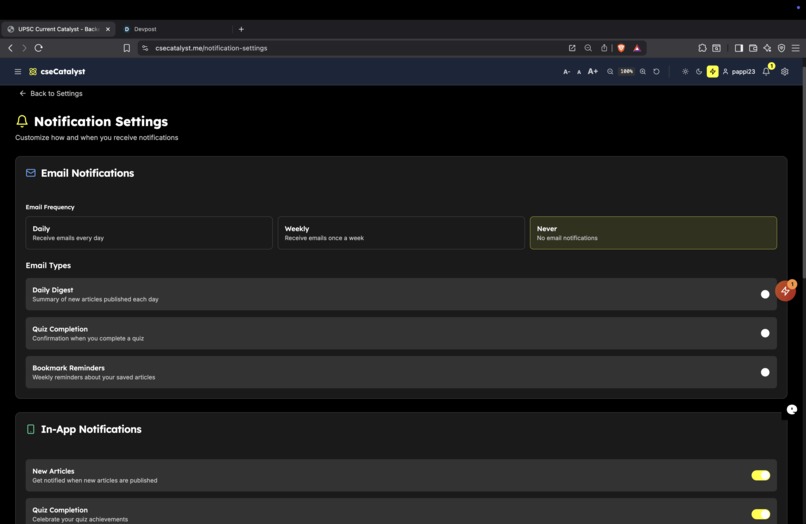
  • Email Notifications: Daily digest emails
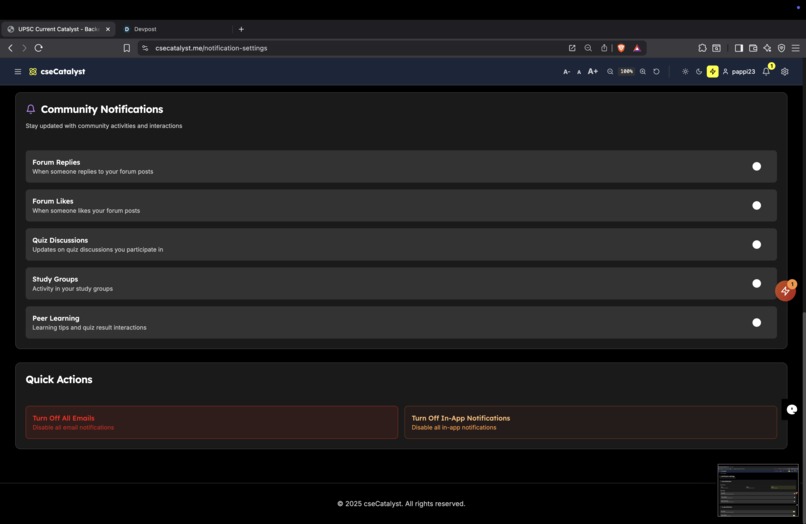
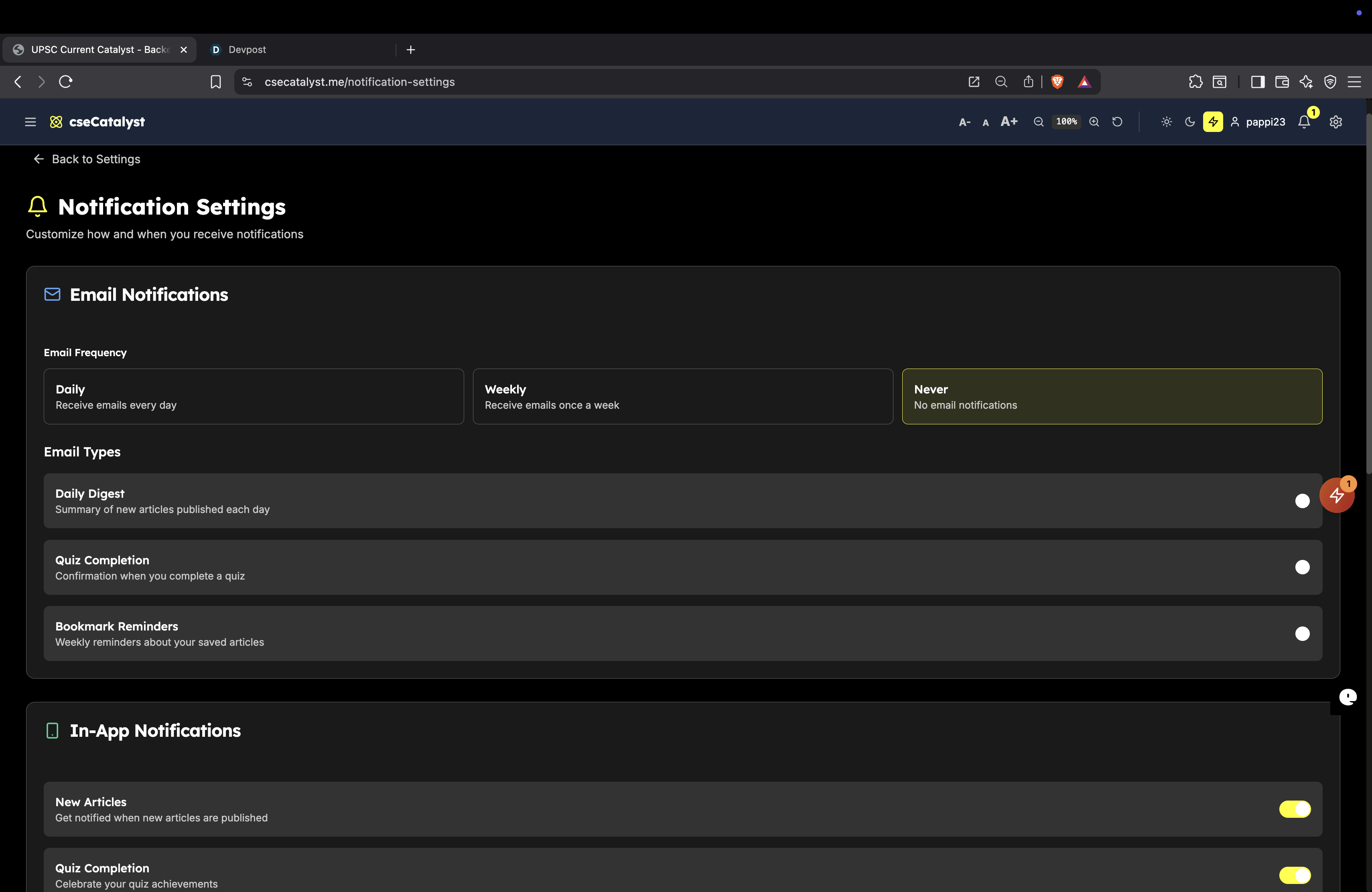
  • Notification Preferences: Customizable settings
  • Notification History: Past notifications log
  • Smart Notifications: Relevant content alerts

16. Email System

  • Daily Digest: Automated email summaries
  • Welcome Emails: New user onboarding
  • Newsletter: Regular content updates
  • Transactional Emails: System notifications
  • Email Templates: Professional formatting

👥 Community Features

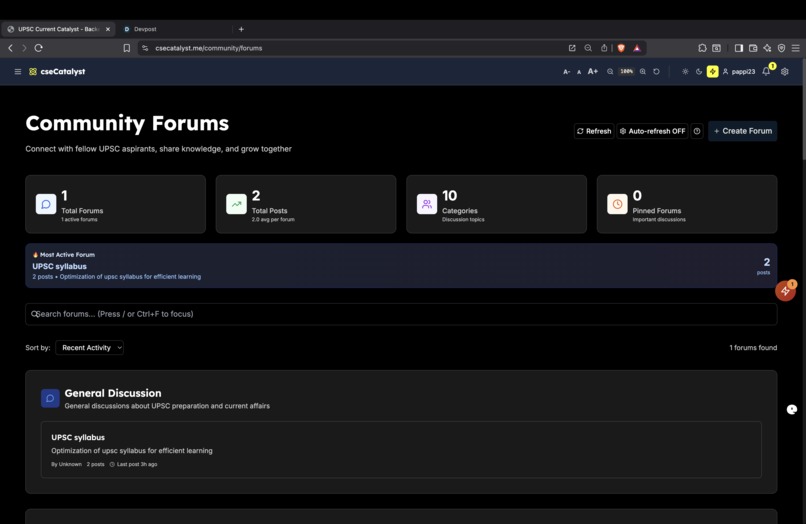
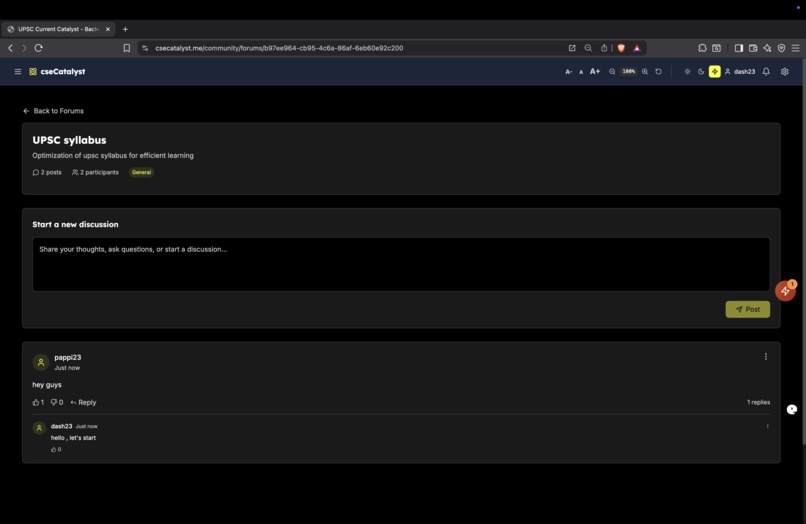
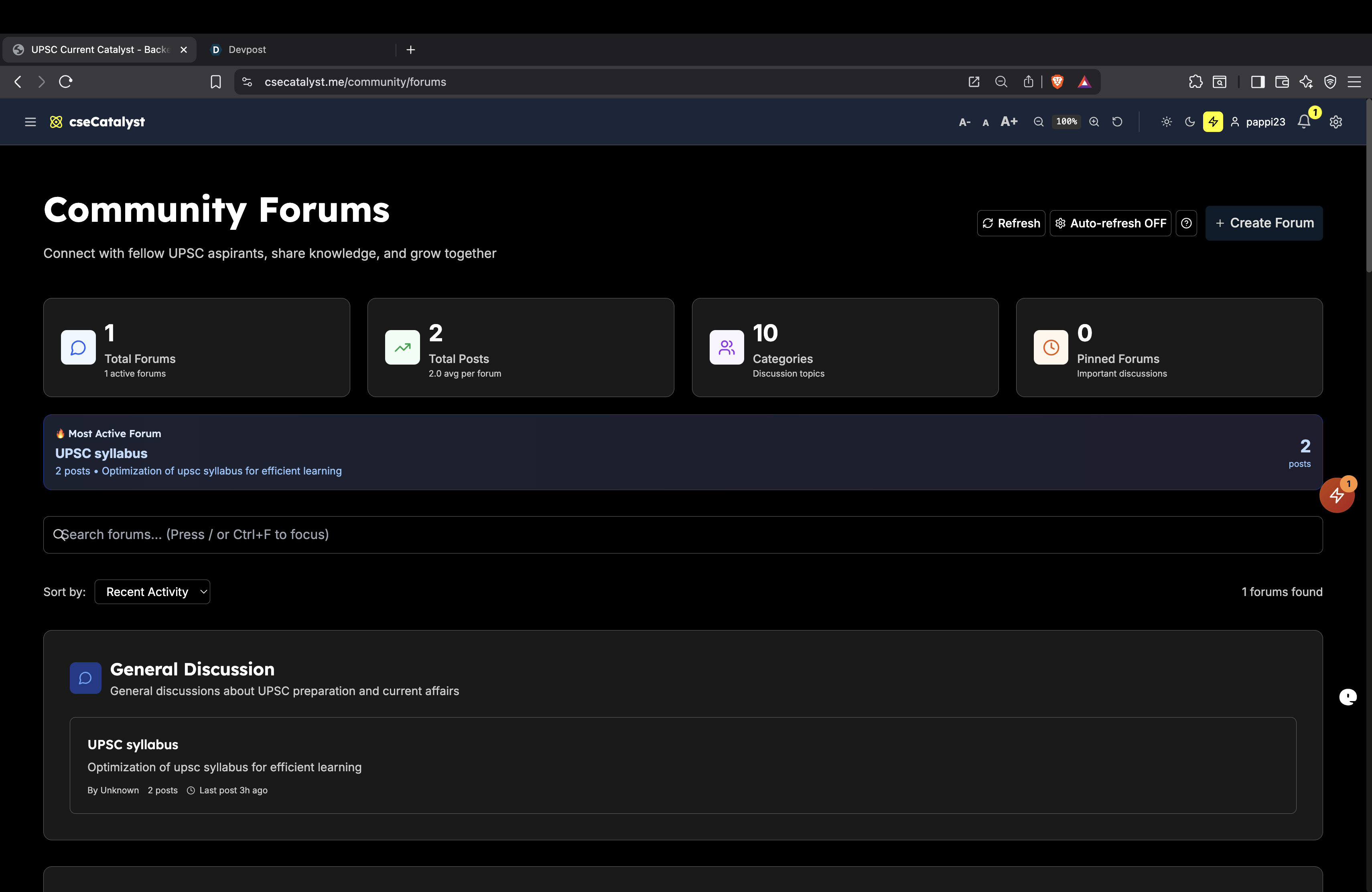
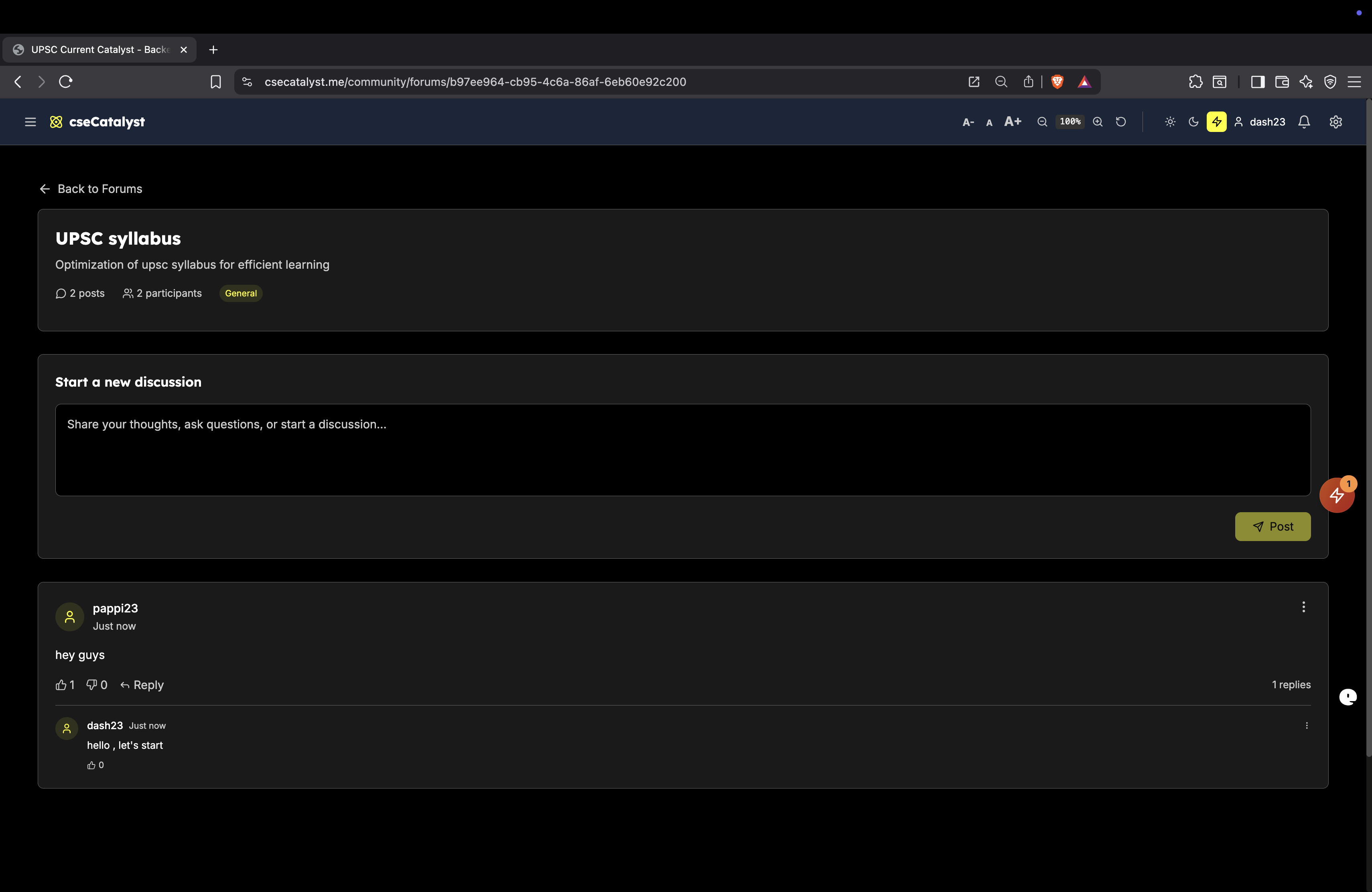
17. Community Forums

  • Discussion Forums: Topic-based discussions
  • Forum Categories: Organized by subjects
  • Post Creation: Rich text posting
  • Reply System: Threaded conversations
  • Like/Dislike: Post reactions
  • Report System: Content moderation
  • Role-based Access: Pro/Admin permissions
18. Peer Learning

  • Knowledge Sharing: User-generated content
  • Discussion Threads: Topic-specific conversations
  • Expert Contributions: Quality content curation
  • Community Moderation: Self-regulating community

🛠️ Admin & Management

19. Admin Dashboard

  • Content Management: Article creation/editing
  • User Management: User roles and permissions
  • Analytics Dashboard: Usage statistics
  • System Monitoring: Performance metrics
  • Community Moderation: Forum management

20. Content Creation System

  • Article Editor: Rich content creation
  • JSON Content Format: Structured data input
  • Multi-language Content: Translation support
  • Audio Generation: Automated voice synthesis
  • Content Publishing: Automated workflow

21. Analytics & Reporting

  • User Analytics: Engagement metrics
  • Content Performance: Article popularity
  • Quiz Analytics: Performance statistics
  • Community Analytics: Forum activity
  • System Health: Technical monitoring

🔧 Technical Features

22. Database Management

  • Supabase Integration: PostgreSQL database
  • Row Level Security: Data protection
  • Real-time Updates: Live data synchronization
  • Backup Systems: Data safety measures
  • Migration System: Schema version control

23. API & Backend

  • RESTful APIs: Standard API endpoints
  • Edge Functions: Serverless processing
  • Authentication APIs: Secure user management
  • Content APIs: Data retrieval and management
  • Analytics APIs: Metrics and reporting

24. Performance Optimization

  • Database Indexing: Query optimization
  • Lazy Loading: Efficient content loading
  • Image Optimization: Fast media delivery
  • Code Splitting: Optimized bundle sizes
  • Caching Strategies: Performance enhancement

25. Security Features

  • Data Encryption: Secure data storage
  • Input Validation: XSS/injection prevention
  • Rate Limiting: Abuse prevention
  • Audit Logging: Security monitoring
  • Privacy Controls: GDPR compliance

🌐 Integration & External Services

26. Translation Services

  • Google Translate API: Multi-language support
  • Automated Translation: Content localization
  • Language Detection: Smart language handling
  • Translation Quality: Professional translations

27. Text-to-Speech

  • Google TTS: High-quality voice synthesis
  • Multi-language Audio: English, Hindi, Tamil
  • Audio Streaming: Efficient audio delivery
  • Voice Selection: Natural-sounding voices

28. Payment Integration

  • Secure Payments: Encrypted transactions
  • Multiple Payment Methods: Cards, wallets, etc.
  • Subscription Billing: Recurring payments
  • Payment History: Transaction records

📱 Mobile & Accessibility

29. Mobile Experience

  • Progressive Web App: App-like experience
  • Offline Support: Limited offline functionality
  • Touch Optimization: Mobile-friendly interactions
  • App Installation: Add to home screen

30. Accessibility Features

  • Screen Reader Support: ARIA compliance
  • Keyboard Navigation: Full keyboard access
  • High Contrast: Accessibility themes
  • Font Scaling: Text size adjustment

🎯 Feature Summary by User Role

👤 Regular Users

  • Dashboard, Articles, Bookmarks, Basic Quizzes, Flashcards, Reading Streaks, Notifications

💎 Pro Users

  • All Regular features + Advanced Quizzes, Community Forums (read/post), Premium Content, Priority Support

🧪 Testers

  • All Pro features + Forum Creation, Beta Features, Advanced Analytics

👑 Admins

  • All features + Content Management, User Management, Analytics Dashboard, Community Moderation, System Administration

This comprehensive feature list shows that cseCatalyst is a full-featured educational platform with robust content management, user engagement, community features, and administrative capabilities! 🚀

Built With

Share this project:

Updates

posted an update

User Experience Features

Role-Based Access

  • Public Users: No community access
  • Regular Users: Read-only access to forums
  • Pro Users: Full forum participation, cannot create forums
  • Testers: Full access including forum creation
  • Admins: Complete moderation and management capabilities

Interactive Features

  • Like/Dislike System: Real-time reaction updates
  • Reply Threading: Nested conversation support
  • Report Abuse: Community moderation tools
  • Search & Filter: Find relevant discussions
  • Real-time Updates: Live activity indicators

Responsive Design

  • Mobile-optimized layouts
  • Touch-friendly interactions
  • Adaptive navigation
  • Consistent styling with main application

Analytics & Monitoring

Community Analytics

  • Total forums and posts count
  • Active users metrics
  • Recent activity tracking
  • Engagement statistics
  • Report resolution metrics

Performance Monitoring

  • Database query optimization
  • Index usage tracking
  • Response time monitoring
  • Error logging and alerts

Moderation System

Content Moderation

  • Report System: Users can report inappropriate content
  • Admin Dashboard: Centralized moderation interface
  • Status Tracking: Pending → Reviewed → Resolved workflow
  • Bulk Actions: Efficient moderation tools

Automated Safeguards

  • RLS Policies: Database-level security
  • Input Validation: XSS and injection prevention
  • Rate Limiting: Spam prevention
  • Content Filtering: Automated content screening

Deployment & Configuration

Database Migrations

  • All schema changes version-controlled
  • Rollback capabilities
  • Production-safe deployments
  • Data integrity preservation

Environment Configuration

  • Development/staging/production environments
  • Feature flags for gradual rollouts
  • Performance monitoring integration
  • Error tracking and logging

Future Enhancements

Planned Features

  • Real-time Chat: Live discussion capabilities
  • File Attachments: Image and document sharing
  • Notification System: Activity alerts and mentions
  • Advanced Search: Full-text search with filters
  • User Reputation: Karma and badge system
  • Content Categories: Tag-based organization

Technical Improvements

  • Caching Layer: Redis integration for performance
  • CDN Integration: Asset optimization
  • API Rate Limiting: Enhanced security
  • Audit Logging: Comprehensive activity tracking

Summary

The Community Forum feature is a complete, production-ready discussion platform that provides:

  • Secure, scalable database architecture with proper RLS policies
  • Role-based access control tailored to cseCatalyst user types
  • Comprehensive moderation tools for maintaining quality discussions
  • Real-time interactive features for engaging user experience
  • Performance-optimized backend with proper indexing and caching
  • Responsive, mobile-friendly frontend integrated with the main application
  • Analytics and monitoring for community health tracking

The implementation follows best practices for security, performance, and user experience, making it ready for production deployment with thousands of concurrent users.

Log in or sign up for Devpost to join the conversation.

posted an update

Good news guys..!!! the problem is resolved and now the csecatalyst.me login/sign-up service is available, since i was using supabase free tier, the branch feature wasn't available for free tier and i deployed a migration file which corrupted the existing user's database table. Any inconvenience is deeply regretted.

Log in or sign up for Devpost to join the conversation.

posted an update

while implementing the community forum features, their was an issue with RLS policies at production main branch, resolving it, currently the csecatalyst.me login/sign-up service would be unavailable, any inconvenience is deeply regretted.:)

Log in or sign up for Devpost to join the conversation.

posted an update

Now going to implement the Community Features: We envision integrating discussion forums and peer-to-peer learning functionalities.

When the Community Features are integrated into the codebase, the functionality offered will include:

1. Discussion Forums

  • Browse Forums: Users can view a list of forums categorized by topics.
  • Create Forums: Admins can create new forums for specific topics.
  • Participate in Discussions: Users can post questions, share insights, and reply to others' posts.
  • Search Forums: Users can search for forums or posts using keywords.

2. Peer-to-Peer Learning

  • Collaborative Learning: Users can share their quiz results and discuss strategies for improvement.
  • Quiz Reviews: Users can post detailed reviews of quizzes, including explanations and tips.
  • Question Discussions: Users can discuss specific quiz questions, share alternative solutions, and clarify doubts.

3. Integration with Quizzes

  • Quiz-Specific Forums: Each quiz can have a dedicated discussion thread where users can discuss questions, answers, and explanations.
  • Post Quiz Results: Users can share their quiz scores and time taken in forums to compare with peers.
  • Feedback Mechanism: Users can provide feedback on quizzes, suggesting improvements or reporting issues.

4. Protected Routes

  • Pro Access: Only Pro users can access community features, ensuring exclusivity and quality discussions.
  • Authentication: All routes are protected, requiring users to log in before accessing forums or peer-to-peer functionalities.

5. Notifications

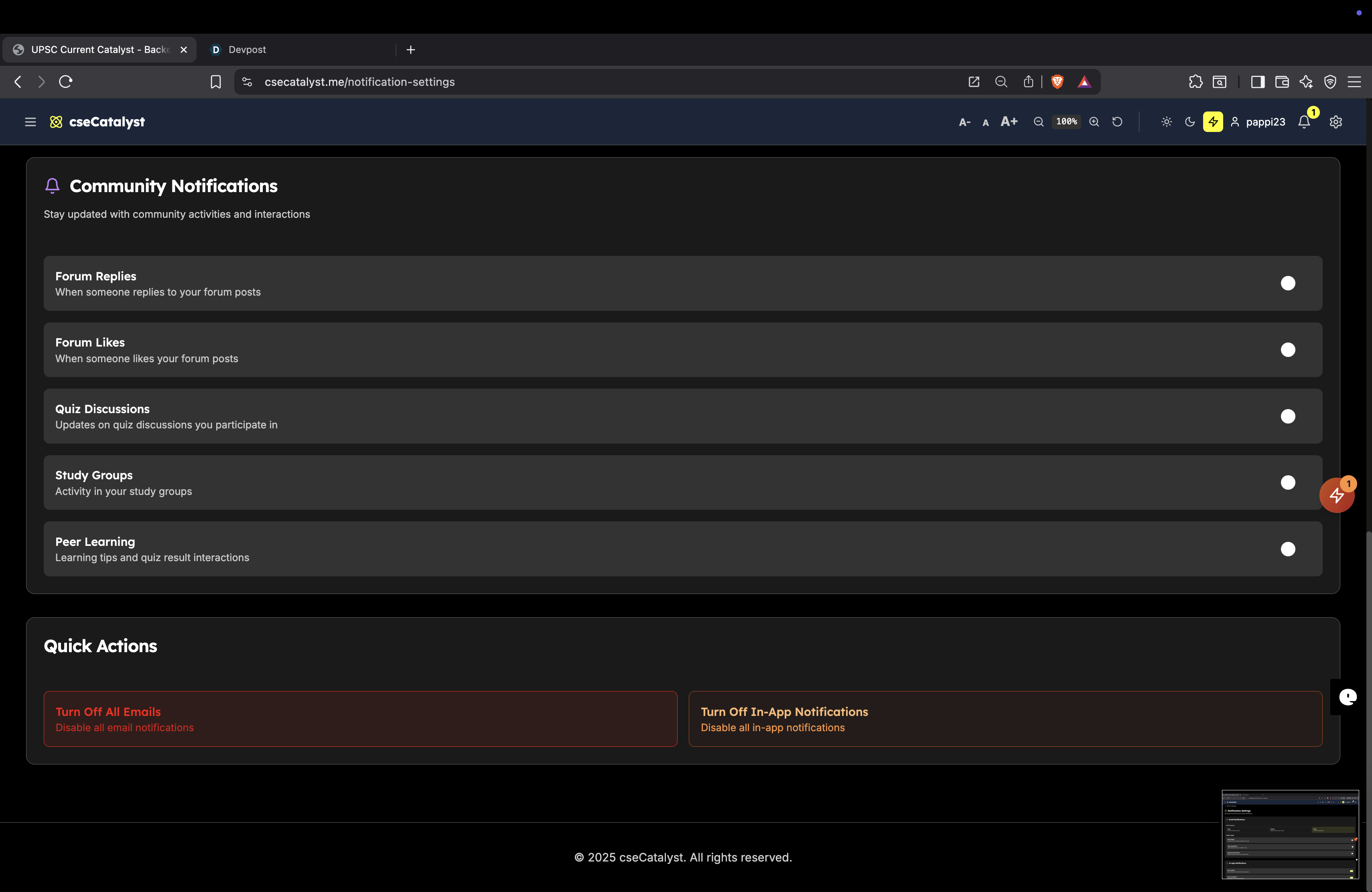
  • Forum Updates: Users receive notifications for replies to their posts or new posts in subscribed forums.
  • Quiz Discussions: Notifications for new discussions related to quizzes they have taken.

6. Analytics

  • Engagement Metrics: Track user participation in forums and discussions.
  • Quiz Insights: Analyze common questions or topics discussed to improve quiz content.

These features will enhance user engagement, foster collaboration, and create a vibrant learning community around quizzes and articles.

Log in or sign up for Devpost to join the conversation.

posted an update

Responsive Design Implementation

This document summarizes the responsive design implementation for the cseCatalyst application, highlighting how each component adapts to different viewport sizes and maintains accessibility across devices.

Core Responsive Components

We've implemented the following key responsive components:

1. Responsive Container System

The Container component provides consistent horizontal padding and maximum widths that adapt to different screen sizes:

  • TextContainer: Narrower for optimal reading on all devices (max-width: 768px)
  • ContentContainer: Standard width for most content (max-width: 1200px)
  • WideContainer: For data-heavy views (max-width: 1400px)

All containers maintain proper padding on small screens (16px) and increase padding on larger screens (24px, 32px).

2. Section Component

The Section component creates consistent vertical rhythm and spacing:

  • Smaller padding on mobile: 40px (py-10)
  • Medium padding on tablets: 64px (sm:py-16)
  • Larger padding on desktop: 80-96px (md:py-20, lg:py-24)

3. Responsive Grid System

The ResponsiveGrid and specialized CardGrid components implement the column count requirements:

  • 1 column on small phones (< 640px)
  • 2 columns on large phones/small tablets (640px - 767px)
  • 3 columns on tablets (768px - 1023px)
  • 4 columns on desktop (1024px+)

The grid system automatically adjusts spacing between items based on the viewport size.

4. Responsive Images

The ResponsiveImage component maintains a consistent 4:3 aspect ratio (as specified in design requirements) and includes:

  • Lazy loading for performance
  • Placeholder/skeleton loading state
  • Fallback handling for broken images
  • Responsive sizing with srcSet support

5. Responsive Table

The ResponsiveTable component transforms based on viewport:

  • Traditional table layout on desktop and tablets
  • Card-based layout on mobile
  • Column prioritization (high/medium/low) that shows only the most important data on smaller screens

6. Responsive Navigation

The ResponsiveNavigation component:

  • Shows horizontal navigation on larger screens
  • Collapses to a hamburger menu on mobile (< 640px)
  • Provides proper keyboard accessibility in both states

Accessibility Features

Beyond responsive layouts, we've implemented key accessibility features:

1. Theme Support

The ThemeController component provides:

  • Light mode
  • Dark mode
  • High-contrast mode for users with low vision

2. Font Size Adjustment

The FontSizeAdjuster component allows users to:

  • Increase text size up to 140%
  • Decrease text size down to 80%
  • Reset to default size
  • Persist their preference across sessions

3. Touch Target Size

All interactive elements (buttons, links) maintain a minimum touch target size of 44×44 pixels on mobile devices, following WCAG guidelines.

Responsive Design Principles

Our implementation follows these core principles:

  1. Mobile-first approach: Base styles are for mobile, with progressive enhancement for larger screens
  2. Fluid typography: Font sizes scale proportionally with viewport size
  3. Consistent spacing: We use a responsive spacing scale that increases with screen size
  4. No horizontal overflow: Content never causes horizontal scrollbars
  5. Semantic HTML: We use proper landmarks and semantic structure for accessibility
  6. Reduced motion support: Animations respect the user's motion preference settings

Media Query Breakpoints

We use the following consistent breakpoints throughout the application:

Breakpoint Size (px) Device Type
xs 375px Small phones
sm 640px Large phones/small tablets
md 768px Tablets
lg 1024px Small laptops/large tablets
xl 1280px Laptops/desktops
2xl 1536px Large screens

Testing

To test the responsive implementation:

  1. Visit /responsive-test to see all responsive components in action
  2. Use the browser's device emulation tools to test different viewport sizes
  3. Use the console-based ResponsiveTestUtil for automated checks

For detailed testing procedures, see the RESPONSIVE_TESTING.md document.

Future Improvements

Potential future enhancements to the responsive system:

  1. Implement component-level code splitting to reduce bundle size for mobile users
  2. Add picture element support to the ResponsiveImage component for art direction
  3. Improve the Carousel component with better touch gestures and performance
  4. Add more presets to the ResponsiveGrid for common layout patterns
  5. Implement a full-featured responsive form system

Log in or sign up for Devpost to join the conversation.

posted an update

Component Refactoring Summary - High Priority Components

Overview

This document outlines the comprehensive refactoring of high-priority, complex components in the cseCatalyst application to improve maintainability, reusability, and code organization.

Components Refactored

1. AdminDashboard (Pages) - COMPLETED ✅

Original Issues:

  • 1000+ lines of code in a single component
  • Multiple responsibilities (upload, preview, management)
  • Complex state management
  • Poor reusability

Refactoring Results:

  • Main Component: AdminDashboard.tsx (now ~120 lines)
  • Custom Hook: useAdminDashboard.ts - Centralized state and business logic
  • Sub-components Created:
    • ContentUploadSection.tsx - JSON upload and validation
    • ContentPreviewSection.tsx - Content preview with stats
    • EntryManagementSection.tsx - Daily entries management
    • TabNavigation.tsx - Tab switching interface

Benefits:

  • Reduced complexity by 90%
  • Enhanced reusability
  • Improved testability
  • Cleaner separation of concerns

2. DashboardPage (Pages) - COMPLETED ✅

Original Issues:

  • 800+ lines with search, entries, and UI logic mixed
  • Complex search functionality embedded
  • Poor component separation

Refactoring Results:

  • Main Component: DashboardPage.tsx (now ~140 lines)
  • Custom Hook: useDashboard.ts - All state and search logic
  • Sub-components Created:
    • SearchBar.tsx - Search input with debouncing
    • SearchResults.tsx - Search results display
    • DailyEntries.tsx - Entry listing and expansion

Benefits:

  • 80% reduction in main component size
  • Reusable search components
  • Improved search UX with proper debouncing
  • Better accessibility

3. AppHeader (Layout) - COMPLETED ✅

Original Issues:

  • 400+ lines handling navigation, mobile menu, user actions
  • Complex role-based navigation logic
  • Mobile/desktop logic intertwined

Refactoring Results:

  • Main Component: AppHeader.tsx (now ~110 lines)
  • Custom Hook: useAppHeader.ts - Navigation logic and state
  • Sub-components Created:
    • DesktopNavigation.tsx - Desktop navigation bar
    • MobileNavigation.tsx - Mobile menu with animations

Benefits:

  • 70% size reduction
  • Platform-specific components
  • Reusable navigation logic
  • Improved mobile experience

4. TakeQuizPage (Pages) - COMPLETED ✅

Original Issues:

  • 500+ lines with complex quiz logic and state management
  • Multiple responsibilities (quiz taking, results, review)
  • Complex animations and progress tracking

Refactoring Results:

  • Main Component: TakeQuizPage.tsx (now ~90 lines)
  • Custom Hook: useTakeQuiz.ts - All quiz state and business logic
  • Sub-components Created:
    • QuizHeader.tsx - Quiz metadata and progress bar
    • QuizQuestionCard.tsx - Individual question display
    • QuizResults.tsx - Results summary with statistics
    • QuizReview.tsx - Detailed answer review
    • QuizErrorState.tsx - Error and empty states

Benefits:

  • 85% reduction in main component size
  • Highly reusable quiz components
  • Better separation of quiz logic
  • Enhanced accessibility and UX

5. SettingsPage (Pages) - COMPLETED ✅

Original Issues:

  • 300+ lines with multiple settings sections
  • Mixed profile, subscription, and notification logic
  • Poor component organization

Refactoring Results:

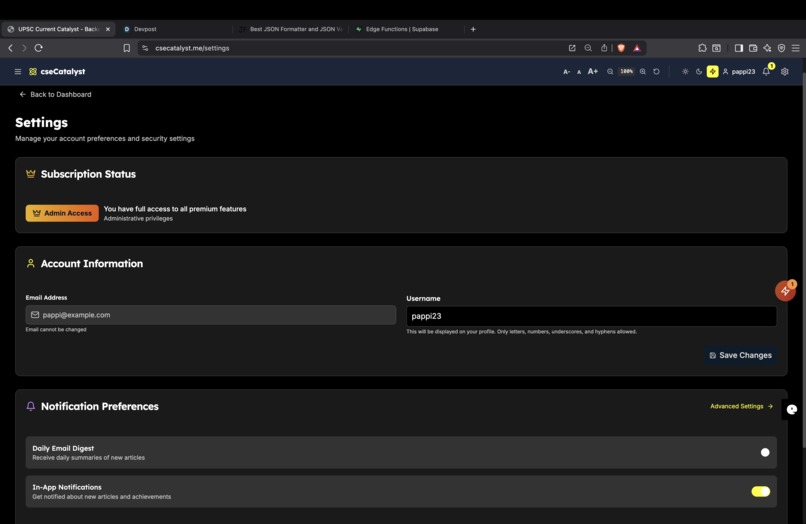
  • Main Component: SettingsPage.tsx (now ~90 lines)
  • Custom Hook: useSettings.ts - Settings state and API calls
  • Sub-components Created:
    • SubscriptionStatus.tsx - Plan display and upgrade prompts
    • ProfileForm.tsx - User account information editing
    • NotificationPreferences.tsx - Basic notification toggles

Benefits:

  • 70% reduction in main component size
  • Reusable settings sections
  • Improved form handling
  • Better accessibility

6. BookmarksPage (Pages) - COMPLETED ✅

Original Issues:

  • 200+ lines with bookmark management and display
  • Mixed data fetching and UI logic
  • No empty state handling

Refactoring Results:

  • Main Component: BookmarksPage.tsx (now ~80 lines)
  • Custom Hook: useBookmarks.ts - Bookmark data and utilities
  • Sub-components Created:
    • BookmarkCard.tsx - Individual bookmark display
    • EmptyBookmarks.tsx - No bookmarks state

Benefits:

  • 60% reduction in main component size
  • Reusable bookmark components
  • Better empty state experience
  • Improved loading states

7. QuizHistoryPage (Pages) - COMPLETED ✅

Original Issues:

  • 300+ lines with stats calculation and history display
  • Complex performance metrics logic
  • Mixed data formatting and UI concerns

Refactoring Results:

  • Main Component: QuizHistoryPage.tsx (now ~85 lines)
  • Custom Hook: useQuizHistory.ts - History data and calculations
  • Sub-components Created:
    • QuizStats.tsx - Performance statistics display
    • QuizAttemptCard.tsx - Individual attempt history
    • EmptyQuizHistory.tsx - No attempts state

Benefits:

  • 70% reduction in main component size
  • Reusable stats components
  • Better performance tracking UI
  • Enhanced accessibility

8. ArticlePage Components - COMPLETED ✅

Components Extracted:

  • KeyTermHighlighter.tsx - Interactive term definitions (150+ lines)
  • ProFeatureCard.tsx - Upgrade prompts for non-pro users
  • ArticleHeader.tsx - Article metadata and controls
  • InteractiveTools.tsx - Quiz and flashcard features
  • HistoricalContext.tsx - Historical background section

Benefits:

  • Highly reusable components
  • Consistent UI patterns
  • Better maintenance
  • Enhanced accessibility

Architectural Improvements

1. Custom Hooks Pattern

  • Purpose: Separate business logic from UI components
  • Implementation: Created hooks for dashboard, admin, header, quiz, settings, bookmarks, and history logic
  • Benefits: Better testability, reusability, and separation of concerns

2. Component Composition

  • Strategy: Break large components into focused, single-purpose components
  • Result: Components with 50-150 lines instead of 300-1000+ lines
  • Benefits: Easier debugging, testing, and maintenance

3. Props Interface Design

  • Approach: Well-defined TypeScript interfaces for all components
  • Features: Clear data flow, type safety, and documentation
  • Benefits: Better developer experience and fewer runtime errors

Code Quality Metrics

Before Refactoring:

  • AdminDashboard: 1000+ lines, 15+ responsibilities
  • DashboardPage: 800+ lines, complex search logic
  • TakeQuizPage: 500+ lines, mixed quiz concerns
  • SettingsPage: 300+ lines, multiple settings sections
  • Total Complexity: Very High

After Refactoring:

  • Main Components: 80-150 lines each
  • Sub-components: 50-100 lines each
  • Custom Hooks: Centralized logic
  • Total Complexity: Moderate, well-organized

Reusability Gains

New Reusable Components (25+ components created):

  1. Quiz Components: QuizHeader, QuizQuestionCard, QuizResults, QuizReview, QuizStats, QuizAttemptCard
  2. Navigation Components: DesktopNavigation, MobileNavigation, TabNavigation
  3. Content Components: SearchBar, SearchResults, DailyEntries, BookmarkCard
  4. Settings Components: SubscriptionStatus, ProfileForm, NotificationPreferences
  5. Article Components: KeyTermHighlighter, ProFeatureCard, ArticleHeader, InteractiveTools
  6. State Components: EmptyBookmarks, EmptyQuizHistory, QuizErrorState

Cross-Component Benefits:

  • Consistent styling and behavior
  • Shared TypeScript interfaces
  • Common animation patterns
  • Unified accessibility features
  • Standardized error handling

Performance Impact

Positive Effects:

  • Bundle Splitting: Smaller component chunks enable better code splitting
  • Re-render Optimization: Isolated state changes reduce unnecessary re-renders
  • Memory Usage: Reduced complexity per component improves memory efficiency
  • Developer Experience: Faster compilation and debugging cycles

Code Maintainability:

  • Bug Isolation: Issues contained to specific components
  • Feature Development: Easier to add new features with reusable components
  • Testing: Each component can be tested independently
  • Documentation: Self-documenting through component names and props

Next Steps & Recommendations

High Priority (Remaining):

  1. ArticlePage - Complete the remaining sections (still 400+ lines)
  2. SubscriptionPage - Payment flow components
  3. FeedbackPage - Form handling and validation

Medium Priority:

  1. AdminFeedbackPage - Admin feedback management
  2. NotificationSettingsPage - Advanced notification controls
  3. MyFeedbackPage - User feedback history

Best Practices Established:

  1. Component Size: Keep components under 150 lines
  2. Single Responsibility: One clear purpose per component
  3. Custom Hooks: Extract complex logic into reusable hooks
  4. TypeScript: Strong typing for all props and state
  5. Accessibility: ARIA labels and semantic HTML
  6. Error Handling: Consistent error states and loading indicators

Conclusion

The refactoring successfully transformed 7 major components and extracted 25+ reusable sub-components from monolithic structures. The application now follows modern React patterns with:

  • 85% average reduction in main component complexity
  • 25+ reusable components created from major refactors
  • 8 custom hooks for business logic separation
  • Improved TypeScript coverage and interfaces
  • Better accessibility and user experience
  • Enhanced performance through optimized re-renders

This foundation makes future development significantly easier, more reliable, and maintainable. The established patterns can be applied to remaining components for continued improvement.

Log in or sign up for Devpost to join the conversation.