-
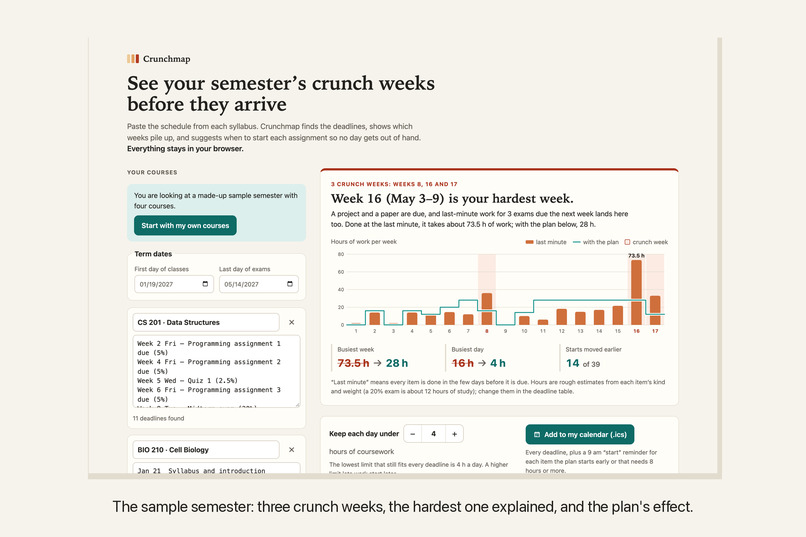
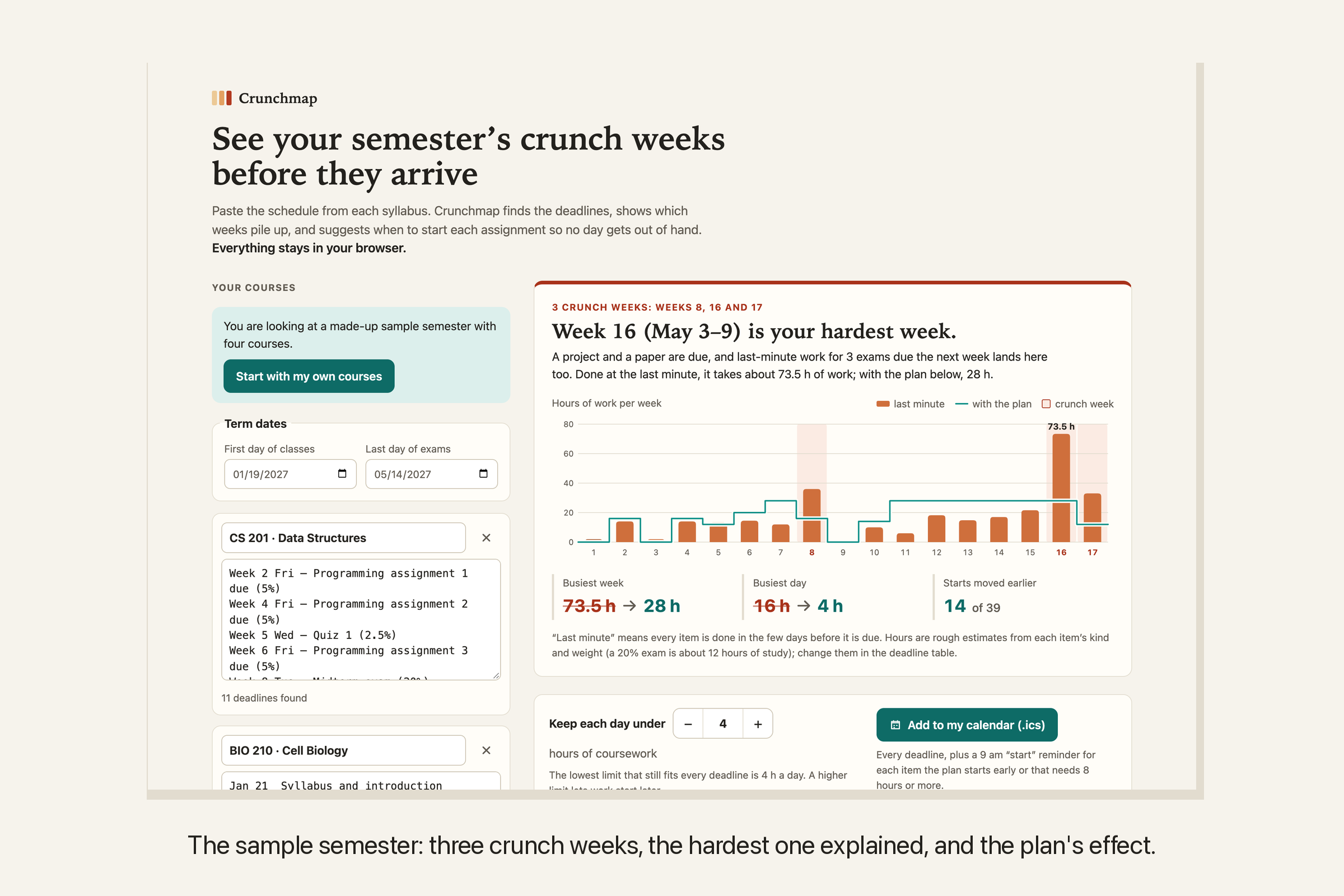
The sample semester: three crunch weeks, the hardest one explained, and what the plan does to the busiest week and day.
-
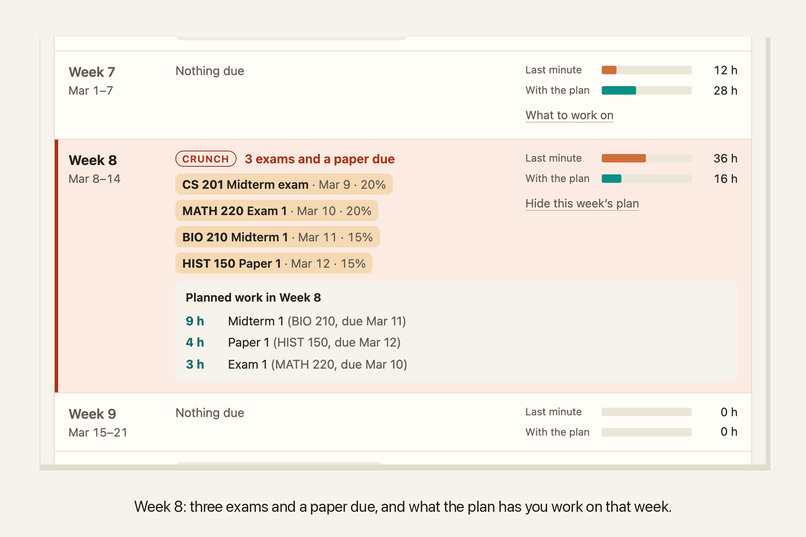
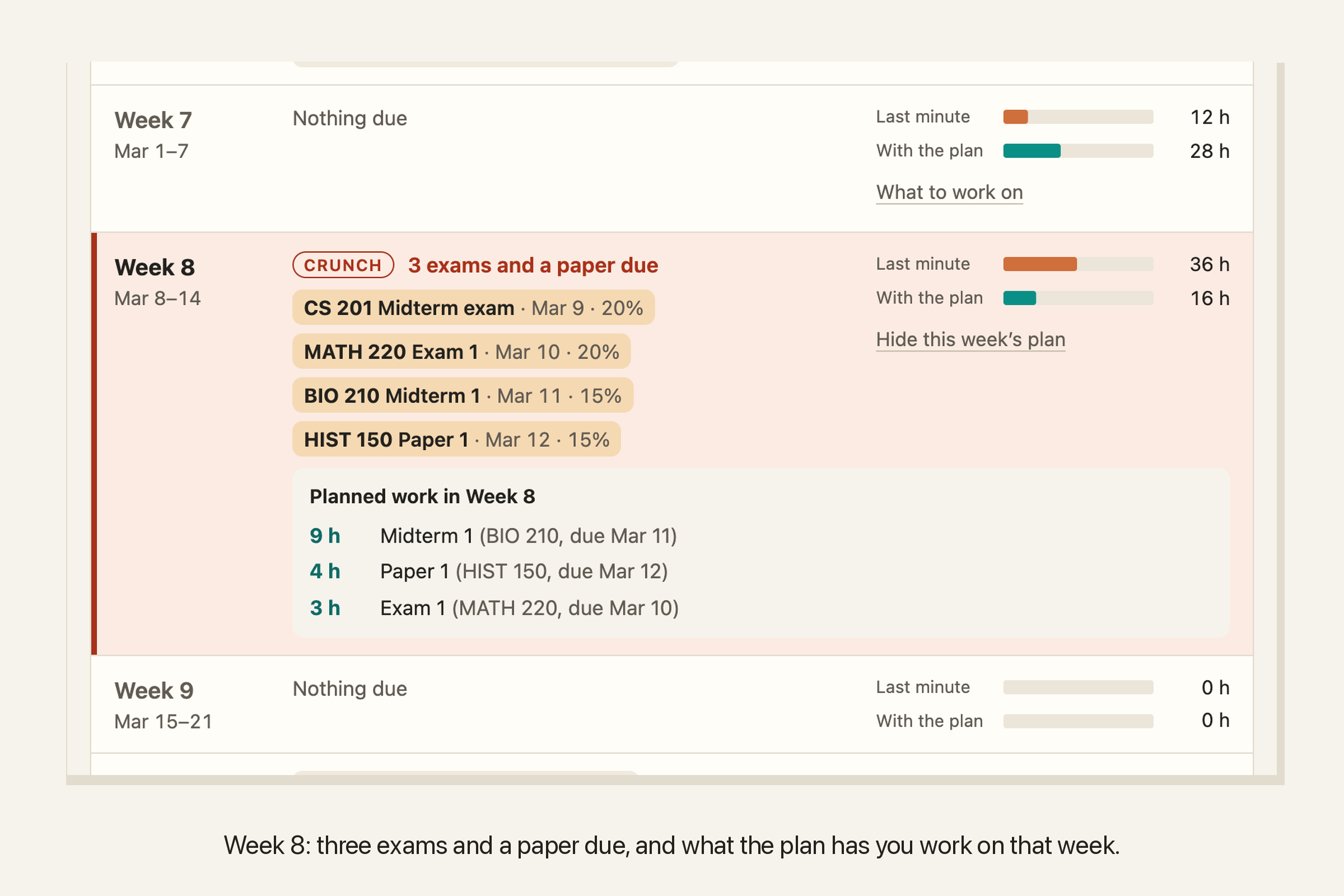
Week 8: three exams and a paper due, and what the plan has you work on that week.
-
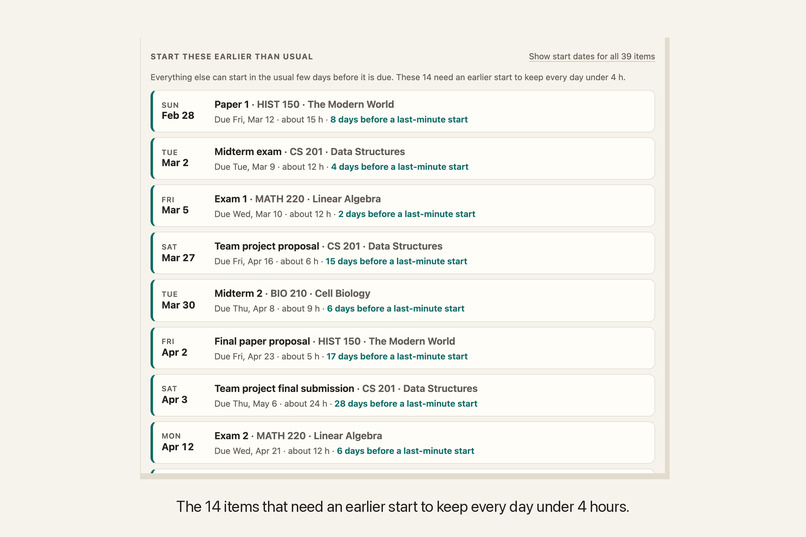
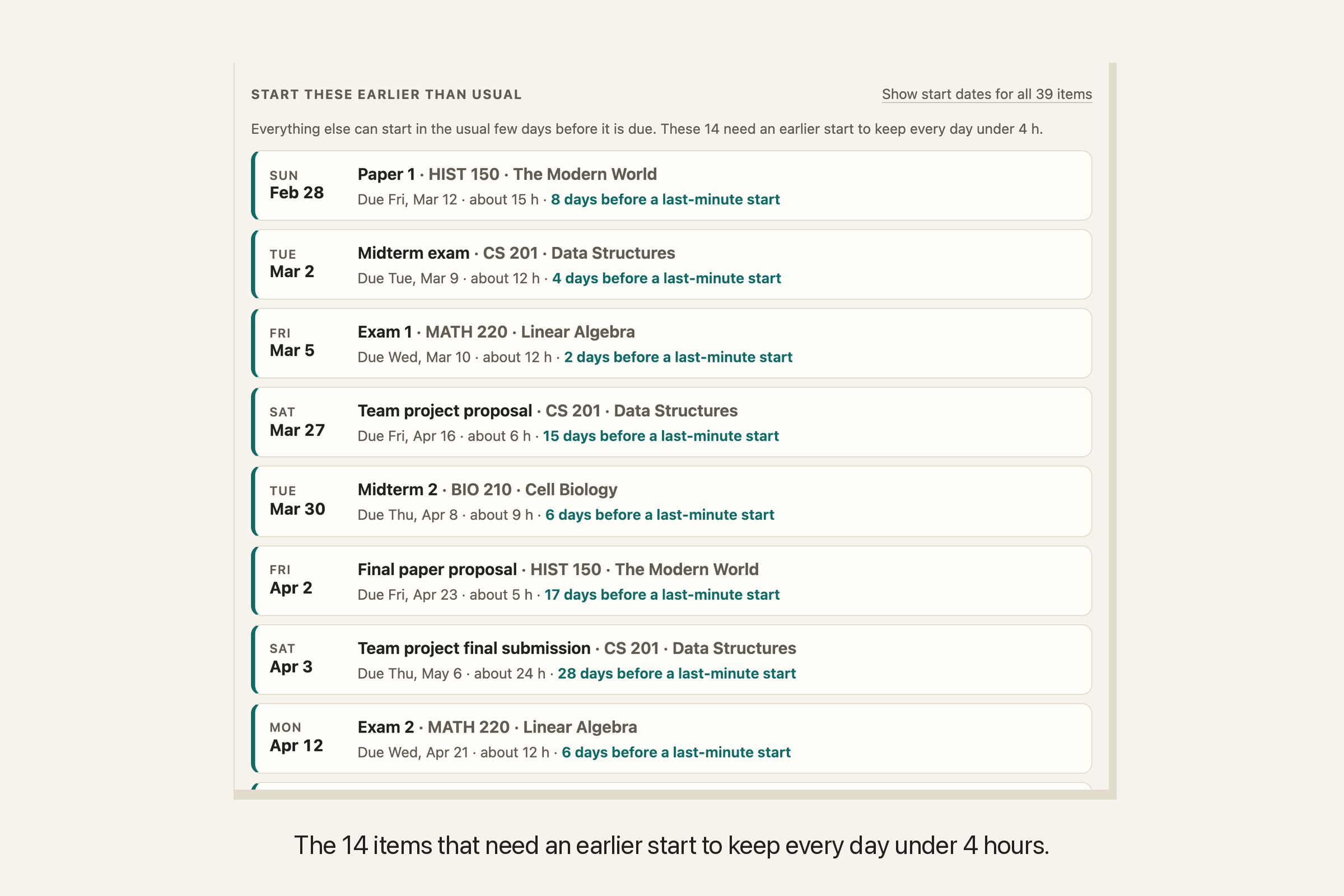
The 14 items that need an earlier start to keep every day under 4 hours.
-
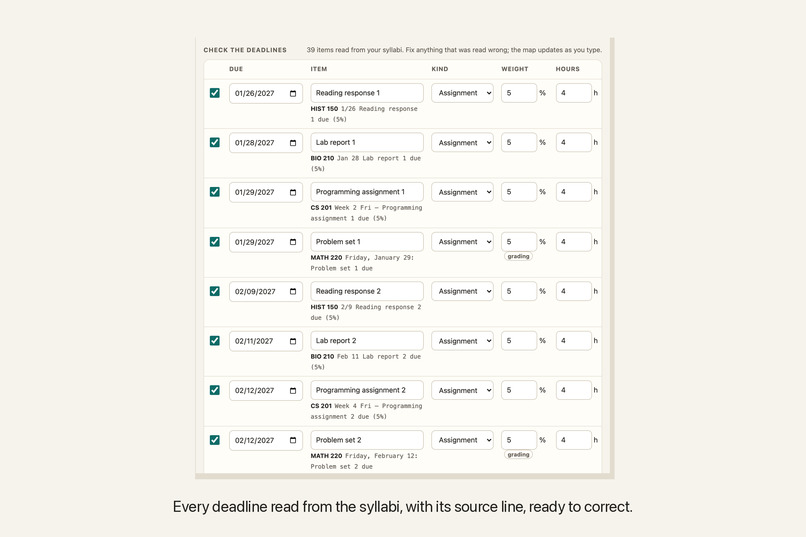
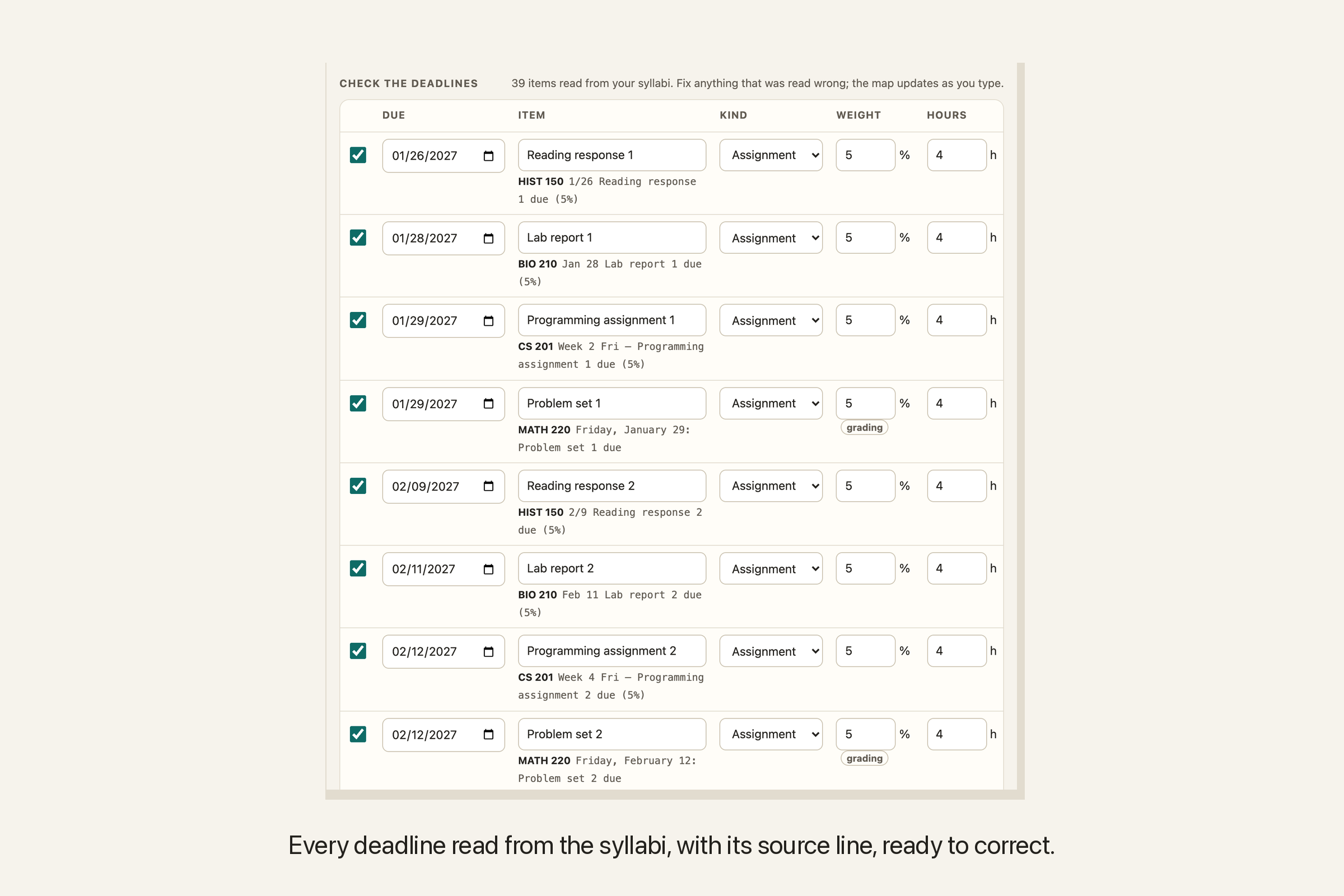
Every deadline read from the syllabi, with the line it came from, ready to correct.
-
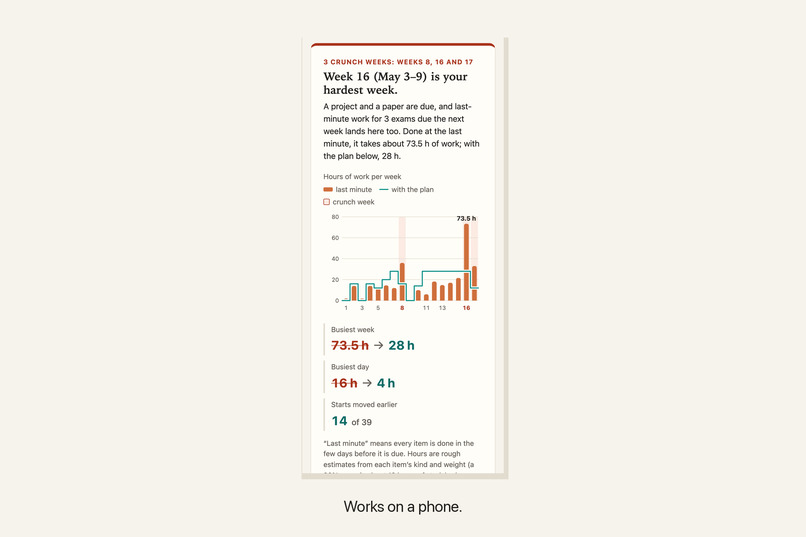
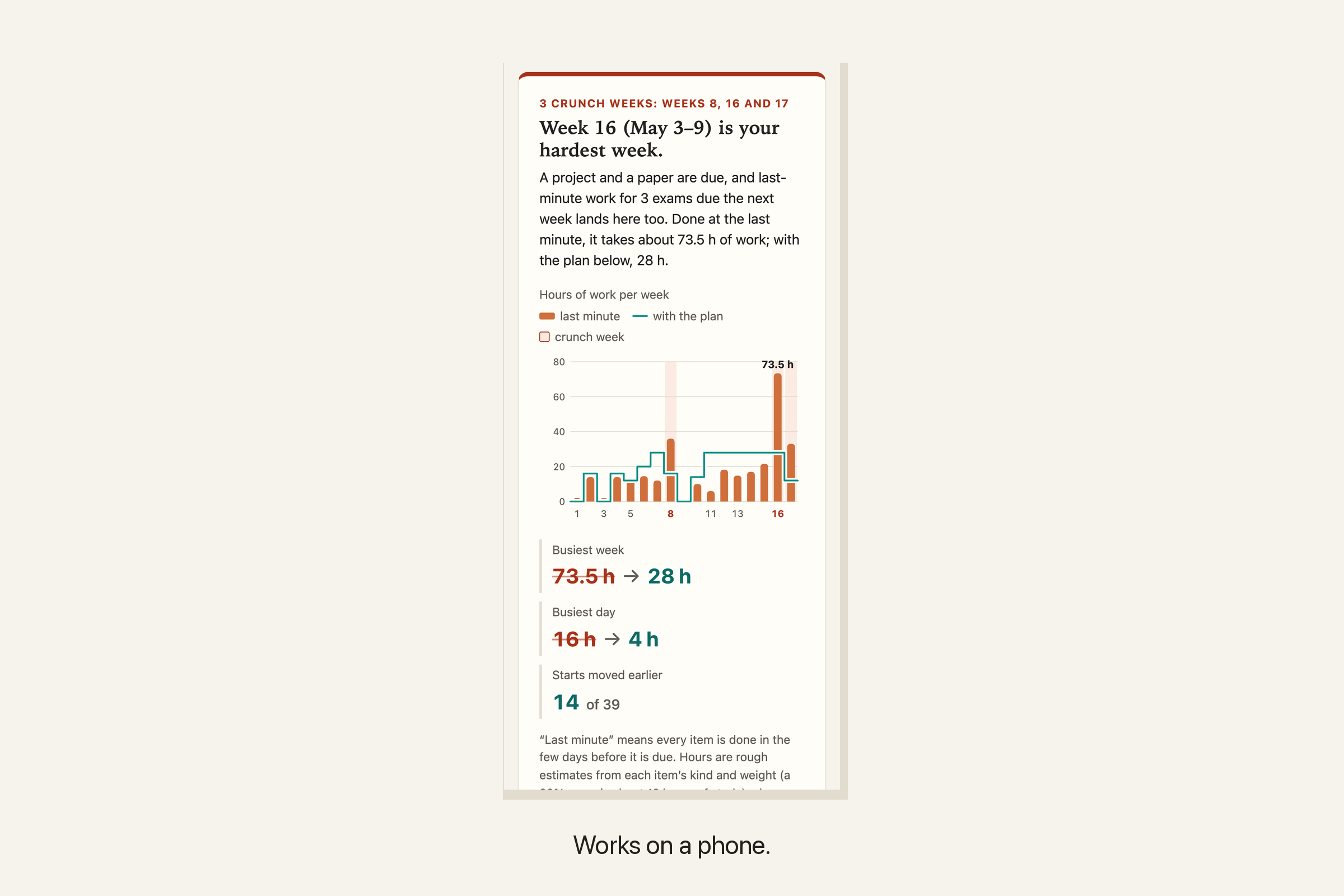
The same map on a phone.
Inspiration
Every syllabus lists its own deadlines, and nobody sees them side by side. Midterms from different courses land in the same week, and so do final projects and papers. A student usually finds out when that week arrives, and by then it is too late to spread the work out.
The spacing matters. In the University of Sydney's assessment data, students did best when their deadlines were about a week apart and worse when deadlines came closer together (Teaching@Sydney, March 2023). A student can't move a deadline, but they can move when the work starts. Crunchmap shows the collisions at the start of the term and plans around them.
Who it helps
Students taking several courses at once: first-years who don't yet know which weeks will pile up, and anyone with a job, a commute or family duties who needs to see heavy weeks coming.
What it does
- Reads the syllabi. Paste the schedule part of each syllabus, or the whole thing. Crunchmap finds every line with a date and graded work, in whatever form the instructor wrote it (
Oct 14,10/14,14 Oct,Week 7 Thu). It works out the kind of work (exam, paper, project, problem set, quiz...) and its weight, taking the weight from the line or from a grading breakdown such asProblem sets 30%, final exam 30%. Everything it found goes into an editable table. - Maps the term. A week-by-week chart shows the hours of work each week would take if every item were done in the few days before it is due, and flags crunch weeks (two major deadlines, or 35 grade points, in one week). The headline names the hardest week and says why, including last-minute studying for the next week's exams that spills into it.
- Plans the starts. For each item, Crunchmap computes the latest start that keeps every day under a daily limit, and lists the items that need to start earlier than usual. Each week shows what to work on. The limit defaults to the lowest one that still fits every deadline, and you can raise it.
- Exports to your calendar. One
.icsfile with every deadline as an all-day event, plus a "start" event with a 9 am reminder for each item the plan starts early or that needs 8 hours or more.
One example, from the built-in sample (four made-up courses, each in a different instructor's style): Crunchmap reads 39 deadlines and finds three crunch weeks, including week 8 with three exams and a paper right before spring break. Done at the last minute, the busiest week takes about 74 hours and the busiest day 16. With the plan, which starts 14 items earlier (the team project on April 3, about a month before it is due), no day goes over 4 hours and no week over 28.
How we built it
A single static page in React, TypeScript and Vite, with no server.
- Parser (
src/extract.ts): one line at a time. It finds dates in the common English formats, prefers the date after "due" when a line has two, counts week numbers from the first week of the term, picks the year that puts a date inside the term, and skips lines that are breaks, lectures or "no class". It also reads a grading breakdown and shares a category's weight over the matching items. - Planner (
src/plan.ts): every item gets an hours estimate from its kind and weight (a 20% exam is about 12 hours of study). It may start a set number of days before it is due (14 for an exam, 35 for a project). The planner schedules backwards from the end of the term, giving each day's hours to the open item whose window closes soonest. That is earliest-deadline-first scheduling in reverse time: it finds a schedule whenever one exists, and every item starts as late as the limit allows. A binary search finds the lowest daily limit that fits everything. - Chart: plain SVG drawn by the app. The weeks are a keyboard-operable group of buttons (arrow keys move between weeks), and choosing one opens that week in the list.
- Privacy: the deployed page carries a Content Security Policy with
connect-src 'none', so the browser blocks any network request from it. Courses are kept only in the browser's local storage, and "Clear everything" removes them.
How we checked it
- 22 unit tests: date formats, years for terms that cross New Year, lines with two dates, fractions that are not dates, item kinds, grading-line weights, the sample semester, a plan that never goes over the limit and never schedules work outside an item's window, and the calendar file (75-octet line folding, escaping, stable UIDs).
- 3 browser tests with Playwright on the production build: the sample flow including the calendar download, keyboard use of the chart, an axe accessibility scan with no violations, no console errors, no network requests, pasting and editing a new course, state kept across a reload, and no horizontal scrolling at phone width.
- The downloaded calendar was parsed again with the Python
icalendarlibrary, an independent implementation: 55 all-day events (39 deadlines and 16 start events with 9 am reminders), no duplicate UIDs.
Challenges we ran into
- Syllabi write dates in many ways, and some lines carry two ("Project assigned Sep 30, due Oct 14") or look like dates without being one ("a 1/2 page summary").
- Many syllabi state weights only in a grading table, not next to each deadline, so the parser had to connect "two exams 20% each" and "final exam 30%" to the right items.
- A plan that starts everything on the first day is useless. Scheduling backwards from the deadlines keeps work as late as possible, so the only items that move are the ones that have to.
What we learned
The hardest week was not the one with the most deadlines. In the sample, week 16 has a project and a paper due (plus a problem set), but last-minute studying for three of the next week's finals lands in it too, which makes it the heaviest week of the term at about 74 hours. Counting deadlines per week would have missed it.
What's next
Reading PDF syllabi directly, more date formats and languages, marking days you can't study (work shifts, trips), and sharing a read-only plan through a link without a server.
Limitations
- The hours are rough estimates, and so is the last-minute comparison; edit the hours if you know better.
- The parser reads English date formats and course vocabulary. A misread line can be fixed in the table, and a missed deadline can be added by typing one more line into the syllabus box.
- It plans coursework only. It doesn't know about your job, your lectures or your weekends.
- Text pasted from PDF tables sometimes merges columns, so check the deadline table after pasting.
Try it
- Live demo: https://hyunsikparker.github.io/crunchmap/ (opens with the sample semester; "Start with my own courses" clears it)
- Video walkthrough (1 min 47 s, captions and transcript): https://hyunsikparker.github.io/crunchmap/demo.html. It is recorded from the live page with the sample semester; the narration is a synthetic voice.
- Source: https://github.com/HyunsikParker/crunchmap (MIT). Run locally with
npm installandnpm run dev; tests withnpm testandnpm run test:e2e.
Credits and disclosure
- All of Crunchmap was built during LaunchPad Hacks 2026 (on October 22, 2026). No pre-existing project code.
- AI assistance: built with Claude (Anthropic), an AI coding assistant, which wrote the code, the tests and this text.
- Libraries: React, Vite, TypeScript; Vitest, Testing Library, Playwright and axe-core for tests; the Python icalendar library for the calendar check.
- The sample courses, dates and weights are made up. The research finding above is from the linked Teaching@Sydney article.
Built With
- axe-core
- github
- playwright
- react
- typescript
- vite
- vitest

Log in or sign up for Devpost to join the conversation.