Inspiration
I still remember the first time I used Slack. There were so many channels and conversations happening at once that it felt overwhelming. To understand a discussion, I had to scroll through long message histories and nested threads. I often found myself wondering,
"What actually matters to me?"
That's when the idea for Crosstalk was born—a personalized Slack agent that tells you exactly what you need to know without making you read everything.
What it does
Crosstalk is a personalized Slack digest agent that continuously ingests conversations from every channel in a workspace and organizes them into a knowledge graph built around people, topics, mentions, and threads.
Simply type /digest to receive a personalized digest containing:
- 📌 Today's Highlights
- 📢 Channel Updates
- ✅ Action Items
- 👋 Unresolved Mentions
- 🕸️ View Graph
Unlike traditional summarization bots, Crosstalk doesn't generate the same summary for everyone. Every digest is personalized based on the user's conversations, mentions, and cross-channel context, ensuring each person receives only the information that's relevant to them.
How we built it
We built Crosstalk as a real-time Slack agent using Slack Bolt and Socket Mode.
Every incoming message is processed by Claude to extract reusable topics and stored in a Neo4j knowledge graph.
Instead of querying raw Slack history, an MCP (Model Context Protocol) server retrieves user-specific context such as:
- Cross-channel discussions
- Unresolved mentions
- Relevant conversations
A second Claude call uses this grounded context to generate a personalized Slack digest.
Users can also inspect the reasoning through an interactive graph visualization built with Flask and vis-network.
Architecture
Unlike traditional Slack summarizers that generate one summary for everyone, Crosstalk continuously builds a knowledge graph and retrieves personalized context before generating each user's digest.
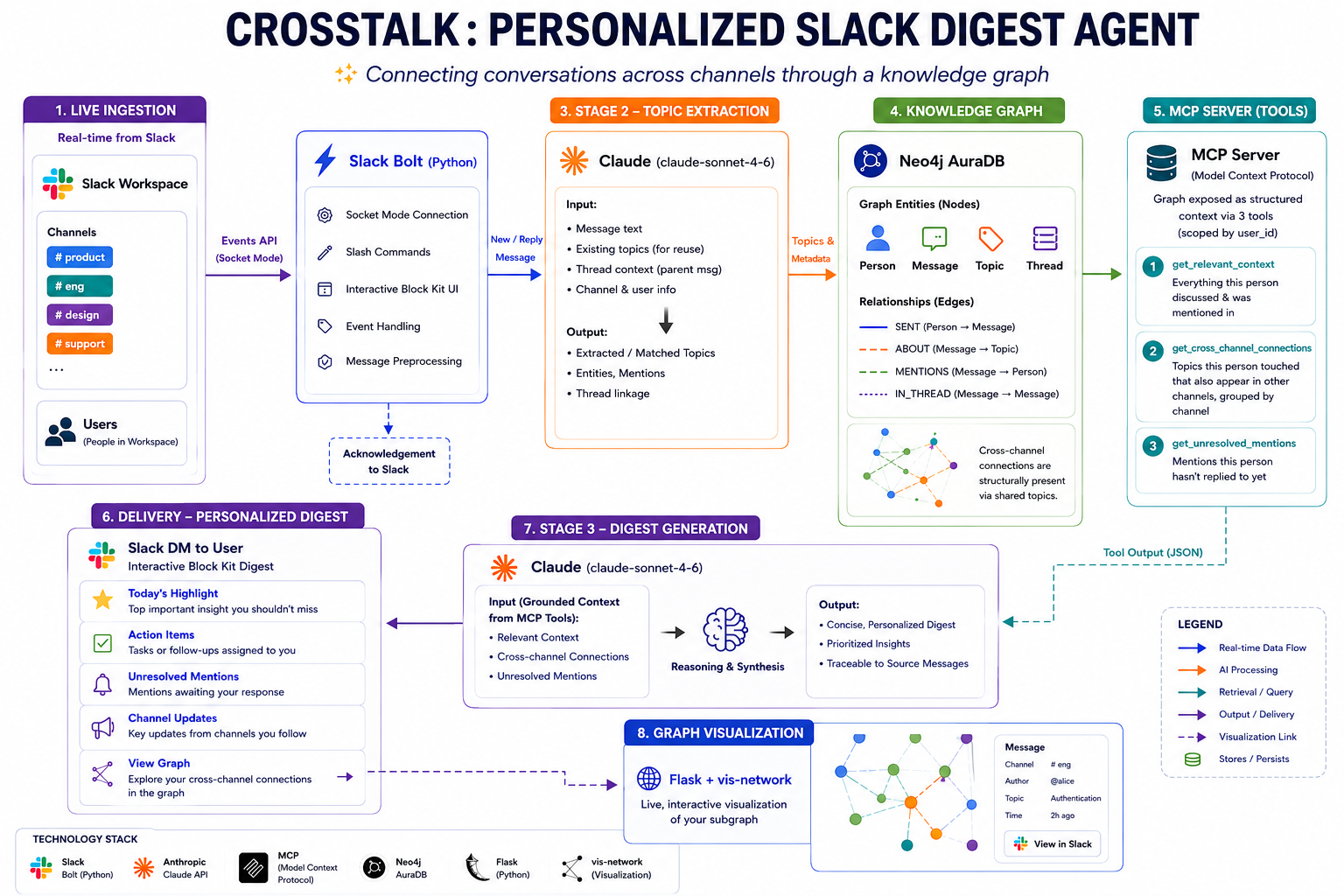
Architecture & Pipeline
1. Live Ingestion
Every message posted in a Slack channel is ingested in real time using the Slack Events API with Socket Mode.
Instead of waiting until digest generation, conversations are continuously processed and added to the knowledge graph.
2. Stage 1 – Topic Extraction (Claude)
Each incoming message is passed to Claude for topic extraction.
Before extracting topics, Claude is provided with the list of existing topics already stored in the graph. This encourages topic reuse instead of creating near-duplicate topics such as:
JWT
Login Issue
User Authentication
which are intelligently grouped into a single reusable topic.
For thread replies, the parent message is also provided so short replies like:
"Yeah, that fixed it."
can still be assigned to the correct topic.
3. Building the Knowledge Graph
The extracted information is stored inside Neo4j.
The graph consists of:
- 👤 Person
- 💬 Message
- 🏷️ Topic
- 🧵 Thread
Cross-channel relationships already exist structurally inside the graph.
For example:
#frontend Message
          │
          ▼
     Dashboard Bug
          ▲
          │
#backend Message
Two conversations from different channels become naturally connected because they reference the same topic.
4. MCP Retrieval Layer
An MCP (Model Context Protocol) server sits on top of the knowledge graph and exposes three user-scoped retrieval tools.
get_relevant_context
Retrieves conversations, topics, and mentions relevant to the requesting user.
get_cross_channel_connections
Finds topics the user participated in that also appear across other Slack channels, grouped by channel to avoid unnecessary noise.
get_unresolved_mentions
Returns mentions that the user has not yet responded to.
These are personalized graph queries, not generic workspace-wide searches filtered afterward.
5. Stage 2 – Personalized Digest Generation
The outputs returned by the MCP tools become grounded context for a second Claude call.
Claude then generates the final personalized digest containing:
- 📌 Today's Highlights
- 📢 Channel Updates
- ✅ Action Items
- 👋 Unresolved Mentions
- 🕸️ Cross-Channel Connections
The digest prioritizes cross-channel insights because they are the hardest for users to discover manually.
6. Delivery
The final digest is delivered as an interactive Slack Block Kit message.
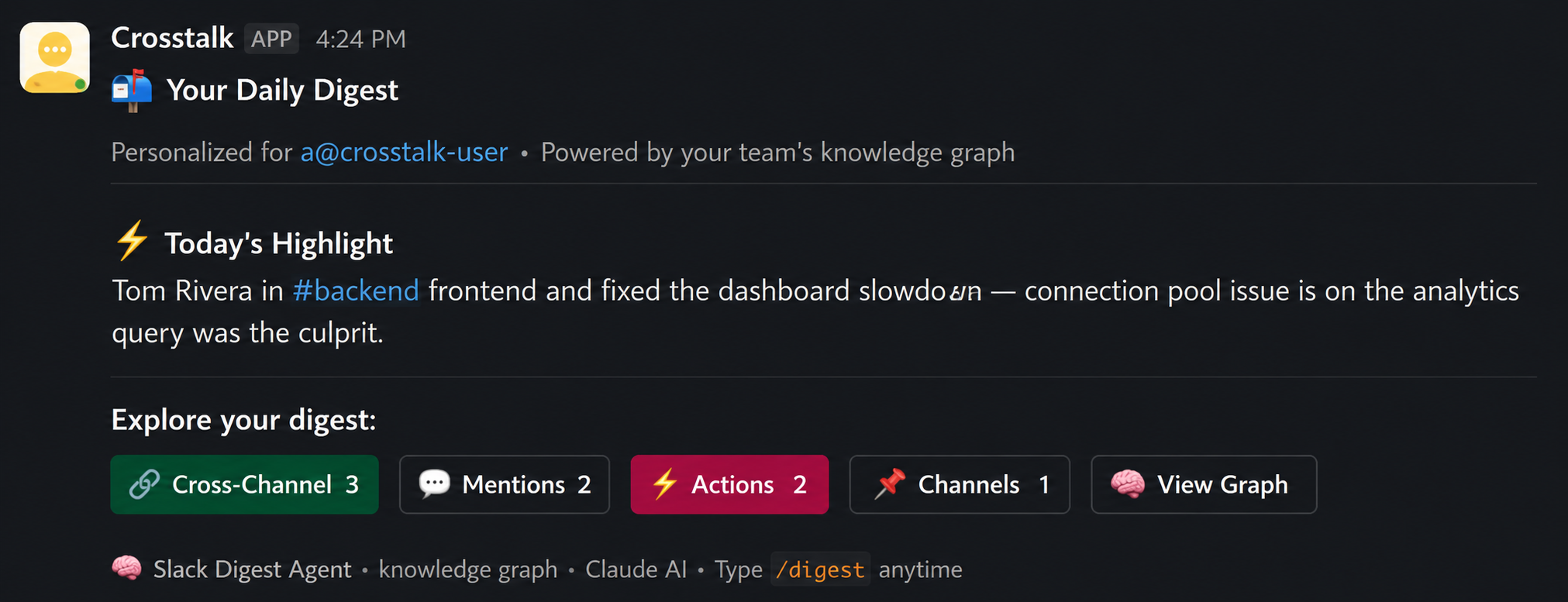
Users can click View Graph to open a live visualization of their own knowledge subgraph, making every AI-generated recommendation transparent and explainable.
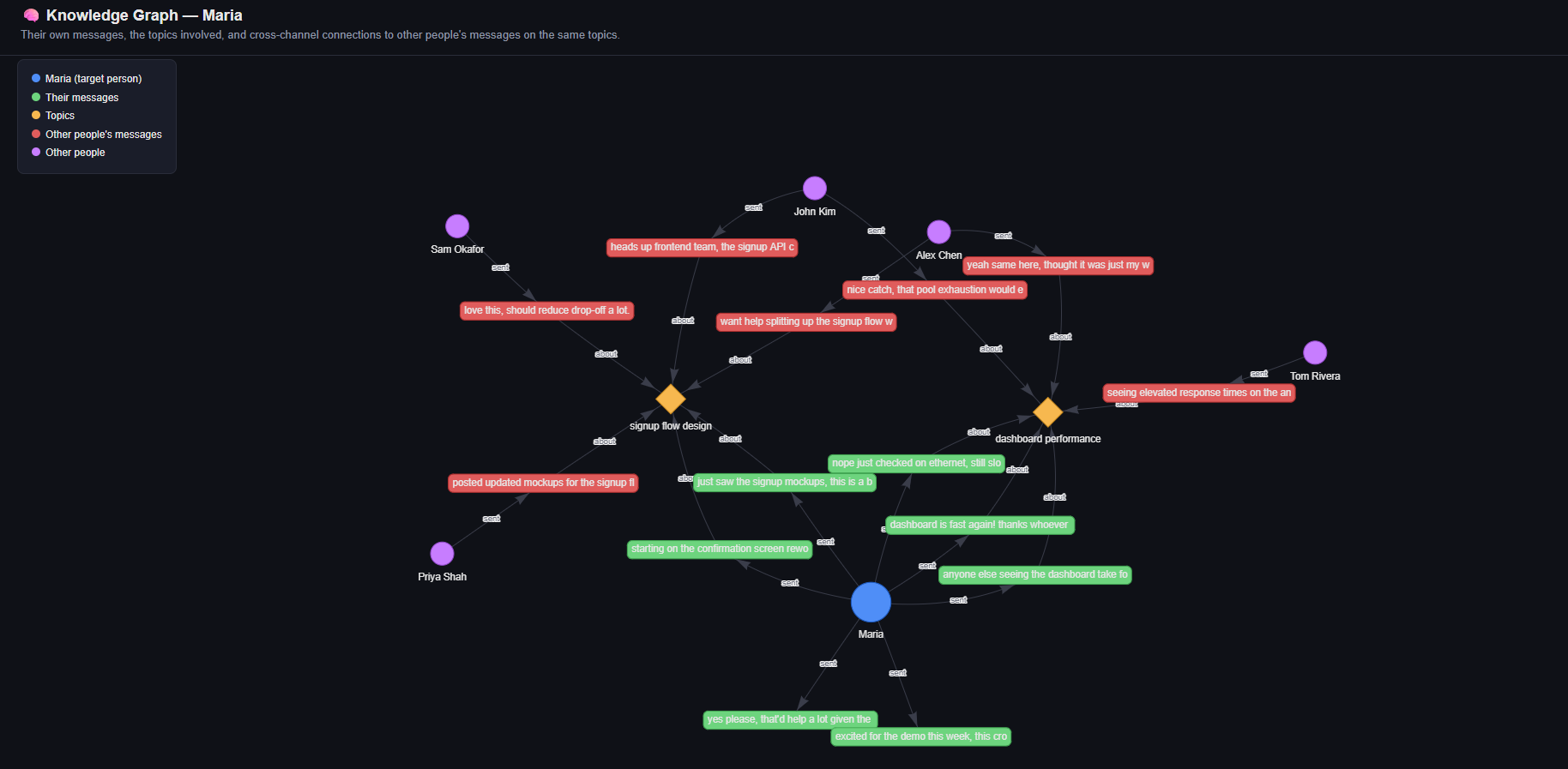
Why MCP Matters
MCP is not just an integration layer—it is the reasoning surface of Crosstalk.
Claude never queries the Neo4j graph directly.
Instead, it only receives structured information returned by the three user-scoped MCP tools.
This approach:
- Keeps every digest grounded in actual Slack conversations.
- Reduces hallucinations by avoiding unrestricted graph access.
- Personalizes retrieval before summarization.
- Makes the retrieval layer reusable for future Slack bots, dashboards, or other clients without rewriting graph logic.
Challenges faced
Preventing duplicate topics
Claude initially created multiple similar topics, so we reused existing topics during extraction to keep the knowledge graph clean.Understanding thread context
Short replies lacked meaning, so we included the parent message to correctly identify the topic.Cross-channel discovery
Connecting related discussions across different Slack channels was challenging, which we solved using a Neo4j knowledge graph.Reducing hallucinations
Instead of letting the LLM access raw data, we grounded responses through an MCP server with structured retrieval tools.Personalized retrieval
Each digest needed to be user-specific, so all graph queries were scoped using the user's Slack ID.Explainable AI
We added an interactive graph visualization so users can see how insights and cross-channel connections were derived.
Accomplishments that we're proud of
Built a real-time Slack agent that transforms conversations into a searchable knowledge graph.
Designed a personalized digest system that surfaces:
- Today's Highlights
- Action Items
- Channel Updates
- Unresolved Mentions
- Cross-Channel Connections by Graph
Implemented an MCP-based retrieval layer to provide grounded, user-specific context and reduce LLM hallucinations.
Enabled cross-channel knowledge discovery by connecting conversations through shared topics instead of simple keyword matching.
Created an interactive graph visualization that makes every AI-generated insight transparent and explainable.
Delivered a complete end-to-end AI solution integrating Slack, Claude, Neo4j, MCP, Flask, and visualization into a working prototype within the hackathon timeframe.
What we learned
Learned how to build a real-time event-driven application using Slack Bolt and Socket Mode.
Gained hands-on experience with knowledge graphs (Neo4j) for organizing and connecting unstructured conversations.
Learned to use MCP (Model Context Protocol) to build grounded, reusable AI retrieval workflows.
Improved our understanding of LLM prompt engineering, especially for topic extraction and structured summarization.
Learned the importance of designing scalable AI systems, where retrieval quality is as important as the language model itself.
Strengthened our skills in integrating Slack, Claude, Neo4j, MCP, Flask, and visualization into a complete end-to-end solution under hackathon constraints.
What's next for Crosstalk: Personalized Slack Digest Agent
Multi-workspace support
Enable organizations to manage digests across multiple Slack workspaces with tenant isolation.Advanced analytics
Provide team-level dashboards showing collaboration patterns, trending topics, and knowledge gaps.Enterprise deployment
Add role-based access control, SSO, audit logs, and compliance features to make Crosstalk production-ready for large organizations.
These future enhancements build on the existing architecture while expanding Crosstalk from a personalized Slack digest agent into a comprehensive organizational knowledge assistant.


Log in or sign up for Devpost to join the conversation.