Inspiration
Phishing attacks are the #1 entry point for cybercrime, yet most tools just flash a red warning without explaining anything. As CSE students studying cybersecurity, we have seen how even educated people fall for well-crafted phishing attempts because they do not understand the warning signs. We wanted to build something that does not just detect threats but teaches users to recognize them. Because awareness is the real defense.
What it does
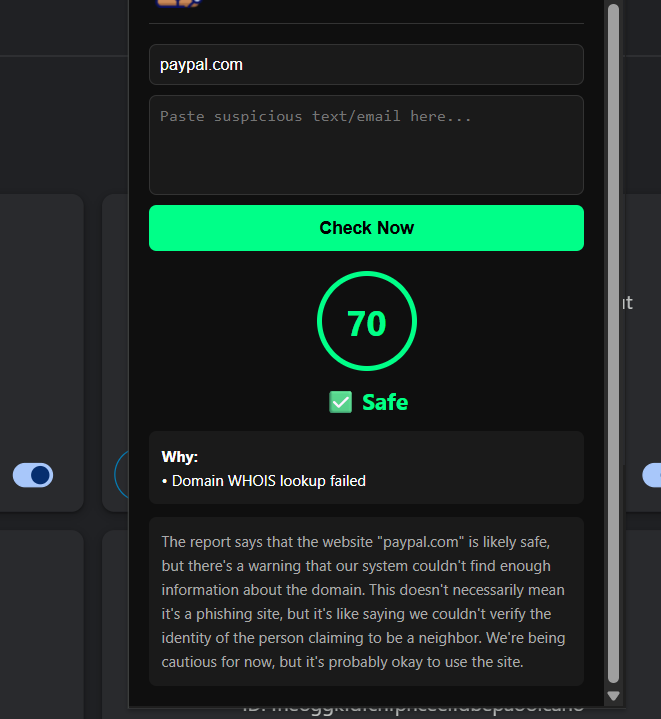
CrossCheck is a Chrome extension that analyzes URLs, emails, and suspicious text in real-time and tells you exactly why something is dangerous — not just that it is.
It detects:
- Domain age via WHOIS — new domains are suspicious
- 70+ security engines via VirusTotal API
- Typosquatting — catches paypa1.com vs paypal.com
- HTTP vs HTTPS — flags unencrypted sites
- Urgency and manipulation language patterns
- AI powered plain English explanation via Groq LLM
Works on any URL, email body, or any text you select on any webpage via right click.
How we built it
Backend: Python FastAPI handling all detection logic
- python-whois for domain age verification
- VirusTotal API for multi engine URL scanning
- difflib SequenceMatcher for typosquat detection
- Groq LLM llama-3.1-8b-instant for plain English explanations
- Custom scoring algorithm 0 to 100 trust score
Frontend: Chrome Extension Manifest V3
- Vanilla JavaScript popup with real time backend calls
- Content script for page text extraction
- Background service worker for right click context menu
Challenges
- Chrome Manifest V3 service worker limitations
- WHOIS rate limiting on major domains
- Making AI explanations simple enough for non technical users
- Building a scoring system strict enough to catch threats but not flag legitimate sites
- Integrating 5 independent detection layers into one score
Accomplishments
- Built a fully working Chrome extension in under 3 days
- Integrated 5 independent detection layers into one score
- AI explanations that non technical users actually understand
- Successfully detects typosquatting, urgency manipulation, and newly registered malicious domains
- Real working product not just a prototype
What we learned
- Chrome Extension Manifest V3 architecture
- VirusTotal and WHOIS API integration
- Building explainable AI security tools
- FastAPI backend development
- Real world phishing attack patterns and techniques
What's next
- Gmail deep integration for automatic email scanning
- WhatsApp Web and Telegram Web message analysis
- Machine learning model trained on PhishTank dataset
- Firefox extension support
- Mobile browser support
Built With
- chrome
- fastapi
- groq-ai
- javascript
- manifest
- python
- python-whois
- virustotal-api

Log in or sign up for Devpost to join the conversation.