-
-
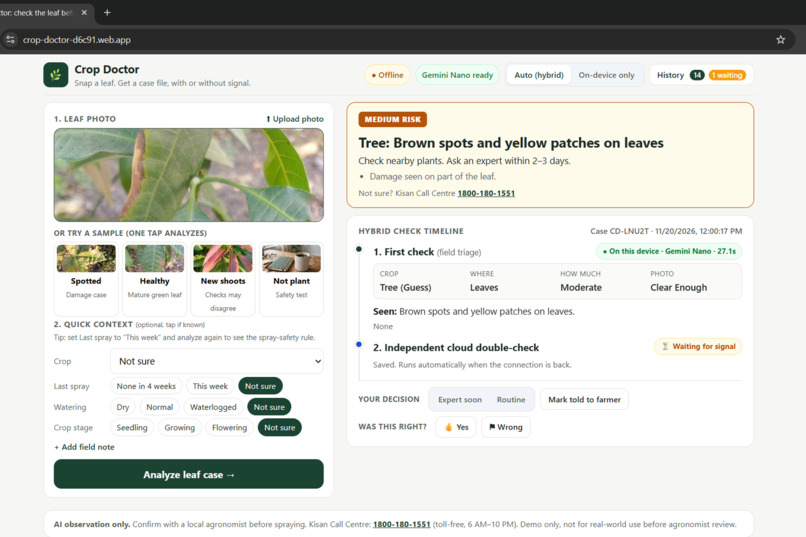
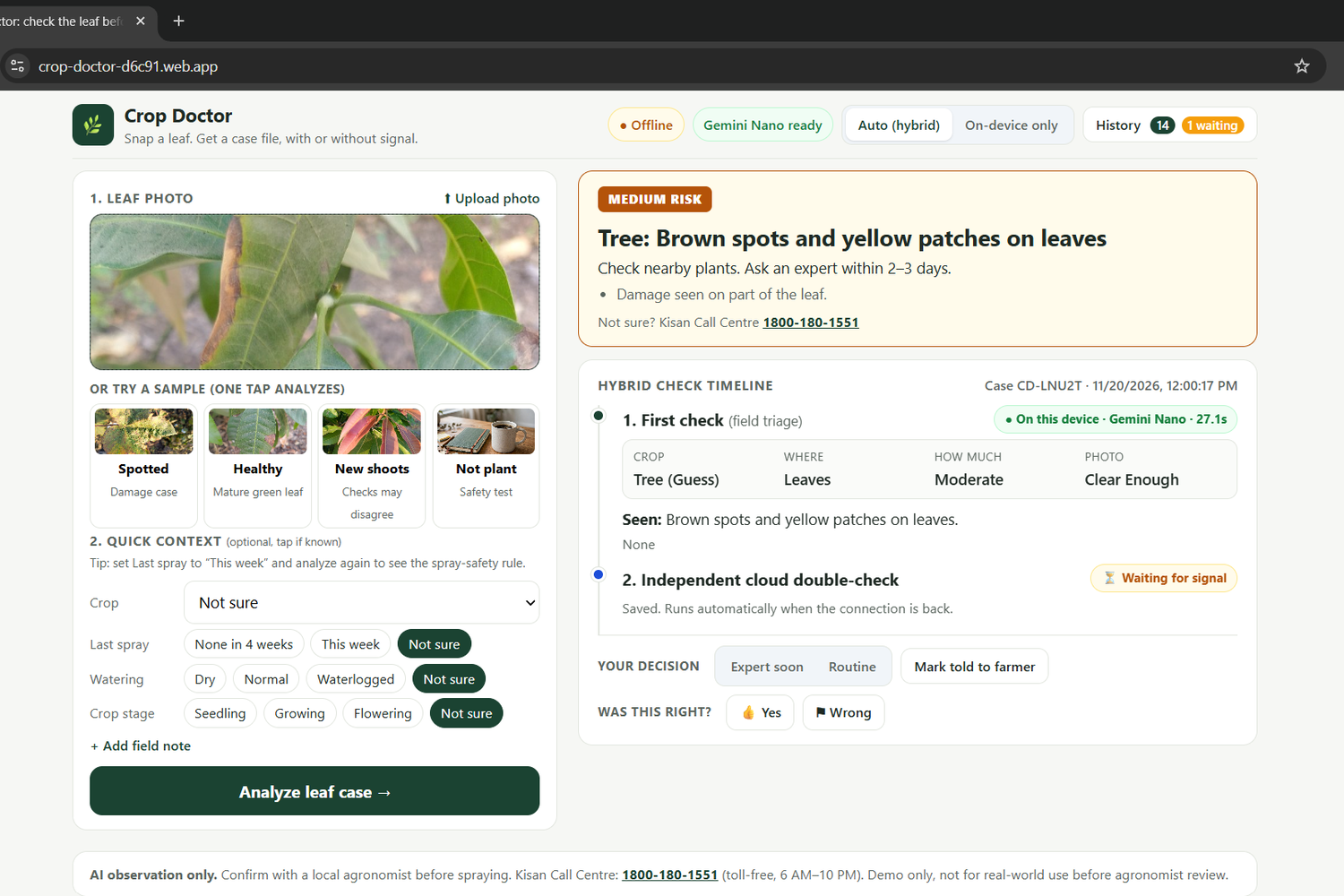
Offline: Gemini Nano checks the leaf on the device. The cloud check waits for signal.
-
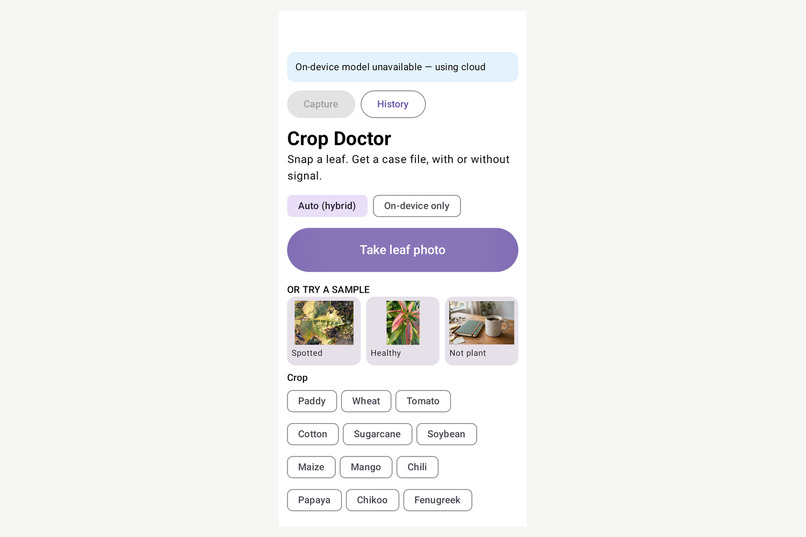
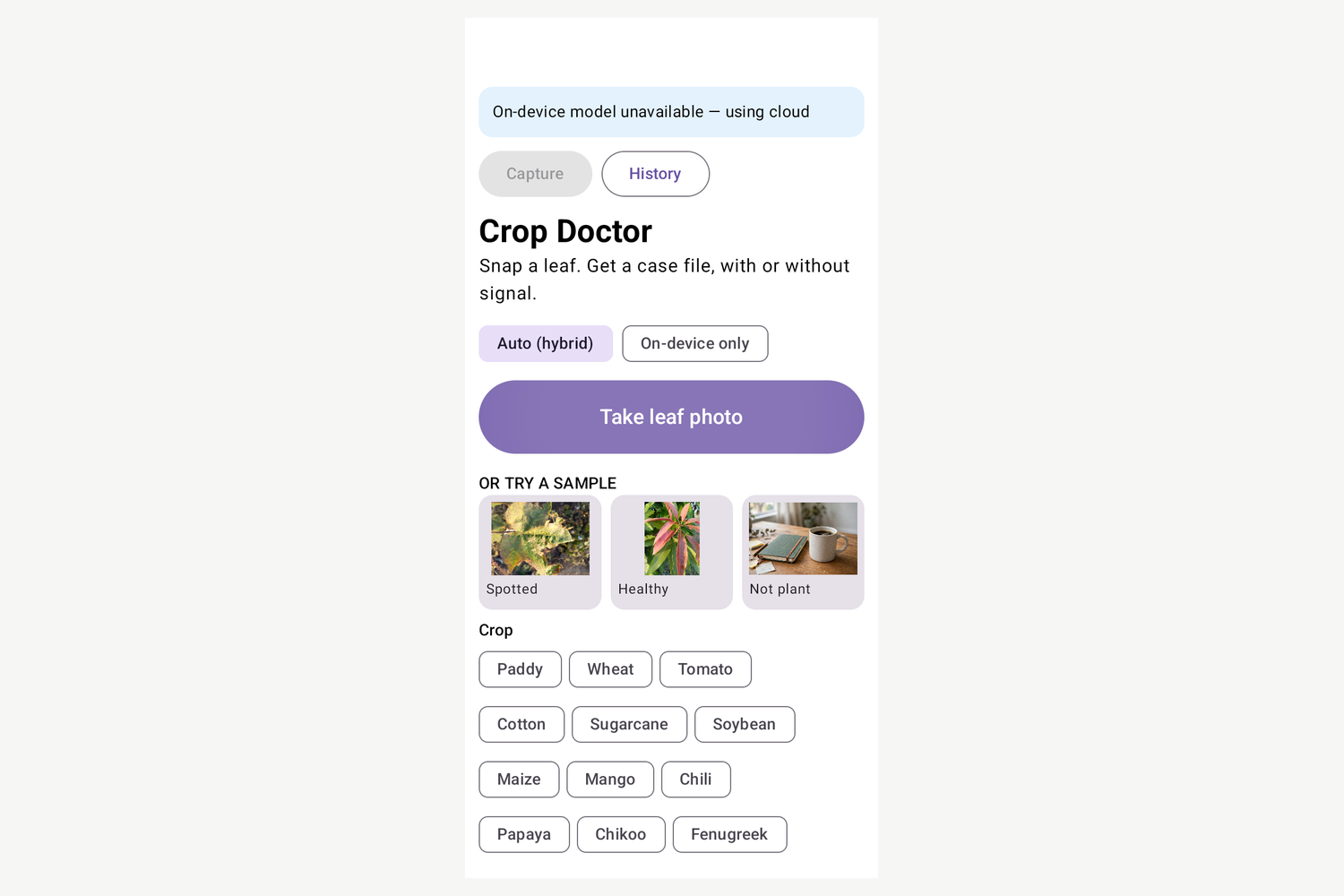
Android app: this phone has no Gemini Nano, so Firebase AI Logic uses the cloud and the app says so.
-
Crop Doctor: check the leaf before anyone sprays.
-
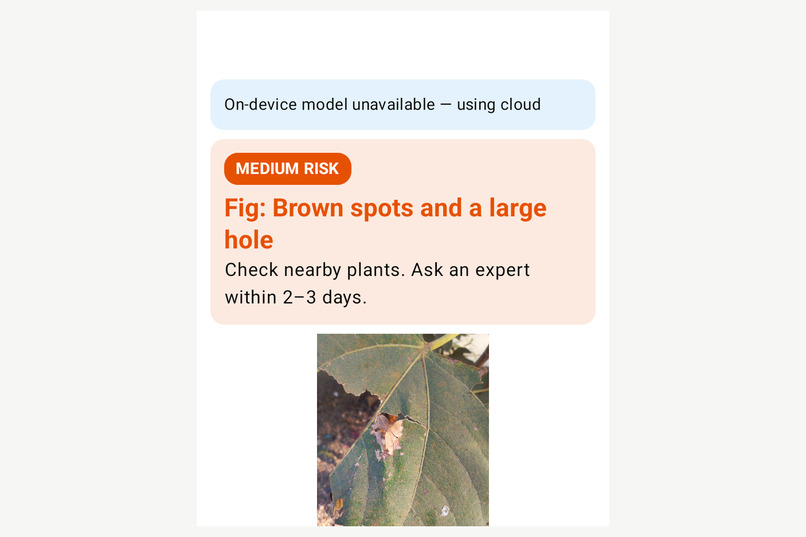
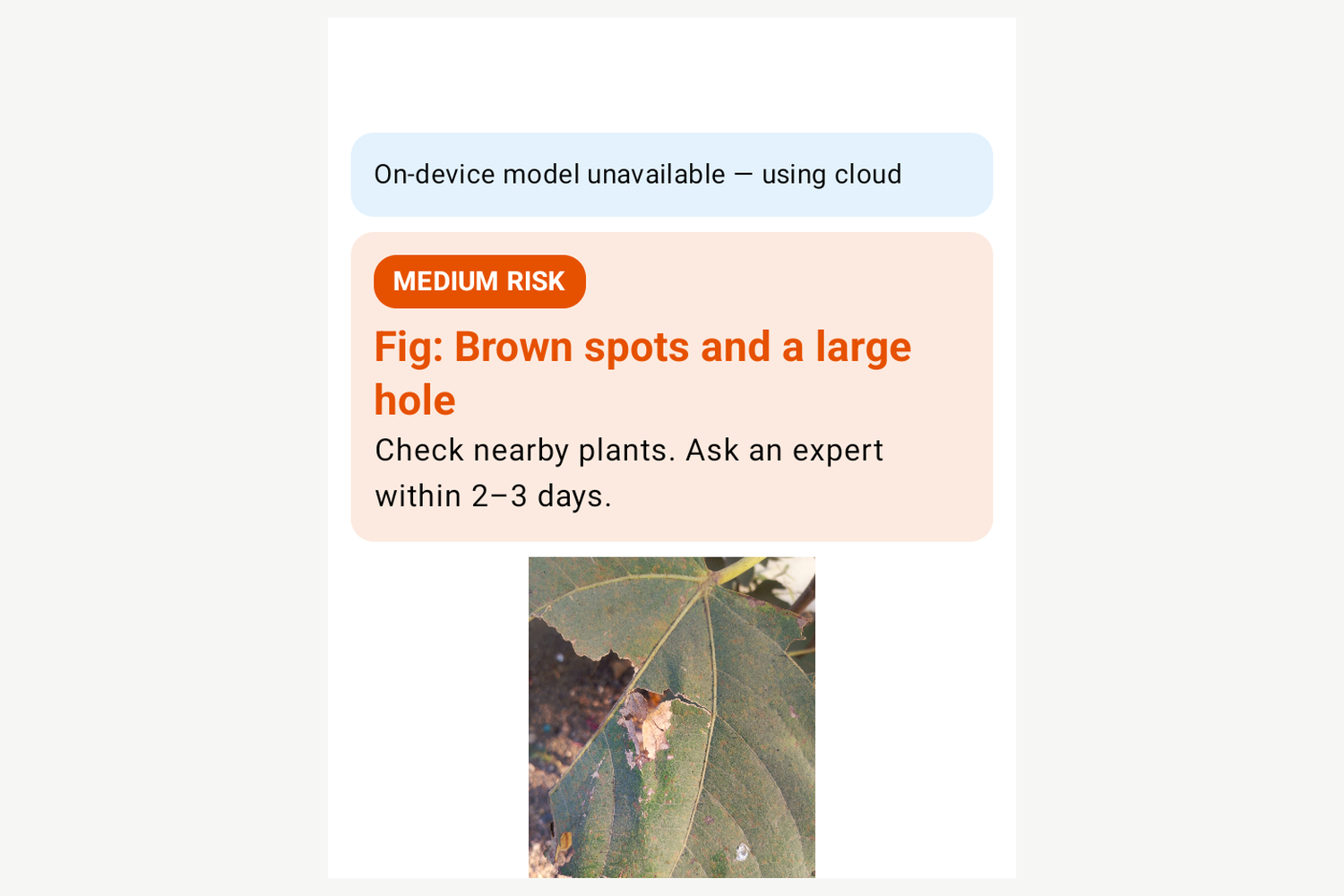
Android result: a clear risk level and what to do next.
-
Android app: this phone has no Gemini Nano, so Firebase AI Logic uses the cloud and the app says so.
-
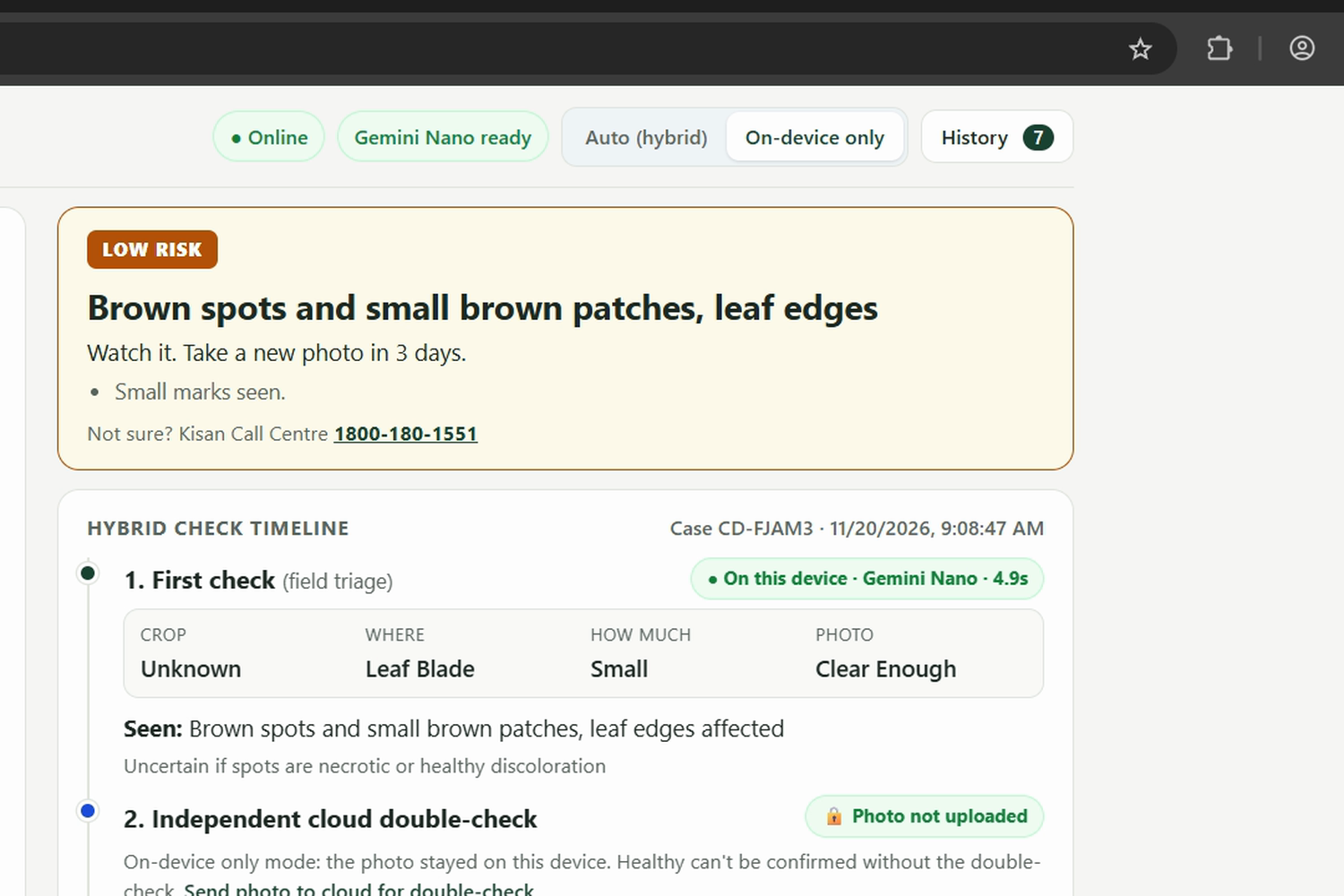
On-device only mode: the photo never leaves the device.
-
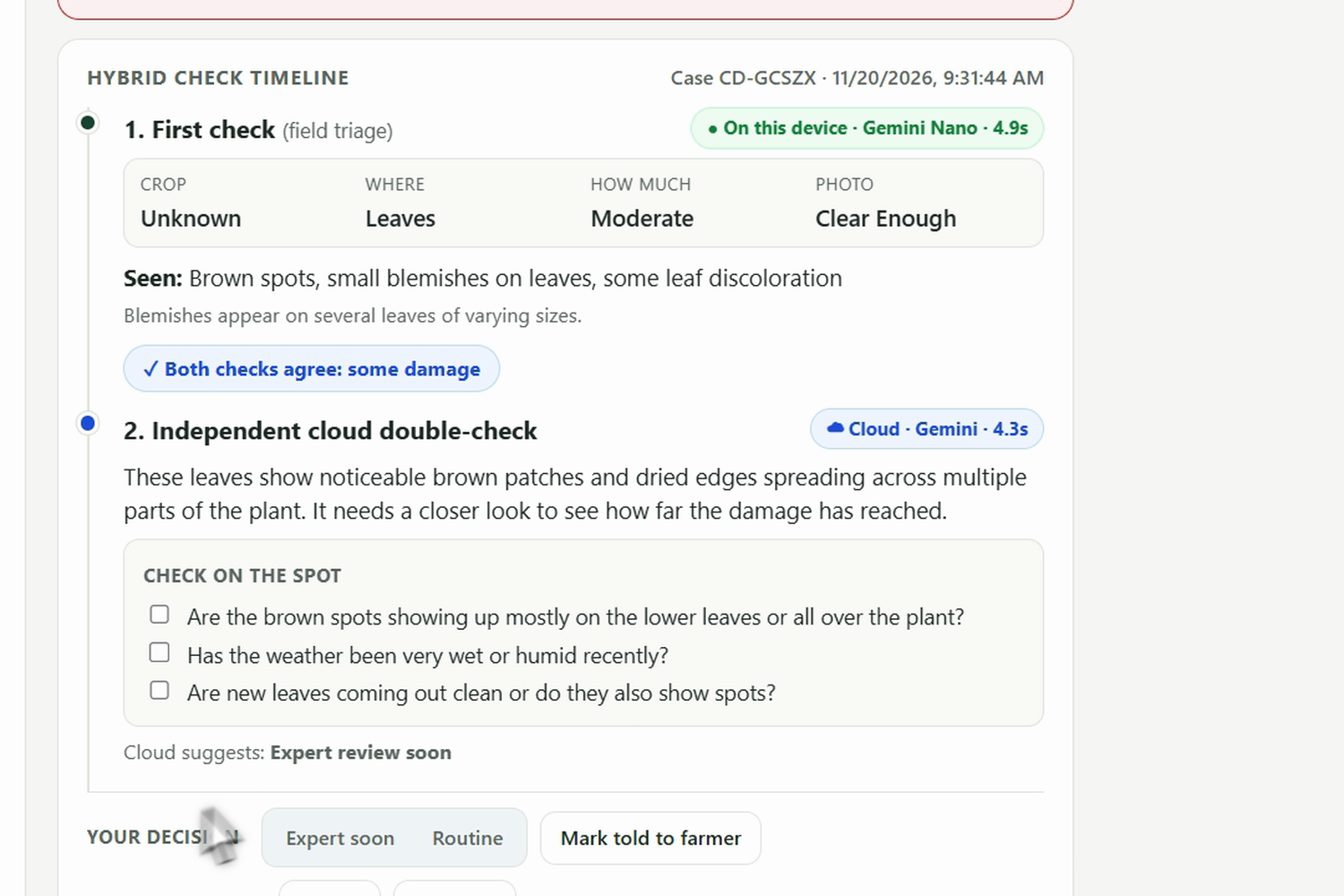
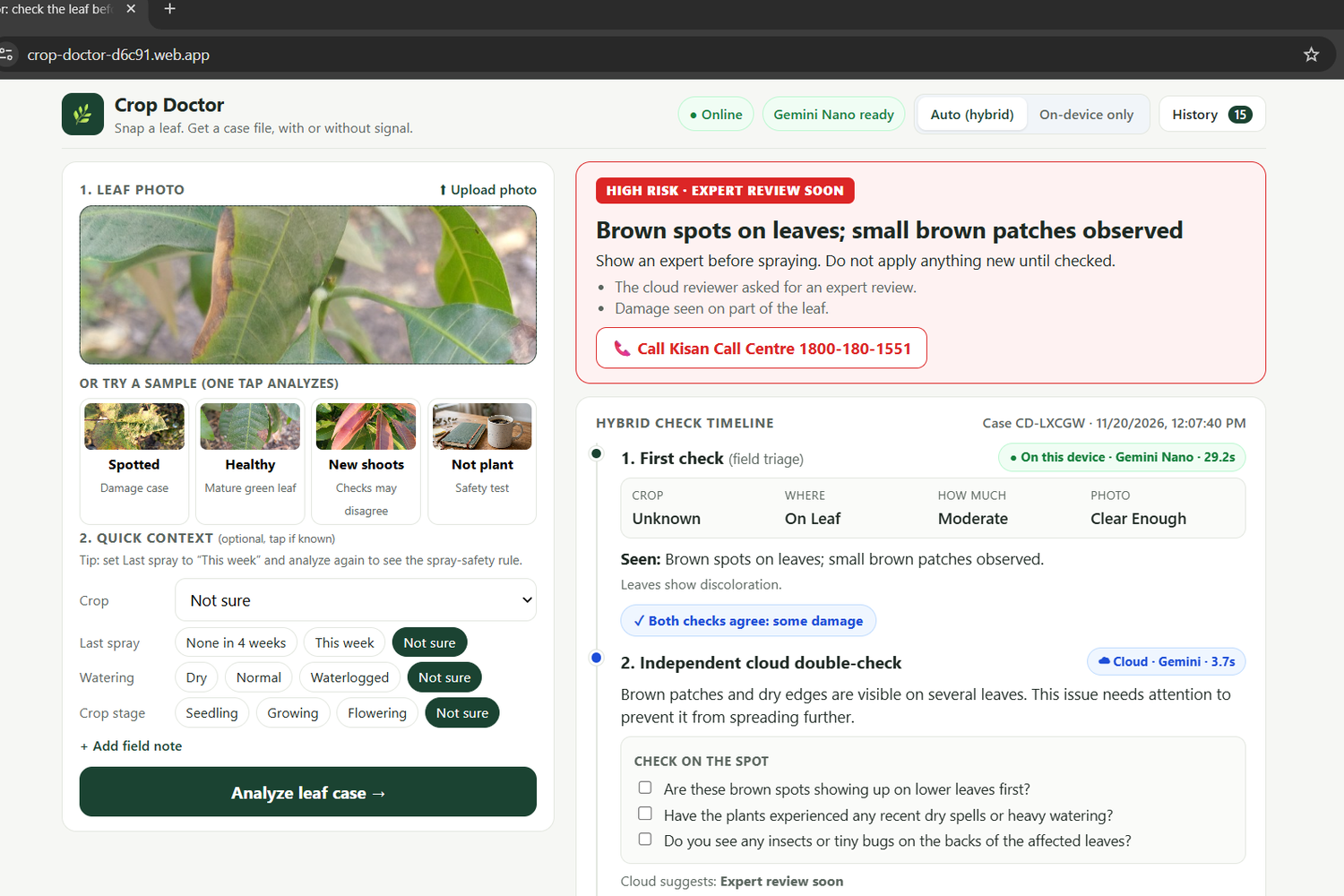
Back online: the cloud checks the same photo on its own. Both agree, and the risk goes up to High with a one-tap helpline call.
-
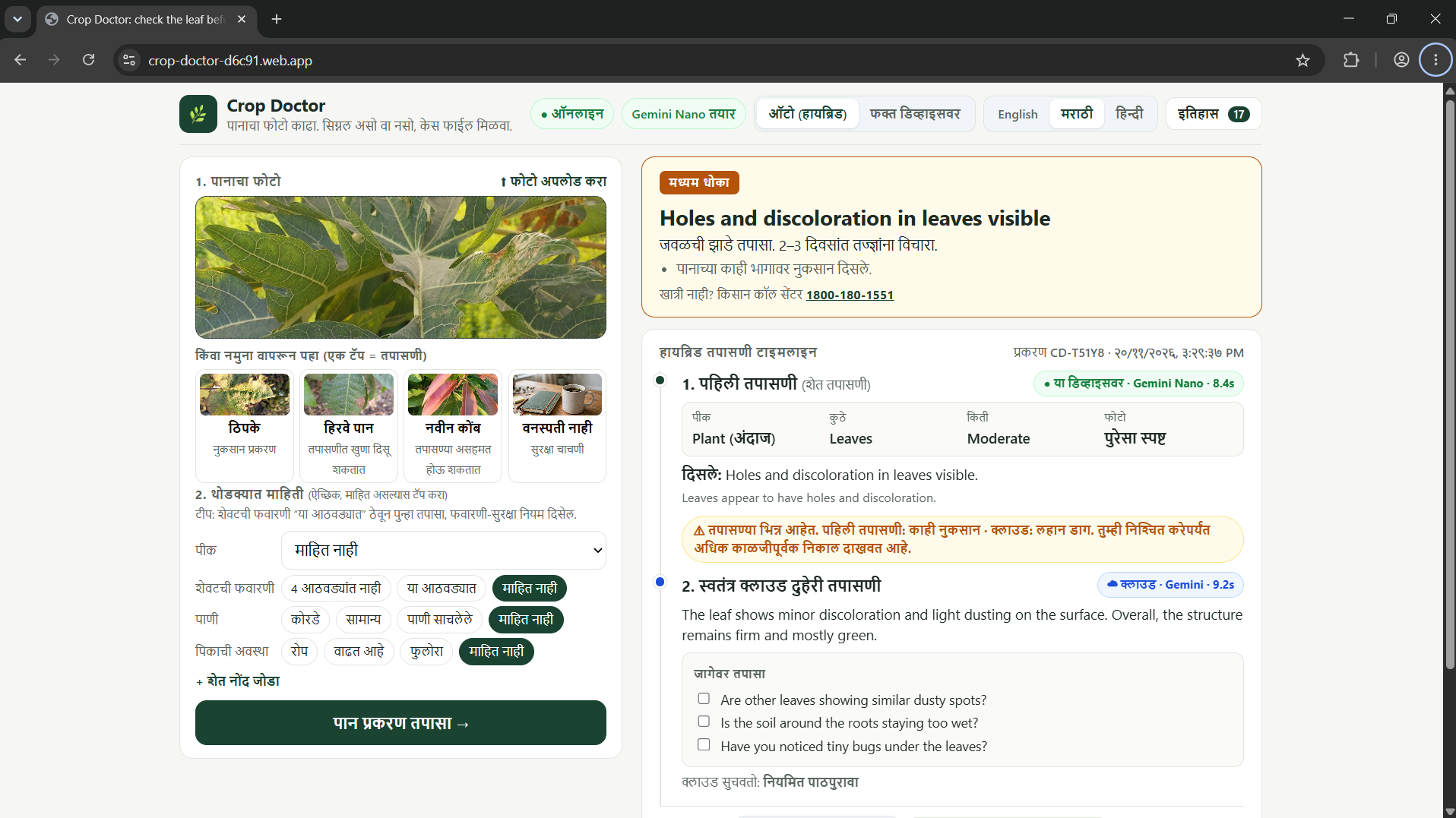
local lang support for farmers
Inspiration
When a crop leaf gets spots or turns yellow, many farmers don't wait for advice. They buy a fertilizer or pesticide from the nearest shop and spray it the same day, without knowing the real cause.
Yellow leaves can mean many things: too much water, a missing nutrient, insects, disease, or damage from a spray already used. The wrong fix wastes money and can hurt the crop.
Farmers act fast because good advice isn't there when they need it. Fields often have no internet, and experts are hard to reach. I wanted a pause before the spray: a quick, honest check that works in the field.
I described the idea to two local farmers. They haven't used the app yet, but both liked it and said they want an answer before spending money on a spray. They made two requests:
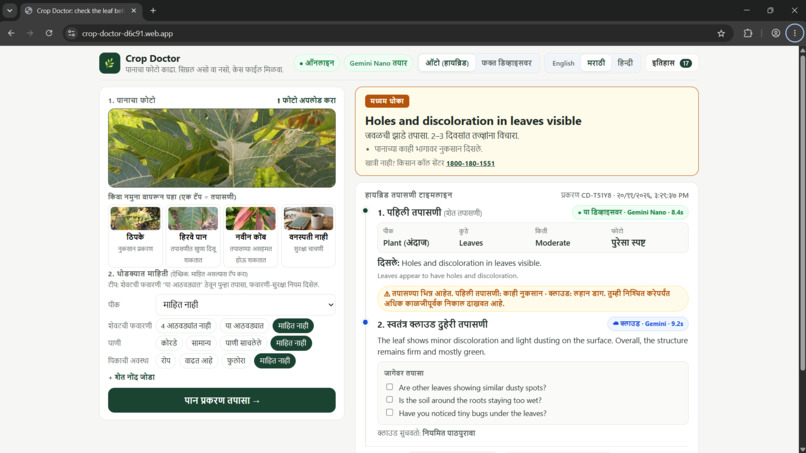
- Use our language. Most farmers here are more comfortable in Marathi or Hindi than in English. I added both.
- Tell us what to spray, and name the insect. I didn't add this yet, for safety reasons (see Challenges).
Try it: https://crop-doctor-d6c91.web.app (Google Chrome on a computer) Video: https://youtu.be/mc_QEsn7B_Y Code: https://github.com/rushibhosalepro/crop-doctor
What it does
- Take one photo of a leaf, even with no internet. You can also tap a few quick answers: crop, last spray, watering, and crop stage.
- Gemini Nano checks the leaf on the device. The app says what it sees, how serious it is (low, medium, or high risk), and what to do first.
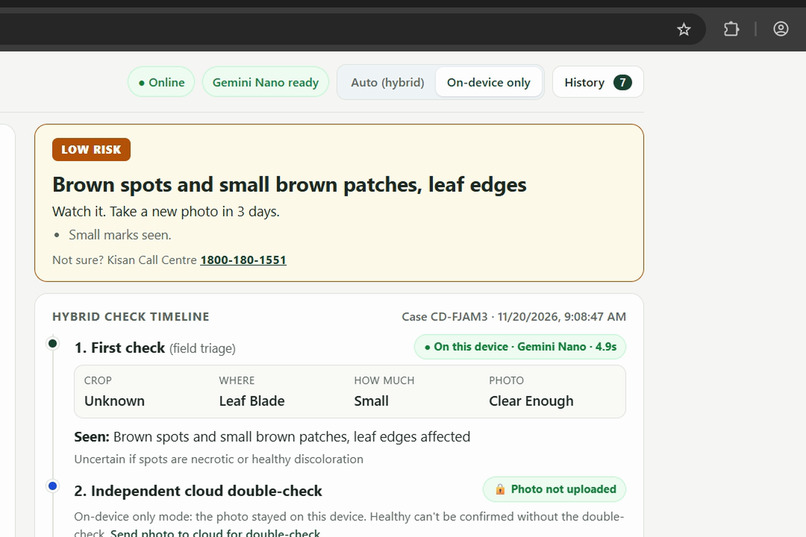
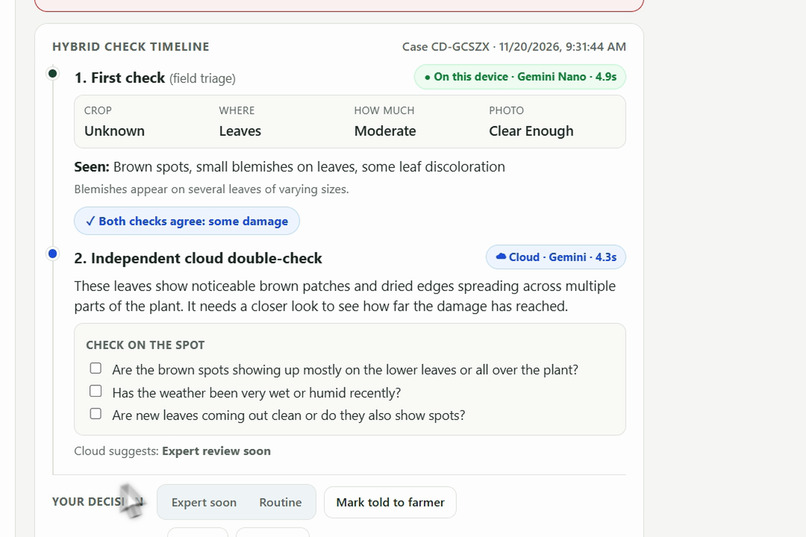
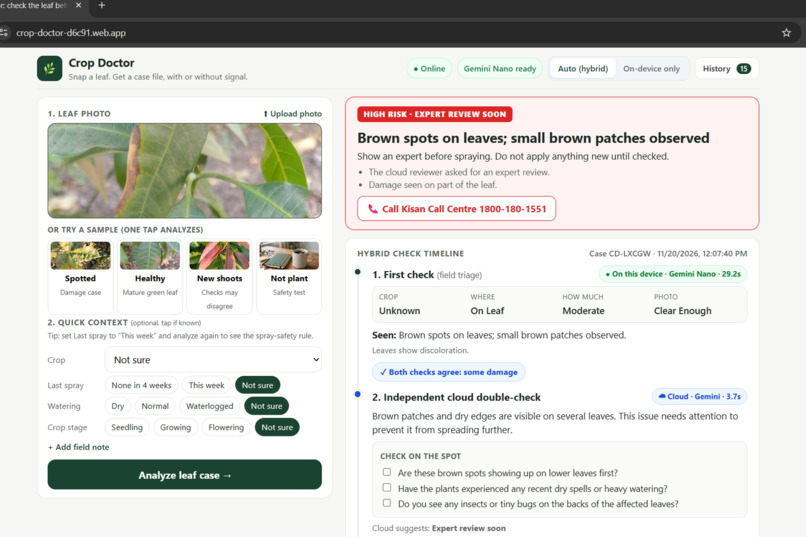
- With no internet, the case is saved. When the internet is back, cloud Gemini checks the same photo on its own, without seeing the first answer. The app shows if both checks agree.
- The person using the app makes the final decision, and the case is saved to history.
What the answer actually says. Each result gives one clear next step, for example:
- High risk: "Show an expert before spraying. Do not apply anything new until checked", with a one-tap call to the Kisan Call Centre.
- Medium risk: "Check nearby plants. Ask an expert within 2 to 3 days."
- Low risk: "Watch it. Take a new photo in 3 days."
It also gives up to three questions to check on the spot, such as "Are the spots mostly on the lower leaves?" and "Has it been very wet lately?". Compared with just calling the helpline, the farmer knows how urgent it is before spending money, and the expert gets a photo and answers instead of "my leaves are yellow".
Works in English, Marathi and Hindi. One tap switches the risk level, the next step, the safety warnings, the buttons and the quick questions, on both the web and Android apps. The AI's own short description of the leaf is still in English (see Challenges).
Who it's for, and who gets the offline check. Gemini Nano needs capable hardware: Chrome on a capable computer, or a recent high-end phone. Most farmers' mid-range phones don't have it. So:
- Extension workers and agri-shop owners with a capable laptop or newer phone get the full offline check. One of them advises many farmers, so one device covers many fields.
- On any other phone, the photo and answers are saved with no signal, and the check runs in the cloud as soon as signal returns. The answer comes later, but still before money goes on a spray.
The web app saves cases in the browser and still opens after a refresh with no internet. The Android app saves cases with Firebase Authentication (anonymous sign-in) and Cloud Firestore, and syncs them when the internet is back.
How it differs from plant-disease apps like Plantix, which identify diseases from photos: Crop Doctor never names a disease or a chemical. It's a pause before spraying, with two independent AI checks and fixed safety rules, and it works with no signal.
Built for safety: AI observations plus fixed rules in code
- Both AI checks only describe what they see. They never name a disease and never give a dose.
- Fixed rules in the code sit on top of the AI's answer, so the AI can't talk its way past them.
- A spray this week, large damage, or the cloud asking for an expert means High risk: show an expert before spraying.
- A blurry photo, or something that isn't a plant, gets "retake photo" instead of a guess. This applies if either check says so.
- "Looks healthy" shows only when both checks see no problem. A result from the device alone stays "not confirmed yet".
- The warnings appear in the user's own language, so they're actually understood.
How I built it
- Firebase AI Logic for every AI call, using hybrid inference:
PREFER_ON_DEVICEfor the first check (Gemini Nano, with a cloud fallback)ONLY_IN_CLOUDfor the independent second checkONLY_ON_DEVICEfor a private mode where the photo never leaves the device
- Every result shows where it really ran ("On this device" or "Cloud") and how long it took.
- Web app (main platform): React, running Gemini Nano in Chrome, deployed with Firebase Hosting. A small service worker keeps it usable offline. Tested with real on-device Gemini Nano, online and offline.
- Android app: Kotlin and Jetpack Compose, with the same AI steps, rules and languages, plus Firebase Authentication and Cloud Firestore. It's tested on the cloud fallback. Its on-device path is built but not yet tested, because no phone I could get supports Gemini Nano.
- Firebase App Check on both platforms (reCAPTCHA Enterprise on the web). No keys or tokens are in the code.
- Unit tests for the safety rules and the translations.
Testing on 21 real field photos
An eval page (https://crop-doctor-d6c91.web.app/?eval) runs 21 real field photos through exactly the same steps as the app. These numbers show how much the two AIs agree with each other, not whether either is right. The photos have no expert labels yet.
| What I measured (Chrome, Gemini Nano) | Result |
|---|---|
| First check ran on the device | 21 of 21 |
| Median time, on device / cloud | 3.6 s / 3.8 s |
| Both checks agreed it was a plant | 20 of 20 (the cloud skipped the one photo Nano asked to retake) |
| Damage level: same / one apart / two apart | 8 / 9 / 3 of 20 |
| Photos where the levels differed at all, and Nano was stricter | 11 of 12 |
| Crop guessed right from the photo alone | 2 of 16 |
What I changed because of it: the crop guess was so poor that the app now uses only the crop the user taps. On-device isn't faster, so its value is offline use, privacy and zero cost per check. Full results: https://github.com/rushibhosalepro/crop-doctor/blob/main/eval/RESULTS.md
Challenges
- No phone with Gemini Nano. None of my family's phones support it, so I built the web version and got real on-device results in Chrome.
- Hidden cloud fallback. In browsers without on-device AI, like Edge, the SDK quietly used the cloud, even in on-device only mode. I added my own check so the app always tells the truth about where a result came from.
- An old model name. In hybrid mode, the SDK ignored my model setting and used an old model that no longer works. Setting the model in the right place (
inCloudParams) fixed it. - A small model can be wrong. Nano is stricter than the cloud and sometimes sees problems that aren't there. That's why the cloud check is independent, and the app shows the more careful result when they disagree.
- Translating without breaking safety. The safety rules read the AI's structured answer, so the AI still answers in English behind the scenes. I translated everything the app itself shows, including every warning. The AI's short description of the leaf is still English.
- What farmers want vs. what's safe. Farmers asked for a spray recommendation. A wrong chemical or dose from an AI can damage the crop or harm the person spraying, so for now Crop Doctor stops at "how serious is it, and should you show an expert first". I'd rather be honest about that limit than guess.
What I learned
On-device AI isn't about speed: Nano answered in 3.6 seconds and the cloud in 3.8. Its value is working with no signal, privately and for free. Nano was the stricter of the two checks, which is the safe direction before a spray, but it means the app leans toward caution. Talking to farmers changed the app: language mattered more to them than any feature I'd planned.
What's next
- Put the app in front of farmers, in Marathi, and fix what they struggle with.
- Test the Android on-device path on a Gemini Nano phone.
- Translate the AI's description of the leaf too, so the whole result is in the farmer's language.
- Name the likely insect, clearly marked as a guess, and give spray advice only from an approved source, such as a local agriculture office list.
- Expert-labelled photos, so accuracy can be measured, not just agreement.
Built With
- android
- chrome-prompt-api
- cloud-firestore
- firebase-ai-logic
- firebase-app-check
- firebase-authentication
- firebase-hosting
- gemini
- gemini-nano
- javascript
- jetpack-compose
- kotlin
- react
- recaptcha-enterprise
- vite

