Inspiration
I’ve lived in Toronto long enough to have a constant background feed of “what if” scenarios in my head: PATH flooding, DVP pileups in a blizzard, Billy Bishop runway issues, downtown hospital overloads during a storm. At the same time, as a computer science student obsessed with security, systems, and multi-agent AI, I kept noticing a gap:
We use AI to autocomplete emails and summarize PDFs, but we rarely use it to explain and stress-test high-stakes decisions in a way a human commander—or even the public—can actually understand.
Crisis Coordinator grew out of that tension. I wanted a safe, simulated environment where I could explore questions like:
- How would multiple AI “roles” coordinate during a city-scale emergency?
- Can they make their reasoning transparent instead of being a black box?
- What would a human-centered mission control UI for that actually look like?
The result is a decision-support prototype and teaching tool—not a real dispatcher—that lets people play through Toronto-flavoured disaster scenarios and see how multi-agent AI could help (and where its limits are).
What it does
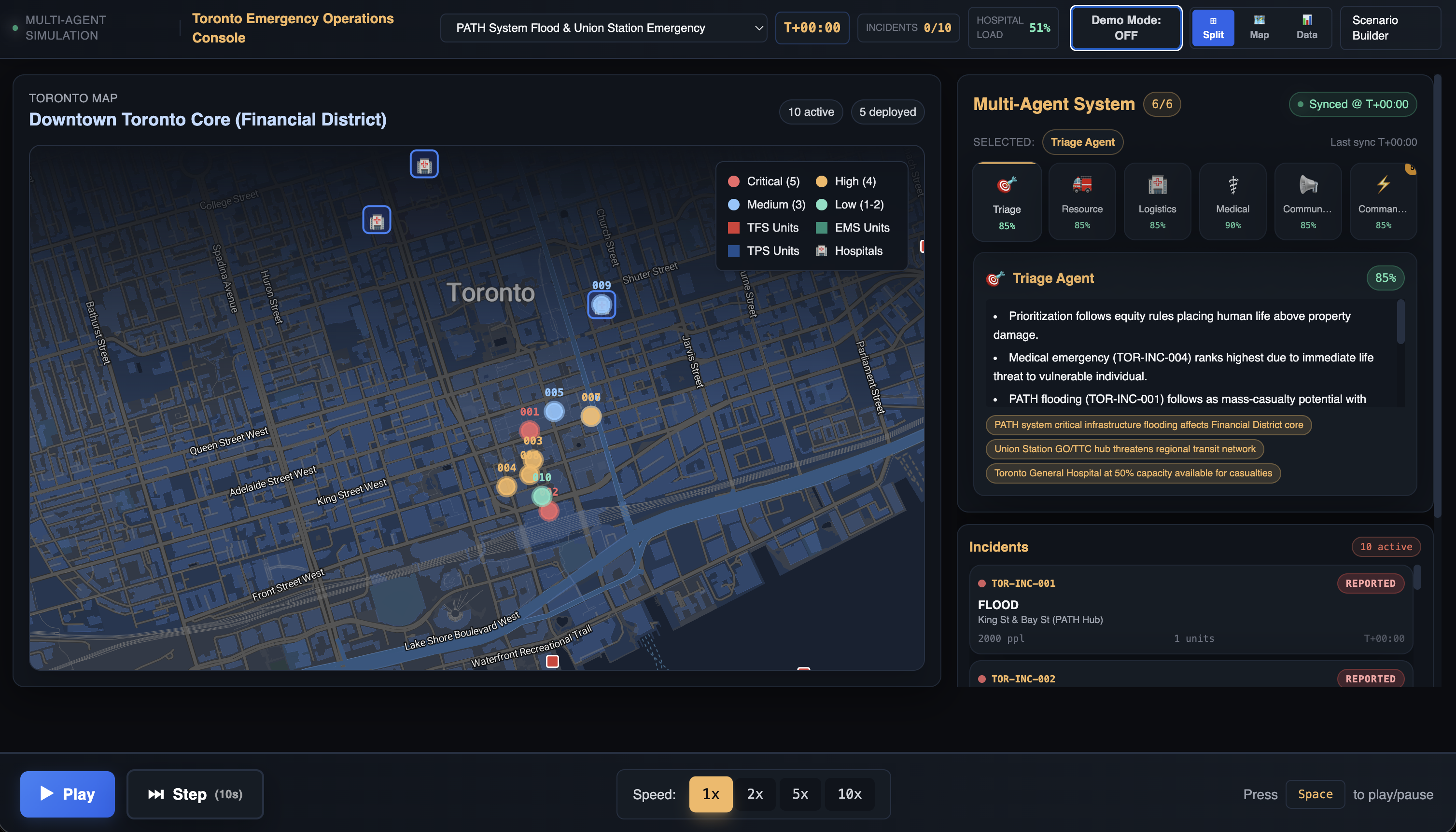
Crisis Coordinator is a simulated emergency operations center for a fictional Toronto.
On a small city grid, it runs scenario-based simulations like:
- PATH network flooding during rush hour
- A DVP whiteout with chain-reaction crashes
- A Billy Bishop airport incident with limited access routes
At each time step (“tick”):
- New incidents appear (fires, medical emergencies, traffic accidents, floods)
- Units move (ambulances, fire trucks, police cars)
- Incidents progress: [ \text{reported} \rightarrow \text{assigned} \rightarrow \text{en~route} \rightarrow \text{on~scene} \rightarrow \text{resolved} ]
- Hospitals and shelters with limited capacity fill up or overload
On top of this, a set of deterministic reasoning agents operate on the state:
- Triage Agent – ranks incidents by severity + time waiting
- Resource Agent – assigns available units to the highest-priority calls
- Logistics Agent – routes people to hospitals/shelters based on distance and capacity
- Medical Agent – monitors hospital load and raises overload warnings
- Communications Agent – picks which incidents/areas to highlight in public messaging
- Commander – synthesizes everyone’s outputs
These agents produce structured decisions (prioritized incident lists, unit assignments, routing choices, overload flags), which then go through an LLM layer (Claude) to generate:
- Per-agent rationales (“why we chose Incident A over B”)
- A Commander Summary of what’s happening and what matters now
- Public-facing messaging: a short SMS-style alert plus a calmer, slightly longer advisory
The main UI is a three-column mission control console:
- Left: stylized city map + incident list with filters and severity badges
- Center: agent cards showing their latest decisions, each with a “show reasoning” toggle
- Right: tabs for Commander Summary, Public Alert, and an Event Log timeline
How we built it
We built Crisis Coordinator as a Next.js 14 + TypeScript app with a clear separation between simulation, agents, and UI.
Core stack:
- Frontend: Next.js 14 (App Router), React, TypeScript
- Styling: Tailwind CSS with a custom “control-room” theme (dark, focused, not generic admin UI)
- LLM layer: Anthropic Claude via a small client in
lib/utils/llmClient.ts - Data / infra: MapTiler key for maps; optional Supabase integration for scenarios/storage
- Environment:
.env.localholdsANTHROPIC_API_KEY, MapTiler key, and Supabase keys if used
Simulation engine
The heart of the system is a TypeScript simulation engine in lib/simulation/SimulationEngine.ts. It maintains a world state ( S_t ) containing:
- Incidents and their attributes
- Units and their locations/status
- Hospitals/shelters and their capacities/loads
- An event log
Each tick applies a state transition:
[ S_{t+1} = f(S_t, A_t) ]
where ( A_t ) are agent decisions (which units to dispatch, who goes to which hospital, etc.). Scenario scripts in lib/scenarios/*.ts define:
- Toronto-specific base maps and points of interest
- Timed incident injections (e.g., “at T+5, spawn a second crash near the DVP”)
- Initial resources, hospital capacities, and any scripted stressors
Multi-agent layer
On top of ( S_t ), we run deterministic “role” agents:
- Each agent receives a filtered view of the world state relevant to its job.
- They output structured JSON: ranked incident IDs, assignments, hospital targets, overload flags, etc.
- These outputs are then optionally passed to the LLM layer using role-specific prompts in
lib/agents/agentPrompts.ts.
The API route /api/agents orchestrates this:
- Read current simulation state
- Run relevant agents (some every tick, some on state changes)
- Call Claude as needed (unless we’re in Demo Mode)
- Return decisions + explanations back to the console UI
Demo Mode
Because this is built to be demo-able (including in hackathon settings), we added a Demo Mode:
- Uses cached / rule-based decisions instead of live LLM calls
- Throttles heavy agent runs
- Reduces context size and token budgets when Claude is enabled
This gives two modes:
- Real-time LLM mode for depth and nuance
- Instant demo mode for reliability under time and rate-limit pressure
Challenges we ran into
State complexity and synchronization
Even a small city simulation gets complicated fast. Early on, we had issues like:
- Units “teleporting” because updates weren’t applied in a single, authoritative place
- Incidents that were assigned but never resolved because a status transition was skipped
- UI occasionally showing stale data if multiple sources tried to update the same state
We fixed this by:
- Centralizing state transitions in the simulation engine
- Treating each tick as a pure function ( S_{t+1} = f(S_t, A_t) )
- Having the UI only subscribe to the authoritative state instead of mutating it
LLM latency, cost, and reliability
Multiple agents × multiple ticks × multiple scenarios can easily explode into:
- Latency spikes (waiting several seconds per tick)
- Rate limits during demos
- Higher costs than we want for a teaching/demonstration tool
To handle this, we:
- Added a Demo Mode with deterministic decisions and minimal or stubbed LLM calls
- Throttled agent runs so not every tick triggers full multi-agent reasoning
- Shrunk prompts and enforced strict, compact JSON schemas to reduce tokens
Designing explainable agents, not just “smart” ones
It’s one thing to compute:
Assign Ambulance 3 to Incident 12.
It’s another to generate a faithful explanation like:
“Ambulance 3 was sent to Incident 12 instead of Incident 8 because severity is higher and it has been waiting 7 minutes longer, while still within a reasonable travel time.”
We had to:
- Design structured outputs so we knew which factors (severity, wait time, distance, capacity) drove decisions
- Write prompts that forced Claude to base its explanation on those actual factors, not hallucinate extra ones
Avoiding a generic CRUD dashboard
It was very easy to slip into “here’s a table, here’s a side panel.” That didn’t feel like an emergency operations center. We spent time iterating on:
- A three-column console with clear mental models:
- Left: where and what is happening
- Center: what the agents propose and why
- Right: what the commander and public see
- A visual language that felt like a calm mission control, not a sales CRM
- Making sure explanations were short, scannable bullet lists, not giant language-model paragraphs
Accomplishments that we're proud of
- End-to-end multi-agent pipeline: From simulation state → agent decisions → LLM explanations → UI, all wired up and inspectable.
- Human-centered explainability: Every decision is traceable. You can click into an agent card and see why it prioritized a call, or why a hospital overload warning was raised.
- Toronto-specific scenarios: PATH flooding, DVP storms, Billy Bishop issues, downtown hospital stress—grounded enough to feel real, but still safely fictional.
- Mission control UX, not a template: A cohesive console that feels like a mini emergency operations center instead of “yet another admin dashboard.”
- Demo-friendly design: The Demo Mode + deterministic fallbacks mean the project is actually usable under hackathon conditions and live demos, not just in ideal offline tests.
What we learned
This project reinforced a few big ideas for me:
Multi-agent AI is as much API design as it is ML.
Clear roles, contracts, and schemas matter just as much as clever prompts.Explainability requires planning, not just post-hoc text.
If you don’t design your decisions around a few key factors (e.g., severity, wait time, distance, capacity), it’s very hard to later ask an LLM to explain them faithfully.Realism vs clarity is a constant trade-off.
We deliberately simplified some aspects of real emergency response to keep the system understandable and teachable.Designing for demos is a real engineering constraint.
Handling latency, rate limits, and failure modes early is what made this a practical, shippable prototype rather than a fragile toy.Metrics change the conversation.
Once we added response-time and capacity metrics, discussions shifted from “this looks cool” to “this policy reduces average response time but overloads specific hospitals—do we accept that trade-off?”
What's next for Crisis Coordinator
There are a few directions we’re excited about:
Richer scenarios and stress tests
More layered scenarios (e.g., a storm plus a secondary unrelated incident) to really test triage and resource allocation policies.Human-in-the-loop controls
Letting a human commander tweak agent priorities (e.g., “favour pediatric cases” or “protect critical infrastructure”) and watch how the agents adapt downstream.Uncertainty and partial information
Introducing noisy reports and delayed updates so agents (and humans) have to reason under uncertainty instead of perfect state.Deeper analytics and policy comparison
Being able to run the same scenario under different triage/dispatch policies and compare metrics: [ \Delta \text{avg_response_time},\quad \Delta \text{overload_probability},\quad \Delta \text{unresolved_incidents} ]Educational tooling
Packaging Crisis Coordinator as a tabletop exercise platform for classes in emergency management, public policy, or AI ethics, where students can run scenarios and debate the agents’ decisions.
Overall, Crisis Coordinator is just a starting point—but it already shows how multi-agent AI, when wrapped in the right constraints and UI, can help humans see trade-offs more clearly in some of the hardest situations we face.
Built With
- anthropic-claude-api
- maptiler
- next.js-14
- node.js
- react
- supabase
- tailwind-css
- typescript


Log in or sign up for Devpost to join the conversation.