-
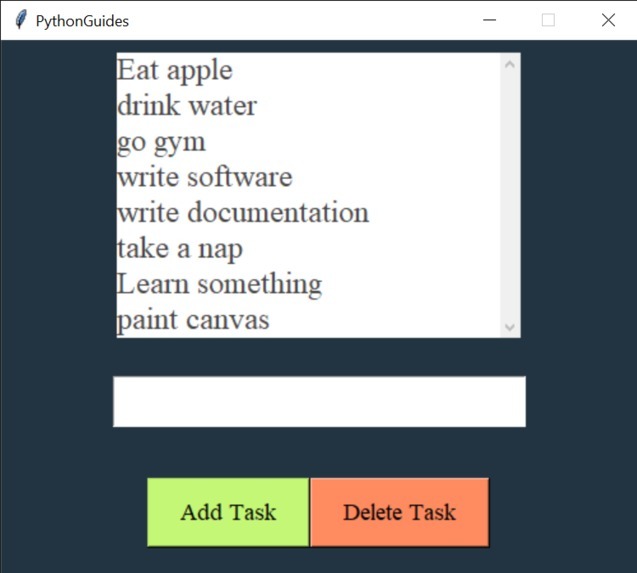
App look like this
-
-

-
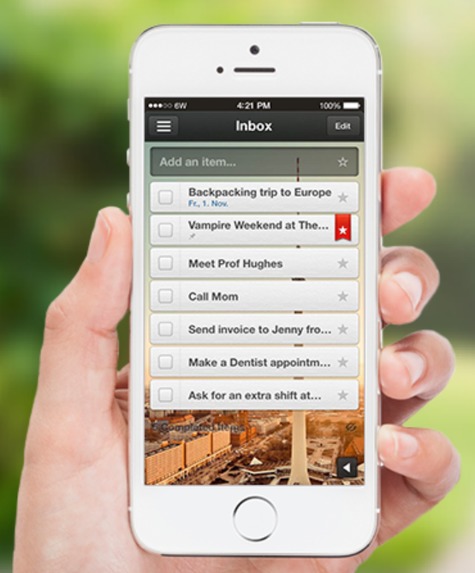



A to-do list app isn't always about the individual. This app is for team collaboration, and it is supported on Web, Windows, Linux, macOS, iPad, and iPhone. For sorting out the project and relevant tasks, this app helps you collaborate with your team.
A to-do list app lets you write, organize, and reprioritize your tasks more efficiently. They also let you attach notes, links, and files to a task, and many let you see when someone else has completed a task. In many ways, a good to-do app is the ultimate productivity app.
How we built it
Your ToDo App will allow users to:
Step 1: Create new list Step 2: View all lists Step 3: Display list Step 4: Rename list Step 5: Delete empty list Step 6: Create task Step 7: Mark task as complete Step 8: Edit a task's content Step 9: Delete a task Here is a program that I have created in order to make a to do app.... from tkinter import * from tkinter import messagebox
def newTask(): task = my_entry.get() if task != "": lb.insert(END, task) my_entry.delete(0, "end") else: messagebox.showwarning("warning", "Please enter some task.")
def deleteTask(): lb.delete(ANCHOR)
ws = Tk() ws.geometry('500x450+500+200') ws.title('PythonGuides') ws.config(bg='#223441') ws.resizable(width=False, height=False)
frame = Frame(ws) frame.pack(pady=10)
lb = Listbox( frame, width=25, height=8, font=('Times', 18), bd=0, fg='#464646', highlightthickness=0, selectbackground='#a6a6a6', activestyle="none",
) lb.pack(side=LEFT, fill=BOTH)
task_list = [ 'Eat apple', 'drink water', 'go gym', 'write software', 'write documentation', 'take a nap', 'Learn something', 'paint canvas' ]
for item in task_list: lb.insert(END, item)
sb = Scrollbar(frame) sb.pack(side=RIGHT, fill=BOTH)
lb.config(yscrollcommand=sb.set) sb.config(command=lb.yview)
my_entry = Entry( ws, font=('times', 24) )
my_entry.pack(pady=20)
button_frame = Frame(ws) button_frame.pack(pady=20)
addTask_btn = Button( button_frame, text='Add Task', font=('times 14'), bg='#c5f776', padx=20, pady=10, command=newTask ) addTask_btn.pack(fill=BOTH, expand=True, side=LEFT)
delTask_btn = Button( button_frame, text='Delete Task', font=('times 14'), bg='#ff8b61', padx=20, pady=10, command=deleteTask ) delTask_btn.pack(fill=BOTH, expand=True, side=LEFT)
ws.mainloop()

Log in or sign up for Devpost to join the conversation.