-
logo
Craftyly
Craftyly is an app made to be a personalized space for artists and their ideas. The app aims to provide fresh ideas and bring opportunity for community to visual artists who struggle with art block. Users can find inspiration through accessing a variety of prompt and challenge generators. Here is a short 1 minute video touring the app!
- Save art prompts from a unique prompt generator
- Create and edit notes to keep ideas and thoughts
- Customize your interface with a variety of colour themes
Contents
Overview
Features
How to set up database
Acknowledgements
Overview
Craftyly is developed using Java in Android Studio with Firebase Firestore and Authentication SDK as a backend. Concepts of MVVM architecture are also incorporated throughout the app.
This project first began as submission for the Technovation Girls 2021 challenge. The Technovation Girls challenge provides youth with resources and a 12-week time period to program an app, write a business plan, and create a pitch. The purpose of is to solve real-world issues and inspire innovation. More information about the challenge found here.
Features
Splash: Detects if the user is logged in, and sends user to sign-in screen if not logged in.
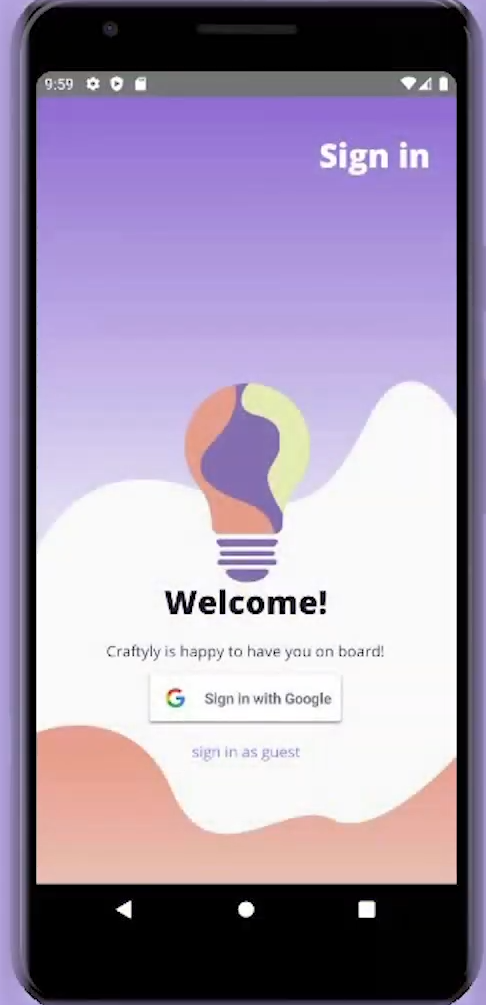
Sign-in: Contains a google sign-in button and an anonymous sign-in button.
Light bulb message dialog: If it is the user's first time using the app each day, a supportive message shows up as a dialog to remind users to take care of themselves.
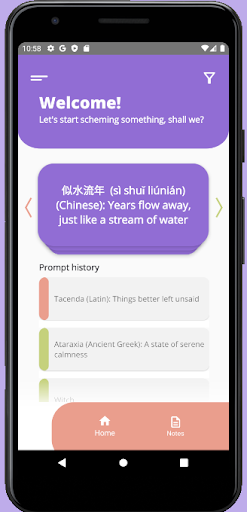
Home/Prompt generator: Includes a stack of cards that displays all prompts. Prompts come from a collection existing in the Firestore database. Prompts displayed can be filtered by category (eg. characters, environments). Users can swipe right to save the prompt as "accepted". Swipe left to save the prompt as "rejected". A full prompt history is displayed underneath the card stack.
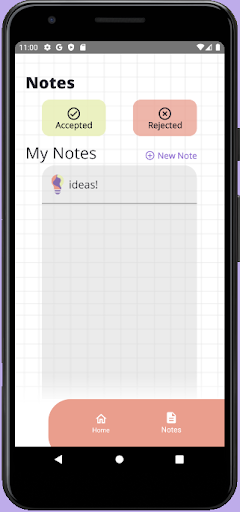
Notes: Users can view their accepted and rejected prompts here. They can also create their own quick notes. Swiping left will allow the user to delete items (both for prompts and for notes).
Settings: Users can set a colour scheme for their app interface. This also changes the design of the lightbulbs shown throughout the app. A shop is set up with information about subscription plans, however purchasing anything currently is not implemented. The about section displays information about our journey and acknowledges those we worked with. Lastly, clicking sign out will sign out the user and bring them back to the sign-in screen.
How to set up database
The app uses Firebase Firestore and Authentication SDK as a backend. However, the google-services.json file is not included in this repository. Instead, users should insert their own to point the code to their own backend. Art prompts are also saved in Firestore, meaning no art prompts will appear if only cloning this repository. Here is an example of how to set up the art prompt collections and documents in Firestore.

Acknowledgements
Team Craftyly: Michelle Xu and Tiffany Trinh
Mentor: Skye Kim
Prototype testers: Aileen K (UX/UI Designer), Nayun K. (UI Designer), Yeojin (Registered Nurse)
Credit to:
Coding In Flow - Tutorials to start with MVVM architecture, RecyclerView and Firestore
Android Architecture Components Beginner Tutorial - Room + ViewModel + LiveData + RecyclerView MVVM
Cloud Firestore Android Tutorials
Firebase UI - Firestore + RecyclerView
Alex Mamo - MVVM, Firestore, Firebase Auth
https://github.com/alexmamo/FilterFirestoreResults
https://github.com/alexmamo/FirebaseAuthentication
https://github.com/alexmamo/FirebaseApp-Clean-Architecture-MVVM

Log in or sign up for Devpost to join the conversation.