-
-
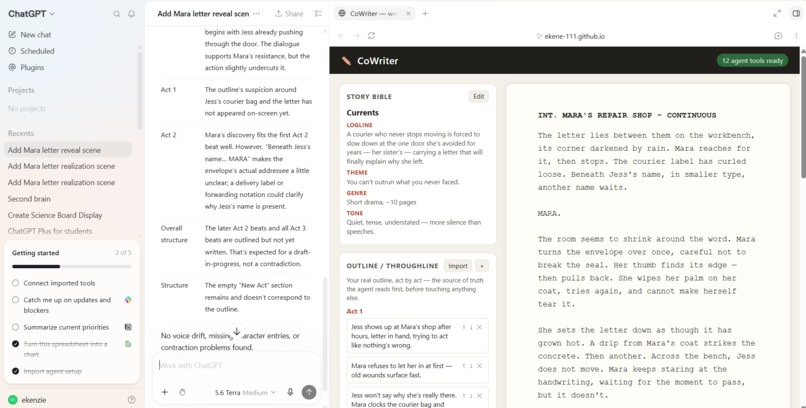
CoWriter in session
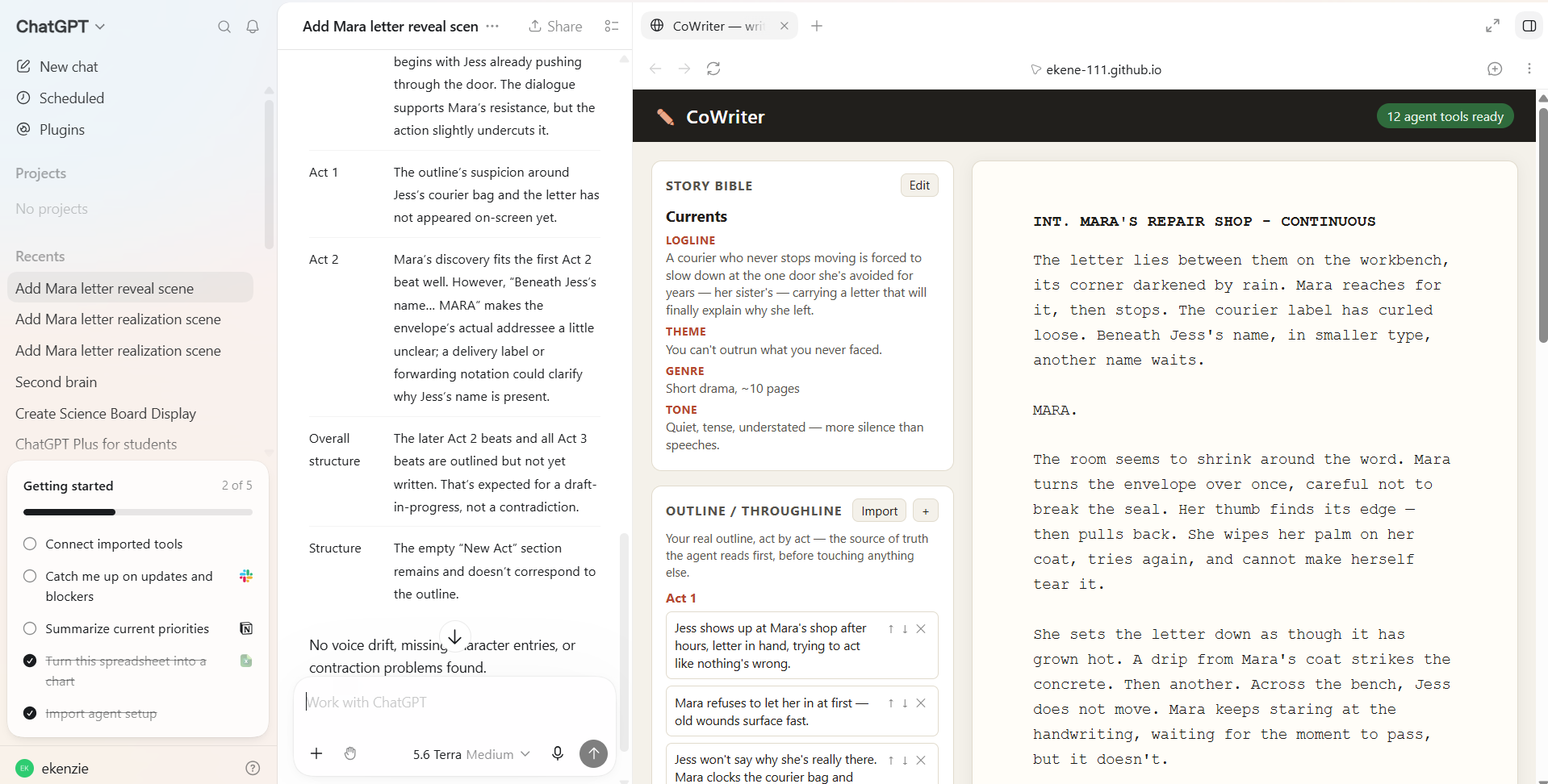
Inspiration
Co-writing with an AI these days usually mean pasting your script into a chat window, getting a lot of text back and then copying these into your document. You loose formatting and context for every round trip. I wanted to see what happens when the agent isn't a chat window, but a real collaborator working on the same page as you are, through the same interface as you use. WebMCP made that possible: expose the app's real actions as tools, and an agent can write directly into your live document instead of describing what it would write.
What it does
CoWriter is a small screenwriting tool: it has a Story Bible panel (title, logline, theme, genre, tone), a real act-by-act Outline panel (paste in your own — Act 1 with its beats, Act 2 with its beats, and so on, including acts with no scenes written yet), that breaks acts and scenes into real screenplay format (sluglines, action, character cues, dialogue). It has a character bible, and a loose idea board where you can tweek ideas on the go.
Every action on that script; revising the premise, importing or editing the outline, adding a scene, editing a line, revising a character, dropping an idea, reordering scenes, checking the whole thing for consistency — is exposed as a WebMCP tool (document.modelContext.registerTool). The agent is not clicking around a UI it has to guess at; it's calling the exact same functions the interface calls, and the result shows up on your screen instantly, on the same live document. You can keep editing by hand at any moment if you wish to.
Crucially, get_script's description tells the agent to call it first, always. It returns the human-authored, act-by-act outline and the Story Bible up front, so every scene the agent drafts, and every consistency check it runs, is explicitly grounded in the story's real throughline and theme. It does not guess at what happens next from whatever scene happens to be open. The outline (the plan) and the written scenes (what's actually on the page) are kept deliberately distinct, the way a real writer's outline and draft are.
You can ask, in plain language, "write a tense scene where she finds the letter, no dialogue yet" — the agent calls add_scene and it appears, correctly formatted, right in front of you. You read it and asks for some more edit if you want it tweeked, and the agent calls edit_scene on that exact scene. The character bible updates the same way as new characters get introduced. And check_consistency hands the agent every dialogue line labeled by speaker plus the full character bible in one structured payload, so it can catch things like a character's voice contradicting itself across acts — the kind of full-document consistency pass that's genuinely tedious for a human to do by re-reading, but natural for an agent to do well.
Nothing about the human side of the app changes because an agent is present — you can type directly into any line at any time, exactly like a normal document. That's the point: one shared script, two collaborators, no export/import step between them.
How we built it
Plain HTML, CSS, and vanilla JavaScript — no framework, no build tooling, no backend. All 12 WebMCP tools are registered in a single readable file (script.js) so the integration itself is easy to inspect end to end. Data persists to the browser's local storage. Tool responses are serialized as compact JSON to keep the token footprint of every agent call low.
Challenges we ran into
Keeping the outline and the written scenes as two genuinely separate sources of truth, rather than letting them silently collapse into one, took deliberate design. It would have been simpler to let the agent treat whatever is on the page as the plan, but this would have let scenes drift from the story's real throughline. Instead, get_script always returns both, and the agent's own tool descriptions tell it the outline is the plan and the scenes are what is actually been written — they won't always be in sync, and that is intentional.
Getting an agent to actually call a tool rather than just answer a writing request conversationally in chat also took some care in how the tool descriptions were phrased — an ambiguous prompt can be satisfied just as easily by the model generating prose in the chat window as by it calling add_scene on the page.
Accomplishments that we're proud of
Twelve WebMCP tools, all grounded in one shared Story Bible, with a UI that never has to know or care whether the human or the agent made the last edit. Watching a scene appear live on the page, correctly formatted and fitting the outline is genuinely satisfying to demo.
What we learned
That grounding matters more than raw capability. An agent that can call add_scene isn't useful on its own. It is useful because get_script forces it to read the outline and premise first, every time, so what it writes actually belongs in the story.
What's next for CoWriter
- Multi-scene consistency diffing — let
check_consistencycompare against the previous run's report so an agent can flag only new contradictions instead of re-surfacing everything each time. - PDF/Fountain export of the finished screenplay.
- Multi-document projects — more than one script per browser profile, with a lightweight project switcher.
- Real backend/cloud persistence, so a script isn't tied to one browser's local storage.
- A visible scene-level undo/history stack for agent-made edits.
- A richer character bible — arcs, relationships, and a "first appearance" pointer the agent can use to catch characters who show up before being introduced.
- A more efficient architecture for managing token consumption for each 'get_script' tool call.
Built With
- css3
- html5
- javascript
- webmcp

Log in or sign up for Devpost to join the conversation.