How it works
 ](https://www.youtube.com/watch?v=cTnMJP2GgdY)
CHATBOT-Cough detection and automated response
RNN noise reduction

- Ref: https://github.com/xiph/rnnoise
- Ref: https://github.com/cpuimage/rnnoise
- Ref: https://blog.csdn.net/dakeboy/article/details/88039977
build librnnoise & rnnoise_demo with CMake
mkdir build
cd build
cmake ..
make
copy the file "rnnoise_demo" from "/build/bin/" to the main directory
download the weight file from https://drive.google.com/file/d/1BV2OSIuuwg6hx-22Q1ApayeWlf45AhmO/view?usp=sharing and move it the "models" directory
Edit the IBM credentials
- Find the Assistant service in your IBM Cloud Dashboard Services.
- Click on your Watson Assistant service and then click on Launch Watson Assistant.
- Use the left sidebar and click on Assistants. Create an assistant.
- Select the Dialog skill card and click Next.
- Select the Import skill tab.
- Click the Choose JSON File button and choose the data/covid_ai_chatbot_skill.json file in your cloned repo.
- Click import
- Go back to the Skills page (use the left sidebar).
- Look for the created skill.
- Click on the three dots in the upper right-hand corner of the card and select View API Details. Copy the skill ID(workspace id). Go to your assitant click on the three dots in the upper right-hand corner and select settings and open API details note down the Assistant id( for android application ), assistant URL Save it for the next step.
- Go to IBM functions and create an action with python 3.7
- Open function_action.py and copy-paste it in the Code section. Click on Parameters and add Parameter with Parameter name as "link" and Parameter Value as " https://api.covid19india.org/state_district_wise.json ".
13.
cp sample.env .env
install anaconda python
conda create -n sound pip python=3.6
conda activate sound
pip install -r requirements.txt
Run
python detail_live.py
Principle
- CONVOLUTIONAL NEURAL NETWORK(CNN) WITH KERAS USING TENSORFLOW BACKEND
Collected sound data: https://voice.mozilla.org/en/datasets, https://urbansounddataset.weebly.com/urbansound8k.html, https://github.com/hernanmd/COVID-19-train-audio/tree/master/not-covid19-coughs
Used transfer learning on the VGG-16 architecture Pre-trained on YouTube-8M for audio recognition
Save the keras model and used for real-time prediction
CHATBOT - Flask

python app.py
and go to 127.0.0.1:1880 from your browser
CHATBOT-Node-Red

follow this tutorial https://developer.ibm.com/tutorials/create-a-voice-enabled-covid-19-chatbot-using-node-red/ and import flows.json from folder "node-red app"
CHATBOT-Android application

Install app-debug.apk
Emotion recognition

cd Emotion recognition
python main_script.py
Principle
- CNN WITH KERAS USING TENSORFLOW BACKEND
Dataset, FER2013 from Kaggle
Construct CNN with Keras using TensorFlow backend
Train the model from the given dataset
Face detection using Caffe based pre-trained deep learning model. Refer https://www.pyimagesearch.com/2018/09/24/opencv-face-recognition/
Real-time emotion recognition and plot animated matplotlib graph from the output.
Heart rate detection
cd Heart rate measurement
python GUI.py
Author : https://github.com/habom2310/Heart-rate-measurement-using-camera
Principle
- DETECTING CHANGES IN SKING COLOR DUE TO BLOOD CIRCULATION AND CALCULATE HEART-RATE
Face detection using dlib library and get the Region Of Interest(ROI)
Apply a band pass filter to eliminate a range of frequencies
Average colour value of the ROI calculated and pushed to a data buffer
Apply Fast Fourier Transform to the data buffer. Highest peak is the heart-rate
Nvidia Jetson Nano
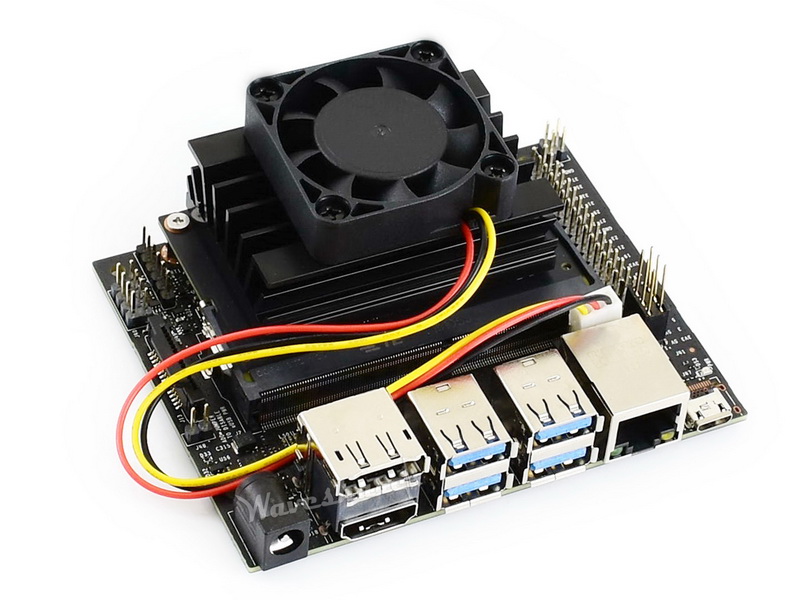
GPU: 128-core NVIDIA Maxwell™ architecture-based GPU
CPU: Quad-core ARM® A57
Video: 4K @ 30 fps (H.264/H.265) / 4K @ 60 fps (H.264/H.265) encode and decode
Camera: MIPI CSI-2 DPHY lanes, 12x (Module) and 1x (Developer Kit)
Memory: 4 GB 64-bit LPDDR4; 25.6 gigabytes/second
Connectivity: Gigabit Ethernet
OS Support: Linux for Tegra®
Module Size: 70mm x 45mm
Developer Kit Size: 100mm x 80mm
Install TensorFlow: https://docs.nvidia.com/deeplearning/frameworks/install-tf-jetson-platform/index.html
- To work with Jetson nano add below script in detail_main.py, this will ensure the script run on CPU. (NB: Running on GPU will throw CUDA error)
os.environ('CUDA_VISIBLE_DEVICES') = '-1'
- Install dependencies and connect usb microphone or USB blueotooth dongle
Reference
- https://github.com/habom2310/Heart-rate-measurement-using-camera
- Real Time Heart Rate Monitoring From Facial RGB Color Video Using Webcam by H. Rahman, M.U. Ahmed, S. Begum, P. Funk
- Remote Monitoring of Heart Rate using Multispectral Imaging in Group 2, 18-551, Spring 2015 by Michael Kellman Carnegie (Mellon University), Sophia Zikanova (Carnegie Mellon University) and Bryan Phipps (Carnegie Mellon University)
- Non-contact, automated cardiac pulse measurements using video imaging and blind source separation by Ming-Zher Poh, Daniel J. McDuff, and Rosalind W. Picard
- Camera-based Heart Rate Monitoring by Janus Nørtoft Jensen and Morten Hannemose
- Graphs plotting is based on https://github.com/thearn/webcam-pulse-detector https://www.pyimagesearch.com/2017/04/03/facial-landmarks-dlib-opencv-python/
- Heart rate detection on https://www.pyimagesearch.com/2018/09/24/opencv-face-recognition/
- Sound recognition on https://github.com/FIGLAB/ubicoustics
Built With
- c
- c++
- cmake
- css
- html
- javascript
- jupyter-notebook
- m4
- objective-c
- python
- shell

Log in or sign up for Devpost to join the conversation.