-
-
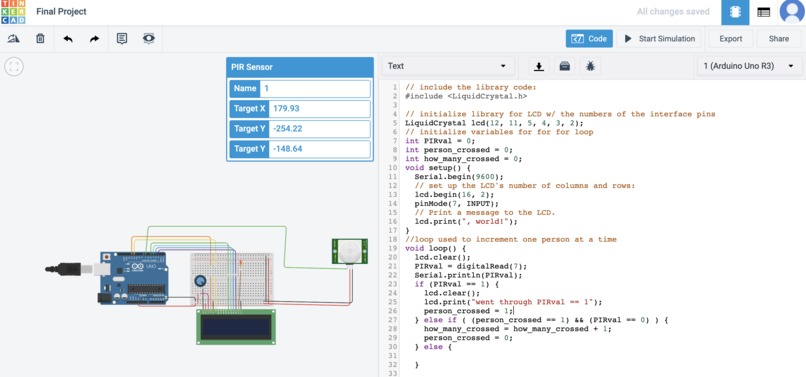
Image/Code
-
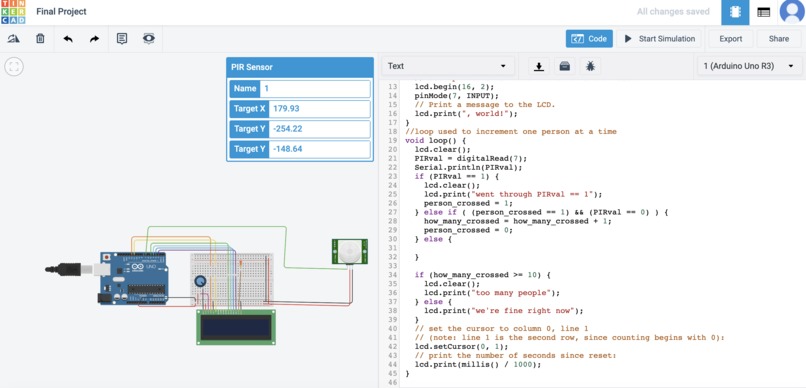
Image/Code
Inspiration
What was our Inspiration?
With the climate of the world in the face of the Covid 19 pandemic, the need for a sensor to collect social gathering information will be crucial in the weeks to come. The nation's top infectious disease expert, Dr. Anthony Fauci, warns the United States of America of a prolonged pandemic if people don't follow the stay at home orders issued by the government. Social distancing is critical right now and people are in constant fear of attending public places that are overcrowded. Our Pyroelectric InfraRed Sensor (PIR) will be able to detect the number of people in a location at a certain time and display that information to anyone that is curious. This sensor can be used in parks, stores, banks, or anywhere that can be subjected to overcrowding. With the ability to detect the number of people in a place at any given time, the public will feel a lot more secure and pleased when making decisions to go places. Our sensor idea was inspired by the youtube video that was used to teach us about tinkercad in our first lab (the distance sensor). It involved using a sensor to sense when a garbage can was filled to the brim. We modified this idea to help with another challenge that the world is currently facing.
What was the process like building your product
Creating the final product took some hard work, communication, and dedication. The first struggle was finding a convenient time to work together as partners outside of the scheduled class time. We also found trouble with the software side of our project. We could not figure out how to code the LCD to display our movements with the PIR sensor. With the help of the TA’s and some for loop tricks we were able to successfully display our readouts on the LCD. Overall, the project went well and we were very happy with our results. The best part about Tinkercad is that there are no faulty wires or arduinos so everything runs pretty smoothly.
Explanation of the hardware/software
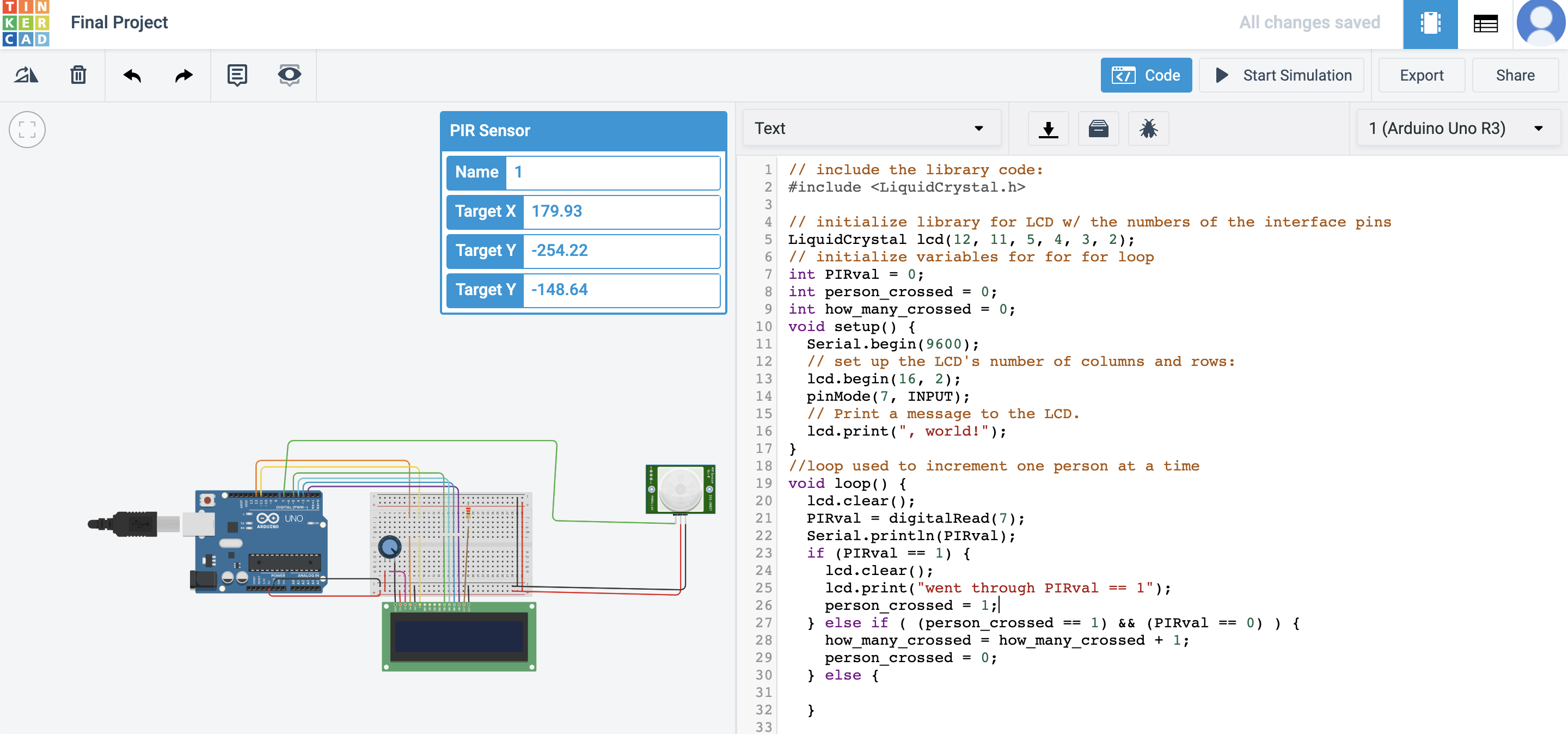
We used a Pyroelectric InfraRed Sensor (PIR) to detect the number of people moving in the area of interest (in front of the sensor). The PIR sensor acts as a laser sensor, once the beam is broken the sensor is triggered and the data becomes collected. By dragging an icon back and forth in front of the sensor you can simulate humans walking back and forth.
The LiquidCrystal library (LCD) was used to display a message to the public reading “we are fine” or “too many people”. This device would act like a miniature light up billboard that you see on skyscrapers in New York City or on highways; displaying a message to the public.
The Potentiometer is a device that adds resistance to the circuit system. We used this device as a way to control the flow of current into the LCD.
How did we program this to operate
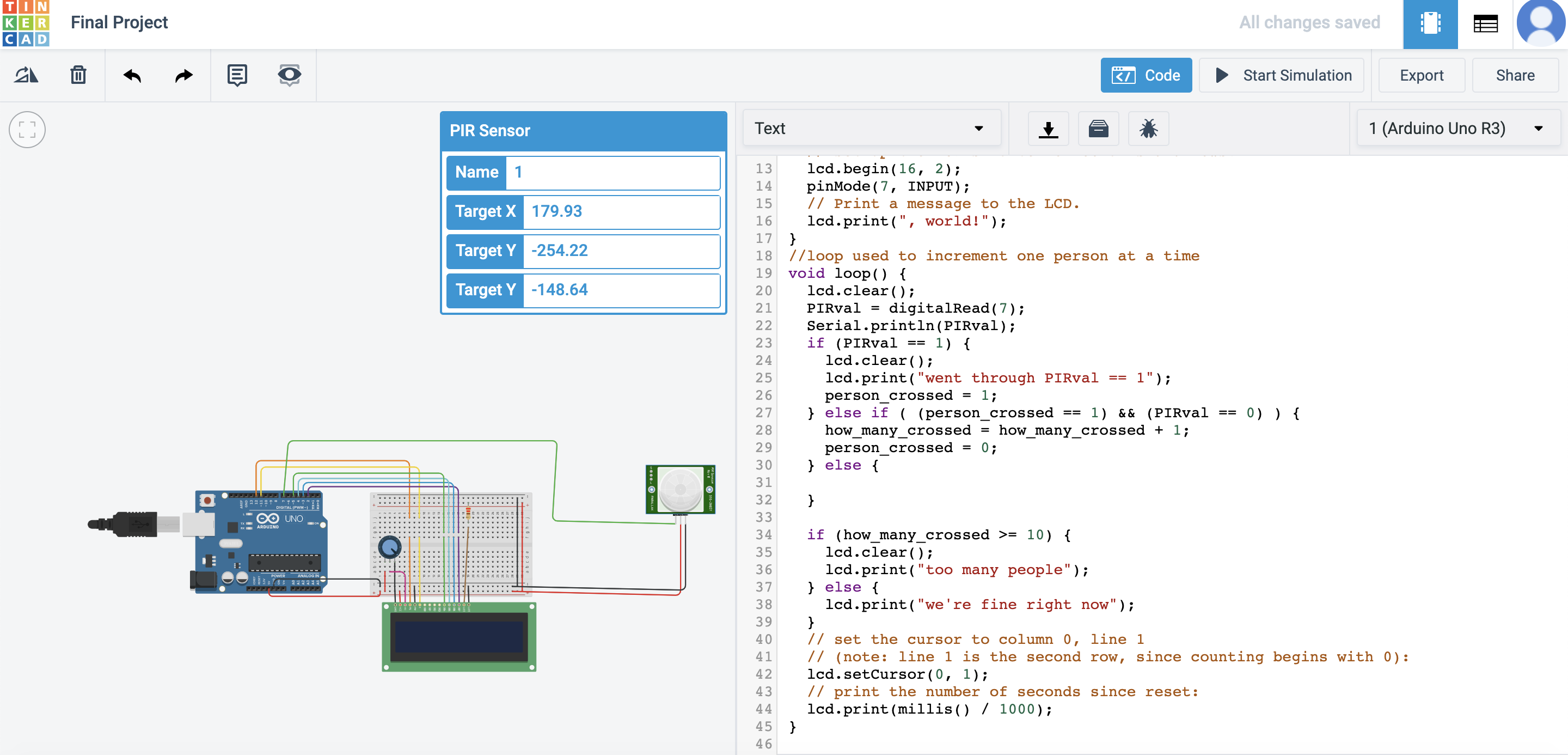
To make this system work we modified some built in LCD code, PIR sensor code, Ultrasonic Distance code, and we created our own personalized for loop. Initially, we had to tell the arduino the correct outputs that were being utilized by the PIR sensor and LCD. We then initialized a few variables that would be used to feed the arduino information when the sensors were running. Our for loop was used to add up the number of people that passed in front of the sensor. We had the system increment one by one every time someone passed in front of the sensor. We then set a cutoff distance of 10 people telling the arduino, that is the maximum amount of people allowed. Next, the for loop would print statements on the LCD as products of the incrementation. Finally, The LCD would display “we are fine” when there were less than 10 people but would quickly read “Too many people” when 10 people passed in front of the sensor.
What would you add if you could have built this in person?
If we had the ability to construct this final project in person we would add a Wifi module to our system. Our original plan was to have a system that would detect the number of people in a given area and convey that information to the public through an app on their phones. We would create a simple app online that would serve as an alert system. The app would alert users of “hotspots” to avoid and places that were safe to attend through notifications on the app. It also would have a minimap of university city and would show the locations from sensors around the town with their uploaded data. With a Wifi module we could code the PIR sensor to relay information directly to our app. This would be extremely helpful because users would get feedback in real time. We would also solder a wire to the retrigger switch, so that we the PIR sensor would initialize automatically once a target moves out of range as opposed to retriggering after a predetermined amount of time. This is according to the specification of the adafruit documentation found here : https://cdn-learn.adafruit.com/downloads/pdf/pir-passive-infrared-proximity-motion-sensor.pdf?timestamp=1587313253
Final Remarks
In brief, our project would hypothetically help slow the spread of the virus in states with a large amount of cases. This project was super fun and allowed us to synthesize several software and hardware skills that we learned throughout the semester. Huge thank you to Professor Sid and all of the TA’s this semester!!!
Built With
- arduino
- lcd
- pir
- pontentiometer

Log in or sign up for Devpost to join the conversation.