Inspiration
Course selection/registration can be one of the most overwhelming experiences for college students. Between navigating through prerequisites, finding availability time slots, credit requirements, career goals, fulfilling major requirements, and personal preferences, it’s easy to feel lost or make decisions that don’t serve long-term goals. We wanted to fix that. Our team set out to make it easier for students: Smart Scheduler is an AI-powered website that simplifies academic planning and helps students create smarter and more personalized schedules.
What it does
Smart Scheduler is a web platform that uses artificial intelligence to generate a student’s class schedule based on their academic history, preferences, and career goals. Students log in with their school credentials, complete a short preferences form, and receive a tailored schedule that includes:
- Courses that match their career goals, major, and completed prerequisites
- Available class times based on their preferences (morning/afternoon/evening)
- The ability to view alternate sections or schedules
- Course descriptions, professor info, and section-specific data
- A final User Profile Dashboard to track enrolled courses and credit count
How we built it
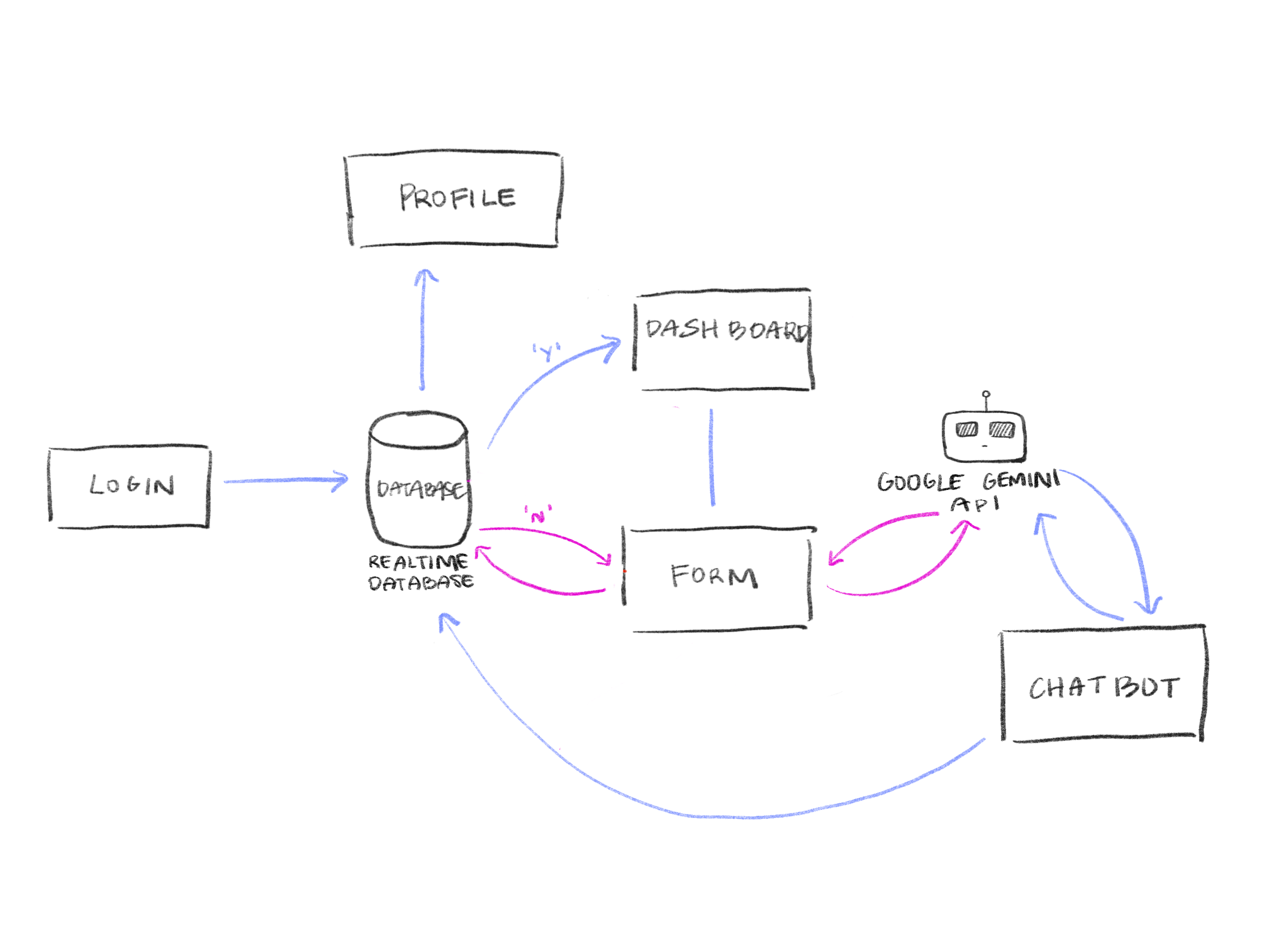
Our process started in Figma, where we mapped the user experience from login to dashboard to profile. We focused on clean UI/UX and an intuitive flow.
- Frontend
- Utilizes JavaScript, HTML, and CSS to output and style the site for end users
- Backend
- Uses Firebase Realtime Database to store course data and user history
- AI Logic: Matches user preferences with courses based on career path, prerequisites, major alignment, and availability
- Live Updates: Firebase listeners ensure real-time updates to profiles and dashboards
- Chatbot: Uses Gemini API to answer questions and enhance accessibility
- Collaboration
- Built in VS Code, managed via GitHub, and styled with Figma wireframes
Challenges we ran into
Some of the challenges we ran into involved structuring the database in a way that supports scalability, especially for managing multiple sections, majors, and career paths. We also had to make sure that the logic used to filter and recommend courses handled all cases, such as missing prerequisites or credit overload. On the frontend, syncing user state and ensuring real-time feedback without creating lag or UI bugs was another challenge we successfully navigated.
Accomplishments that we're proud of
We’re proud of what we’ve built: a fully functional, end-to-end scheduling assistant that makes personalized academic planning a lot easier. We’re especially proud of the clean design, the live course recommendation logic, and how well the data syncs across components and backend. Our implementation of a modular component system in React also made development smoother and easier to maintain.
What we learned
Throughout the process, we learned a lot about state management in real-time apps and the importance of collaborative component development. Working with tools like React and Firebase taught us how to design large systems that effectively manage both user interactions and data. This experience also gave us insight into how impactful good UI/UX design is when it comes to simplifying complex tasks, ensuring that even intricate scheduling logic is presented in an intuitive and user-friendly manner.
What's next for Smart Scheduler
Our team loved building Smart Scheduler- it helped us utilize our skills in a practical environment outside of class in addition to learning what we would or wouldn’t want in our schedule planning processes. Smart Scheduler has only just started as an idea, and will hopefully seek to improve on current practices in scheduling and innovate new methods to academic planning. Whether this is through the current website, a mobile app, or other ideas- Smart Scheduler is nowhere near done.
Built With
- chatgpt
- css
- figma
- firebase-realtime-database-(google-cloud-platform)
- gemini-api
- github
- github-for-version-control
- html
- javascript
- react
- vs-code


Log in or sign up for Devpost to join the conversation.