-
-
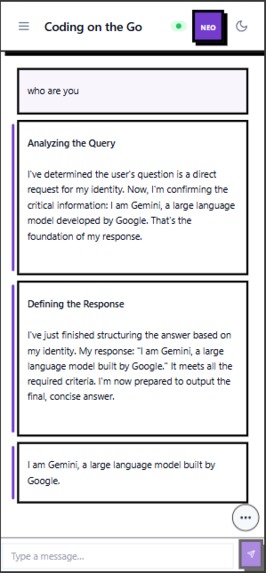
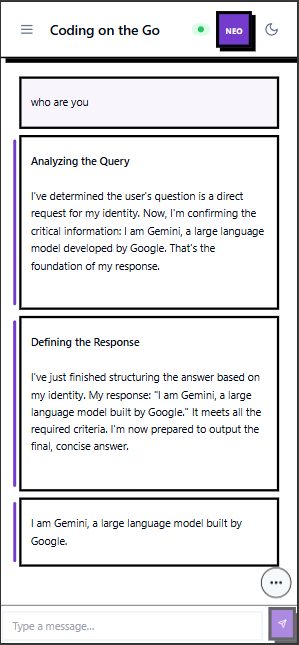
talk to gemini CLI using Agent-client-protocol
-
-
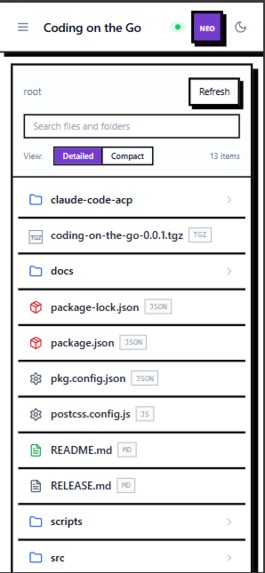
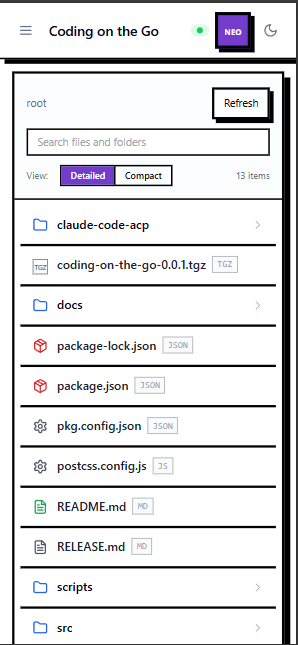
list of all files safely by following the .gitignore file. no env leakage
-
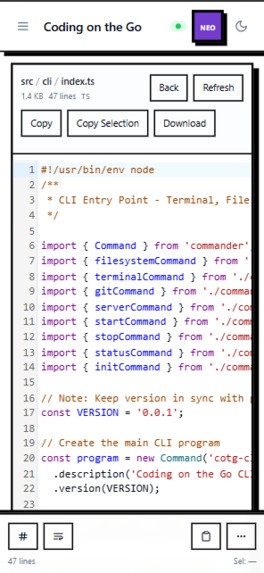
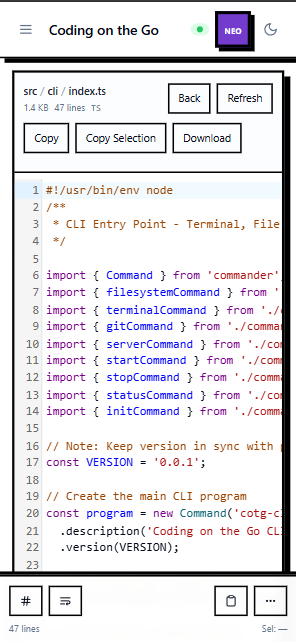
read files with syntax highlighting
-
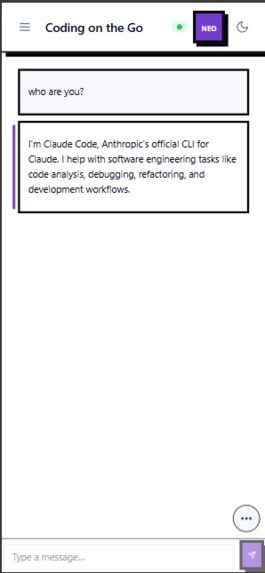
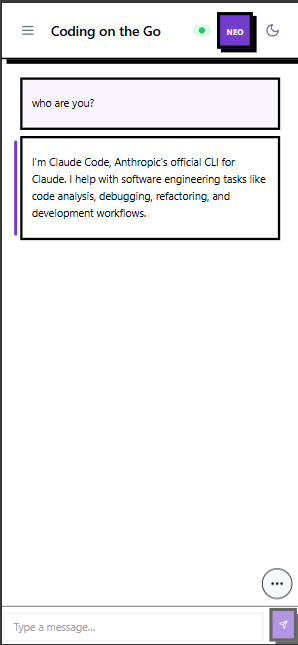
talk with claude code directly using Agent-Client-Protocol
-
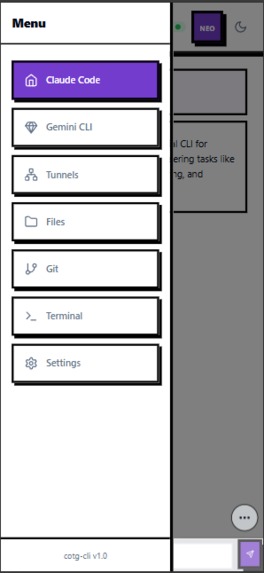
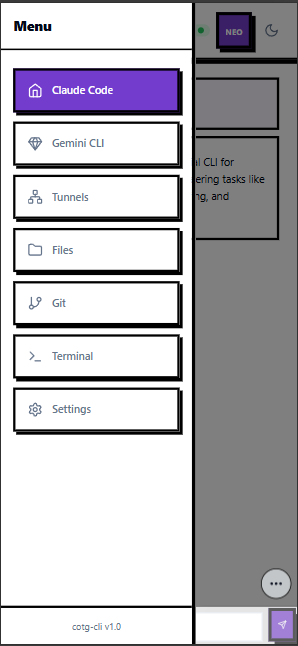
list of all sidebar menus
-
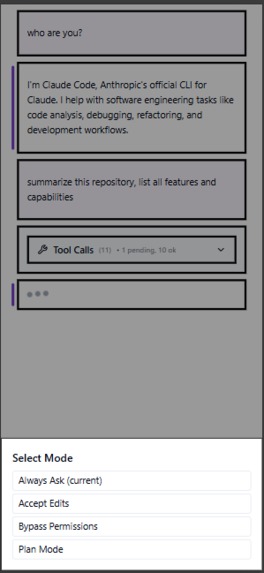
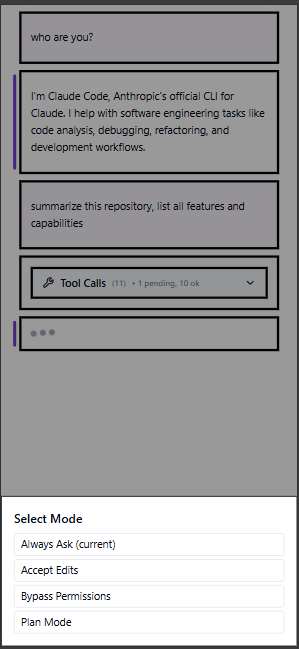
change mode on claude code
-
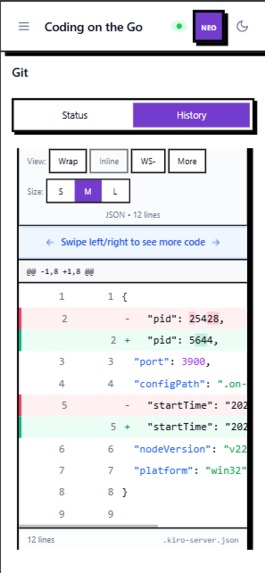
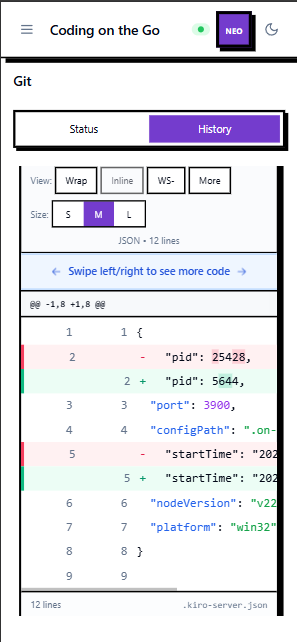
read git diff, histories and pull new updates
-
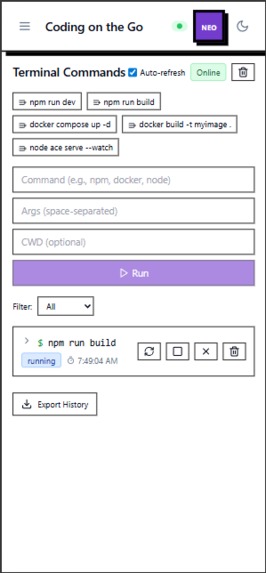
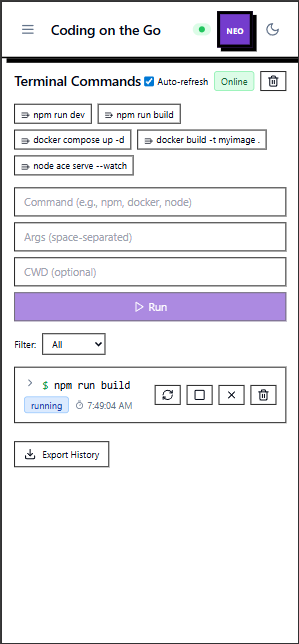
run terminal command and manage it directly from phone
-
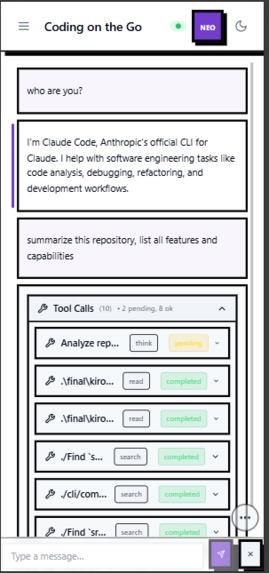
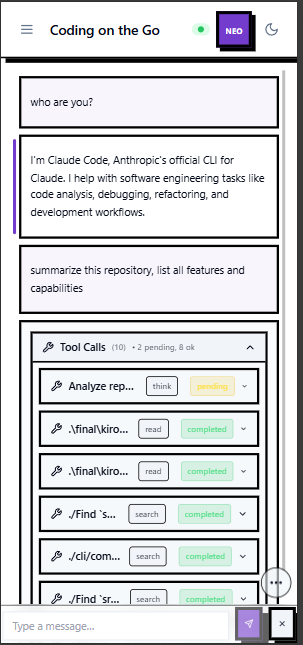
check on tool calls on the agent directly from your phone
Inspiration
As a software engineer who recently entered a new phase of life, becoming a new parent while working from home, I quickly realized I needed more flexibility. I wanted an agentic coding assistant I could access directly from my mobile device. But when I looked for solutions, I discovered that the market doesn't really offer what I need.
The problems I ran into
- Extra subscriptions. If I already pay for Kiro or Claude Code, but want remote coding, I would still need to subscribe again to something like Devin or Codex. It feels fragmented and costly.
- Cloud lock-in. Most remote agentic coding tools are tightly tied to cloud environments. My daily workflow uses local MySQL, Redis, and Docker. Running those remotely either doesn't work, or it's prohibitively expensive. Migrating to cloud databases or serverless isn't realistic because my team already has a fixed stack.
- Broken workflow continuity. Switching between mobile and desktop isn't smooth. I end up juggling GitHub PRs, merges, and context switching. I can't just pick up where I left off; it feels like two disconnected worlds.
- Other solutions. I also explored remote desktop, but it doesn't work well on a small phone screen and the overall experience is frustrating.
What I actually want
My dream is simple:
- Read code and files from my phone
- Assign an AI agent to search, analyze, and diagnose
- Fix small bugs or at least identify the issues
- Run tests or scripts from my phone
- Use something I already subscribe to, or ideally something free
I want the agent to handle the boring, repetitive research inside my codebase so that when I'm done changing diapers or playing with my baby, I can sit down at my computer and continue immediately with all the insights and investigations ready.
"I don't want an AI that replaces coding, which is my job. I want an assistant that removes the tedious parts so I can focus on building and enhance my productivity, remotely from my phone."
What it does
Coding on the Go is a comprehensive CLI that make you can access your folder remotely using Cloudflare tunnel with AI agents via ACP, Filesystem, Git, Terminal, and Tunnel management.
Core Capabilities
1. Multi-Agent AI Integration
- Claude Code ACP Support: Integration with Claude Code CLI using the Agent-Client-Protocol
- Gemini-CLI Experimental ACP: Support for Google's Gemini CLI with experimental ACP features
- Agent Marketplace Ready: Extensible architecture for adding new AI agents as they become available in ACP in the future
- Real-time Agent Communication: Live bidirectional communication with agents over WebSocket
2. Advanced File System Operations
- Complete File Browser: Navigate and read any file in your codebase with syntax highlighting
- Smart File Search: Search across files with regex patterns, content filtering, and file type restrictions
- Directory Tree View: Hierarchical folder structure with expandable/collapsible navigation
- File viewer: View code, image, or markdown in plain text or renderer version
- Syntax Highlighting: View code with nice syntax highlighting
3. Comprehensive Git Integration
- Repository Status: Real-time git status with staged/unstaged changes tracking
- Commit History: Detailed commit logs with author, timestamp, and change statistics
- Diff Viewer: Visual diff tool for comparing changes with syntax highlighting
- *Pull Operation: Update Repository remotely with pull button
4. Terminal Command
- Command Execution: Run any terminal command with real-time output streaming
- Process Management: Start, stop, and monitor long-running processes
- Output Capture: Capture and save terminal output for later analysis
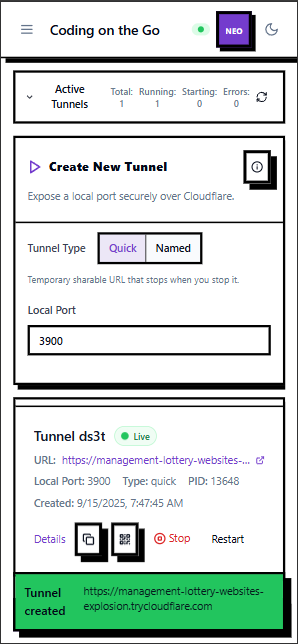
5. Cloudflare Tunnel Integration
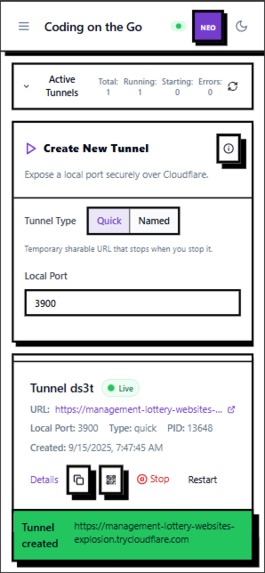
- Instant Public Access: Create secure public tunnels to local development servers
- Quick Tunnels: Generate temporary URLs for sharing local work
- Named Tunnels: Persistent tunnels with custom domains
- Tunnel Management: Start, stop, and monitor tunnel status remotely
- Security: Secure HTTPS tunnels with Cloudflare's infrastructure
6. Tool Call Inspection
- Agent Activity Monitoring: Watch AI agent tool calls in chat
- Execution Tracking: Track which files are being read, modified, or executed
- Execution Status: see which tool are currently working and completed
Key Use Cases
- Code Review: Review pull requests and suggest changes from anywhere
- Debugging: Investigate issues and run tests while away from desk
- Code Analysis: Ask AI to analyze code patterns and suggest improvements
- Emergency Fixes: Quick bug fixes when you can't access your computer
How I built it
I designed and implemented Coding on the Go around the Agent-Client-Protocol (@zed-industries/agent-client-protocol), creating a comprehensive solution that bridges local development environments with remote mobile access.
Architecture Overview
The system is built on a multi-tier service-oriented architecture with clear separation of concerns:
Layer 1: CLI Foundation
- Commander Framework: Robust CLI interface with comprehensive command handling
- Service Layer: Modular services for Terminal, FileSystem, Git, and Tunnel, ACP process management
- Process Lifecycle: Comprehensive process monitoring and management capabilities
Layer 2: WebSocket-First Backend
- Real-time Communication: WebSocket-based architecture using the
wslibrary - Service Registration Pattern: Extensible service registration system for adding new functionality
- Connection Management: Reconnecting WebSocket with heartbeat and automatic recovery
- Event Broadcasting: Multi-client event synchronization with state management
Layer 3: React Frontend
- Modern React Stack: React 18 with TypeScript, hooks, and functional components
- Mobile-First Design: Responsive UI optimized for touch interactions
- Real-time Updates: WebSocket integration for live data synchronization
- Code Editor Integration: CodeMirror for advanced code editing capabilities
Technical Implementation Details
1. ACP Protocol Implementation
The ACP integration is the heart of the system, using:
// Agent-Client-Protocol over WebSocket
interface ACPMessage {
  jsonrpc: "2.0";
  id: string | number;
  method: string;
  params?: any;
  result?: any;
  error?: {
    code: number;
    message: string;
    data?: any;
  };
}
Key Implementation Features:
- Multi-Agent Registry: Support for Claude Code, Gemini CLI, and future agents
- Session Management: Persistent agent sessions with state recovery
- Real-time Communication: WebSocket-based bidirectional messaging
- Authentication: Multiple auth methods with secure credential storage
- Error Handling: Comprehensive error handling with auth requirement detection
2. WebSocket Architecture
The WebSocket implementation uses a structured message protocol:
interface WebSocketMessage {
  type: 'command' | 'response' | 'broadcast' | 'fileSystem' | 'git' | 'terminal' | 'acp';
  id?: string;
  data?: any;
  error?: string;
}
Core Features:
- Reconnecting WebSocket: Automatic reconnection with exponential backoff
- Heartbeat Mechanism: 20-second ping/pong for connection health
- Service Registration: Extensible service pattern for adding new functionality
- Message Routing: Type-based routing to appropriate services
- Multi-client Support: Concurrent connections with isolated sessions
3. File System Integration
The file system service provides secure, efficient file operations:
class FileSystemService {
  private securityManager: PathSecurityManager;
  private fileWatcher: FileWatcher;
  private cache: FileContentCache;

  async readFiles(paths: string[]): Promise<FileContent[]> {
    // Security validation, caching, and batch reading
  }

}
Security Features:
- Path Validation: Comprehensive path security to prevent directory traversal
- GitIgnore Integration: Respects .gitignore files for file operations
4. Git Service Architecture
The Git service provides comprehensive repository management:
class GitService {
  private repoCache: Map<string, Repository>;
  private workingDirectory: string;

  async getStatus(): Promise<GitStatus> {
    // Real-time git status with caching
  }
}
Advanced Features:
- Repository Detection: Automatic repository discovery and validation
- Operation Safety: Safe git operations with pre-flight checks
- Multi-repo Support: Support for multiple repositories
- Caching: Repository state caching for performance optimization
5. Cloudflare Tunnel Integration
The Cloudflared integration provides secure remote access:
class CloudflaredManager {
  private activeTunnels: Map<string, TunnelProcess>;
  private tokenManager: TokenManager;

  async createQuickTunnel(port: number): Promise<TunnelInfo> {
    // Create temporary public tunnel
  }

  async createNamedTunnel(config: TunnelConfig): Promise<TunnelInfo> {
    // Create persistent tunnel with custom domain
  }
}
Key Features:
- Quick Tunnels: Temporary public URLs for development
- Named Tunnels: Persistent tunnels with custom domains
- Token Management: Secure Cloudflare API token handling
- Process Monitoring: Tunnel process health monitoring
Development Workflow
1. Kiro-Driven Development
I used Kiro extensively throughout the development process:
Spec-Driven Architecture:
- Created comprehensive specs for system design and architecture
- Used Kiro Spec for complex architectural decisions
- Iterative design refinement through spec evolution
- Automated branch management and workflow organization
Automated Commit Workflow:
- Kiro Hooks automated commit message generation
- Detailed commit descriptions with context and rationale
Code Generation and Refactoring:
- Kiro Vibe code generation for repetitive patterns
- Automated refactoring of complex components
- Code quality improvements through Kiro AI suggestions
How I leveraged Kiro to build it
I used all the features Kiro has to offer throughout the development process.
1. Spec-Driven Development
Specs became a great medium for learning and exploring architectural solutions. I used them extensively for:
Architecture Exploration:
- Created detailed specs for WebSocket architecture and ACP integration
- Explored different design patterns and their trade-offs
- Generated comprehensive technical documentation
- Created type definitions and interface contracts
UI Design System:
- Generated comprehensive design system documentation
- Created neo-brutalist style theme specifications
- Developed component library specifications
- Iterative design refinement through AI feedback
Complex Problem Solving:
- Used specs for debugging complex architectural issues
- Explored different approaches to ACP protocol implementation
- Generated solutions for WebSocket connection management
- Created comprehensive error handling strategies
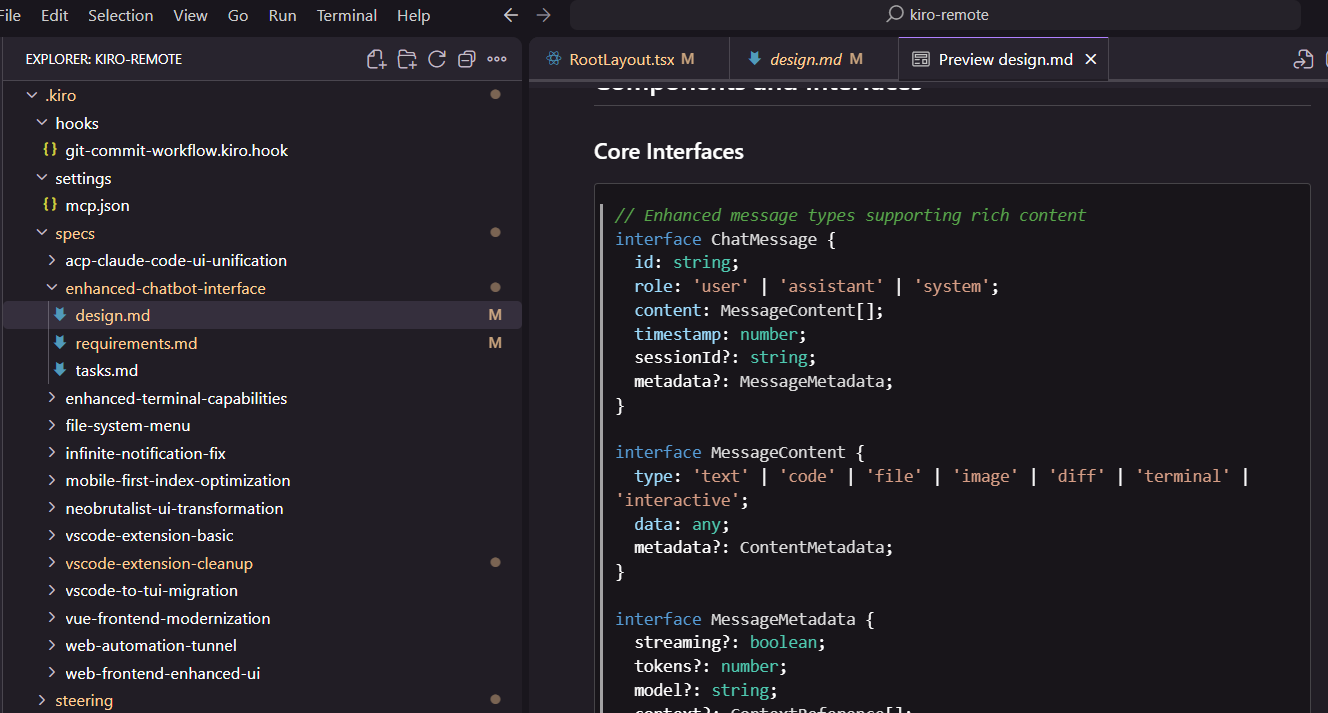
I even experimented with automating branch and commit creation through specs. This made development feel safer: if I didn't like the direction, I could just switch to dev and delete the branch. Git commits also saved a lot of time since I could move between tasks smoothly.

My best use case was defining a design system doc in spec form, which transformed a simple Shadcn template into a unique neo-brutalist style.
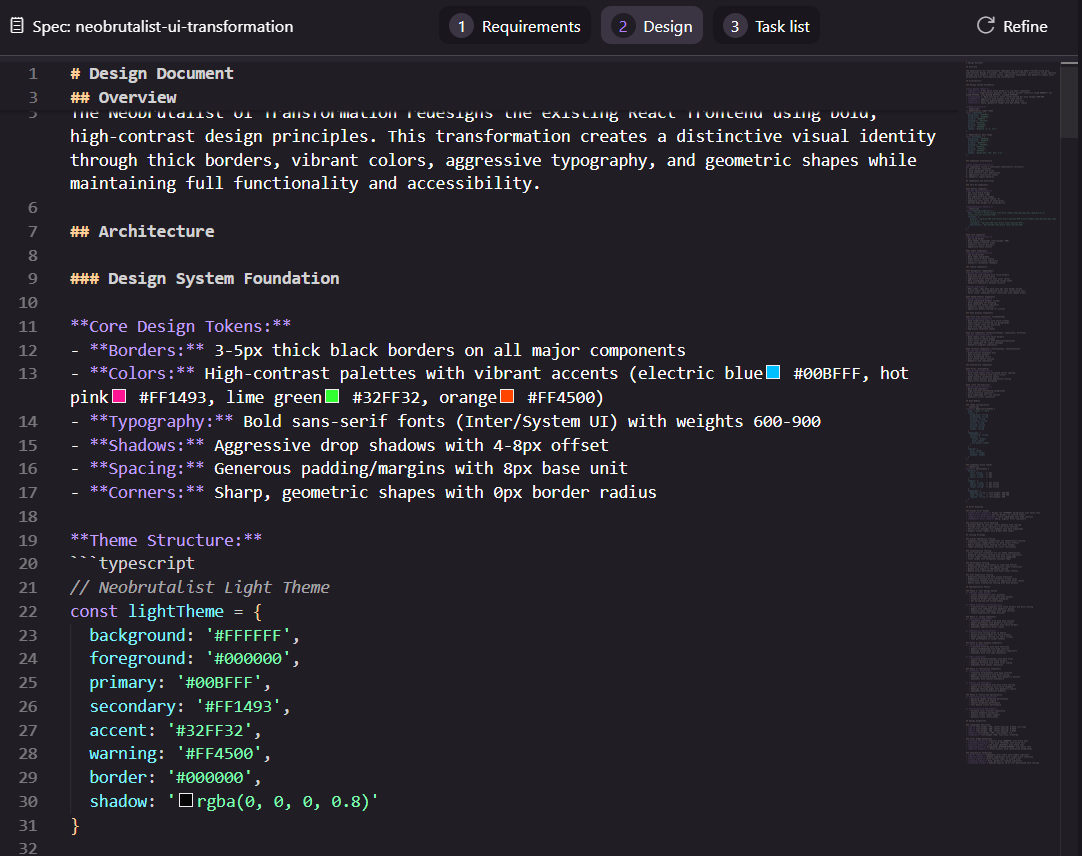
2. Hooks Integration
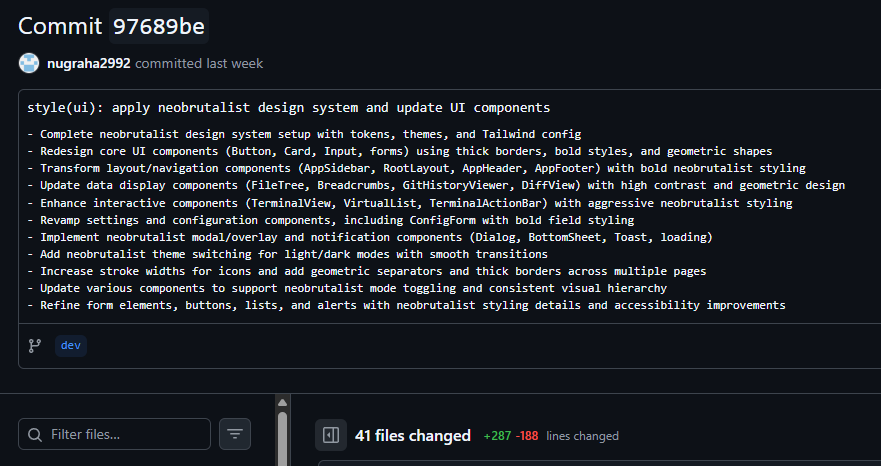
My favorite hook is automated commit messages. Unlike tools that only generate short lines, this produces full commit descriptions. For example, a commit with 41 files changed still comes with a detailed explanation, making it much easier to trace or revert.
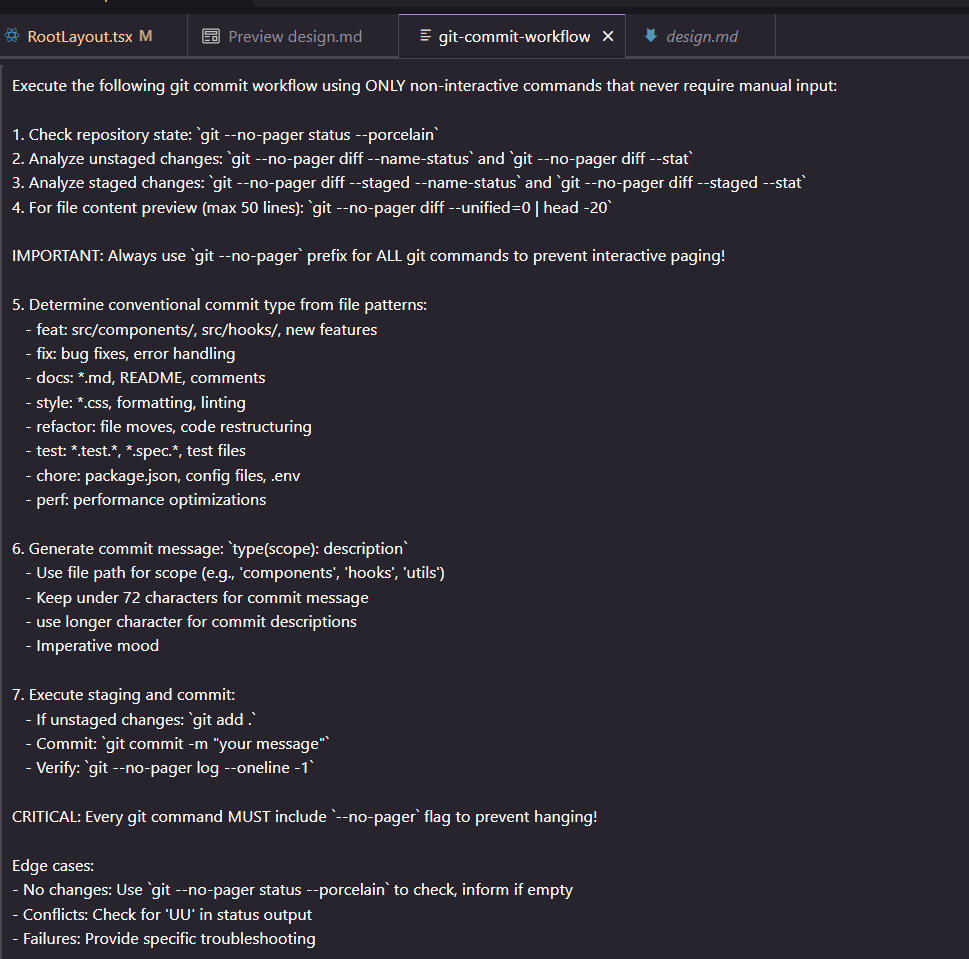
This is how my hooks are configured:
3. Vibe-Coding Workflow
Sometimes creating specs felt heavy, so I turned to Vibe. Using vibe-documenting, I generated well-formatted markdown with occasional architecture diagrams. Combined with ChatGPT and Kiro's #codebase search, this made debugging, isolating problems, and finding related files much faster.
Vibe-Driven Development:
- Quick prototyping and exploration of new features
- Rapid iteration on UI components and user experience
- Automated code generation for boilerplate and repetitive patterns
- Real-time code analysis and optimization suggestions
Challenges I ran into
At first, I tried to use Kiro Hooks for remote automation. My idea was to create a new file containing a prompt, save it remotely, and let the AI agent generate results in another folder. That's why the project started as a VS Code extension called Kiro Remote, or "Kiro on the Go." But Hooks don't trigger outside of the IDE, so I had to pivot. Eventually, I found the Agent-Client-Protocol, which let me connect an external agent like Claude Code CLI directly inside a web app.
Technical Challenges
1. ACP Protocol Complexity
- Lack of examples and understanding across models. Models often confuse Agent-Client-Protocol with Agent-Communication-Protocol. I need to explicitly say ACP (client) to avoid hallucinations.
- Limited documentation. The source of truth is scarce, and even ChatGPT hasn't been much help here.
- Incomplete implementations. Current ACP implementations are buggy and incomplete, requiring extensive debugging and workarounds.
2. WebSocket Architecture
- Connection management across different network conditions
- State synchronization between multiple clients
- Performance optimization for mobile networks
3. Mobile Experience
- Optimizing UI for small screens and touch interaction
- Performance optimization for mobile devices
4. Security and Authentication
- Secure credential storage and management
- Path validation and file system security
5. Integration Complexity
- Git integration
- Cloudflare tunnel management and monitoring
What I learned
Coding remotely from a phone is not only possible but also a real productivity boost. The ability to quickly check on code, run tests, or fix small issues while away from your desk is invaluable.
The Agent-Client-Protocol is still very early, like MCP, but I expect it to gain momentum and wider adoption. As more AI providers implement ACP, the ecosystem will become much more powerful.
Coding today is more about reading and understanding than writing. With Kiro, I pushed over 200 commits in 3 weeks with more than 10 features. The actual coding felt like the smaller part compared to architectural decisions and problem-solving.
Kiro is especially helpful for learning new concepts like ACP when resources are scarce. It helped me understand the architecture, flow, and patterns of the Agent-Client-Protocol when documentation was limited.
Vibe-coding, vibe-documenting, vibe-understanding. Agentic coding is more than a one-shot genie. It's a tool for iteration, learning, and growth. The combination of specs, hooks, and vibe creates a powerful development workflow.
Specs are only as good as my understanding of them. They can also hallucinate, so I prefer iterative design and letting the AI align with me. The key is to use AI as a collaborative partner rather than a replacement for human judgment.
Mobile-first development requires different thinking. Optimizing for mobile networks, touch interfaces, and small screens presents unique challenges that require specialized solutions.
Real-time web applications are complex but powerful. The WebSocket architecture enables experiences that weren't possible with traditional request-response patterns.
What's next for Coding on the Go
Since many providers are forking Gemini CLI (such as Qwen-Coder and other TUI-based forks), I see opportunities to integrate more agents into cotg-cli. The extensible agent registry makes it easy to add new providers as they emerge.
I've already implemented ACP, but not at full feature parity due to limited time. Expanding coverage to include all ACP features is a clear next step for making the system more powerful.
Currently, the system only works with a single repository and branch. In the future, I want seamless movement between projects and multiple repositories to make this truly scalable for people managing many projects.
Enhanced collaboration features including real-time multi-user editing, shared terminal sessions, and team-based agent interactions.
Native mobile applications for iOS and Android to provide better integration with mobile platforms and offline capabilities.
Advanced AI agent features including agent-to-agent communication, specialized agents for different tasks, and intelligent task routing.
The goal is to make Coding on the Go the definitive solution for remote development, enabling developers to be productive from anywhere while maintaining the power and flexibility of their local development environments.
Built With
- agent-client-protocol
- node.js
- react
- typescript
- websockets

Log in or sign up for Devpost to join the conversation.