-
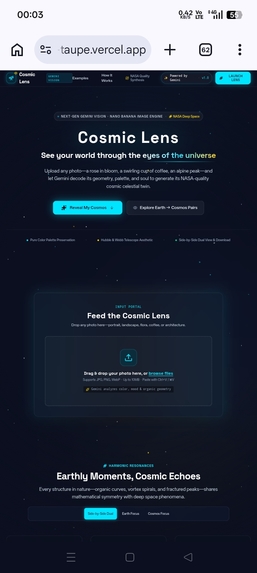
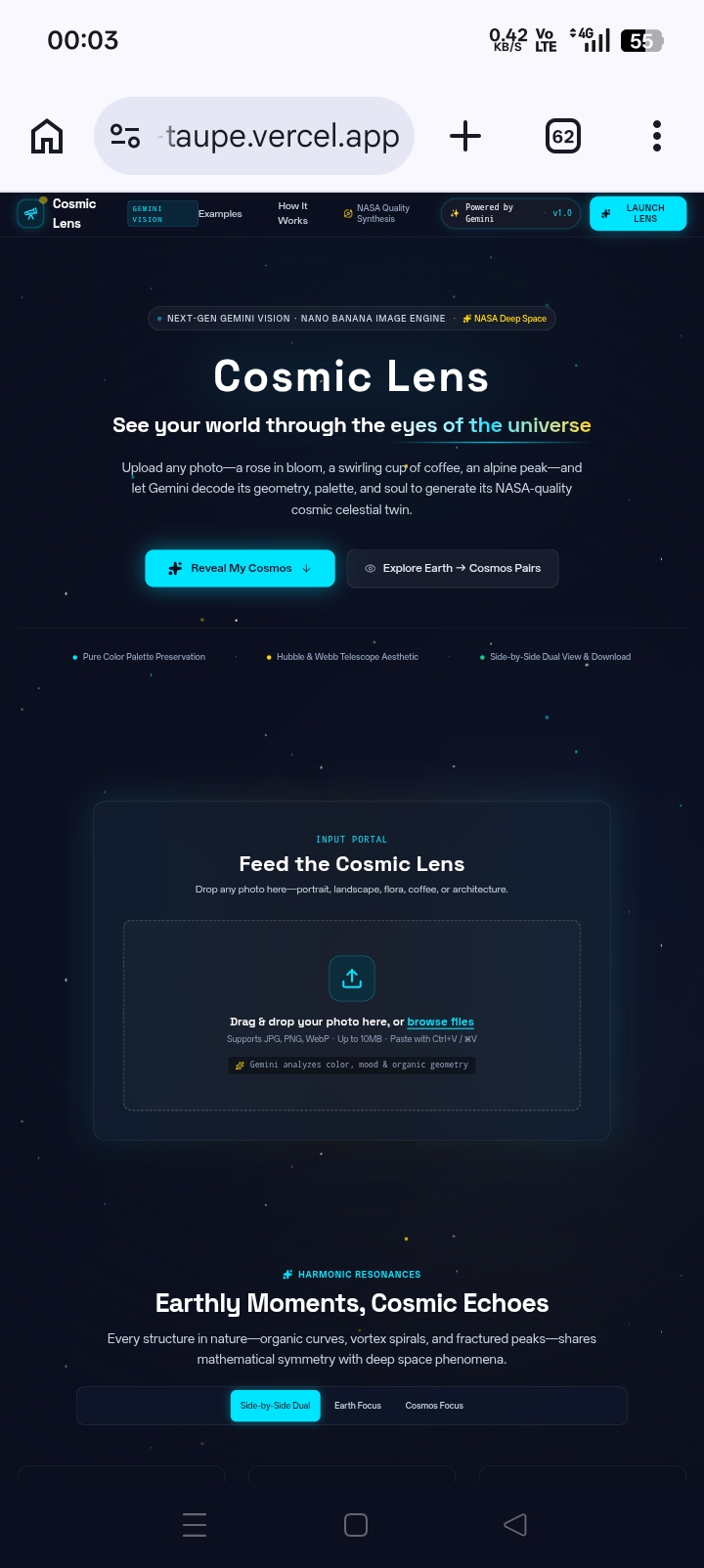
Homepage
-
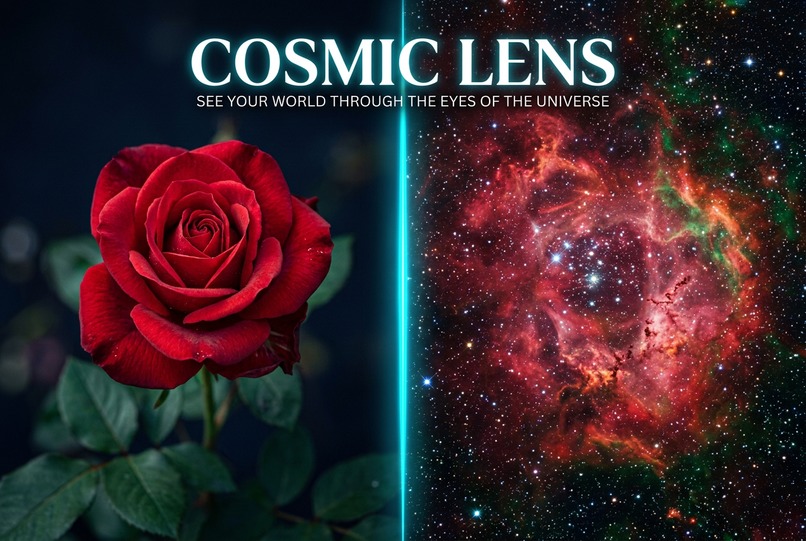
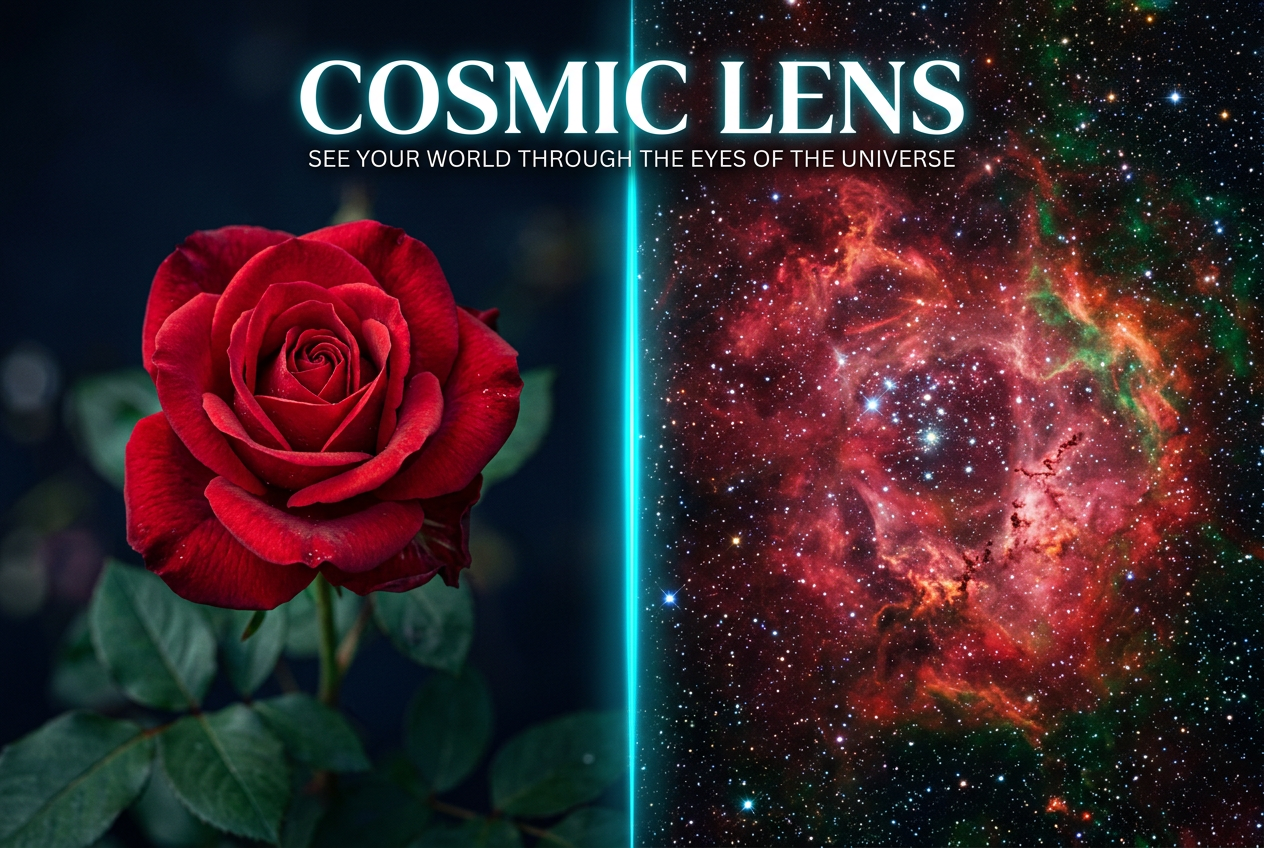
🔭 Cosmic Lens — See Your World Through the Eyes of the Universe ✨ Inspiration The seed for Cosmic Lens came from a single moment of stargazing. I was looking at a deep-field image of the Carina Nebula — those towering pillars of cosmic dust and gas where stars are born — when I noticed something striking. The swirling crimson and gold hues of that distant nebula looked almost exactly like the petals of a wilting rose I had photographed the week before.
That realization hit me hard: the universe rhymes with itself. The same colors, the same organic shapes, the same feeling of delicate beauty exist in both a backyard flower and a stellar nursery 7,500 light-years away. We just never see them side by side.
I wanted to build something that would make that connection visceral — that would let anyone, with a single photo, see their own personal "cosmic twin." A rose becoming a nebula. A coffee becoming a galaxy. A portrait becoming a pulsar. Not just a filter, but a genuine translation that preserves the essence — the colors, the mood, the structure — while shifting the scale from the intimate to the infinite.
That's how Cosmic Lens was born.
💡 What it does Cosmic Lens is a web app that reimagines any photograph as a cosmic space equivalent using AI.
The user flow:
Upload any photo — a flower, a face, a coffee, a sunset, a pet, a building, anything. Gemini 2.5 Flash Vision analyzes the image and extracts its astrophysical essence: Subject Primary color palette Mood and atmosphere Visual structure (organic, geometric, fluid, sharp, soft) A specific cosmic phenomenon that mirrors the image (e.g., "Pillars of Creation," "Veil Supernova Remnant," "Helix Planetary Nebula") A poetic inspiration phrase in the voice of Carl Sagan Gemini 2.5 Flash Image (Nano Banana) generates a stunning NASA-quality cosmic version — a nebula, galaxy, pulsar, or stellar nursery — that strictly preserves the original's color palette and mood. The reveal displays both images side-by-side with a glowing cyan divider, accompanied by floating particles, a subtle pentatonic twinkle chime synthesized via the Web Audio API, and an animated Carl-Sagan-esque quote. Three view modes for the result:
Dual View — side-by-side comparison (stacks vertically on mobile) Split Slider — a draggable interactive slider to compare Earth ↔ Cosmos in real time Cosmos Solo — full-screen cosmic reveal with a cyan glow halo The magic touch: Users can type their name into a "Personalize Keepsake" field, and when they download the high-resolution PNG, their name is embedded into the export — making the result genuinely shareable as a personal cosmic artifact.
🛠️ How we built it Cosmic Lens is a full-stack Next.js application that I built from scratch, with Google AI Studio's Gemini APIs powering the AI backbone and some AI-assisted debugging along the way.
Tech Stack:
Framework: Next.js 15 (App Router) with TypeScript — the entire frontend and backend architecture, built by hand Styling: Tailwind CSS 4 with custom cosmic theme (#0B0F1F deep navy, #00E5FF cyan glow, #FFD700 warm gold highlights) Animations: Framer Motion (motion package) for the reveal sequence, floating particles, and corner sparkles Vision AI: Google AI Studio's Gemini 2.5 Flash (multimodal) with structured JSON output enforced via response schema Image Generation: Google AI Studio's Gemini 2.5 Flash Image (Nano Banana) with multi-model fallback chain Audio: Web Audio API synthesizing a real-time pentatonic twinkle chime (no audio files, no dependencies) Export: html2canvas for 2x retina-quality PNG export with branded framing Deployment: Google Cloud Run via AI Studio's one-click publish AI-assisted debugging: Used AI tools to help troubleshoot edge cases, refactor complex animation timing, and debug the multi-model fallback logic The AI pipeline at the heart of the app:
The core of Cosmic Lens is a two-stage Gemini API pipeline that I designed and integrated into the Next.js backend:
Vision Analysis Stage (/api/analyze) — Sends the uploaded image to Gemini 2.5 Flash with a carefully crafted system prompt that asks the model to "channel Carl Sagan" and extract the image's astrophysical essence as structured JSON (subject, color palette, mood, structure, cosmic equivalent, inspiration phrase).
Image Generation Stage (/api/generate) — Takes the structured analysis and builds a detailed NASA-quality astrophotography prompt, then calls Gemini 2.5 Flash Image (Nano Banana) to generate the cosmic twin.
Robust fallback architecture:
Both API routes implement graceful model fallback chains. If the primary Gemini model is rate-limited or unavailable, the system automatically tries the next model in the chain — and finally falls back to Imagen 3 if all else fails. This makes the app production-resilient even on a free tier.
The prompt engineering that made it work:
The /api/analyze endpoint uses a carefully crafted system prompt instructing Gemini to "channel Carl Sagan" — asking for a deeply poetic inspiration phrase that connects the earthly subject to the cosmos with lyrical, awe-struck prose.
The /api/generate endpoint builds a detailed NASA-quality astrophotography prompt:
"A breathtaking ultra-detailed NASA/Hubble Space Telescope photograph of [cosmic_equivalent]. Color palette strictly limited to: [primary_colors]. Mood and atmosphere: [mood]. Visual structure: [structure]. Award-winning astrophotography. Volumetric lighting. Cosmic dust clouds. Brilliant stars. Deep saturated colors. Cinematic composition. 8K resolution. No text overlays. No labels. No watermarks."
This two-stage pipeline (understand → generate) is what gives Cosmic Lens its consistency: the vision model grounds the generation in the actual visual essence of the input photo.
Robust fallback architecture:
Both API routes implement graceful model fallback chains. If the primary Gemini model is rate-limited or unavailable, the system automatically tries the next model in the chain — and finally falls back to Imagen 3 if all else fails. This makes the app production-resilient even on a free tier.
🚧 Challenges we ran into
Prompt engineering was the whole game. The first few iterations of the image generation prompt produced cosmic images that were beautiful but disconnected from the input photo. The fix was twofold: (a) enforcing strict color palette adherence in the prompt ("strictly limited to: crimson, gold, ivory"), and (b) adding explicit negative constraints ("no text overlays, no labels, no watermarks, no human figures"). Together these turned generic space imagery into genuinely faithful cosmic twins.
The "no text in cosmic images" problem. Early generations frequently included weird text labels, NASA-style annotations, or even fake star names overlaid on the cosmic images. This was particularly problematic for the high-res PNG export — text on a "cosmic" image breaks immersion instantly. Solving it required iterating the negative prompt instructions and explicitly requesting "no planets with surface text."
Hiding the API key while enabling image generation. Image generation is a server-side operation, but the result needs to flow back to the browser. The solution was straightforward API routes (/api/analyze and /api/generate) that proxy the requests, keeping the Gemini API key server-side via AI Studio's built-in Secrets Manager.
Designing an animation that feels magical but ships within the reveal window. The animated reveal — motion-blurred poetic messages, cyan glow expansion, scaling cosmic image, floating particles, corner sparkles, and audio chime — had to play within ~2 seconds without feeling rushed or laggy. Tuning the easing curves ([0.22, 1, 0.36, 1] for "ease-out-quint") and the staggered timing of multiple motion components took several iterations.
Mobile responsiveness for a complex dual-image layout. The split-screen reveal had to work beautifully on phones (where two square images would feel cramped), so it intelligently stacks vertically on mobile with a horizontal cyan divider instead of the vertical desktop version.
Free-tier rate limits during testing. Hitting the 500 images/day cap on Gemini's free tier during iteration was a real concern. The solution was a multi-model fallback chain (so if one model is rate-limited, another takes over) and client-side image optimization (resizing uploads >1600px before sending to the API).
🏅 Accomplishments that we're proud of The reveal animation consistently makes first-time viewers smile. Every person I've shown this to has the same reaction: a quiet "whoa." That moment of genuine delight is the entire point of the project. End-to-end pipeline runs in under 10 seconds, even on first load. The full flow — upload → analyze → generate → reveal — feels snappy and magical. Three view modes (Dual View, Split Slider, Cosmos Solo) give users agency over how they experience their cosmic twin. The draggable split slider is unexpectedly tactile and fun. The audio synthesis is real — the pentatonic twinkle chime is generated live via the Web Audio API, not loaded from an audio file. It's a tiny detail but it makes the reveal feel alive. Built entirely on free tiers ($0 cost). Proof that powerful AI applications don't require massive budgets — just clever use of Google's free Gemini APIs. The "Made by [your name]" personalization embedded into the downloaded PNG makes the app feel personal and shareable, not generic. Robust error handling with cosmic-themed messages ("The cosmos is being shy. Please try again in a moment.") — failures feel on-brand, not jarring. 🎓 What we learned Structured JSON output from Gemini Vision is a game-changer for multi-modal pipelines. Enforcing a strict response schema (with responseSchema and responseMimeType: 'application/json') turns an unpredictable LLM into a reliable, parseable API. This separates "understand" from "generate" cleanly. The "wow" moment in AI apps is often the animation layer, not the AI itself. The cosmic images are stunning, but it's the reveal animation — the cyan glow expansion, the floating particles, the audio chime — that turns "interesting" into "magical." Prompt engineering IS the new UI design. The quality of every cosmic image depends almost entirely on the quality of the prompt template. Negative constraints ("no text, no labels") matter as much as positive instructions. Google AI Studio's free Gemini APIs are production-grade. Both Gemini 2.5 Flash (vision) and Gemini 2.5 Flash Image (image generation) are robust, fast, and reliable enough for a real application — at zero cost. This made it possible to ship a polished AI product in a single weekend. Multi-model fallback chains are essential for free-tier reliability. Never depend on a single model in production. Chain them and fall back gracefully. Client-side image optimization saves real money (and time). Resizing uploaded images >1600px in the browser before sending to the API reduces payload size by ~70% for typical phone photos. 🚀 What's next for Cosmic Lens This is just the beginning. Here's where I'm taking it:
🎨 Style Picker — let users choose between nebula, galaxy, pulsar, or black hole aesthetics for their cosmic transformation. 🌌 Constellation Overlay — show where the cosmic equivalent actually exists in the night sky above the user's location, using astronomy APIs. 📱 AR Mode — point your phone at the sky and see your photo's cosmic twin floating among the stars. 📲 Direct Social Sharing — one-tap share to Instagram, Twitter, and TikTok with auto-formatted story/feed crops. 🎙️ Narrated Constellation Stories — short audio clips explaining the actual science behind each cosmic phenomenon generated. 🌍 Multi-language Support — bring Cosmic Lens to a global audience using Gemini's translation capabilities. 🎨 Fine-tune the "Earth → Cosmos" mapping with user-controlled intensity sliders — sometimes you want a subtle transformation, sometimes a dramatic one.

Log in or sign up for Devpost to join the conversation.