Inspiration
I wanted to make a coronavirus tracker that sets it apart from the many other coronavirus trackers on the internet. Not only do I want the website to track local coronavirus cases, but I also want it to inform the user of the most accurate information regarding the coronavirus.
What it does
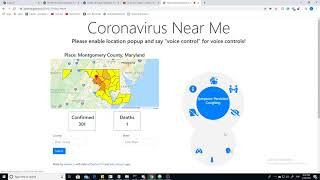
It utilizes the google maps API to extract the user's current location and displays the current number of cases and deaths in their county. It also displays a map showing how severe each county in the state is affected. The thing that sets this web app apart from other trackers is the fact that it caters to people with disabilities. It has a voice control feature that allows the user to navigate through the website using simple voice commands. For example, if the user were to say "get cases", the website would read out the number of cases and deaths in his or her county. Also, the user can change the location the tracker is viewing by saying "change place [county name] [state name]", which would change the map to the new state map and display relevant statistics. Finally, the user can say "get preventative measures", and the website would read out necessary steps the user should take to exercise safety precautions.
How I built it
The website is built using HTML, CSS, and Javascript. To access the user's location, I use Google's geolocating and Google maps API, and for the coronavirus case information I used ExpDev07's coronavirus API. I also utilized billcccheng's API to retrieve the coordinates for county boundaries, which I used to draw county outlines on google maps. To program the speech recognition and text to speech function, I utilized Javascript's SpeechRecognition and SpeechSynthesisUtterance features.
Challenges I ran into
The biggest challenge that I ran into was creating the coronavirus map and figuring out a way to display the severity of each county with color. I couldn't find an API that would allow me to display a simple state map with county boundaries, so I decided to utilize the ability to draw polygons in google maps, and using the coordinates for county boundaries to draw the counties myself. Also, I've never worked with speech recognition and text-speech before, so that experience was challenging, but also very rewarding.
What I learned
Building this web app helped me refresh my javascript skills, such as fetching JSON API information. The experience also taught me how to utilize Google maps API, and how to work with Javascript's native speech recognition and text-speech functions. I also learned a few design elements in CSS, such as the methods used to display preventative measures on the website.
Built With
- css
- github-apis
- google-maps
- html5
- javascript



Log in or sign up for Devpost to join the conversation.