-
-
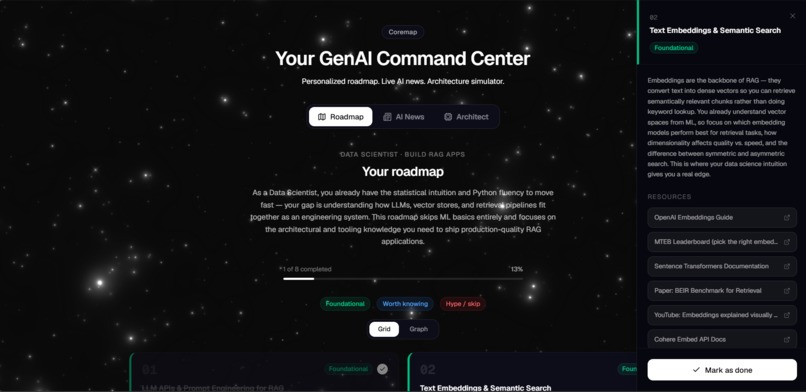
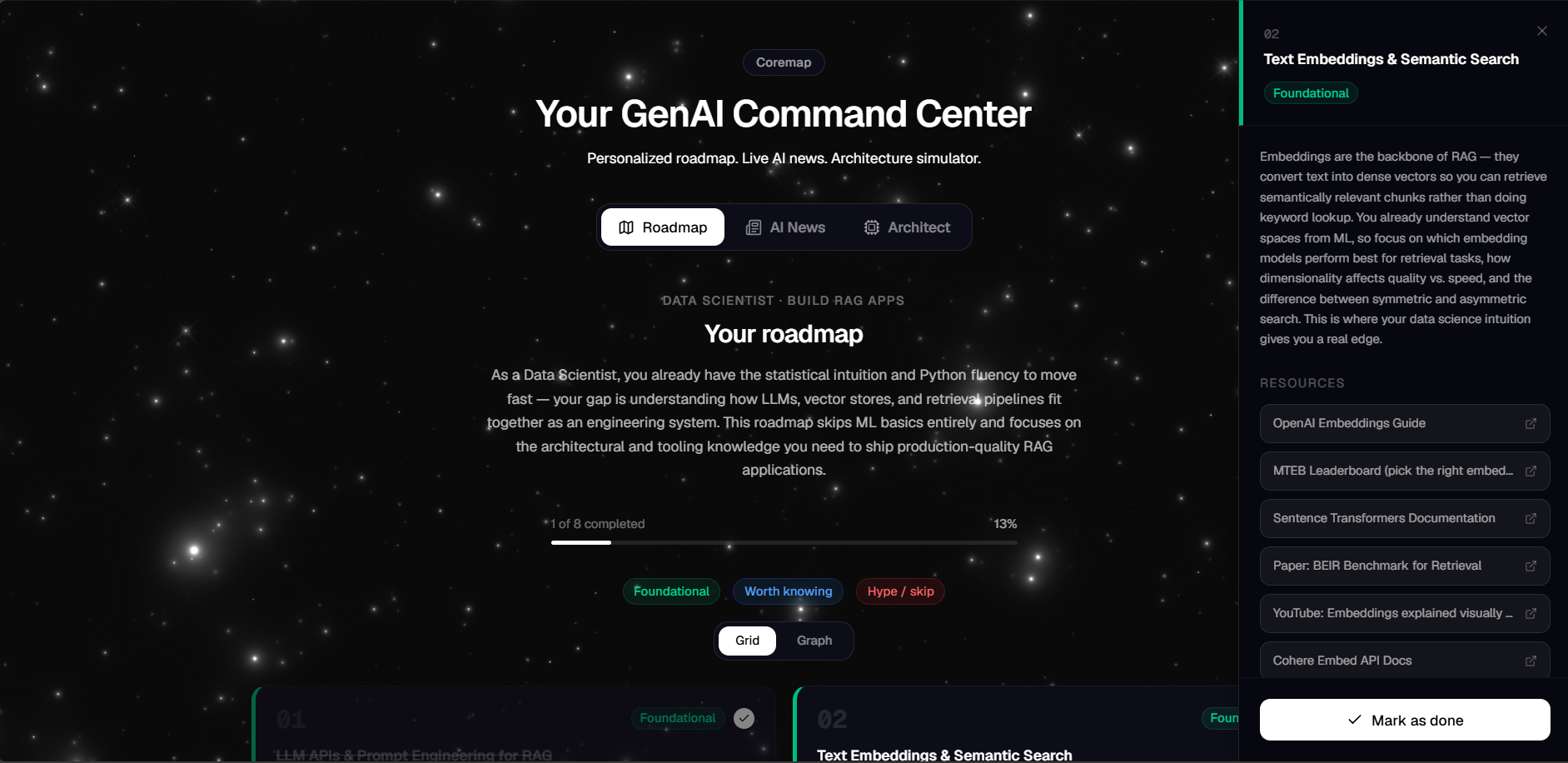
Road Map Tab
-
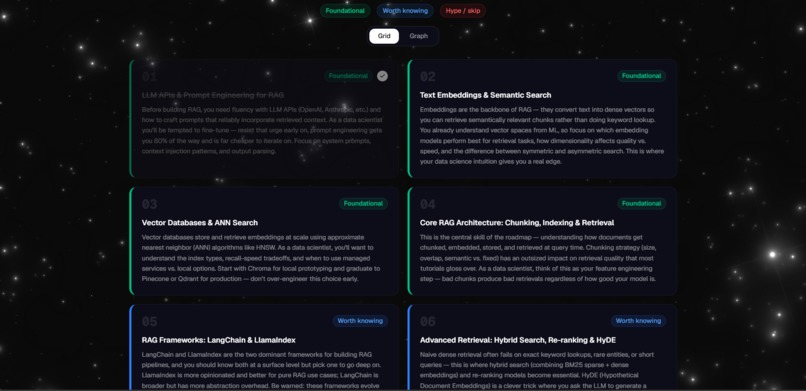
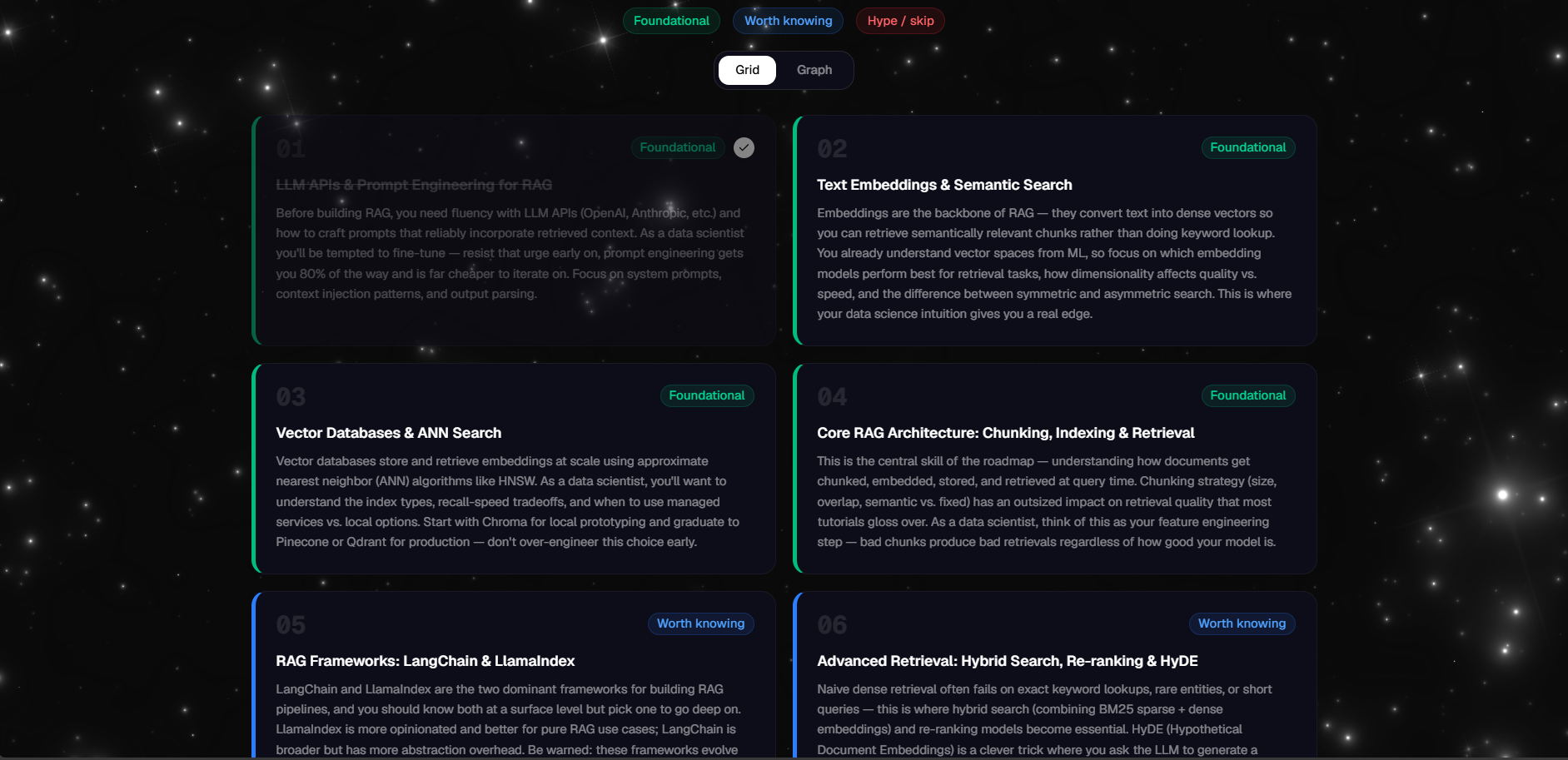
Grid View
-
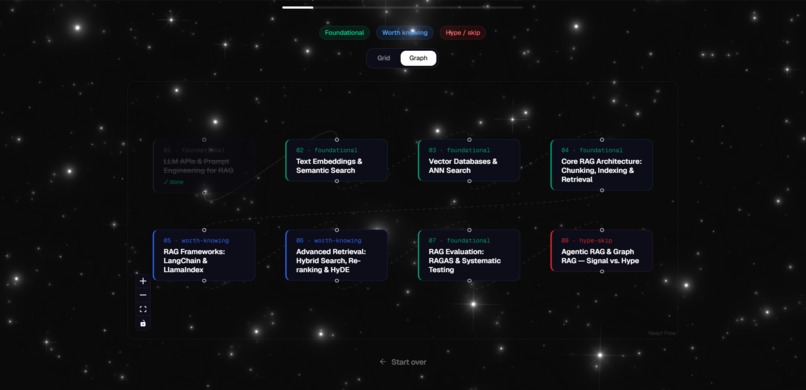
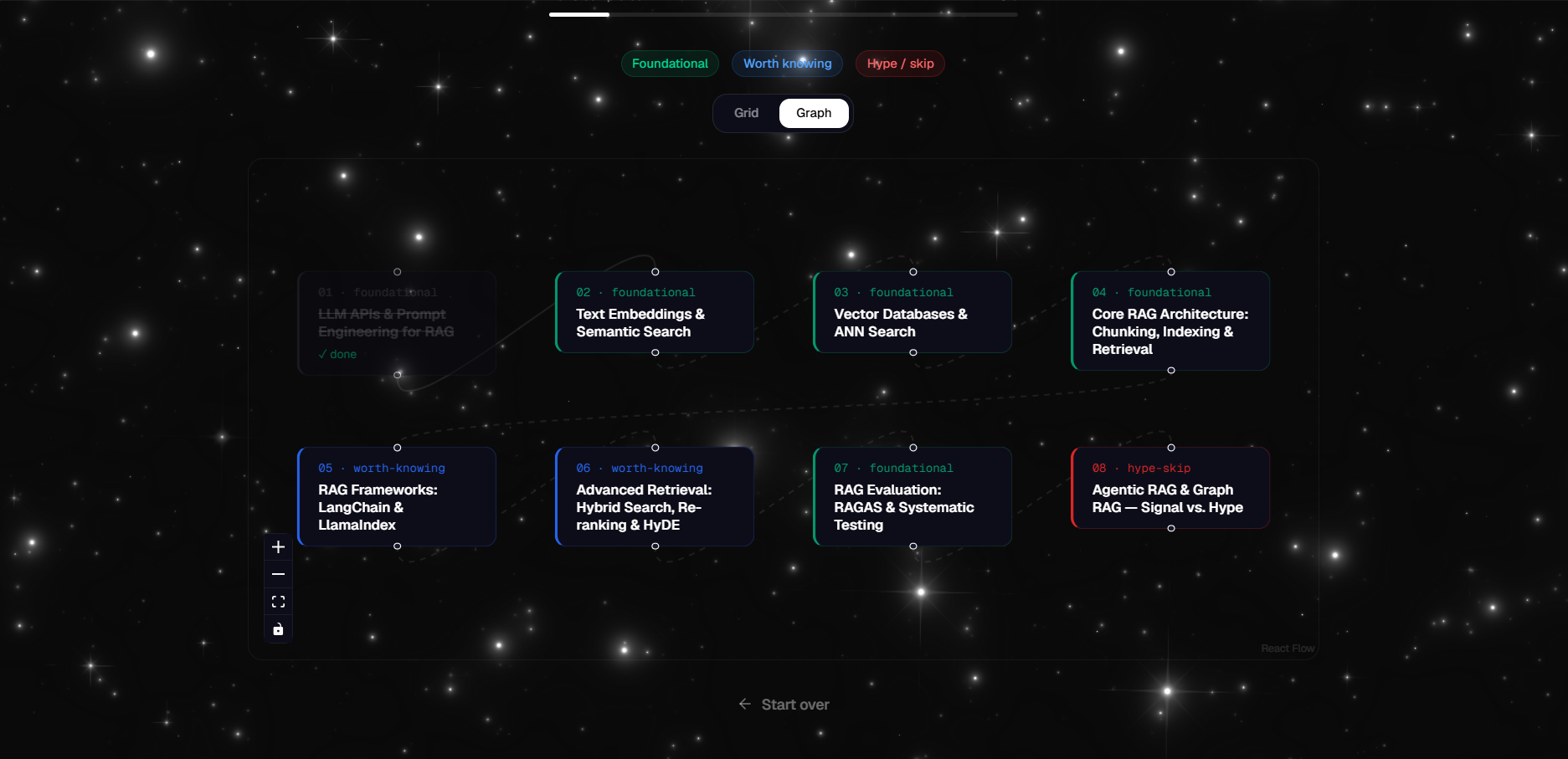
Graph View
-
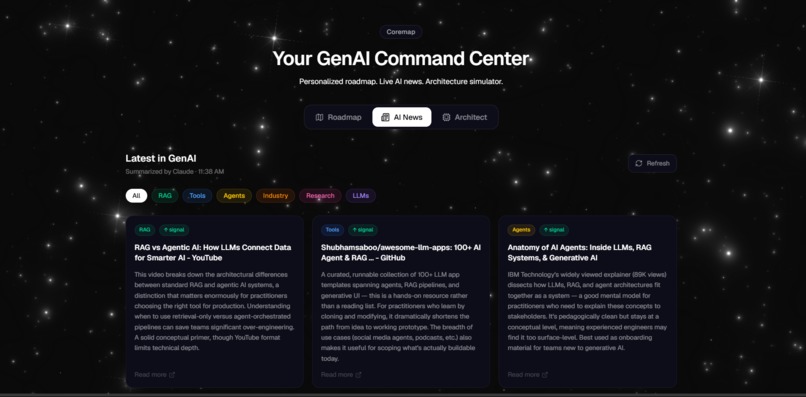
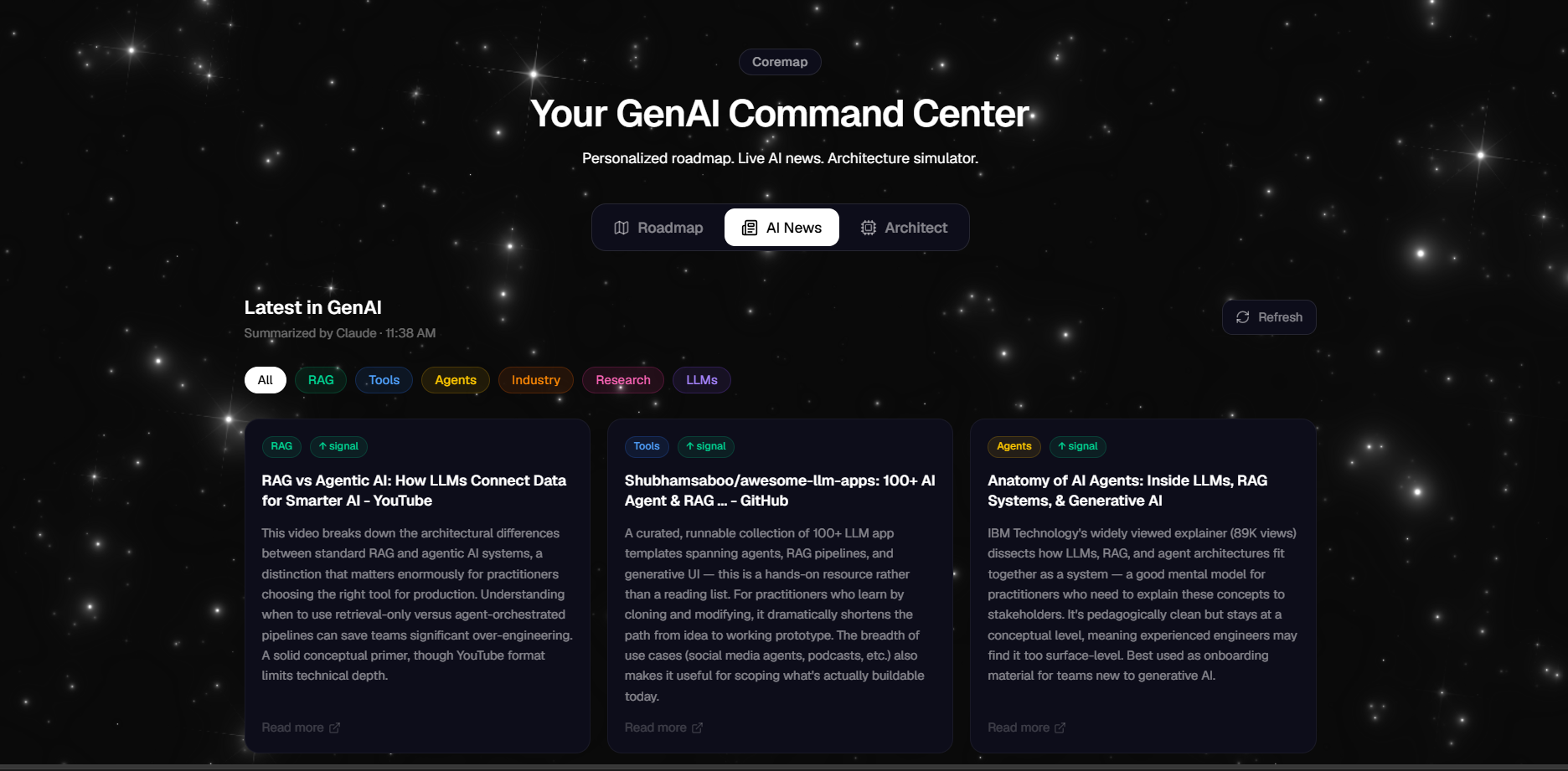
AI News Tab
-
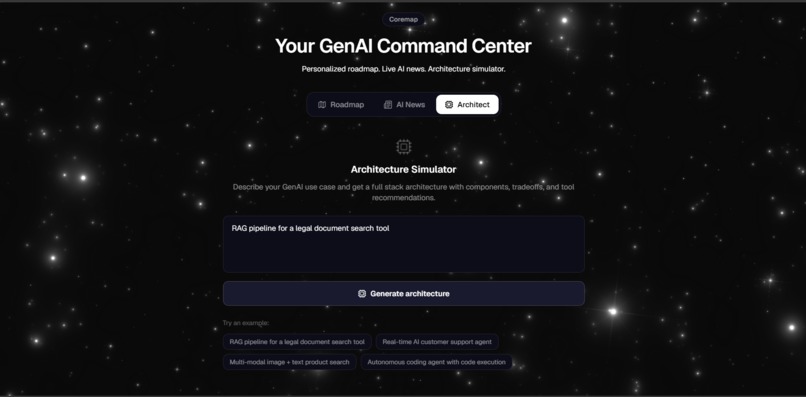
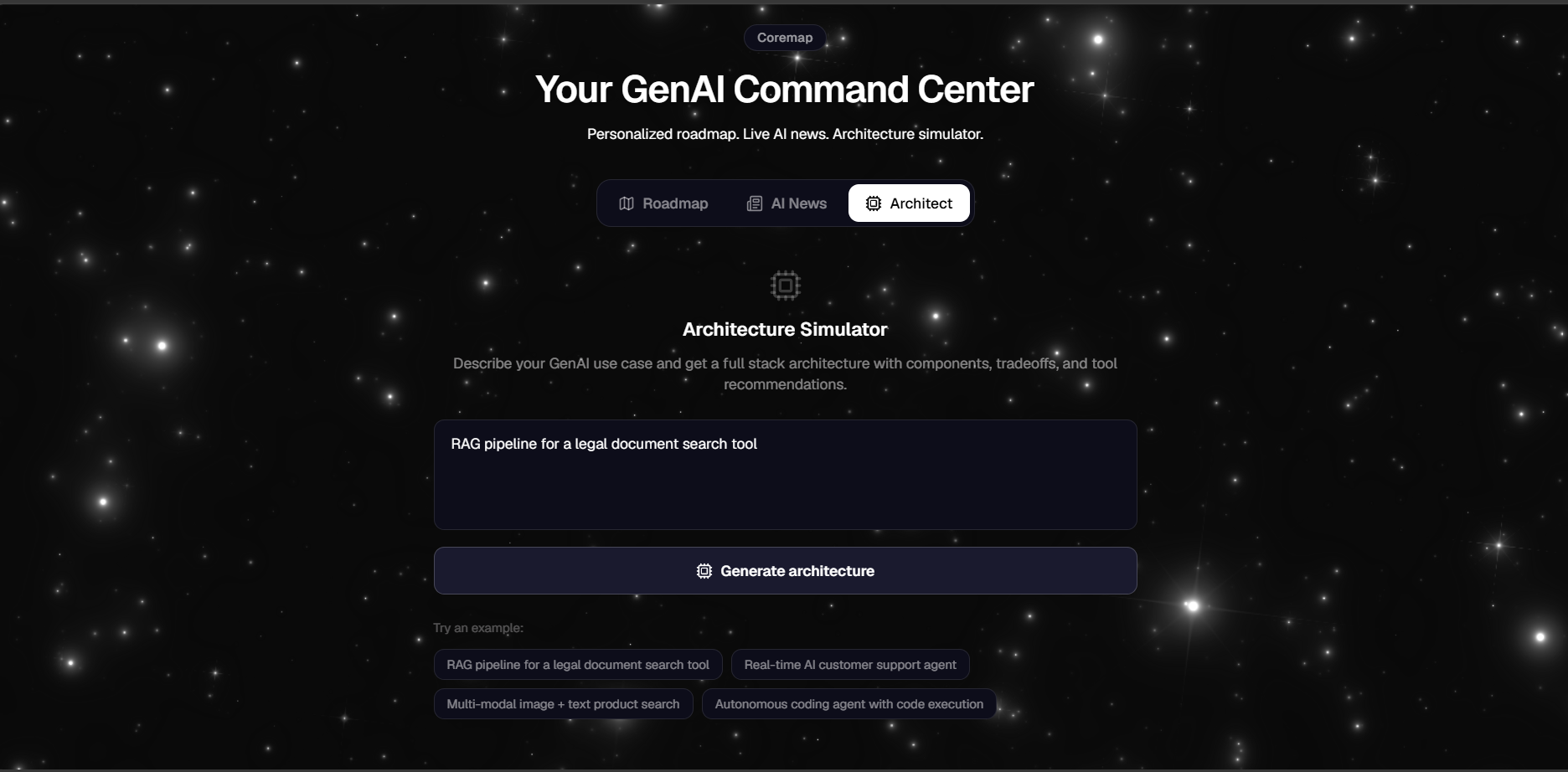
Architect Tab
-
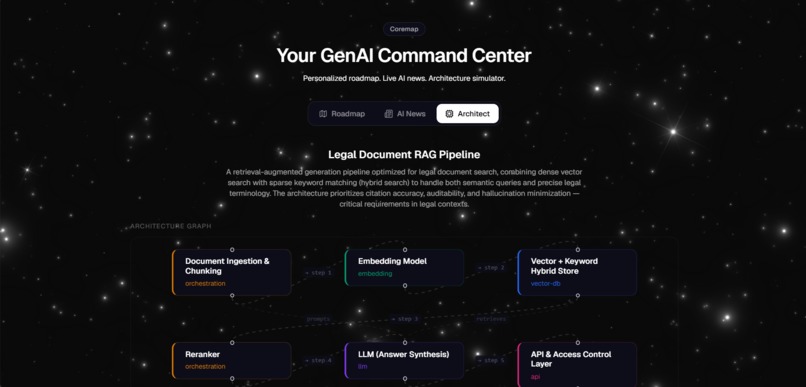
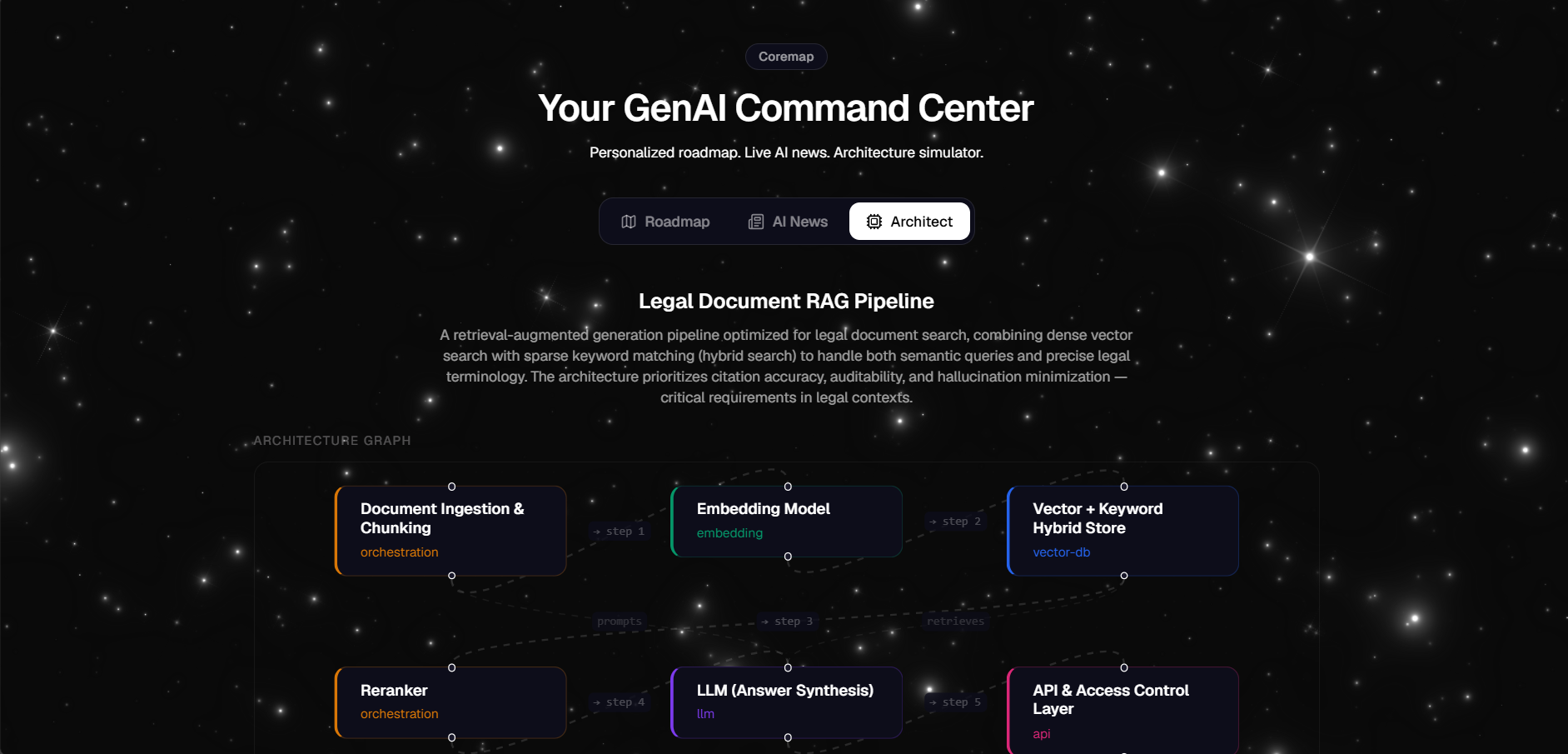
Graph View for Architecture
-
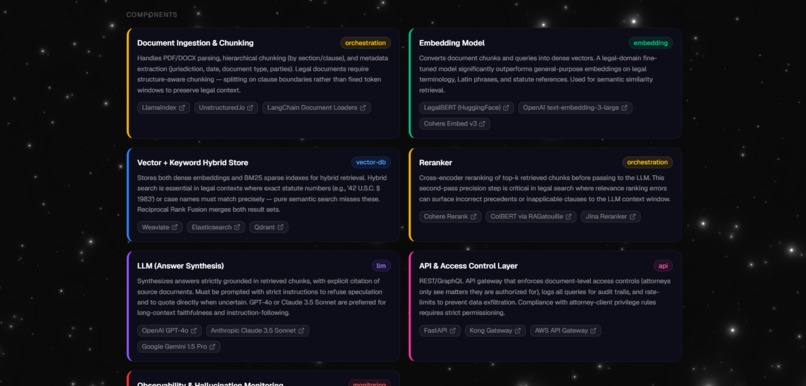
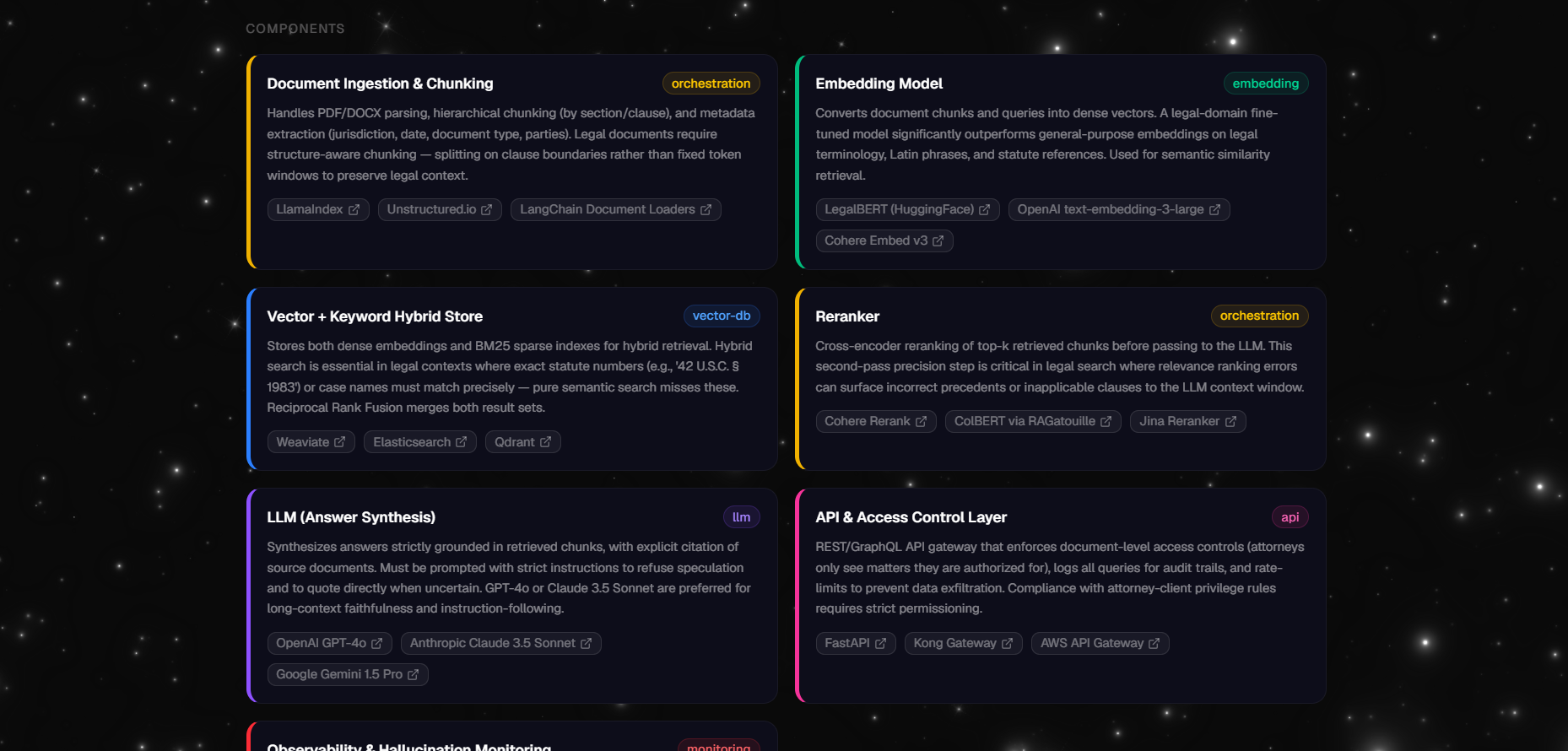
Grid View for Components
-
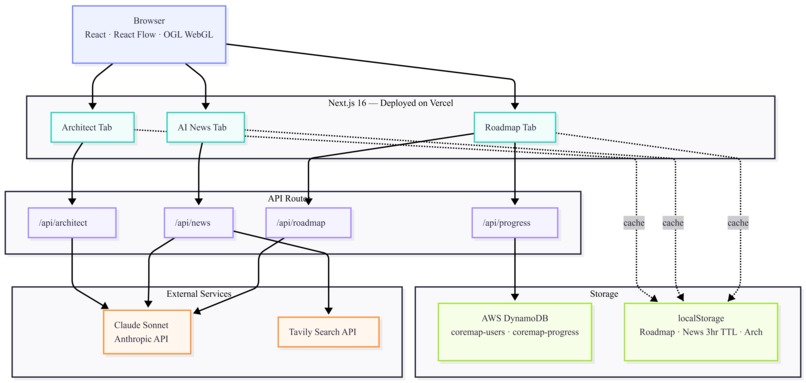
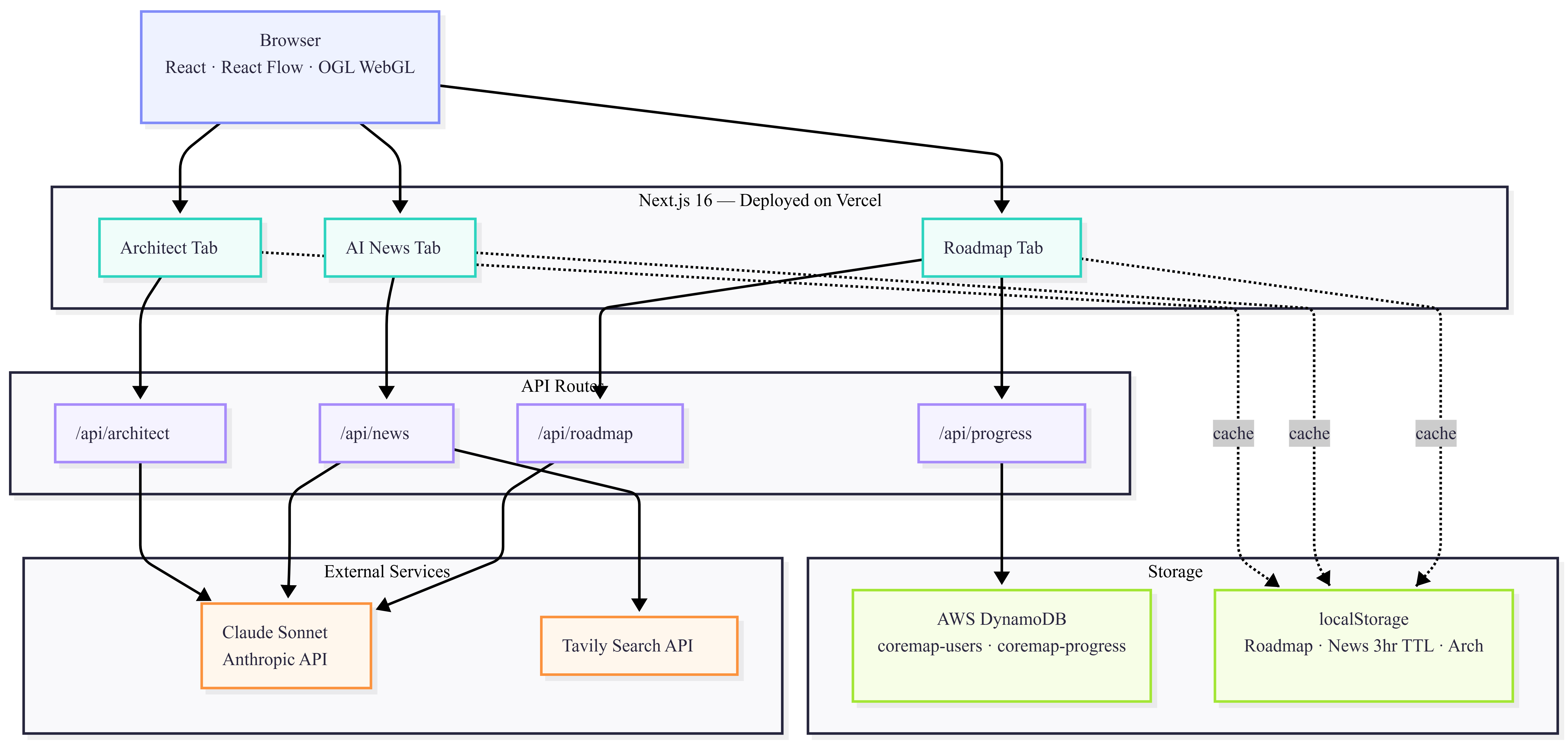
Architecture Diagram
Coremap - Cut Through the GenAI Noise
Inspiration
Every week there's a new framework, a new paper, a new "must-learn" tool in GenAI. As someone actively building in this space, I found myself constantly asking: what actually matters right now, and where do I even start?
Existing resources were either too generic, too outdated, or buried in hype. I wanted something opinionated, a tool that tells you what to learn, in what order, and why, while also keeping me updated on what is actually moving the needle in the industry. Coremap started as a personal tool to solve my own frustration and turned into something I think every GenAI practitioner needs.
What it does
Coremap is a personalized GenAI command center with three core features.
Roadmap
Generates a tailored 8-step learning path based on your background (Software Engineer, Data Scientist, PM, or Student) and goal (Build RAG apps, Get a GenAI job, Understand LLMs deeply, or Build AI agents). Each concept is categorized as foundational, worth knowing, or hype to skip, with 4-6 curated resources per step including papers, docs, courses, and tools. Progress is tracked per step and persisted to AWS DynamoDB so your learning state survives page refreshes. Steps open a side panel with full descriptions, resource links, and a mark-as-done button. The roadmap can be viewed as a card grid or an interactive node graph.
AI News
Fetches the latest GenAI news from the past 3 days using the Tavily search API, then passes every article through Claude Sonnet for summarization and tagging. Each article gets a topic tag (LLMs, Agents, RAG, Tools, Research, Industry, Policy) and a signal quality label (signal or hype), so practitioners can filter by what actually matters. Results are cached locally for 3 hours to avoid redundant API calls.
Architect
Describe any GenAI use case in plain English and get a full production architecture instantly. The output includes 5-8 components with type classification (llm, vector-db, embedding, orchestration, storage, api, frontend, monitoring), a step-by-step request flow, real tool recommendations with links, and 3-5 production caveats. The architecture is visualized as an interactive React Flow graph with color-coded nodes, animated sequential edges, and semantic cross-edges drawn based on known relationships between component types.
How I built it
Frontend
Built with Next.js 16 scaffolded via Vercel v0, styled with Tailwind CSS, and deployed on Vercel. The UI uses a custom WebGL star field background built with OGL shaders for interactive mouse-driven parallax. All routing is handled via the Next.js App Router with client components for interactive features.
AI Layer
Three Next.js API routes handle the core AI features:
/api/roadmapcalls Claude Sonnet with a structured JSON schema prompt to generate personalized learning paths/api/architectcalls Claude Sonnet with a system prompt defining the architecture output schema/api/newschains Tavily search with a Claude Sonnet summarization pass to produce tagged, signal-filtered articles
All Claude calls use direct fetch to the Anthropic API with defensive JSON parsing including markdown fence stripping to handle formatting variations in model output.
Database
Progress persistence uses AWS DynamoDB with two tables:
coremap-usersstores background and goal per anonymous sessioncoremap-progressstores per-concept completion status with a composite key ofuserIDandconceptId
Anonymous session IDs are generated with crypto.randomUUID() and stored in localStorage, giving each browser a persistent identity without requiring authentication. The AWS SDK v3 DynamoDBDocumentClient handles all database operations with IAM credentials scoped to DynamoDB only.
Graph Visualization
The architecture graph uses React Flow with custom node styling and a graph builder that computes both sequential edges between components and semantic cross-edges based on component type pairs (embedding indexes into vector-db, orchestration prompts llm, llm traces to monitoring). The roadmap also has a graph view where clicking a node opens a slide-in side panel with full step detail and resource links.
Caching
All three tabs use localStorage caching. The generated roadmap, last architecture, and news feed (3-hour TTL) all survive page refreshes without additional API calls.
Challenges I ran into
Structured JSON from Claude was harder than expected. Responses occasionally included markdown code fences or got truncated mid-object at low token limits. The fix required fence stripping before parsing, bumping max_tokens to 6000 for architecture responses, and defensive try/catch with raw response logging.
React Flow graph layout needed significant custom logic. A naive sequential layout left large empty canvas areas, so I built a grid-based positioning system with last-row centering and a semantic cross-edge builder that draws meaningful connections between known component type pairs rather than just linking nodes linearly.
DynamoDB partition key casing was a subtle bug. The table was created with userID (capital D) but the code used userId (lowercase d), causing ValidationException errors that required careful reading of the DynamoDB error messages to surface.
pnpm and npm lockfile conflict caused the initial Vercel deployment to fail. The project was scaffolded with pnpm but packages were installed with npm during development, causing a frozen lockfile mismatch. The fix required switching fully to pnpm, regenerating the lockfile, and adding a vercel.json with the --no-frozen-lockfile install command.
Accomplishments that I am proud of
Signal vs hype categorization across both the roadmap and news feed is the feature I am most proud of. It is opinionated in a way most AI tools avoid, and that is exactly what makes it useful.
The architecture graph produces interactive diagrams with semantic cross-edges that reflect real data flow patterns between component types, not random connections.
Zero unnecessary API calls on revisit thanks to localStorage caching across all three tabs. A returning user lands directly on their saved roadmap with progress intact, their last architecture ready, and news loaded instantly from cache.
The UI feels like a shipped product rather than a hackathon demo. The WebGL star background, solid dark cards, color-coded component taxonomy, and slide-in step panel contribute to a cohesive visual identity.
What I learned
Prompt engineering for structured outputs requires significantly more rigor than casual prompting. Defining an explicit JSON schema, specifying exact field names and allowed enum values, adding negative rules about markdown formatting, and writing defensive parsing on the receiving end are all necessary for reliable structured generation.
React Flow layout is not automatic. It requires deliberate positioning logic to look good with dynamic data, especially when edge semantics matter.
The gap between local prototype and clean production deployment is larger than it looks. Lockfile conflicts, IAM permission scoping, environment variable propagation, and token budget tuning all surfaced only during deployment and required focused debugging time.
What's next for Coremap
More backgrounds and goals — expanding to ML Engineer, AI Researcher, and Startup Founder profiles with deeper per-combination specialization.
Pro tier with cross-device progress sync via authenticated sessions, personalized weekly news digests by email, unlimited architecture simulations, and team roadmaps for engineering orgs. The DynamoDB backend is already structured to support multi-device sync once authentication is added.
Architecture exports — PNG/PDF export of diagrams, side-by-side architecture comparison, and cost estimates for recommended tools based on usage projections.
Community layer where practitioners can share roadmaps and architectures publicly, vote on the most useful ones, and fork them as starting points, turning Coremap into a living knowledge base for the GenAI community.
Learning platform integrations with Coursera, fast.ai, and Hugging Face to track actual course completion rather than just self-reported progress.
Built With
- amazon-web-services
- claude-api
- css
- dynamodb
- flow
- next.js
- react
- tailwind
- tavily
- v0
- vercel

Log in or sign up for Devpost to join the conversation.