Inspiration
Access to the right specialist is often less about whether help exists and more about whether someone can find it, trust it, and coordinate it quickly. We built Shiftlink to help doctors discover hospitals and referral sites, understand why a facility might be a good fit, and turn that discovery into real scheduling action.
Shiftlink was inspired by the messy coordination layer between doctors, hospitals, volunteers, and underserved communities, especially in settings where health need, facility capacity, and scheduling availability are hard to line up.
What it does
Shiftlink is a doctor-hospital exchange for referrals, volunteering, and scheduling.
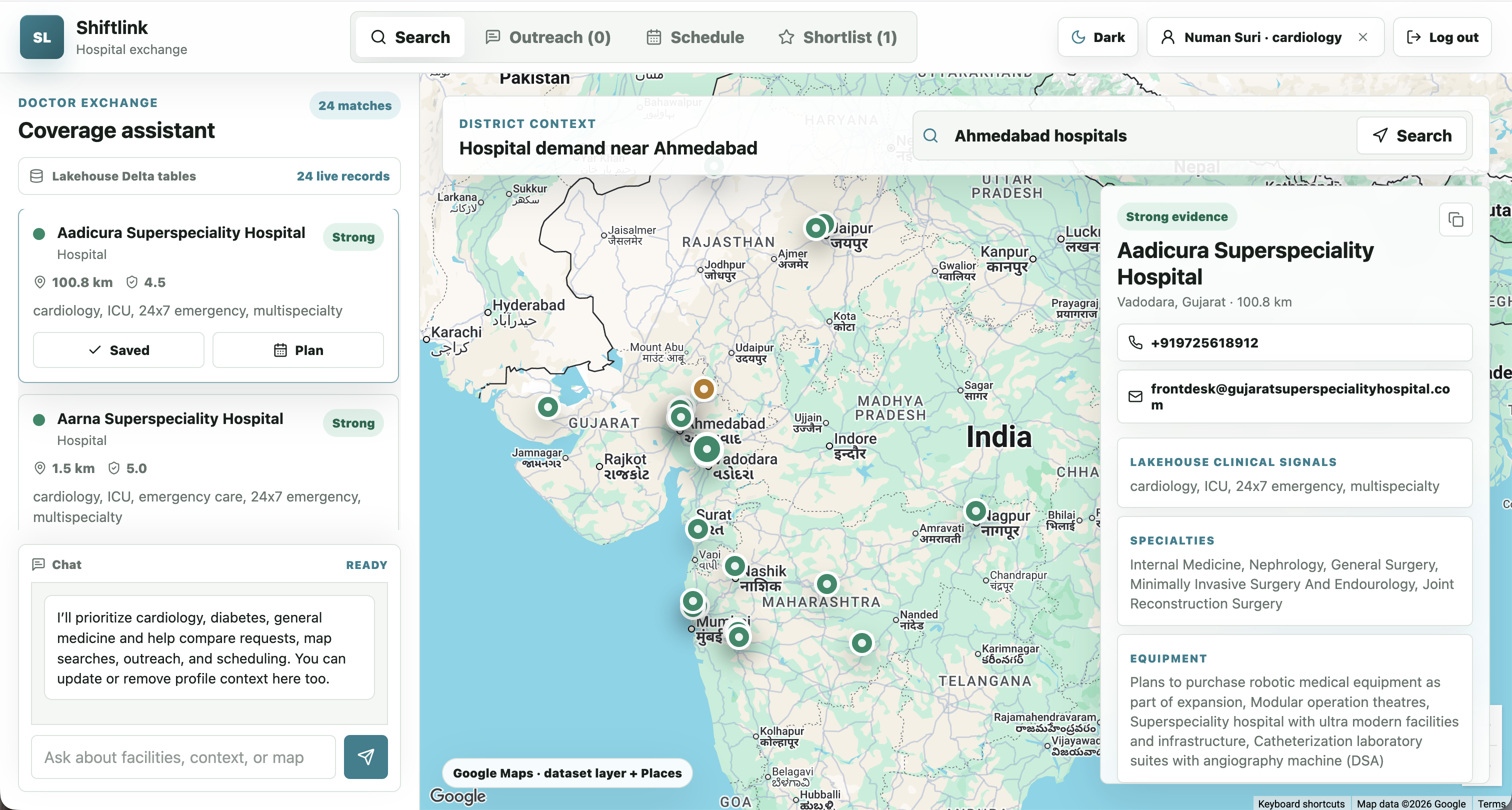
Doctors create a profile with their specialties, experience, preferred regions, and volunteering interests. They can type this context or speak it using speech-to-text. Inside the app, doctors get a map-based search workspace with Lakehouse-backed facility cards, Google Maps search, shortlist actions, scheduling tools, and a guarded chatbot that helps them find relevant facilities and update their profile context.
Hospitals get their own view where they can review doctor scheduling requests, approve or deny them, and also request doctors directly. Doctors can then accept hospital-originated requests and add them to their schedule.
How we built it
We built Shiftlink as a React/Vite frontend with a small Node/Express server. The app is deployed as a Databricks App and configured with Databricks secrets for Google Maps and OpenAI.
The data layer uses Databricks Lakehouse tables built from the Virtue Foundation dataset. The deployed app queries workspace.virtue_foundation_enriched.gold_facilities at runtime through Databricks SQL Statement Execution, then maps those real facility records into the facility cards, evidence drawer, and map markers.
The AI layer uses OpenAI for speech-to-text and chatbot responses. The chatbot streams responses, stays scoped to facility search, doctor context, map logistics, outreach, and scheduling, and returns structured metadata for map handoffs and facility recommendations.
The map experience uses Google Maps JavaScript API, Advanced Markers, and Places search. Lakehouse facility records form the core dataset layer, while Google Places search provides a live map exploration layer.
Challenges we ran into
The biggest challenge was data engineering. The source data had real-world messiness: facility information, location fields, health indicators, pincodes, district names, and specialty signals did not arrive as one clean product-ready table. We had to normalize geography, extract facility capabilities, preserve uncertainty, and shape the data into a table the app could query in real time.
Another challenge was connecting product design to trustworthy data. A hospital recommendation only matters if the doctor can see why it appeared. We built the Lakehouse layer to expose evidence such as specialties, equipment, emergency-readiness signals, contact verification, and quality flags instead of hiding recommendations behind a black box.
We also had to coordinate several moving pieces across the stack: Databricks Apps deployment, Unity Catalog permissions, SQL warehouse access, OpenAI streaming chat, speech-to-text, Google Maps, local account state, and two-way scheduling workflows. The hard part was not any single component; it was making the workflow feel coherent end to end.
Accomplishments that we're proud of
We built a working role-based prototype with both doctor and hospital experiences.
We are especially proud that the app now uses real Lakehouse-backed facility data at runtime. The doctor workspace can load live records from the enriched gold_facilities table and show them as searchable, mappable facility cards with evidence.
We are also proud of the two-way scheduling workflow: doctors can request hospitals, hospitals can approve or deny, and hospitals can also request doctors back. That made the app feel less like a static search tool and more like an actual coordination system.
The onboarding flow is another highlight. Doctors can describe their practice in natural language, either by typing or speaking, and the app carries that context into the main experience.
What we learned
We learned that AI is most useful here when it acts as a workflow layer, not just a chatbot. The assistant needs to help translate a doctor’s intent into map searches, facility comparisons, scheduling actions, and profile updates.
We also learned that healthcare coordination tools need transparency. It matters whether a recommendation comes from Lakehouse facility data, a live Google Places search, or local fallback data. Showing data-source status directly in the UI became an important design choice.
Finally, we learned that hospital-side workflows are just as important as doctor-side discovery. Scheduling only becomes useful when both sides can act.
What's next for ShiftLink - Hospital Exchange
Next, we want to make the Lakehouse query smarter by passing doctor specialty, region, and volunteering preferences into the facility search endpoint.
We also want to connect the runtime app to the district need and specialist gap tables, so Shiftlink can recommend not just nearby hospitals, but places where a doctor’s specialty could have the greatest impact.
After that, we want to add persistent backend storage for users, doctor profiles, hospital profiles, chat events, map searches, shortlists, and scheduling decisions. We also want stronger authentication, role authorization, Lakehouse-backed recommendation scoring, and more robust hospital matching.
Built With
- css
- databricks-apps
- databricks-lakehouse
- databricks-sql-statement-execution-api
- databricks-sql-warehouse
- delta-tables
- express.js
- git
- google-advanced-markers
- google-maps-javascript-api
- google-places
- html
- javascript
- localstorage
- node.js
- openai-api
- openai-speech-to-text
- python
- react
- streaming-chatbot-responses
- unity-catalog
- vite

Log in or sign up for Devpost to join the conversation.