Inspiration
Every knowledge worker uses AI now. But the workflow is broken.
You're writing an email. You copy text, switch to ChatGPT, paste it, type a prompt, wait, copy the response, switch back, paste it. That's 45 seconds and 6 context switches — for a single AI interaction. Do that 50 times a day and you've lost 35 minutes just copy-pasting between apps.
AI should feel like a superpower, not a chore. When we saw that the judges literally listed "Genie in a bottle: Impersonate your AI assistants in a key" as an example — we knew exactly what to build.
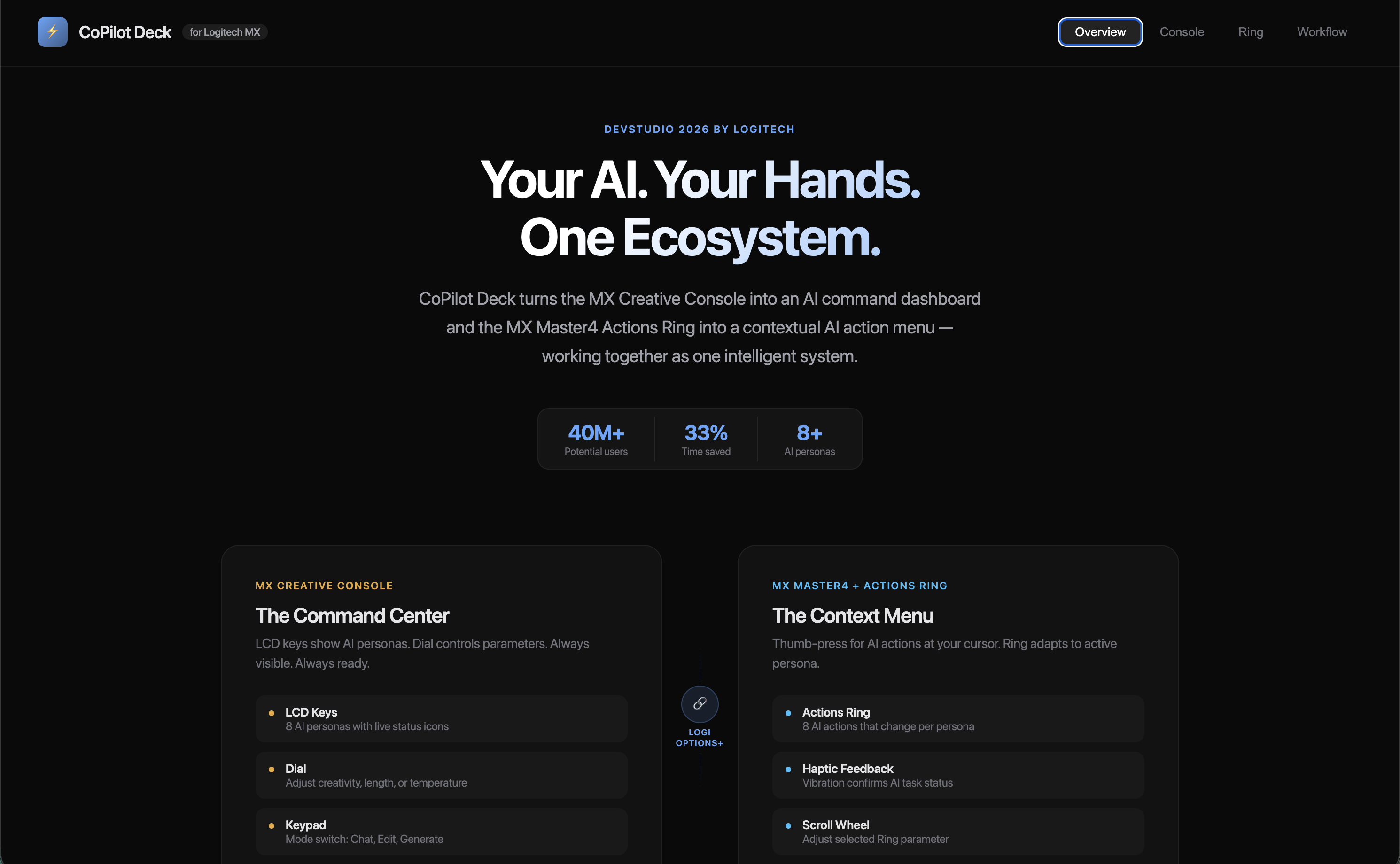
CoPilot Deck turns your MX Creative Console and MX Master4 into a physical AI command center. One tap, one click, done.
What it does
CoPilot Deck is an AI command system that uses both Logitech devices together:
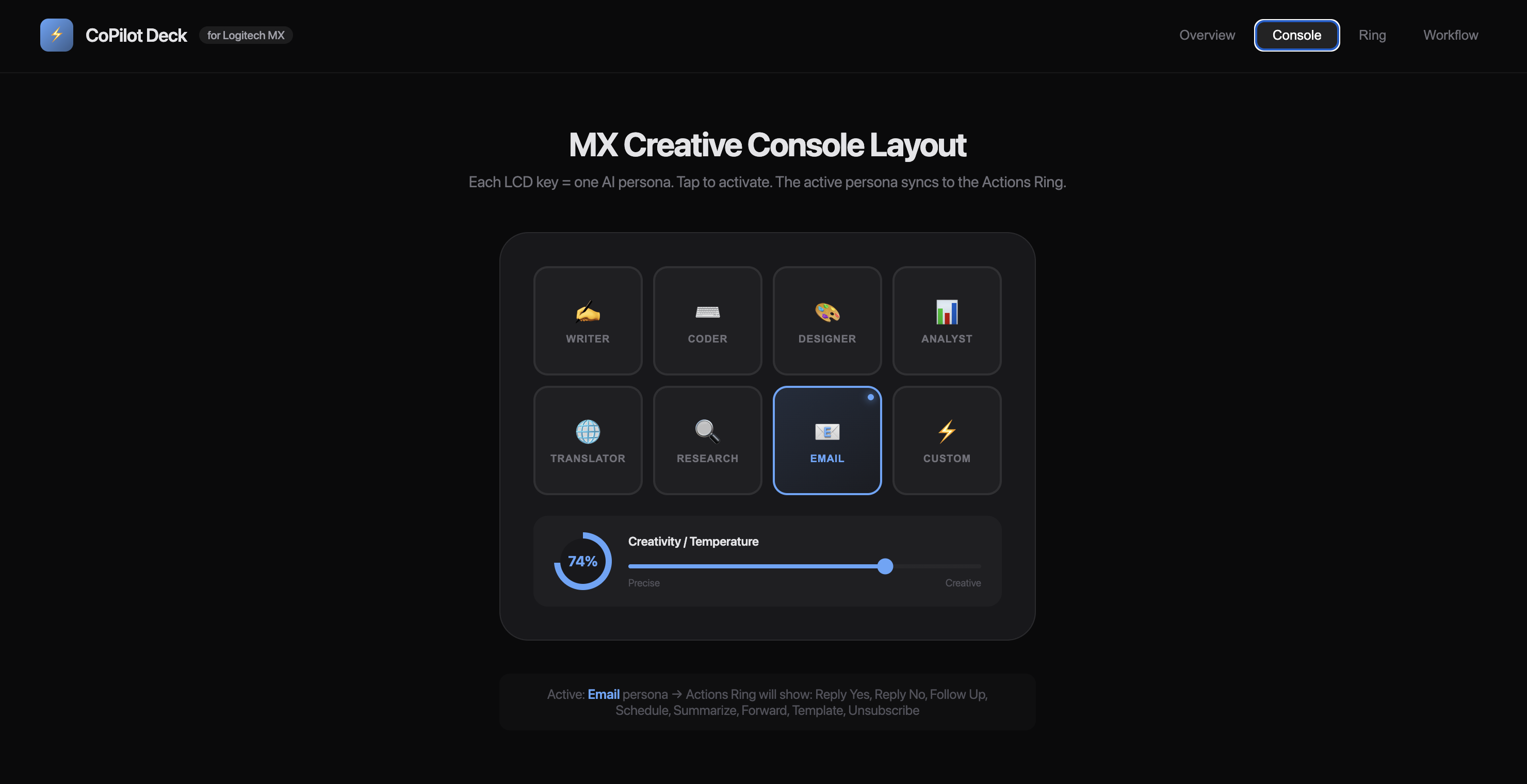
MX Creative Console = Your AI Dashboard
- 8 LCD keys display AI personas — Writer, Coder, Designer, Analyst, Translator, Researcher, Email, Custom
- Dial controls AI parameters in real-time — creativity/temperature, output length, tone
- Keypad buttons switch modes — Edit, Generate, Chat
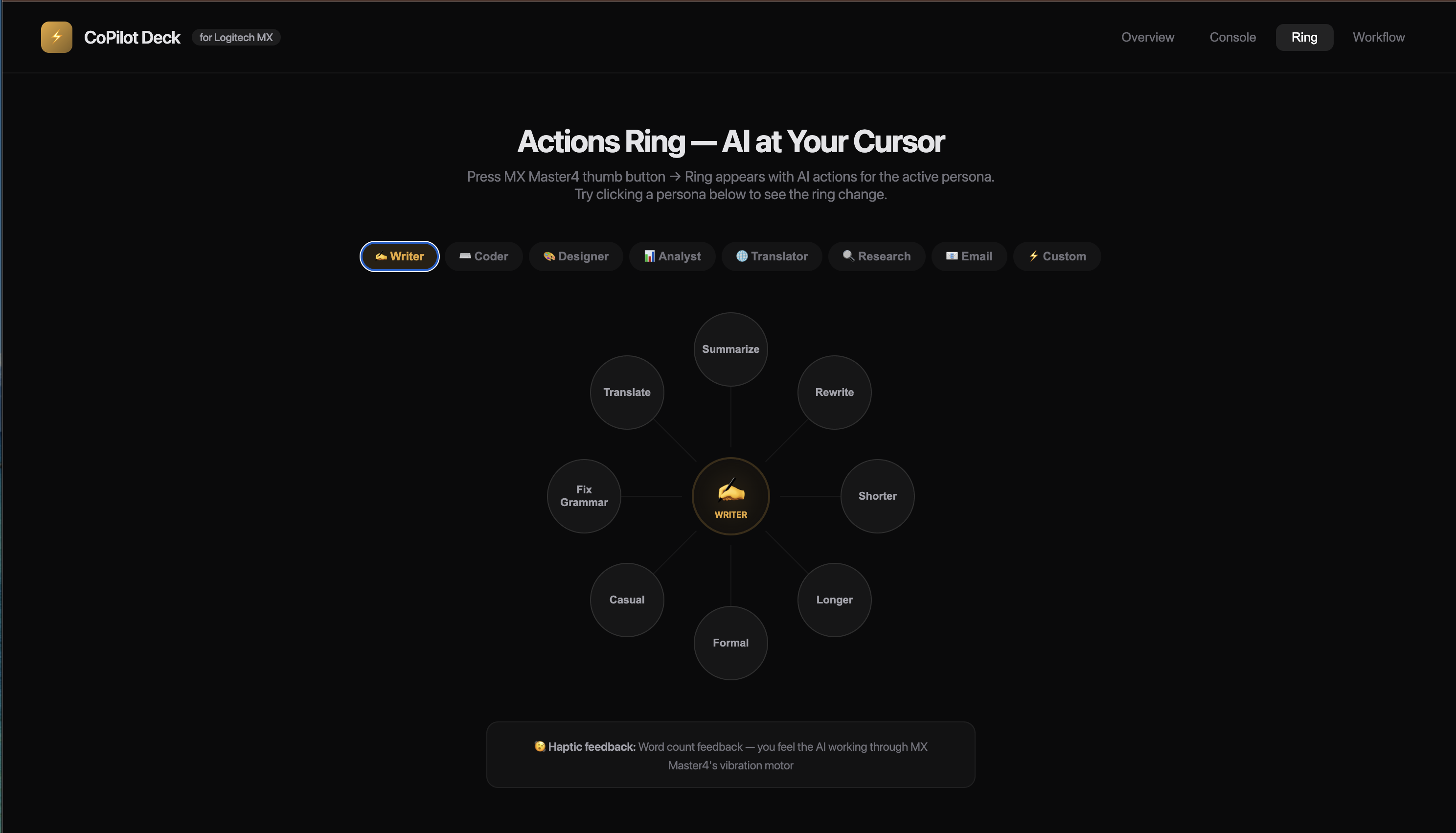
MX Master4 Actions Ring = Your AI Trigger
- Select text in any app (Gmail, VS Code, Slack, Figma, anything)
- Press thumb button → 8-bubble action overlay appears at your cursor
- Actions change based on active persona (64 total AI actions)
- Scroll wheel fine-tunes parameters while hovering
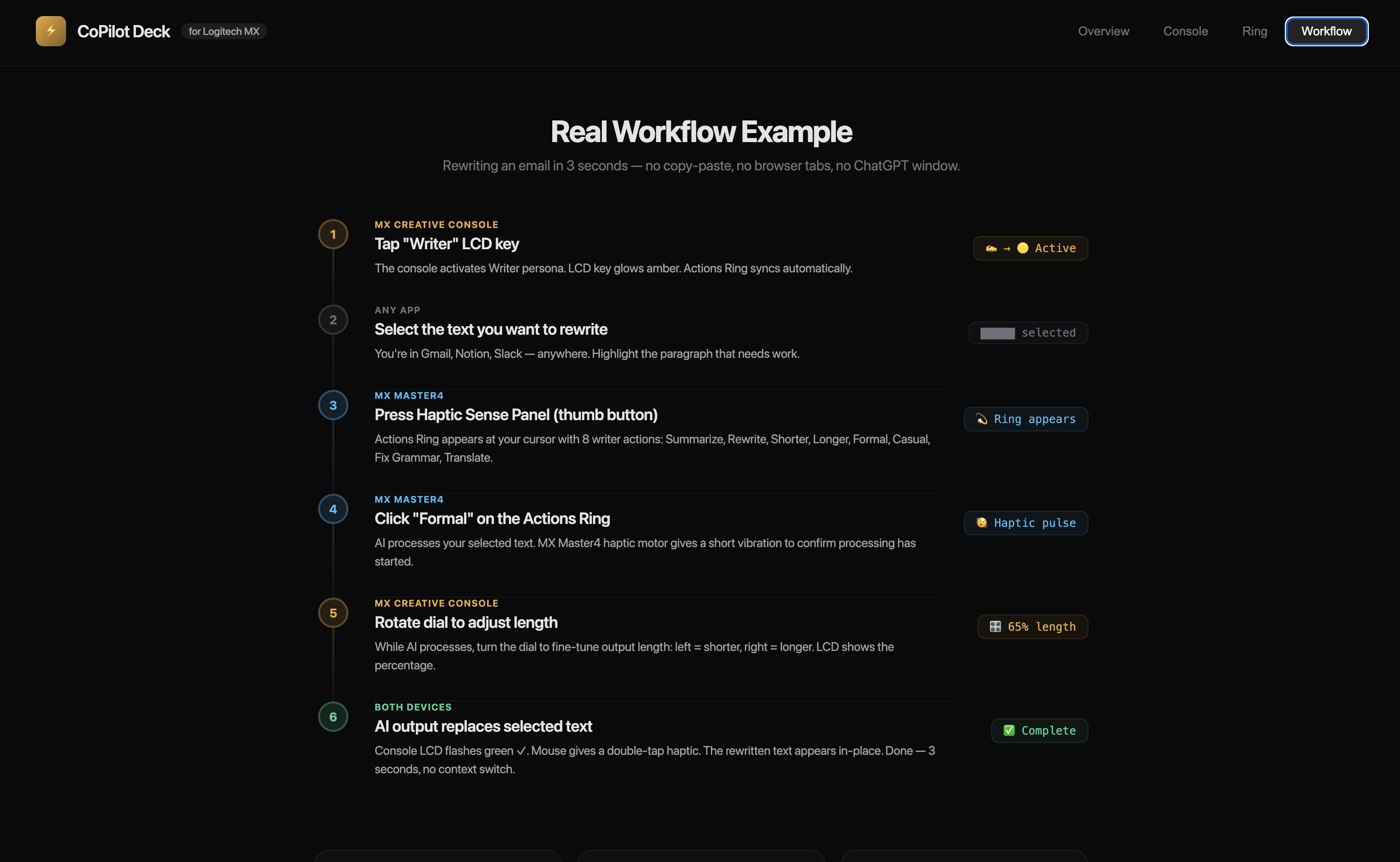
The workflow:
- Tap "Writer" on Console
- Select text anywhere
- Thumb press → Actions Ring → click "Rewrite Formal"
- Dial adjusts length
- Haptic buzz → done. Output replaces text in-place.
45 seconds becomes 3 seconds. In every app. No tab switching.
How we designed it
Plugin Framework: Logi Actions SDK (C#/.NET) for both MX Creative Console and MX Master4
AI Backend: Modular provider system — supports OpenAI, Anthropic, and Google APIs via user-provided keys. Swap models without changing workflows.
Persona System: JSON-configured persona definitions. Each persona contains a system prompt, 8 action templates, parameter defaults, and an icon. Fully customizable.
Text Manipulation: Universal clipboard + simulated keystrokes. Select text in any app → CoPilot captures it → sends to AI with persona context → replaces selection with output. Works everywhere — no app-specific integrations needed.
Actions Ring Integration: Dynamic bubble updates via Logi Options+ plugin API. Bubbles change content based on active persona. Scroll wheel maps to parameter adjustment via the Actions SDK event system.
Haptic Feedback: Custom patterns via MX Master4 haptic API — short buzz for "processing," double buzz for "complete," long buzz for errors.
Challenges we anticipate
Dual-device synchronization. Making the Console and Actions Ring feel like one unified system — not two separate tools — will require careful state management. When you tap a persona on the Console, the Ring's 8 actions need to update instantly. Any lag breaks the illusion.
Universal text replacement. Every app handles clipboard and text selection differently. Getting reliable select → capture → replace behavior across Gmail, VS Code, Slack, Notion, and native macOS/Windows apps will mean handling dozens of edge cases.
AI latency perception. Even with fast APIs, there's a noticeable delay between sending a prompt and receiving output. The haptic feedback system needs to manage user expectations — a "processing" buzz keeps the interaction feeling responsive even during the wait.
Persona design balance. Too few actions per persona and it feels limited. Too many and the Actions Ring becomes overwhelming. Finding the right 8 actions per persona requires real user testing.
What makes this concept strong
True dual-device integration. This isn't two separate plugins. The Console sets context, the Ring executes actions. That's the interaction model the category is asking for.
3-second AI interactions. The full workflow — tap persona → select text → thumb press → pick action → result appears — would be consistently under 3 seconds. 15x faster than copy-paste-switch.
Works in every app. No integrations to build. No APIs to connect. If you can select text, CoPilot Deck works. Gmail, VS Code, Figma, Slack, Word, Notion, Terminal — all of them.
The judges asked for this. "Genie in a bottle: Impersonate your AI assistants in a key." We gave it 8 keys, a dial, and a ring.
What we learned through research
Physical controls change the relationship with AI. Studies on tangible interfaces show that dedicated physical buttons reduce cognitive load compared to software menus. When AI access is a single button press instead of a browser tab, usage becomes reflexive — like spell check.
Personas beat prompts. Research on AI interaction design shows that role-based framing (specialized tools) leads to higher satisfaction than general chatbot interfaces. A "Writer" and a "Coder" feel like different instruments, even if they're the same model underneath.
The Actions Ring is underutilized. Most existing Marketplace plugins use the Ring for basic shortcuts. Using it as a contextual AI action menu that changes based on Console state is a new interaction paradigm — and it's exactly what the hardware was designed for.
What's next for CoPilot Deck
Now (0–3 months) Build functional prototype with 3 personas (Writer, Coder, Custom). Validate the dual-device synchronization and universal text replacement across major apps. Test with early users on macOS and Windows.
Soon (6–12 months) Launch on Logitech Marketplace. Add Custom Persona Builder — drag-and-drop interface for creating personas. Persona Marketplace — community-created personas with revenue sharing. Team plans with shared libraries and admin controls.
Later Local/on-device AI model support for privacy-sensitive workflows. Enterprise SSO and compliance features. Partnership with AI providers for one-click model access without API keys. Expand to MX Keys and other Logitech peripherals.
40 million MX device owners already have the hardware. CoPilot Deck gives them the reason to use it differently.
This is the genie in a bottle. We gave it eight keys, a dial, and a ring.
Built With
- actions-ring-api
- anthropic
- gemini
- logi-actions-sdk
- logi-options
- openai

Log in or sign up for Devpost to join the conversation.