-
-
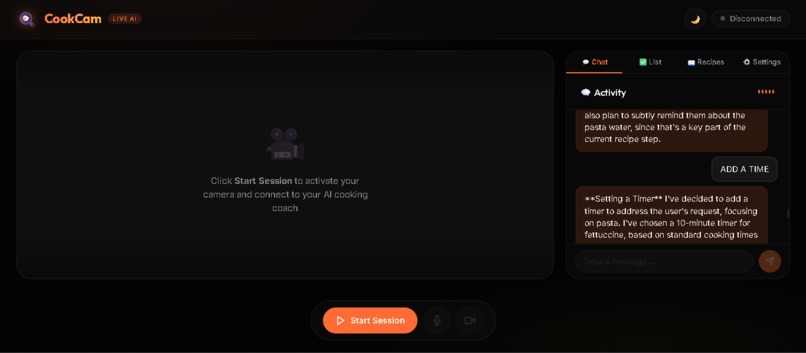
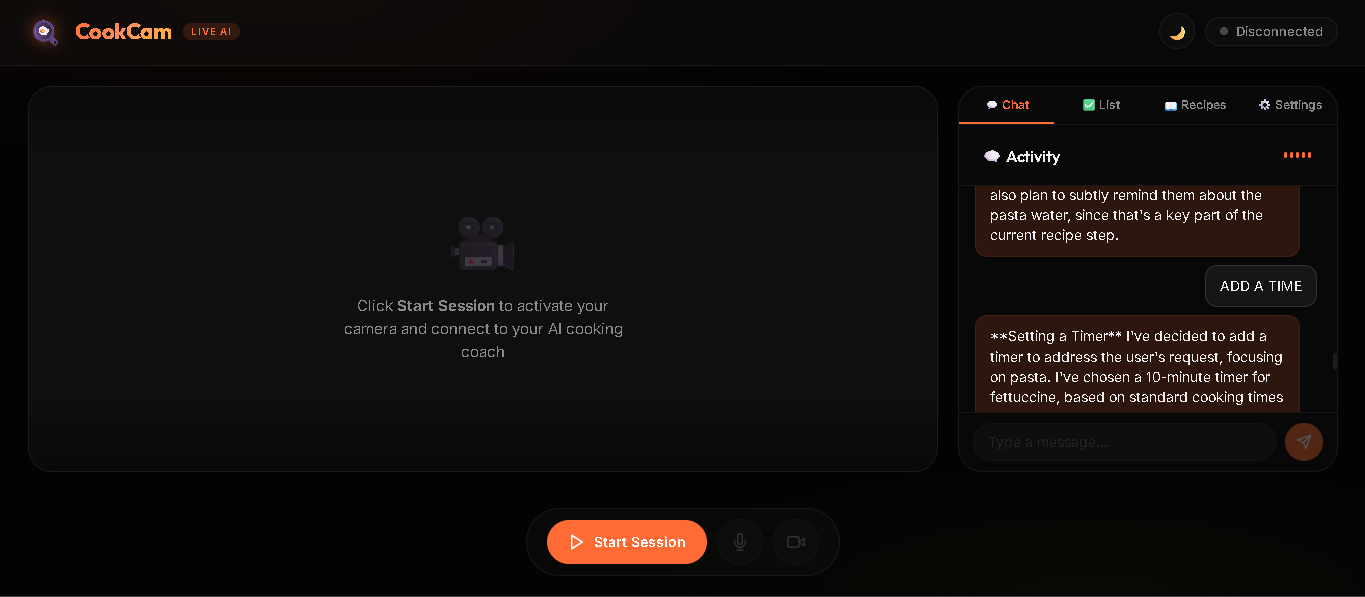
CookCam (Voice and Text only mode)
-
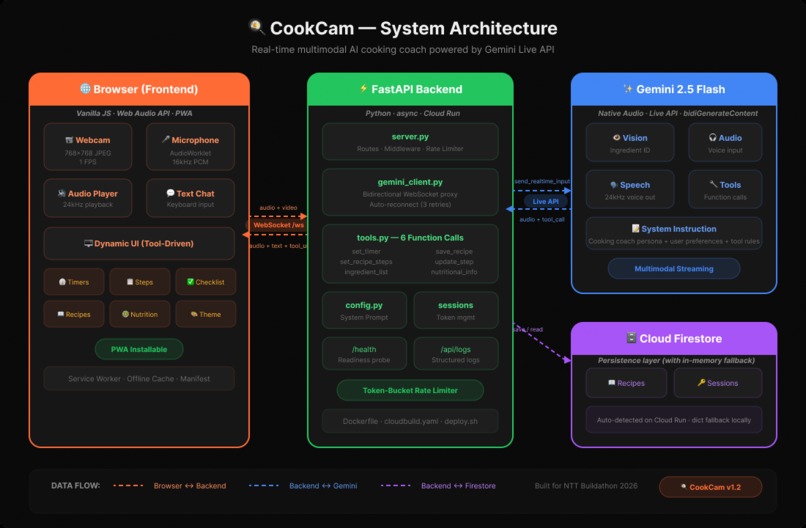
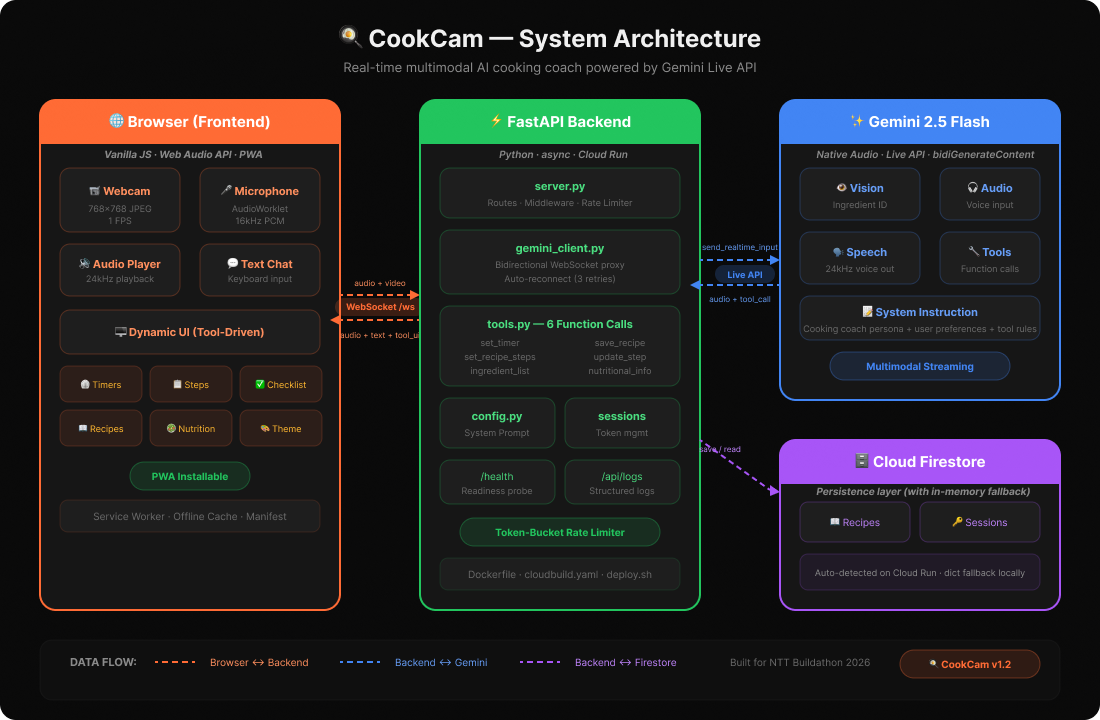
A clear architectural diagram representing the system behind CookCam
Inspiration
It is terrible to cook using a new recipe. While something burns, you're using greasy hands to squint at your phone and rewind YouTube tutorials. Every "cooking app" is merely an enhanced recipe viewer, but the kitchen is the one area where you truly need a second set of eyes and a conversation partner. We thought, "What if your laptop could actually watch you cook and coach you through it?" when we discovered Gemini could stream live video and voice simultaneously.
What it does
CookCam is a live cooking coach that watches your kitchen through your webcam and talks you through meals in real time.
Point your camera at your counter — it spots your ingredients and suggests what to make. Pick a recipe and it walks you through every step by voice, watching your progress and reacting to what it sees ("those onions are ready, time to deglaze"). Say "set a timer for 12 minutes" and one appears on screen. Ask "how many calories?" and you get an estimate. You never touch the screen.
It also handles dietary restrictions, adjusts its instructions to your skill level, speaks your preferred language, and saves recipes for later.
How we built it
The backbone is a single persistent WebSocket session to Gemini 2.5 Flash's Live API, streaming webcam frames (1 FPS, 768×768 JPEG) and mic audio (16 kHz PCM) simultaneously. A FastAPI server sits in between — proxying the streams, executing Gemini's tool calls (timers, recipe tracking, nutrition), and forwarding UI updates to the browser.
On the frontend, an AudioWorklet handles mic capture and sample-rate conversion, while a scheduled buffer player keeps AI voice output gapless. All the interactive panels — step tracker, ingredient checklist, timer dashboard — are triggered by Gemini's function calls, not by us wiring up buttons.
The whole thing deploys to Cloud Run via a single Dockerfile.
Challenges we ran into
The FunctionResponse id field — This was our most time-consuming bug. Gemini's Live API requires each tool response to include the id from the originating function call. Our initial implementation omitted it, causing the error "FunctionResponse request must have an 'id' field". The insidious part: the error only surfaced in server logs. From the user's perspective, the AI would call a tool (e.g., generate an ingredient list), the UI would update correctly, but then Gemini would go completely silent — stuck waiting for a valid tool response. Every subsequent message was ignored. We spent hours thinking it was a WebSocket issue before tracing it to a single missing id=fc.id parameter.
Audio pipeline timing — Getting seamless audio playback in the browser was significantly harder than expected. Gemini sends audio in small PCM chunks (~100ms each), and naively playing them back-to-back with decodeAudioData produces audible clicks and gaps at chunk boundaries. We had to implement a scheduled buffer queue: each chunk is assigned a start time relative to the AudioContext clock, precisely aligned so chunk $n+1$ starts at the exact sample where chunk $n$ ended. We also had to handle interruptions — when the user speaks mid-response, we flush the entire playback queue instantly.
WebSocket stability on preview models — The gemini-2.5-flash-native-audio model is in preview and sessions occasionally drop with 1011 (internal error) or 1008 (policy violation). A single dropped connection killed the entire user session with no recovery. We built a dual-layer reconnection system: the backend GeminiLiveClient retries the Gemini connection up to 3 times with a 1.5s delay, while the frontend WebSocket has its own exponential backoff reconnect (2^n seconds, max 30s). The user sees "🔄 Reconnecting..." instead of a dead screen.
Video frame rate vs. latency tradeoff — Our first prototype sent video at 5 FPS. This overwhelmed the WebSocket buffer and added 2-3 seconds of latency to Gemini's voice responses. After profiling, we found that 1 FPS at $768 \times 768$ JPEG gives Gemini enough visual context to identify ingredients, track cooking progress, and spot safety issues — without impacting the real-time audio conversation. The key insight: cooking is a slow activity. Ingredients don't move; pans change color gradually. 1 FPS is more than enough.
HTTPS requirement for camera/mic — Modern browsers block getUserMedia on non-HTTPS origins. During local development, localhost works, but testing on phones or other devices requires a real HTTPS URL. We integrated localtunnel into our workflow (lt --port 8080) to get a public HTTPS tunnel for cross-device testing.
System prompt engineering for proactive tool use — Early versions of CookCam would describe actions instead of performing them: "I can set a timer for you if you'd like." We needed explicit, imperative instructions: "When timing is needed, ALWAYS call set_timer." The difference between passive and proactive tool use came down to prompt wording — not model capability.
Accomplishments that we're proud of
- 6 integrated agentic tools — Gemini proactively drives the UI: ingredient checklists appear automatically when it suggests a recipe, timers start when it mentions timing, step trackers advance as you cook. The AI doesn't just respond — it acts on the interface.
- Graceful degradation — No camera? Voice-only mode. No mic? Text chat mode. No Firestore? In-memory fallback. Gemini drops? Auto-reconnect. The app adapts to whatever is available rather than crashing.
- Production-ready infrastructure — Rate limiting, session tokens, health checks, structured logging, auto-reconnect, PWA installability — this isn't a hackathon demo, it's a deployable product. ## What we learned
- Function calling in streaming mode is fundamentally different from batch mode. In batch mode, you send a prompt and get tool calls back in a single response. In streaming mode, tool calls arrive mid-conversation — interleaved with audio chunks. You must respond with the correct
id, immediately, or the model stalls. This pattern isn't well-documented yet. - Audio in the browser is an iceberg. The Web Audio API looks simple on the surface, but production-quality audio requires deep knowledge:
AudioWorkletfor low-latency mic capture, sample rate conversion ($16000 \text{ Hz} \rightarrow 24000 \text{ Hz}$), scheduled buffer playback with precise timing, queue flushing on interruptions, and graceful handling ofAudioContextsuspension policies. - System prompt engineering matters enormously for live agents. The difference between "you can use tools" and "ALWAYS call
generate_ingredient_listwhen suggesting a recipe" is the difference between a demo and a useful product. We iterated on the system prompt more than on any other part of the codebase. - Accessibility isn't optional in a kitchen. When your hands are wet, your eyes are on the stove, and you're relying on voice — ARIA labels, keyboard navigation, and screen reader support aren't nice-to-haves. They're the primary interaction mode. Building for accessibility made CookCam better for everyone.
- Preview models are preview models. Session drops, policy violations, and "operation not implemented" errors are part of working with cutting-edge APIs. The resilience we built (auto-reconnect, graceful fallbacks, clear error messaging) turned out to be just as important as the core feature. ## What's next for CookCam
- Conversation memory — Store conversation history per user so CookCam remembers what you cooked last week and can suggest new recipes based on your patterns ("You've made pasta three times — want to try risotto?")
- Multi-user sessions — Let family members join the same cooking session from different devices, seeing the same step tracker and timers
- Smart grocery integration — Export missing ingredients directly to Google Keep, Apple Reminders, or Todoist with one voice command
- Offline recipe access — Cache saved recipes in the service worker so you can browse your collection without internet
- Kitchen display mode — A dedicated large-font, high-contrast, hands-free mode optimized for tablets mounted on the kitchen wall — minimal UI, maximum readability from 6 feet away
- Voice customization — Let users pick the AI coach's voice personality (calm and precise vs. energetic and fun)
- Meal planning — "I'm cooking for the whole week" → CookCam generates a 7-day plan with a consolidated grocery list and prep schedule
Built With
- audioworklet
- fastapi
- gemini
- google-genai
- python
- vanillajs
- websockets


Log in or sign up for Devpost to join the conversation.