Inspiration With the rise of large language models, enterprise legal teams still struggle to quickly digest complex, multi-page legal documents without losing context. We wanted to build a seamless, premium, B2B legal-tech platform called Clauselens that bridges the gap between static contract text and AI intelligence—making contract review interactive, highly visual, and efficient for enterprise users.
What it does Clauselens is an AI-powered contract intelligence SaaS featuring a dark enterprise aesthetic across three core workflows:
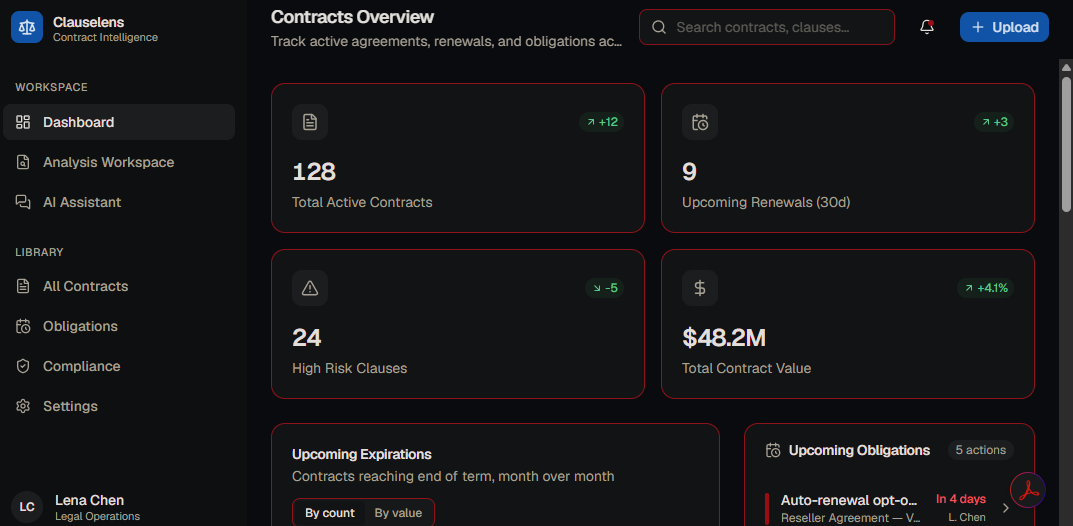
Dashboard: Tracks key legal metrics using animated stat cards and includes a toggleable data visualization chart mapping contract expiration dates.
Analysis Workspace: A split-screen client layout featuring a PDF-style document viewer alongside an AI clause-extraction panel. Clicking on any AI-extracted clause instantly highlights and auto-scrolls to the exact section in the document viewer.
AI Assistant: An interactive chat interface that provides markdown-formatted AI answers. Responses include quote cards referencing precise contract text and smart suggestion chips for quick legal actions.
How we built it The UI framework was engineered leveraging a modern front-end stack:
Next.js & React: Powered the application framework, component architecture, and file-based routing.
Tailwind CSS: Allowed us to design a custom global dark theme tailored for high-end corporate platforms.
TypeScript: Ensured type-safe development across our multi-view application state.
Recharts: Handled animated data visualization for contract obligations and expirations.
Centralized Data Layer: Built a robust client-side state mock structure (lib/data.ts) to manage seamless tab switching on mobile and cross-component interactivity on desktop.
Challenges we ran into One of our primary challenges was orchestrating the shared state between separate components in the Analysis Workspace. Ensuring that a user clicking a dynamically rendered clause in the right-side AI panel would trigger smooth scrolling and exact highlighting in the independent left-side document viewer required meticulous event tracking and clean client-side state syncing. Another roadblock was responsive design—collapsing a complex split-screen workspace into an intuitive, tab-toggled layout for smaller mobile viewports without sacrificing data hierarchy.
Accomplishments that we're proud of Interactive Micro-interactions: We successfully built a highly polished, interactive framework where the simulated typing indicators, smart suggestion chips, and cross-panel clause highlighting work together seamlessly.
Enterprise Aesthetic: Curating a crisp, dark enterprise layout that presents dense legal information cleanly and scannably.
Modular Clean Code: Setting up a highly componentized, fully production-ready UI skeleton where all three views compile perfectly and are primed for backend integration.
What we learned We learned the importance of structuring mock data realistically ahead of database implementation. By centralizing our application data early on, it became much simpler to manage user interactions like sorting and searching through extensive contract lists. We also deepened our understanding of building adaptive user interfaces that can fluidly scale down from complex dual-panel desktop workspaces into mobile-optimized layouts.

Log in or sign up for Devpost to join the conversation.