Inspiration
When I first tried creating AI-generated videos, I tested many tools and kept running into the same problem: the results looked promising for one clip, but fell apart across multiple scenes. Characters changed faces, clothes, hairstyles, facial features, and sometimes even skin tone. Motion could look unnatural, and small glitches made the story feel inconsistent. Some premium tools produced more stable characters, but they were too expensive for longer videos. Creating even a few minutes of usable footage meant regenerating scenes many times, which quickly became unaffordable. I realized that lower-cost models could still produce better results when given very precise prompts, reference images, and structured instructions. That inspired Continuity Studio: a tool that helps creators improve low-cost AI video generation by locking down the details that matter most, such as identity, wardrobe, environment, motion, voice, and camera direction.
What it does
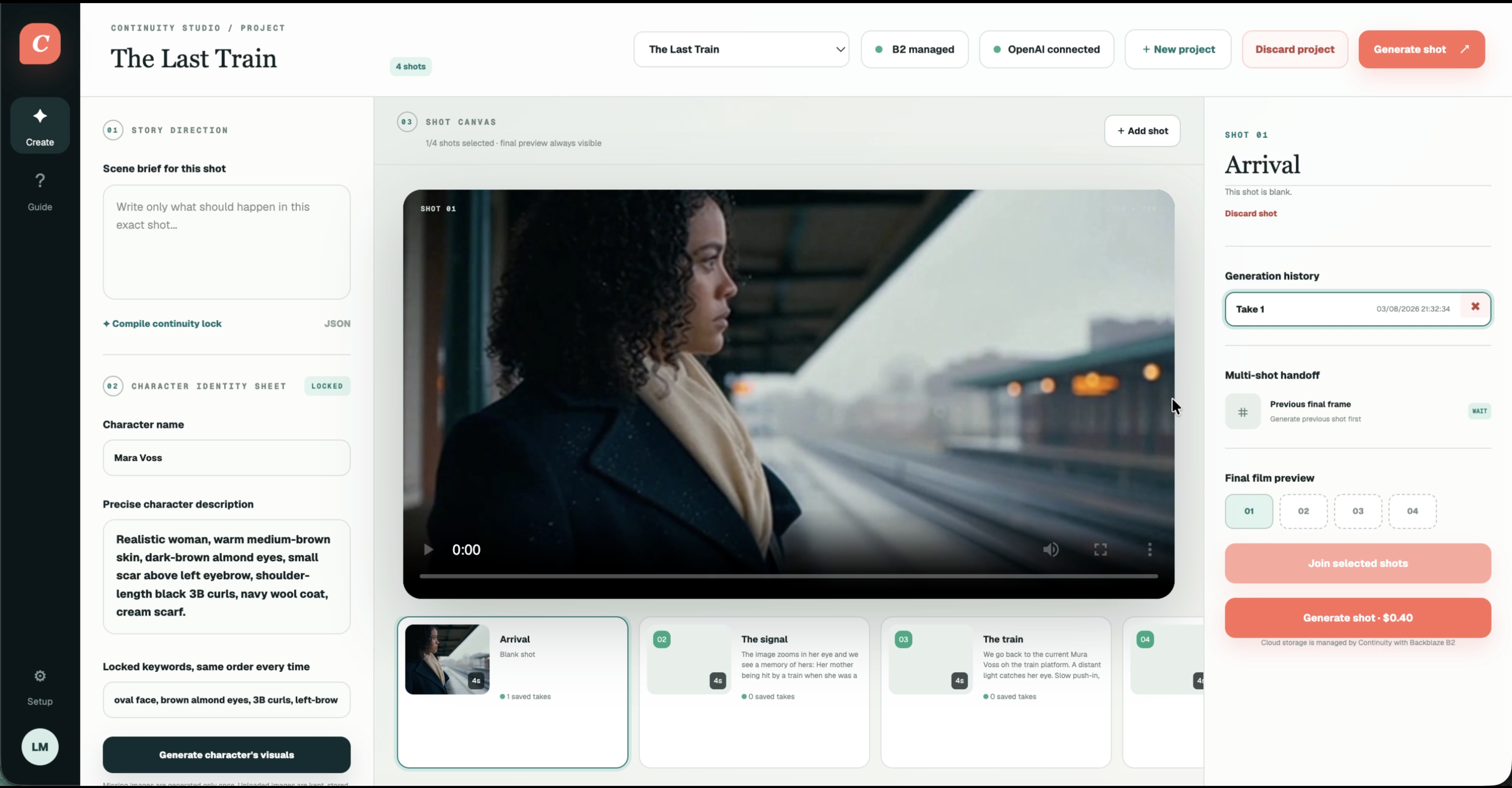
Continuity Studio helps creators make AI-generated videos with more consistent characters from one scene to another. The idea is to reduce the freedom of the AI model by being very specific about everything that should stay the same: the character’s face, skin tone, hairstyle, clothes, environment, camera direction, body movement, voice style, etc. The app turns a simple scene idea into a structured prompt lock, almost like a character and scene reference. Then it uses that locked information to generate videos and store the results in Backblaze B2.
How we built it
Continuity Studio was built as a web app with a creator workspace. The user can write a scene brief, see the main characters description, check the continuity details, connect their own provider API key and generate a video shot. On the backend, a Python media worker was built to handle the generation process, talk to AI video providers, track the run status, and store generated videos in Backblaze B2. Genblaze was used to support generative media workflows and provider orchestration, especially for GMI Cloud workflows. Backblaze B2 was used as the storage layer for generated videos, references, metadata, and future provenance records.
Challenges we ran into
The biggest challenge was actually finding the right method to organize prompts in a way that the outcome video would be consistent with the previsous scenes and the characters continuity. The aim was to allow the users to save money, but the process itself to write efficient prompts is quite expensive. AI models naturally want to be creative, but for video storytelling, the excess of freedom creates problems. So the prompts had to be organized in a way that locks the important details while still allowing the scene to feel alive. Generation was often not satisfying, or I even sometimes ran into errors or the AI would return something that is not playable, so the run status, error handling, and video playback had to be improved as well.
Accomplishments that we're proud of
I am proud that the project solves a problem I personally had while trying to create AI videos. A working app was built that connects the creator workflow, structured prompt engineering, AI video generation, Backblaze B2 storage, and Genblaze orchestration. I am also proud that the app is focused on cost-efficiency, since it also means energy efficiency. The goal, which is to generate the best possible clip in fewer tries is then met.
What we learned
I learned that prompt engineering matters a lot when it comes to AI use. It is not only about writing a long prompt, but about organizing the details in a consistent way and repeating the important identity features clearly. Also, I learned that formats like json are more efficient for the AI to take them into account. Also, I experienced the fact that storage, error handling, run tracking, cost awareness, and asset management are also needed when it comes to creating an AI media app. Backblaze B2 and Genblaze were useful when it came to storage.
What's next for Continuity
Next, I want Continuity Studio to support accounts management. For example, the last frame of one video should become the starting reference for the next video, so the character and scene stay consistent. I also want to add better character sheets, voice consistency, background sounds, automatic continuity checks, retries when the character changes too much, and a media library where creators can organize all generated assets. Long term, Continuity Studio could become a tool for creators who want to make short films, ads, story videos, or educational content with consistent AI characters without spending too much money.
Built With
- backblaze
- cloud
- cloudflare
- genblaze
- gmi
- next.js
- openai
- python
- react
- render
- sqlite
- typescript
- workers

Log in or sign up for Devpost to join the conversation.