Inspiration
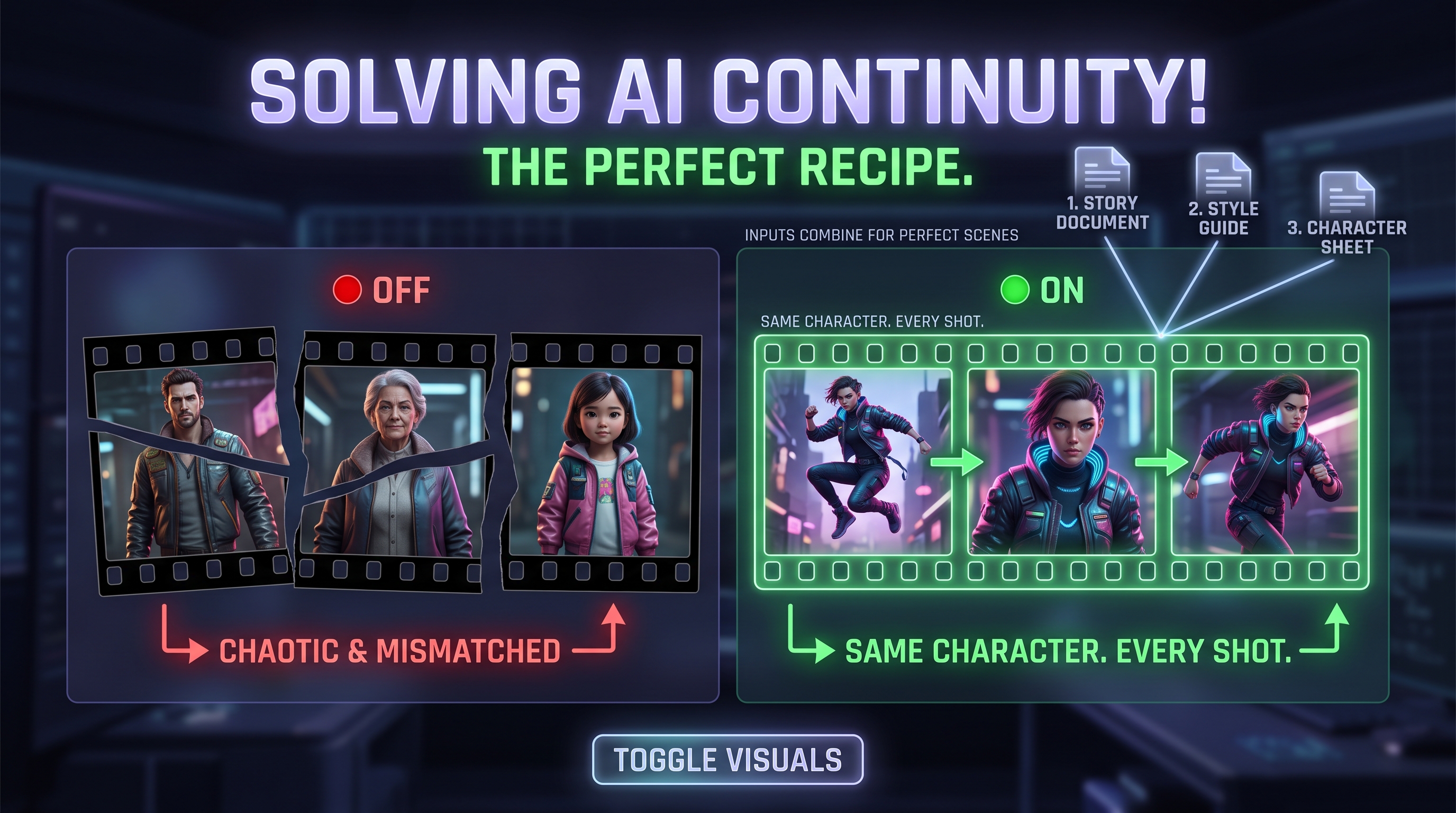
I tried generating a storyboard for a short scene and got three completely different women. Same description each time. Different face, different jacket, different hair every frame. The images looked fine on their own but they did not belong to the same story.
That is a real job on a film set. The continuity person makes sure the jacket is the same in every shot and the glass is still half full. Image models have no idea that job exists. Every frame is a fresh start with no memory of the last one.
So I built the continuity person.
What it does
You upload three documents.
The first is your story. What happens in each scene.
The second is your style guide. Faded 1970s film stock. Overcast light. Wide static shots.
The third is your character sheet. Maya. Mid twenties. Short black hair. Oversized olive green jacket. Faded red canvas bag over her left shoulder.
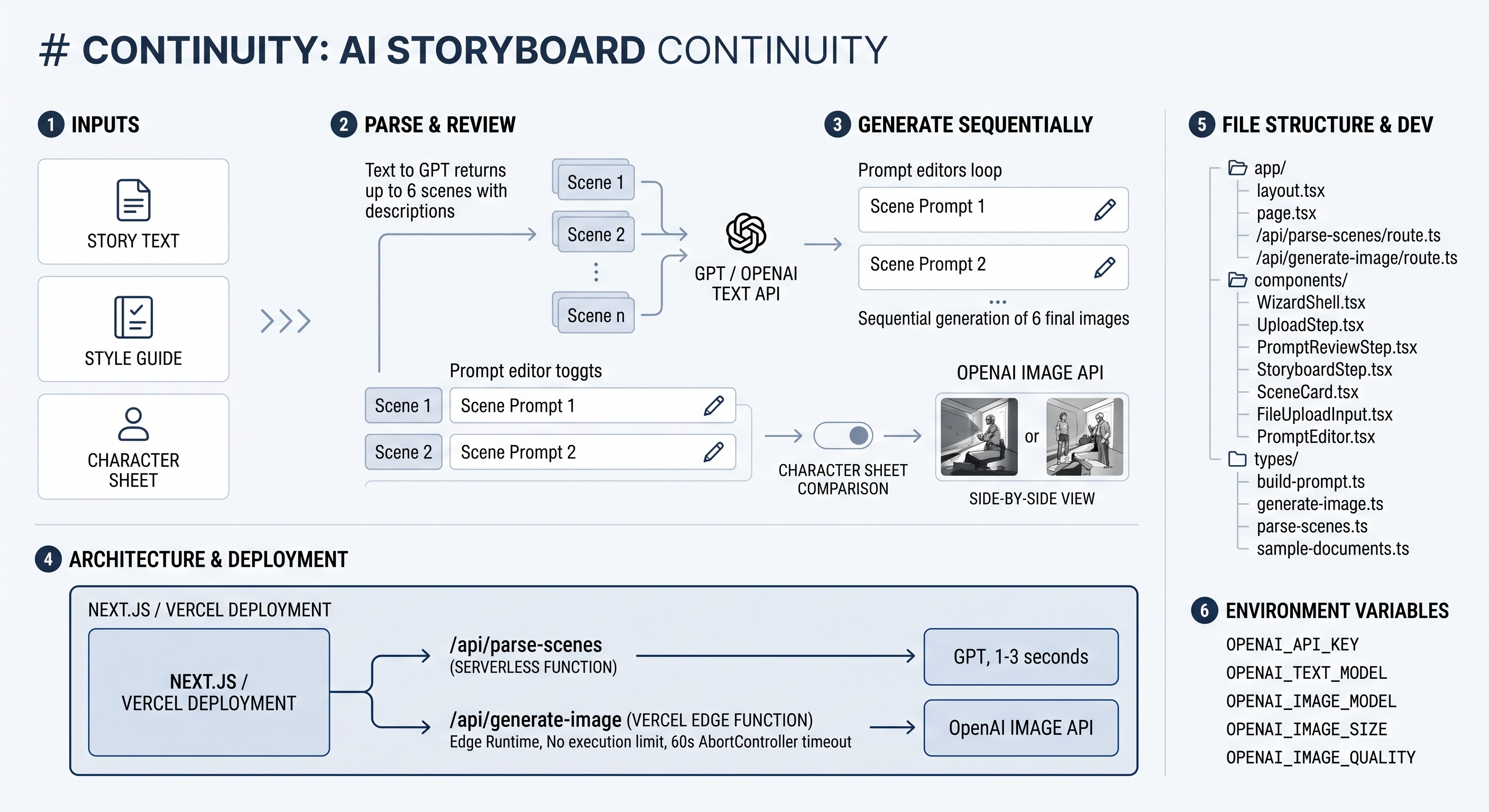
Continuity splits your story into scenes and builds an image prompt for each one by combining all three documents. The action comes from the story. The look comes from the style guide. The character description goes into every single prompt without exception.
Then it generates the frames and lays them out as a storyboard.
There is a toggle in the final step that turns the character sheet off. Flip it and you watch three different people appear in the same three scenes. That is the whole argument in one click.
How we built it
Next.js 14 with the App Router deployed on Vercel. Two API routes. One parses the story into scenes. One generates a single image.
IBM Bob wrote the code. I worked in Plan mode first to get the architecture settled before any implementation, then moved to Agent mode and worked through the sub tasks one at a time.
The design decisions that mattered turned out to be structural rather than visual.
I chose a three step wizard over a single page. Step one parses and confirms the scenes. Step two shows every assembled prompt as editable text. Step three generates. That middle step exists so you can see the character sheet sitting inside each prompt before spending anything on images. It is a debugging tool that turned into the best part of the demo.
I generate images sequentially rather than in parallel. Slower but it does not trip rate limits and when something fails you get one clear error instead of a pile of simultaneous ones. A failed scene shows a retry button and the run continues to the next scene rather than aborting.
Scene count is capped at six. Twelve scenes at thirty seconds each is five minutes of waiting which is too slow to iterate on and too slow to demo.
Challenges we ran into
The first plan used IBM watsonx for scene parsing. My IBM Cloud trial had already expired and reactivating it required billing information I did not want to add at midnight. I moved parsing to OpenAI and kept IBM Bob as the tool building the project. Losing an hour to that taught me to check every dependency for account state before writing code against it.
The image route kept failing with an unknown parameter error. The code was sending response_format which belongs to DALL·E. gpt image 1 rejects it outright and returns base64 by default. The fix was one line but finding it took much longer than it should have because the route was swallowing the real error behind a generic message. I rewrote the error handling to surface exactly what OpenAI said and every bug after that took minutes instead of an hour.
The strangest one was a run that hung with no output at all. The logs showed a successful image generation and then nothing. My OpenAI usage had not increased which meant the request never left my machine. The loop was stopping after the first scene.
And a deployment that worked locally but failed live because a model name got mistyped by one character in the Vercel dashboard. Local environment variables and production environment variables are set separately and I learned to check both.
Accomplishments that we're proud of
It works and it is deployed. It also does not look like a hackathon project. Warm off white background. A real serif for the headings. One muted accent colour and a lot of whitespace. I set the visual system up early rather than bolting it on at the end and everything built after that inherited it.
The comparison toggle is the thing I am most pleased with. It would have been easy to just claim that injecting the character sheet keeps frames consistent. Showing it happen is a completely different kind of argument.
What we learned
Coding agents are fast at writing code and that is not usually the slow part. What actually took time was integrating an API the model did not know well, sorting out account state, and finding a control flow bug in the front end. Planning before implementing paid for itself several times over.
Never let an error handler swallow the real error. A generic message costs you an hour every time.
Deploy early with nothing working. I pushed to Vercel before any UI existed and caught a runtime incompatibility then instead of the morning of the deadline.
What's next for Continuity
Multiple characters in one scene sheet with consistency held across all of them.
Reference image conditioning rather than text only descriptions, which should hold faces much more tightly than a written description can.
Regenerating a single frame without rerunning the whole storyboard.
Timing the frames to narration to produce an animatic instead of a static board, which is the version an actual director would use.
Built With
- css
- gpt-4o-mini
- gpt-image-1
- ibm-bob
- javascript
- next.js
- node.js
- openai
- react
- tailwindcss
- typescript
- vercel


Log in or sign up for Devpost to join the conversation.