-
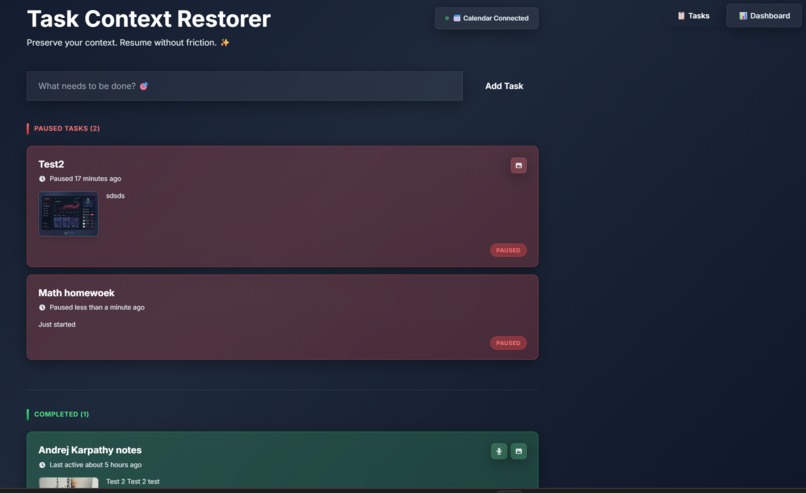
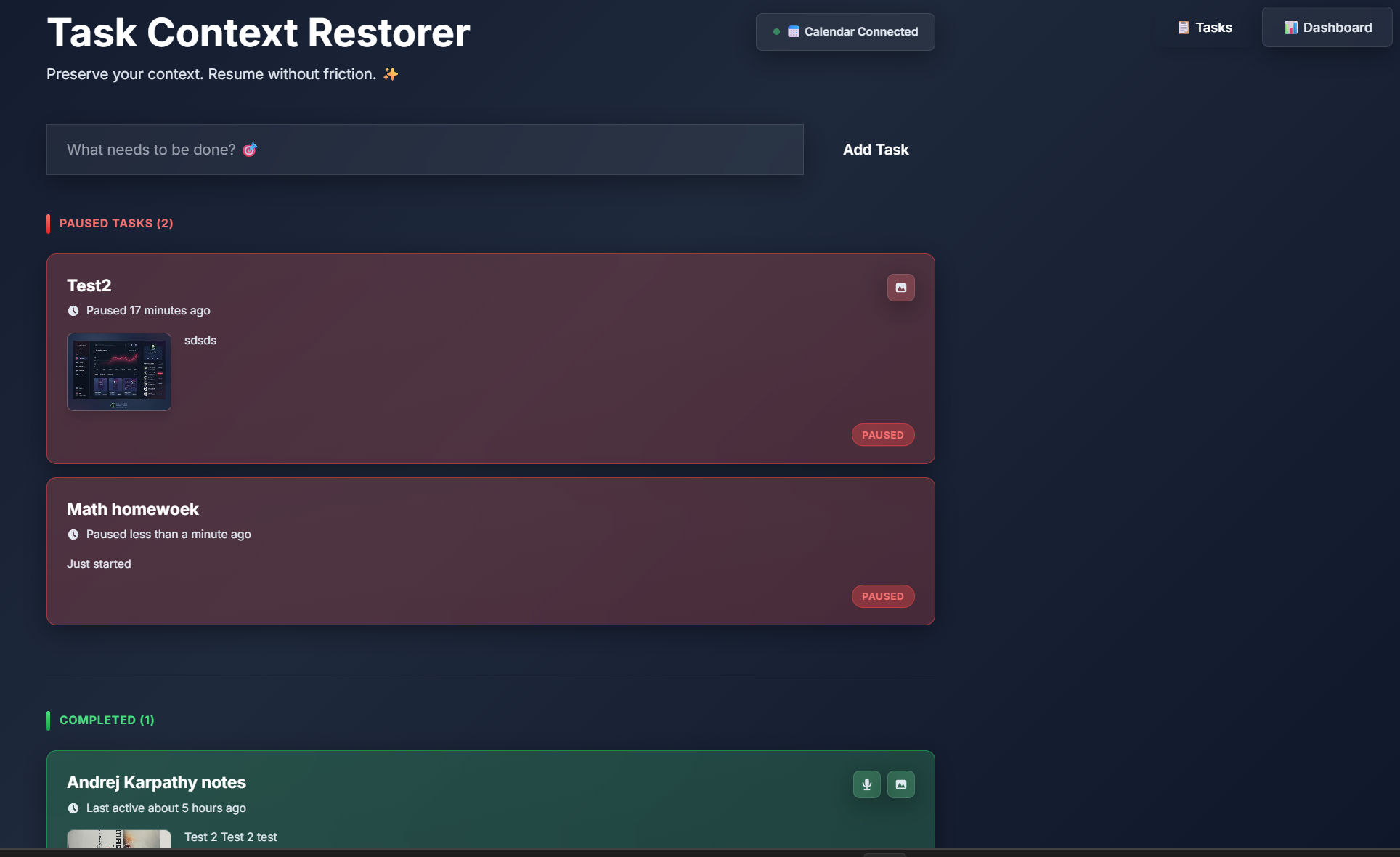
Landing Page
-
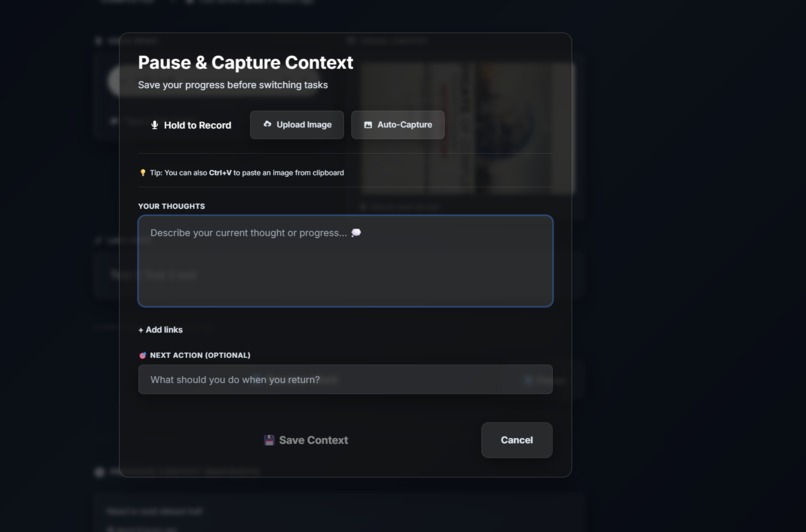
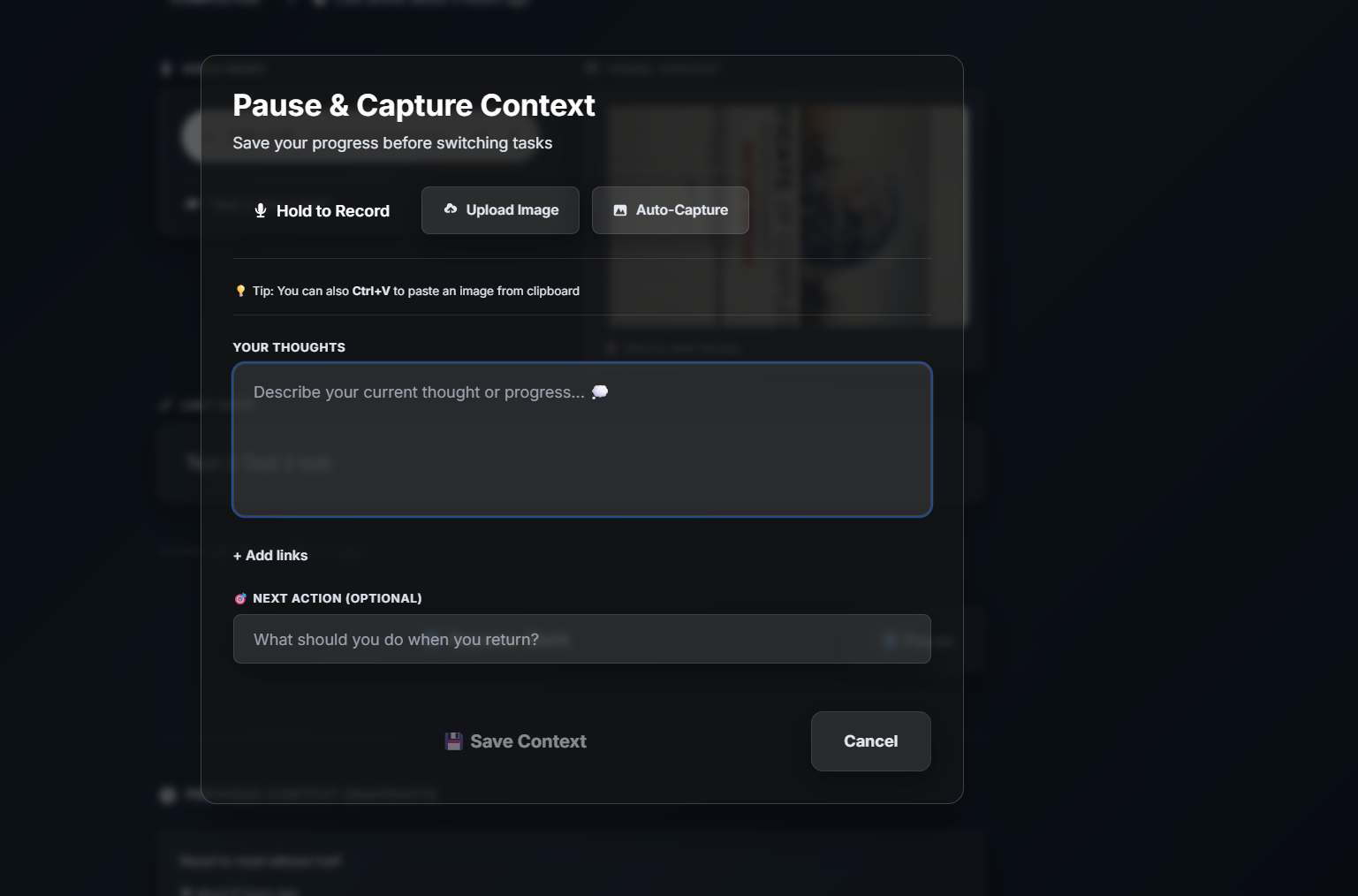
Pause-Context Saving
-
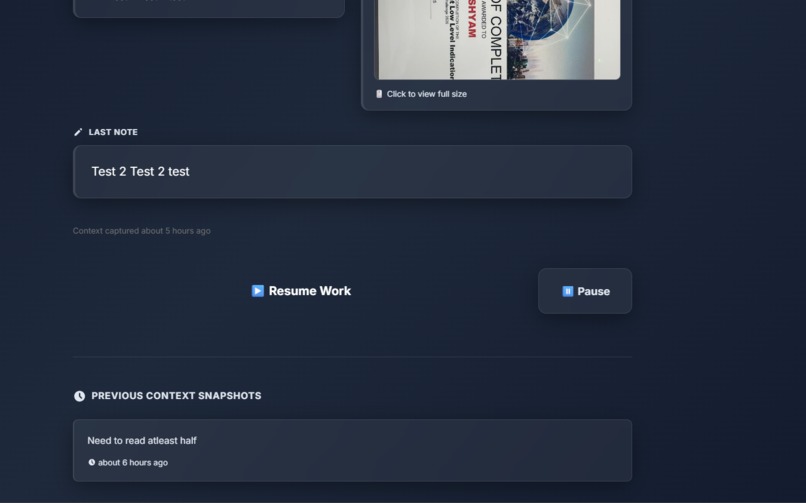
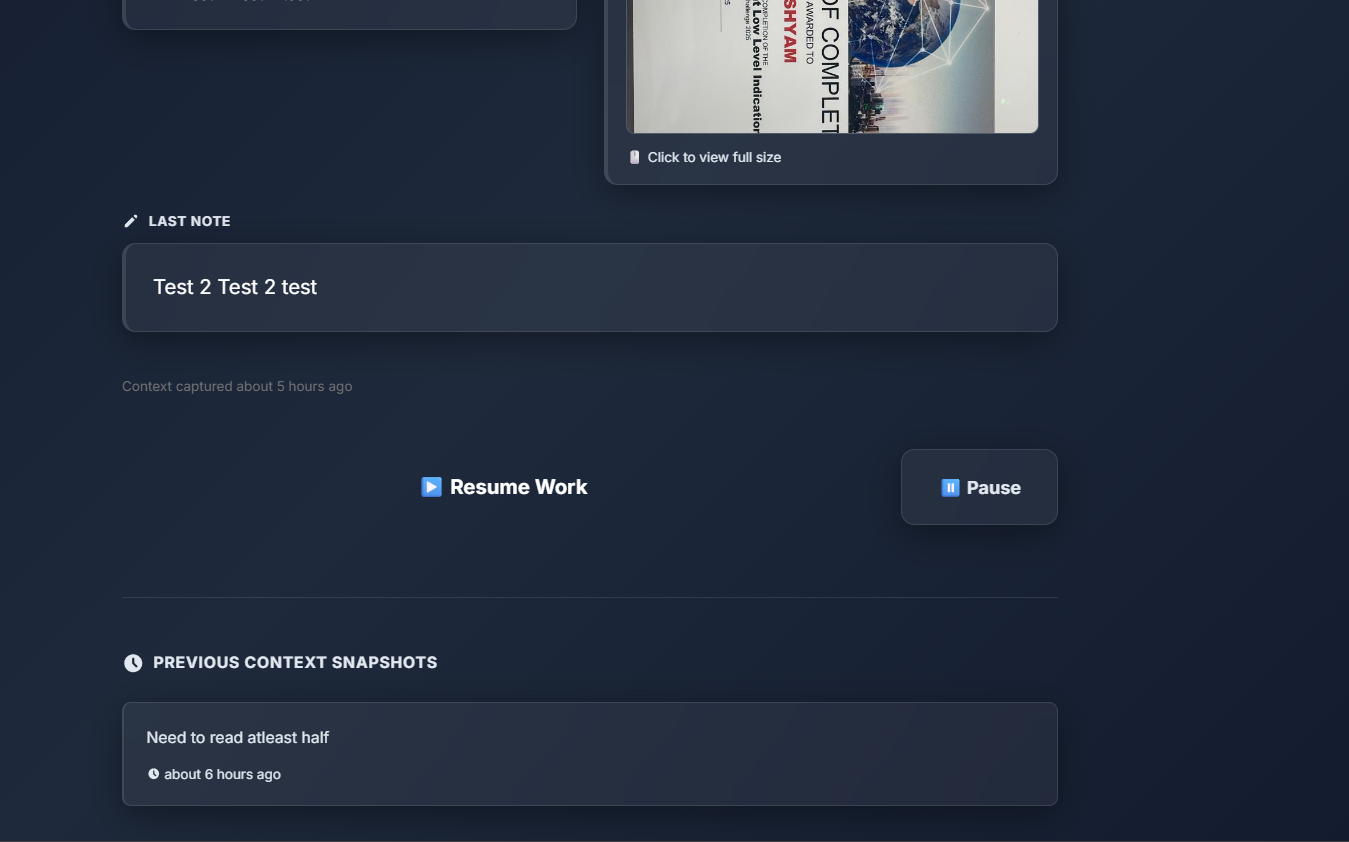
Detailed preview
-
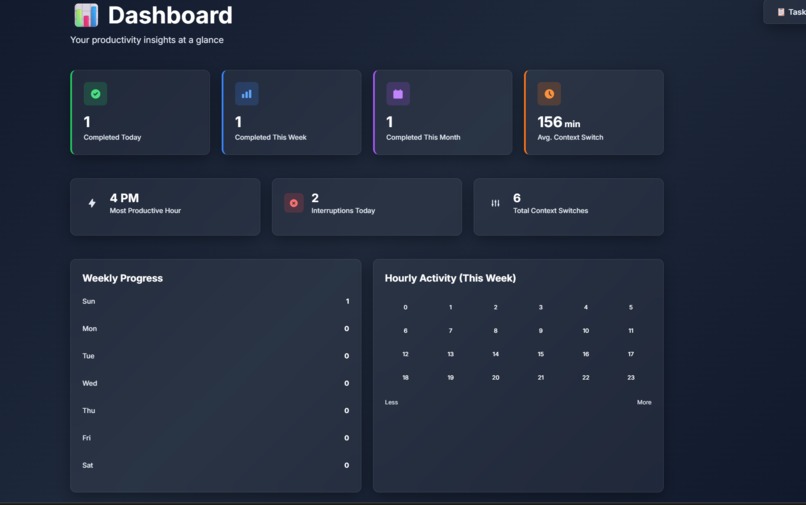
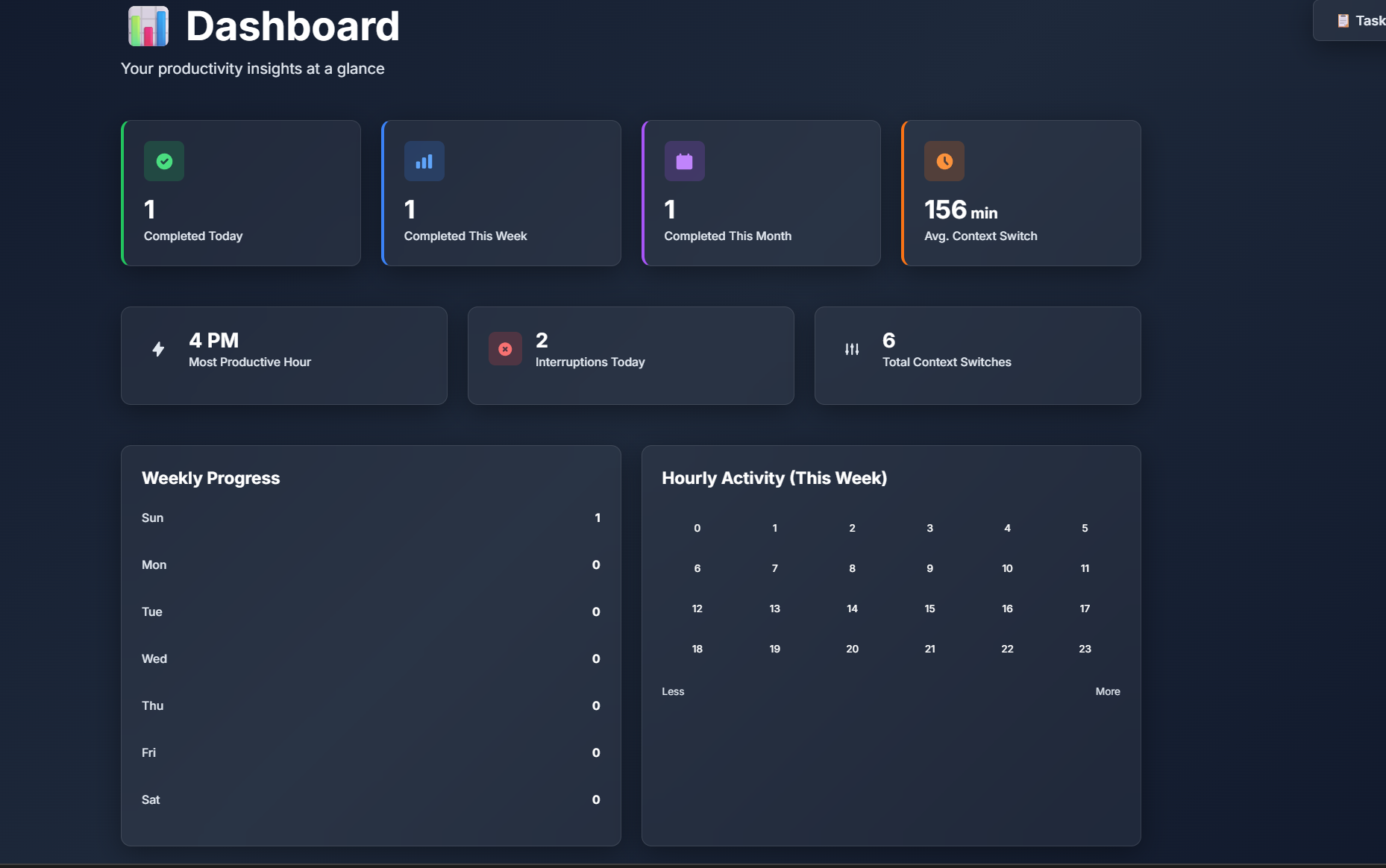
Dashboard-Analytics
Inspiration
As developers and knowledge workers, we constantly juggle multiple tasks throughout the day. Whether it's switching between a bug fix, a feature implementation, and a code review, or getting interrupted by urgent requests, we noticed a painful pattern: every context switch costs us precious mental energy and time. Studies show it takes an average of 23 minutes to fully regain focus after an interruption. We built Contexto to solve this universal productivity problem—preserving your exact mental state so you can resume any task instantly, without the cognitive overhead of "What was I doing again?"
What it does
Contexto is a smart task management app that captures and restores your complete work context. When you need to pause a task:
- 🎙️ Voice Recording - Press and hold to capture your current thoughts and next steps via auto-transcribed voice memos
- 📸 Screenshot Capture - Save visual context with drag-and-drop uploads, paste (Ctrl+V), or automatic screen capture
- 📝 Rich Notes - Write detailed context, ideas, or blockers
- 🔗 Link Tracking - Save relevant URLs, documentation, or resources
- 🎯 Next Actions - Define exactly what to do when you return
When you're ready to resume, everything is there—your voice notes, screenshots, links, and thoughts—so you can pick up instantly without mental friction. The app also syncs with Google Calendar to tie tasks to your schedule and provides a Dashboard with productivity analytics (completion trends, context switch frequency, hourly heatmaps) to help you understand and optimize your work patterns.
How we built it
Frontend Architecture:
- React 19 + TypeScript - Modern component-based UI with full type safety
- Vite 7 - Lightning-fast dev server with HMR for rapid iteration
- Zustand - Minimal state management library for clean, predictable data flow
- TailwindCSS 3 - Utility-first styling with custom dark theme configuration
Key Technologies:
- Web Speech API - Real-time voice transcription for hands-free context capture
- MediaRecorder API - High-quality audio recording with playback
- html2canvas - Screenshot generation and processing
- Google Calendar API + OAuth 2.0 - Secure calendar integration via @react-oauth/google
- date-fns - Date manipulation for analytics calculations
- LocalStorage - Client-side persistence with zero backend dependency
Design System:
- Custom dark premium theme with glassmorphism effects (backdrop-blur, semi-transparent cards)
- Gradient accents (purple/blue/pink/cyan) for visual hierarchy
- Smooth animations (fadeIn, slideUp, scaleIn, glow, float) for delightful UX
- Color-coded task states: orange (active), red (paused), green (completed)
Analytics Engine:
- Built custom statistical functions to calculate productivity metrics
- 24-hour activity heatmap to visualize work patterns
- Weekly progress bar chart with percentage-based trends
- Context switch analysis with average time calculations
Challenges we ran into
Google OAuth "Access Blocked" Error - Initially hit a 403 error during OAuth flow. Discovered that Google requires adding test users explicitly in the OAuth consent screen during development. Fixed by adding the test email to the allowed users list in Google Cloud Console.
CSS Compilation with Tailwind - Ran into issues trying to use
@applywith custom gradient utilities from the Tailwind config. The compiler couldn't resolve custom gradient names likefrom-accent-purple. Solved by using direct CSSlinear-gradient()withbackground-clip: textinstead of Tailwind's@applydirective.Voice Transcription Accuracy - Web Speech API can be finicky across different browsers. Had to implement robust error handling and fallback states when transcription fails or isn't supported.
Context Switch Time Calculation - Defining "average context switch time" was tricky—do we count switches hours apart? Ended up filtering for switches under 8 hours to exclude overnight gaps and capture true work-session interruptions.
State Persistence Strategy - Balancing between localStorage limits (5-10MB) and storing audio/images. Implemented Base64 encoding for images and audio blobs, with size warnings to prevent quota issues.
Accomplishments that we're proud of
✨ Seamless Voice Capture - The press-and-hold mic interface feels natural and produces clean, auto-transcribed text that genuinely preserves thought context.
🎨 Premium Dark Theme - Achieved a modern, professional aesthetic with glassmorphism effects, smooth animations, and gradient accents that rivals commercial SaaS products.
📊 Actionable Analytics - The dashboard doesn't just show numbers—it reveals insights like your most productive hour and interruption frequency, helping users make data-driven decisions about their work habits.
🔒 Zero Backend Complexity - Everything runs client-side with LocalStorage and Google Calendar OAuth, meaning zero server costs, instant setup, and complete data privacy.
⚡ Instant Resume Flow - Clicking a paused task and seeing all your captured context (voice, screenshots, notes) displayed beautifully makes the "resume work" experience genuinely frictionless.
🏗️ Production-Ready Code - Built with TypeScript for type safety, proper error handling, environment variable management (.env setup), and comprehensive documentation (README + Google Calendar setup guide).
What we learned
Context switching is expensive - Building this app made us hyper-aware of how often we switch tasks ourselves. Measuring it quantitatively (avg switch time, interruption count) was eye-opening.
Voice is underutilized - The Web Speech API is incredibly powerful but rarely used in productivity tools. Voice context capture is faster and more natural than typing, especially for capturing "stream of consciousness" work state.
Glassmorphism done right - Creating a cohesive dark theme with glassmorphism requires balancing transparency, blur, borders, and shadows carefully. Too much blur = unreadable; too little = flat.
OAuth isn't scary - Google Calendar OAuth seemed daunting initially, but breaking it down (Cloud Console → API enable → Credentials → Token flow) made it manageable. Documentation is key.
Analytics need context - Raw numbers like "15 tasks completed" don't mean much. Adding time dimensions (today/week/month), visual charts (heatmap/bar graph), and comparative metrics (productive hour) makes data actionable.
What's next for Contexto
🚀 Upcoming Features:
AI-Powered Context Summaries - Use LLMs to automatically summarize voice notes and screenshots into concise "what you were doing" descriptions
Browser Extension - Capture tabs/URLs automatically when pausing tasks; one-click context restoration that reopens all relevant tabs
Time Tracking Integration - Connect with tools like Toggl/Clockify to track actual time spent per task and correlate with context switches
Team Collaboration - Share task contexts with teammates for better handoffs ("here's exactly where I left off on this bug")
Smart Notifications - Remind you to resume paused tasks after a set duration or based on calendar availability
Advanced Search - Full-text search across all voice transcriptions, notes, and links
Keyboard Shortcuts - Power-user features like Cmd+K command palette, quick task creation, and navigation
Mobile App - Native iOS/Android apps with push notifications and mobile voice capture
Export/Backup - Export tasks as Markdown/JSON for external backup or migration
Custom Themes - Let users create their own color schemes and glassmorphism intensity settings
Long-term Vision: Contexto aims to become the universal context layer for knowledge work—a tool that sits between you and all your other productivity apps, capturing and restoring context no matter what you're working on. Imagine never losing your train of thought again, even across devices, projects, or interruptions. That's the future we're building toward.


Log in or sign up for Devpost to join the conversation.