-
-
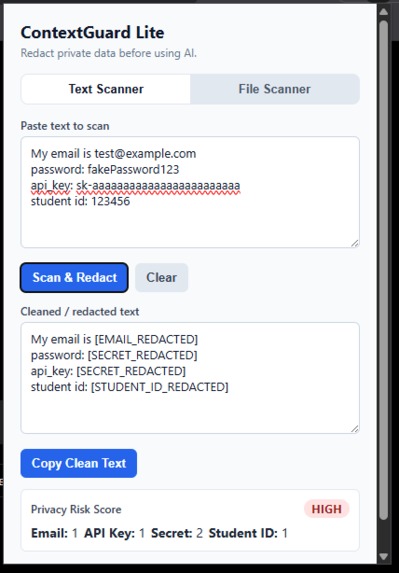
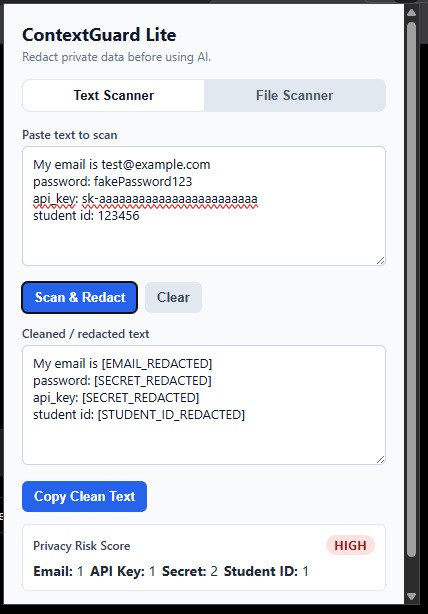
ContextGuard Lite popup — scanning sample student text and redacting private information before using AI tools.
Inspiration
Students are using AI tools more often for homework, studying, coding, and projects. The problem is that many students accidentally paste private information into AI tools without thinking about it, such as emails, phone numbers, passwords, API keys, school IDs, or personal notes. I wanted to build a simple privacy tool that helps students clean their text before sending it to AI.
What it does
ContextGuard Lite is a local-first Chrome/Edge browser extension that scans text for sensitive information and replaces it with safe redacted labels.
Users can paste text into the extension, scan it, and copy the cleaned version. It can detect and redact things like emails, phone numbers, URLs, passwords, API-key-like strings, student IDs, and other private patterns. It also supports simple text-based file scanning for formats like TXT, MD, CSV, and JSON.
The goal is to give students a quick safety check before using AI tools like ChatGPT, Claude, Gemini, or other chatbots.
How we built it
I built ContextGuard Lite using HTML, CSS, JavaScript, and Chrome Manifest V3. The extension runs locally in the browser and does not require a backend, account, database, or paid API key.
The popup interface handles text input, file uploads, scanning, risk level display, copying cleaned text, and downloading cleaned files. I also added reusable redaction logic so the same scanning rules can be used across the extension.
Challenges we ran into
One challenge was designing redaction rules that were useful but still simple enough to run fully in the browser. I also had to debug browser extension script loading issues and make sure the redaction logic could be shared correctly between different parts of the extension.
Another challenge was making the interface simple enough so a student could paste text, scan it, and understand the privacy risk without needing technical knowledge.
Accomplishments that we're proud of
I am proud that ContextGuard Lite is a working open-source MVP that runs locally and helps students think about privacy while using AI tools. It includes a text scanner, file scanner, redacted output, risk score, copy/download options, and a clean browser extension interface.
What we learned
I learned more about Chrome extension development, Manifest V3, JavaScript file handling, local privacy tools, pattern matching, and building user-friendly security features. I also learned how important it is to protect sensitive information before sending data into AI systems.
What's next for ContextGuard Lite: AI Privacy Shield for Students
Next, I want to improve the redaction rules, add more file type support, improve the floating scan button on AI websites, add better explanations for each detected risk, and create more test examples for students.
Built With
- ai
- browser-extension
- chrome
- css
- github
- html
- javascript
- manifest-v3
- privacy
- security


Log in or sign up for Devpost to join the conversation.