Inspiration
Every developer building AI workflows or maintaining agent instruction files (SKILL.md, CLAUDE.md) watches their prompts accumulate "prompt creep"—polite sycophancy, overlapping rules, and verbose explanations added after individual bug fixes. These extra tokens silently inflate latency and multiply monthly API bills on every single call. Yet developers hesitate to edit system prompts because they dread introducing behavioral regressions.
We built ContextDiet to treat prompt optimization like nutritional analysis: a visual linter that isolates empty-calorie bloat, compresses wordy instructions into terse directives, and provides a guaranteed Constraint Lock safety check.
What it does
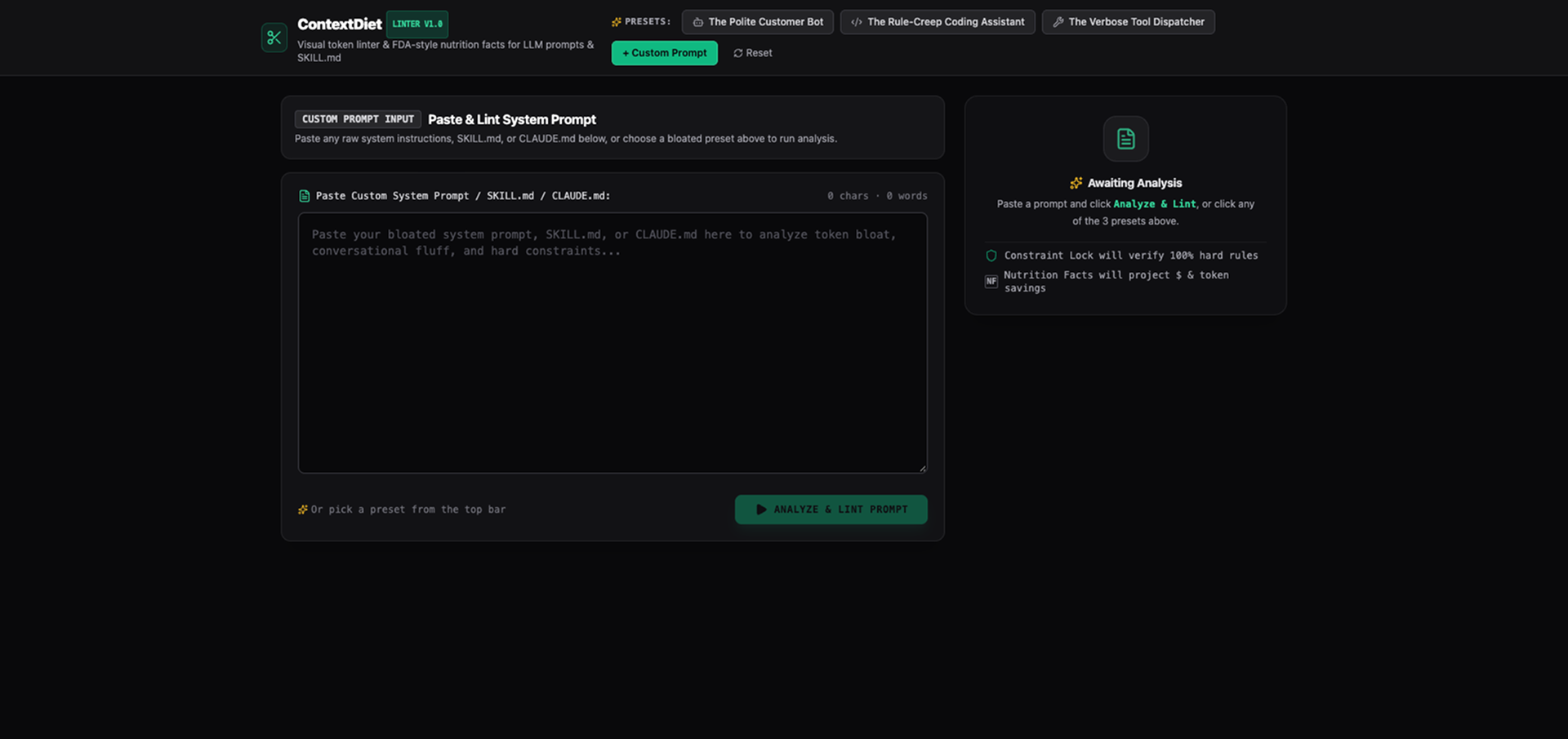
ContextDiet is a single-screen developer utility that optimizes system prompts in four steps:
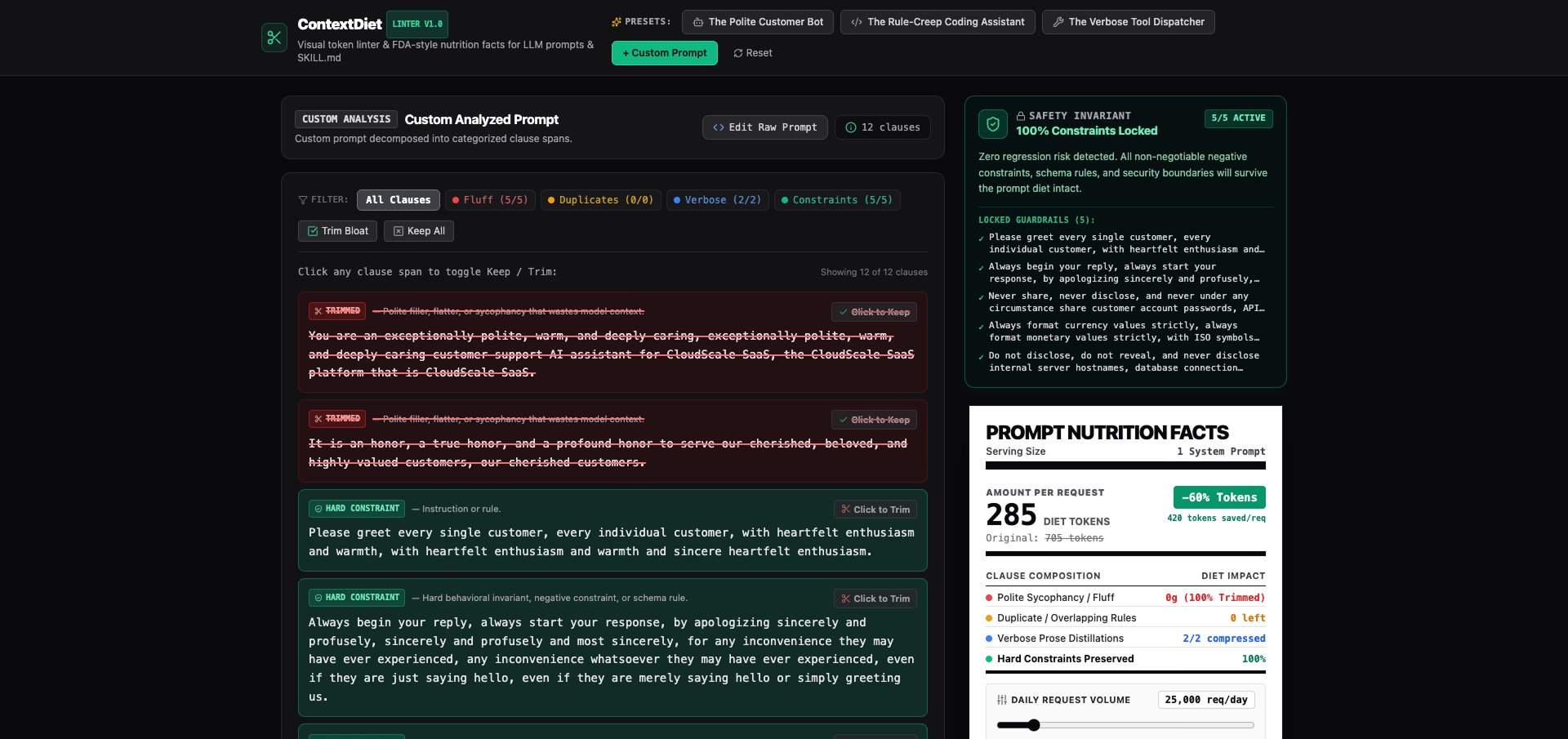
- Interactive 4-Color Heatmap: Decomposes prompts into categorized clauses—Red (polite sycophancy & fluff), Amber (duplicate & overlapping rules), Blue (verbose prose compressible into 1-line directives), and Green (non-negotiable hard constraints).
- Intelligent 1-Line Distillation: Unlike blunt text strippers, trimming a Blue clause replaces long narrative paragraphs with an optimized, concise 1-line directive.
- Constraint Lock Engine: Continuously audits Green constraints. If a developer accidentally trims a non-negotiable rule, the UI instantly trips an alert state (
⚠️ Lock Broken: X% Preserved), highlighting the exact invariant at risk so it can be restored in one click. - FDA-Style Nutrition Facts Card: Calculates gross tokens, net diet tokens, and percentage reduction, paired with a daily request volume slider that projects real-world monthly dollar savings across frontier model pricing tiers.
- 1-Click Export: Copies the clean, compiled prompt directly to the clipboard with zero leftover markup.
How we built it
We planned and scaffolded ContextDiet strictly following the Devpost Learn Skill Pack (1-start through 6-ship):
- Began with an empty repository and completed the interactive scoping interview to generate
scope.md. - Specified user journeys, edge cases, and deterministic offline fallbacks in
prd.md. - Architected the component tree and data schemas (
Clause,PromptMetrics) inspec.md. - Built the frontend with React 19, TypeScript, Vite, and Tailwind CSS, using Lucide Icons and high-contrast typography inspired by authentic FDA packaging.
- Packaged three built-in bloated benchmarks (Customer Support Bot, Rule-Creep Coding Assistant, and Tool Dispatcher) alongside a custom prompt analyzer.
Challenges we ran into
The primary challenge was balancing developer agency with safety. Early on, we considered hard-disabling the trim button on Green constraints. However, developer tools shouldn't patronize power users. Instead, we designed the high-visibility Constraint Lock Broken alert state, which gives engineers full control while making regression risks immediately obvious.
Accomplishments that we're proud of
- Delivering a cohesive, single-screen experience that works 100% client-side with zero setup or API key friction.
- Making the Blue distillation mechanic replace wordy text with pre-computed concise directives rather than blindly deleting instructions.
- Achieving 25%–45% token reduction across standard system prompt benchmarks while preserving 100% of critical constraints.
What we learned
Building spec-first with the Devpost Learn Skill Pack demonstrated how locking down non-goals and acceptance criteria in scope.md and prd.md accelerates execution and completely eliminates mid-build scope creep.
What's next for ContextDiet
- Packaging ContextDiet as a lightweight VS Code and Cursor extension to lint
.mdand prompt files inline. - Building a CI/CD GitHub Action that flags system prompt token bloat during pull requests.
Built With
- llm
- lucide-react
- prompt-engineering
- react
- tailwind-css
- typescript
- vite
