Project Story
AI Content Remix is an AI-powered Adobe Express add-on that helps users rewrite content inside existing designs without disturbing the original layout. Instead of manually editing text across flyers, presentations, imported PDFs, educational templates, campaign assets, or multi-page marketing documents, users can scan a design, rewrite the copy with AI, and generate a new version while preserving the overall structure, spacing, and visual composition.
We have built a complete working demo Try it here :
The core idea is simple:
Keep the design. Change the message. Create new versions faster.
Previously, we built img-crafter, an AI-powered Adobe Express add-on focused on image generation, image editing, and style transfer directly inside Adobe Express. That project was selected for the Adobe Fund for Design and has grown to more than 400 users, including 20+ paying users.
We also built Content Hub, a content generation add-on designed to create platform-ready captions for X, Instagram, and LinkedIn while maintaining consistency in tone, style, and intent across platforms. Content Hub was also selected for the Adobe Fund for Design and is currently under review by the Adobe Marketplace Team, with publication expected soon.
Working on these AI-powered creative tools helped us understand how creators, marketers, educators, founders, and agencies actually use Adobe Express in real workflows. Many users do not start from a blank page. They start from an existing template, a client-approved design, a campaign asset, a presentation deck, or an imported document that already has visual structure. The design is often good enough, but the message needs to change.
That is where the problem appears. Updating written content inside an existing design is still highly manual. Users may need to rewrite every text box one by one, preserve event details, avoid breaking the layout, keep the tone consistent, translate the content, or adapt the same asset for a different audience. A normal AI writing tool can generate new text, but it does not understand where that text will live inside the design.
This led to the idea behind AI Content Remix.
Instead of asking users to rebuild or manually update every page, AI Content Remix scans the selected Adobe Express design, understands the text structure across pages, rewrites the editable content with AI, and then creates a new version while preserving the original design. The message changes while the design remains intact.
What is AI Content Remix?
AI Content Remix is an AI-powered Adobe Express add-on designed to rewrite content across one page or multiple pages while keeping the original design intact.
Unlike regular AI writing tools that generate disconnected copy in a blank interface, AI Content Remix is built around existing visual templates. It understands that users often start with a finished design and only want to update the message, tone, audience, language, or campaign angle without disturbing the layout.
The add-on is especially useful for:
- marketing flyers
- event posters
- pitch decks
- school and educational templates
- imported PDFs
- product one-pagers
- agency campaign assets
- social media templates
- brand or client presentation documents
- multi-page brochures and explainers
The goal is not to replace design work. The goal is to remove the repetitive content-editing work that happens after the design already exists.
Key Features
- Multi-page template rewriting: Rewrite the current page, selected pages, or the full document.
- Semantic section rewriting: The add-on groups nearby text into logical sections such as headlines, body copy, captions, and content blocks instead of treating every raw text node as an isolated sentence.
- Character-length aware generation: Each editable text range keeps the original character count as its target, with minimum and maximum bounds based on whether the content is a headline, body paragraph, or caption.
- Layout-safe body copy: Long body sections stay detailed and visually full instead of collapsing into short summaries.
- Compact headline handling: Headlines are rewritten with stricter length and word-count limits so they are less likely to overflow.
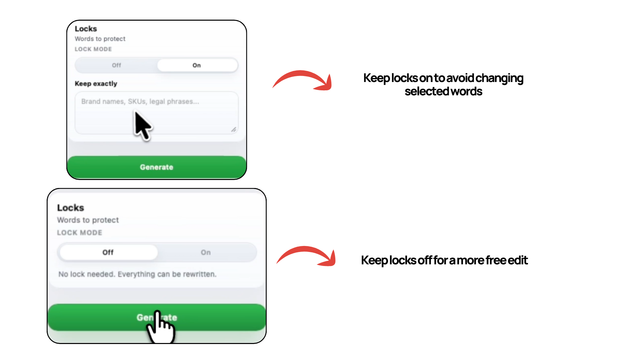
- Fact-safe rewriting: Dates, times, prices, phone numbers, emails, URLs, addresses, and factual labels are protected by default.
- Mixed text box support: If one text box contains both narrative copy and factual lines, AI Content Remix rewrites the editable narrative ranges while preserving the factual ranges.
- Grammar polish: Improve grammar, phrasing, and clarity while preserving the original message.
- Translate + adapt: Translate content while making it sound more natural in the target language.
- Custom briefs: Give the add-on a direct instruction for how the message should change.
- Context Upload UI: A planned context-aware mode where users can add PDFs, DOCX files, text files, brand notes, campaign briefs, or pasted source material to guide the rewrite.
- Linked page rewriting: When multiple pages are selected, users can choose to treat them as one connected sequence or rewrite each page individually.
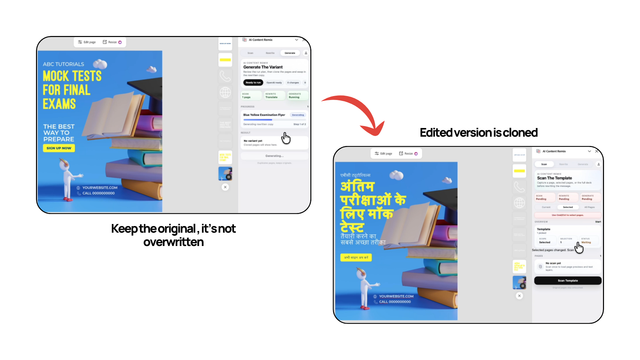
- Safe generation workflow: AI Content Remix duplicates pages and applies changes to the new version, keeping the original pages untouched.
- Redo workflow: Users can rerun the same prompt again with a fresh AI call if they want another variation.
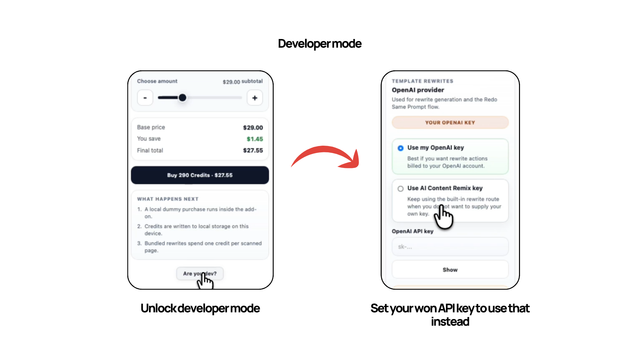
- Credit and developer routing system: Users can use bundled credits or unlock Developer Mode to run rewrites through their own OpenAI key.
How AI Content Remix Works
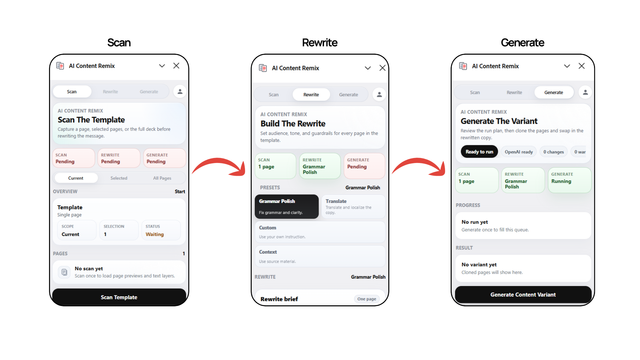
AI Content Remix is designed to feel simple on the surface while handling scanning, section modeling, factual protection, character-length matching, multi-page sequencing, and layout-safe rewriting in the background.
From the user's perspective, the workflow is divided into three clear steps:
- Scan
- Rewrite
- Generate
Behind those steps is a section-first rewrite pipeline built specifically for Adobe Express documents.
1. Scan Phase
The first step is scanning the template.
Users can choose one of three scan modes:
- Current: Scan only the page currently open in Adobe Express.
- Selected: Scan multiple selected pages.
- All Pages: Scan the full document.
Once scanning begins, AI Content Remix extracts visible text layers from the chosen pages in a stable order. This matters because Adobe Express designs are made of many independent text nodes, and the add-on needs to know where each piece of copy belongs when the rewritten text is applied later.
If the user selects multiple pages, the add-on also keeps track of page order and text-layer grouping so the rewrite behaves consistently across the set. This makes the tool useful for designs that work as a sequence, such as a pitch deck, brochure, product explainer, classroom handout, or multi-page campaign asset.
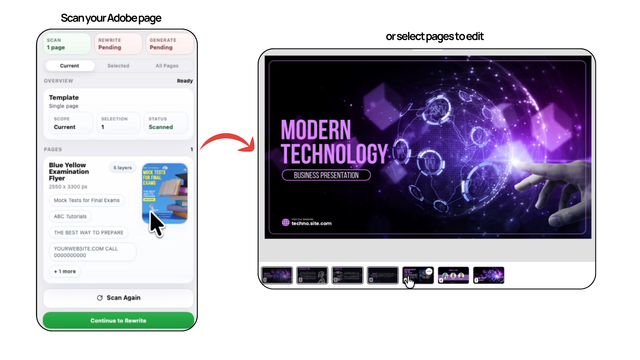
During scanning, the add-on collects useful structure from the document:
- page order
- page dimensions
- text node order
- text box bounds
- visible copy
- approximate role of each text range
- whether a text node is editable content, protected factual content, or mixed content
This scan step is important because the add-on is not trying to generate random new copy. It is trying to rewrite a real design while preserving its structure.
2. Rewrite Phase
After scanning, users move to the rewrite stage, where they define how the content should change.
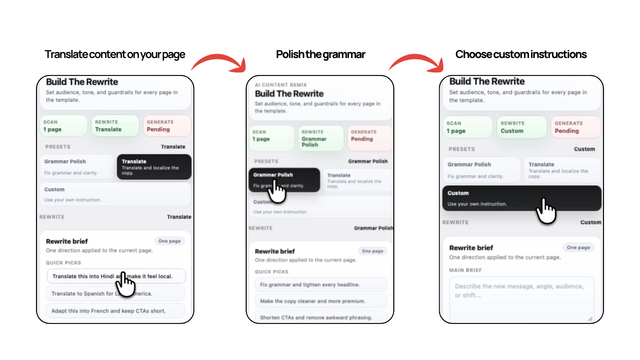
AI Content Remix currently supports several rewrite directions:
Grammar Polish
Grammar Polish improves grammar, clarity, and readability while keeping the meaning of the original content largely intact. This is useful when the existing design already says the right thing, but the writing needs refinement.
Grammar Polish is intentionally gentler than the other rewrite modes. It focuses on cleanup, flow, and readability rather than forcing a new message.
Translate + Adapt
Translate + Adapt rewrites the content into another language while making it feel more natural and local. Instead of doing a rigid direct translation, the system adjusts tone and phrasing so the output feels more usable in real communication.
This is useful for teams that reuse the same design across regions or audiences, especially when they need the translation to still fit inside the existing layout.
Custom Brief
Custom Brief gives the user direct control. They can describe the new angle, audience, tone, or message shift in plain language, and AI Content Remix uses that instruction to rewrite the scanned content accordingly.
Examples:
- "Make this more premium and concise."
- "Rewrite this flyer for parents instead of students."
- "Turn this event copy into a fundraising campaign."
- "Make this product one-pager sound more founder-led."
- "Adapt this pitch deck for small business owners."
Context Upload
The next major feature is Context Upload. We have started building the UI for a Context mode where users can upload or paste source material before rewriting.
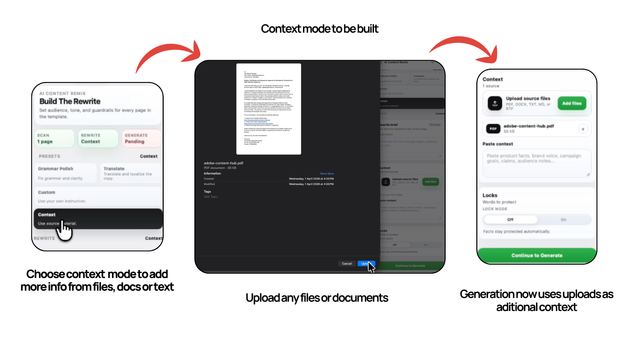
The planned flow is that users will be able to provide:
- product PDFs
- brand guideline documents
- campaign briefs
- client notes
- DOCX files
- TXT, MD, or RTF files
AI Content Remix would then extract the important facts, brand voice, audience, product details, claims, tone rules, and campaign goals from that source material. The rewrite would be grounded in real context instead of relying only on a short prompt.
Multi-page Handling
When more than one page is scanned, users can choose between two behaviors:
- Combined: Treat the selected pages as one connected sequence.
- Individual: Rewrite each page independently using the same instruction.
Combined mode is useful when a set of pages forms one narrative, such as a pitch deck, course brochure, product explainer, or campaign sequence. It helps the rewrite stay coherent across pages.
Individual mode works better when each page stands on its own, such as a batch of separate social graphics or repeated template pages.
3. Generate Phase
Once the rewrite brief is ready, users move to generation.
AI Content Remix sends the structured rewrite payload to OpenAI, receives rewritten section output, checks the result, duplicates the original pages, and applies the updated copy to the duplicated version.
This approach keeps the original document safe. Users are not forced into destructive edits, and they can compare the new output against the original design.
A key design decision is that AI Content Remix does not overwrite the original design. It creates a new version by duplicating the original pages and applying the rewritten text to the duplicate.
This makes the workflow safer, easier to test, and more trustworthy. Users can experiment with different tones, audiences, languages, and campaign directions without losing the original work.
The generate phase also includes two useful follow-up actions:
- Redo Same Prompt: Run the same exact rewrite again to get another variation.
- Create a New One: Start the workflow again from scan.
This makes the tool useful not only for one-time editing, but also for iterative content exploration.
What Makes AI Content Remix Different :
AI Content Remix is not just a wrapper around a text generation model. The hard part is not simply calling AI. The hard part is rewriting copy inside a visual design without breaking the design.
Adobe Express documents often contain many separate text layers: display headlines, body columns, captions, footers, dates, URLs, emails, addresses, prices, event times, and small labels. Some text boxes contain both editable narrative copy and factual details. A normal AI rewrite can easily shorten a body column, expand a headline, alter an event date, change a price, break an email address, or remove important client-approved wording.
AI Content Remix is different because it treats design copy as structured content.
1. Section-first Rewriting
Instead of rewriting raw text nodes one by one, the add-on builds an internal section model from scanned text. Nearby editable headline, body, and caption ranges are grouped into logical sections. This allows the AI to rewrite a content block as a coherent unit instead of treating every text box as disconnected.
This is especially important for multi-column pages and template layouts where one story may be split across multiple text nodes.
2. Character-length Awareness
AI Content Remix measures each editable range and keeps the original character count as the target length. It also calculates minimum and maximum bounds based on the role of the text:
- headlines get compact bounds
- captions get moderate bounds
- body copy gets tighter density preservation
- long body sections are kept especially close to their original length
This is one of the most important layout features. Many AI tools generate copy that is semantically correct but visually unusable because it is too short or too long. AI Content Remix tries to keep the rewritten copy close to the original reading density so the design still feels balanced.
For body text, the add-on also checks word count and line density. This helps prevent long columns from collapsing into short summaries.
3. Semantic Delta Check
For Custom and Translate workflows, the add-on checks whether the rewritten section actually changed enough. If the AI output stays too close to the original wording, the section is marked as a weak rewrite and retried.
This matters because layout preservation should not mean preserving the old message. The goal is to change the meaning when the user asks for a meaningful shift, while still respecting the available design space.
4. Fit Repair
After the first rewrite and any semantic retry, AI Content Remix checks for layout-related problems:
- text that is too short
- text that is too long
- body copy with too few words
- long sections that lost visual density
- headlines that overflow
- stale placeholder text that survived the rewrite
Only the affected editable ranges are repaired. This keeps the pipeline focused and avoids rewriting the entire page again when only one section has a problem.
5. Factual Protection
AI Content Remix protects factual fields by default. This includes:
- dates
- times
- prices
- phone numbers
- email addresses
- URLs
- physical addresses
- factual labels such as "Info," "Tickets," or "Open Hours"
The add-on also handles cases where URLs or emails wrap across multiple lines. This is important because many templates use narrow text columns where contact information can split visually.
6. Request Lifecycle
- The user scans the current page, selected pages, or the full document.
- The document sandbox extracts visible text layers in page order.
- The rewrite layer classifies every text node as editable content, protected factual content, or mixed content.
- Mixed text boxes are split into editable and protected ranges.
- Editable ranges are grouped into semantic sections.
- Each editable range receives a role, target character count, minimum character count, maximum character count, and density instruction.
- The UI sends the section-level rewrite payload to OpenAI.
- The response is checked for semantic change, stale placeholder copy, underfilled text, overflow, and weak rewrites.
- Failing sections or ranges are repaired without rewriting the entire document.
- The document sandbox duplicates the original pages.
- Rewritten text is applied to the duplicated version.
- The user can compare the new output with the original and optionally redo the same prompt.
What's Next for AI Content Remix
AI Content Remix is already a working prototype, but our goal is to turn it into a production-ready, end-to-end rewrite workflow inside Adobe Express. If supported by the Adobe Fund for Design, we plan to build across these key areas that directly improve creator experience, output quality, and production readiness.
1. Context Upload and Source-grounded Rewriting
The most important next step is Context Upload. The next version will allow users to upload or paste deeper source material before rewriting.
Users will be able to provide product documents, brand guidelines, PDFs, DOCX files, client notes, campaign briefs, sales sheets, website copy, audience notes, approved claims, and other useful reference material. AI Content Remix will extract the important context from those sources, including brand voice, audience, product facts, campaign goals, tone rules, approved claims, terminology, positioning, value propositions, and required details.
This will make rewrites much more accurate and useful. Instead of asking the AI to "make this more premium" with only a short prompt, a user could upload a brand guide and product brief, then generate Adobe Express copy that follows the correct tone, uses the right facts, and stays aligned with the campaign.
2. Secure AI Infrastructure
To make AI Content Remix safe and scalable for real users, we plan to move AI requests behind a secure backend proxy. This will remove the need for client-side API keys in the standard user flow and allow us to support proper rate limiting, usage tracking, request validation, and safer handling of model calls.
This is especially important as Context Upload becomes part of the product. Source documents and campaign materials need to be handled carefully, and a backend layer will let us process context more securely while keeping the Adobe Express add-on fast and simple for users.
3. Real Credits and Monetization
AI Content Remix will use a freemium, credit-based model so users can experience the value of the add-on before paying. New users will receive starter credits to test the product, then they can buy one-time credit packs when they need more.
The planned model is simple: users can purchase credit packs on a pay-as-you-go basis, with pricing based around $1 for 10 credits and packs ranging from approximately $3 to $50. This keeps the product accessible for casual users while still supporting heavier usage from creators, agencies, and teams.
We also plan to offer a Developer Mode option for power users and technical teams. With Developer Mode, users can connect their own OpenAI API key and bypass the normal credit system for generation. This gives advanced users more control over cost, routing, and model usage.
4. Production-ready Developer Mode
The current prototype includes the idea of a wallet, credits, and Developer Mode routing. The next step is to make this production-ready with proper billing, account-level usage tracking, secure API key storage, clearer routing controls, and reliable fallback behavior.
This matters because different users need different workflows. Casual users want simple bundled credits. Agencies may want predictable pay-as-you-go usage. Developers and technical teams may prefer to bring their own API key and manage generation directly.
In Summary
AI Content Remix is built for a simple but valuable workflow: rewriting content inside existing Adobe Express designs without breaking the layout.
It combines structured page scanning, semantic section modeling, factual protection, character-length aware rewriting, multi-page handling, safe duplication, developer routing, and iterative generation into one Adobe Express add-on.
The result is a tool that helps users move from one finished template to many finished variants without rebuilding the design each time.
AI Content Remix is especially valuable because it treats copy as part of the design. It does not just generate words. It rewrites designed content with attention to layout, facts, structure, and context.
Built With
- adobe


Log in or sign up for Devpost to join the conversation.