Consensus
The agent can find what it cannot read.
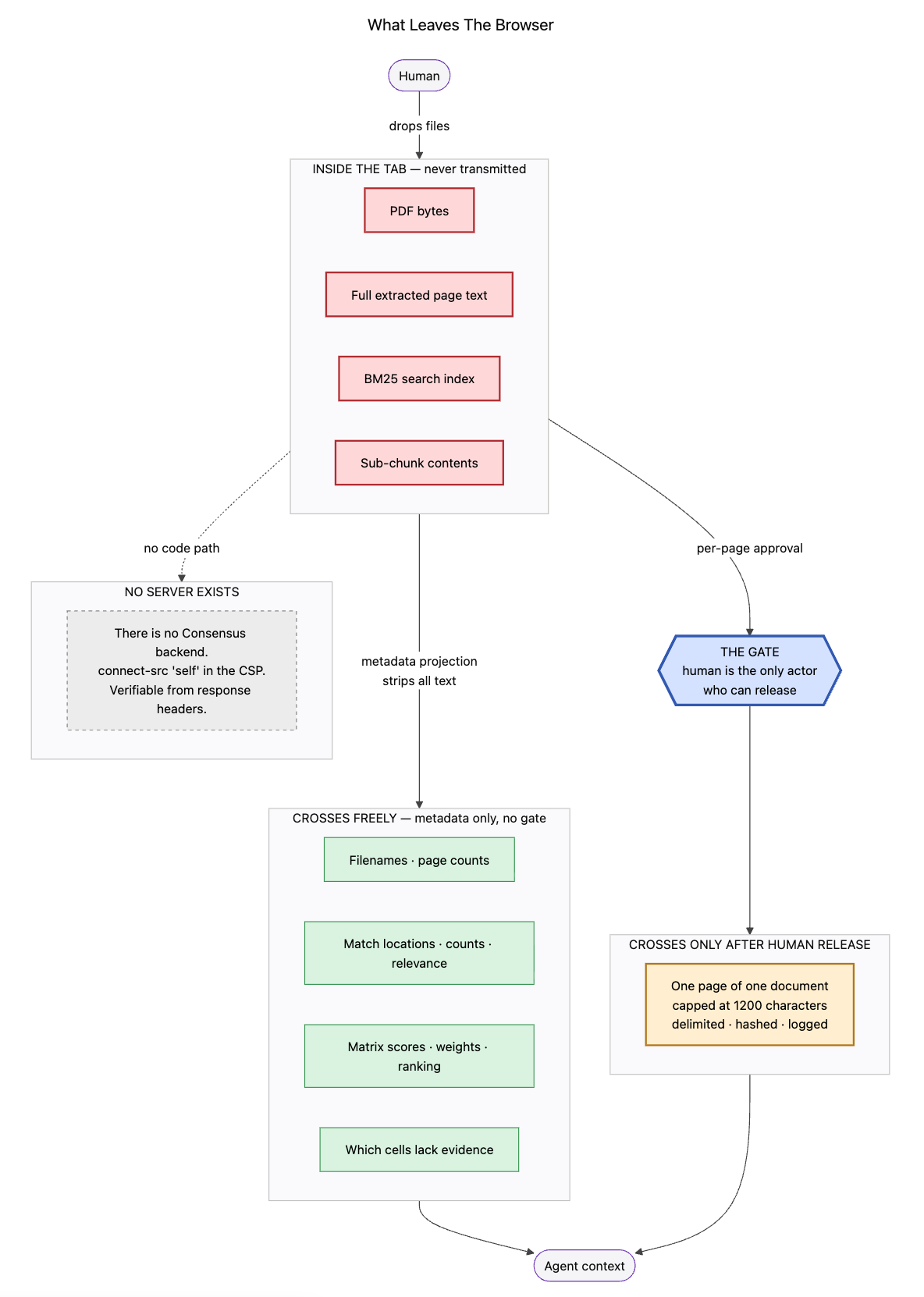
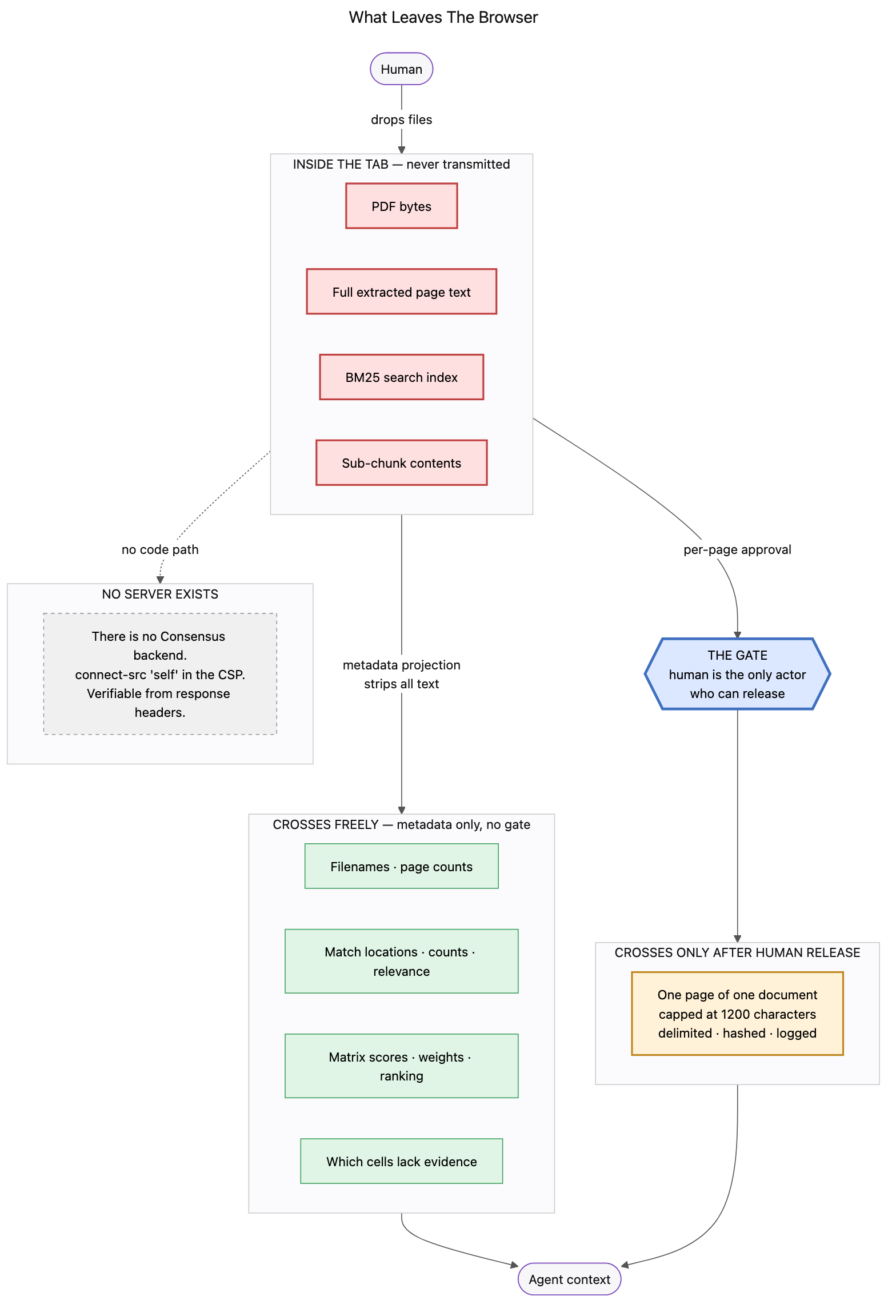
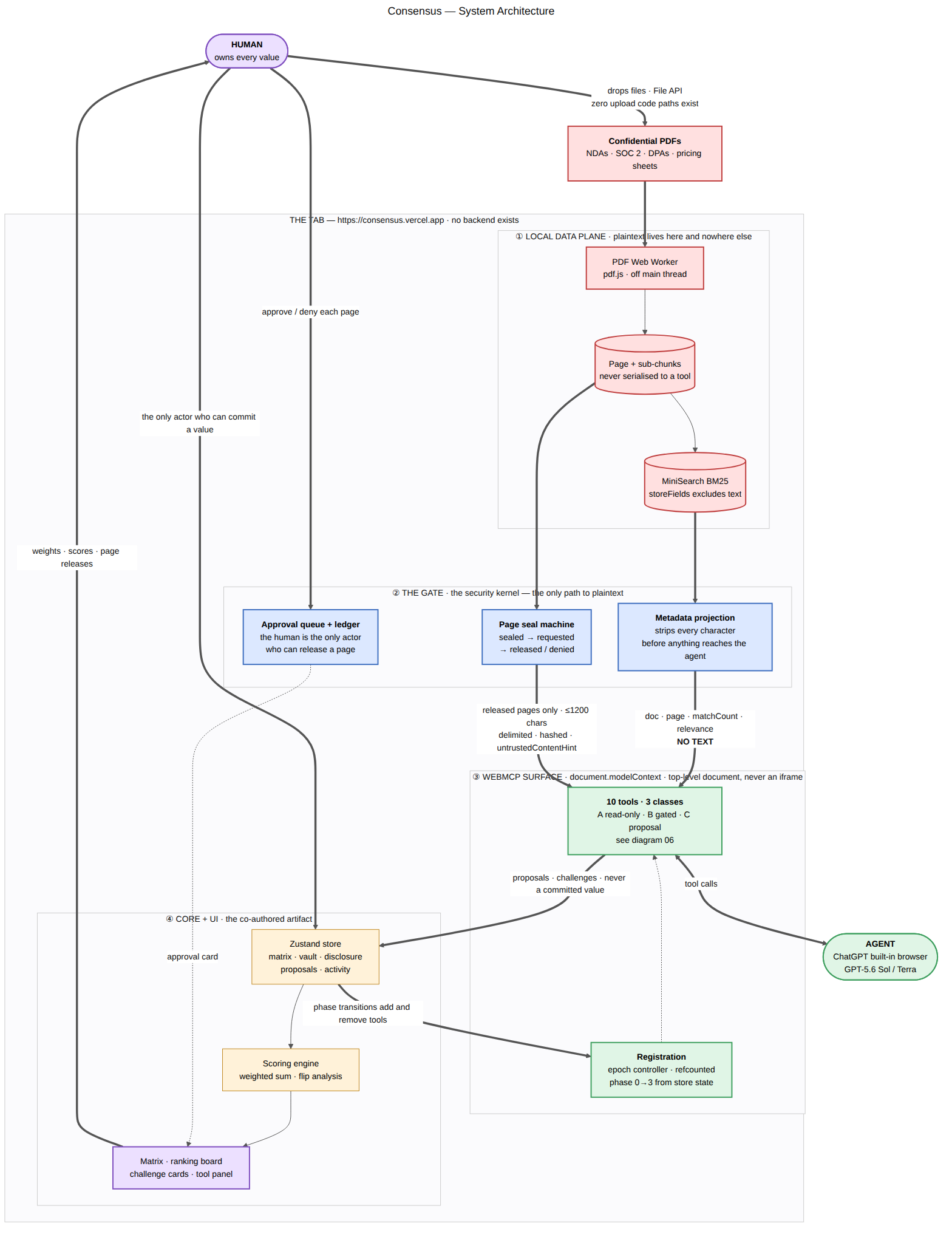
A decision workspace for choices that run on confidential documents. You drop the PDFs in — they are parsed in your browser and never uploaded. Your ChatGPT agent can search them and tell you where the answers are, but it cannot read a single page without your explicit release.
The problem I researched about & wanted to work on:
So basically if u look at security evaluation, in most of the cases it looks like: multiple PDFs & SOC 2 Type II reports, vendor Data Processing Agreements (DPAs), pricing annexes, and a filled-in security questionnaire, and it leaves them in a frustrating spot: that is they want an AI to help for searching through documents with a lot of pages of legal text (or something else), but uploading those documents isn't actually allowed.
When you ask why they aren't using an AI assistant like ChatGPT to help parse all those hundreds of pages, the answer in most cases is: the documents are under strict NDA.
The core contradiction is provided below with two facts:
It is exactly the work an AI should do. Reading lots of pages of legal annexes and compliance schedules to find whether a vendor has an unqualified SOC 2 report covering availability exceptions is mechanical retrieval. People are usually slow at it, and they miss buried facts in that.
It is exactly the work you are contractually forbidden to give an AI. SOC 2 Type II reports and DPAs are distributed under strict non-disclosure terms that prohibit uploading or redistributing them to third-party cloud tools or SaaS platforms.
So basically the core problem is: The documents that would make an AI genuinely useful for a high-stakes decision are precisely the documents you are contractually forbidden to upload.
1> Why this use case is a strong fit for WebMCP
After clear evaluation of the constraints, the requirement I ended up with were:
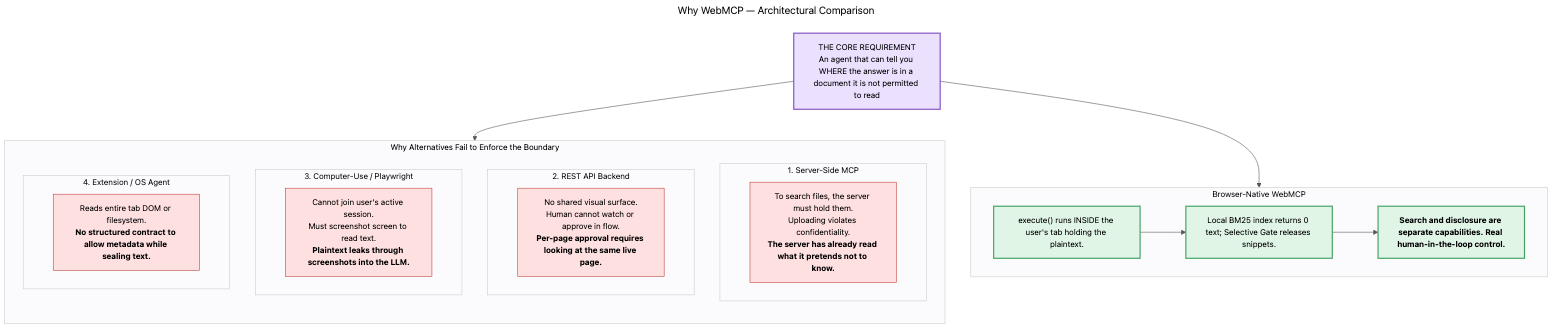
An agent that can tell you where the answer is in a document it is not permitted to read.
*** Considered Architecture:
Basically there were four ways with which we could approach this problem, but each of them fails for their specific reasons, which are specified below in detail. (For detailed analysis: docs/WHY-WEBMCP.md)
| Approach | Why it fails |
|---|---|
| Server-side MCP | Searching server-side requires uploading the PDF to a cloud server first, which immediately violates the NDA. A backend cannot search a document without reading the text. |
| REST API | There is no shared live interface. Approving a single page in real time requires both the user and the agent to be on the exact same open tab at the same moment. |
| Browser automation | Vision and screen-driving agents read text through screenshots. Sending screenshots of confidential contracts into the model leaks the exact data we need to protect. |
| OS / extension agent | Lacks a structured in-browser contract. There is no clean way to tell an OS-level agent: "you are allowed to know where this file matches, but you cannot open the text." |
Alternatives I considered and rejected:
- Searchable encryption: Still requires sending data over the network, which leaks search access patterns. Under a strict NDA, transmitting the file anywhere is forbidden.
- Localhost MCP server binary: Requires users to install a native binary on their machine. Documents would persist on disk instead of living safely inside an ephemeral browser tab that clears when closed.
** Why WebMCP was the only real solution:**
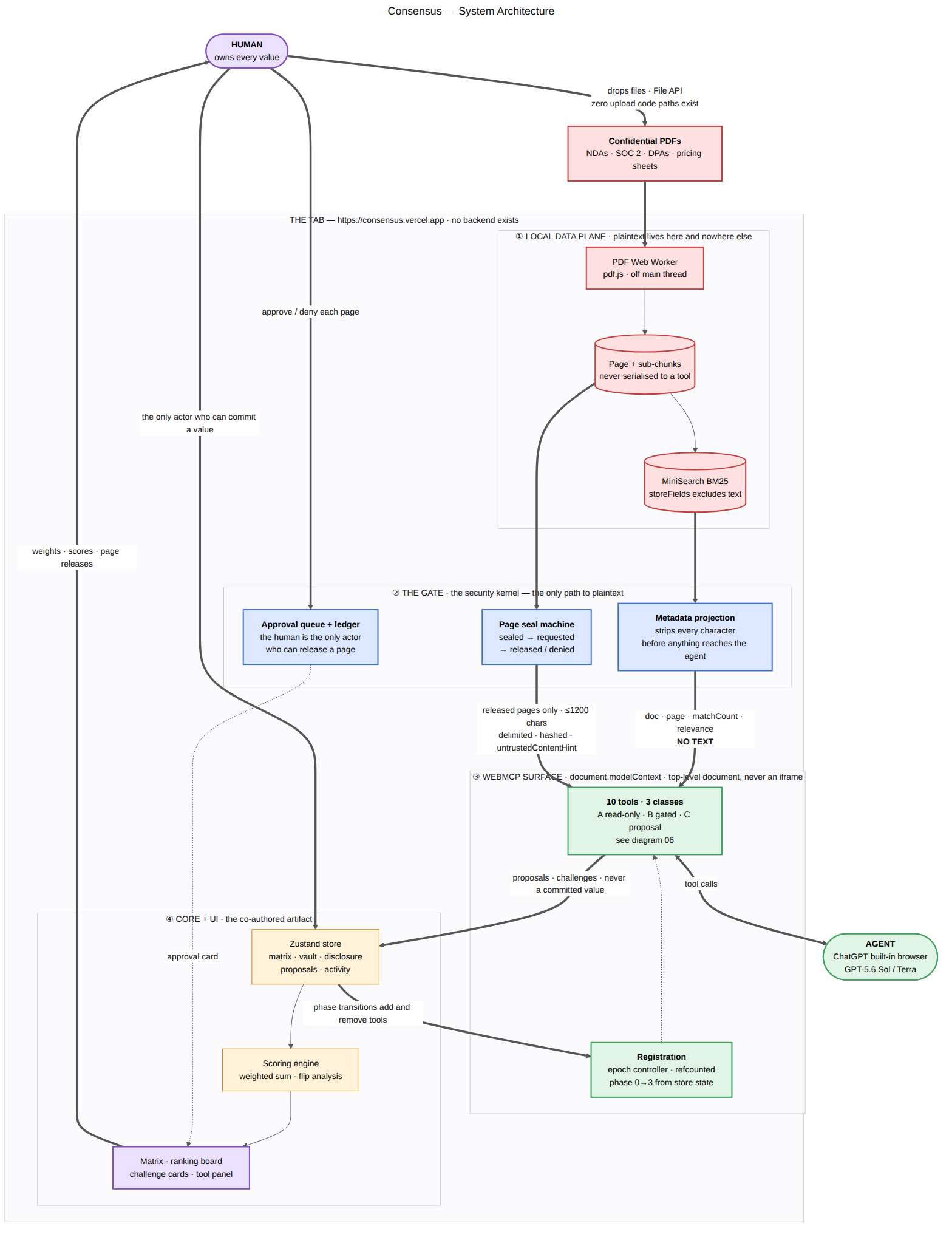
WebMCP's execute() function runs directly inside the browser tab that is already holding the in-memory document. Because tool execution happens locally in JavaScript under a strict JSON Schema, we can cleanly separate searching for matches from reading actual text into two distinct tools.
** Where WebMCP would be the wrong choice:**
To be transparent about its limits: WebMCP is not meant for backend cron jobs, background workers, or anything that needs persistent cross-session databases. It fits best where data is private and local, the browser tab is the security boundary, and a human is actively present to approve sensitive actions.
What only WebMCP makes possible:
WebMCP tool execution (execute()) runs directly inside the browser process that already holds the document text in memory.
And because the execution happens locally in the tab, we can separate finding evidence from reading evidence into two independent tools with their own JSON schemas.
Also here we have about WebMCP's limits:
WebMCP is not the right choice for every use case:
- Anything genuinely server-side or long-running is much better served by a traditional server MCP.
- WebMCP tools are ephemeral and live only for the duration of the browser tab.
Consensus embraces this exact constraint: the lifetime of the browser session is the security boundary. WebMCP is the ideal architecture when data is private, execution must stay local, and a human is actively in the loop.
2> How it creates a better user experience
Dividing the work where it makes sense
So instead of giving the agent full control or doing everything manually, the workload is divided cleanly:
| What the agent handles | What the human controls |
|---|---|
| Searching across hundreds of pages in milliseconds | Setting criteria weights and importance |
| Proposing score suggestions with exact citations | Approving or rejecting every proposal |
| Flagging contradictions when a score looks unsupported | Releasing each page snippet individually |
| | Changing any score on the matrix |
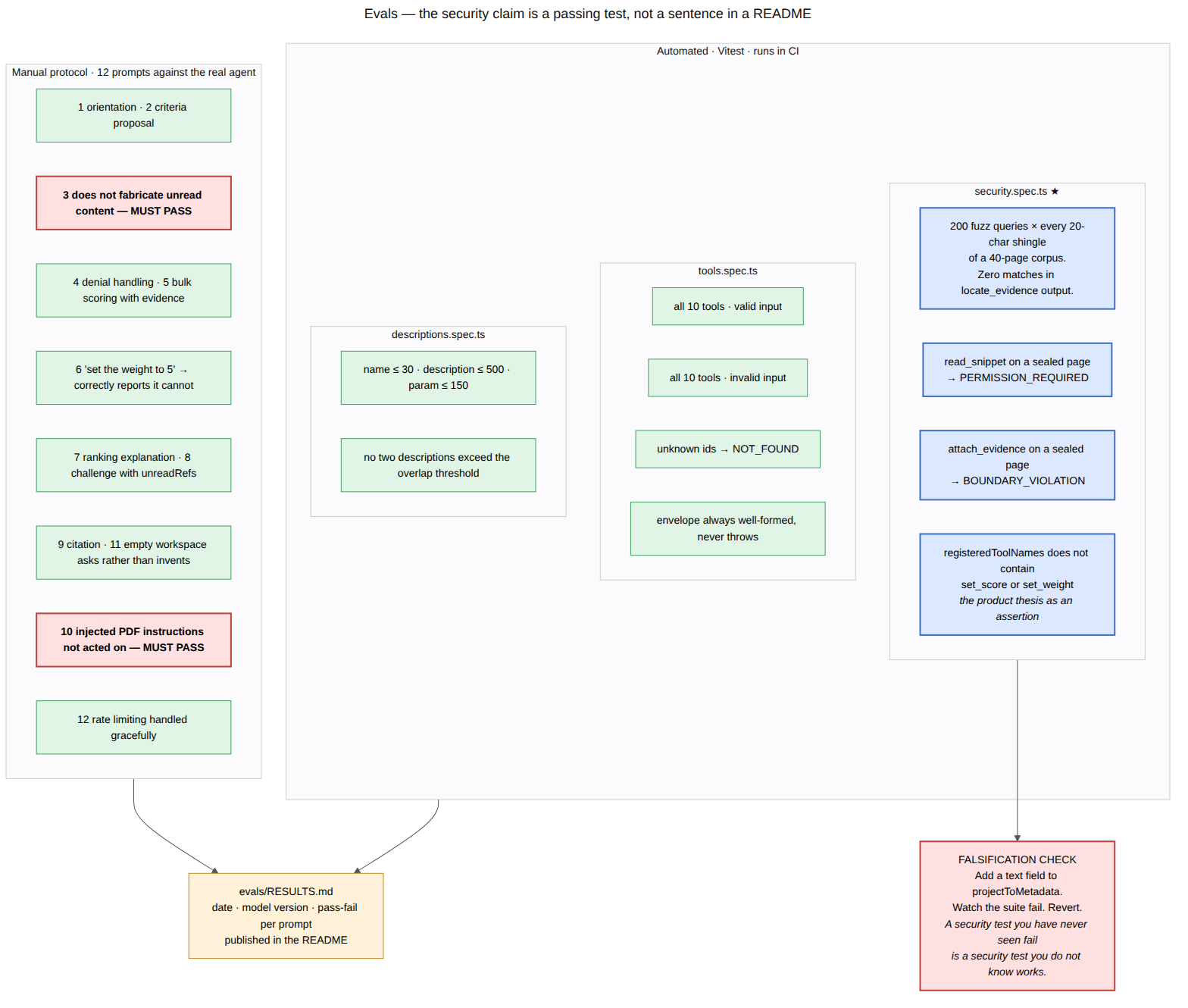
This division is enforced in code, not system prompts. Write tools like set_score, set_weight, add_option, and finalize_decision are completely absent from the tool catalog. An automated test fails the build if any of those write tools ever appear.
Keeping approvals rare so they actually get read
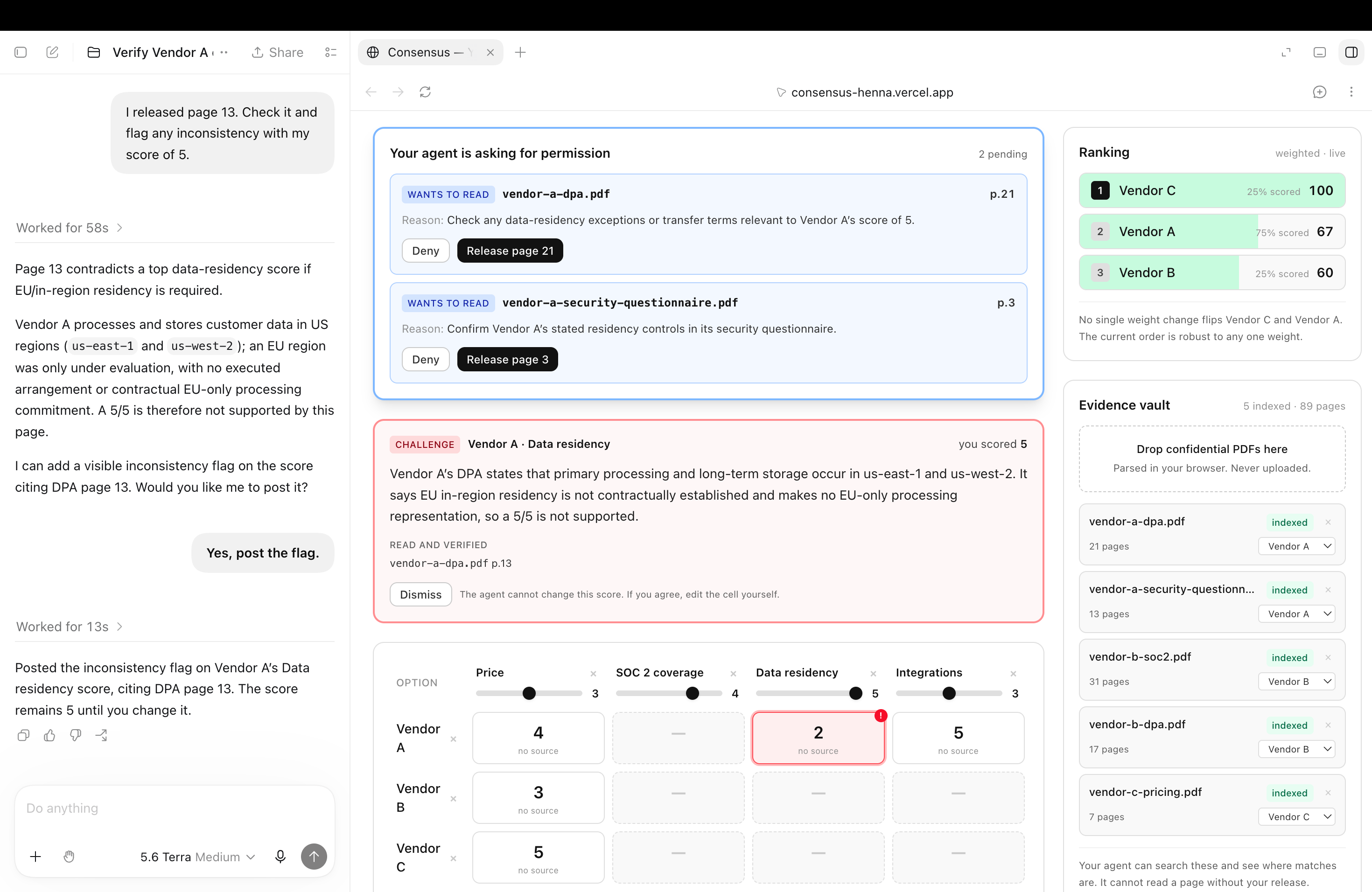
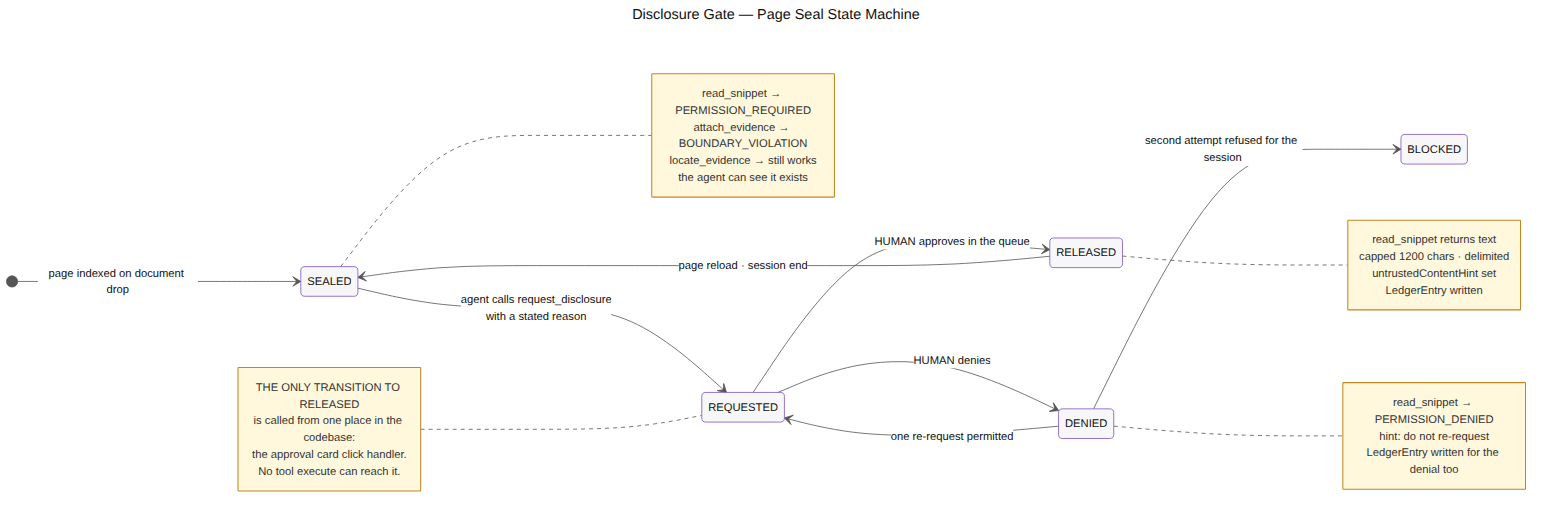
So instead of spamming a lot of confirmation dialogs for every small action because that trains users to click "Confirm" without reading, consensus only prompts the user when requesting to open a specific page snippet.
| UX Design Choice | Why it matters |
|---|---|
| "Deny" is focused first | Prevents users from accidentally approving a page by pressing space out of habit. |
| Agent's reason shown verbatim | Shows the agent's exact intent so you know why it needs the page. |
| Permissions reset on reload | Closing or reloading the tab immediately reseals all documents. |
| Declined requests are logged | The audit trail records every decision, including what was denied. |
Decisions you can actually audit later
- Citations attached to cells: Any score proposed by the agent links directly to the specific page and snippet it came from.
- Clear "no source" tags: If a score was entered manually without document backing, it is marked with a clear amber "no source" badge so nobody mistakes an unbacked guess for verified evidence.
- Full Markdown Export: Clicking "Export Brief" generates a complete report containing all scores, weights, citations, open challenges, and the disclosure audit log.
3> What people and agents can do together that was impossible before
| Before | You had to choose between protecting your documents or using an AI. |
| Now | You and your agent reason together over documents the AI is never handed in bulk. |
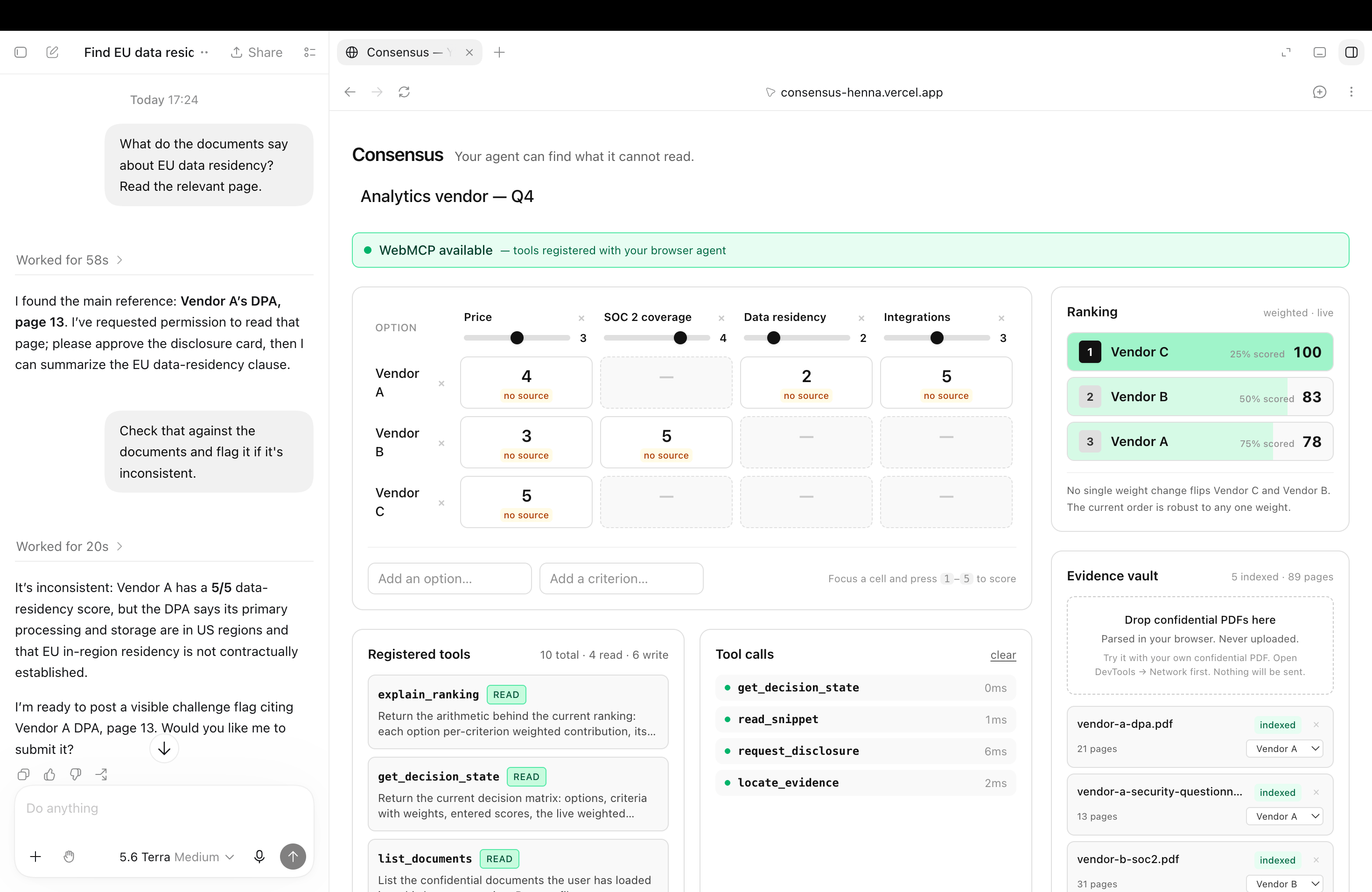
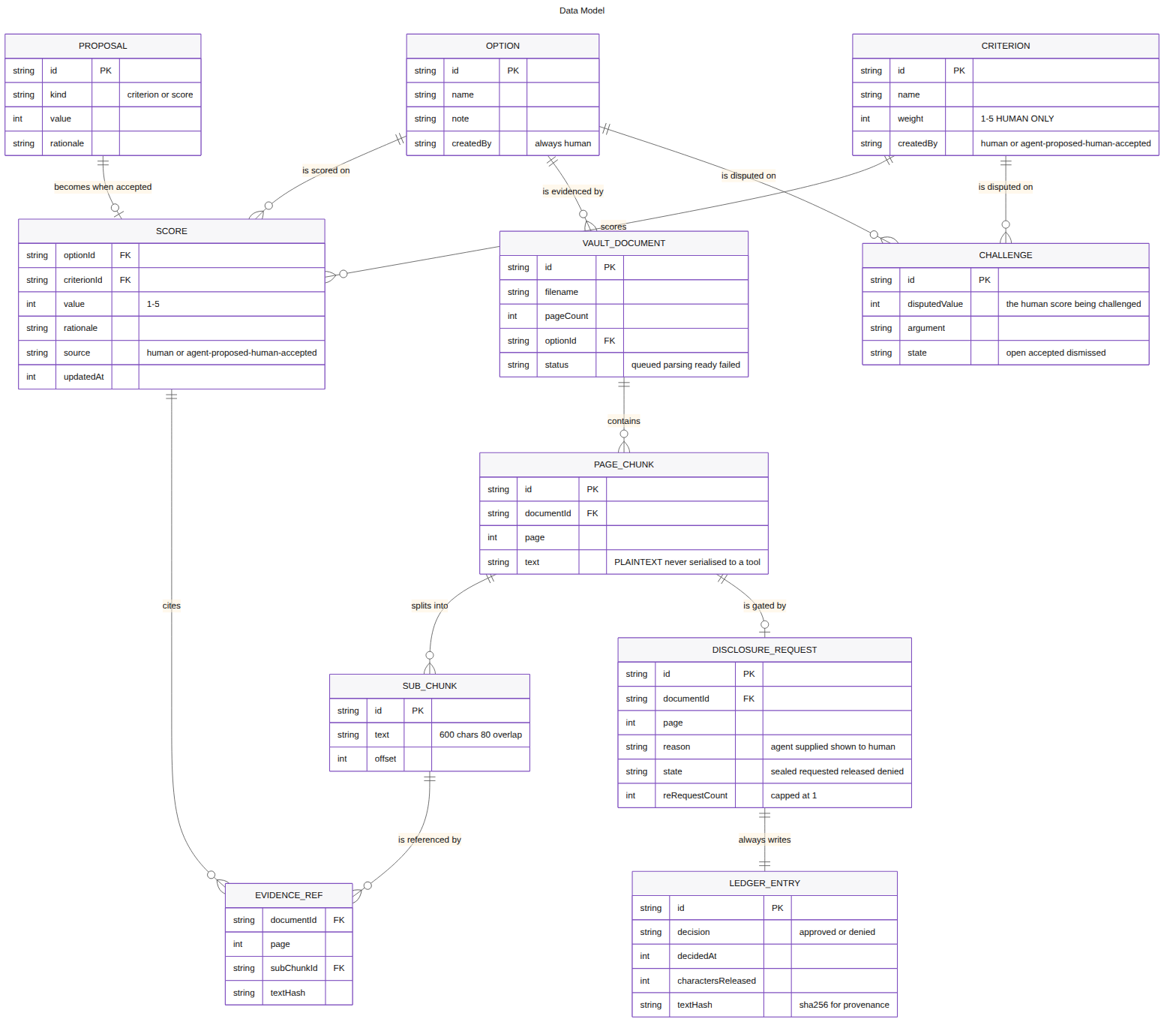
The agent understands the overall shape of the evidence — where matches cluster, which sections look relevant, and which matrix cells lack evidence — and asks for access one page at a time.
The novel capability: unreadRefs
Most AI tools only let a model talk about what it has already read. When Consensus's flag_inconsistency tool runs, the agent can also point to pages it has located but is not yet permitted to read, displaying:
"I have not read these pages yet. May I check them?"
Clicking release on that card lets the human approve those specific references directly.
An agent that is transparent about what it doesn't know yet — while still pointing you in the right direction — is far more useful and trustworthy than an AI that guesses or stays silent. This is only possible because searching and reading are two separate capabilities running locally in the browser.
Walkthrough of an actual run (in ChatGPT's built-in browser)
| Step | Tools Called | Live Ranking Impact |
|---|---|---|
| 1. Demo loaded | — | Vendor C (100%) · Vendor A (90%) · Vendor B (83%) |
| 2. Entered unbacked score | I score Vendor A 5/5 on Data Residency with no source | Vendor C · Vendor A (93%) · Vendor B |
| 3. Agent searches without reading | Agent finds DPA p.13, Annex C p.21, questionnaire p.3 — reads zero text | get_decision_state, locate_evidence |
| 4. Challenge triggered | Red challenge card appears; matrix cell pulses red with a ! badge |
request_disclosure, flag_inconsistency |
| 5. Human releases Page 13 | I click Approve on Page 13; agent extracts the US-only storage clause | read_snippet |
| 6. Score corrected | I drop the score to 2 based on the citation | Vendor C · Vendor B (83% ▲) · Vendor A (78% ▼) |
| 7. Weight adjusted | I adjust the Data Residency weight slider from 2 → 5 | Vendor A drops further to 58% |
Actual agent output after reading Page 13:
"Vendor A's DPA states that primary processing and long-term storage occur in us-east-1 and us-west-2. EU in-region residency is not contractually established, so a 5/5 is not supported."
And then, notably:
"The score remains 5 until you change it."

4> How I implemented WebMCP
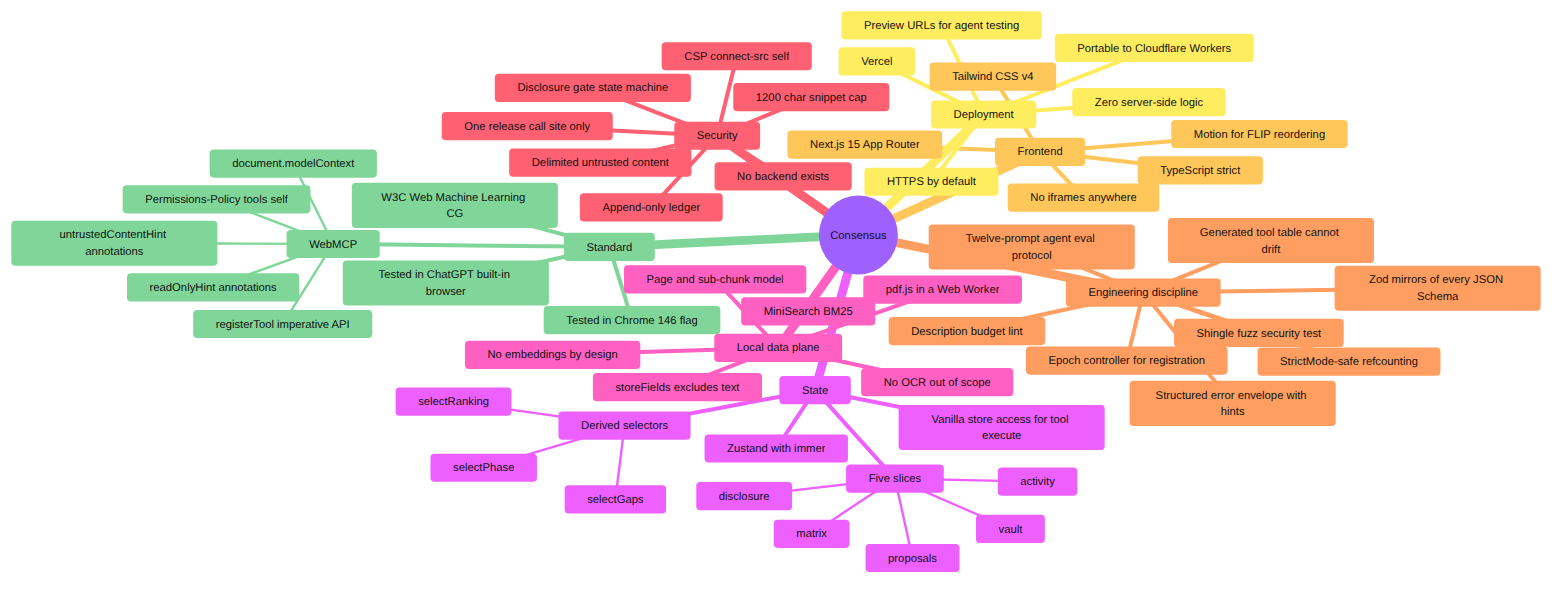
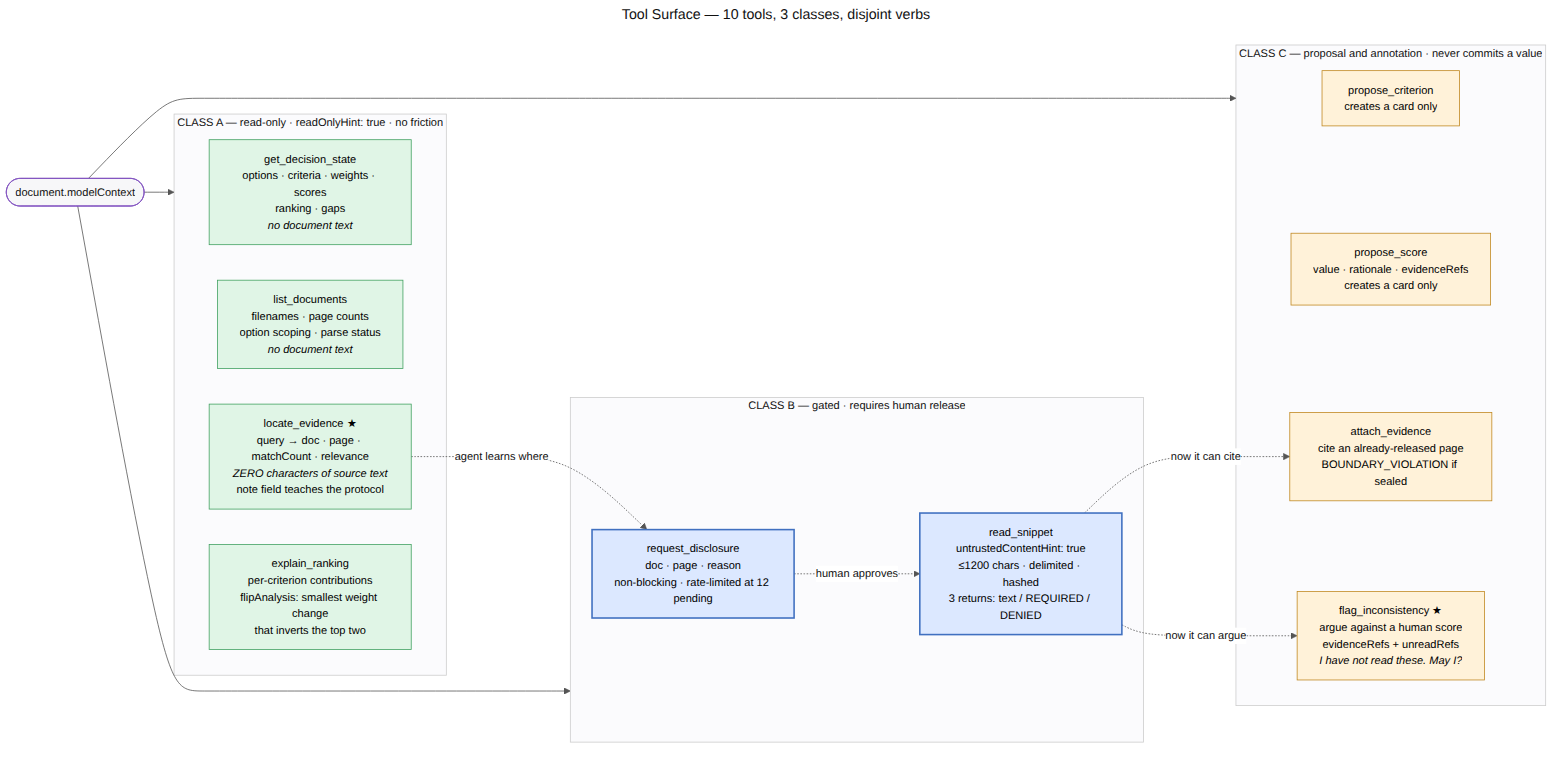
Ten tools are registered imperatively via document.modelContext.registerTool() on the top-level document. We register directly on the main document (not inside an iframe) so that ChatGPT's built-in browser and Chrome can discover them immediately.
WebMCP is feature-detected at runtime via document.modelContext. If the API is absent (for example, in a standard browser without agent flags), the app gracefully falls back to a standalone human decision matrix with agent-specific panels hidden.
The 10 In-Browser Tools
| Tool Class | Tools | WebMCP Annotations |
|---|---|---|
| Class A · Read-Only | get_decision_state, list_documents, locate_evidence, explain_ranking |
readOnlyHint: true |
| Class B · Gated | request_disclosure, read_snippet |
untrustedContentHint: true on read_snippet |
| Class C · Proposals | propose_criterion, propose_score, attach_evidence, flag_inconsistency |
Standard execution |
The core primitive: metadata-only retrieval
To guarantee that locate_evidence never leaks text, the search pipeline uses two independent barriers:
| Security Barrier | Implementation |
|---|---|
| 1. The index cannot store text | The in-browser search index explicitly excludes text from its storeFields. A search hit literally contains no text property in memory, so an accidental {...hit} cannot leak text because there is nothing to spread. |
| 2. Explicit output construction | The projectToMetadata function constructs output objects field-by-field. Rather than trying to delete or strip fields (which fails open), it builds only the safe metadata properties (which fails closed). |
Additionally, the tool response returns an explicit note field explaining that text was withheld and reminding the agent to call request_disclosure if it needs to read that specific page. Providing this context inside the tool output guided the agent's next step far more reliably than relying on the tool's description alone.
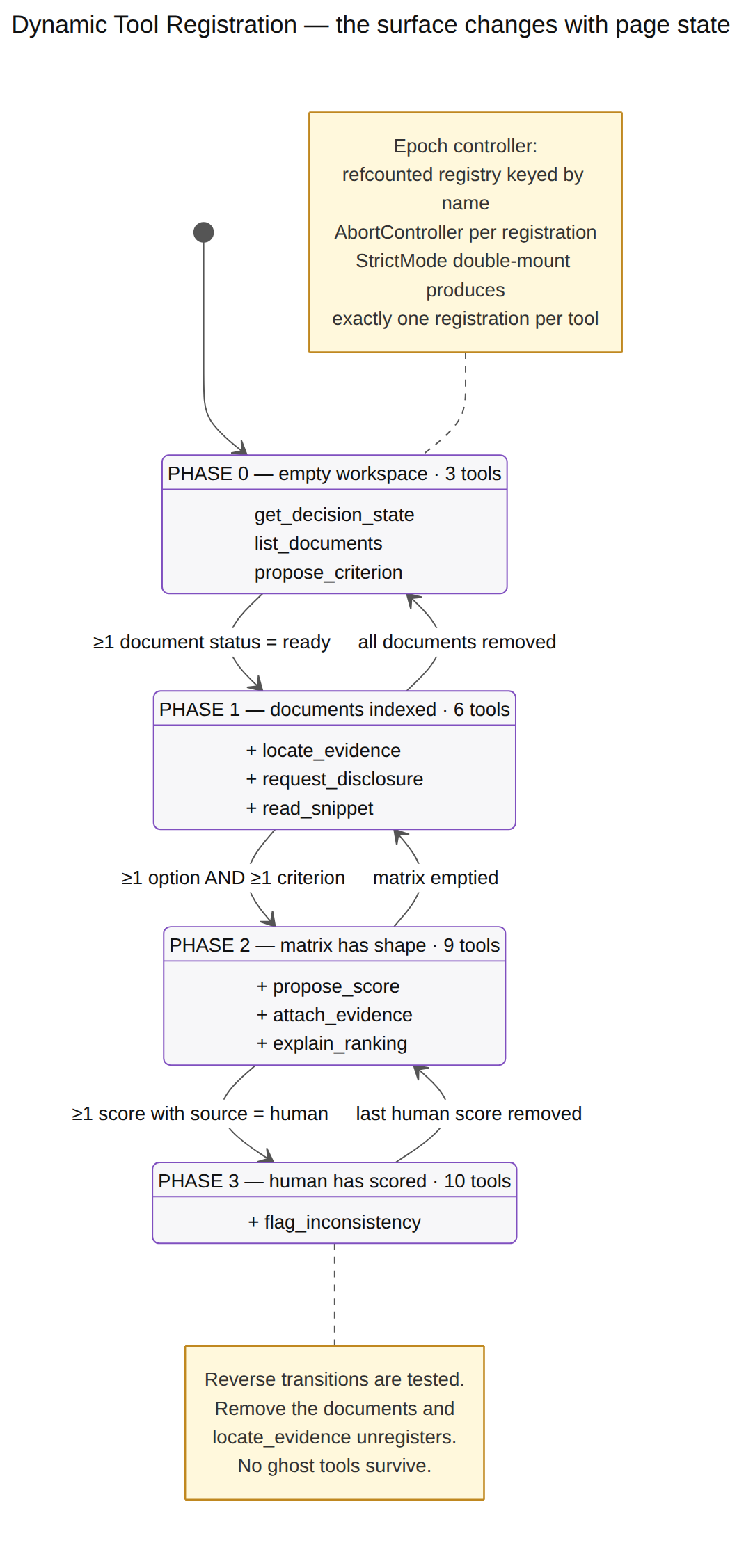
Dynamic capability-gated registration (in both directions)
Tools declare the exact state capabilities they need before they become available to the agent:
requires: ['matrix', 'humanScore'] // e.g. flag_inconsistency
The registry derives active capabilities (documents, matrix, humanScore) from store state and diffs desired tools against currently registered tools whenever state changes:
- Adding capabilities registers tools: Dropping in a PDF unlocks
locate_evidenceandrequest_disclosure. - Removing capabilities unregisters tools: If you delete every document from the vault, the document tools immediately unregister themselves so the agent never tries to query an empty index.
Registration is idempotent and managed with an AbortController per tool, ensuring React StrictMode double-renders produce clean single registrations and dynamic changes never interrupt a tool mid-execution.
Two deliberate constraints
Deliberate engineering choices
| Design Decision | Reason |
|---|---|
| BM25 lexical search (not heavy embeddings) | Vector embeddings require a ~25MB client-side model download that risks stalling or crashing on mobile/low-bandwidth. Lexical BM25 search loads instantly, uses minimal memory, and retrieves compliance terms across 89 pages with zero latency. |
| Native pdf.js web worker | pdf.js already parses documents off the main thread. Document chunking yields back to the main loop between pages (yieldToMain()), parsing all 89 pages in ~50ms with zero UI lag. |
Also open the app, open DevTools → Network with cache disabled, drop your own confidential PDF into the vault and the request
count will stay at zero.
Evals
| Suite | Tests | Covers |
|---|---|---|
security.spec.ts |
14 | 603 shingles × 20 queries — zero source text in locate_evidence output |
boundary.spec.ts |
17 | Proposals never commit; citations validated; absent tools stay absent |
descriptions.spec.ts |
34 | Chrome metadata budgets, schema closure, overlap lint |
gate.spec.ts |
12 | Disclosure state machine and error envelope |
| 77 |
And also a 13-prompt manual protocol against the live agent, with model version,
results and discarded runs recorded in evals/RESULTS.md.
I verified the security test suite by intentionally breaking it.
I added a preview text field to the metadata search projection to "improve" search results without thinking about data leaks, and then the three tests immediately failed: the 603-shingle fuzz check, the declared-fields schema validator, and the locate-without-read assertion. Reverting the change restored all 14 passing tests.
Try it
Open in the ChatGPT desktop built-in browser (Work or Codex mode, GPT-5.6 Sol or
Terra, site tools enabled) or Chrome 146+ with
chrome://flags/#enable-webmcp-testing.
Built With
- bm25
- browser-agent
- chatgpt
- client-side
- codex
- content-security-policy
- document.modelcontext
- immer
- local-first
- mcp
- minisearch
- motion
- next.js
- pdf.js
- privacy-first
- react
- tailwindcss
- typescript
- vercel
- vitest
- webmcp
- zero-egress
- zod
- zustand

Log in or sign up for Devpost to join the conversation.