Inspiration
I've always loved playing board games, and Connect 4 has been one of my favorites since childhood. Recently, I was feeling nostalgic and wanted to relive the excitement of this classic game. That's when the idea struck me to create a digital version of Connect 4 in Python.
What it does
The Connect 4 game I built allows two players to take turns dropping their colored tokens into a grid. The goal is to be the first to connect four tokens vertically, horizontally, or diagonally. It's a fun and challenging game of strategy and anticipation.
How we built it
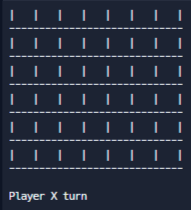
I built the game using Python programming language. I started by creating a 6x7 grid as the game board and implemented the logic for player turns, token placement, and win conditions. I also added a user-friendly interface using the terminal, displaying the board and accepting player inputs.
Challenges we ran into
One of the main challenges I faced was designing the win condition logic to check for four connected tokens in all possible directions. Ensuring the game flow was smooth and error-free also took some time. Additionally, creating an intuitive and visually appealing user interface within the terminal was a bit tricky.
Accomplishments that we're proud of
I'm proud of being able to complete the Connect 4 game within the given time constraints. Despite the challenges, I was able to create a functional and enjoyable game. Seeing the project come together, with players competing and experiencing the thrill of victory, is a significant accomplishment for me.
What we learned
Throughout the development process, I learned more about the intricacies of game logic and the importance of efficient programming. I also honed my skills in user input validation and handling edge cases. Overall, it was a great learning experience in Python development and game design.
What's next for Connect 4
In the future, I plan to enhance the game by adding additional features such as an AI opponent for single-player mode. I also want to explore options for a graphical user interface (GUI) to make the game more visually appealing. Additionally, I would like to implement different difficulty levels and customizable board sizes to provide a more dynamic gameplay experience.


Log in or sign up for Devpost to join the conversation.