Inspiration
Students often miss key concepts because they're forced to choose between listening and taking notes. ConceptLink eliminates that choice. Just listen, and our app will automatically map the lecture's key ideas, turning hours of disorganized notes into minutes of effective review.
What it does
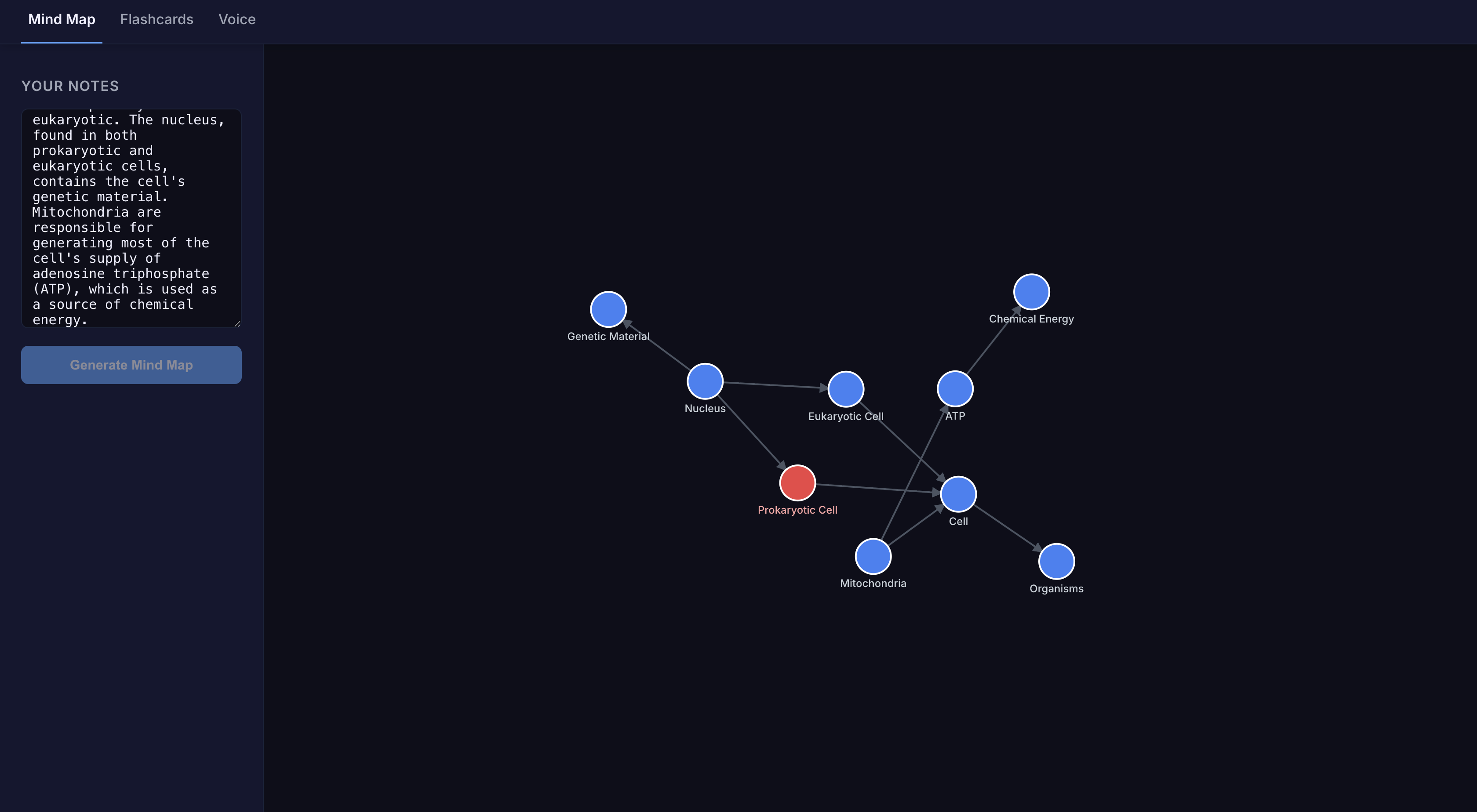
ConceptLink captures your ideas through either typed text or direct voice recordings. Our AI analyzes the content to not only map key concepts and their relationships but also to validate the information for accuracy. The result is an intelligent mind map that visually organizes your notes while flagging any potential inaccuracies. This crucial step helps prevent misunderstandings from making their way into your study sessions. For effective review, the entire mind map can be instantly converted into a deck of flashcards.
How we built it
Input: Text or Voice are two ways to input information in this application. The recorder uses the browser's built-in MediaRecorder to capture your voice and then sends it to a speech-to-text API to transcribe it into raw text.
The Process: The text is extracted. Our model identifies the main ideas that become the mind map nodes. It then analyzes how the concepts relate to each other to establish links. It also fact-checks the concepts and flags the nodes on the mind map if there is inaccuracy in your information.
Frontend: React manages the application's state and renders the user interface, including the different views for the mind map, flashcards, and voice recorder. D3.js is used to visualize the data and draw the interactive, force-directed mind map. It handles the features like zooming and dragging nodes.
We used React as the frontend and used Gemini API
Challenges we ran into
A major hurdle was our team's first experience with API integration. We dedicated significant time to learning how to properly authenticate and make asynchronous calls to the Gemini and ElevenLabs APIs, and then correctly process the data they returned.
We also tackled the classic challenge of making React and D3.js work together. The key was creating our components to give D3 control over the SVG canvas, which was essential for making the mind map fully interactive.
Accomplishments that we're proud of
One of our biggest successes was bringing our core concept for the visualization to life. We effectively translated complex relationships from raw text into a dynamic, interactive format.
We are also very proud of the final UI design. We prioritized creating a streamlined and user-friendly interface to ensure that anyone can navigate the application and use its powerful features without confusion.
What we learned
How to use API and apply it to the larger architecture of the idea. How to use D3 visualization library How React works especially with states.
What's next for ConceptLink
To help students prioritize their studying, we want to introduce an AI-powered feature that not only groups related concepts but also ranks these clusters by importance. The app would analyze the source text to identify foundational or critical keywords and visually highlight these "must-know" concepts, allowing students to focus on the most impactful information when they're short on time.
We will add a sharing feature that allows multiple students to collaborate on a single mind map in real-time. This leverages the collective knowledge of a study group, allowing students to fill in gaps and see concepts from different perspectives.
To transform the application from a single-session tool into a persistent study companion, we will implement a full backend with a database and user authentication. This will allow users to create an account, log in, and securely save their mind maps and flashcard decks. Their information would be accessible across any device, ensuring their study materials are always available whenever they need them.
Built With
- css
- d3.js
- elevenlabs
- gemini
- javascript
- react
- vite


Log in or sign up for Devpost to join the conversation.