Con-Sche — Construction schedules that agents can actually operate
Live app: https://hackathon-con-sche.pages.dev/ Repository: https://github.com/tatelog/Hackathon-Con-sche (AGPL-3.0)
Open the link and a real schedule is already loaded. No sign-up, no sample to pick, nothing to configure — the WebMCP tools are registered and ready to call.
What it is
Con-Sche is a browser-based editor for ADM network schedules — the arrow-diagram form of critical path scheduling that construction sites in Japan still run on. A single project holds hundreds of activities linked by dependencies. Move one activity and the effect ripples through the whole network.
It runs entirely in the browser. Schedule data is stored locally in IndexedDB (via Dexie.js) and is never sent to a server.
With WebMCP, an agent sitting next to the user can read that schedule and change it — without the data ever leaving the page.
Why this use case is a strong fit for WebMCP
1. The data cannot leave the browser.
A construction schedule is one of the most sensitive documents a contractor owns. It exposes delivery dates, subcontractor assignments, and — by implication — cost structure. Firms will not upload it to a third-party server so that an assistant can read it.
A conventional MCP server would require exactly that: ship the data out, process it remotely, ship the result back. WebMCP removes the requirement. The tools run inside the page, against state already in the user's browser. Nothing is transmitted. The privacy constraint that blocks AI adoption in this industry simply does not apply.
2. The computation is already local.
Con-Sche calculates CPM (ES/EF/LS/LF, total float, free float, critical path) on the client. When an agent shifts an activity, the recalculation happens immediately, in the same process. The agent asks a question and gets an answer grounded in a real solver — not an approximation, and not a round trip.
3. The data model was already structured for this.
This is the part we want to be clear about: Con-Sche was not retrofitted with an API wrapper. It was built as a local-first application with an explicit activity/event graph, because that is the correct way to model an ADM schedule. When WebMCP arrived, exposing that graph took seven tool definitions — not a rewrite. An app designed to keep its own state coherent turns out to be an app an agent can operate.
How it creates a better user experience
Network schedules are read by specialists. To move one activity in a GUI you must know which arrow to grab, how far it may travel, and what it will drag with it. Total float — the number of days an activity can slip without delaying the project — is computed but not obvious. Most site staff never see it.
With an agent in the loop, that knowledge becomes conversational:
"How many days can I delay the 3F concrete pour?" "What work is scheduled for today?" "Push the steel erection back three days and tell me what it hits."
The agent reads float, checks the allowed range, applies the change, and reports the new project duration. The user does not need to know the vocabulary of CPM to benefit from it.
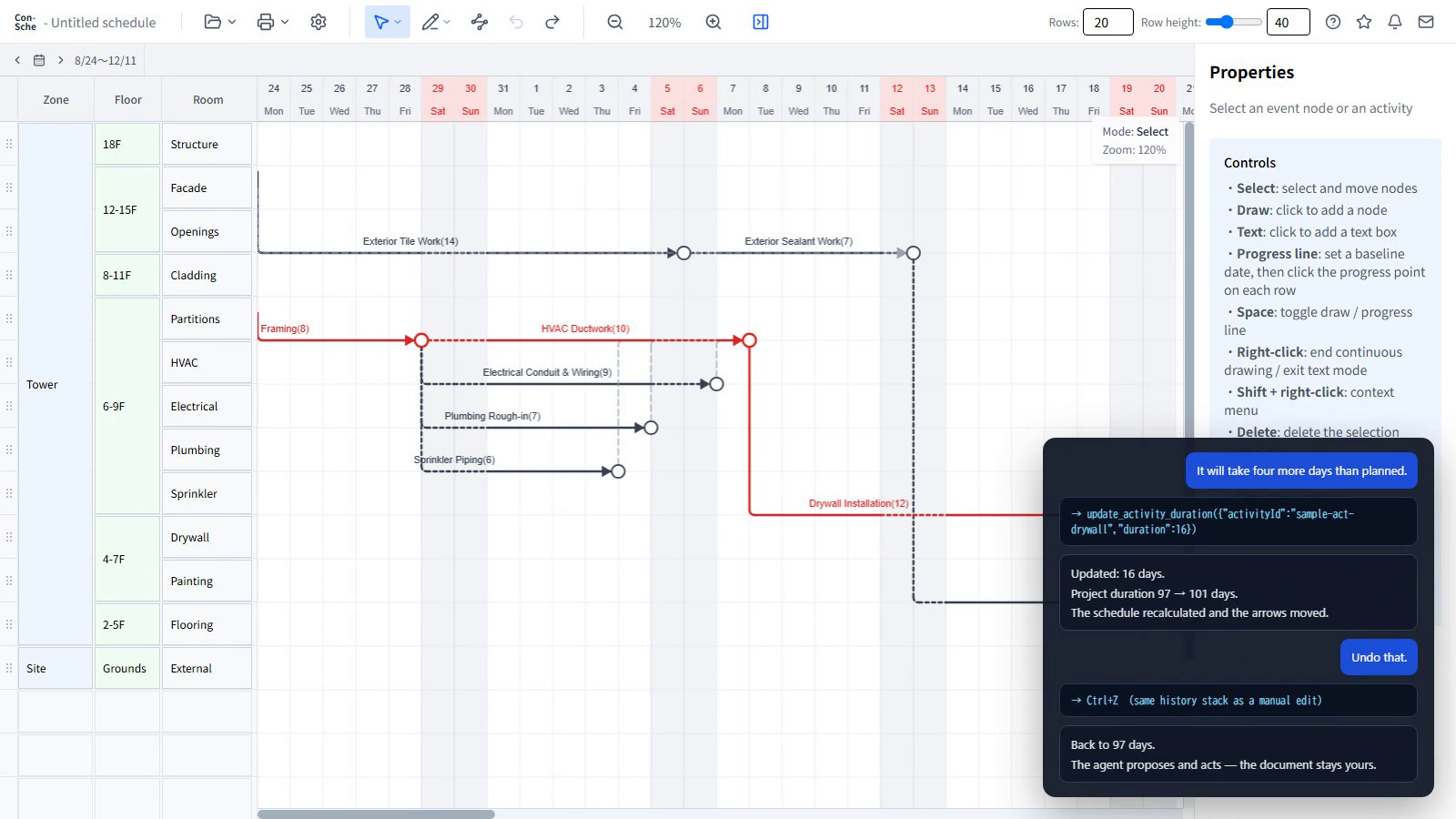
Every change an agent makes goes through the same undo stack as a human edit. The user stays in control of their own document.
What people and agents can do together that was difficult before
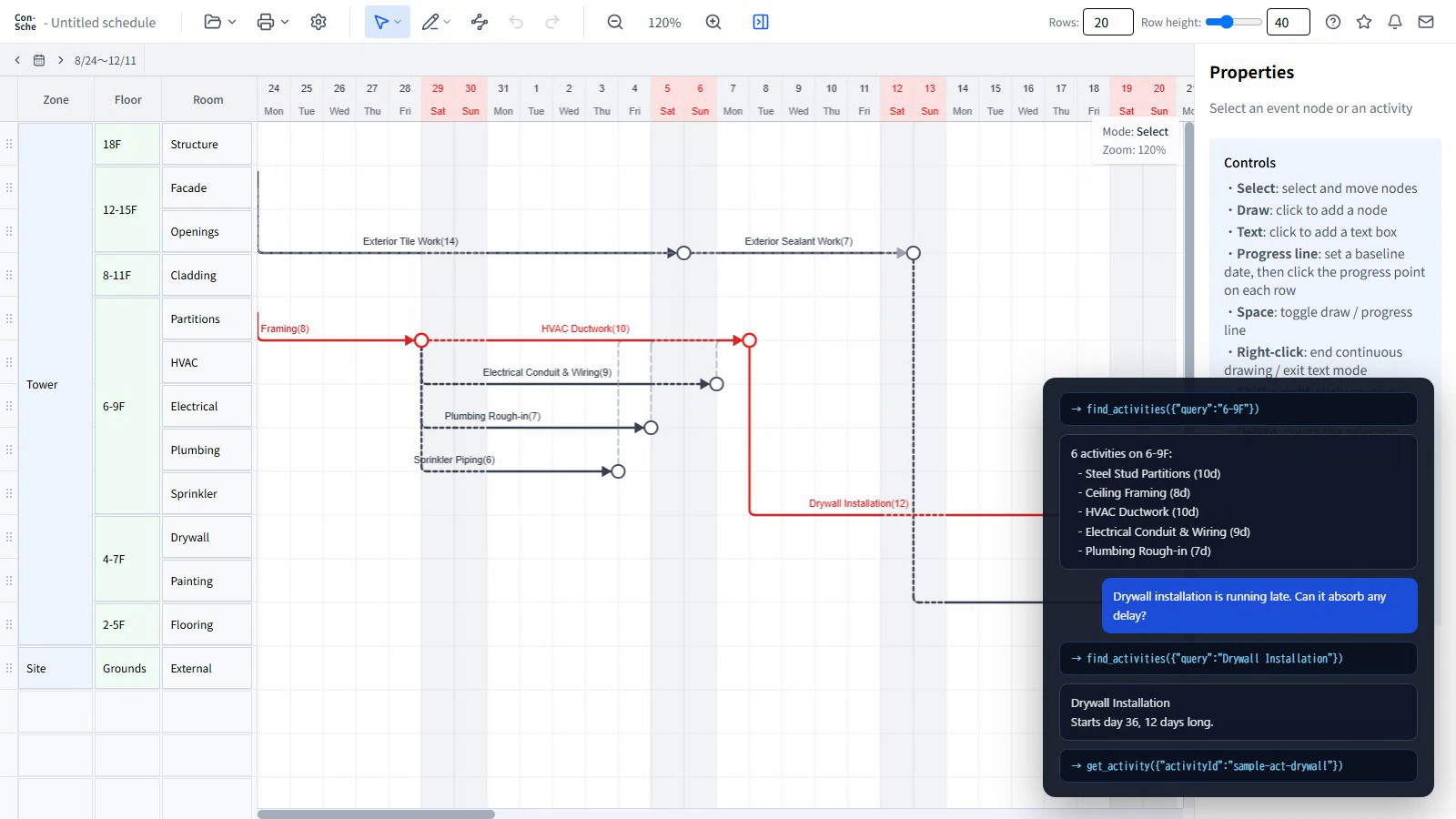
Before: interpreting a network schedule was tacit knowledge held by experienced schedulers. "The drywall is running late — can we absorb it?" was answered by a person who could hold the network in their head, or by nobody.
Now: the question is answered against the actual graph, in the browser, in one turn. In the demo the agent looks up the drywall activity, reads its total float — zero, it sits on the critical path — and says plainly that any delay there moves the completion date. Told the work will take four more days, it updates the duration; CPM recalculates and the project goes from 97 days to 101. One undo puts it back, because the agent writes through the same history stack a person does.
Concretely, an agent working with Con-Sche can:
- Summarise an entire schedule including full CPM results (
get_schedule) - Report how far one activity can move in each direction, and what it would
affect (
get_activity) - Change a duration and return the recalculated project duration, so a delay
reported on site becomes a new completion date in one turn
(
update_activity_duration) - Shift an activity within its allowed range (
shift_activity) - Detect circular dependencies and orphaned event nodes (
validate_schedule) - Answer "what work is happening today?" (
get_activities_on_date) - Find activities by name, zone, or floor (
find_activities)
This is not a chatbot describing a picture of a schedule. It is an agent holding the same object the user is holding.
How we implemented WebMCP
Registration is feature-detected and non-invasive:
export function registerConScheTools(): void {
  if (typeof document === 'undefined') return
  const modelContext = document.modelContext
  if (!modelContext || typeof modelContext.registerTool !== 'function') return
  for (const tool of ALL_TOOLS) {
    try {
      void modelContext.registerTool(withTelemetry(tool))
    } catch (e) {
      console.warn(`[webmcp] tool registration failed: ${tool.name}`, e)
    }
  }
}
On a browser without WebMCP, nothing happens and ordinary users see no change. A failure to register one tool cannot take down the others or the app itself.
Design decisions worth naming:
- Tools read and write the in-page schedule store only. They operate on the Zustand store backed by local IndexedDB. No schedule content is sent anywhere. This is enforced by the shape of the code, not by policy.
- Mutating tools are undoable.
update_activity_durationwrites through the same history stack as a manual edit, so a single undo reverses what the agent did. The demo ends on exactly that. - Tools return structured, bounded results.
get_activityreports the legal shift range and the affected chain, so the agent can reason before acting rather than guessing and retrying. - Telemetry records the tool name only. A separate Cloudflare Worker + D1 logs who called which tool and when — never schedule data. This is the metering layer for future paid tiers, and it was built so that usage can be billed without the operator ever seeing a customer's schedule.
Stack: React 19, TypeScript, Vite, Konva.js (canvas rendering), Zustand (state), Dexie.js (IndexedDB), Tailwind CSS. Deployed on Cloudflare Pages, with Cloudflare Workers + D1 behind the telemetry endpoint.
Prior work vs. work during the Hackathon
Con-Sche existed before this Hackathon and is a shipped product. Per the rules, here is the split.
Before the Submission Period (as of 2026-08-07):
- The Con-Sche ADM editor, CPM solver, and local-first storage model (IndexedDB)
- All seven WebMCP tools (
src/webmcp/), committed 2026-08-07 - The usage-telemetry endpoint (
workers/api/src/webmcpEvent.ts)
During the Submission Period (2026-08-25 – 2026-09-03):
- Relicensed to AGPL-3.0 so the source is genuinely open
- Split this open build out of the hosted product into its own repository, and removed the landing page, the sign-up gate, the usage telemetry and the commercial pathways. The scheduling engine and the WebMCP layer are untouched
- Translated the entire interface to English — roughly 900 strings, down to the messages the tools themselves return to an agent
- Added a real sample schedule that loads on first visit: an 18-storey office building in fit-out, with exterior, interior, services and site works running in parallel, a genuine critical path, and activities that carry float. Judges and agents start on something worth asking questions about instead of a blank canvas
- Submission materials and demonstration video
We are entering an existing application rather than a new one. What we are putting forward is not "we added WebMCP in ten days" but "we had spent months building an app whose state an agent could safely operate, and WebMCP was the interface it had been waiting for."
What we learned
The most useful realisation was not a technical one. It was that WebMCP changes who has to supply the AI.
Construction firms in Japan are not short of AI. Their staff already have an assistant open. What has been missing is a way for the software they work in to be operated by the assistant they already have and already trust. Until now the answer was for every vendor to embed a model in their own product, and carry the cost, the support burden and the privacy problem that comes with it. WebMCP lets us stop doing that. We publish the tools; the customer brings the agent. For a small vendor selling into a conservative industry, that is a different economic proposition entirely — and it is why we think WebMCP matters specifically for construction software, not just generally.
The second realisation is about where the work actually happens. This industry's software has been moving to the cloud on the assumption that collaboration requires it. But a schedule is worked on by one person at a desk, usually against a deadline, often with data they are contractually not permitted to upload. A document that lives in the browser — with the solver in the same process, and an agent that can read and change it in place — fits that reality better than a cloud service does. WebMCP is what makes the local option viable instead of a limitation.
Built With
- cloudflare-pages
- construction
- cpm
- indexeddb
- konva
- react
- typescript
- vite
- webmcp
- zustand

Log in or sign up for Devpost to join the conversation.