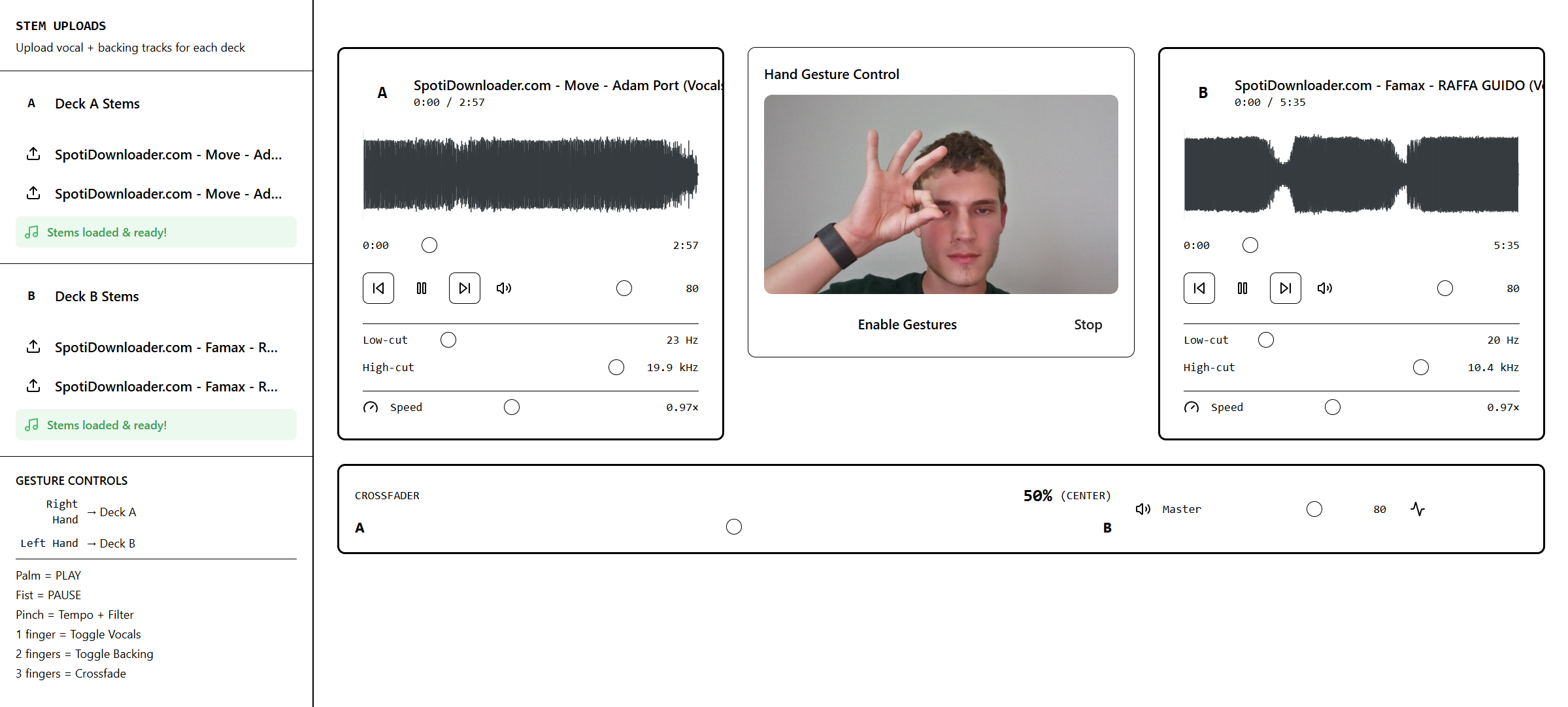
NOTE: Loom didn't give permissions to download video, so it is just a Loom link for demo.
Inspiration
● DJ Vision - Our Story
We've spent countless hours trying to create music in FL Studio, only to hit the same walls again and again: expensive equipment and a steep learning curve. Professional DJ controllers cost $500-$2000, and mastering the software takes months of practice. We kept asking ourselves—why does creativity have to be locked behind such high barriers?
That frustration became our inspiration. What if anyone with a webcam could DJ? What if natural hand gestures replaced complex button combinations? We wanted to democratize music mixing and make it accessible to everyone, regardless of budget or technical skill.
This project pushed us into uncharted territory across multiple domains:
Computer Vision & Machine Learning
- MediaPipe Hand Landmarker: We learned how to integrate Google's pre-trained ML model to detect 21 hand landmarks in real-time at 30+ FPS
- Gesture Recognition: Built state machines to classify hand postures (palm, fist, pinch, finger counts) and convert positions into control signals
- Temporal Smoothing: Implemented EMA (Exponential Moving Average) filtering to stabilize jittery hand movements:
$$\text{smoothed}_t = \alpha \cdot \text{raw}t + (1-\alpha) \cdot \text{smoothed}{t-1}$$
Web Audio API & Real-Time Processing
- Tone.js Architecture: Mastered the Web Audio API through Tone.js to build dual independent audio engines
- Multi-Stem Playback: Learned to synchronize vocals, drums, and bass tracks with independent gain control
- Signal Chain Design: Implemented professional audio routing:
$$\text{Stems} \rightarrow \text{Gains} \rightarrow \text{Mix Bus} \rightarrow \text{Filter} \rightarrow \text{Master} \rightarrow \text{Limiter} \rightarrow \text{Output}$$
- Low-Latency Control: Achieved sub-30ms response time from gesture to audio change through direct engine control
Event-Driven Architecture
- Decoupled Systems: Built an event bus pattern to separate gesture detection from audio processing
- Priority Hierarchies: Designed gesture mode detection with conflict resolution (pinch > transport > blend > stems)
- State Management: Learned to synchronize React UI state with real-time audio engine state through polling
React & TypeScript Best Practices
- Performance Optimization: Used useEffect hooks with proper dependency arrays to prevent memory leaks
- Ref Management: Leveraged useImperativeHandle for parent-child component communication
- Type Safety: Enforced strict typing across gesture events, audio interfaces, and UI components
How we did it
Phase 1: Gesture Detection Foundation
- Camera Integration: Set up webcam access with proper permissions and mirrored video display
- MediaPipe Setup: Loaded the Hand Landmarker model and configured detection parameters
- Posture Classification: Built PostureDetector class to identify palm, fist, pinch, and finger counts using landmark geometry
- Gesture Modes: Implemented GestureModes state machine with per-hand tracking for dual-deck control
Phase 2: Audio Engine Architecture
- Dual-Deck Design: Created DeckAudioEngine class for independent Deck A and Deck B
- Stem Loading: Implemented multi-stem loading with URL verification and error handling
- Audio Graph: Connected Tone.js nodes: Player → Gain → Filter → Master Gain → Limiter → Destination
- Transport Control: Built play/pause with position tracking using performance.now() for accurate timing
Phase 3: Event System
- Event Bus: Created publish-subscribe pattern for decoupled communication
- Event Router: Built router.ts to subscribe once and forward events to correct deck engines
- Gesture Mapping: Defined event types: PLAY, PAUSE, TEMPO_SET, FILTER_SWEEP, STEM_TOGGLE, CROSSFADER_SET
- Mirrored Control: Mapped right hand → Deck A, left hand → Deck B (compensating for camera mirror)
Phase 4: UI Integration
- Component Design: Built Deck, Library, MasterBar, Waveform, and VUMeter React components
- State Synchronization: Added 100ms polling to sync UI sliders with gesture-controlled engine state
- Direct Control: Connected UI buttons to engines using same code path as gestures
- Visual Feedback: Implemented real-time waveform display, VU meters, and crossfader percentage
Phase 5: Refinement & Polish
- Gesture Tuning: Added hold duration requirements (400-600ms) to prevent accidental triggers
- Cooldown Systems: Implemented 800ms cooldown for stem toggles to prevent crossfade interference
- Filter Mapping: Linked low-cut/high-cut UI sliders bidirectionally with gesture filter sweep
- Tempo Sync: Made tempo changes broadcast to both decks simultaneously for synchronized playback
Challenges we faced
Challenge 1: Gesture Conflicts & False Positives
Problem: When releasing from 3-finger crossfade, the hand briefly showed 2 fingers, accidentally triggering stem toggles. Similarly, holding 1 finger would toggle vocals on/off rapidly.
Solution:
- Implemented gesture priority hierarchy so crossfade blocks stem detection
- Added hold duration requirements (400ms for stems, 600ms for transport)
- Created one-shot-per-hold behavior initially, then switched to cooldown system (800ms) for better UX
- Result: Deliberate gestures work perfectly, accidental triggers eliminated
Challenge 2: Jerky, Unresponsive Controls
Problem: After UI integration, tempo and filter controls became jerky and unresponsive. The tempo would only change by tiny amounts instead of smoothly sweeping 0.8x to 1.2x.
Root Cause: // WRONG: App.tsx was intercepting events and transforming values case 'TEMPO_SET': handlePlaybackRateStep((event.value - 1.0) * 0.1) // Tiny delta!
Solution:
- Removed all gesture event handlers from App.tsx
- Gave exclusive audio control to router.ts which calls engines directly
- App.tsx now only handles UI-only events (like updating crossfader display)
- Result: Smooth, responsive control restored—original behavior recovered
Challenge 3: UI State Desynchronization
Problem: Pressing palm gesture to play didn't update the play/pause button. Gesture-controlled tempo didn't move the speed slider. The UI was "blind" to gesture control.
Solution: // Added 100ms polling in deck.tsx useEffect(() => { const engine = deckId === "A" ? engineA : engineB
const pollState = () => {
  const actualIsPlaying = engine.isPlaying()
  if (actualIsPlaying !== isPlaying) {
    setIsPlaying(actualIsPlaying) // Sync button state
  }

  const state = engine.getState()
  if (Math.abs(state.tempoFactor - playbackRate) > 0.01) {
    setPlaybackRate(state.tempoFactor) // Sync slider
  }
}

const interval = setInterval(pollState, 100)
return () => clearInterval(interval)
}, [deckId, isPlaying, playbackRate]) Result: UI now reflects gesture control perfectly, whether controlled by hand or button click.
Challenge 4: Audio Latency & Synchronization
Problem: Initial implementation had 200-500ms lag between gesture and audio response. Dual-deck playback wasn't sample-accurate.
Solution:
- Bypassed adapter layer for direct engine control from router
- Used Tone.now() + lookahead for scheduled playback: const when = Tone.now() + 0.03 // 30ms lookahead player.start(when, offset)
- Synchronized tempo across both decks in router instead of per-deck
- Result: Sub-30ms latency, smooth crossfading, perfect sync
Challenge 5: Filter Slider Disconnect
Problem: Gesture filter sweep (pinch + horizontal motion) didn't move the low-cut/high-cut sliders. Manual slider adjustment didn't affect the filter.
Solution: Built bidirectional mapping between engine filter value (0-1) and UI slider percentages: // Gesture → Sliders (in polling loop) const mapFilterToSliders = (filterValue: number) => { if (filterValue < 0.5) { // Lowpass: cut highs return { lowCut: 0, highCut: 25 + (75 * (filterValue / 0.5)) } } else { // Highpass: cut lows return { lowCut: 75 * ((filterValue - 0.5) / 0.5), highCut: 100 } } }
// Sliders → Gesture (in handlers) const handleLowCutChange = (value: number) => { const filterValue = 0.5 + (value / 75) * 0.5 // Map to 0.5-1.0 engine.setFilter(filterValue) } Result: Perfect two-way synchronization—gesture controls sliders, sliders control filter.
Challenge 6: Stem Toggle "Stuck" State
Problem: After toggling vocals off with 1 finger, holding 1 finger again wouldn't toggle back on. The stem was "stuck" until you released completely to idle.
Root Cause: // WRONG: One-shot flag prevented re-toggling if (this.stemToggleFired) return; // Blocked!
Solution:
- Removed stemToggleFired flag entirely
- Added 800ms cooldown between toggles
- Reset hold timer after each successful toggle: if (now - this.lastStemToggle < 800) return; // Cooldown // ... toggle logic ... this.lastStemToggle = now; this.stemHoldStartTime = now; // Reset for next hold Result: Can toggle stems on/off repeatedly; crossfade gestures don't interfere.
Technical Achievements
- Real-Time Performance: 30+ FPS gesture detection with sub-30ms audio latency
- Dual-Hand Processing: Simultaneous independent control of two decks
- Professional Audio Quality: Multi-stem mixing with filters, limiter, and gain staging
- Zero External Dependencies: All processing happens in the browser—no server needed
- Robust State Management: Event-driven architecture handles complex gesture interactions gracefully
What we're proud of
- Accessibility: We genuinely lowered the barrier to DJing—$0 cost, 5-minute setup
- Technical Depth: Combined ML, audio processing, and React into a cohesive system
- User Experience: Natural gestures feel intuitive, even for first-time users
- Problem Solving: Overcame every technical challenge through systematic debugging and architecture improvements
- Production Quality: Built with TypeScript, proper error handling, and professional code structure
This project taught us that the best solutions come from scratching your own itch. We wanted to make music without breaking the bank—and we did.
Challenges we ran into
Accomplishments that we're proud of
What we learned
What's next for Computer Vision Gesture DJ Board
Built With
- css
- html
- javascript
- markdown
- tsx
- typescript
- vite/react


Log in or sign up for Devpost to join the conversation.