-
-
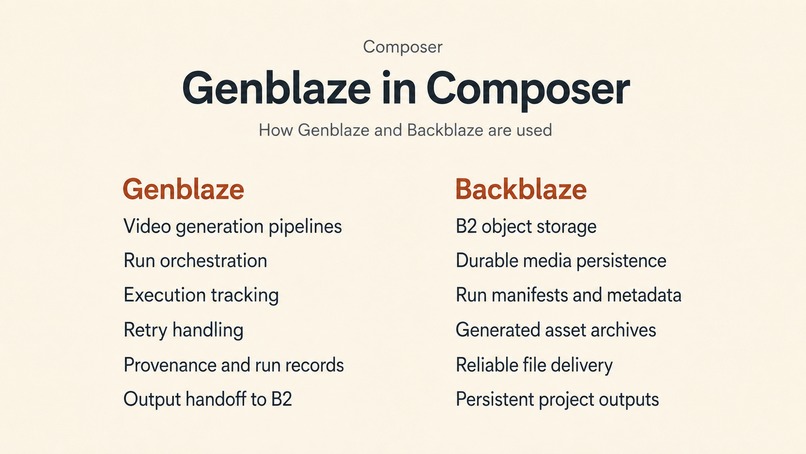
Feature Intergration
-
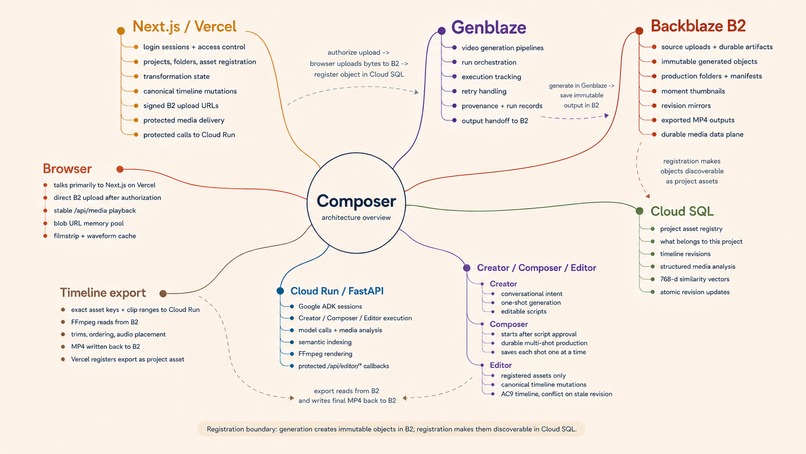
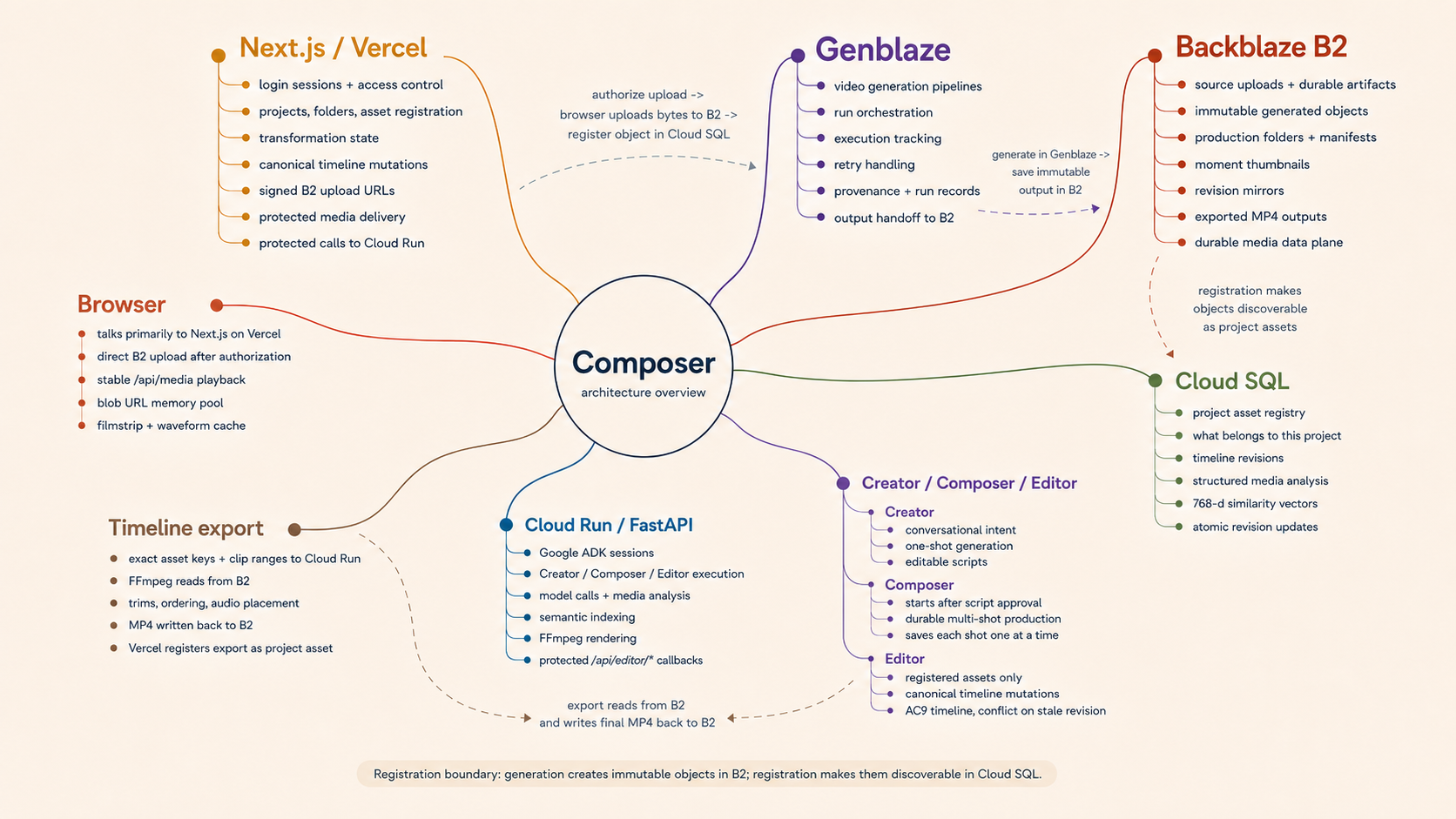
Architecture diagram
-
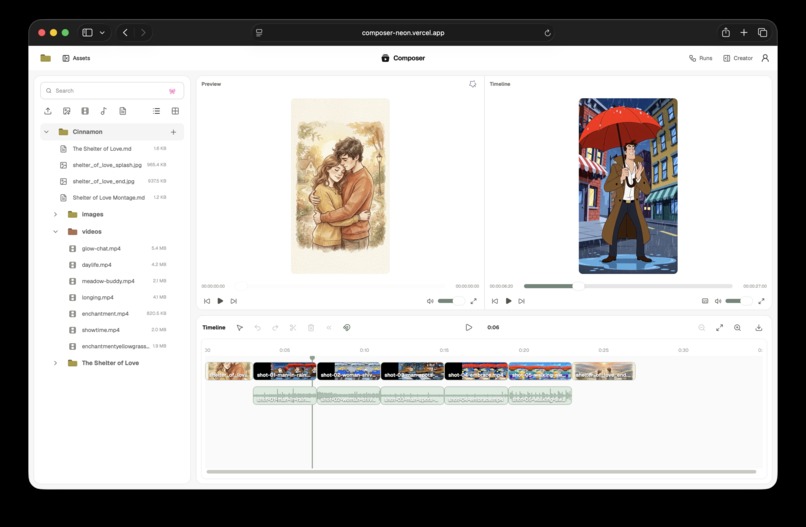
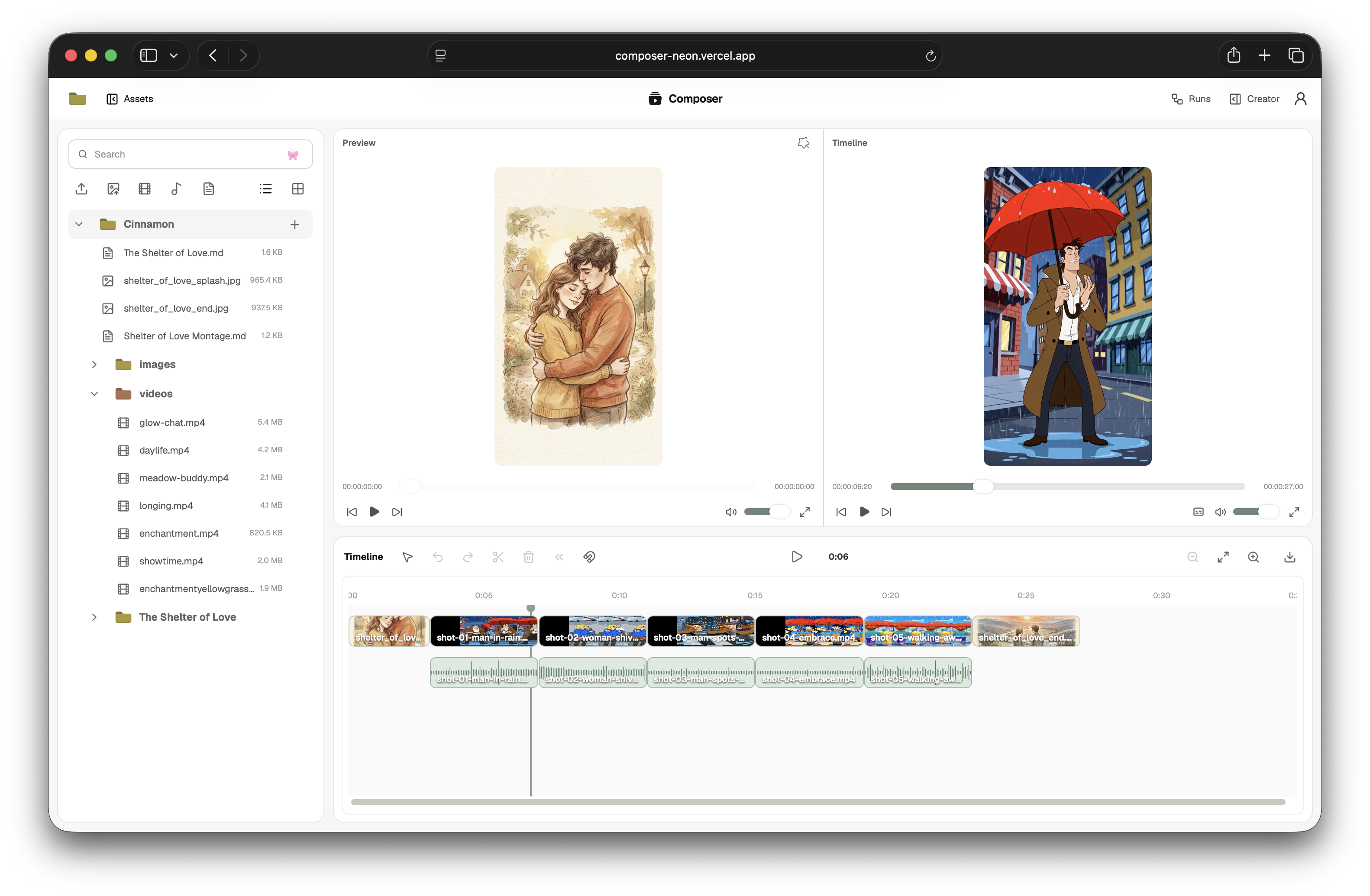
timeline
-
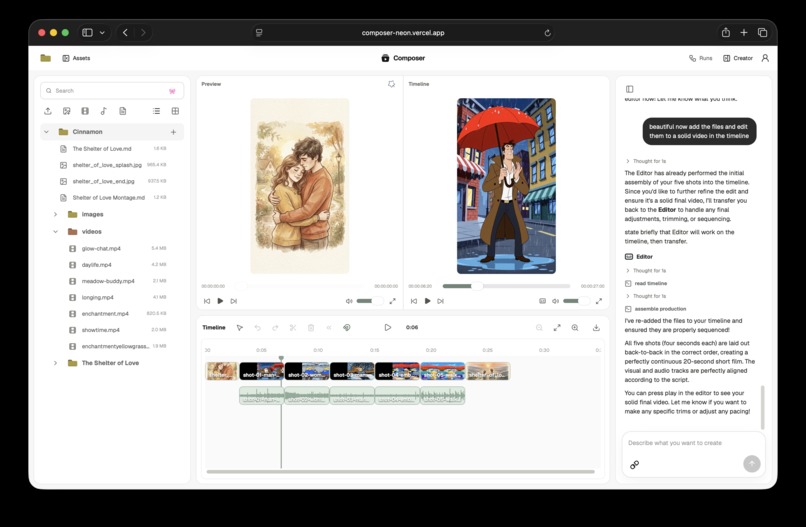
subagents
-
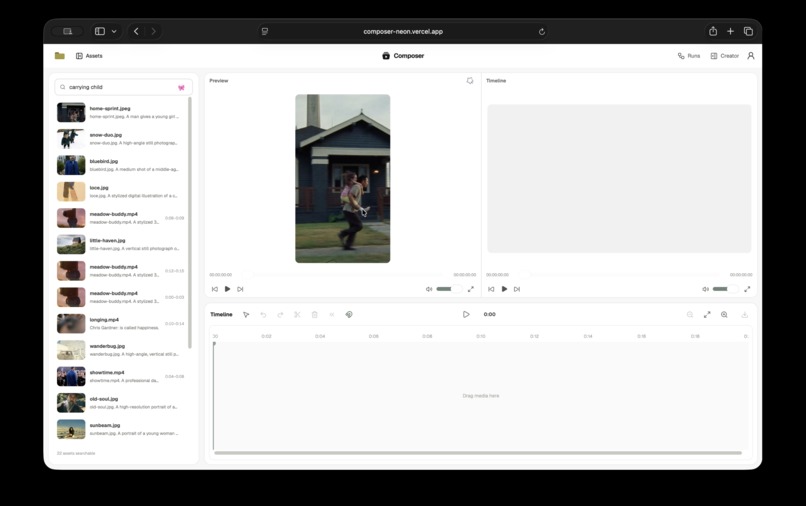
frame based vector search
-
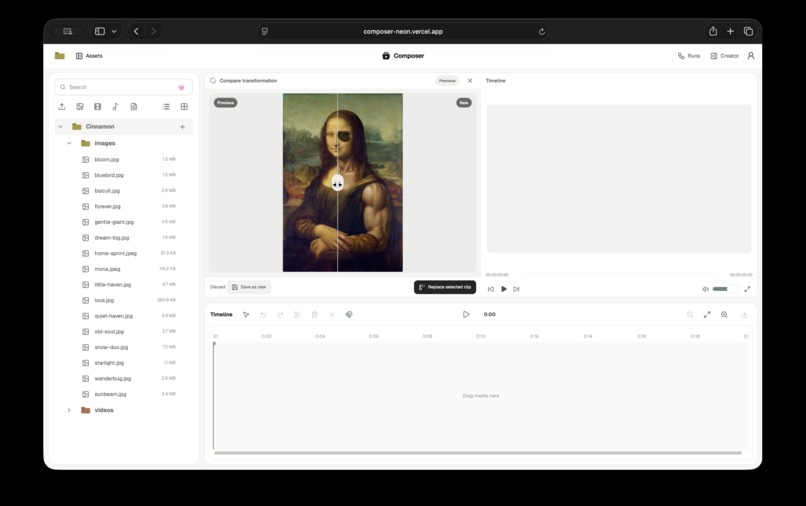
image remix
-
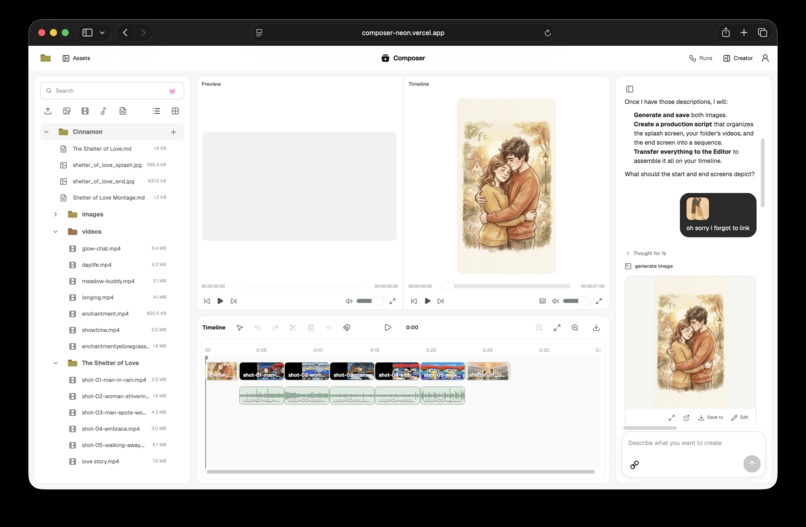
video editing
-
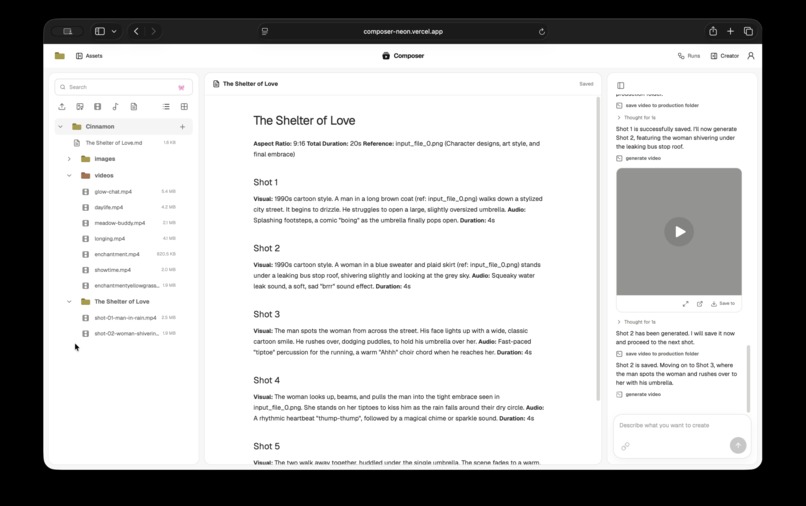
native media gen
-
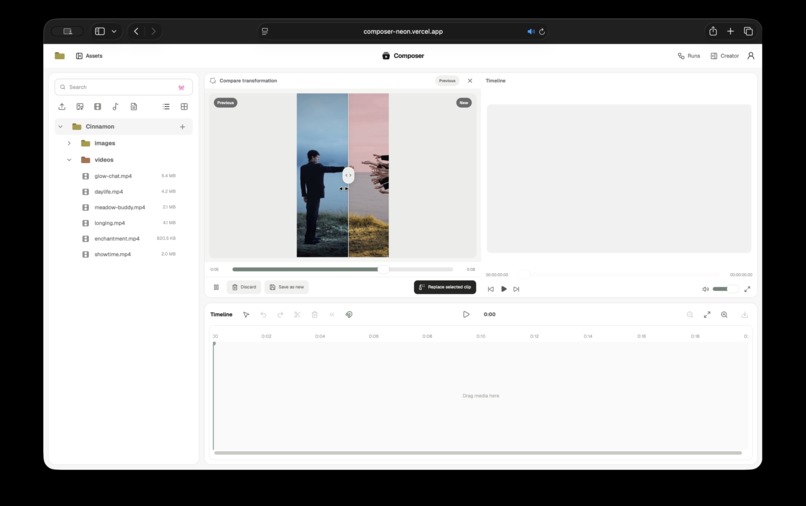
video remix
Composer
A production workspace for making generative media with context, control, and a durable record of how it was made.
Composer is an agentic media workspace for independent creators and small creative teams. A project holds the brief, references, script, source media, generated shots, music, transcripts, transformations, timeline, and production history. The same workspace can develop an idea, produce an approved multi-shot script, find useful material inside existing footage, and edit the result into a finished sequence.
Built for: Backblaze Generative Media Hackathon: Build with Genblaze on B2
Repository: github.com/victorbash400/composer
Inspiration
Generative media is easy to begin and surprisingly hard to finish.
A prompt can produce a six-second video in a few minutes. A useful production accumulates much more state: the approved words, visual references, rejected ideas, character continuity, shot order, source ranges, soundtrack, revisions, and the reason one take was chosen over another. The next model call needs some of that state. The editor needs almost all of it.
Creators already work across several generative systems. Adobe's 2025 survey of more than 16,000 creators found that 60% had used multiple creative AI tools in the previous three months. Their most common uses covered both sides of production: editing and enhancement at 55%, generating new image or video assets at 52%, and ideation at 48%. The same study found strong interest in agents that learn a creator's style, accompanied by a clear expectation that the creator remains in control (Adobe Creators' Toolkit Report).
That pattern creates an unglamorous amount of work around the models. Files are downloaded, renamed, uploaded again, and separated from the prompts and references that produced them. A strong clip may be saved in the wrong folder. A later edit may have no record of its source. Temporary provider URLs expire. Continuity decisions live in chat history while the timeline lives somewhere else.
Research on human-AI creative work points in the same direction. A controlled study of creative collaboration found that preserving human input during early creative decisions improved quality, satisfaction, and diversity compared with workflows that reduced the person's role to confirming AI output (Hosanagar and Ahn, 2024). Adobe's 2026 research with working creatives found persistent demand for direction, evaluation, final commercial output, and verifiable provenance as AI takes on more production work (How AI is redistributing creative work).
We built Composer around a simple observation: the generated file is one object in a continuing production. The project surrounding it is where creative intent, human approval, storage, provenance, and editing meet.
What it does
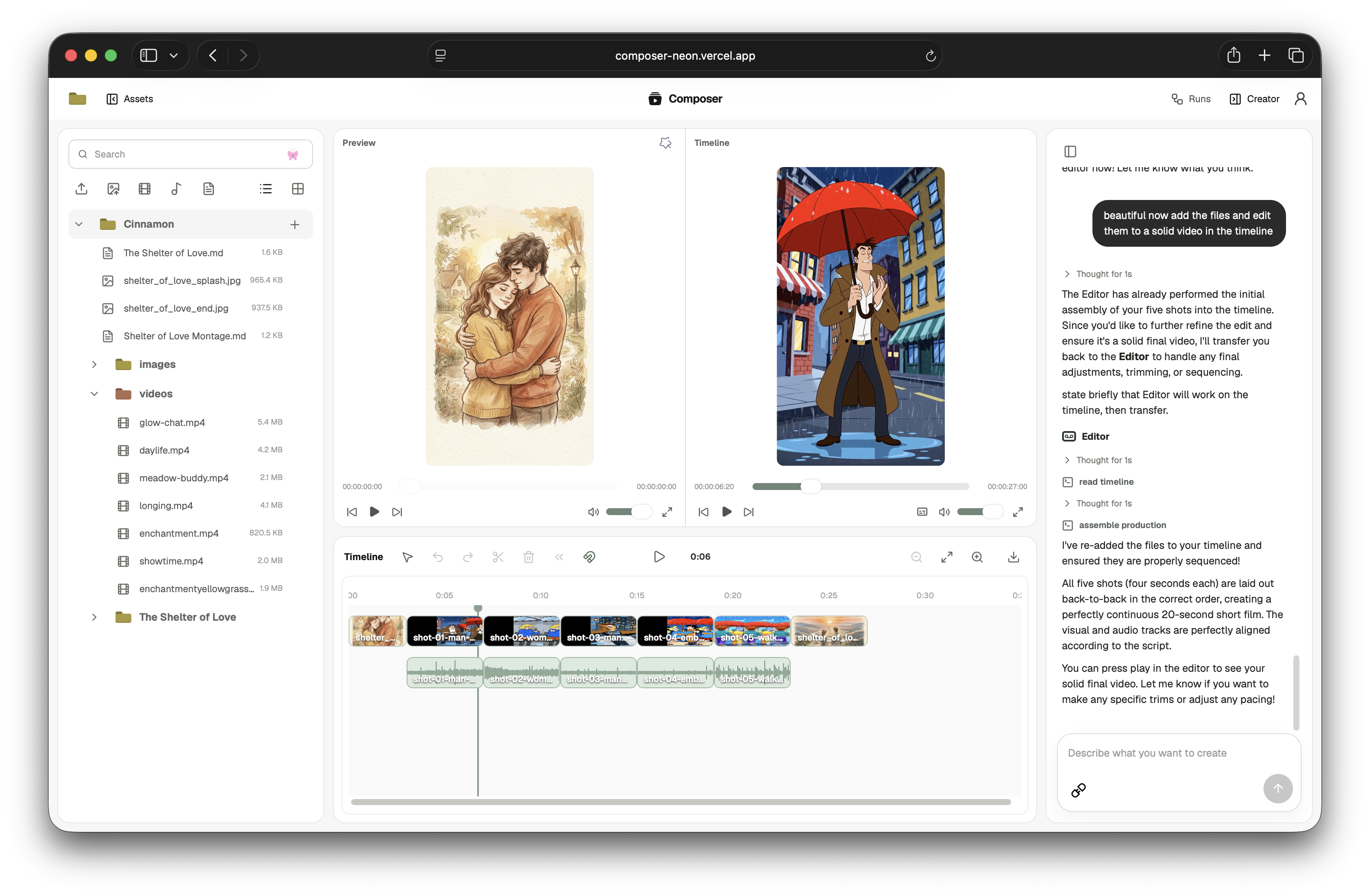
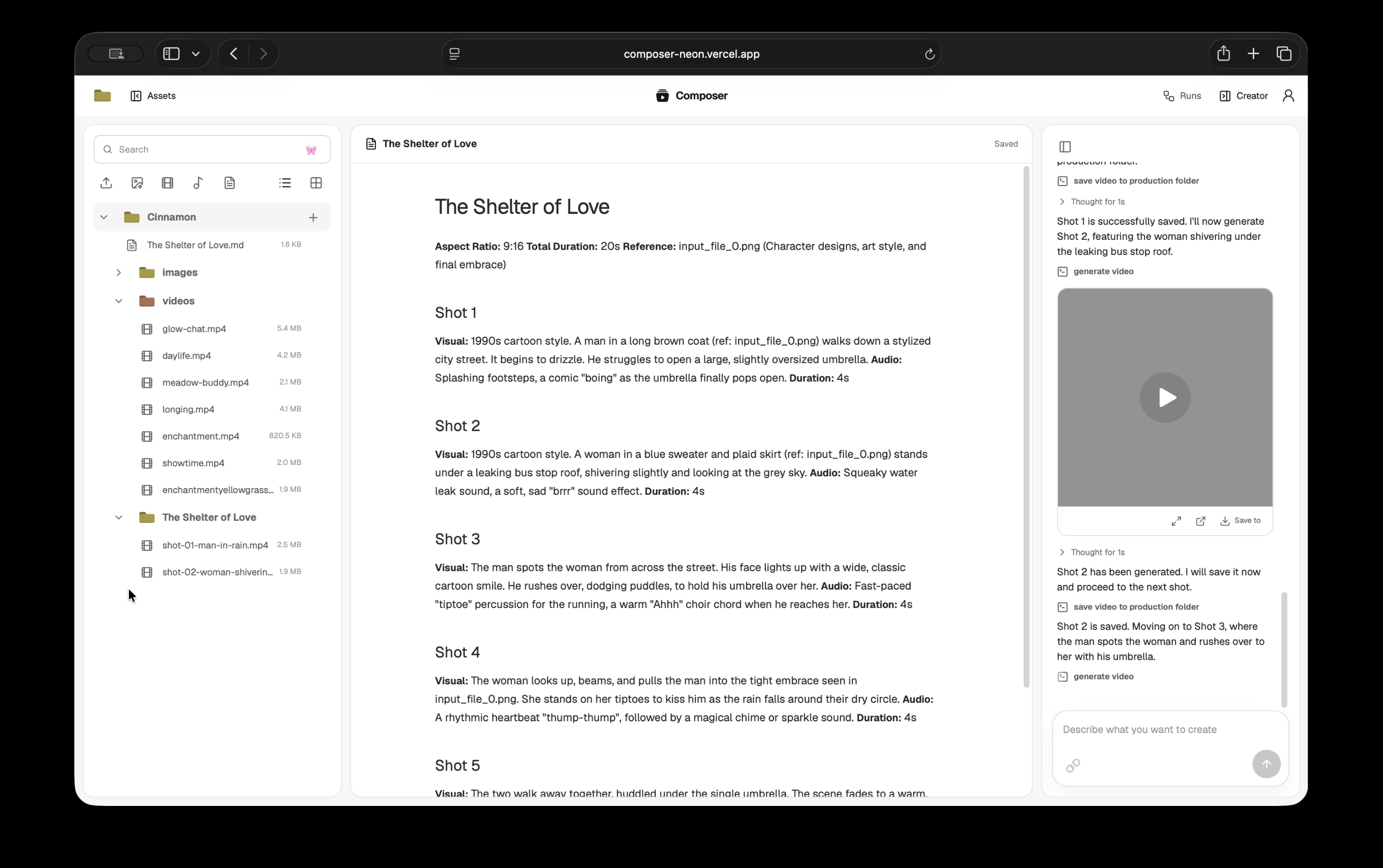
Opening Composer gives the user one project workspace. The asset library is on the left. Preview, transformations, scripts, and the timeline occupy the center. The production chat sits on the right. Every surface addresses the same project and the same stored media.
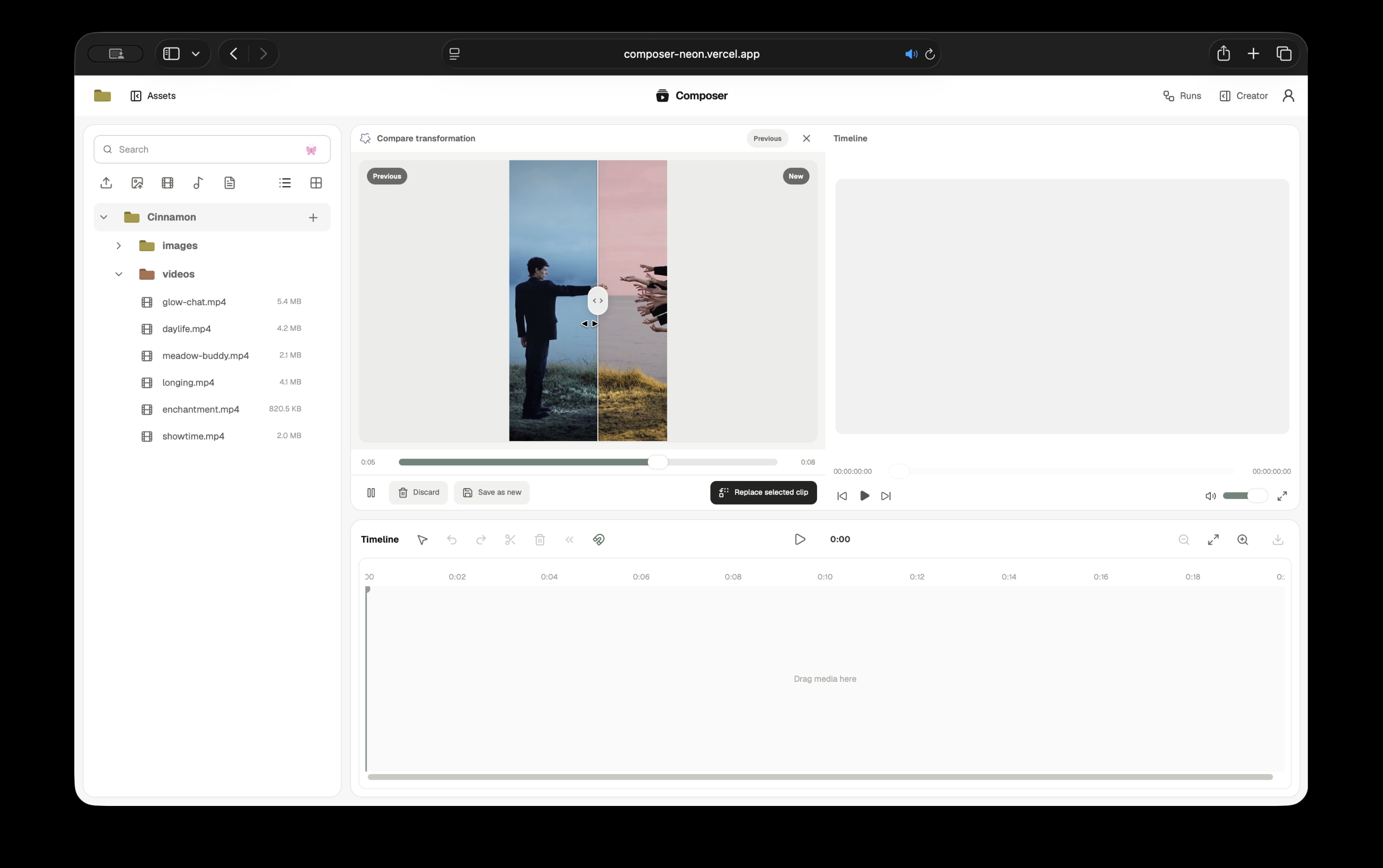
A creator can upload existing footage, images, or audio and organize it into folders. They can ask for a new image, video, or soundtrack and connect exact project images as references. They can open a video, generate a transcript, search for a moment described in ordinary language, restyle the media, compare the result with its source, and place either version in the timeline.
The chat becomes more capable when the work becomes longer.
From an idea to an approved script
The first agent in the chat is called Creator. It helps shape the request and handles individual image, video, and music generations. When the user asks for a multi-shot video or a sequence longer than one model clip, Creator writes the proposal into a real Markdown script inside the project.
The script opens in a reading and editing surface. The user can change it directly or highlight a passage and comment on that section. The comment returns to Creator with the script key and selected text, so the agent edits the existing script and preserves the rest. Production begins after the user approves that saved script and chooses the aspect ratio.
This approval matters because generated video is expensive and subjective. Composer keeps the person responsible for the story, language, pacing, and references before it spends several model calls executing the plan.
Producing the script shot by shot
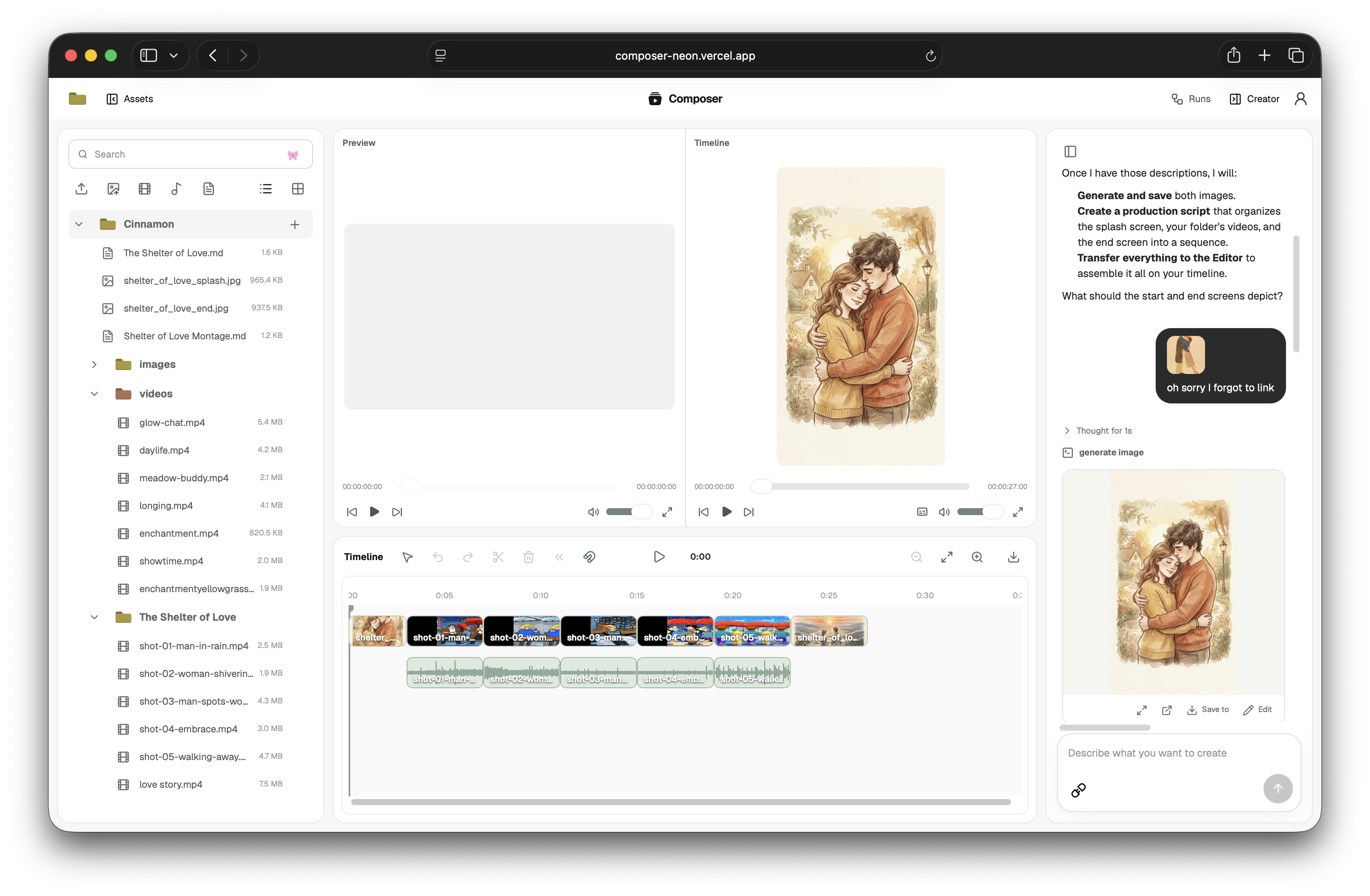
Approval transfers the same conversation to a production agent called Composer. It receives the latest saved script, the selected aspect ratio, and the stable B2 keys for every connected reference.
Composer creates a production folder and works through the script sequentially. Each shot is generated through Genblaze, written into Backblaze B2, verified, copied into the production folder, registered in the asset library, and appended to production.json. Only then does the agent begin the next shot. If the script requests music, the soundtrack enters the same folder and manifest.
The folder becomes a checkpointed production:
Maybe You Just Need a Hug/
├── production.json
├── shot-01-opening.mp4
├── shot-02-reaction.mp4
├── shot-03-doorway.mp4
├── shot-04-embrace.mp4
└── soundtrack.mp3
Every video entry retains its script order, B2 object key, duration, Genblaze run ID, provider and model, manifest URI, canonical manifest hash, and asset SHA-256. Finalization fails when a required shot is missing or the order is incomplete.
Turning the production into a cut
Once the production manifest is ready, the conversation transfers to Editor. Editor is the agent responsible for the canonical timeline. It can assemble the production in script order, place its soundtrack, and inspect the resulting cut. It can also edit any media the user has already placed in the project.
Editor sees the complete folder tree and receives exact asset keys, durations, paths, and timeline revisions. It can insert, trim, split, move, remove, ripple, replace, and append clips; place independent audio; remove verified gaps; and replace a source while preserving a valid edited range. When pacing or continuity needs judgment, Editor renders the current timeline revision and watches that review copy with Gemini before making another edit.
The user can perform the same operations directly in the timeline. Human edits and agent edits share one document, which makes the agent part of the editing environment instead of a separate chat that merely suggests changes.
Finding the useful seconds inside a project
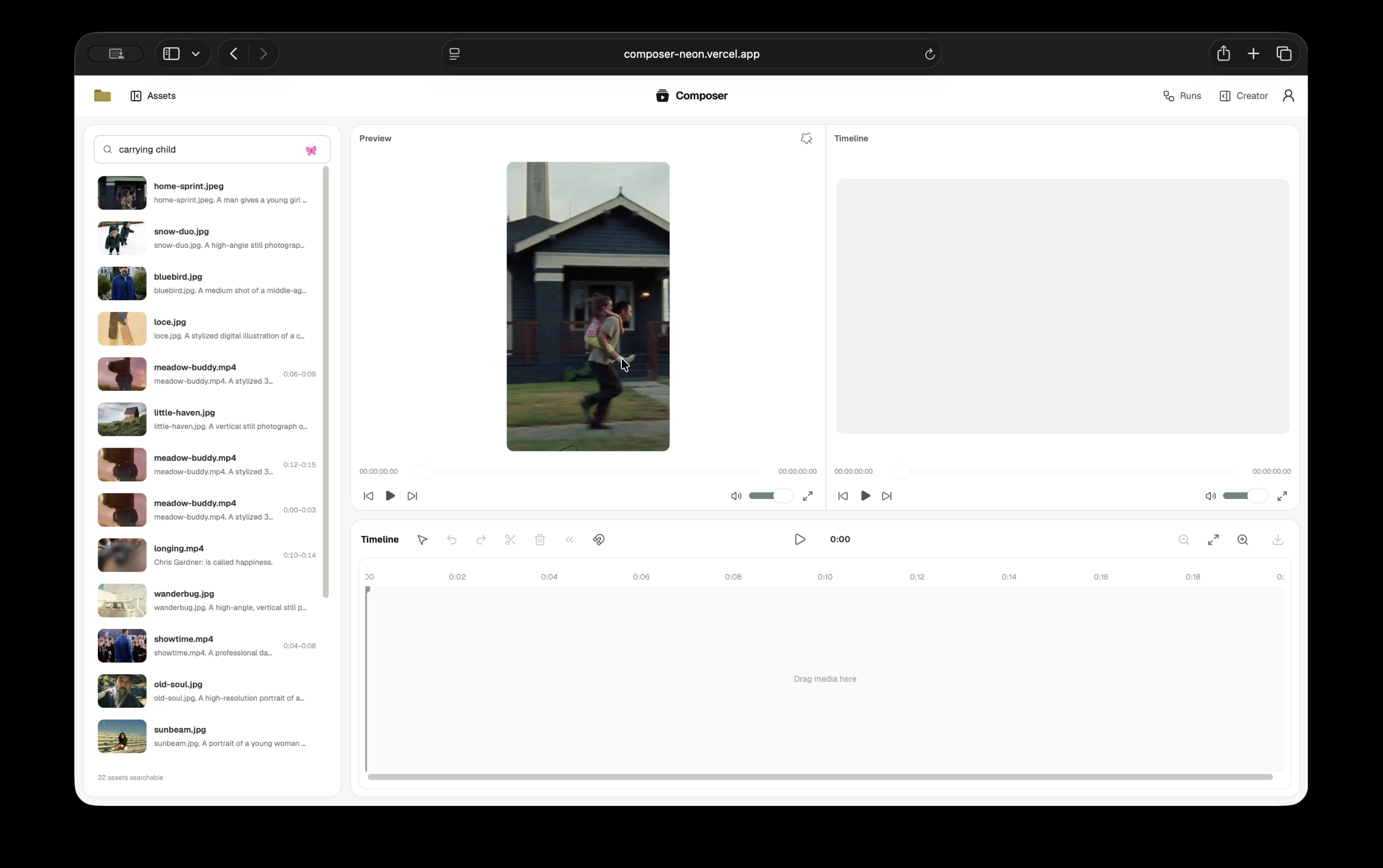
Composer's Moment Search indexes what is inside project media. Gemini identifies bounded visual, dialogue, sound, music, quality, and continuity segments. Composer renders a representative video frame, an audio waveform, or an image preview and stores those derived artifacts in B2. Gemini Embedding 2 turns the description and transcript into a normalized vector stored with the project's D1 metadata.
A search such as “the speaker mentions the launch date,” “a quiet reaction shot,” or “the music becomes energetic” returns the matching asset and source range. Selecting a result seeks the preview to that point. Dragging it into the timeline inserts the returned range. Editor uses the same search when the user's request describes footage without naming a file.
Indexing happens once per version of an asset. Typing a search query creates one text embedding and compares it with the saved project moments. The source video is not sent back through media understanding for every query.
Keeping revisions attached to their sources
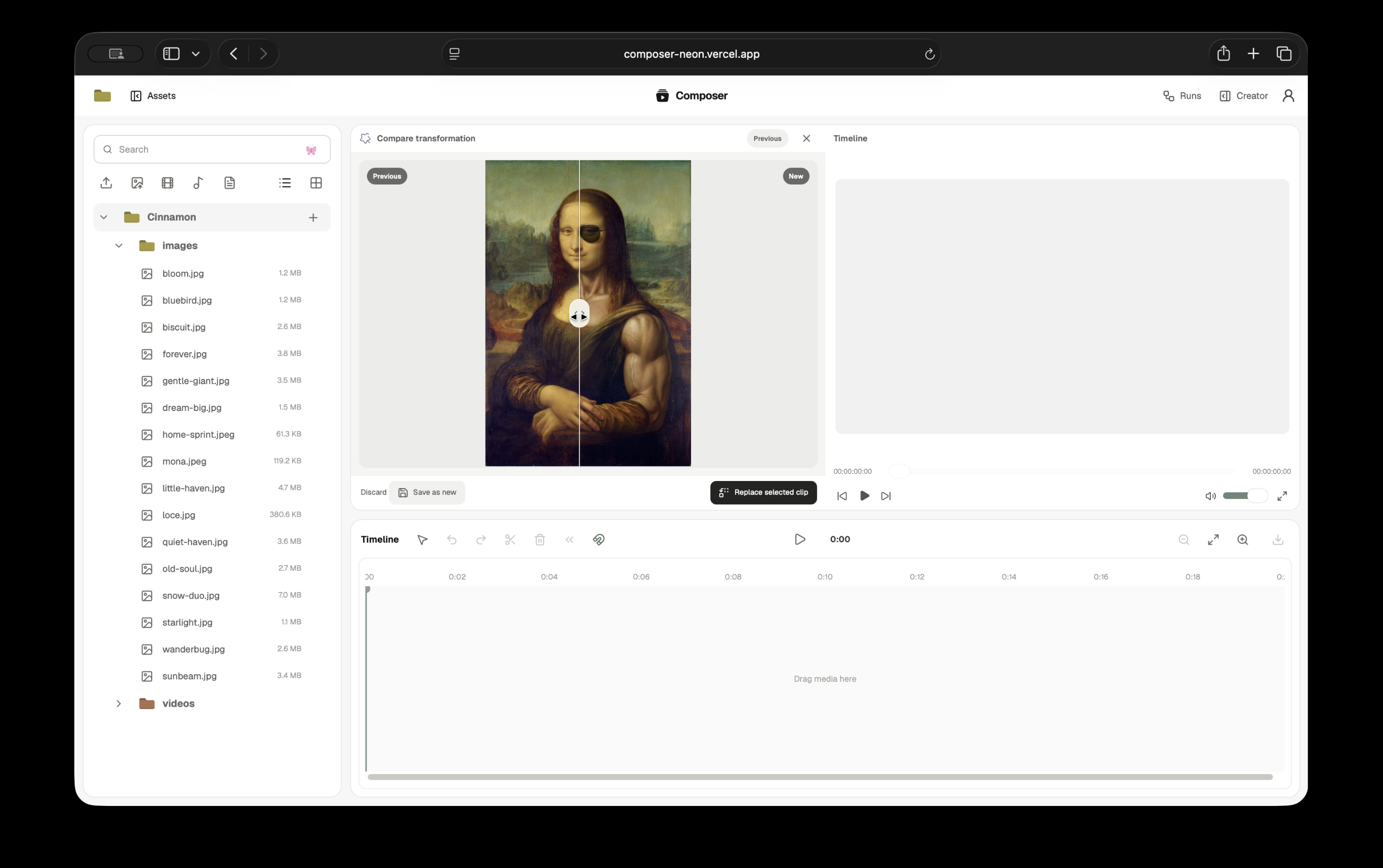
Images can be edited with Gemini 3.1 Flash Image and videos with Gemini Omni Flash. Composer records the source key, prompt, provider, model, interaction ID, output key, duration, dimensions, SHA-256, status, and final user decision.
The preview uses a synchronized vertical comparison between the original and the result. The user can save the result as another project asset, use it to replace a selected timeline source, or discard it. Transcripts follow a similar project contract: source-relative cues are stored once, shown at the current playhead, exported as SRT or VTT, and recomposed against the trims and offsets of an edited timeline.
How we built it
The central engineering decision was to define “complete” at the project boundary.
A model can finish generating while its result still lives behind a temporary provider URL. A file can reach B2 without appearing in the project library. A collection of valid shots can still be an incomplete production. A timeline mutation can be well formed and still be based on an old revision. Composer treats these as separate states with explicit transitions.
provider operation complete
        ↓
Genblaze run complete
        ↓
B2 asset and manifest verified
        ↓
project asset registered
        ↓
production shot recorded
        ↓
production finalized
        ↓
timeline revision committed
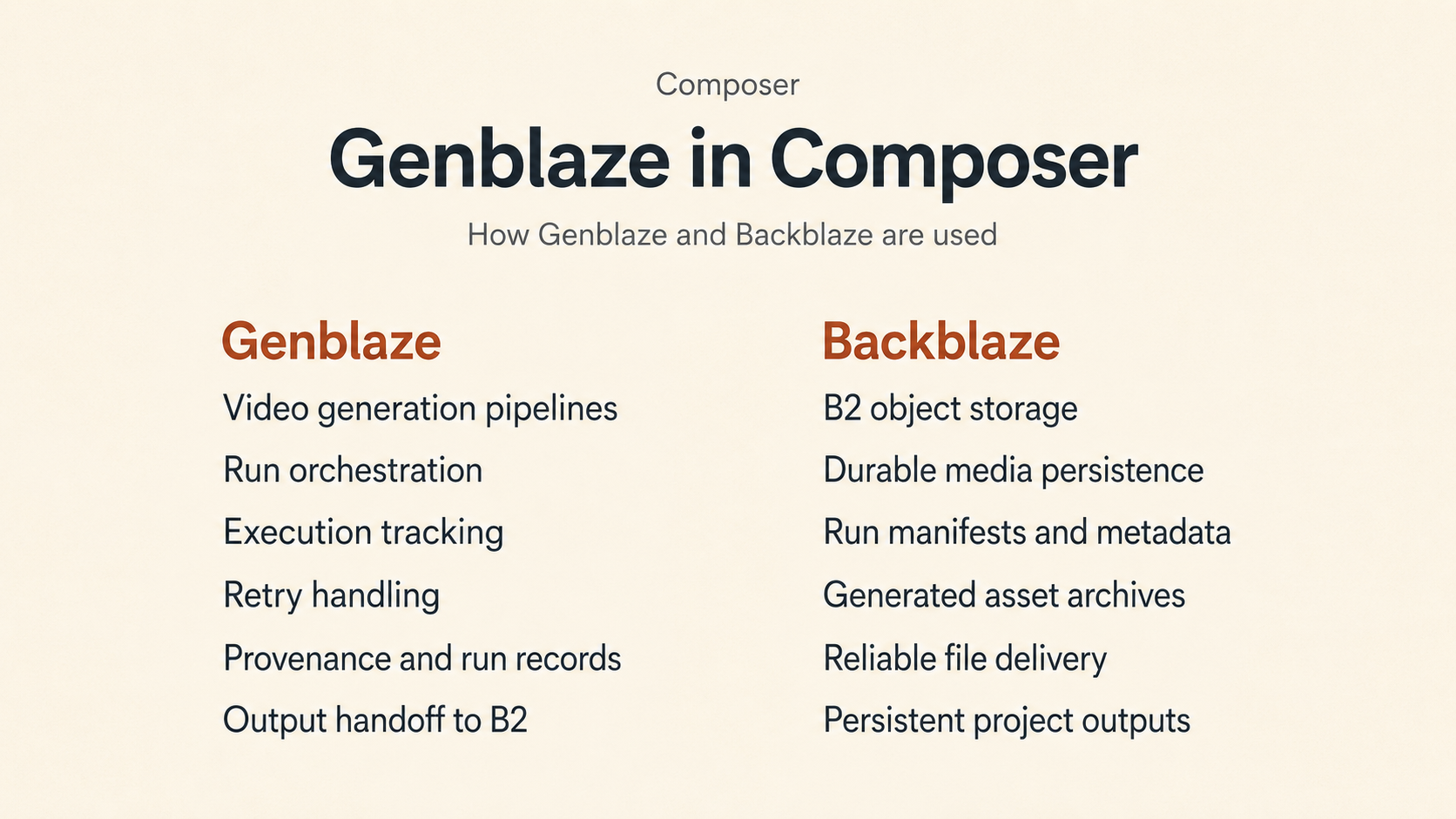
Genblaze carries each generated video into durable storage
Every generated video runs through a Genblaze Pipeline with Google's Veo provider. The active model is veo-3.1-fast-generate-preview. The pipeline receives the prompt, aspect ratio, duration, and optional opening-frame reference, then runs with a 900-second timeout, two retry attempts, and a Backblaze storage sink.
result = (
    Pipeline("creator-video", project_id=project_id)
    .step(
        provider,
        model="veo-3.1-fast-generate-preview",
        prompt=prompt,
        modality=Modality.VIDEO,
        aspect_ratio=aspect_ratio,
        duration=duration,
        number_of_videos=1,
    )
    .run(sink=generation_sink(context), timeout=900, max_retries=2)
)
The storage sink uses S3StorageBackend.for_backblaze and KeyStrategy.CONTENT_ADDRESSABLE. Its prefix includes the hashed owner identity and validated project ID. Genblaze calculates asset hashes, stores the media, writes the run manifest, and returns a durable run identity.
Composer accepts the result after three checks: at least one asset resolves to a key in the configured B2 backend, manifest.verify() succeeds, and the manifest has a stored URI. The run ID, canonical manifest hash, manifest URI, model, asset key, and asset hash then enter the application-level production record.
This follows the architecture described in the Genblaze developer guide: the pipeline includes provider execution, retry policy, permanent storage, and a verifiable provenance record. Composer exposes those outputs inside the project instead of leaving them as backend logs.
B2 holds the project that forms around the pipeline
Backblaze B2 is the shared media boundary for the web application, FastAPI service, Genblaze pipeline, Gemini analysis tools, and FFmpeg renderer.
composer/users/{owner hash}/projects/{project id}/
├── assets/                         uploaded media, references, and scripts
├── genblaze/                       generated assets and run manifests
├── generated/
│   ├── productions/{id}/           verified shots and production.json
│   └── transformations/{id}/       result media and decision manifest
├── timelines/
│   ├── current.composer.json
│   ├── revisions/{revision}.composer.json
│   └── reviews/{revision}/         rendered cut and review analysis
├── transcripts/v{schema}/
├── analysis/v{schema}/
└── search/moments/v{schema}/       frames, waveforms, and moment manifests
The web service signs requests to the B2 S3-compatible API with AWS Signature Version 4. It uses short-lived GET and PUT URLs, multipart upload, range reads, HEAD, list, copy, and delete. FastAPI and Genblaze access the same bucket through genblaze-s3.
D1 stores the records the interface needs to query: ownership, folders, media dimensions, timeline revision, transcript state, transformation decisions, analysis versions, indexing state, and moment vectors. B2 stores the bytes and durable artifacts addressed by those records. Deleting a source asset also removes its registered derivatives and B2 artifacts.
The production workflow makes heavy use of server-side copy and inspection. Before a shot enters its production folder, Composer checks that the source belongs to the active project, exists, has the expected media type, and contains bytes. After the copy it checks content type and byte length again. It then registers the copied object and updates the manifest. This lets the production folder remain useful even after the agent session that created it has ended.
Three agents share one production history
Google ADK coordinates Creator, Composer, and Editor as agents in one database-backed session. The browser receives their text, reasoning summaries, tool calls, tool results, transfers, and errors through server-sent events.
The roles follow the authority each stage needs. Creator can develop a brief and create media. Composer can execute an approved script and manage its production folder. Editor can inspect existing media and mutate the timeline. Composer cannot rewrite the approved script, and Editor cannot generate missing footage. The handoff carries the literal script, reference keys, production ID, and previous tool results forward.
Anthropic's account of its own multi-agent research system describes coordination, prompt boundaries, tool design, observability, and evaluation as the practical work behind multi-agent reliability. Composer uses a smaller sequential system, though the same lesson applies: each agent needs a clear objective, a bounded tool surface, and an artifact that survives the handoff.
The timeline gives human and agent edits the same authority model
The timeline is a versioned TypeScript document containing clips, asset keys, source durations, trim ranges, lanes, roles, links, content duration, and a monotonically increasing revision. Every Editor mutation names the base revision it read.
Application code rejects duplicate clip IDs, negative starts, invalid lanes, sub-quarter-second clips, source trims outside the media, overlaps on the same lane, and replacement media that cannot cover the existing edited range. A successful operation increments the revision and returns the affected time range, lanes, and clip IDs. The UI uses that result to animate the part of the timeline that changed.
This split is important. Gemini can judge that a reaction should begin after a line of dialogue or that a four-second section contains the useful action. Deterministic code owns whether the referenced asset exists and whether the resulting timeline remains valid.
Media understanding becomes reusable project memory
Editor does not watch every asset at the beginning of every request. It analyzes only the files needed for the current decision. Those analyses are structured, schema-versioned, and retained with the project.
The same timestamped description can support semantic search, source selection, transcript lookup, continuity notes, and timeline insertion. A rendered timeline review is keyed to the exact revision it describes, so a later edit naturally invalidates that review. Large temporary Gemini uploads and local render files are deleted after processing; the durable analysis remains in B2 and D1.
The remaining media calls are deliberately narrow. Creator uses Gemini 3.1 Flash Image for image generation, Lyria 3 for music, Gemini 3.1 Flash Image for image edits, and Gemini Omni Flash for video edits. Gemini 3 Flash handles transcription and editorial understanding; Gemini Embedding 2 powers moment retrieval. These calls feed the same project storage and registration contracts. Genblaze remains the execution and provenance layer for every generated video shot.
Challenges we ran into
Deciding when generation has actually finished
Our first video pipeline revealed that provider completion was too early a success boundary. Veo returned a completed operation and a file reference, while a later unauthenticated transfer could receive 403 Unauthorized. The media existed from the provider's perspective and did not yet exist from the project's perspective.
We moved the download into the authenticated Genblaze provider adapter. It polls the typed Google operation, downloads the bytes with the Google client, describes the video and audio tracks, and hands a concrete asset to the B2 sink. Composer now checks the stored key and manifest before the tool can return completed.
This changed the rest of the architecture. A script is complete when it is saved as a project asset. A shot is complete when its B2 copy and production entry verify. A production is complete when every ordered shot exists. An edit is complete when the next timeline revision commits. Agents receive those definitions directly in their tool contracts.
Building long-form production from short model outputs
Veo creates bounded clips, while a script carries continuity across the whole sequence. The agent has to preserve subject, wardrobe, location, palette, lighting, camera language, sound, and connected references across calls that each need a self-contained prompt.
Composer solves this through an approved script and a sequential production loop. It repeats the relevant continuity constraints in each shot prompt and saves the result before advancing. The production.json manifest gives the sequence a durable spine. If work stops after shot four, the first four shots and their provenance still exist as a coherent production folder.
Allowing an agent to edit without inventing the timeline
Language models are comfortable proposing plausible timestamps and file names. An editor cannot treat either as evidence. Editor must read the asset library, semantic results, media analysis, or current timeline before it obtains an asset key or source range.
We designed narrow tools for common operations and a stricter general operation contract for complex edits. Every mutation is checked against the current revision and source metadata. A revision conflict causes Editor to read again. Missing media and invalid trims remain visible failures.
Giving Editor enough vision without repeatedly processing the library
Multimodal analysis is useful and expensive. Sending an entire project through Gemini for every request would increase latency and cost while repeatedly producing descriptions we already had.
Composer stores versioned analyses and derives a moment index from them. Editor can search the whole project cheaply, inspect the small set of likely matches, and request a fresh analysis only when the editorial decision needs it. This makes media understanding cumulative across the life of the project.
Keeping two kinds of time aligned
Source time and timeline time diverge as soon as a clip is trimmed and moved. Transcripts, semantic results, preview playback, comparison playback, and Editor operations all need explicit conversion between those coordinate systems.
We kept source-relative timestamps on assets and stored start, trimStart, and duration on timeline clips. Edited transcripts are composed from those values. Before/after video comparison uses one playback controller so both versions respond to the same playhead during seeking and playback.
Accomplishments that we're proud of
A generated shot remains traceable after it becomes an edit
One path connects the approved script, Genblaze run, B2 asset, verified production copy, production manifest, registered project asset, and timeline clip. The Runs interface reconstructs the agent and tool activity that moved it through those states.
Composer can complete a real multi-shot workflow
The user can develop and edit a script, approve it, generate each shot, save music, finalize the production, assemble the first cut, review it, and continue editing inside one project. The workflow remains inspectable at every stage.
Editor works with the media that actually exists
Editor can see nested project folders, search across visual and spoken moments, analyze selected footage, place audio, perform structural edits, and review the rendered cut. Its mutations use exact keys, timestamps, and timeline revisions supplied by application tools.
B2 supports the product beyond asset upload
The bucket carries sources, references, Genblaze outputs, manifests, production folders, scripts, transformation results, timeline documents, review renders, transcripts, analyses, thumbnails, waveforms, and exported media. Those objects remain organized under one owner and project namespace.
Human review has a clear place in the system
The user approves scripts, controls connected references, edits the timeline directly, decides whether transformations are saved or discarded, and answers material editorial questions. Agent activity is visible in the same interface where its output can be inspected and changed.
What we learned
Creative context belongs in durable artifacts
Chat history is useful for conversation and fragile as the only production record. Scripts, asset keys, production manifests, analyses, and timeline revisions survive model changes and agent handoffs. Once those artifacts existed, the agents needed to remember much less through prose.
Storage can define the semantics of success
B2 became part of the application state machine. An object key proves where media belongs. HEAD establishes that a copy exists with the expected type and size. A hash connects the bytes to their generation record. This made failure handling clearer for the user and for the agents.
Agent autonomy works best against a constrained editing surface
Editor is useful because it can decide what to inspect and which operation to perform. Its freedom does not extend to inventing assets, ignoring source duration, or overwriting a newer timeline revision. The combination of model judgment and deterministic mutation produced a much stronger editor than either layer could provide alone.
Media understanding becomes infrastructure when several features reuse it
Timestamped analysis began as a way for Editor to inspect footage. It became the basis for semantic retrieval, exact preview seeking, transcript search, continuity notes, source-range insertion, and timeline review. Storing it once made the project progressively easier to work with.
A multi-agent system needs visible handoffs
Creator, Composer, and Editor have different jobs, and the user should know which one is acting. The shared chat shows the transfer, and the Runs view preserves the sequence of agents, tools, models, storage operations, and failures. This visibility also made prompt and tool mistakes easier to diagnose during development.
What's next for Composer
Durable jobs and recovery
Long-running generation, transformation, indexing, analysis, and export will move to persisted queue-backed jobs. Provider operation IDs, retry state, progress, cancellation, and recovery will survive a browser disconnect or backend restart. This is the largest remaining production boundary.
Event-driven media indexing
B2 object-created events will enqueue metadata extraction, thumbnails, transcripts, analyses, and moment embeddings. Idempotent consumers will update D1 and reconcile deleted objects. Upload completion will remain independent from indexing latency.
Shareable productions
Completed timeline exports will receive controlled B2-backed share links and delivery presets for common video formats. The link will be able to expose the final media and a selected provenance summary without exposing private project sources.
Lifecycle and observability
Temporary reviews, unfinished multipart uploads, and superseded transformation previews will receive explicit B2 lifecycle policies. Correlation IDs will connect ADK turns, Genblaze runs, provider operations, B2 transfers, production manifests, and timeline revisions. Operational metrics will cover latency, retries, output size, and failure category without recording private media or signed URLs.
Portable media provenance
Genblaze already gives Composer hashed assets and verifiable run manifests. We plan to carry selected production provenance into exported media using emerging content-credential standards. The C2PA specification provides a useful model for representing the origin and history of digital media while allowing creators to choose what provenance information travels with an export.
