-
-
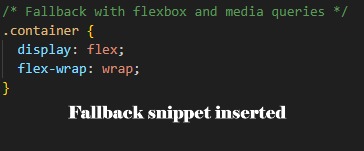
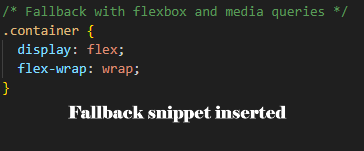
Fallback-Snippet-Inserted
-
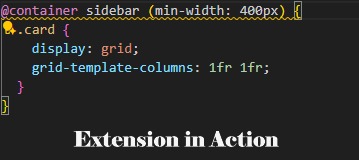
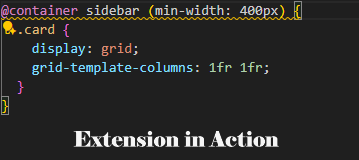
Extension-in-Action
-
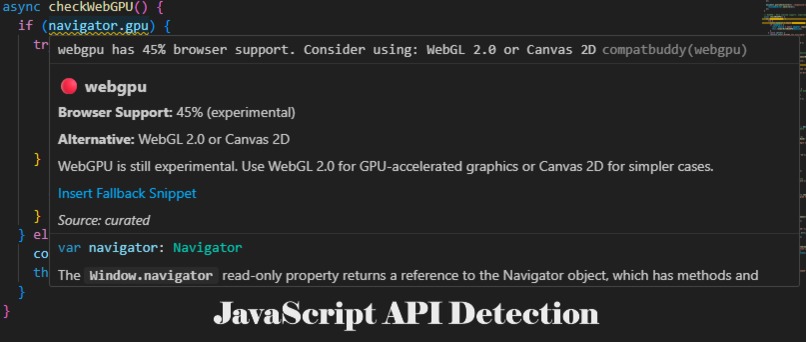
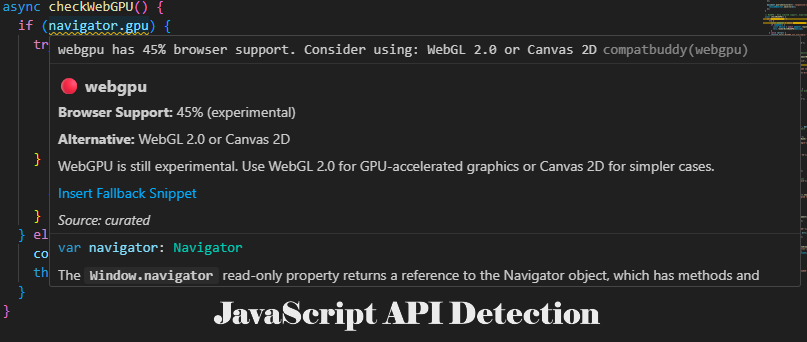
JavaScript-API-Detection
-
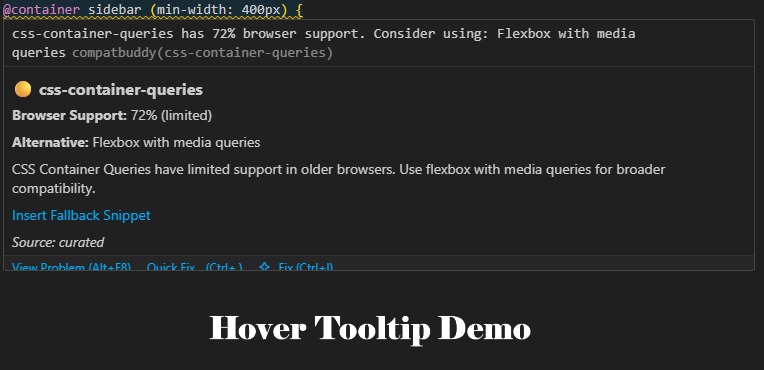
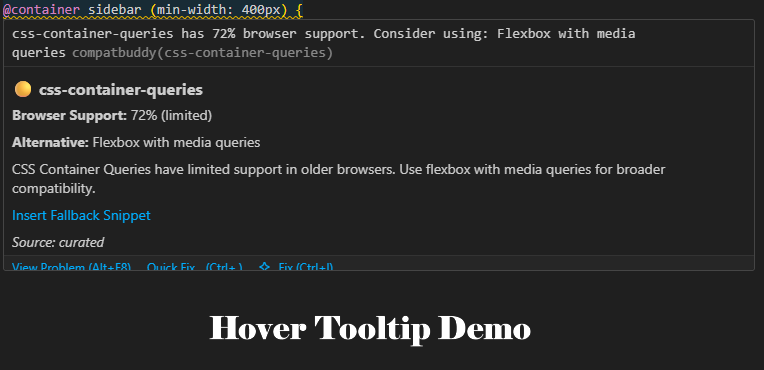
Hover-Tooltip-Demo
Inspiration
The inspiration for CompatBuddy came from a daily frustration every web developer faces: "Is it safe to use this modern web feature yet?"
We've all been there - excited about a new CSS feature like @container queries or a JavaScript API like WebGPU, only to deploy to production and discover it breaks for users on certain browsers. The web platform evolves rapidly, but browser support varies dramatically. Developers often choose between:
Playing it safe - Missing out on amazing new features that could improve user experience Living dangerously - Using cutting-edge features without knowing the compatibility risks The Baseline initiative addresses this exact problem by providing clear browser compatibility guidance, but we realized developers needed this information right in their development environment - not as an afterthought during deployment. CompatBuddy bridges this gap by bringing Baseline-powered compatibility checking directly into VS Code, where developers spend most of their time.
What it does
CompatBuddy is an AI-powered VS Code extension that acts as your personal web compatibility guardian:
🔍 Real-time Detection: Automatically scans your CSS, JavaScript, TypeScript, and HTML files as you type, identifying modern web features that might have limited browser support.
⚠️ Smart Warnings: Highlights risky features with red underlines and provides detailed compatibility information through hover tooltips, showing exact browser support percentages.
💡 Intelligent Suggestions: Offers curated fallback alternatives and safer approaches for each detected feature, powered by our compatibility database.
🛠️ One-Click Fixes: Provides "Insert Fallback" buttons in hover tooltips that automatically add safer code snippets to your files.
📊 Support Metrics: Displays real browser support percentages based on Baseline data, helping you make informed decisions about feature adoption.
Supported Features Include:
CSS: Container Queries, :has() selector, Cascade Layers, CSS Subgrid, Logical Properties, color() function JavaScript: ResizeObserver, IntersectionObserver, WebGPU, Web Share API Example Workflow:
Hover shows: "🟡 css-container-queries - Browser Support: 72% (limited) - Alternative: Flexbox with media queries"
How we built it
CompatBuddy follows a modular architecture designed for scalability and Baseline integration:
🏗️ Architecture Frontend: VS Code Extension (TypeScript) Built using VS Code Extension API with TypeScript 5.9 Implements HoverProvider, DiagnosticProvider, and CodeActionProvider interfaces Uses regex pattern matching to detect web features in real-time Webpack bundling for optimized distribution
Backend: Node.js + Express API RESTful API service providing compatibility data Curated fallback mappings stored in JSON format CORS-enabled for future web dashboard integration Endpoints: /checkFeature, /features, /health
Data Layer: Curated Compatibility Mappings Hand-crafted compatibility database with 10+ web features Browser support percentages aligned with Baseline methodology Fallback code snippets and safer alternatives Architecture ready for official web-features npm integration
🔧 Development Process VS Code Extension Scaffolding: Used yo code generator and configured TypeScript environment Pattern Recognition: Developed regex patterns to detect CSS and JavaScript features Backend API: Created Express server with compatibility endpoints Integration: Connected extension to backend via HTTP requests using Axios Testing: Built comprehensive demo files and tested in Extension Development Host Packaging: Generated production-ready .vsix file for distribution
📦 Key Technologies VS Code Extension API for IDE integration TypeScript for type safety and developer experience Node.js + Express for scalable backend architecture Webpack for optimized bundling npm/vsce for packaging and distribution
Challenges we ran into
🔥 VS Code Extension Complexity Learning the VS Code Extension API was initially overwhelming. Understanding the difference between HoverProvider, DiagnosticProvider, and CodeActionProvider interfaces, and how to properly implement them, took significant research and experimentation.
🎯 Pattern Matching Accuracy Creating regex patterns that accurately detect web features without false positives was challenging. For example, distinguishing between @container queries and regular CSS @media queries required careful pattern crafting.
🔄 Extension-Backend Communication Establishing reliable communication between the VS Code extension and the Node.js backend while handling errors gracefully required multiple iterations to get right.
⚙️ Development Environment Setup Setting up the Extension Development Host, understanding activation events, and debugging extension behavior in VS Code's sandboxed environment presented a steep learning curve.
📦 Packaging and Distribution Learning how to properly package the extension with vsce, handle dependencies, and create a distribution-ready .vsix file required understanding VS Code's packaging system.
🌐 Cross-Platform Compatibility Ensuring the extension works across different operating systems, especially handling PowerShell vs. bash command differences in the task configuration.
Accomplishments that we're proud of
🎉 Complete End-to-End Solution We built a production-ready VS Code extension from scratch, not just a prototype. The extension includes hover tooltips, diagnostics, code actions, and a complete backend API - all working seamlessly together.
📦 Ready-to-Install Package Created a distributable .vsix file (91.86 KB) that anyone can install immediately without building from source. This makes CompatBuddy accessible to developers who just want to use it.
🔍 Real-time Feature Detection Achieved accurate, real-time detection of 10+ modern web features as developers type, providing instant feedback about compatibility risks.
🎯 Baseline Mission Alignment Successfully addressed the core Baseline mission of helping developers make informed decisions about web platform features, integrating this guidance directly into their development workflow.
🏗️ Extensible Architecture Built a scalable architecture that's ready for official Baseline data integration via the web-features npm package, making future enhancements straightforward.
📚 Comprehensive Documentation Created detailed documentation with installation guides, usage examples, API references, and development guidelines - making the project accessible to contributors.
🚀 GitHub Deployment Successfully deployed the complete project to GitHub with proper version control, making it open source and available to the community.
💡 Innovation in Developer Tools Created the first VS Code extension specifically for real-time web compatibility checking, introducing a new category of developer productivity tools.
What we learned
🎓 VS Code Extension Development Gained deep expertise in VS Code's extension ecosystem, including the Extension API, packaging system, and development best practices. Understanding how to create hover providers, diagnostics, and code actions opened up new possibilities for developer tooling.
🌐 Web Platform Compatibility Landscape Developed a comprehensive understanding of modern web features and their browser support challenges. Learning about the Baseline initiative and web-features project provided valuable insights into the web standards ecosystem.
🏗️ Architecture for Developer Tools Learned how to design scalable architectures that can integrate with existing developer workflows. The separation between frontend extension logic and backend data services proved crucial for maintainability.
🔍 Pattern Recognition and Parsing Mastered regex pattern creation for accurate code analysis, understanding the balance between precision and performance when scanning files in real-time.
📦 Distribution and Packaging Gained experience with software distribution pipelines, from development to packaging to deployment, including version management and dependency handling.
🤝 Open Source Best Practices Learned about creating maintainable open source projects, including documentation standards, licensing considerations, and community contribution guidelines.
💻 Full-Stack Development Enhanced skills in full-stack development by building both frontend VS Code integration and backend API services, understanding how they work together effectively.
What's next for CompatBuddy
🌟 Official Baseline Integration Integrate web-features npm package: Replace our curated mappings with official Baseline data Live data updates: Automatically sync with the latest browser compatibility information Expanded feature coverage: Support 50+ web features instead of our current 10
🤖 AI-Powered Enhancements OpenAI integration: Generate context-aware fallback suggestions based on your specific code Smart recommendations: Learn from your coding patterns to provide personalized compatibility advice Natural language explanations: Provide human-readable explanations of compatibility issues
🔧 Developer Experience Improvements Auto-start backend: Eliminate manual backend service startup Configuration management: Advanced settings for different project types and browser targets Performance optimization: Faster scanning for large codebases Cross-platform support: Better Windows/Mac/Linux compatibility
🌐 Ecosystem Expansion GitHub Action: CI/CD integration for compatibility checking in pull requests Web dashboard: React-based project analysis tool for teams IDE integrations: Expand beyond VS Code to other popular editors CLI tool: Command-line interface for build pipeline integration
📊 Analytics and Insights Usage analytics: Track which features developers use most Compatibility trends: Historical data on web feature adoption Team dashboards: Project-wide compatibility reports for development teams
🎯 Advanced Features Custom compatibility targets: Define specific browser support requirements Progressive enhancement suggestions: Recommend feature detection patterns Performance impact analysis: Show how fallbacks affect bundle size and performance Accessibility integration: Combine compatibility checking with accessibility guidelines
🤝 Community and Adoption VS Code Marketplace: Publish to official marketplace for wider distribution Community mappings: Allow developers to contribute compatibility data Educational content: Tutorials and guides for better web compatibility practices Conference presentations: Share learnings with the developer community
The ultimate goal: Make CompatBuddy the go-to tool that every web developer installs first when setting up their development environment, ensuring the web becomes more compatible and accessible for everyone.
CompatBuddy represents our vision of a future where developers can confidently use modern web features while maintaining broad browser compatibility - making the web better for both developers and users.
Built With
- express.js
- node.js
- npmecosystem
- typescript
- vscodeextensionapi
- webpack

Log in or sign up for Devpost to join the conversation.