-
-
Problem Statement
-
Compass Architecture
Inspiration
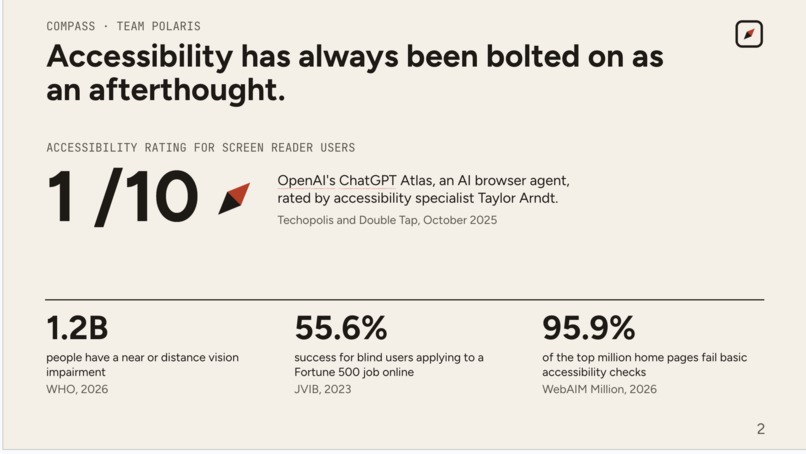
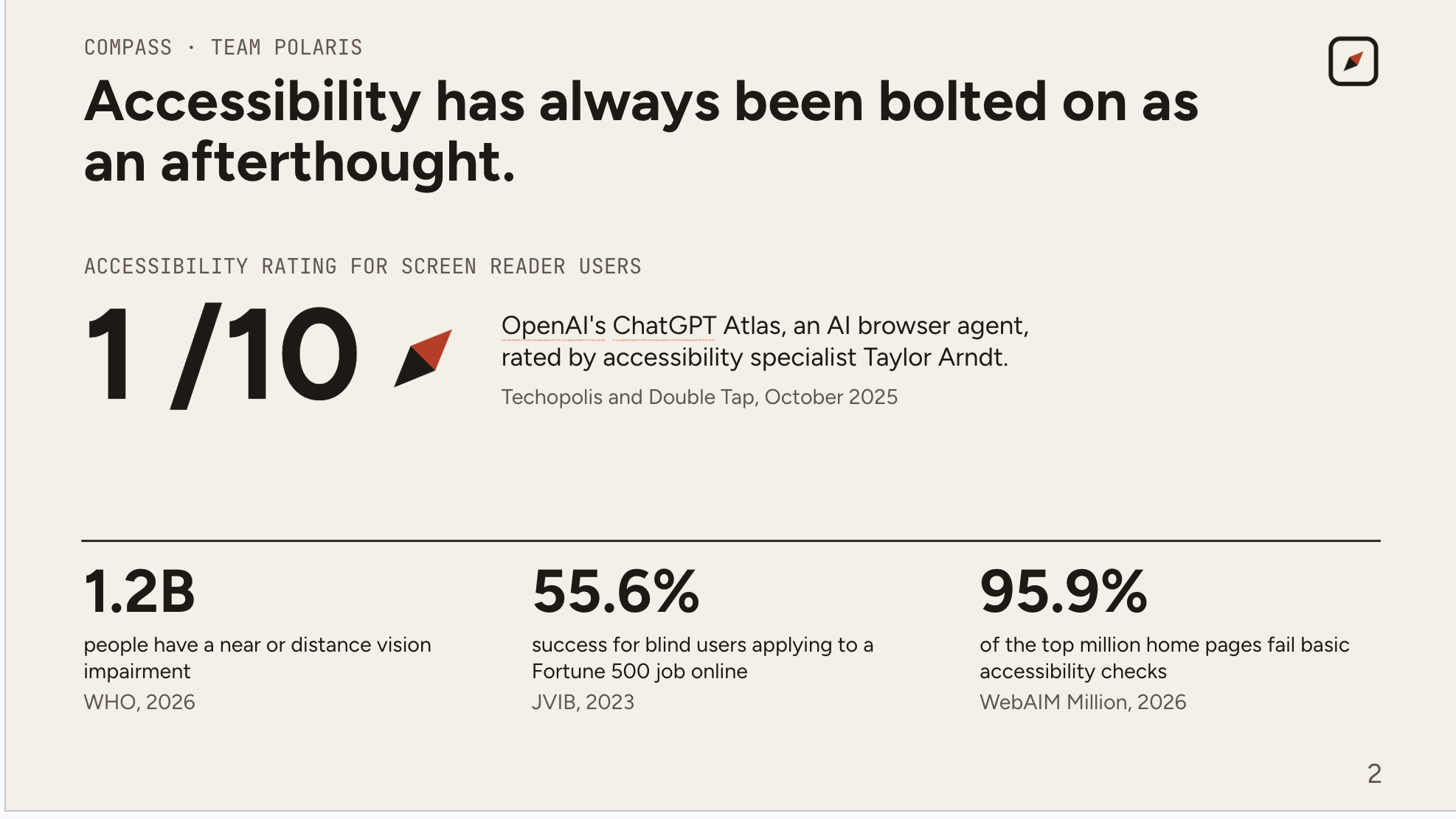
Every technology built has always had accessibility bolted on as an afterthought. This pattern appears even with the most advanced and powerful technologies. For example, when ChatGPT Atlas launched, blind accessibility experts rated it 1/10 for usability. Even today, 97% of websites fail even basic accessibility checks (AudioEye, 2024).
I have a background in working with visually impaired and blind users. Last summer, I spoke with 20+ blind and low-vision people and eight organizations that train people to use assistive technology. Across the board, they all were saying the same thing. Every tool assumes something. Screen readers demand months of learning complex shortcuts. Voice control assumes you can see the label you need to say. And more recently, AI agents assume you're watching the screen. Compass assumes nothing and adapts to you.
What it does
Hold fn and say what you want. Compass does it in whatever app is in front of you, then tells you what actually happened.
It reads the app, not a script. Compass reads the live controls of the frontmost app through the macOS Accessibility API: every menu item, button, and toggle, with its label and state. It can only press controls it actually found, so it never invents one.
It works in apps it was never built for. The same request is a different control in every app. "Bring back the sidebar" might be Show Sidebar in one app and Toggle Navigator in another. Compass reads what the app in front of you actually offers, works out which control matches what you meant, and presses that one. There are no specific app rules and no hardcoded phrases; each time it derives intent.
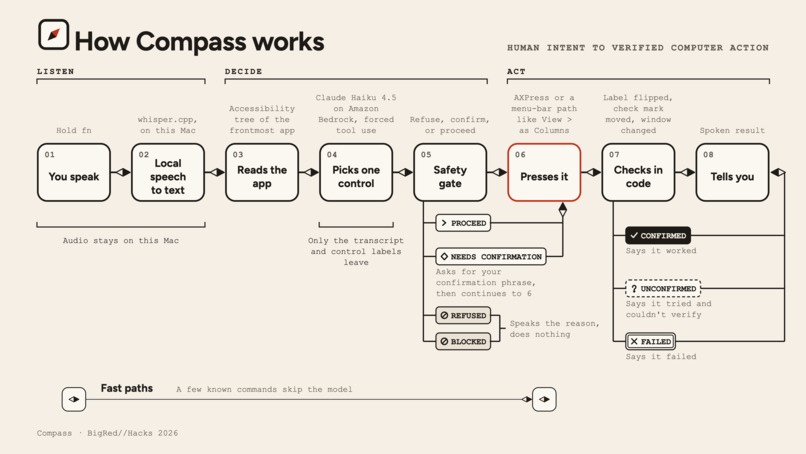
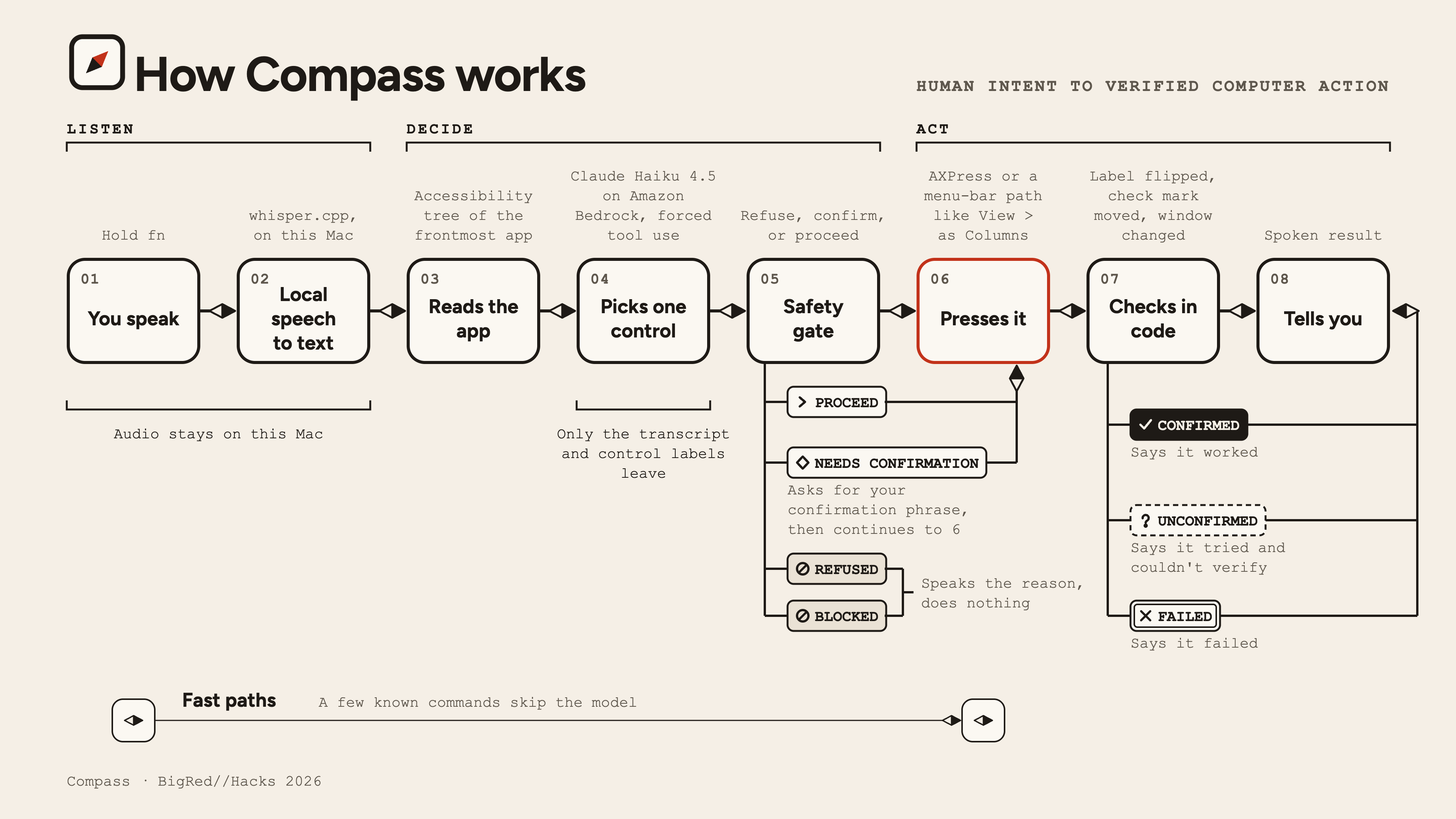
It checks its own work. After pressing, Compass checks whether the app actually changed and speaks only what it can prove. A press that goes through without an error is not reported as success.
It can confirm risky actions from your phone. For actions like sending a message, Compass can send an approval request through Photon to a paired iMessage thread. You reply YES or NO from your phone, and Compass only continues if that response matches the expected sender, thread, request, and time window.
You never have to learn the software's labels, shortcuts, or layout. Compass adapts to what is on screen and to you.
How I built it
Compass is native to macOS. Speech goes through local whisper.cpp. Compass then reads the frontmost app's live controls through the macOS Accessibility API. Claude Haiku 4.5 on Amazon Bedrock picks one real control from that list using forced tool use. A safety gate refuses blocked actions and asks for confirmation on consequential ones. After the press, code checks the result (a label flipped, a check mark moved, a window changed) and reports CONFIRMED or UNCONFIRMED.
ElevenLabs is the voice of every outcome. Each result, refusal, and confirmation prompt is spoken, because the people Compass is built for can't rely on the screen. I use Flash v2.5 with the Roger voice for low latency, and you can interrupt mid-sentence. A native AppKit HUD shows the same result without taking focus.
Photon handles remote approvals over iMessage. Compass uses Photon’s shared iMessage transport as a narrow confirmation channel, not as another agent. The phone has to pair once by initiating the conversation. After that, Compass can send approval prompts into the established thread, validate the sender and request, and resume or cancel the original local action. The same confirmation state is shared with the local HUD, so whichever valid approval is consumed first wins.
Compass can only press controls it actually discovered, and it never says "done" because a press returned without an error.
Challenges
Making it work in apps I didn't build it for. The easy way to make a demo work is a table that maps phrases to controls. It works until someone says it differently or opens a different app, so I didn't build one. Every app names its controls differently, and some barely name them at all. The hard part was making Compass choose from what is actually on screen. This is why it failed a lot initially. Compass tried to name the exact control before looking at the app, so a request like "show the sidebar" was refused even though the control was right there. I moved control discovery ahead of the decision, so the model chooses from the app's real controls. I then tested on apps and phrasings I hadn't tuned for, and scored each stage separately: understood the goal, found the control, pressed it, verified it.
Verification. A press that returns without an error proves nothing. Apps don't report whether an action worked, and a control can be pressed while nothing changes. So after every press, code looks for evidence inside the app itself: a label that flipped, a check mark that moved, a window title that changed, a new panel that opened. The interface can only show success when that check passes. Some actions can't be checked from outside the app. Compass can hand a message to Messages but can't see it delivered. In those cases, and whenever the evidence is missing, Compass says "I pressed it but can't confirm" and nothing stronger. The hard part was resisting the easy version, where every press that didn't throw an error counted as success.
What I learned
Interpreting a request and binding it to a real control are separate problems, and merging them causes false refusals. A refusal is only safe if the reason is accurate. And for a tool someone depends on, "I can't verify that" is a feature.
What's next
Technology that adapts to you has to learn you. Four things come next:
Know where you are. "Where am I?" and "What can I do here?" will read the same live controls Compass already uses and describe them out loud. The same idea can go beyond the screen. With the user’s permission, Compass could use your location, maps, and the web to describe where you are in the world physically.
Remember what works. Compass will remember the routes you use often and adjust its speaking speed and level of detail to you. This is stored on your Mac, and you can forget everything with one click.
Reach more software. Windows has its own accessibility API, and Electron apps expose theirs unevenly, which is where today's gaps are. Closing them is the fastest way to make Compass work for more people.
Take remote control further. Today, Photon is used only for bounded YES/NO approvals. Next, Compass could extend that secure channel to richer remote workflows without turning the phone into another general-purpose agent.
Built With
- appkit
- automation
- elevenlabs
- macos
- photon
- python


Log in or sign up for Devpost to join the conversation.