Inspiration
Color work is everywhere—design reviews, accessibility checks, brand matching, photography, and everyday curiosity—but many color-picker tools require uploads, heavy software, or an account. I wanted a fast, privacy-first tool that works directly in the browser and makes color comparison easy to understand.
What it does
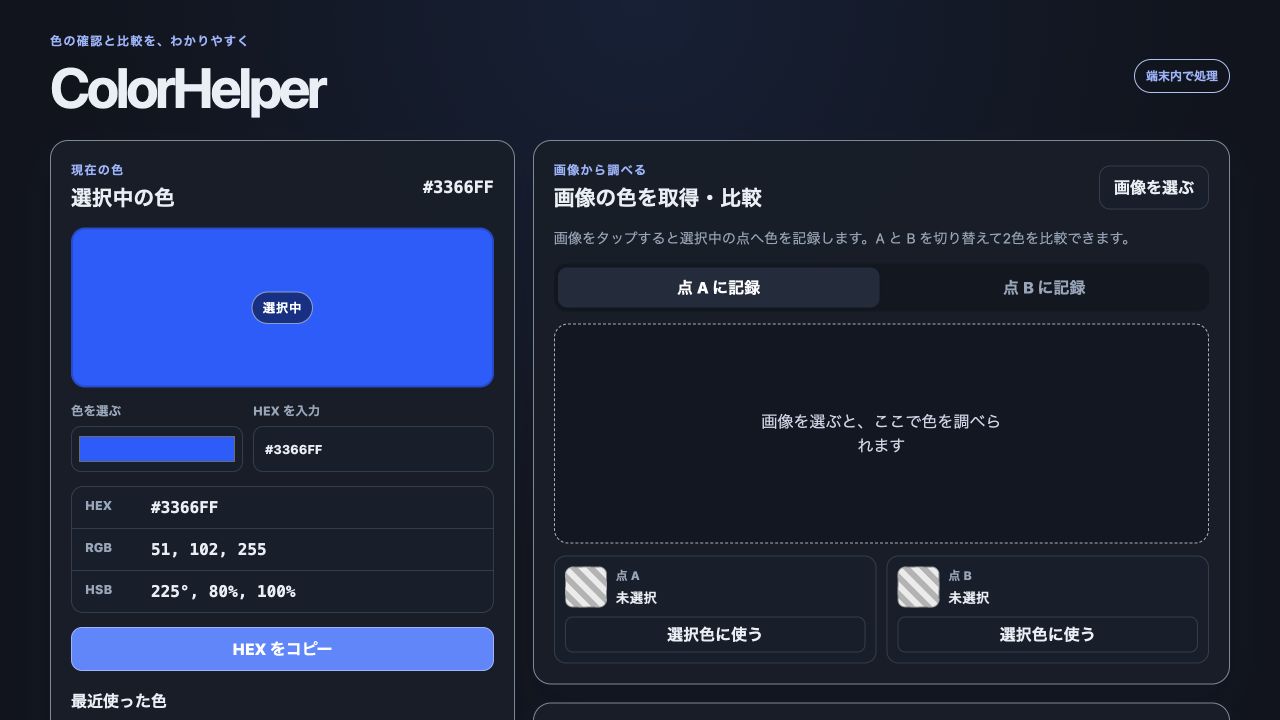
ColorHelper lets users enter a HEX value, sample a color from an uploaded image, or use a live camera. It reports precise HEX, RGB, and HSB values, keeps two sampled colors side by side, and calculates both a visual similarity score and RGB distance. Image and camera processing stay on the device.
How I built it
The app is a lightweight installable Web app built with HTML, CSS, and modern JavaScript. Canvas handles pixel sampling, the MediaDevices API powers the optional live camera, and a small set of color utilities performs validation, conversion, distance, and similarity calculations. A minimal Node server supports local HTTPS for camera testing, while the production app has no runtime dependencies.
Codex and GPT-5.6 were core development partners. I used them to turn the product idea into a focused browser architecture, implement the color-conversion and sampling flows, refine the responsive interface and accessibility labels, create automated tests, review edge cases, and prepare the public documentation and demo. They also helped challenge product decisions—for example, keeping processing local instead of introducing an upload backend, and showing both an intuitive percentage and a precise numeric distance.
Challenges
The main challenge was making three different inputs—typed values, photos, and live camera frames—feel like one coherent workflow. Camera access also requires a secure context, so local HTTPS support had to be simple and clearly documented. Another challenge was presenting technical color data without overwhelming casual users.
Accomplishments that I'm proud of
ColorHelper is fast, works offline after loading, needs no account, and sends no photos to a server. The comparison view turns raw channel values into immediate, useful feedback, while the interface remains approachable on both desktop and mobile.
What I learned
Privacy can be a product feature, not just an implementation detail. Browser APIs were sufficient for the full experience, and pairing structured tests with iterative AI-assisted review made it possible to move quickly without giving up clarity or reliability.
What's next
Next I would add perceptual color-difference modes such as CIEDE2000, saved palettes, export options, and stronger accessibility guidance for contrast-aware workflows.

Log in or sign up for Devpost to join the conversation.