Inspiration
We wanted to put a fresh twist on the hyper-casual "color match" genre. While classic games often focus on gravity and physics (tapping to jump), we wanted to test a different kind of skill: cognitive reflexes. We asked, "How fast can your brain recognize a color and react?" The result is a fast-paced, rhythmic experience where your finger triggers the transformation, not the movement.
What it does
Color Switcher is an endless runner that tests your reaction speed and color recognition.
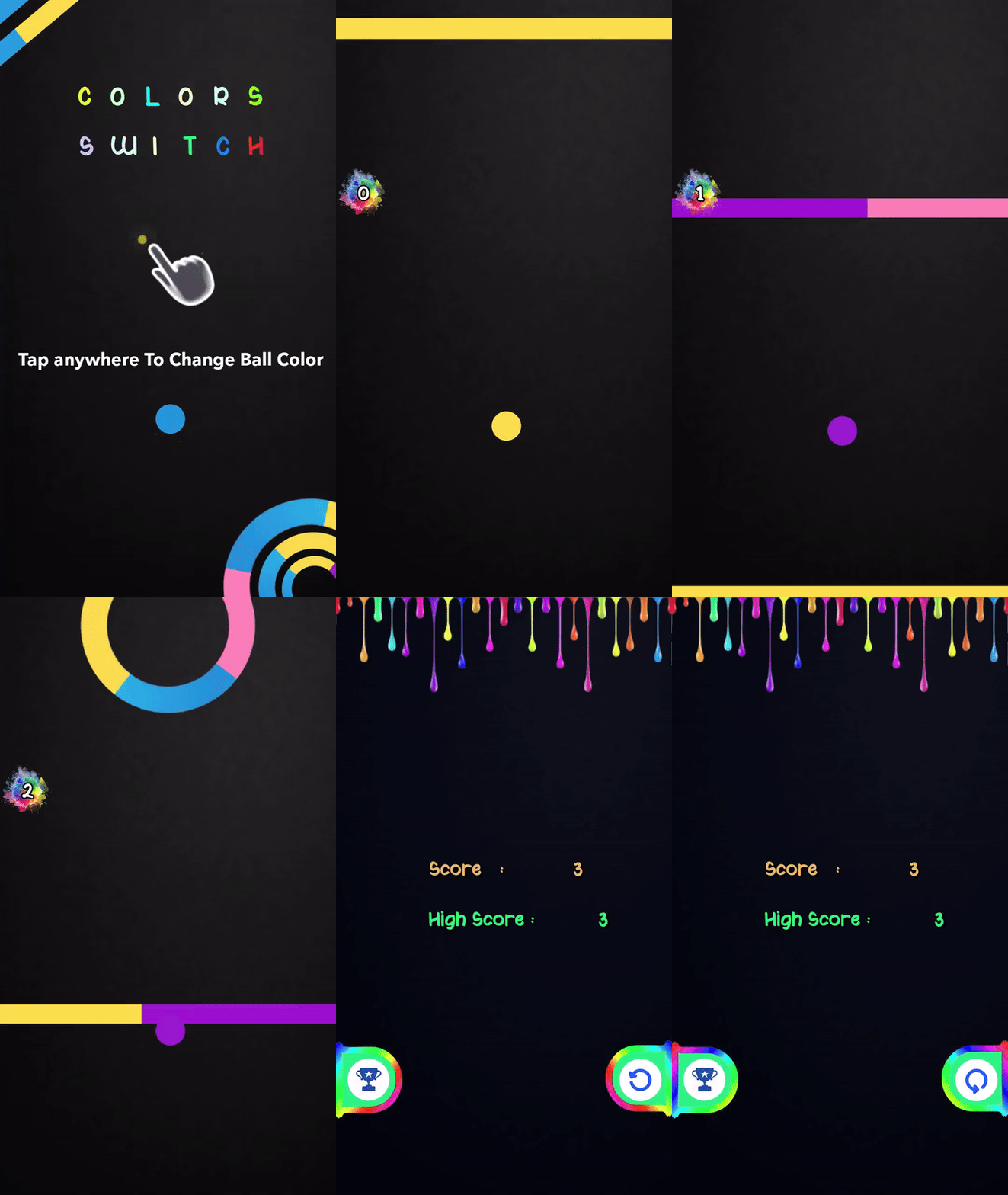
- The Core Mechanic: Unlike traditional platformers, the player does not control the movement. The ball moves forward automatically. The player's job is to Tap to Switch the ball's color (cycling through Yellow, Blue, Pink, Purple) to match the upcoming obstacles.
- Obstacle Variety: The player must navigate through rotating circles, sliding bars, and multi-colored gates.
- Instant Fail State: If the ball touches a color that doesn't match its own, the ball explodes, and the game ends immediately.
- Global Competition: We integrated a Real-Time Leaderboard (resetting yearly) so players can see how their reflexes compare to the top players directly inside the lens.
How we built it
- Color State Machine: We created a custom script using an array of Color Objects. Every time the screen is tapped, the index increments
(current_index + 1), instantly updating the material of the ball. - Collision Detection: We used Lens Studio's physics and tag system. Each segment of an obstacle is tagged with a string (e.g., "CYAN", "YELLOW"). Upon collision, the script compares the Ball's current tag with the Obstacle's tag. If
Ball.Tag != Obstacle.Tag, the "Game Over" event triggers. - Procedural Generation: To make the game "Endless," obstacles are spawned from a pool and placed at randomized intervals above the player, ensuring no two runs are exactly the same.
Challenges we ran into
- Syncing Colors: Manually matching the hex codes of the 2D UI elements (the "Score" text and buttons) with the materials (the glowing neon obstacles) required careful color grading to ensure they looked consistent.
- Input Lag: Since this is a reflex game, any delay between the tap and the color change felt "unfair." We optimized the script to change the material on the
TouchStartevent rather thanTouchEndto make it feel snappier. - Leaderboard Logic: Handling the case where a user plays offline or has a poor connection. We had to implement a local "Best Score" save system that syncs with the Cloud Leaderboard once the connection is restored.
Accomplishments that we're proud of
- The "Neon" Aesthetic: We are proud of the visual polish—the glow effects against the dark background and the "dripping paint" UI on the Game Over screen give it a distinct arcade vibe.
- Seamless Loop: The logic for recycling obstacles works perfectly, allowing for infinite gameplay without memory leaks or frame drops.
What we learned
We learned a lot about User Interface (UI) design in Lens Studio, specifically how to create scrolling lists for the Leaderboard. We also learned how to balance difficulty: starting the game slow and gradually increasing the speed of the ball to keep the player in the "flow state."
What's next for Color Switcher
- Rhythm Mode: Syncing the obstacles to a background beat, so players have to tap the color change in time with the music.
- Dual Mode: A hardcore mode with two balls where the player has to control colors for both simultaneously using split-screen taps.
- New Shapes: Adding triangles and moving windmills to the obstacle pool.
Built With
- javascript
- lensstudio


Log in or sign up for Devpost to join the conversation.