-
-
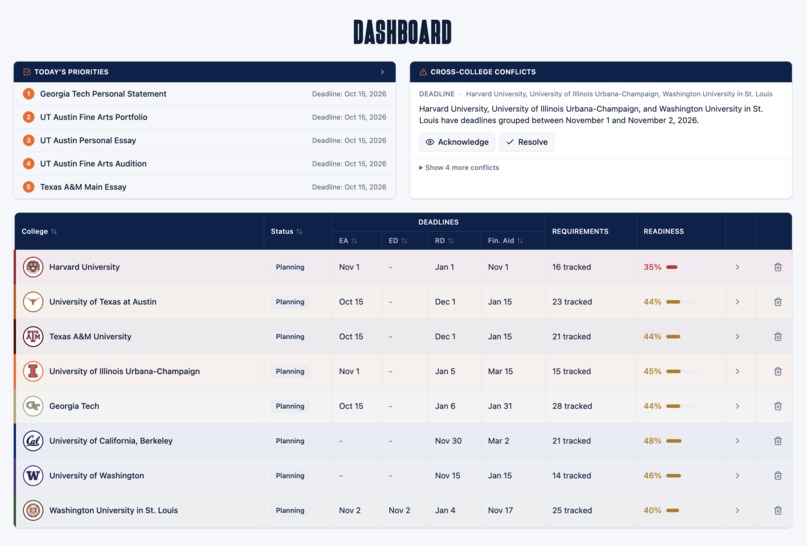
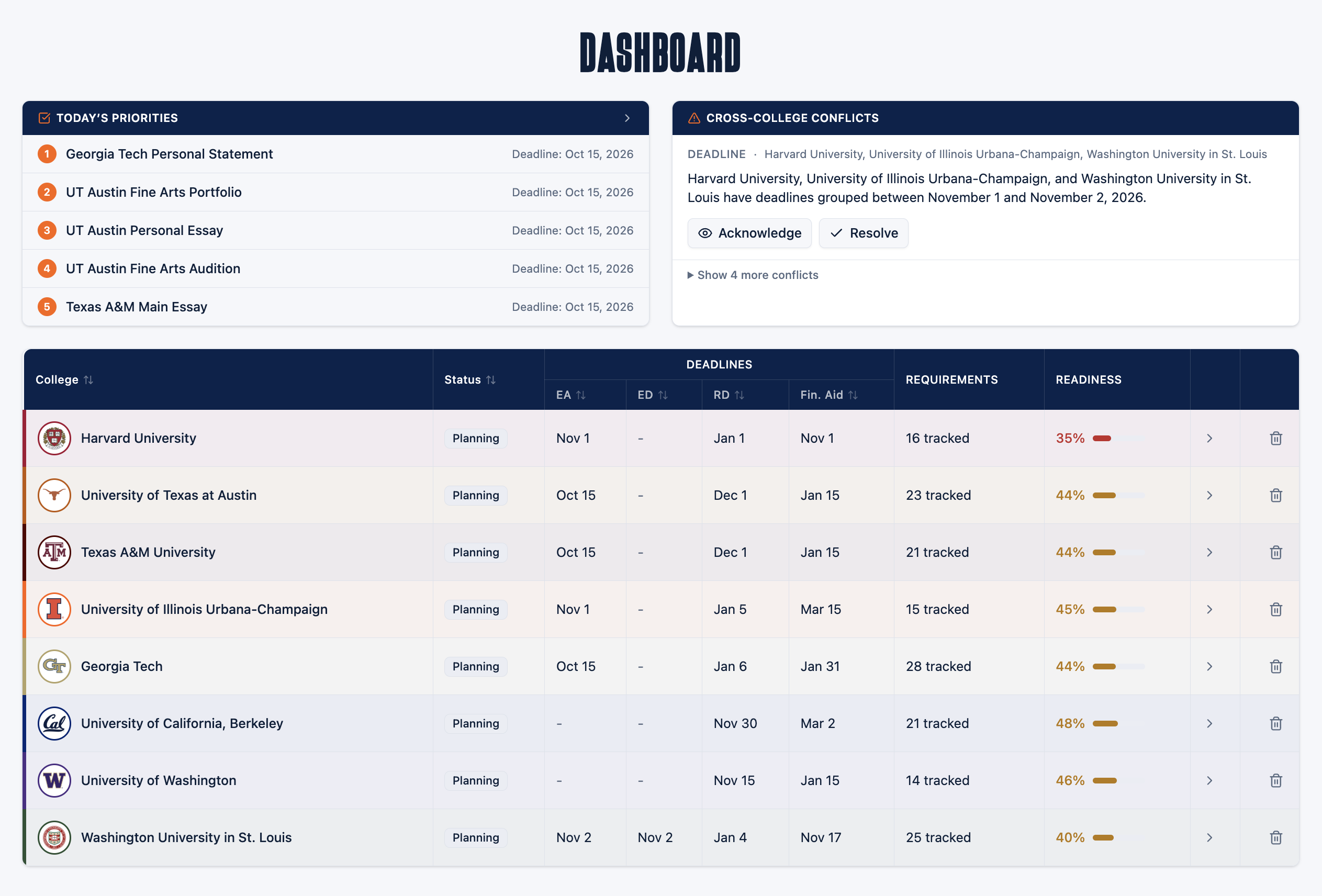
Dashboard Interface
-
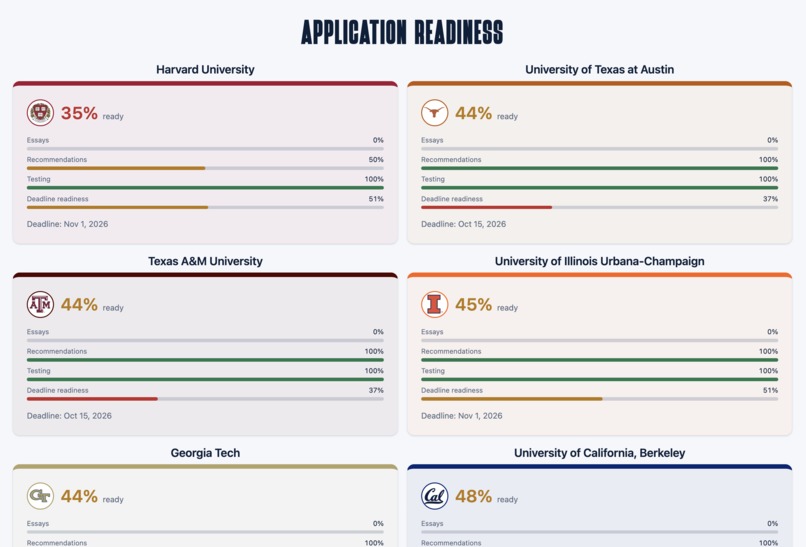
Application Readiness Interface
-
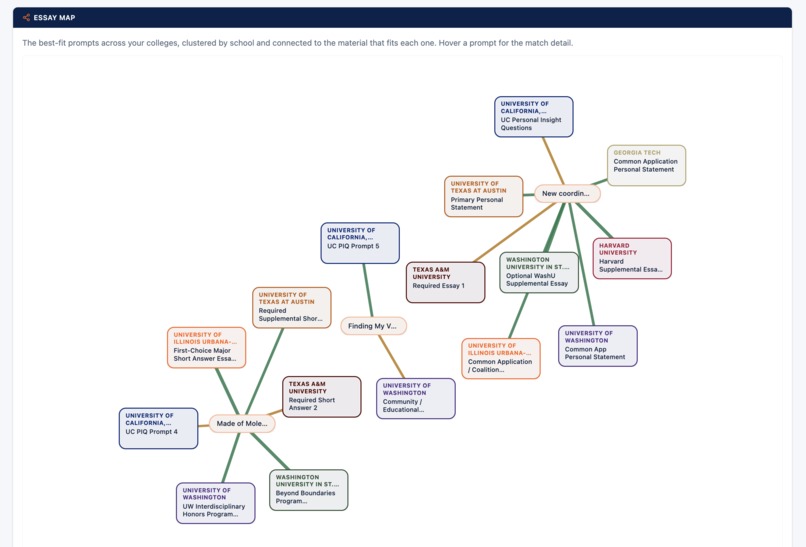
Essay Map
-
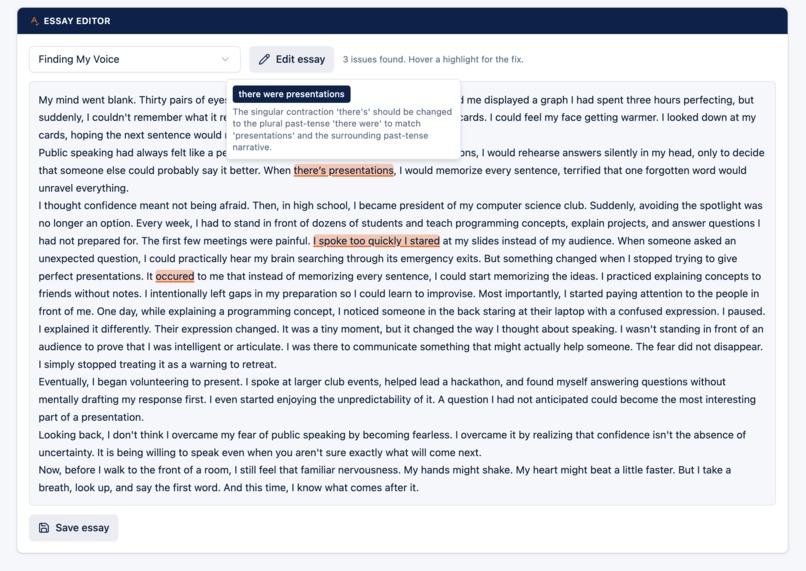
Essay Editor
-
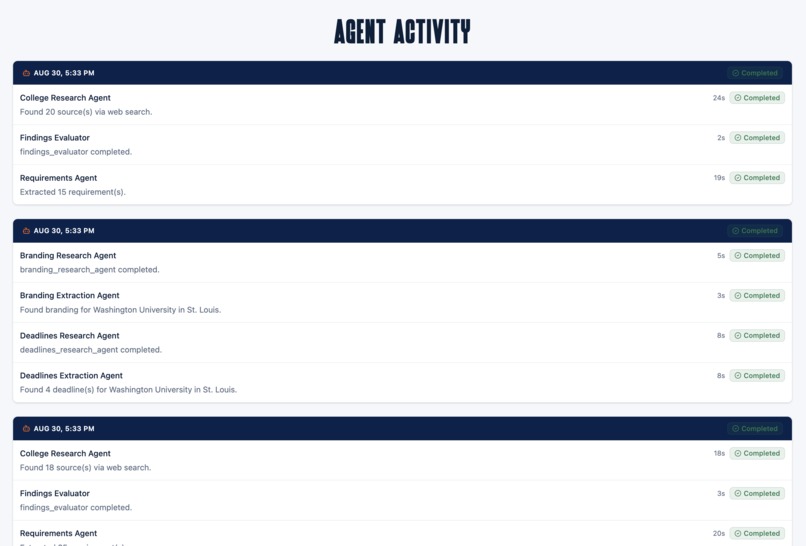
Agent Activity Log
-
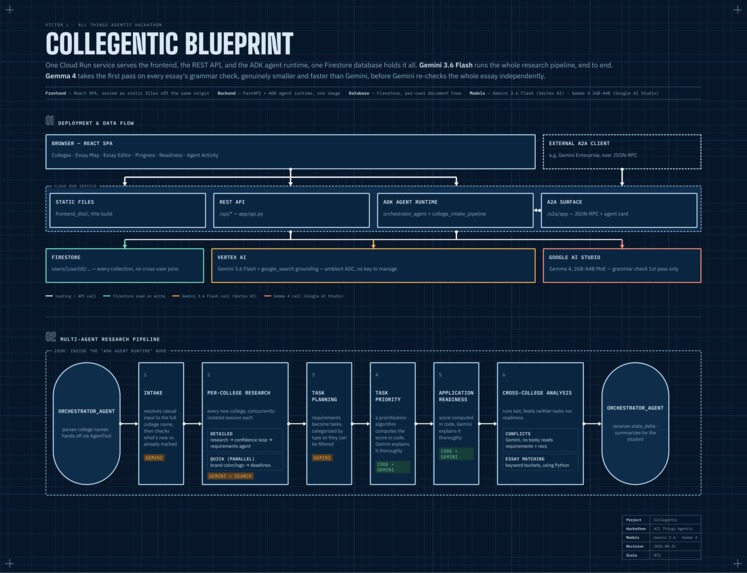
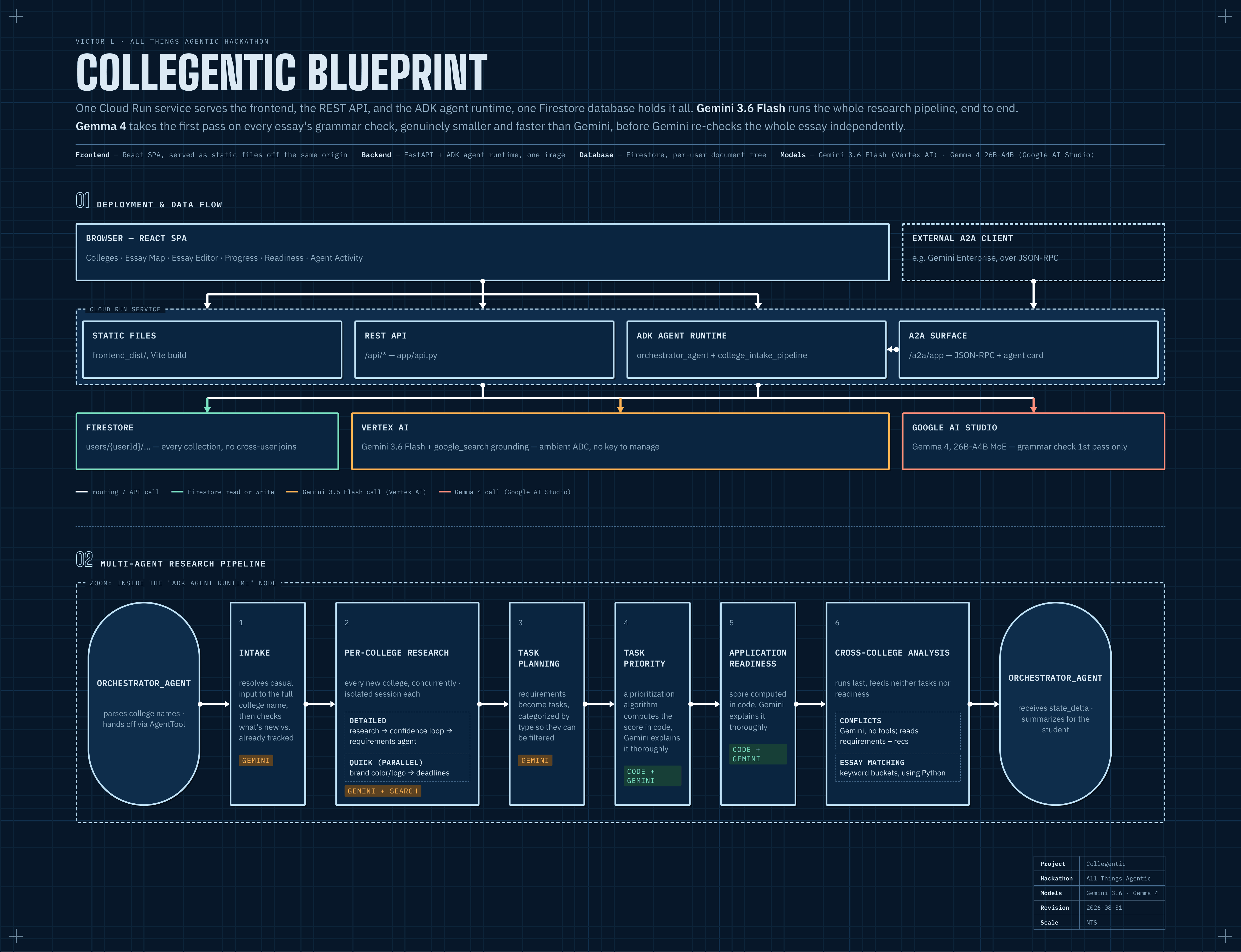
Collegentic Architecture Diagram
-
Collegentic Logo
-

Collegentic Title Slide

Overview
Last year, I went through the college application process. I found that there were a lot of small things to keep track of, such as researching requirements, finding deadlines, figuring out which essays could be reused, and making sure nothing was missing. I wasn't alone: 3.3 million other students were also applying to college for the first time. According to the Art & Science Group's studentPOLL, 89% of high school seniors experienced moderate to severe anxiety during their college search, and a report by Higher Ed Dive found that over half of students rank college applications as their most stressful academic experience to date.
Collegentic is designed to take some of that busywork off the student's plate. Instead of manually researching every school's deadlines and requirements, Collegentic uses an agentic pipeline to research them automatically. It also tackles one of the most time-consuming parts of applications: essays. One of the main features is the Essay Map, which helps students see how their existing ideas and drafts can be adapted to different prompts. Additionally, there's an Essay Editor using Gemma, which assists students with spelling and grammar. Finally, Collegentic gives students one place to keep track of test scores, recommendation letters, essays, and other requirements, while automatically tracking how close each application is to being complete.
Features and Functionality
The Collegentic platform starts on an Onboarding screen with two ways to enter data. A student can type in real college names and immediately start researching their deadlines and requirements. For testing and demonstrations, they can also use Demo Mode, which loads a pre-seeded profile so the entire app can be explored without waiting for research to finish.
Once colleges are added, the Colleges page is where the research agents start working. Each college is researched concurrently rather than one at a time, and the student can watch the research happen through a live progress bar that fills in field by field. This saves hours of research spent looking for deadlines and requirements, as information can be messy and difficult to find when researched manually.
Two pipelines run in parallel for each school. The first is a detailed research agent that finds deadlines, requirements, and essay prompts directly from official admissions pages. It also uses a confidence-checking loop: when a finding looks uncertain, the agent performs a targeted follow-up search rather than simply guessing. Alongside it, a dedicated branding agent researches the school's actual brand color and finds its logo, then uses that information to color-code the college throughout the app. This turns a plain table into something the user can scan visually in a second, which helps a lot for visual learners or those juggling many schools at once.
If the user clicks on a school name, they can open the College Detail page. It shows the school's structured requirements, with each requirement tagged with a confidence level and linked back to its source. Deadlines are separated into Early Action, Early Decision, and Regular Decision, with Financial Aid deadlines included as well.
The Progress page turns each requirement into a task and automatically categorizes it by type, such as essays, testing, or recommendations. This means a student can filter the list down to something specific, like the essays they still need to finish. Each task receives a priority score from a deterministic prioritization algorithm that considers deadline proximity, task type, and estimated effort. Gemini 3.6 Flash then explains the reasoning behind those priorities in plain English.
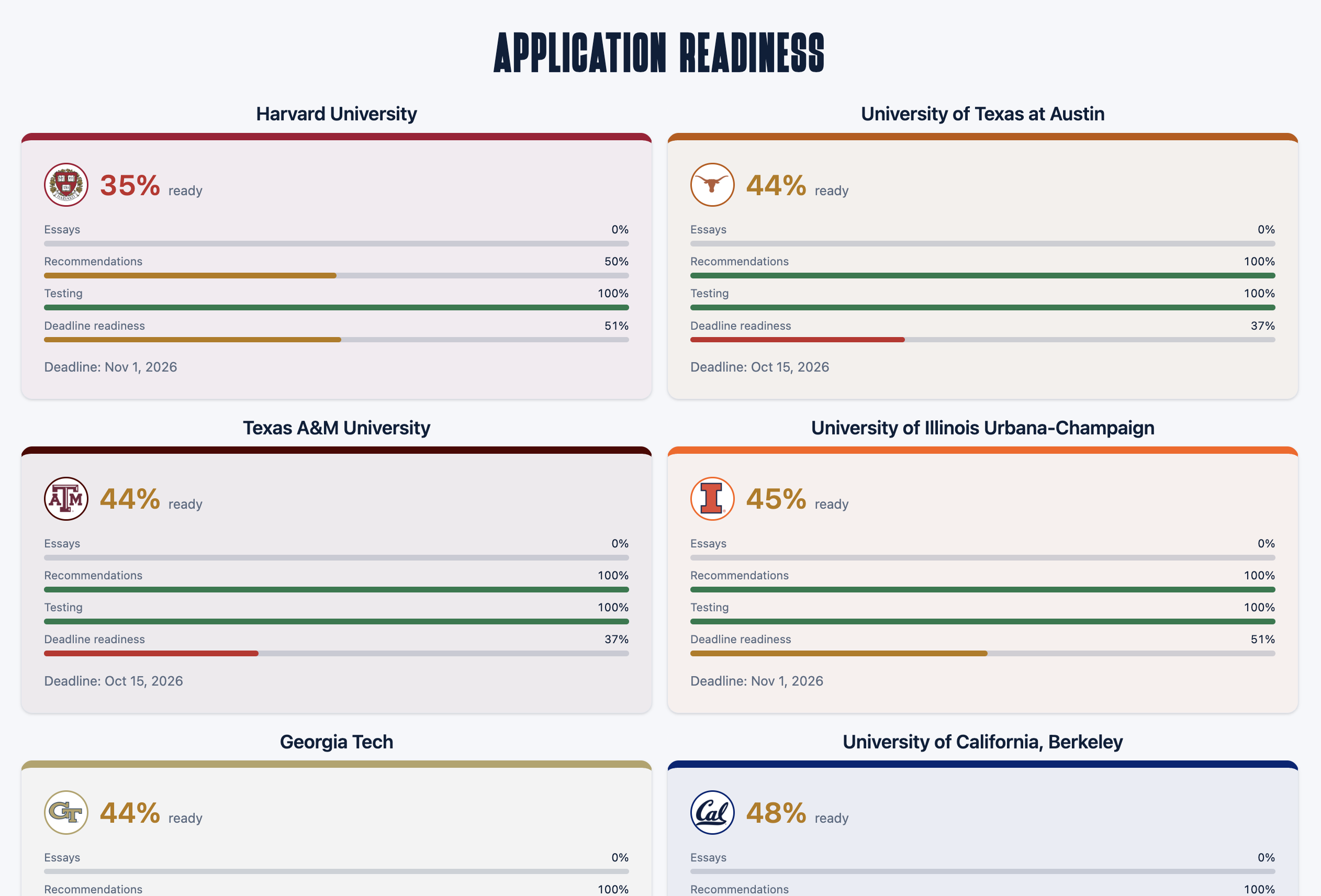
The Application Readiness page summarizes this progress into an application readiness score for each college. The percentage itself is deterministic and based on what the student has actually completed. Gemini is used afterward to explain what's holding the score back and what the student should focus on next.
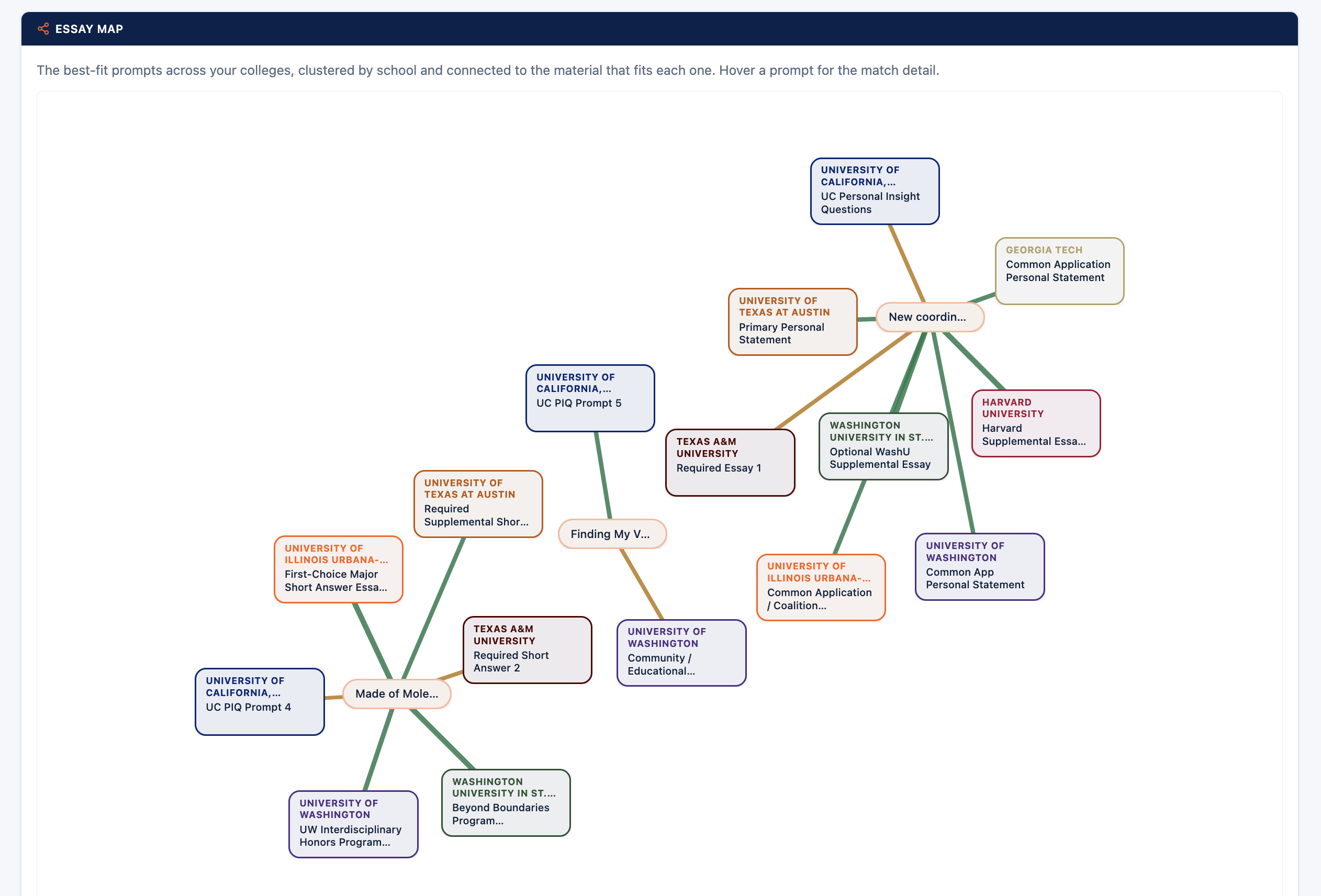
The Essays section has two parts. The Essay Map is a network graph connecting essay prompts across different schools to existing drafts that could potentially answer them. Students often have ideas that can work for multiple prompts, but figuring out those connections manually can be difficult. The Essay Map makes those connections visible, while the essay matching agent narrows dozens of prompts down to a smaller set of drafts that can realistically be adapted.
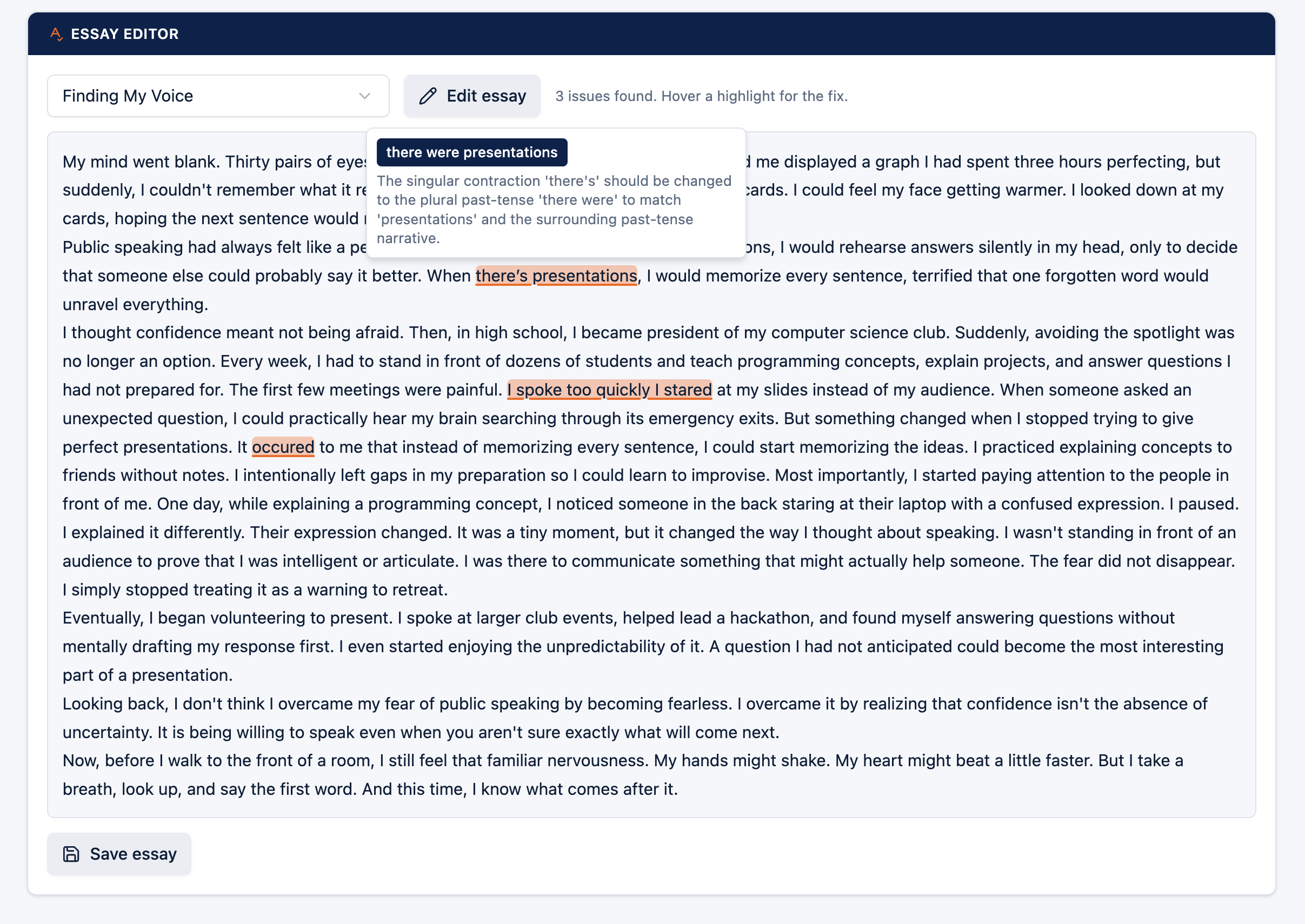
The Essay Editor is where Gemma 4 is used. Gemma performs a first pass for grammar and spelling, and then Gemini 3.6 Flash independently checks the essay again. An issue is only highlighted when the suggested correction matches the actual text of the essay. This lets the system catch basic mistakes without rewriting the student's ideas or changing their writing style.
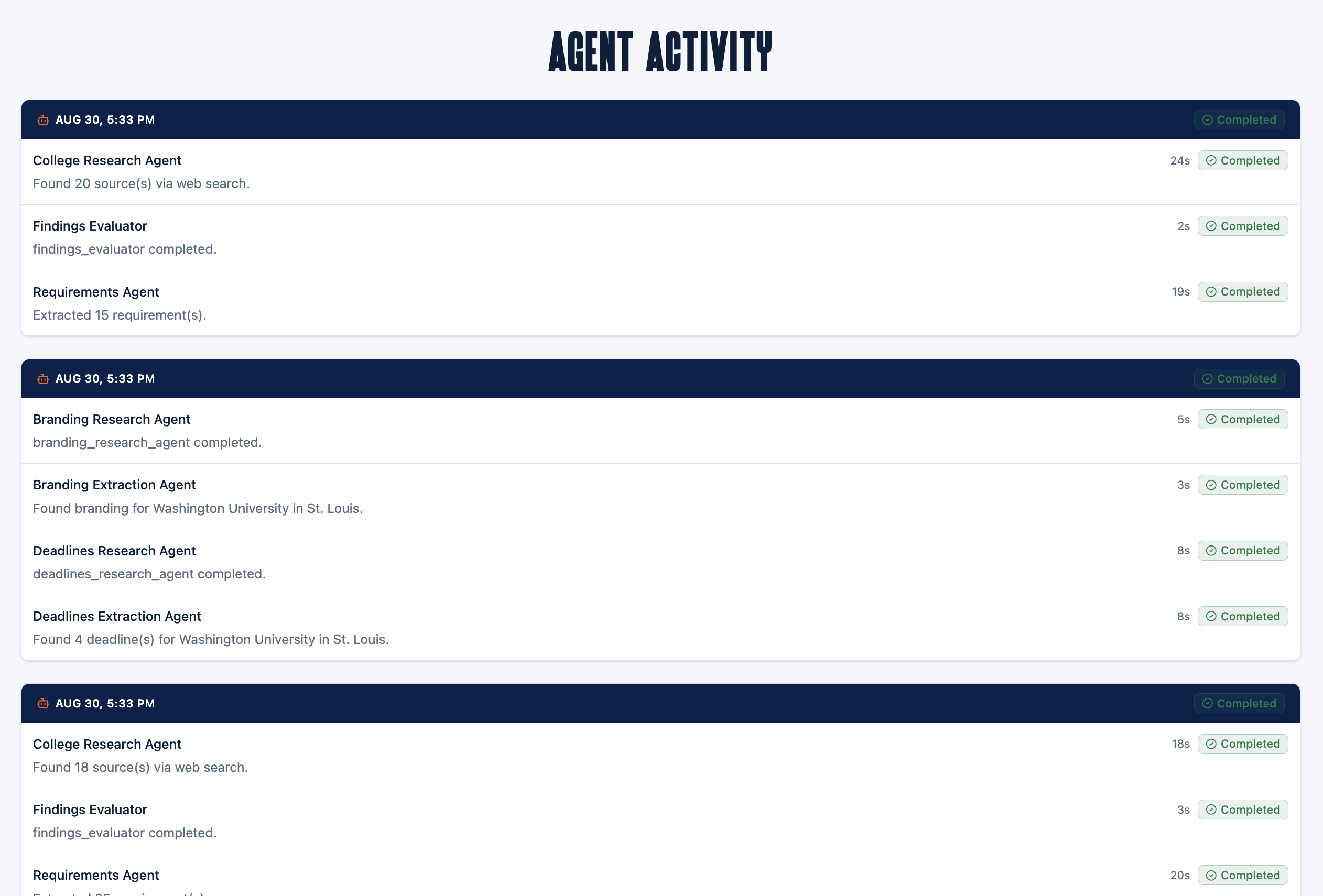
Finally, Agent Activity provides a transparent view of what the system is doing. It contains a live log of agent runs, the pipeline each run belongs to, and a plain-language summary of what the agent did and found. The goal is to make it possible for a student to see what happened behind the scenes instead of having the system operate as a black box.
Technologies Used
I built Collegentic on Google's Agent Development Kit (ADK), which handles orchestration for the multi-agent system. A root orchestrator agent interprets what the student wants, delegates work to specialized sub-agents, and turns the resulting structured data into a plain-language summary. ADK also let me expose the application over A2A, so an external orchestrator such as Gemini Enterprise can communicate with Collegentic through an agent-to-agent protocol rather than interacting only through the frontend.
Gemini 3.6 Flash, served through Vertex AI, handles most of the reasoning in the application. It identifies which colleges a student means, researches requirements, explains application scores, detects conflicts between schools, and independently checks grammar suggestions before they are displayed.
I paired Gemini with Google Search grounding, an ADK tool that allows the research agents to retrieve current information from the web rather than relying entirely on the model's existing knowledge. This is particularly important for college applications because deadlines and requirements can change from year to year.
For the essay editor, I wanted to use a smaller model for the initial grammar pass, so I chose Gemma 4, specifically the 26B-A4B mixture-of-experts variant. It runs through Google AI Studio rather than Vertex AI, since Gemma isn't enabled in every project's Vertex Model Garden and AI Studio provides direct API access. Gemma handles the initial grammar and spelling check, while Gemini independently verifies its suggestions afterward. In testing, Gemma was fast enough to make this two-stage approach practical, even though it was somewhat less reliable than larger models on some inputs.
On the backend, I used FastAPI for the REST API and Firestore as the database. Data is stored under a per-student document tree, so there is no need to perform joins across users. The frontend is built with React, TypeScript, and Vite. I also built the Essay Map's network graph myself and use client-side pdf.js parsing so uploaded essay drafts never need to be sent to the backend just to extract their text.
The entire application runs as a single Cloud Run service. The built frontend is bundled into the same container as the backend, giving me one image and one URL rather than having to host the frontend separately. Cloud Build automatically deploys the service whenever I push to main.
Other Data Sources Used
Collegentic doesn't rely on a pre-built database of college information. I deliberately chose to research this information live instead. A manually maintained database would require constantly updating deadlines and requirements, and eventually some information would become outdated.
The research agents use Google Search grounding and are instructed to prioritize official admissions and financial-aid pages over secondary sources such as forums or ranking sites. Every extracted requirement keeps a link to its source. If the system has to rely on a secondary source, that is indicated in the UI rather than being presented as equally reliable.
For the automatic branding feature, college logos are sourced from logobrands.com and Wikipedia, with the lookup performed deterministically rather than having a model generate or guess a logo. Brand colors are researched separately by the branding agent because official school colors aren't always documented in one obvious place.
Findings and Learnings
Going into the hackathon, I mostly thought of agentic systems as a way to automate research. Building Collegentic changed that a little. The same idea worked surprisingly well for things that aren't traditionally thought of as "agent tasks."
One example was the branding agent. It has nothing to do with admissions requirements. Its job is simply to find a school's logo and brand color and use them in the interface. But once I had it working, it made the application much easier to scan, especially when there were many schools on screen. It showed me that agents can be useful for small pieces of a product experience, not just large research tasks.
The Essay Map taught me something similar about visualization. Students don't usually think about applications as a graph of prompts and drafts. They think about one essay at a time. But once the matching system started drawing connections between an existing draft and multiple schools' prompts, those relationships became much easier to see. I personally didn't start thinking about essay reuse this way until after going through applications myself. Building the Essay Map made me realize how much of the application process can be simplified just by making those connections visible.
I also came into the hackathon without much hands-on experience with Gemma. Building the grammar checker taught me a lot about choosing a model based on the task rather than simply using the largest model available. Grammar and spelling checking is a relatively narrow problem. Since Gemma 4 is so quick, it became useful as a first pass. Gemini could then handle the more expensive verification step. That two-model setup ended up being a better fit than asking one model to do everything.
One of my biggest technical lessons was around concurrency. My first version of the research pipeline handled all requested colleges in one shared model call. That meant the student had to wait for the entire call to finish before seeing any results. I then changed it to research colleges one at a time, which improved the experience but made the total wait increase with every additional school.
I eventually changed the architecture so each college is researched concurrently in its own isolated session. I also separated the branding and requirements pipelines, since there was no reason for finding a school's logo to wait for a full requirements search to finish. This made the research experience much more responsive and, more importantly, taught me that the way agents are orchestrated can matter just as much as the agents themselves.
Hosted Link
You can try the project out for yourself here: https://collegentic-git-74535340651.europe-west1.run.app
Please keep in mind that the first load may take a few minutes to run because the Cloud Run service can scale down when it isn't being used. Additionally, the platform may run a little slower than a local build or the one shown in the demo. This is because I capped max-instances at 3 to control costs and keep the hackathon deployment within budget. Thanks for your understanding!
Built With
- d3.js
- docker
- fastapi
- gemini
- gemma
- google-adk
- google-cloud
- google-cloud-build
- google-cloud-firestore
- google-cloud-run
- pdf.js
- pydantic
- python
- radix-ui
- react
- tailwind
- typescript
- uvicorn
- vertex-ai
- vite


Log in or sign up for Devpost to join the conversation.