-
-
Cograph
-
Cograph Canvas
Inspiration
Most AI integrations I use put the agent in a chat box on the side of the screen. You type a request, you get a wall of text back, and the actual thing you are working on (the document, the board, the diagram) sits somewhere the agent cannot touch.
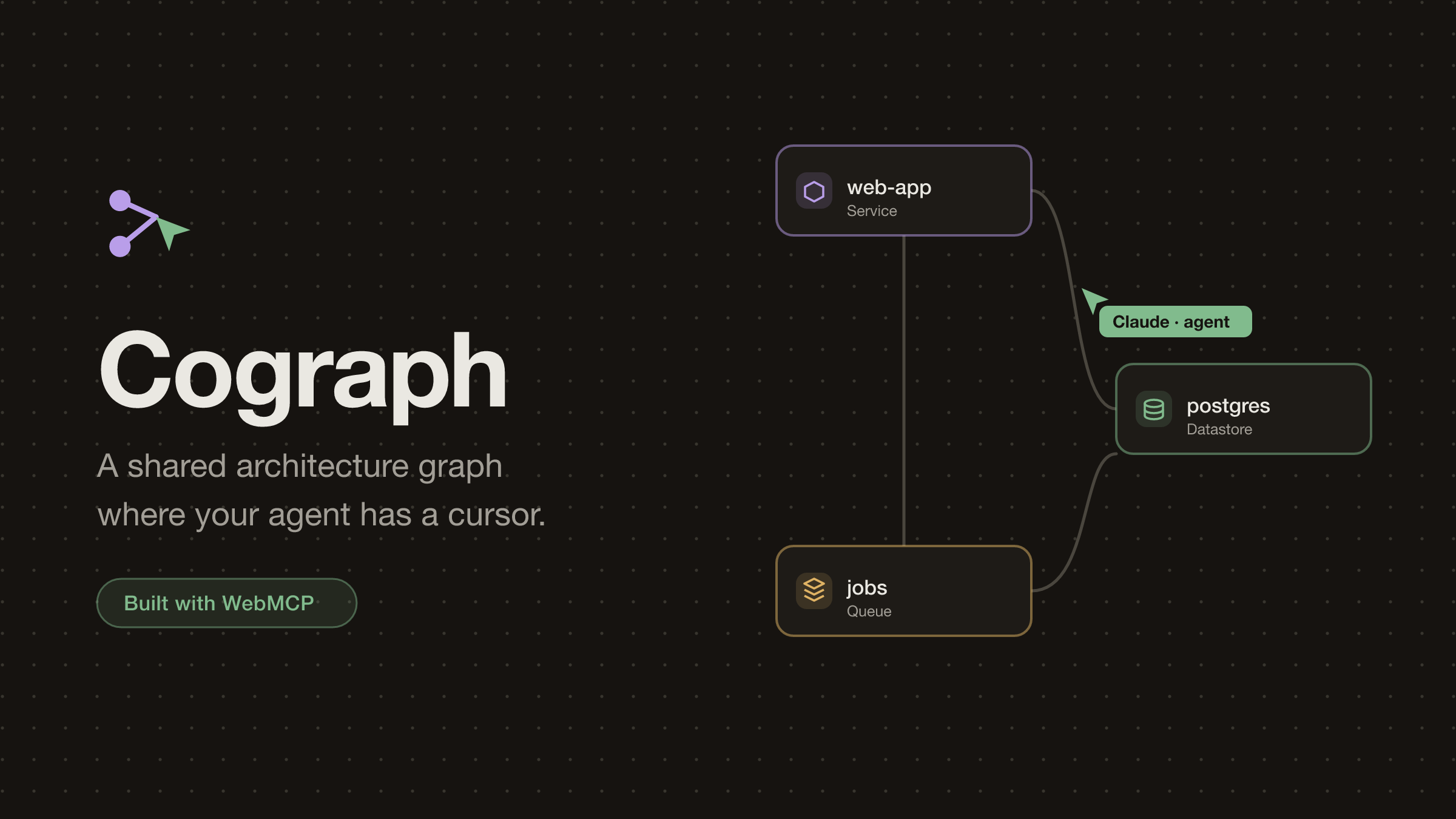
WebMCP puts tools inside the page itself through document.modelContext, and that made me want to try a different framing. Instead of a chat box, the agent becomes a participant. It gets a name in the member list, a color, a cursor you can watch move around, and a permission set, just like everyone else on the board.
For the board itself I went with something every engineer has squinted at during a 2 a.m. incident: an architecture and dependency graph. A graph gives an agent real work that humans are slow at, like computing blast radius or finding cycles. It also demos honestly with a single person in the room, because one human plus their agent already makes two actors.
What it does
Cograph (cograph.rimzzlabs.com) is a real-time collaborative architecture board. Humans and agents edit the same graph at the same time, through the same operations. Anyone can join a room, and everyone can create exactly one, with a global cap of twenty rooms and deletion open to anybody. That sounds reckless until you remember this runs on Cloudflare's free tier: the app enforces its own limits instead of hiding behind a paywall.
The core idea is that the tool surface is a function of application state. If you cannot use a tool right now, it is not registered. It does not exist for the agent, so the agent can never call it and get back an error.
| Board state | Tools the agent can call |
|---|---|
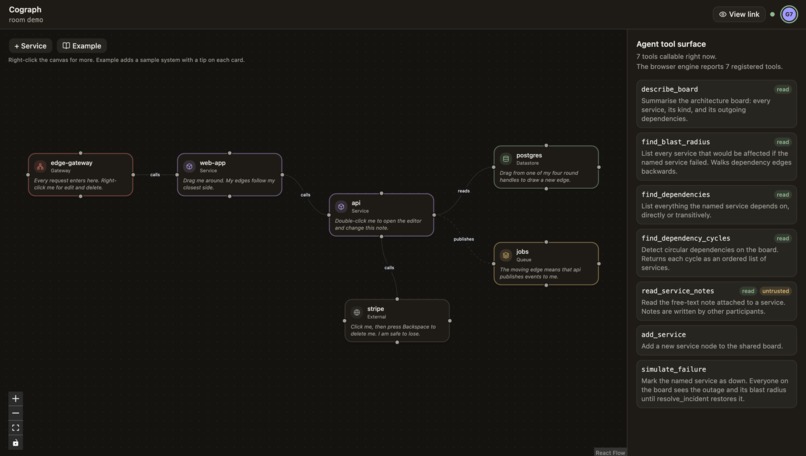
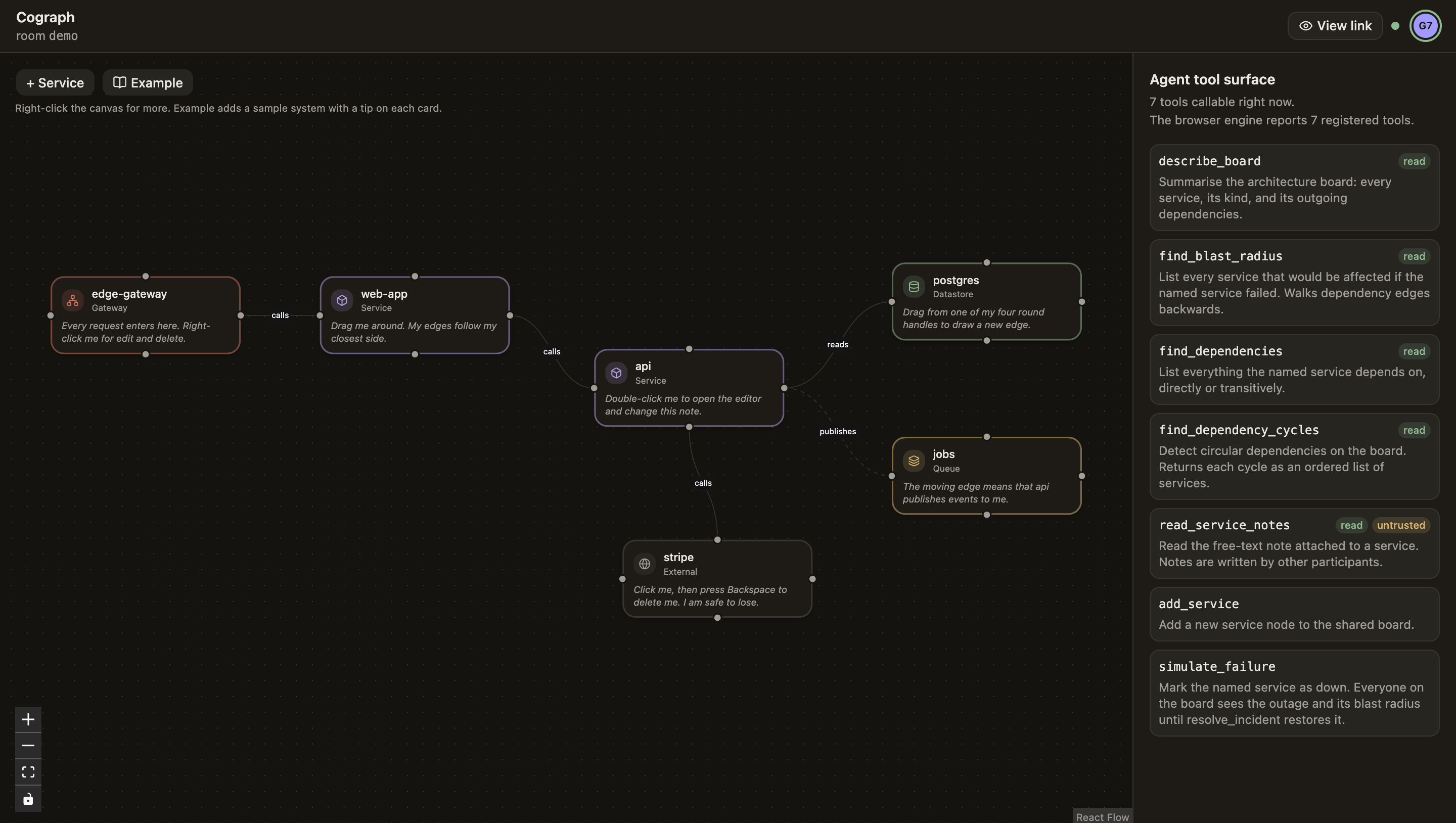
| Any | describe_board, find_blast_radius, find_dependencies, find_dependency_cycles, read_service_notes |
| Role permits editing | + ten mutating tools, from add_service and connect_services through move_service and simulate_failure |
| A service is down | + resolve_incident |
| Role is viewer | read-only tools only |
resolve_incident is the gate I am proudest of. It registers the moment something is marked down and unregisters when the board recovers, so the option list itself tells the agent there is an incident. No status-polling tool, no error handling for "nothing to resolve".
An earlier version also gated tools on canvas selection: select one node and update_selected_service appeared. I ripped that out. Agents are bad at clicking before they act, so every tool is addressed by label now (connect_services takes two service names), and selection survives as pure presence: the agent can draw its own dashed ring with select_services so the room sees what it is focused on, and no tool depends on it.
The agent earns its seat with its first tool call. It gets a participant chip, a color from the same name-hash rule humans use, and a cursor that jumps to whatever node the call touched, with a little bubble narrating what it is doing ("Simulating a failure of postgres…"). When the session itself is automated, over CDP or an in-app agent browser, that session is the agent: one seat under its own name, no phantom "someone's agent" twin. Analysis is shared too. When the agent computes a blast radius, the affected services light up for every participant, and the highlight fades on its own after fifteen seconds, because a spotlight that never turns off is just stale state.
There is a live inspector panel in the app, so you can watch the agent's option list grow and shrink as roles and incidents change. If you share a ?role=viewer link, the agent's mutating tools disappear along with the human's toolbar.
Trust is part of the surface too. Notes on services are written by other participants, so read_service_notes carries untrustedContentHint: whatever is in there is data for the agent to report, not instructions to follow. Read-only and destructive tools carry their own hints, shown as badges in the inspector.
How I built it
The app is a Vite single-page app with React 19 and TypeScript. The canvas is React Flow 12, rendered with real DOM and SVG on purpose. A <canvas> bitmap is opaque, and this whole project is about pages that agents can read, so real elements won. They also bring focus, text editing, and accessibility along for free; the canvas is fully keyboard-operable, Tab selects and arrows move.
Yjs owns the graph as a CRDT document, and React Flow only renders it. Human edits and agent tool calls go through the same mutation functions, so an agent edit is just an edit with a different author. Sync runs through Cloudflare Workers with one Durable Object per room, speaking the standard y-websocket protocol and persisting on a debounce. A second Durable Object is the room registry, which is where the one-room-per-creator rule and the cap live. Serving the app and the sockets from one origin keeps the Permissions-Policy: tools=(self) header that WebMCP needs in a single place, and one wrangler deploy ships everything.
Registration comes down to one small hook, useAgentTool(spec | null). Passing null is the whole point: React effect cleanup fires an AbortSignal, and the agent's tool list ends up following the UI exactly.
Even the participant colors turned into real engineering. Identity colors live in OKLCH with fixed lightness and chroma, and hues sit on a shared grid of 12 slots anchored at the local user's name hash:
$$h_i = h_{\text{me}} + 30°\, i, \quad i \in {0, \dots, 11}$$
so any two visible participants stay at least $30°$ apart in hue. My first version stepped each peer on its own grid, which felt right and quietly produced a closest pair of 21 degrees with twelve participants. A property test caught it, and the shared grid fixed it.
Performance got its own late chapter. Remote cursors arrive many times a second, and my first wiring rebuilt every canvas node on every cursor frame. Fixing that render storm meant keying derived arrays on content instead of identity, adopting the React Compiler, and adding a sync skeleton so joining a room shows a settling board instead of a flash of nothing.
Challenges I ran into
Building on an API this new means testing against the engine, not the spec document. I verified everything headless over CDP against Chrome for Testing 152, and the engine disagreed with my types in ways I would never have guessed. RegisteredTool.inputSchema comes back as a serialized string. executeTool takes a JSON string in and returns a JSON string out. The engine never validates arguments against your schema, so structured error results are the only feedback an agent ever gets. Brave has the WebMCP strings in its binary but the API never installs, no matter which flags you enable. And on macOS the base feature flags were not enough. document.modelContext only shows up once you also pass --enable-blink-features=WebMCP,WebMCPTesting, which cost me an evening of flag archaeology.
React Flow's controlled selection bit me twice. First, clicks showed their selection ring a tick late, because React Flow emits select changes without applying them. Then the onSelectionChange handler I had kept around as a safety net turned out to be a second writer on the same state, and a multi-select crashed with React's "Maximum update depth exceeded". The lesson I am keeping: one writer per piece of state, and a store that bails out when nothing actually changed.
Presence lies about idleness. y-websocket renews awareness for every open tab, so an idle tab never expires on its own. Each client now stamps its own last-active time on real input, and every reader decides locally who looks online. You cannot trust a publisher to tell you it went stale.
The freshest bug cost me a demo take. The shared blast-radius highlight lived in awareness and nothing ever cleared it, so after resolve_incident the restored services stayed orange until the agent left the room. A code comment called that behavior a feature. On camera it read as a broken board. Highlights fade after fifteen seconds now, and the incident tools clear them explicitly, so node status alone drives the incident tint.
One more surprise: an empty shell is a terrible first impression for a project about agent-readable pages. A plain HTTP fetch runs no JavaScript, so any WebMCP page answers a fetcher with an empty <div id="root">. The static shell now carries an honest description of the app and the full state-to-tools table, about 2.2 kB gzipped, so a crawler or an LLM fetch gets something real to read.
What I learned
Register capability instead of erroring on incapability. With state-scoped tools, "the agent tried something invalid" turns into "the option never existed", and the option list itself becomes information. When resolve_incident shows up, the agent knows there is an incident.
Derived state should stay derived. The outage status is a single flag per node in the shared document, and every client recomputes the blast radius from it. If I stored the affected set, it would drift the moment someone changed an edge mid-incident. The highlight bug taught me the same rule from the other side: a spotlight is not state, and anything that only exists to draw attention needs an expiry.
Ship your assumptions through a real browser. My e2e check launches actual Chrome and drives every tool through the engine's own executeTool, and the demo driver that records the video runs the same path. They caught things no unit test would have.
And agent ergonomics and human ergonomics are the same discipline. Annotations are basically ARIA for agents.
What's next
Server-side role enforcement is the big one. The viewer link currently shrinks the surface on the client, and the Durable Object should refuse those writes too. After that: cross-origin tool discovery with exposedTo, so another page could read a Cograph board's tools, a proper screen-reader pass on top of the automated accessibility checks, and trying the tool surface in more WebMCP-capable agents as they ship.
Built With
- react
- react-flow
- typescript
- webmcp
- yjs


Log in or sign up for Devpost to join the conversation.