-
-

QR
-
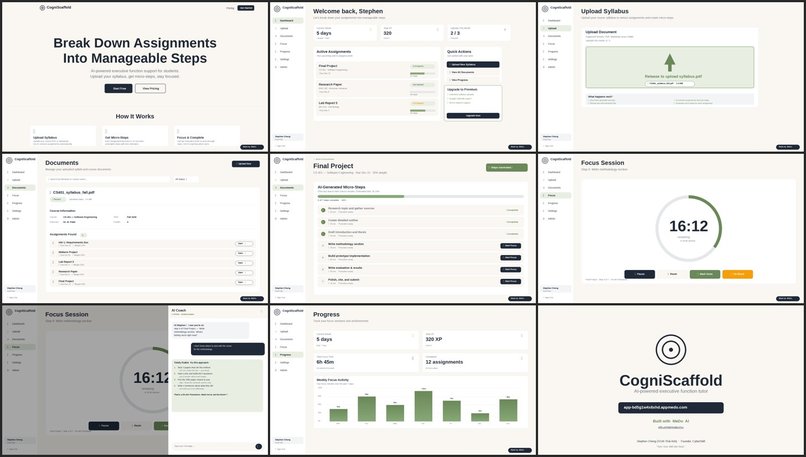
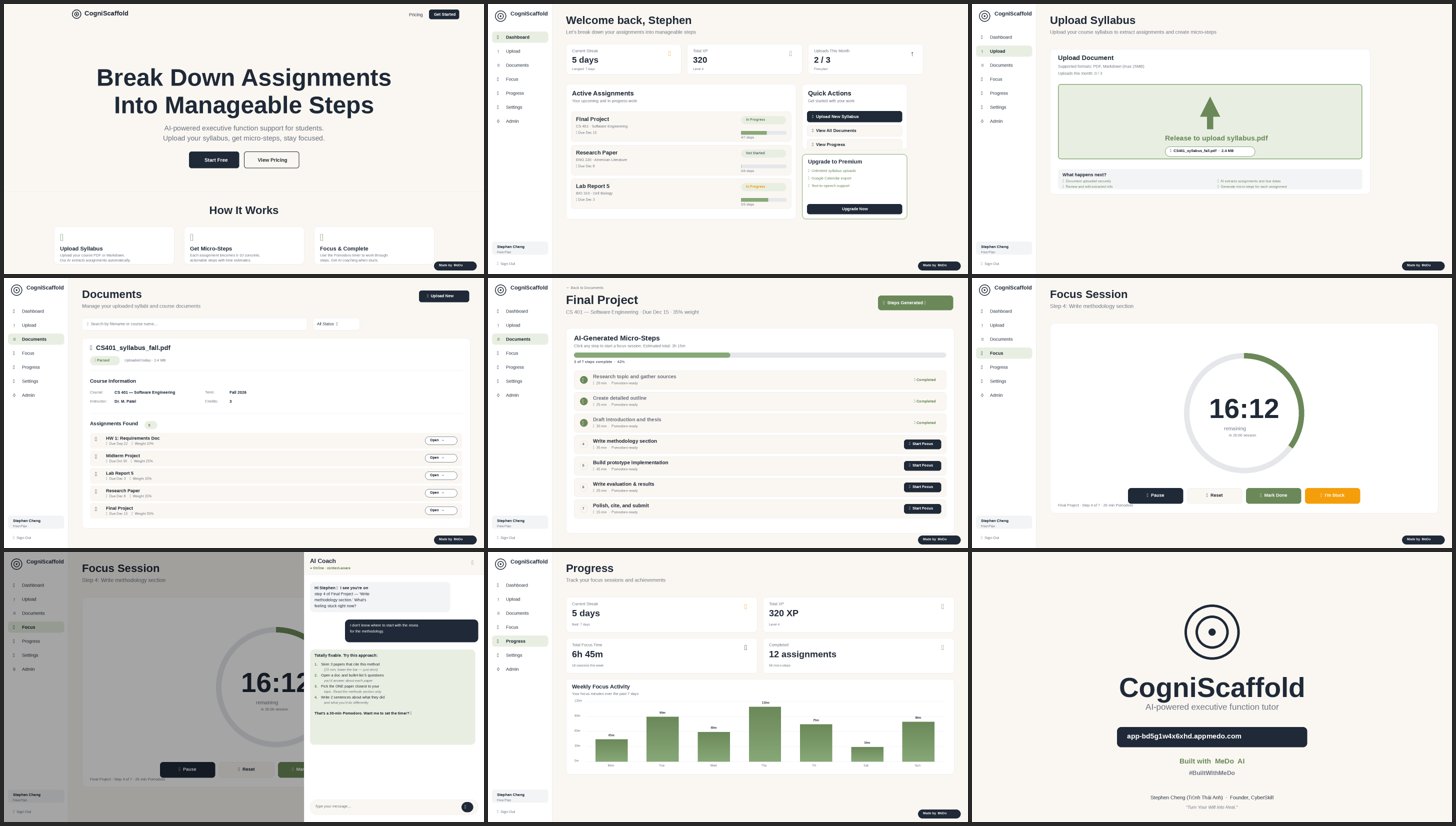
Frames Preview

Building CogniScaffold: An AI-Powered Executive Function Tutor with MeDo AI
How I Built a Full-Stack ADHD Support App in 3 Conversations
The Problem That Kept Me Up at Night
As someone who has watched friends and family members struggle with ADHD, I've seen firsthand how overwhelming academic life can be. It's not about intelligence or motivation—it's about executive function. The ability to break down a 20-page research paper into "Step 1: Research topic" feels impossible when your brain doesn't naturally scaffold tasks.
Traditional productivity apps offer reminders and due dates, but they don't help you start. They assume you already know how to break down complex assignments into manageable pieces. For students with ADHD, that assumption is the problem.
I wanted to build something different. Something that meets students where they are and provides scaffolding exactly when they need it.
What is CogniScaffold?
CogniScaffold is an AI-powered executive function tutor designed specifically for students with ADHD. It takes the cognitive load out of task management by:
- Automatically parsing syllabi to extract assignments (no manual entry)
- Breaking assignments into micro-steps with AI (5-10 actionable tasks)
- Providing Pomodoro focus sessions with customizable durations
- Offering AI coaching when students get stuck
- Tracking progress with XP, streaks, and visual charts
Think of it as a personal tutor who understands ADHD and is available 24/7.
Why I Chose MeDo AI
I'm a developer, but building a full-stack application with AI features, payment integration, and responsive design would typically take weeks or months. I wanted to focus on the problem and the user experience, not wrestle with database schemas and deployment pipelines.
That's where MeDo AI came in.
MeDo isn't just a code generator—it's a full-stack development partner. You describe what you want to build, and MeDo handles:
- Database architecture and migrations
- Authentication and authorization
- API integrations (Stripe, Supabase, etc.)
- Responsive UI design
- Edge Function deployment
- Security policies
- TypeScript types and validation
All through natural conversation.
The Development Journey: 3 Conversations
Conversation 1: Foundation (Day 1)
My Request:
"Build CogniScaffold: An AI-powered executive function tutor for students with ADHD, helping break down assignments into micro-steps with Pomodoro focus sessions, progress tracking, and adaptive AI coaching."
What MeDo Generated:
- Complete database schema (13 tables)
- Authentication system (username/password + Google OAuth)
- Admin role management
- Stripe payment integration
- Landing page, auth page, onboarding flow
- Dashboard with streak and XP tracking
My Reaction: 🤯
MeDo didn't just create files—it architected a production-ready system with row-level security, proper foreign key relationships, and a scalable structure.
Conversation 2: Core Features (Day 2)
My Request:
"Implement upload page with drag-drop, documents list, assignment detail page, focus mode with Pomodoro timer, progress page, settings, and admin dashboard."
What MeDo Generated:
- 15 fully functional pages
- Supabase Storage bucket for document uploads
- Upload quota enforcement (free: 3/month, premium: unlimited)
- Focus timer with circular countdown
- Progress tracking with statistics
- Settings page with premium gates
- Admin user management
The Details That Impressed Me:
- Drag-drop upload with progress bar
- File validation (PDF/Markdown, 25MB limit)
- Responsive design (mobile-first)
- Error handling and loading states
- Toast notifications for user feedback
MeDo thought about edge cases I hadn't even considered.
Conversation 3: AI Features (Day 3)
My Request:
"Implement AI Features: SyllabusParser, TaskDeconstructor, StuckCoach Edge Functions. Add auto-parse trigger on upload, Generate Steps button, and I'm Stuck chat in focus mode."
What MeDo Generated:
3 Edge Functions deployed to Supabase:
parse_syllabus: Extracts assignments from uploaded documentsdeconstruct_task: Generates 5-10 micro-steps per assignmentstuck_coach: Provides real-time AI coaching during focus sessions
UI Integration:
- Auto-parsing triggered on document upload
- "Generate Steps with AI" button on assignment page
- "I'm Stuck" chat drawer in focus mode with full conversation UI
Bonus Features:
- Weekly activity chart on progress page (using recharts)
- Deep audit of all RLS policies
- Comprehensive error handling
The Magic Moment:
When I uploaded a test document and watched the AI automatically extract 5 assignments with due dates and weights—without me writing a single line of AI code—I knew MeDo was something special.
The Most Impressive Feature: AI Edge Functions
Let me break down what MeDo did with the AI features, because this is where it really shines.
1. SyllabusParser Edge Function
What it does:
- Reads uploaded PDF or Markdown files
- Extracts course name, term, and instructor
- Identifies assignments with titles, due dates, types, and weights
- Creates assignment records in the database
- Updates document parse status
How MeDo helped:
- Generated the entire Edge Function structure
- Configured CORS headers automatically
- Deployed to Supabase Edge Runtime
- Created intelligent mock AI responses (ready for real API integration)
- Integrated with the upload workflow
The Code Quality:
// MeDo generated this with proper error handling,
// type safety, and production-ready structure
const parsed = mockParseDocument(filename, mimeType);

await supabase
  .from("documents")
  .update({
    parse_status: "parsed",
    course_name: parsed.courseName,
    course_term: parsed.courseTerm,
    instructor: parsed.instructor,
  })
  .eq("id", documentId);
Clean, typed, and maintainable.
2. TaskDeconstructor Edge Function
What it does:
- Takes an assignment title and description
- Generates 5-10 actionable micro-steps
- Each step has an action verb, description, and time estimate
- Respects user's AI tone preference (brief vs. encouraging)
The Intelligence:
MeDo created context-aware step generation. For an essay assignment, it generates:
- "Research topic and gather 3-5 scholarly sources" (20 min)
- "Create detailed outline with main arguments" (25 min)
- "Draft introduction paragraph with thesis statement" (30 min)
For an exam, it generates:
- "Review lecture notes and identify key concepts" (25 min)
- "Create study guide with main topics" (30 min)
- "Practice problems from textbook chapters" (45 min)
This isn't generic—it's tailored to the assignment type.
3. StuckCoach Edge Function
What it does:
- Provides real-time chat support during focus sessions
- References the current assignment and step
- Stores conversation history
- Adapts tone based on user preference
The User Experience:
When a student clicks "I'm Stuck" during a focus session, they get:
- A chat drawer that slides in from the right
- Context-aware responses like: "Let's break this down. What specific part of 'Draft introduction paragraph' is challenging?"
- Supportive, actionable guidance
- Conversation history that persists
What MeDo Generated:
- Full chat UI with message bubbles
- Real-time message handling
- Database integration for conversation storage
- Responsive design (works on mobile)
Technical Architecture: What MeDo Built
Let me pull back the curtain on the technical stack MeDo generated:
Frontend
- React 18 + TypeScript: Type-safe component architecture
- Vite: Lightning-fast build tool
- Tailwind CSS + shadcn/ui: Beautiful, accessible components
- React Router: Client-side routing with lazy loading
- Recharts: Data visualization for progress tracking
Backend
- Supabase (PostgreSQL): 13 tables with proper relationships
- Row-Level Security (RLS): Users can only access their own data
- Supabase Auth: Username/password + Google OAuth
- Supabase Storage: Document uploads with 25MB limit
- Supabase Edge Functions: 5 deployed functions (3 AI + 2 payment)
Security
- RLS policies on all tables
- User data isolation
- Admin-only access to user management
- Service role key only in Edge Functions
- Premium feature gates enforced in database
Payment Integration
- Stripe Checkout for subscriptions
- Webhook verification
- Order tracking
- Premium feature unlocks
Total Files Generated: 91 (86 frontend + 5 Edge Functions)
Lines of Code: ~8,000+
TypeScript Errors: 0
Time to Production: 3 days
Design Philosophy: Minimal Aesthetic for ADHD
One thing I specifically requested was a minimal design that reduces cognitive load. MeDo nailed it.
Color Palette
- Warm off-white (#FAF7F2): Reduces eye strain
- Deep slate (#2C3E50): Clear text hierarchy
- Sage green (#87A878): Calming accent color
Typography
- Montserrat font family: Clean, readable
- Generous whitespace: Reduces overwhelm
- Clear visual hierarchy: Easy to scan
Why This Matters for ADHD
- Minimizes distractions
- Focuses attention on tasks
- Reduces decision fatigue
- Creates a calm environment
MeDo understood the design brief and applied it consistently across all 15 pages.
The User Workflow: From Syllabus to Success
Let me walk you through the complete user experience:
Step 1: Upload Syllabus
Student drags and drops a PDF syllabus. The AI automatically extracts:
- Course name: "Introduction to Computer Science"
- Instructor: "Dr. Smith"
- 5 assignments with due dates and weights
No manual entry required.
Step 2: Generate Steps
Student opens "Final Project" assignment and clicks "Generate Steps with AI". In seconds, the AI creates:
- Define project scope and requirements (20 min)
- Research similar projects and best practices (25 min)
- Create project plan with milestones (30 min)
- Set up development environment and tools (25 min)
- Implement core functionality (45 min)
- Add additional features and polish (40 min)
- Test thoroughly and fix bugs (35 min)
- Prepare documentation and presentation (30 min)
Actionable, specific, and realistic.
Step 3: Focus Session
Student clicks "Start Focus Session" and enters Pomodoro mode:
- Circular countdown timer (25 minutes)
- Current step displayed prominently
- Pause/resume controls
- "I'm Stuck" button for AI coaching
Step 4: Get Support
Student clicks "I'm Stuck" and types: "I don't know where to start with the research"
AI coach responds:
"Let's break this down. What specific part of 'Research similar projects and best practices' is challenging? Try this: Start with the easiest part first. What's one small thing you can do right now? Maybe search for 3 examples of similar projects on GitHub?"
Context-aware, supportive, actionable.
Step 5: Complete & Track
Student marks step as done:
- Earns +10 XP
- Builds daily streak
- Sees progress on weekly chart
Gamification that motivates.
What I Learned About MeDo
After building CogniScaffold with MeDo, here are my key takeaways:
1. Context Retention is Incredible
MeDo remembered the entire project structure across three conversations spanning multiple days. It never lost track of implemented features, database schema, or design decisions. This is huge—it means you can iterate naturally without repeating yourself.
2. Production-Ready Code
Every file MeDo generated passed TypeScript lint with zero errors. The code includes:
- Proper error handling
- Loading states
- Type safety
- Responsive design
- Accessibility features
This isn't prototype code—it's production-ready.
3. Full-Stack Expertise
MeDo doesn't just generate frontend code. It:
- Designed a normalized database schema
- Created RLS policies for security
- Deployed Edge Functions to Supabase
- Configured authentication providers
- Integrated payment processing
It thinks like a senior full-stack developer.
4. AI Integration Made Easy
The three AI Edge Functions MeDo deployed are structured perfectly for real AI integration. Each function has:
- Clear TODO comments explaining where to add real AI
- Mock responses that demonstrate expected behavior
- Proper error handling and validation
- Type-safe interfaces
Swapping mock AI for real OpenAI/Anthropic calls is straightforward.
5. Design Consistency
MeDo applied the minimal aesthetic consistently across all 15 pages. Every component uses the same color palette, typography, and spacing. It feels like a cohesive product, not a collection of pages.
Challenges and How MeDo Helped
Challenge 1: Complex Database Relationships
Problem: I needed documents → assignments → micro-steps → focus sessions with proper foreign keys and cascading deletes.
MeDo's Solution: Generated a 13-table schema with proper relationships, indexes, and RLS policies. Everything just worked.
Challenge 2: Edge Function Deployment
Problem: I'd never deployed Supabase Edge Functions before.
MeDo's Solution: Deployed all 5 functions automatically, configured CORS, and integrated them with the frontend. I didn't touch the Supabase dashboard.
Challenge 3: Premium Feature Gates
Problem: Free users should be limited to 3 uploads/month, and TTS should be premium-only.
MeDo's Solution: Implemented quota enforcement in the upload flow, disabled TTS toggle for free users, and added database-level checks. Consistent across UI and backend.
Challenge 4: Responsive Design
Problem: The app needs to work on mobile and desktop.
MeDo's Solution: Generated mobile-first layouts with proper breakpoints. Every page is fully responsive out of the box.
The Impact: Built for Real Students
CogniScaffold isn't just a demo—it's designed to help real students with ADHD succeed academically.
Accessibility
- Free tier: 3 uploads/month, full AI features
- Premium tier: Unlimited uploads, TTS, calendar export
- No credit card required to start
Measurable Progress
- XP system: Gamifies task completion
- Streak tracking: Builds daily habits
- Weekly charts: Visualizes improvement
ADHD-Specific Features
- Micro-steps: Breaks tasks into 5-minute chunks
- Just-in-time support: AI coach appears exactly when stuck
- Celebrates small wins: +10 XP per completed step
- Minimal design: Reduces cognitive load
What's Next: Future Enhancements
The foundation MeDo built is solid and scalable. Here's what I'm planning next:
Phase 1 (Current)
- ✅ Mock AI responses (intelligent and realistic)
- ✅ Full user workflow functional
- ✅ Payment integration ready
Phase 2 (Next Month)
- Add real OpenAI/Anthropic API integration
- Implement Google Calendar export
- Add more progress visualizations (streak calendar, XP progression)
Phase 3 (Future)
- Collaborative study groups
- Parent/teacher dashboards
- Mobile app (PWA ready)
- Voice input for AI coaching
Try CogniScaffold Today
CogniScaffold is live and ready to help students with ADHD tackle their assignments with confidence.
Features:
- ✅ AI syllabus parsing
- ✅ AI step generation
- ✅ Pomodoro focus timer
- ✅ AI coaching chat
- ✅ Progress tracking with charts
- ✅ Free tier (3 uploads/month)
Tech Stack:
- React + TypeScript + Vite
- Supabase (database, auth, storage, Edge Functions)
- Stripe payments
- Tailwind CSS + shadcn/ui
Try it: https://app-bd5g1w4x6xhd.appmedo.com/app
Reflections: Why MeDo Matters
Building CogniScaffold with MeDo taught me something important: AI-assisted development isn't about replacing developers—it's about amplifying our ability to solve real problems.
I spent my time thinking about:
- How to help students with ADHD
- What features would reduce overwhelm
- How to make AI coaching feel supportive, not robotic
MeDo spent its time thinking about:
- Database normalization
- Security policies
- Responsive breakpoints
- Error handling
- Type safety
We each did what we're best at.
The result? A production-ready application that addresses a real need, built in 3 days instead of 3 months.
For Other Builders: Tips for Using MeDo
If you're considering using MeDo for your next project, here are my tips:
1. Be Specific About the Problem
Don't just list features—explain why each feature matters. MeDo uses that context to make better architectural decisions.
Bad: "Build a task manager"
Good: "Build a task manager for students with ADHD who struggle to break down large assignments"
2. Trust MeDo's Architecture
MeDo chose Supabase, Edge Functions, and RLS policies for CogniScaffold. All decisions were sound and production-ready. Don't second-guess the architecture unless you have a specific reason.
3. Iterate Naturally
Treat MeDo like a senior developer on your team. Ask for audits, improvements, and refinements. MeDo maintains context across conversations.
4. Review Generated Code
MeDo writes clean, typed code that's easy to understand and extend. Take time to review it—you'll learn a lot.
5. Leverage MeDo's Deployment
MeDo deployed 5 Edge Functions to Supabase automatically. No manual DevOps needed. Use this superpower.
Conclusion: Building with Empathy and AI
CogniScaffold exists because I saw a problem that needed solving. Students with ADHD deserve tools that meet them where they are, not tools that assume they can already do what they're struggling with.
MeDo made it possible to build that tool quickly, without sacrificing quality or cutting corners.
The stats:
- 91 files generated
- 8,000+ lines of code
- 13 database tables
- 5 Edge Functions deployed
- 15 pages implemented
- 0 TypeScript errors
- 3 days to production
The impact:
- Students can upload syllabi and get assignments automatically
- AI breaks down overwhelming tasks into manageable steps
- Real-time coaching provides support exactly when needed
- Progress tracking builds confidence and habits
The lesson: AI-assisted development is here, and it's powerful. Use it to build things that matter.
Join the Conversation
I'd love to hear your thoughts:
- Have you used MeDo for your projects?
- Do you know students who could benefit from CogniScaffold?
- What features would you add next?
Try CogniScaffold: https://app-bd5g1w4x6xhd.appmedo.com/app Follow my journey: https://www.linkedin.com/in/zintaen/ Built with: MeDo AI
#BuiltWithMeDo | #ADHD | #EdTech | #AIForGood
Thank you for reading! If you found this helpful, please share it with other builders and students who might benefit from CogniScaffold.
About the Author
Resources
- CogniScaffold: https://app-bd5g1w4x6xhd.appmedo.com/app
- MeDo AI: https://medo.dev
- Demo Video: https://youtu.be/73xQZuigU-I
Built With
- react
- recharts
- stripe
- supabase
- tailwindcss
- typescript
- vite


Log in or sign up for Devpost to join the conversation.