-
-

LOGO
-

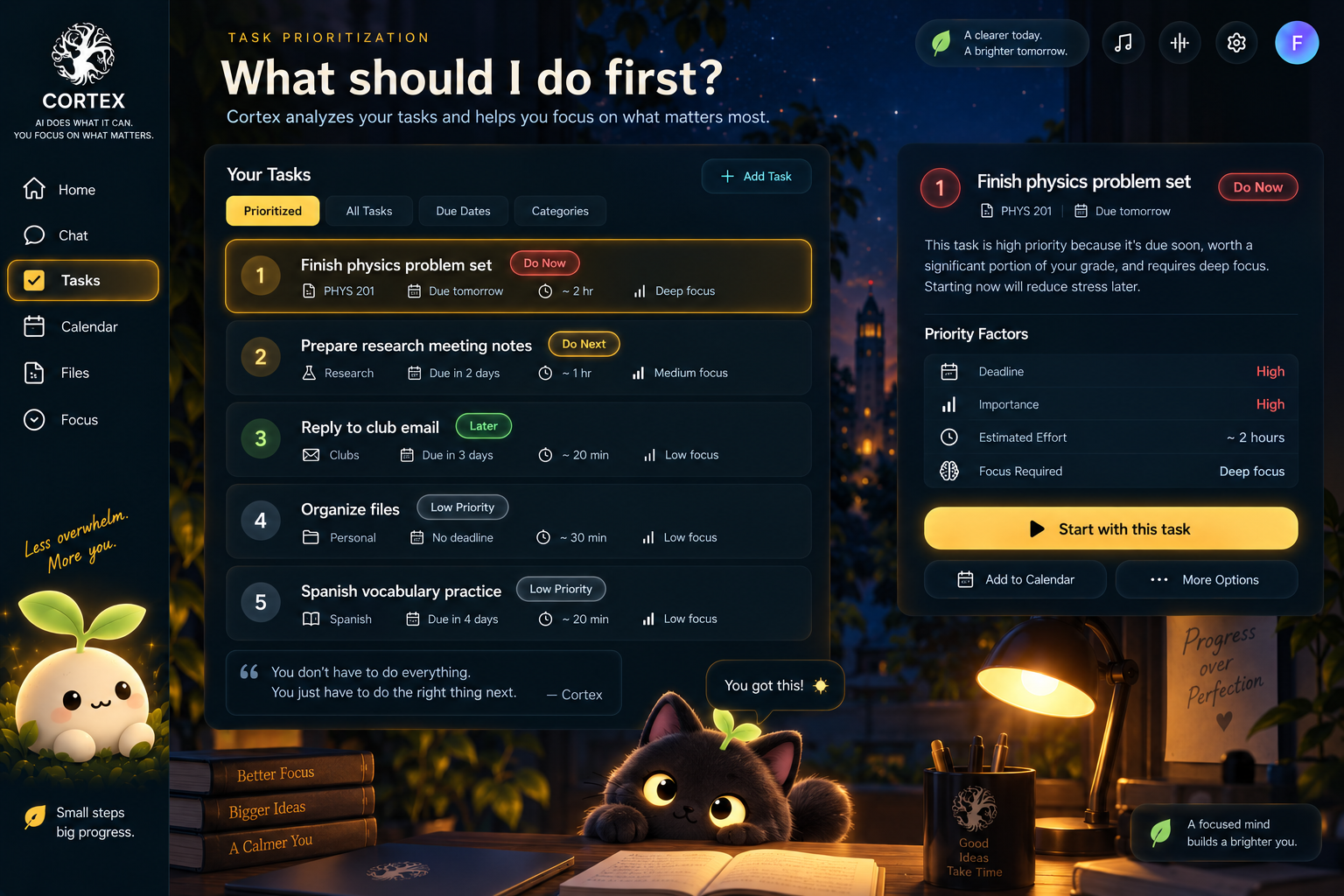
Introduction → Cortex helps users decide what to do, what AI can do, and what requires approval.
-
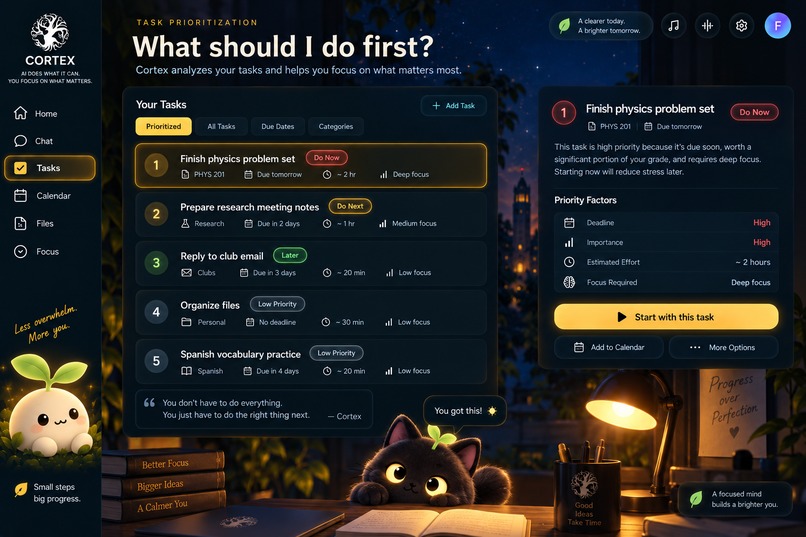
Task Prioritization → Cortex analyzes tasks and recommends what to focus on first based on urgency and impact.
-

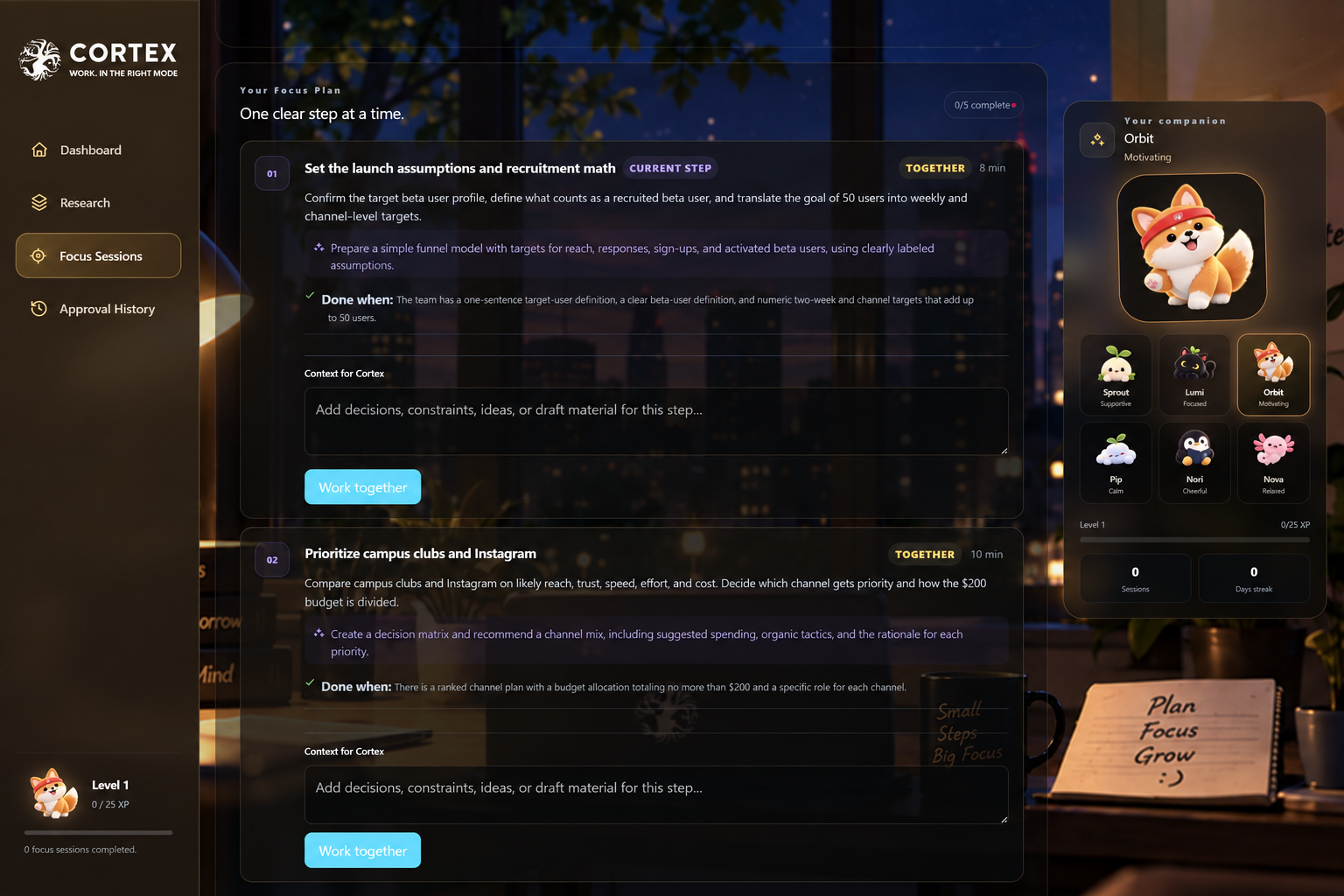
Focus Mode → Focus Mode turns one priority into a guided session with a timer, steps, and distraction blocking.
-
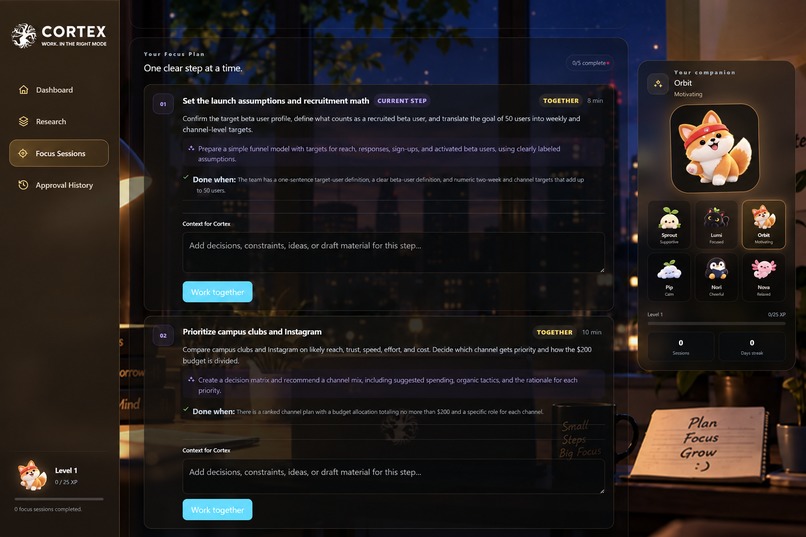
Task Breakdown Feature in Focus Mode
-
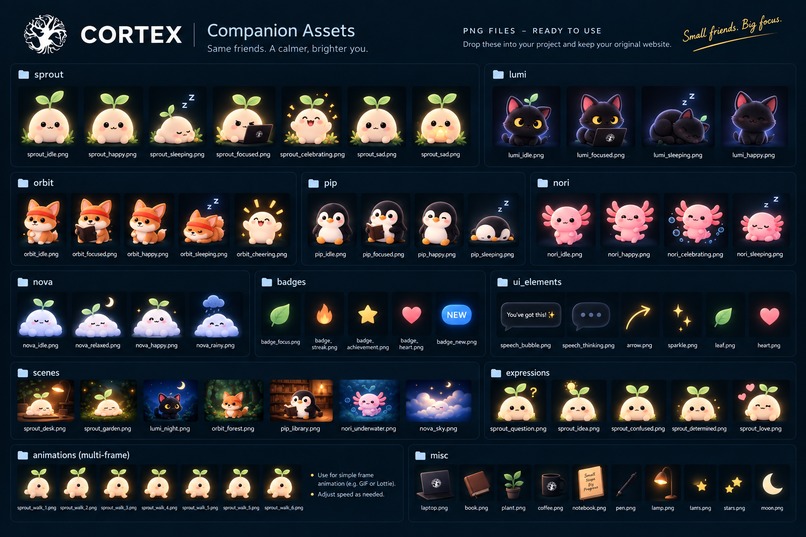
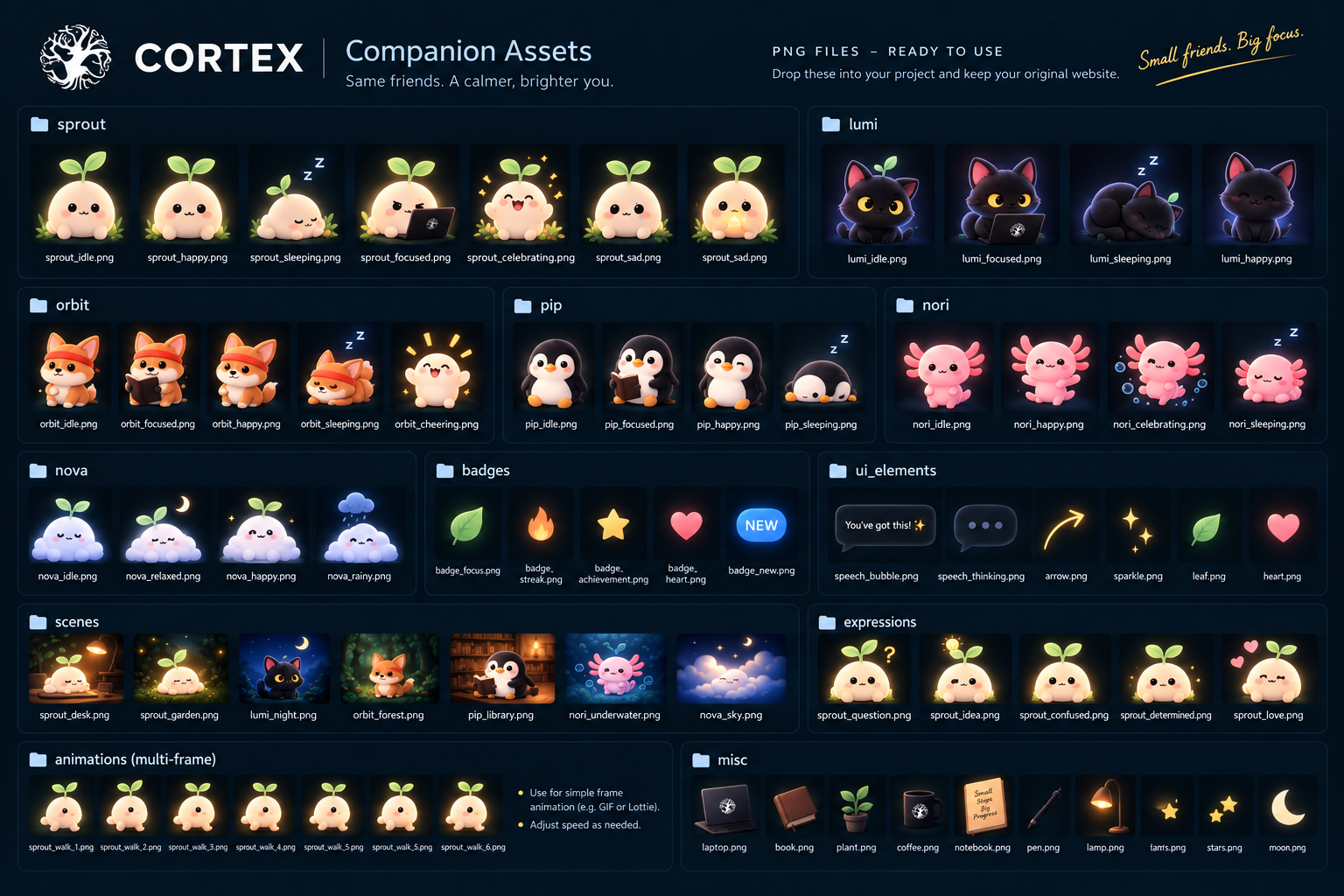
Companions Family
-

Market Opportunity
-

Cortex starts with students and then grows with users from individuals to teams—giving people more time to focus on what matters.
-
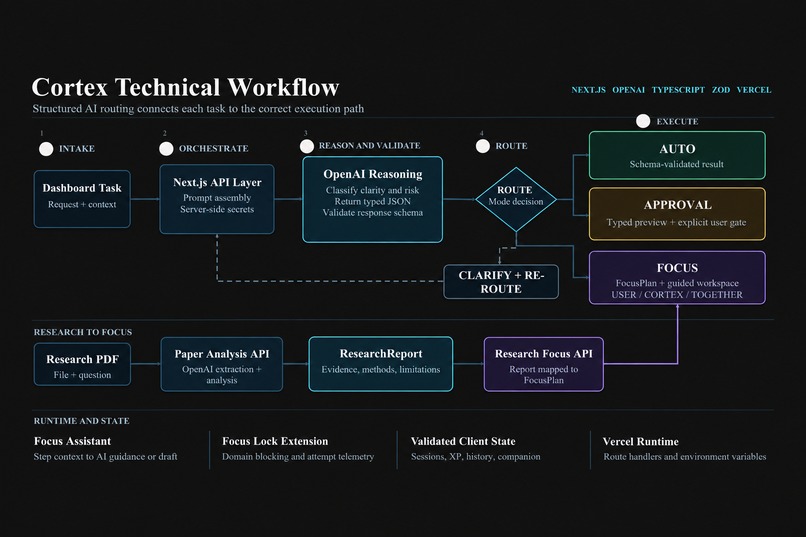
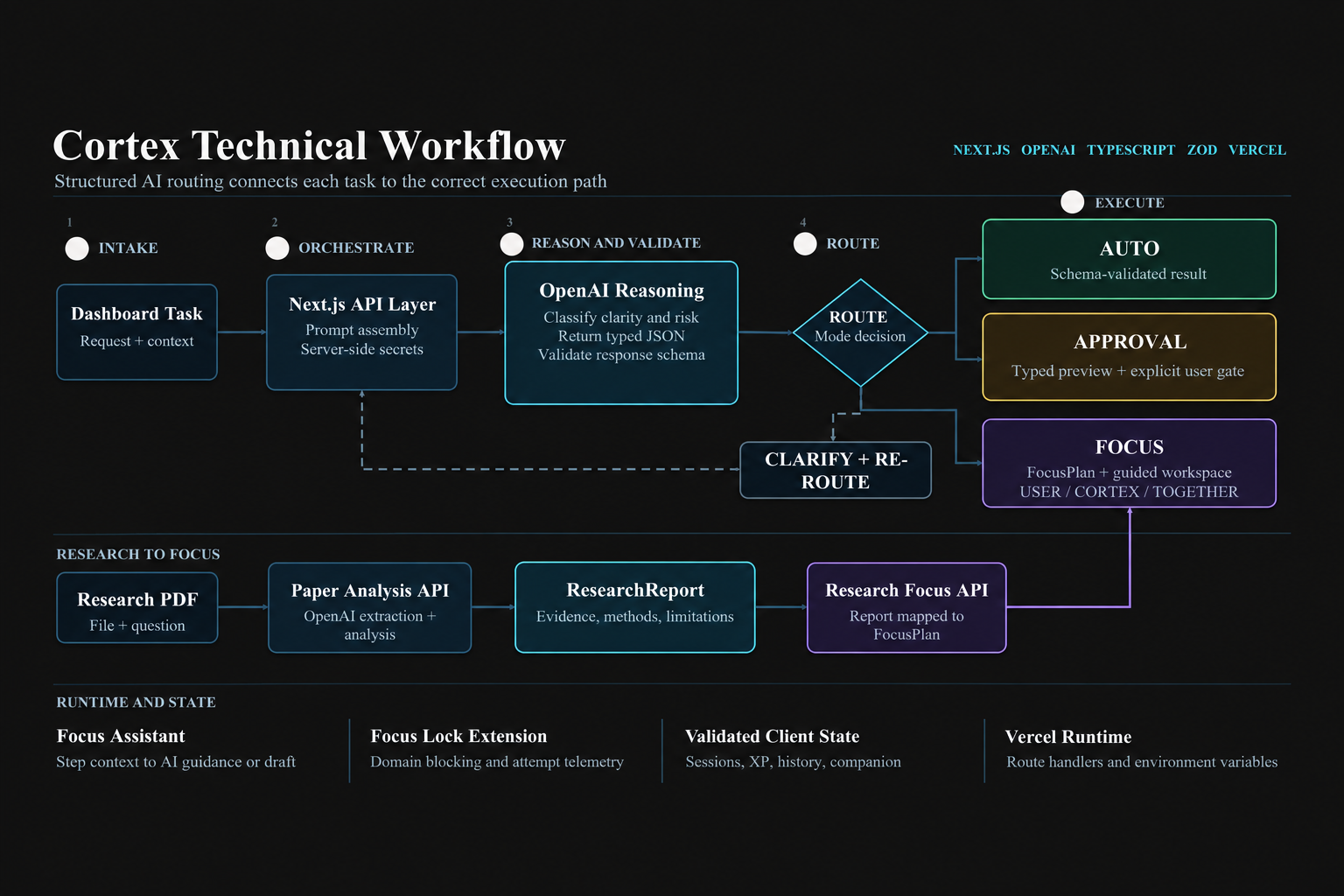
workflow





Inspiration
Staying productive is often harder than it seems: we struggle with when to work, how to approach complex tasks, and how to stay focused.
What if AI could help bridge the gap between having a task and actually getting it done?
We found that this gap comes from three main problems:
1. We Don't Know What to Do and When
Short time gaps are often wasted, while difficult tasks are attempted when our energy is low or interruptions are likely. For example, a 30-minute break might be perfect for reviewing notes, but terrible for starting a difficult proof.
We wanted AI to understand each task's difficulty, priority, time commitment, energy requirement, and context, then match it with the moment when you can do it best.
2. We Struggle to Protect Our Attention
Notifications, tabs, and multitasking constantly create cognitive overload. Most productivity tools simply tell you to focus—but leave the responsibility of resisting every distraction to you.
Instead, Cortex enforces single-tasking by presenting one cognitive task at a time, blocking distractions, and providing deliberate rest.
3. Difficult Tasks Create Overwhelming Cognitive Load
Even when we are focused, a task can simply feel too difficult. Progress feels invisible, feedback is limited, and it becomes easy to lose motivation.
Instead of simply splitting work by time, Cortex uses AI to break complex tasks into small cognitive units that build naturally on one another. Each step provides visible progress and immediate feedback, making difficult work feel manageable.
1. We Don't Know What to Do, When to Do It, or What AI Can Do for Us
Short time gaps are often wasted, while difficult tasks are attempted when our energy is low or interruptions are likely. At the same time, we often spend time manually doing tasks that AI could already complete for us.
We wanted Cortex to understand each task's difficulty, priority, time commitment, energy requirement, context, and level of human involvement.
If a task can be safely completed by AI, Cortex can execute it directly. If the task requires human judgment or participation, Cortex routes it back to the user at the right moment and helps them work through it effectively.
2. We Struggle to Protect Our Attention
Notifications, tabs, and multitasking constantly create cognitive overload. Most productivity tools simply tell you to focus—but leave the responsibility of resisting every distraction to you.
Instead, Cortex enforces single-tasking by presenting one cognitive task at a time, blocking distractions, and providing deliberate rest.
3. Difficult Tasks Create Overwhelming Cognitive Load
Even when we are focused, a task can simply feel too difficult. Progress feels invisible, feedback is limited, and it becomes easy to lose motivation.
Instead of simply splitting work by time, Cortex uses AI to break complex tasks into small cognitive units that build naturally on one another. Each step provides visible progress and immediate feedback, making difficult work feel manageable.
Cortex also adds a reward system with XP, streaks, progress feedback, and an evolving virtual companion, turning sustained focus into a more motivating and engaging experience.
How We Built It
Cortex is an AI-powered task orchestration system built around three decisions:
- What can AI complete?
- What requires human approval?
- What must the user personally focus on?
When a user submits a task through the Cortex command center, the request is sent to our Next.js backend through the POST /api/execute-task endpoint.
The backend uses the OpenAI Responses API with Zod-defined Structured Outputs, ensuring that routing decisions follow a predictable schema instead of returning unstructured text.
AI Router and Safety Layer
The AI Router classifies every task into one of three modes:
AUTOAPPROVALFOCUS
Its response includes the model's confidence, task complexity, risk level, verifiability, reasoning, missing information, and suggested duration.
We also built a deterministic safety layer outside the model. Consequential actions—such as sending, deleting, publishing, submitting, purchasing, paying, transferring, or booking—are automatically forced into the APPROVAL route, even if the model initially considers them automatable.
This lets Cortex use AI aggressively where it is useful without blindly giving it control.
AUTO Execution
For AUTO tasks, Cortex passes the request to a separate AI execution layer.
The executor returns a structured result containing:
- A title
- A summary
- The completed output
- Output format
- A verification checklist
This allows Cortex to display usable and reviewable work, rather than simply returning another chatbot response.
FOCUS Planning
For FOCUS tasks, Cortex deliberately does not complete the task for the user.
Instead, the API returns a FOCUS_READY state and generates a structured Focus Plan containing:
- The objective
- The first action
- Estimated duration
- Missing-information questions
- Completion criteria
- An ordered sequence of cognitive steps
Each step specifies whether it belongs to the user, Cortex, or both, as well as what to do, how Cortex can help, how long the step should take, and what counts as completion.
If a request is underspecified—for example, "Do it"—Cortex generates a clarification workflow instead of inventing missing context.
Focus Workspace
The plan is then handed to the Focus workspace, which operates as a session state machine with:
READY → ACTIVE → PAUSED → COMPLETED / CANCELLED
The workspace provides a countdown timer, step-by-step progress tracking, and controls for starting, pausing, resuming, completing, or cancelling a session.
A browser-extension integration applies a configured blocked-domain list and reports Focus Lock status and blocked attempts during the session.
Reward System
Cortex also connects productivity to gamification and immediate feedback.
Completing focus sessions awards XP, builds streaks, increases the user's level, and advances a virtual companion pet through multiple growth stages.
This creates an immediate reward loop around completing difficult work instead of simply collecting more tasks on a to-do list.
Complete Workflow
User Task → Next.js API → AI Router + Safety Guard → AUTO Execution / APPROVAL Gate / FOCUS Plan → Focus Workspace + Browser Lock → Completion Verification → XP + Pet Progress
In the current MVP, smart scheduling is demonstrated through the AUTO execution pipeline, which can generate a structured schedule draft using the context provided by the user.
Direct Google Calendar, task-management API, and operating-system-level integrations are future extensions and are not presented as completed features in the current prototype.
Challenges We Ran Into
1. Deciding What AI Should and Shouldn't Do
One major challenge was determining which tasks Cortex should execute autonomously and which should remain under human control.
Giving AI too much autonomy introduces unnecessary risk. But requiring approval for everything defeats the purpose of automation.
Our solution: We designed a risk-aware routing system.
Simple, low-risk tasks can be prepared automatically, while Cortex requires human approval before consequential actions. Tasks involving higher risk, subjective judgment, or complex reasoning are routed to Focus Mode, keeping the user in control.
2. Breaking Down Complex Tasks Effectively
Our second challenge was that simply asking an LLM to "break this task into smaller steps" often produced steps that were still too broad or disconnected from what the user actually needed to understand.
Our solution: We redesigned decomposition around Cognitive Load Theory and scaffolding.
Cortex first identifies prerequisites, then generates small, sequential cognitive units with immediate feedback—turning task decomposition into a guided learning process rather than another checklist.
Accomplishments We're Proud Of
1. Protecting What Actually Deserves Your Attention
We're proud that Cortex starts with what we believe is the most important productivity problem: deciding what actually deserves your attention.
It then goes one step further by actively protecting that attention instead of simply recommending that you focus.
2. Going Beyond Single-Tasking
We realized that even a single task can contain dozens of small decisions.
Cortex therefore goes beyond conventional single-tasking by breaking complex work into small cognitive units, reducing both the decisions and cognitive load required at each step.
3. Bringing Cortex to Life
We're especially proud of how we brought Cortex to life through an energetic and engaging demo video.
Instead of only describing our ideas, we wanted people to immediately see and feel how Cortex changes the experience of working through difficult tasks.
4. Building the Complete Technical Workflow
Technically, Cortex brings together multiple backend agents, external APIs, AI reasoning, safety logic, browser-extension functionality, and a polished frontend into one cohesive workflow—from understanding and routing tasks to execution, focus, decomposition, and rewards.
What We Learned
1. AI Works Better When Complex Problems Are Built Step by Step
We learned that when working with generative AI, giving the model the right context and breaking the development process into clear stages dramatically improves the result.
For example, when designing our UI, trying to generate the entire experience at once was ineffective. Instead, we identified individual features—such as our virtual companion system—designed the visual assets, developed the interaction, and then integrated everything into the larger product.
Interestingly, this mirrored the exact principle behind Cortex itself: complex tasks become much easier when they are decomposed into manageable steps.
2. Building the Product Is Only Half the Challenge
We also learned that building a good product is only half the challenge.
A product has to communicate why people should care.
That pushed us to spend significant time understanding the user experience, refining our interface, clarifying our value proposition, and improving the quality of our demo video.
3. Teamwork Multiplies What You Can Build
Finally, we learned the importance of teamwork.
By dividing responsibilities across frontend development, backend development, AI integration, and product presentation, we were able to work in parallel while continuously integrating our work into one cohesive product.
What's Next for Cortex
We want to start with roughly 265 million students worldwide using a freemium model.
Cortex will be free to start, while Cortex Pro at $9.99/month will unlock deeper AI execution, personalization, and integrations.
Our next step is simple: put Cortex in the hands of real students.
We want to understand how users schedule tasks, where they lose focus, which AI actions they trust, how they respond to cognitive decomposition, and which features they repeatedly return to.
That feedback will allow us to continuously improve Cortex's scheduling, decomposition, focus system, and AI execution.
As the product matures, we plan to expand beyond students to more than 1.25 billion knowledge workers, bringing the same model into professional workflows.
Finally, Cortex for Teams would take the idea from individual productivity to organizational productivity—coordinating work not only between people, but between humans and AI.
Built With
- canva
- capcut
- claude
- css
- deepseek
- extension
- gemini
- html5
- javascript
- kimiv3
- looka
- luna
- openai
- sessionstorage
- typescript
- vscode

Log in or sign up for Devpost to join the conversation.