Inspiration
We wanted something that makes coding a bit more fun, so we made a Tamagotchi-style pet that reacts to your code.
What it does
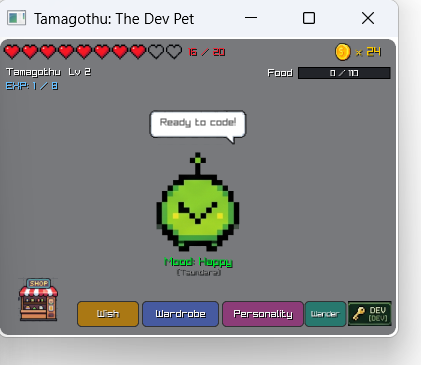
It's a small pet that stays on top of your screen while you code in VS Code.
- When you compile or run code in the VS Code terminal, the pet sees it. You get a token for every compile and EXP for every one that works. If there's an error, the pet loses a heart.
- When there's an error, the pet tells you what went wrong in simple words, like "Line 4: You forgot a semicolon."
- The pet gets hungry over time. You buy it food in the shop with your tokens.
- If its health runs out, it dies and you have to revive it.
- It levels up as you code. After level 25, it levels up more slowly.
- You can name it, poke it, and pick a personality, like Tsundere or Pirate. It says funny things when you're not doing anything.
- You can spend tokens on random outfits, from 1-star to 5-star, like the wishes in Genshin Impact. You're guaranteed a 4-star every 10 tries and a 5-star within 90.
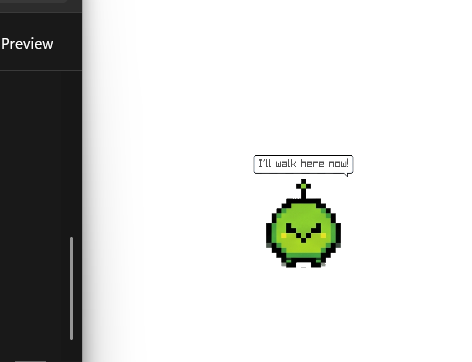
- In wander mode, it walks around your desktop. You can drag it somewhere else and double-click it to bring it back.
How we built it
We wrote it in C++ with the raylib library. A small PowerShell script watches the commands you run in the VS Code terminal and saves any errors to a file, and the pet checks that file every couple of seconds. The pictures were made with AI. We also used Claude Code to help with the coding.
Challenges we ran into
- Getting raylib to work on all our computers. We each had different setups, and one had an old compiler that didn't work with it.
- The AI pictures had fake see-through backgrounds, so we had to write code to cut out each picture.
- Catching every compile, not just the ones from our own build script.
- Making the window see-through, keeping it on top of other windows, and letting it walk around the screen.
Accomplishments that we're proud of
- The pet explains errors in a way beginners can understand.
- The outfit system works like Genshin's. When we tested 200,000 tries, the 5-star rate was 1.59%, almost the same as the real game.
- The pet can leave its window and walk across your screen.
What we learned
- How to read compiler errors and turn them into simple advice.
- How to make a game with raylib.
- How to set up C++ and libraries on Windows.
- How to work together on GitHub.
What's next for Coding Tamagachi
- Making it work with VS Code's Run button.
- More pets, outfits and things to do.
- Rewards for coding every day.
- Mac and Linux versions.

Log in or sign up for Devpost to join the conversation.