-
-
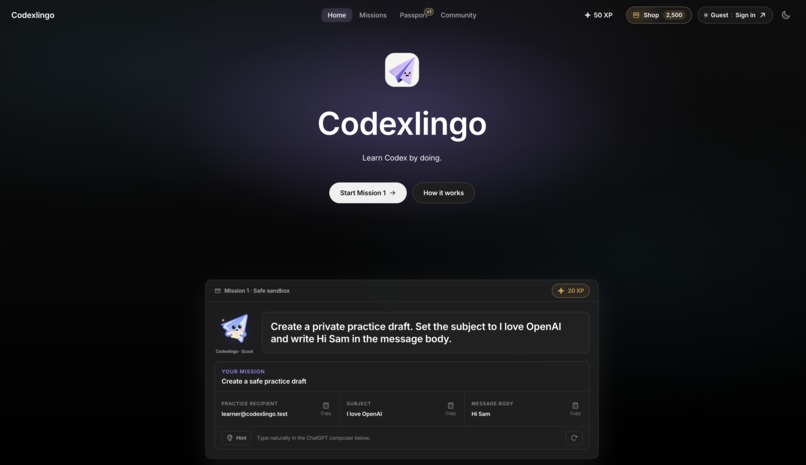
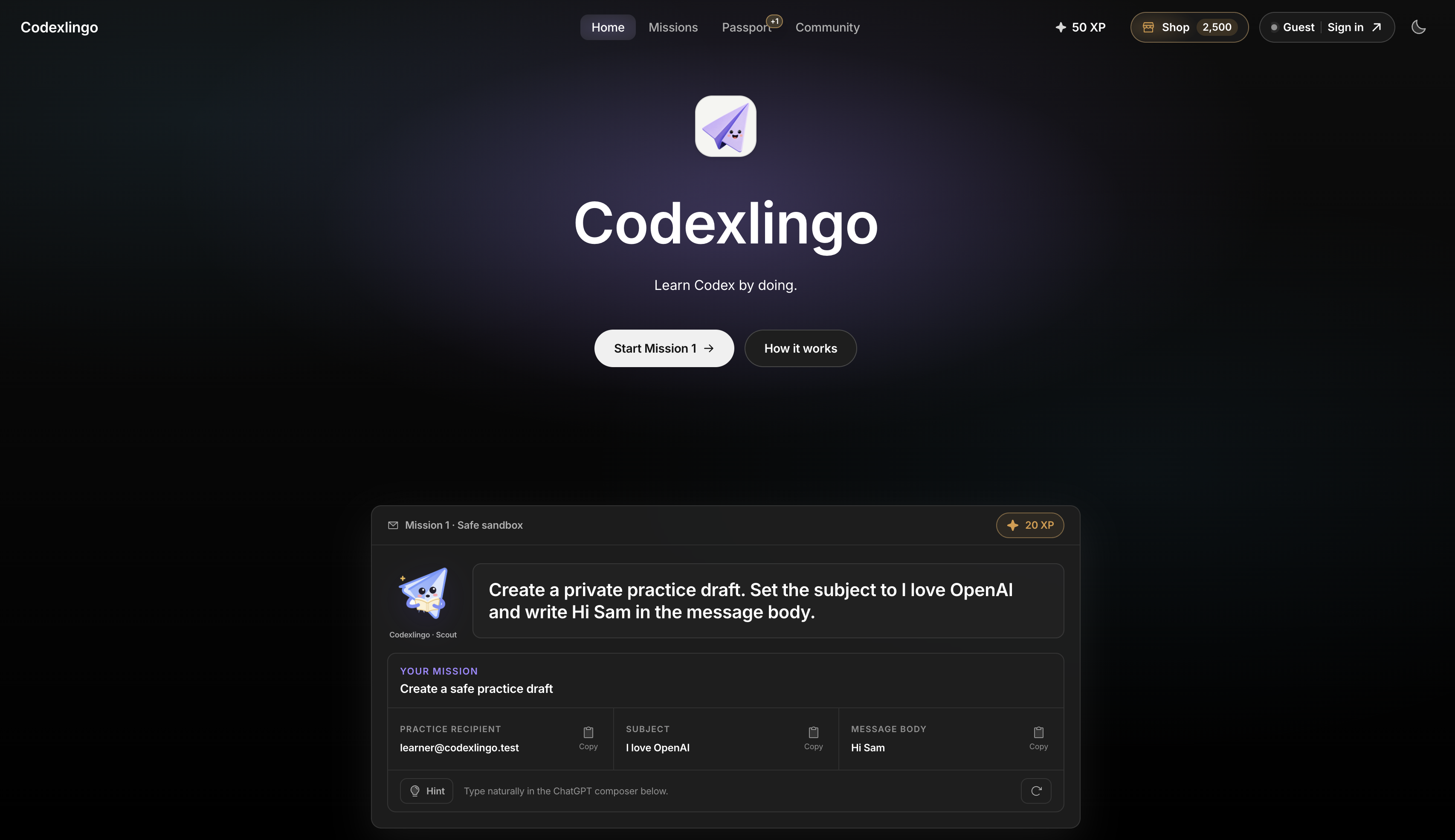
Codexlingo Hub
-
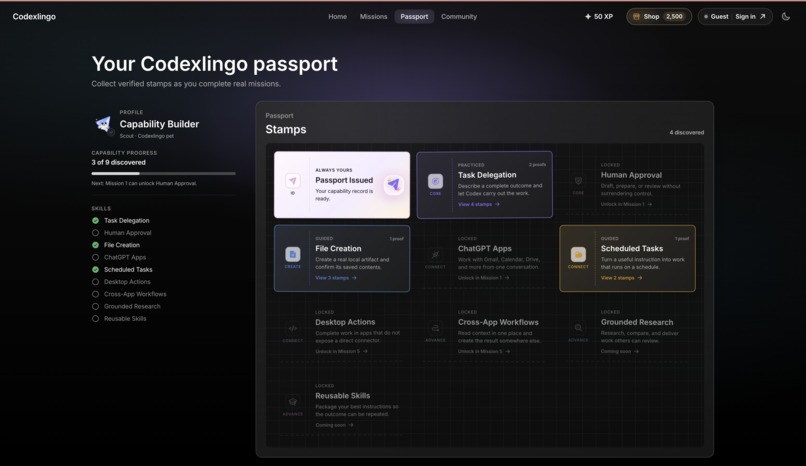
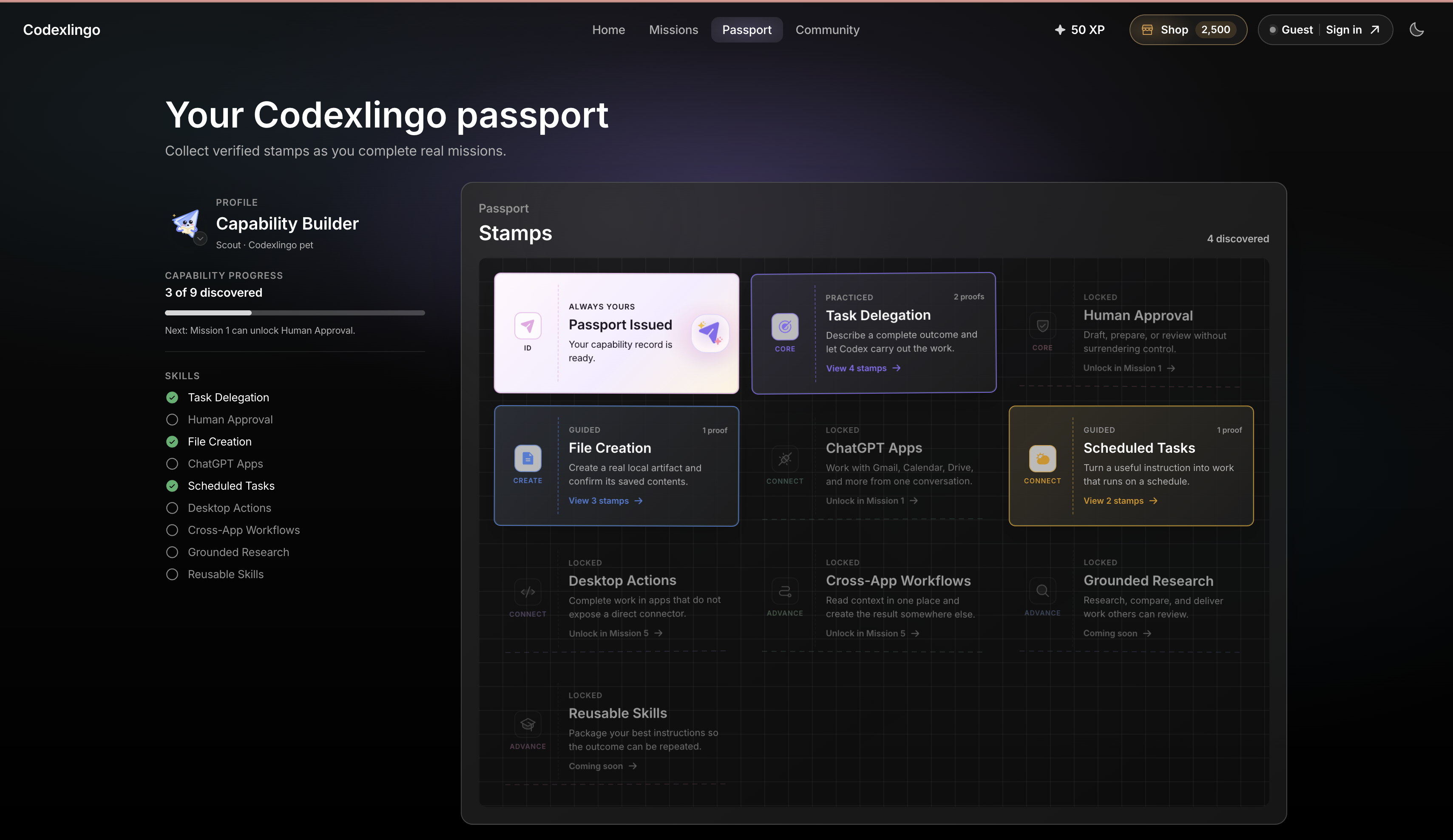
Codexlingo Passport
-
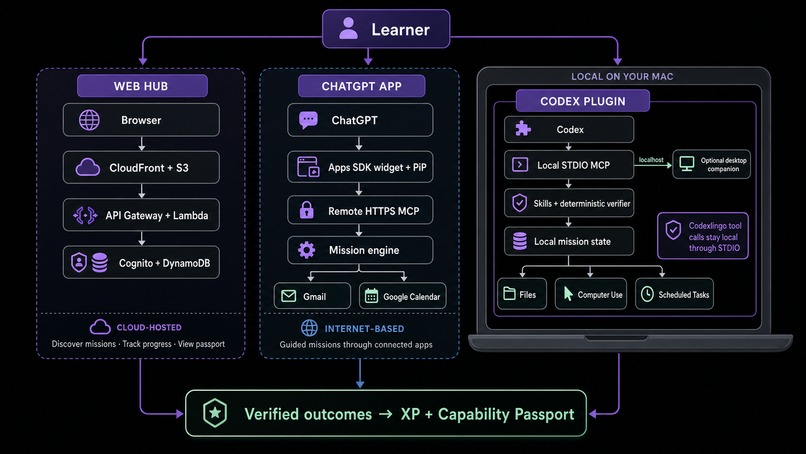
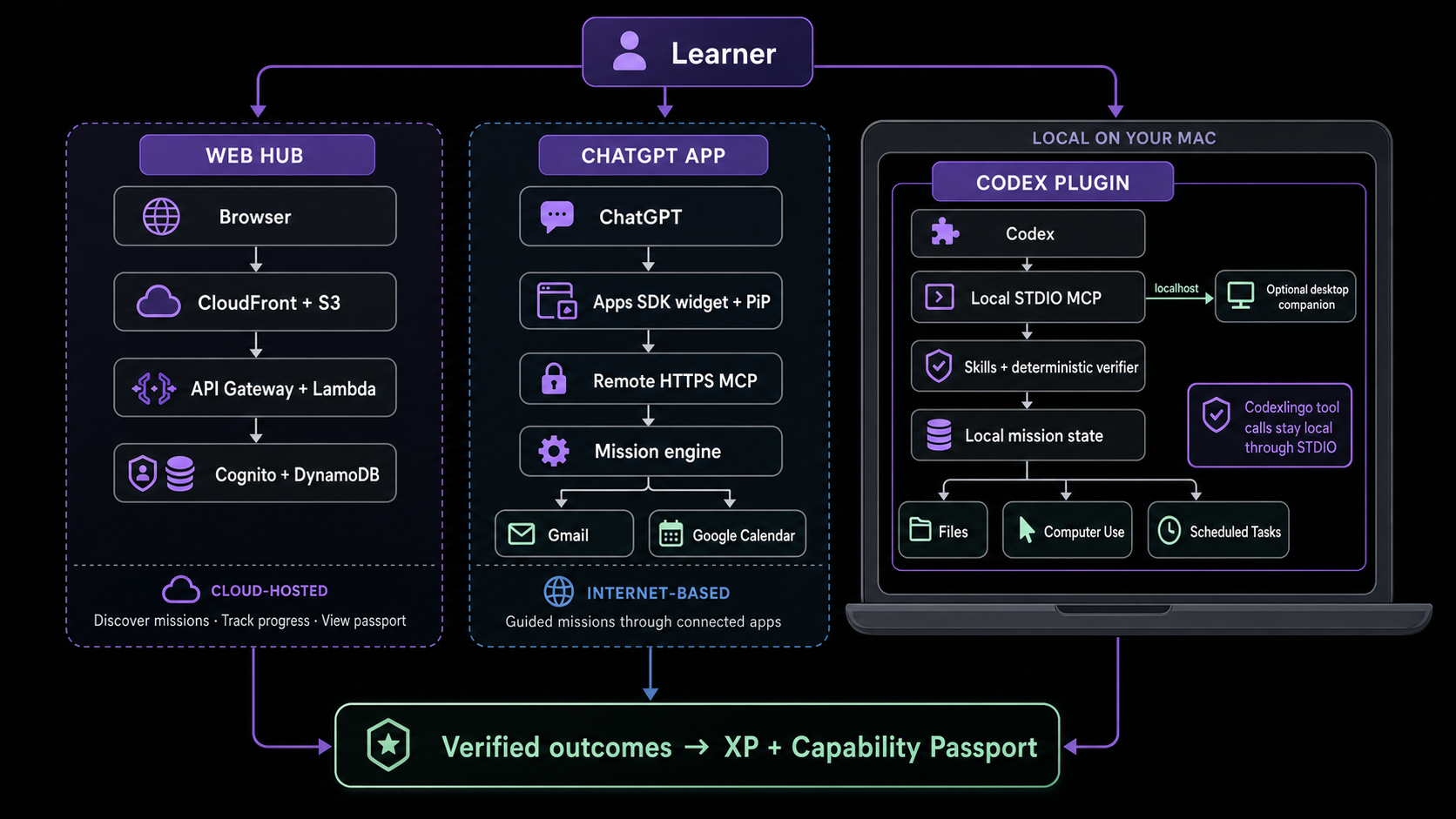
Ecosystem Architecture
-
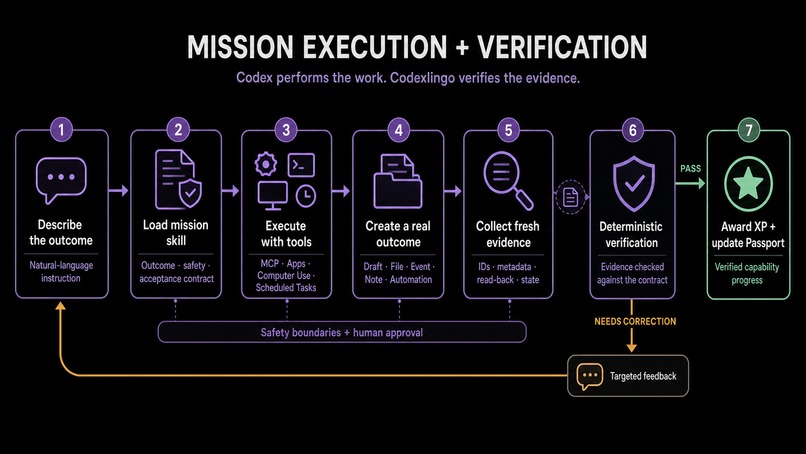
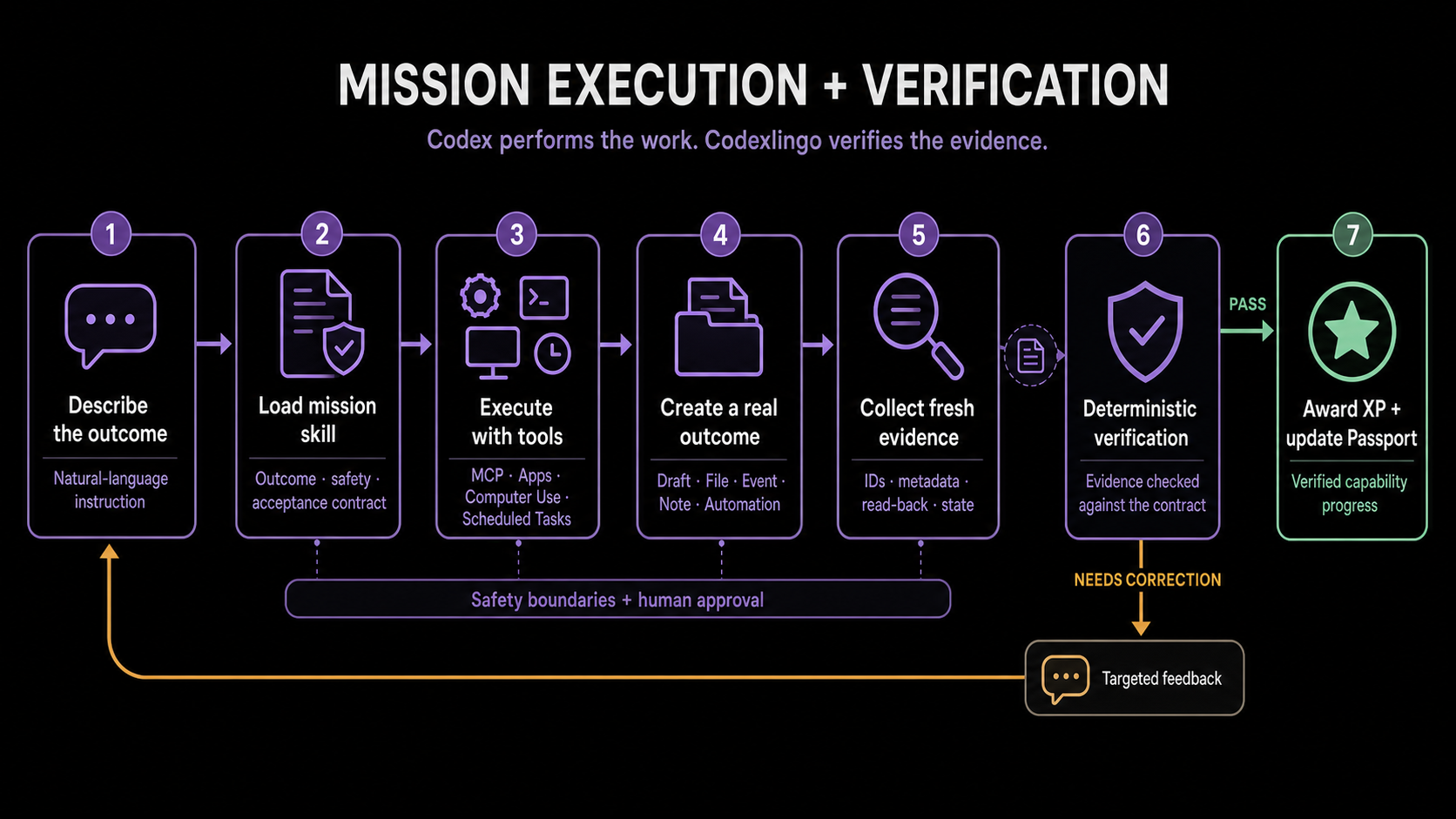
Mission Architecture
-

Gale Codexlingo Pet
-

Patch Codexlingo Pet
-

Scout Codexlingo Pet
-

Nela Codexlingo Pet




Inspiration
Codexlingo was inspired by two pieces: OpenAI’s article on the AI capability overhang and our own experiences as frequent Codex users.
The article highlighted a gap between what AI can already do and how most people use it. We saw the same gap among our peers: many simply use AI only as a chatbot, and Codex remains either unknown or barely explored. To us, it feels like watching people walk everywhere without realising cars exist.
We believe tools like Codex will become a natural part of everyday life and work and that inspired us to create a way for people to learn Codex by doing. We hope they can discover how much Codex and ChatGPT can do and adopt into their every life.
OpenAI’s plugin development kit gave us the opportunity to turn that vision into an interactive learning experience. That’s how Codexlingo was born.
What it does
Codexlingo is a gamified interactive platform offered through 3 unique experiences (Codex, ChatGPT Work and desktop app).
Users learn Codex functionalities by completing guided missions with their Codexlingo pet. They will earn experience points, which can be exchanged for real Codex tokens! (that's our vision). Capability badges can also be earnt in their passport as they progress through their journey by demonstrating core skills, a way to track progress.
The community page allows users to share how they use Codex, a neat way to learn from each other. They also get the chance to submit new mission ideas where the Codexlingo team will review and implement these suggestions.
How we built it
We built Codexlingo through 6 core stages:
1. Planning Codexlingo & assessing feasibility
We began by assessing the feasibility of Codexlingo as a "companion like" experience inside of ChatGPT and Codex by understanding the current capability OpenAI offered around Apps SDK and plugins package.
2. Turning mission ideas into contracts
We turned each mission idea into contracts defining the intended outcome, safety boundaries, acceptance evidence and capability unlocks.
3. Building the mission engine
We implemented the MCP tools, mission state management, and deterministic verification needed to run each mission and confirm real outcomes instead of relying solely on model judgement.
4. Connecting our systems
We connected the web hub, ChatGPT app, Codex plugin, PiP interface, desktop companion, and external services such as Gmail and Google Calendar through MCP.
5. User interface & experience
We built the hub and companion interfaces with React and Vite and added game like instructions, narration, music. (Don't forget to choose your Codexlingo pet)!
6. Deployment
We deployed the platform on AWS and GitHub Actions to handle automatic CI/CD and testing.
Technology Stack
| Category | Technologies |
|---|---|
| OpenAI | Apps SDK, MCP, Codex plugins and skills, MCP Apps, Computer Use |
| Frontend | React, TypeScript, Vite, HTML, CSS |
| Backend | Node.js, Express, Zod, AWS Lambda, API Gateway |
| Desktop | Electron, React |
| Authentication and data | Amazon Cognito, Amazon DynamoDB |
| Hosting and infrastructure | Amazon S3, CloudFront, CloudFormation |
| Testing and deployment | GitHub, GitHub Actions, automated tests, TypeScript validation |
How we used Codex
We used codex as both our engineering assisstant and the learner's execution environment
As our engineering collaborator
We used GPT‑5.6 Sol High - Ultra to:
- Assess whether Codexlingo’s companion experience was technically feasible across ChatGPT, Codex PiP and desktop.
- Design the architecture connecting Apps SDK, MCP tools, Codex plugins, external apps, AWS services and the web hub.
- Diagnose difficult engineering problems involving authentication, caching and audio playback error.
- Create nice UI/UX that we envisioned for the hub.
We used GPT5.6 Terra Medium - High to:
- Implement smaller and more straight forward functions that required less extended reasoning.
- UI refinements that are specific and small in scale.
- Routine tasks such as Github workflow, web search and less complicated debugging.
As the learner facing execution environment
- Codex understands learners’ natural-language instructions, loads the appropriate mission skill and coordinates MCP tools.
- It follows each mission’s safety and human-approval boundaries, then returns evidence to Codexlingo’s deterministic verifier.
Challenges we ran into
- Being able to play narration and music in ChatGPT Web companion.
- Designing a Cognito flow that supports both guests and signed in users while preserving learner progress.
- Balancing playful gamification with a professional and useful learning experience.
- Testing plugin changes required frequent reinstalls and fresh Codex sessions, repeatedly interrupting our development and testing workflow. (I think we reinstalled 100+ times)
- Understanding the availability and limitations of current OpenAI tools when assessing the feasibility of new features, we did not want to give up until we exhausted options. (For example, there is no way of selecting Codexlingo App from a button on the hub & there is no way of audio automatically playing in codex companion without user interaction).
Accomplishments that we're proud of
- We pushed the limits of each platform to create the most interactive experience possible, implementing features such as narration, mission music and PiP wherever the host supported them while adapting gracefully where it did not.
- We designed an original experience that reflects both Codexlingo’s playful identity and OpenAI’s clean product language, including the Codexlingo pets, mission companions and OpenAI inspired learning hub. (More on this in the last section)
- We brought together many of our favourite OpenAI capabilities, including Apps SDK, MCP Apps PiP, voice experiences and Computer Use, within one connected product.
- We continually refined the experience across ChatGPT, Codex and desktop despite plugin reinstalls repeatedly interrupting our engineering and testing workflow.
- Most importantly, we believe Codexlingo can make a genuine impact by helping more people understand AI’s capabilities and confidently use them to accomplish real work.
What we learned
- How to match different levels of work with the right model and reasoning effort.
- We gained a much clearer understanding of what PiP interfaces can currently do, and where their limitations differ between ChatGPT and Codex.
- Watching MCP tools and skills come together showed us how much a model can accomplish when it has the right context, instructions and capabilities.
- We had rarely used Git worktrees before this project, but we finally discovered how powerful they are and became comfortable using them in Codex to develop multiple features safely in parallel.
What's next for Codexlingo
Expand beyond beginners: Add more missions across beginner, intermediate and advanced levels. Organise the uses cases into more structured pathways for different use cases.
Become a native OpenAI learning plugin: We envision Codexlingo as an in house OpenAI product, similar to the Product Design and Data Analytics plugins. Native distribution would remove local installation friction and allow OpenAI to develop https://learn.chatgpt.com/use-cases use cases into Codexlingo missions. Codexlingo’s original interface is designed to feel at home within the OpenAI ecosystem.
Build a trusted capability passport: We were especially inspired by OpenAI’s new Dreaming memory system. With clear user consent, we imagine Codexlingo recognising capabilities demonstrated naturally across Codex and ChatGPT, not only through missions. Our long-term hope is for this passport to become a trusted, evidence backed profile that learners feel proud to share with employers.
Built With
- cloudformation
- cloudfront
- cognito
- dynamodb
- electron
- express.js
- gateway
- github
- gpt-4o-mini-tts
- gpt-5.6
- lambda
- node.js
- plugins
- react
- s3
- skills
- typescript
- vite


Log in or sign up for Devpost to join the conversation.