-
-
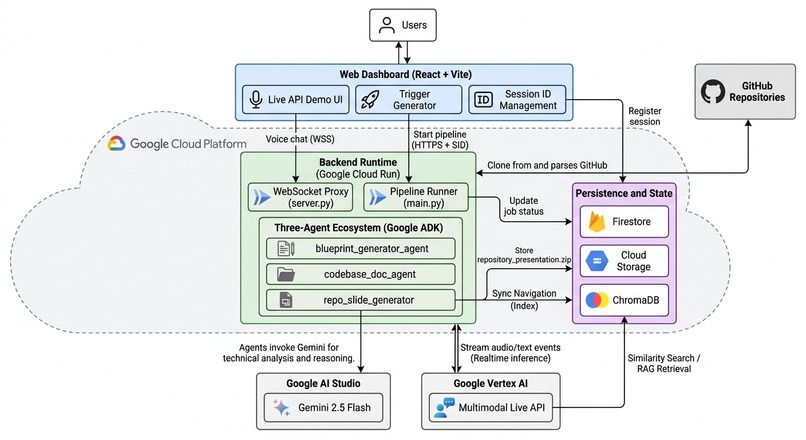
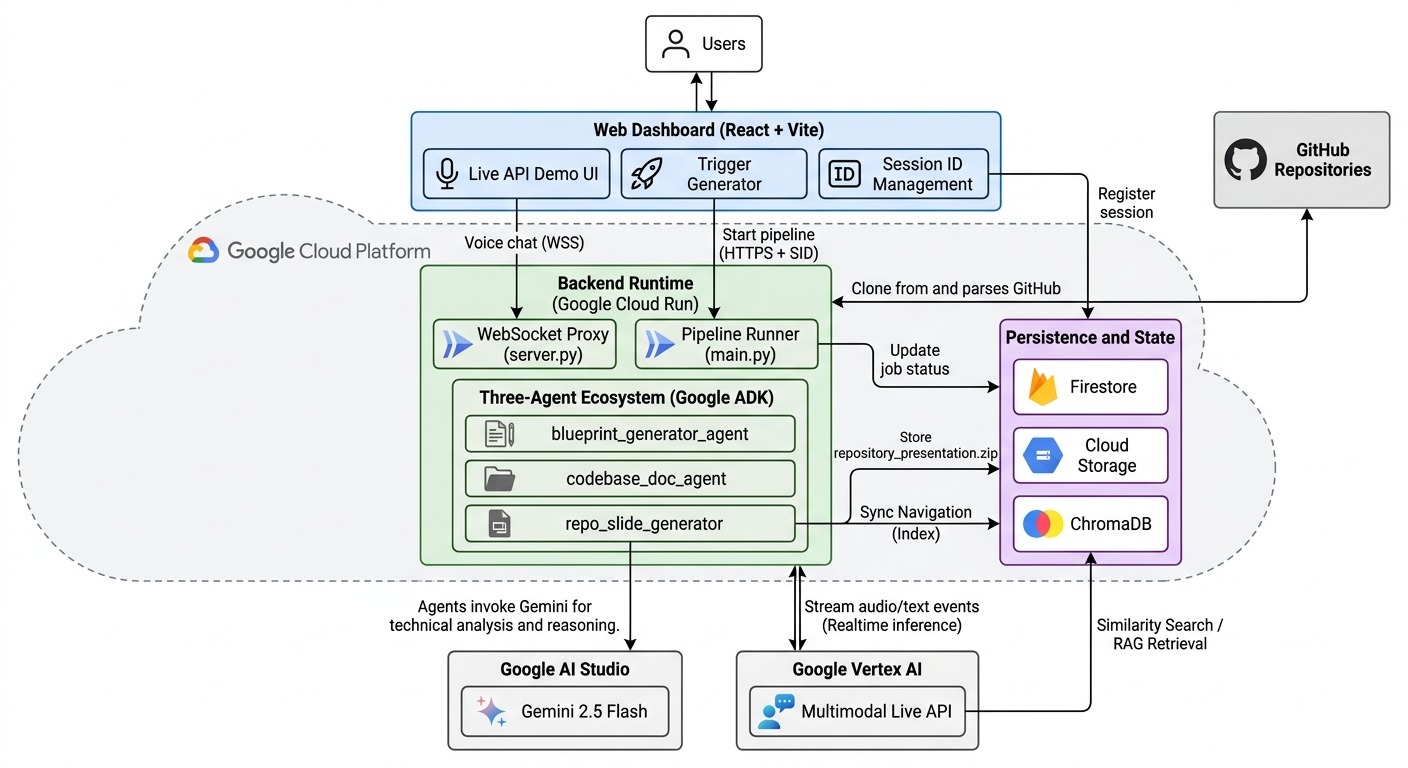
Architecture Diagram
Inspiration
The idea came from a frustration every developer has felt but few talk about openly: reading someone else's code is hard, and there's almost no good tooling to make it easier.
We've been in that seat — dropped into a legacy codebase mid-sprint, expected to be productive within days, armed with nothing but a stale README and a senior engineer who's too busy to give more than thirty minutes. We've watched new hires spend their first two weeks just trying to understand what talks to what. We've seen code audits delayed because reviewers needed an architectural overview that simply didn't exist.
The frustration isn't just about time. It's about the fact that the knowledge is there — locked inside the code itself — but there's no good way to extract and communicate it at speed.
What pushed us toward this specific solution was discovering the Multimodal Live API. The moment we realized we could build something that doesn't just generate documentation but lets you converse with a codebase in real time — interrupting, asking follow-ups, getting answers grounded in actual source files — the project became inevitable. Voice changes everything. It's the most natural way humans transfer complex knowledge to each other. We wanted to bring that to code.
What It Does
Gemini CodeStory takes a GitHub URL and transforms it into a fully interactive, voice-guided technical experience — in minutes, with zero manual effort.
You paste a repo link. The pipeline clones it, analyzes the architecture, generates professional slides and documentation with real Mermaid.js diagrams, and prepares a synchronized voice walkthrough. Then you just... listen. And talk back.
Key Features
Slide-Based Learning Every module is converted into presentation-ready slides that explain the architecture and logic clearly, designed to be understood at a glance.
Interrupt Anytime The explanation isn't a recording. It's a live conversation. Ask a question mid-sentence, get an answer, and the walkthrough picks back up exactly where it left off.
Real-Time Screen Understanding Share your screen during a session. Point at a file, a config, or a webpage and ask about it directly. The AI sees what you see.
Dynamic Slide Generation If you ask something the pre-generated slides don't cover, new slides are generated on the fly in milliseconds. The deck grows with the conversation.
Record and Revisit Download transcripts and video recordings of your session with a voice command. The walkthrough becomes a shareable artifact.
The result: you can genuinely understand an entire codebase without typing a single line.
How We Built It
The architecture is built around three core decisions that shaped everything else.
Decision 1: A Three-Agent Pipeline, Not a Single Monolithic Prompt
Using the Google Agent Development Kit (ADK), the intelligence is split into three specialized agents:
| Agent | Name | Responsibility |
|---|---|---|
| The Architect | blueprint_generator_agent |
Maps repository structure and identifies core modules |
| The Documentarian | codebase_doc_agent |
Generates deep technical docs and Mermaid.js diagrams |
| The Presenter | repo_slide_generator |
Converts everything into synchronized, presentation-ready slides |
Each agent has a single job and does it well. This separation is the key to producing output that's actually coherent rather than generically summarized.
Decision 2: Gemini 2.5 Flash as the Inference Engine
The massive context window was non-negotiable. Reading entire repositories in a single pass — without chunking, without losing cross-file context — is what makes the architectural understanding genuine rather than piecemeal. The reasoning capability handled structured slide generation reliably at scale.
Decision 3: Keep the Voice Layer as Thin as Possible
The WebSocket proxy in server.py is intentionally minimal — a low-latency mediator between the browser and the Multimodal Live API on Vertex AI, streaming audio and text events with as little processing overhead as possible. This is what makes interruption feel natural rather than mechanical.
The Rest of the Stack
- Frontend: React + Vite
- Compute: Google Cloud Run (stateless, auto-scaling)
- Real-time tracking: Firestore for live job status
- Artifact storage: Google Cloud Storage
- In-session memory: ChromaDB for RAG retrieval, grounding every voice answer in actual code evidence
Challenges We Ran Into
Making Interruption Actually Feel Natural
Supporting mid-sentence interruption sounds simple until you build it. Managing WebSocket state, handling partial audio streams gracefully, and recovering conversation context after an interruption — each was its own debugging session. Latency that's acceptable in a chat interface feels broken in a voice conversation.
Anti-Hallucination at Scale
Getting three agents to produce technically accurate output across repositories they've never seen required significant prompt engineering. Every agent operates under strict evidence-only rules — no technical claim without a corresponding file, config key, or source reference. Enforcing this reliably across diverse codebases, from small weekend projects to large monorepos, took considerable iteration.
The Dynamic Slide Agent's Speed Requirement
Generating a new slide in response to a live voice question needs to feel instantaneous. A two-second delay in a chat is fine. In a voice conversation mid-flow, it kills the experience. Optimizing the generation pipeline to hit sub-second slide creation while maintaining quality required rethinking how context was passed and cached.
Cross-Platform Resilience
A developer tool needs to work everywhere. Solving UnicodeEncodeError crashes on Windows environments — by forcing UTF-8 and sanitizing log output — was unglamorous but essential. The kind of bug that only surfaces at 11pm before a deadline.
Synchronizing Slides with Voice
The slide_index.json manifest that keeps on-screen visuals in sync with the AI's narration sounds straightforward until you're debugging why slide 4 is advancing while the AI is still talking about slide 3. Getting the timing right across different repo sizes and explanation lengths required careful design of the manifest format itself.
Accomplishments That We're Proud Of
The interruption experience works. Mid-sentence, naturally, without losing context. Getting this right was the hardest single technical challenge and the feature that makes everything else feel real.
Zero hallucination on architecture claims. Every diagram, every module description, every slide bullet point in every test run has been traceable to actual source files. For a tool whose entire value proposition is trustworthy understanding, this matters enormously.
End-to-end in under five minutes. From pasting a GitHub URL to having a fully interactive voice walkthrough ready — on repos up to several hundred files — the pipeline consistently completes in under five minutes.
Dynamic slide generation that surprises. Watching a new, contextually accurate slide appear on screen in response to a live voice question — one that wasn't pre-generated, built purely from the session's RAG context — was genuinely surprising even to us. It's the moment the system stops feeling like a generator and starts feeling like a collaborator.
What We Learned
Voice changes the design problem entirely. Building for voice isn't just adding a microphone to a text interface. The interaction model, the error recovery, the latency requirements, the way context needs to be managed across turns — all of it is different. Designing for conversation means designing for interruption, ambiguity, and recovery in ways that text interfaces never demand.
Agent specialization compounds quality. A single agent asked to "understand this repo and make slides" produces mediocre output. Three agents — each with a narrow, well-defined job — produce something qualitatively better than the sum of their parts. The Blueprint grounds the Documentation. The Documentation structures the Slides. The chain matters.
Context management is the real engineering challenge in agentic systems.
Getting the data right — read once, structured carefully, passed cleanly — is more impactful than any individual prompt optimization. The PipelineContext object that flows through all three agents was one of the last things we built and one of the most important.
The gap between "demo works" and "tool works" is enormous. A demo runs on one repo, in one environment, with no edge cases. A tool runs on hundreds of repos, on Windows and Mac and Linux, with emoji in commit messages and non-UTF-8 file names and circular dependencies. Closing that gap is most of the work.
Grounding isn't just a safety feature — it's a quality feature. Forcing agents to cite evidence doesn't just prevent hallucination. It produces better, more specific, more useful output. The constraint improves the result.
What's Next for CodeStory
Private Enterprise Repo Support
The most consistent feedback from anyone who's seen the demo: "Can I use this on our internal codebase?" Supporting authenticated access with team-level permissions and secure pipeline execution is the most requested next step.
GitHub Actions Integration
We already have GitHub Actions wired into CodeStory's pipeline. The next step is deepening that integration — triggering walkthrough regeneration automatically on every pull request, so the documentation reflects what the codebase looks like today, not six months ago when someone last ran the pipeline manually.
Live Code Debugger Mode
Extend the screen-sharing capability into active debugging — share your terminal, walk through a bug with the AI seeing your output in real time, and get answers grounded in both the codebase's architecture and the specific error in front of you.
Deeper Diagram Intelligence
Moving beyond Mermaid.js to richer, interactive architectural diagrams — ones you can click through, zoom into, and navigate as part of the voice session rather than static visuals on a slide.
Session History and Team Knowledge Bases
Persist walkthroughs across sessions, build a searchable library of past explanations, and let teams share and annotate CodeStory sessions as living documentation artifacts.
The long-term vision hasn't changed since day one: Understanding a codebase should be as natural as having a conversation with the engineer who built it — regardless of whether that engineer is available, or even still at the company.


Log in or sign up for Devpost to join the conversation.