Inspiration
Most AI design tools start with a prompt and generate an entire interface at once. While fast, this can move designers away from the canvas and reduce their agency. Many design decisions are also visual and spatial, making them difficult to fully express through words.
Codesign explores the space between traditional UI design and prompt-driven AI design. Inspired by tab completion in code editors, it asks: what could visual autocomplete look like for interface designers?
What it does
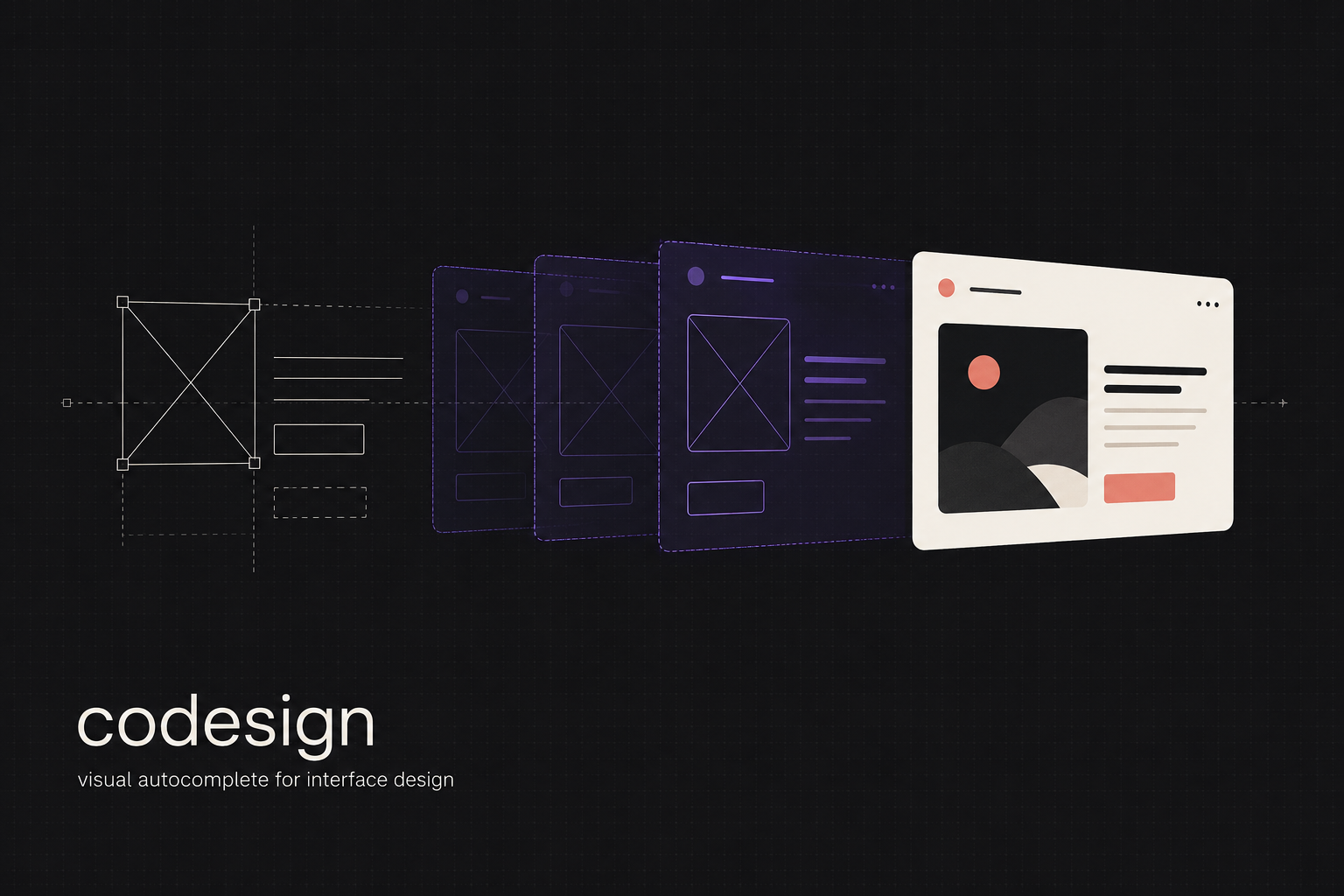
Codesign is visual autocomplete for interface design. Designers continue working on a familiar canvas while Codesign sequentially suggests what their design could become next.
The AI basically does a "visual autocomplete" based on existing elements in the working frame, layer names, and the placement of the elements in relation to each other. At the end of the day, designers control what the AI can observe and change.
The prototype supports three levels of fidelity:
Base: Raw rectangles, text, and layout AI Draft: A low-to-mid-fidelity interpretation AI HiFi: A more detailed and polished direction
Suggestions are staged separately from the original design. Designers can accept selected elements, reject the result, or generate another direction. Accepted elements remain native, editable layers.
How we built it
I developed the core thesis and interaction principles in ChatGPT Work using GPT-5.6 Sol at xhigh reasoning, alongside sketches drawn on my tablet.
I then built the application entirely through Codex using GPT-5.6 Sol at high reasoning. I liberally used subagents and Git worktrees to help keep the workflow manageable for me personally, while keeping a separate ChatGPT Work thread with GPT-5.6-Sol on xhigh reasoning to act as my sounding board for the overall concept.
Codex and I built Codesign as a SvelteKit application with a canvas editor, structured scene graph, component registry, "design candidate" staging system, and review workflow.
When the user selects a group/frame of elements in the canvas and clicks the "Codesign with AI" button, GPT-5.6 Luna hooks into the harness that Codex created and operates the canvas through Codex App Server. It can inspect the scene, discover components, render the design, apply atomic changes to a separate candidate, validate its work, and submit the result for review.
Main rationale for using the Codex App Server is to allow users to reuse their existing ChatGPT authentication without managing a separate API key (and because I don't have the budget to spend on a separate API key).
Challenges we ran into
Main challenge was describing the visual bugs that I experienced while building out and testing the platform. I had to lean heavily on my existing SWE knowledge to try get the AI out of what I call "understanding loops". I don't think I would've been able to build something like this if I didn't know what to ask of the AI, even with a capable model like gpt-5.6-sol on high with subagents.
One large snag I also hit later on was the "generation" step. Initially, my app would take a screenshot, pass the base64 to Luna then try to add the photo through the wire. But i immediately realized that this was bad engineering so I asked Codex to create an agent harness in the app, expose a CLI (or functions the agent can hook in to), and basically make the whole generation step agentic and letting the AI construct the design on the canvas. With this approach though I quickly discovered that output quality (especially in a custom canvas like what I used) also depends on the primitives (such as components rectangles, groups, frames etc) available to the AI. The current canvas primitives and shadcn-svelte components are functioning but hit or miss (probably because the raw shadcn primitives are not enough to fully create a design). I'm not too confident yet at the current version of codesign to create/generate production-ready interfaces.
Accomplishments that we're proud of
I was able to build this whole thing in the span of a week. As someone who isn't really a software engineer (just a humble HCI researcher, UXer, and frontend developer with some foundational knowledge in building software), I could not have imagined that I would be able to build something this complex (even though its still a bit jank) in this little time.
This is also my first time fully just using Codex to build everything out. It was comforting for me to know that, even though my SWE knowledge isn't that deep, I was still able to prompt something that was functional and enough to illustrate the interaction that I've been thinking about for so many months now.
What we learned
Integrating AI into creative software is as much an interaction design problem as it is a model capability problem. Scope, reversibility, staging, partial acceptance, and continued editability determine whether AI feels like a collaborator or a replacement.
I also learned that the canvas can act as an implicit prompt. Position, hierarchy, naming, grouping, and existing components communicate intent that would be difficult to fully translate into text.
Finally, agent output is heavily shaped by the tools and primitives available to it, not only by the underlying model. I honestly thought I could get away with just using something like GPT-5.3-spark for faster generations but wanted to err on the side of safety and just used gpt-5.6-luna
What's next for codesign
My next priority is improving the quality and consistency of generated designs by (1) expanding the available primitives and (2) adding richer component compositions such as shadcn blocks (and potentially a more full blown design system instead of a component library).
I also want to support more flexible sequential iteration across entire canvases, frames, and individual components.
Future work includes multiple suggestions, better rerolling and comparison, image support, stronger visual inference, reusable design constraints, and a clearer history of what the AI observed and changed.
I also fully intend to keep working on this prototype and perhaps use this as a base prototype for a potential HCI research paper that explores this "visual autocomplete" interaction modality compared to traditional prompt-box interfaces.
Built With
- codex
- sveltekit


Log in or sign up for Devpost to join the conversation.